


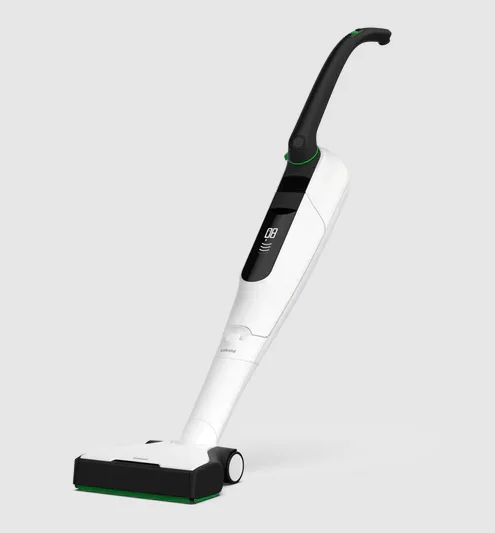
Kobold VB100 Cordless Vacuum
Before you start
Congratulations on the purchase of your new Kobold device. We hope that you will enjoy using this accessory with your Kobold VB100 Cordless Vacuum Cleaner.
- Before you use the device for the first time, carefully read this instruction manual and the instruction manual for your Kobold VB100 Cordless Vacuum Cleaner. These instruction manuals can also be found at: [www.koboldvacuum.com.au]or [www.koboldvacuum.co.nz].
Storing of Product Documentation
- Retain this instruction manual for future reference. It is an important part of the device and must be kept with it if you pass it on to someone else.
Signs and symbols
The symbols in this instruction manual have the following meanings: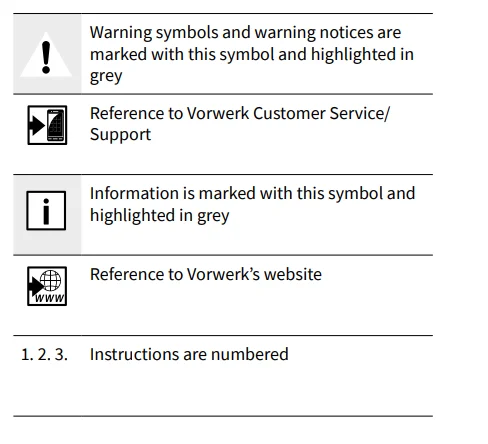
QuickStart
- Before starting

- Setting the suction power level

- Setting the brush mode

- Charging

- Replacing the filter bag

Product overview
Kobold VB100 Cordless Vacuum Cleaner
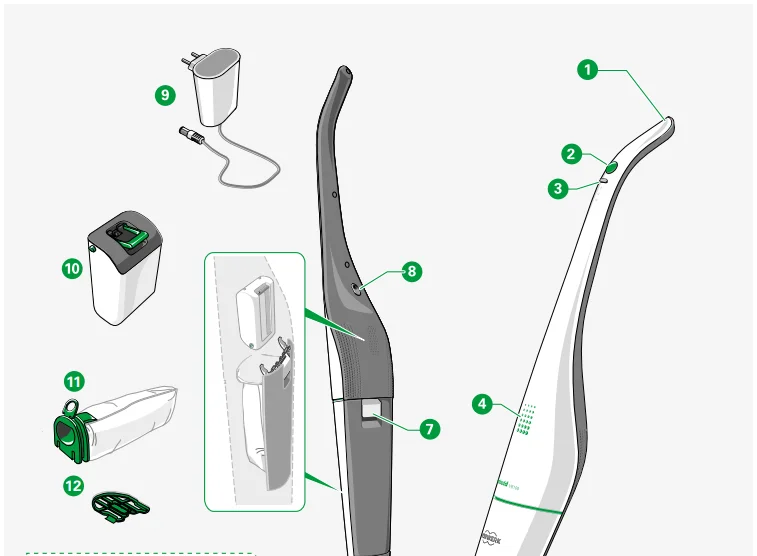
- Kobold VB100 Cordless Vacuum Cleaner
- On/Off Button
- Power setting (soft, medium, hard)
- LED display – VB100
- LED display – EBB100
- Foot switch for brush mode
- Filter cover lever
- Charging point
- AC charger
- Battery pack
- Kobold FP100 Premium Filter Bag
- Motor protection filter
- Kobold EBB100 Electric Brush for carpet and hard floors
- Kobold 2-in-1 nozzle


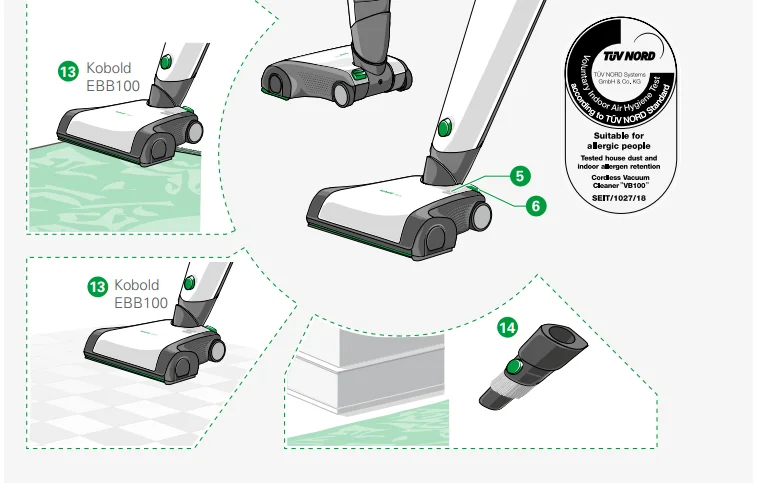
ⓘ Nature and extent of the accessories included may vary. Accessories can be purchased as options. The illustrations shown in this instruction manual are meant to illustrate the functions of the Kobold VB100 Cordless Vacuum Cleaner and its accessories. The illustrations may differ with respect to detail and proportions of the actual product. The illustrations of plugs are only exemplary. The actual product can differ depending on the country.
2 Getting started
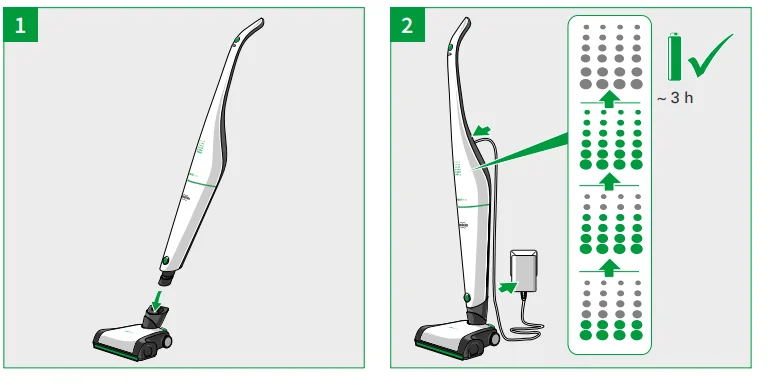
In this chapter, you will learn how to set up your Kobold VB100 Cordless Vacuum Cleaner. You will get to know the basic functions of your cordless vacuum cleaner and how to use it properly. Your cordless vacuum cleaner is supplied with the battery and premium filter bag already inserted. Before you can start, you must attach the Kobold EBB100 Electric Brush (see chapter “2.1 Attaching or changing the accessory head” on page 16) and fully charge the battery (see chapter “2.3 Charging the Kobold VB100 Cordless Vacuum Cleaner” on page 19).
ⓘ When you first receive your cordless vacuum cleaner, the transport mode is activated. You will need to charge your device before you can switch it on for the first time (chapter “2.3 Charging the Kobold VB100 Cordless Vacuum Cleaner” on page 19).
2.1 Attaching or changing the accessory head
For cleaning floors, you use the Kobold VB100 Cordless Vacuum Cleaner in combination with the Kobold EBB100 Electric Brush.
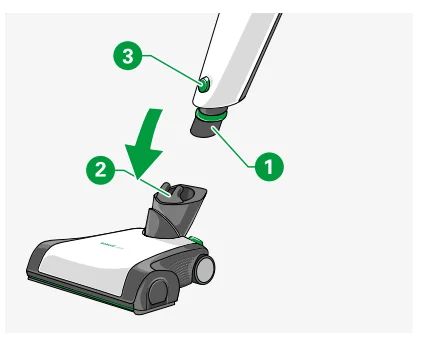
- Connect the attachment socket 1 of the cordless vacuum cleaner to the pivot on the electric brush 2.
- Make sure you hear the attachment socket click into the pivot.
- To remove the electric brush from the cordless vacuum cleaner, press the button 3 located at the bottom of the suction piece. Once it is unlocked, you can remove the electric brush from the cordless vacuum cleaner.

2.2 Standby position and power setting
2.2.1 Setting the device into standby position
CAUTION
Risk of injury and falling! The standby position is used to park the device after you have finished working with it or when you take a break.
- Always place the Kobold VB100 Cordless Vacuum Cleaner and the accessory head on a level surface when in the standby position.
- Never use the Kobold VB100 Cordless Vacuum Cleaner to support yourself.
- Never stand on the accessory heads.
NOTICE
Risk of damage when the device starts up automatically!
- Please note that the Kobold EBB100 Electric Brush starts up automatically when you take the cordless vacuum cleaner out of standby position if you have not switched the cordless vacuum cleaner off at the main switch first.
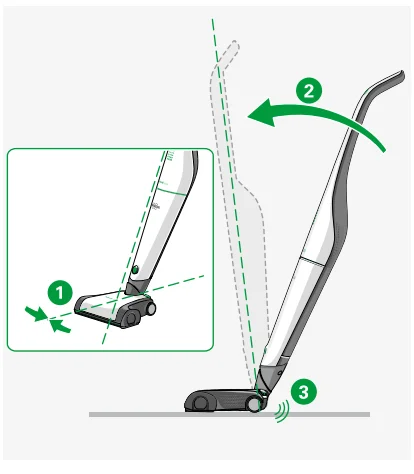
The standby position is used for storing your cordless vacuum cleaner when you are not using it or want to charge it. You can also ‘park’ it in this position if you want to take a short break while cleaning. In the standby position, the device stands upright and firmly on the floor.
You can only put the cordless vacuum cleaner into the standby position when it is centered.
- This is done by rotating the cordless vacuum cleaner at the pivot so that both the cordless vacuum cleaner and the accessory head are facing straight ahead 1. Now you can set it to the standby position.
- Move the handle forward 2 until it is upright and you hear it click into the pivot 3.

ⓘ If you put the cordless vacuum cleaner with the electric brush into standby position without having switched the cordless vacuum cleaner off at the main switch, the cordless vacuum cleaner will keep running and the electric brush will switch itself off.
2.2.2 Setting the device to the power setting
In the power setting, the cordless vacuum cleaner can be moved freely, and the device can be steered in all directions on the floor.
- Hold the accessory head firmly in place with your foot 1 and tilt the handle back 2 so that you hear the cordless vacuum cleaner disengage from the standby position. Now the accessory head can be moved in all directions again.


2.3 Charging the Kobold VB100 Cordless Vacuum Cleaner
HAZARD
Risk of fire hazard!
- Only charge the Kobold VB100 Cordless Vacuum Cleaner using the AC charger supplied.
NOTICE
Risk of damage to property or equipment from improper use!
- Use and charge the Kobold VB100 Cordless Vacuum Cleaner at temperatures between 5°C and 35°C.
- Extreme heat or cold extends the charging time and/or can cause damage to the battery.
ⓘ The Kobold VB100 Cordless Vacuum Cleaner is not fully charged on delivery. It must therefore be charged before initial use. This may take around three hours.
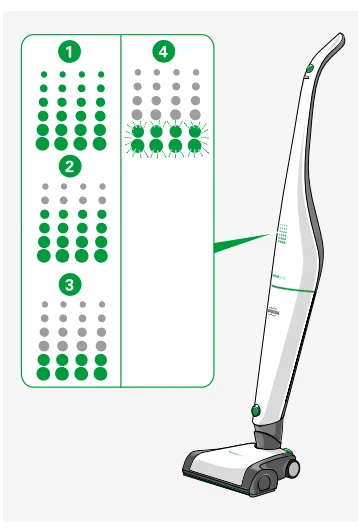
2.3.1 LED display indicating battery charge level during operation
The LED display indicates the current battery level of your cordless vacuum cleaner. To see this display, your cordless vacuum cleaner must be switched on (see chapter “3.1 Switching the Kobold VB100 Cordless Vacuum Cleaner on and off” on page 22).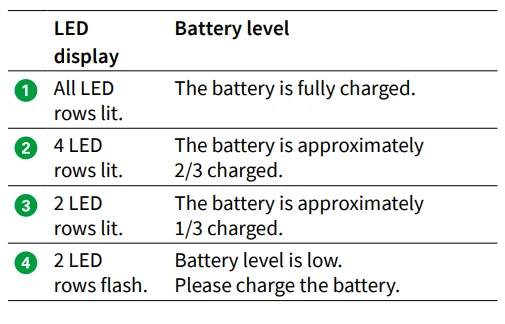
2.3.2 Charging
To charge your cordless vacuum cleaner, proceed as follows:
HAZARD
LIVE PARTS WITHIN!
- Never attempt to open the charger and repair it yourself. The charger is not a serviceable part.
- Put the cordless vacuum cleaner into the standby position (see chapter “2.2 Standby position and power setting” on page 17).
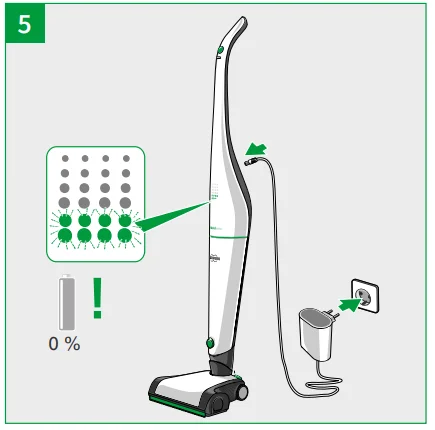
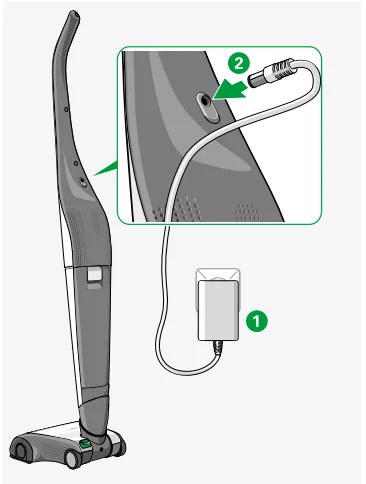
- Connect the AC charger 1 to the power supply.
- Note the prescribed voltage of 220-240 V.
- Connect the AC charger to the charging point on the cordless vacuum cleaner 2.
- Ensure that the plug is fully inserted.

ⓘ You can also charge the battery pack separately. For more information on this, see the chapter “Charging the removed battery pack” on page 40.
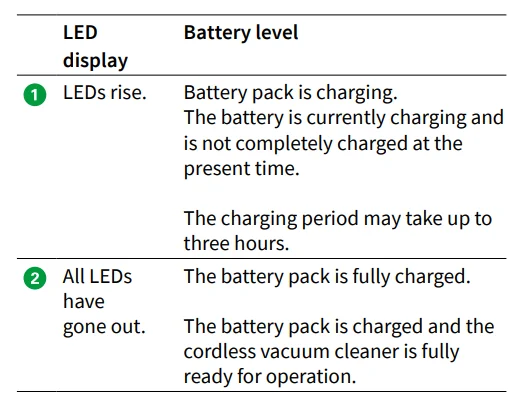
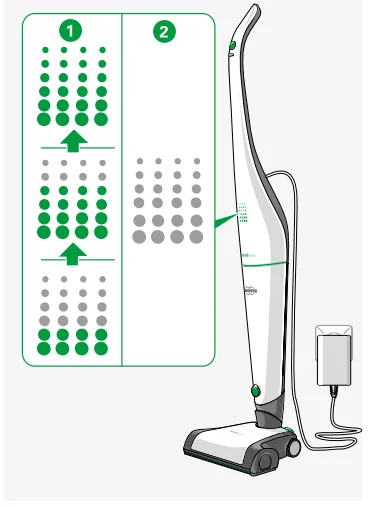
2.3.3 LED display indicating charging status
2.4 Premium filter bag, motor protection filter, and battery pack
Your cordless vacuum cleaner is supplied with the premium filter bag, motor protection filter, and battery pack already inserted.
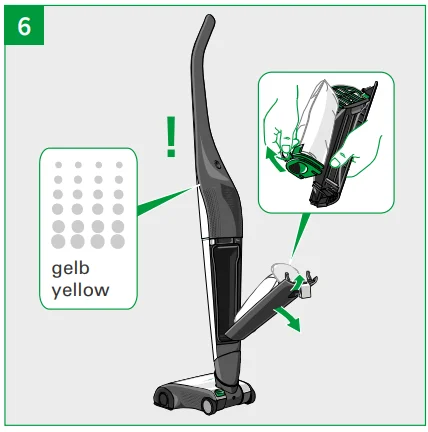
ⓘ If the LED display 1 lights up yellow when the cordless vacuum cleaner is on, check whether the premium filter bag is full or whether the suction channels are blocked.
See chapter “5 Maintenance” on page 31 to find out how to change the premium filter bag (chapter 5.2.1 on page 34), how to replace or clean the motor protection filter (chapter 5.2.2 on page 37), and how to change the battery pack (chapter “5.2.4 Replacing the battery pack on the Kobold VB100 Cordless Vacuum Cleaner” on page 39).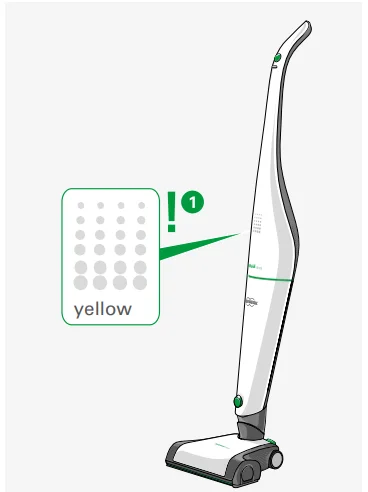
NOTICE
Risk of damage due to closing the filter cover by force!
- Do not use force to close the filter cover.
- The device may only be used with an original Kobold FP100 Premium Filter Bag inserted.
- Never use force when inserting the battery pack.
3 Operation
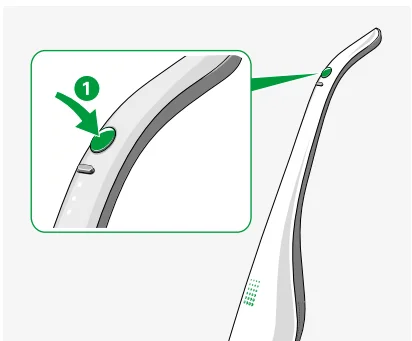
3.1 Switching the Kobold VB100 Cordless Vacuum Cleaner on and off
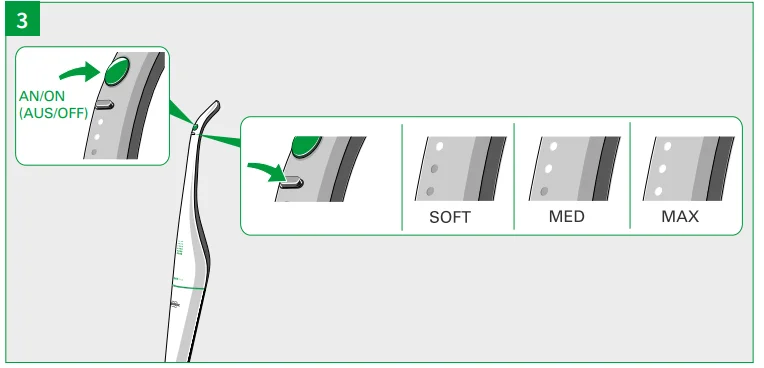
- Switch on the Kobold VB100 Cordless Vacuum Cleaner by pressing the main switch 1.
- To switch it off, press the main switch again.

3.2 Setting the suction power level
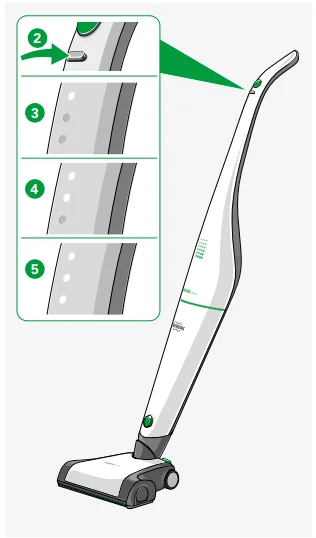
The suction power level can be manually set using the silver switch 2 as follows:
ⓘ Every time you switch on your cordless vacuum cleaner, it will automatically start operating on the medium suction power setting. The electric brush will start in the mode that was last selected (see chapter “3.3 Cleaning with the Kobold EBB100 Electric Brush” on page 23).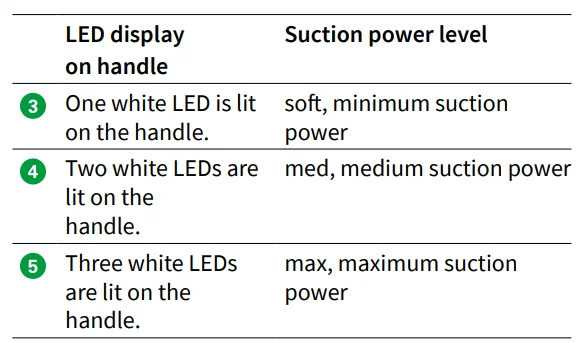
3.3 Cleaning with the Kobold EBB100 Electric Brush
The electric brush performs equally well on carpets and hard floors.
NOTICE: Risk of damage to property or equipment from improper use!
- Seek advice from carpet manufacturers before using the electric brush on woolen or delicate carpets.
The electric brush with its versatile functionality can be used on most floors. Nevertheless, please make sure that it is suitable for your floor before using it (see table on page 9).
HAZARD
Risk of electric shock!
- Never run your Kobold EBB100 Electric Brush over cables on the floor.
CAUTION
Risk of injury from debris flying out!
- Avoid abruptly placing the device on loose, coarse debris (e.g., glass shards), especially at eye level.
- Switch off the Kobold VB100 Cordless Vacuum Cleaner before lifting the Kobold EBB100 Electric Brush.
CAUTION
Risk of injury from pinching your fingers!
- Stay clear of the moving parts on the Kobold EBB100 Electric Brush.
NOTICE
Risk of damage to property or equipment from improper use!
- Avoid working with the device in one specific spot for a prolonged period of time.
- Avoid vacuuming up rugs/fringes.
Legend
- Foot switch for brush mode
- LED display
- Side caps (left and right)
- Type plate
- Roller brushes
- Switch for flex/fine settings
- Inspection flap

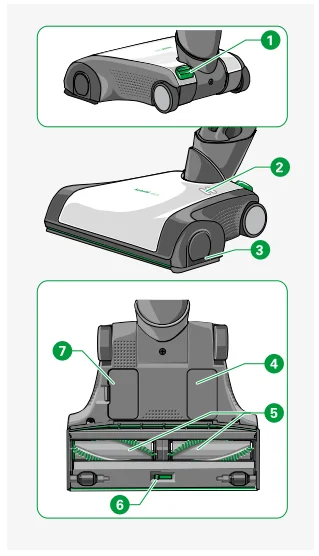
3.3.1 Brush modes of the Kobold EBB100 Electric Brush
There are three operating modes for cleaning floors with the Kobold EBB100 Electric Brush. The selected operating mode is shown on the electric brush.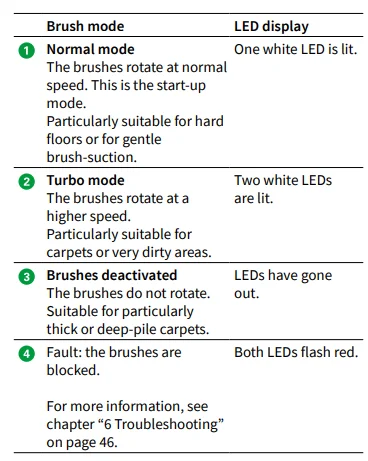
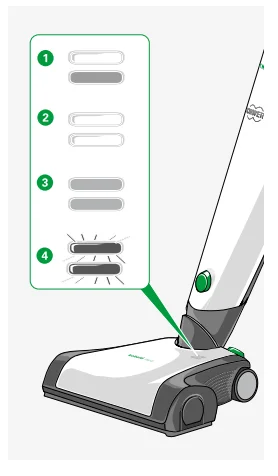
Setting the brush mode
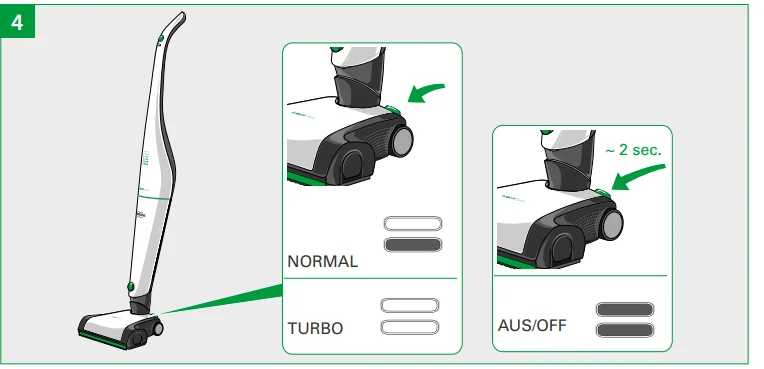
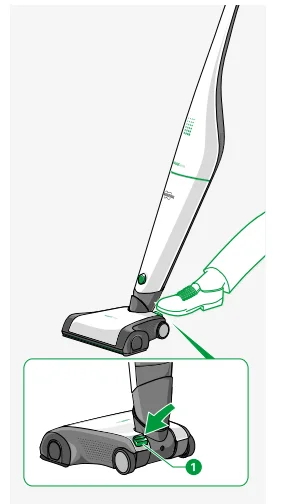
The electric brush will start in the mode that was last selected. You can set the operating mode using the foot switch 1 on the electric brush.
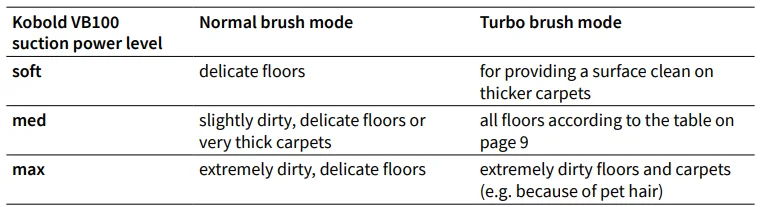
- Select the correct suction power level for your floor according to the table on page 26.
- Press and release the foot switch 1 to change the brush mode. The LEDs on the electric brush show which brush mode you are in.
- Press and hold the foot switch 1 for approximately 2 seconds to deactivate the brush. The LEDs on the electric brush go out.
- Press the foot switch 1 again to reactivate the brush. To find out more about the ‘Deactivate brush’ mode, see chapter “6 Troubleshooting” on page 46.

Brush mode recommendations
3.3.2 Instructions for use
- Only use the ‘max’ suction power level for extremely dirty floors and carpets.
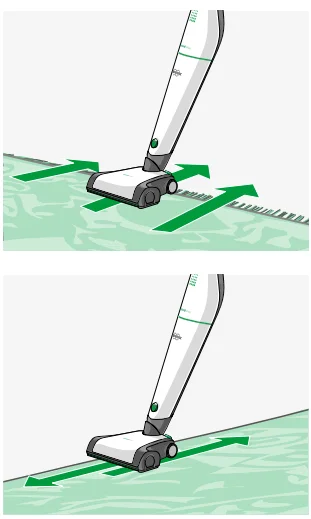
- Always move the device evenly back and forth.
- Never let the device work in one place for a long period, as this could cause damage to the floor.
- The rotating roller brushes can mechanically work on the fringes of the carpet and clean in the narrow gaps. Only pull the electric brush over the fringes backward, away from the carpet.
- Vacuum parallel to the edges of the carpet.

NOTICE
Risk of damage to property or equipment from improper use!
- Seek advice from carpet manufacturers before using the electric brush on woolen or delicate carpets.
3.3.3 Switching between flex/fine
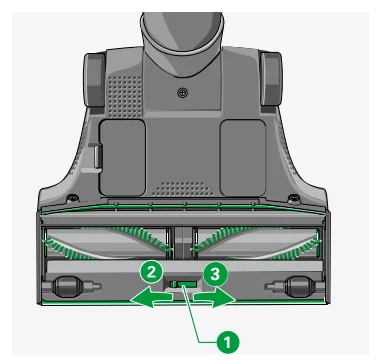
The ‘flex’ and ‘fine’ setting options on the underside of the Kobold EBB100 Electric Brush can be used to adjust the device in line with the cleaning requirements.
ⓘ On delivery, the electric brush will be switched to the ‘flex’ setting to protect during transportation. Read the instructions below on how to switch your electric brush to ‘fine’ for everyday use.
- Fine setting: Use your electric brush on the ‘fine’ setting for everyday vacuuming.
- Flex setting: If you are vacuuming coarse dirt, it is advisable to switch the electric brush to the ‘flex’ setting.
CAUTION
Risk of injury due to the rotating brush!
- Always disconnect the Kobold EBB100 Electric Brush from the Kobold VB100 Cordless Vacuum Cleaner before changing the settings on the underside of the Kobold EBB100 Electric Brush.
You can change between the settings as follows:
- Switch the cordless vacuum cleaner off at the main switch.
- Push the slider 1 on the underside of the electric brush to position 2 (fine) for removing fine dust from crevices or for deep-cleaning carpets, or to position 3 (flex) for picking up coarse material. You will feel the slider locking into place, and the front sealing lip extends outwards.

3.4 Cleaning with the Kobold 2-in-1 nozzle
The Kobold 2-in-1 nozzle is extremely versatile. It has two bristle settings that can be used for different tasks.
NOTICE
Risk of damage to property or equipment from improper use!
- Do not use the Kobold 2-in-1 nozzle attachment on smooth or polished surfaces.
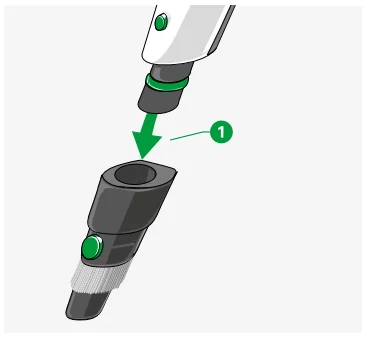
- Place the attachment socket 1 of the Kobold 2-in-1 nozzle onto the Kobold VB100 Cordless Vacuum Cleaner.
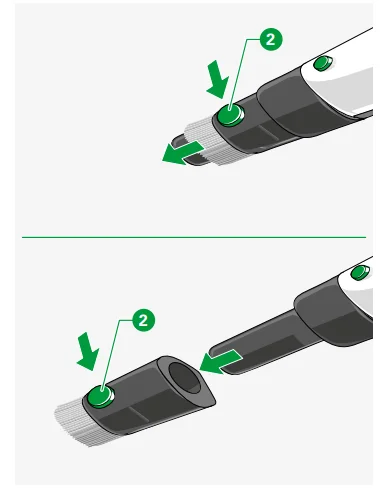
- For fine dust or delicate objects, increase the length of the bristles. This is done by pressing the green button 2 and sliding the brush attachment outwards until the green button engages.
- For ground-in dirt, remove the brush attachment. This is done by holding down the green button 2 and pulling off the brush attachment.
- To remove the Kobold 2-in-1 nozzle, press the button on the suction piece of the Kobold VB100 Cordless Vacuum Cleaner and pull the whole nozzle forward.


3.5 Storing the Kobold VB100 Cordless Vacuum Cleaner
- When you are not using your cordless vacuum cleaner, switch it off and store it carefully.
- If you are going to store your cordless vacuum cleaner for a long period without using it, you should remove the battery pack from the device (chapter “Removing the battery pack” on page 40).
- Unused battery packs should be charged fully at least once a year.
3.6 Moving the Kobold VB100 Cordless Vacuum Cleaner
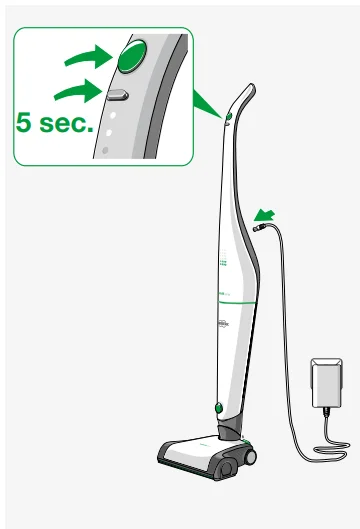
The Kobold VB100 Cordless Vacuum Cleaner has a transport mode so that it can be moved safely without accidentally being switched on.
- Connect the cordless vacuum cleaner to the power supply, as described in chapter “2.3 Charging the Kobold VB100 Cordless Vacuum Cleaner” on page 19.
- Press both buttons on the handle simultaneously for at least 5 seconds. Two rows of LEDs flash to confirm that the transport mode is on.
- You can deactivate the transport mode by connecting the cordless vacuum cleaner to the power supply again, as described in chapter “2.3 Charging the Kobold VB100 Cordless Vacuum Cleaner” on page 19.

4 Operating modes and battery operating times
The operating time of your cordless vacuum cleaner varies depending on the suction power level and the brush mode you use.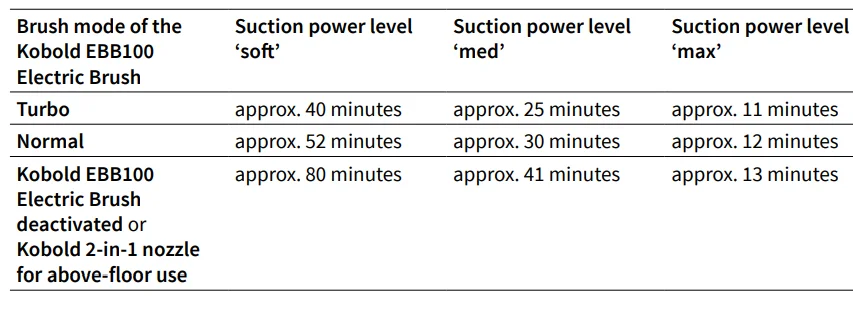
ⓘ The stated operating times are average operating times. They have been determined using a battery pack in new condition and at room temperature. The actual operating times may vary. The operating times given are approximate values that depend on the type of use and the ambient conditions. Low and high temperatures can, for example, shorten the operating time of the battery.
5 Maintenance
It is important to carry out regular maintenance on your Kobold VB100 Cordless Vacuum Cleaner to ensure that it always runs smoothly. In the following chapter, you will learn how to maintain the different devices and accessory parts and how to replace parts.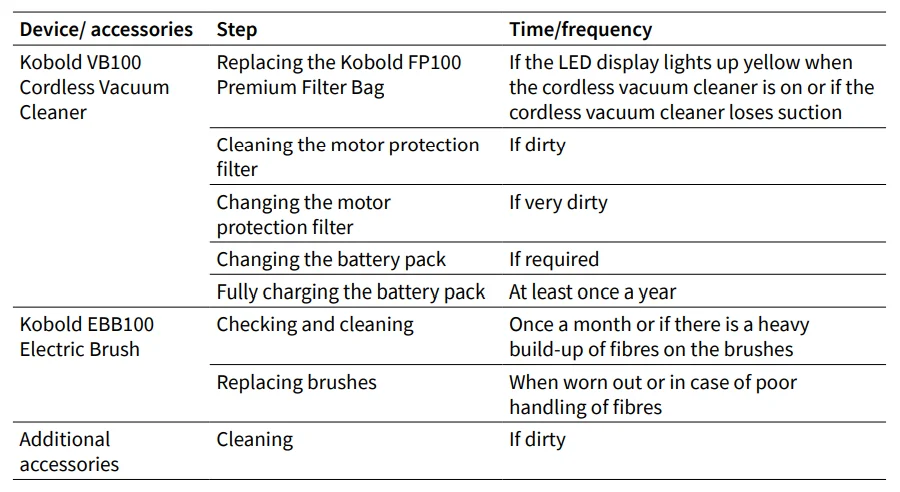
5.1 Spare parts and consumables
You have purchased a quality product from Vorwerk. To keep you as satisfied in the future with your Vorwerk device as you were the first day, we recommend you take advantage of our reorder options for original care products and original consumables in good time. Reordering is quick and easy.
5.2 Maintaining the Kobold VB100 Cordless Vacuum Cleaner
HAZARD
Risk of electric shock!
- Always switch the device off before all retrofitting, cleaning, and maintenance work.
- If connected, disconnect the Kobold VB100 Cordless Vacuum Cleaner from the AC charger before performing retrofitting, cleaning, or maintenance work on the device.
CAUTION
Risk of injury from pinching your fingers!
- Keep clear of movable elements of the accessory heads.
- Always switch the device off before all retrofitting, cleaning, and maintenance work.
- Disconnect the accessory head from the Kobold VB100 Cordless Vacuum Cleaner before performing retrofitting, cleaning, or maintenance work on the accessory head.
8 Warranty
For any warranty terms and conditions, please refer to your purchase contract. Any warranty is in addition to your rights under the Australian Consumer Law.
9 Customer Service Australia / New Zealand
The Mix Australia – Vorwerk Official Distributor
30 Ledgar Road, Balcatta, WA 6021
Telephone: 1800 004 838
Contact us via our website www.koboldvacuum.com.au.
The Mix New Zealand – Vorwerk Official Distributor
A3, 570 Mount Wellington Highway, Mt Wellington AUK 1062
Telephone: 0800 766 966
Contact us via our website www.koboldvacuum.co.nz.
10.1 Manufacturer
Vorwerk Elektrowerke GmbH & Co. KG
Mühlenweg 17–37
42270 Wuppertal
Germany
For More Manuals By Vorwerk, Visit ManualsLibraryy.
Kobold VB100 Cordless Vacuum-FAQs
Why is the red light flashing on my Kobold VB100?
A flashing red light indicates an error has been detected. Check the Kobold app for detailed error information and follow the on-screen troubleshooting instructions to resolve the issue.
What should I do if my Kobold vacuum stops working?
If the vacuum won’t turn on, make sure it’s properly charged, the dust container is empty, and the filters are clean. Also, check the nozzle and hose for any blockages that could affect performance.
Why does my Kobold vacuum lose suction?
Reduced suction is often caused by clogged filters, a full dust container, or a blocked hose. Cleaning or replacing filters and removing debris usually restores full suction.
How long does it take to fully charge the VB100?
The Kobold VB100 takes approximately 3–4 hours to charge completely, providing up to 80 minutes of cleaning time depending on the suction level used.
How can I tell when my vacuum is fully charged?
While charging, the indicator light glows. Once fully charged, the light turns off or shows a steady green, depending on the model’s settings.
Why is my battery blinking red and not charging?
A blinking red light means there may be a poor connection between the charger and battery. Ensure the charging cable is properly plugged in and that there is no dirt or damage on the contacts.
What should I do if my VB100 overheats and shuts off?
Overheating protection will automatically power off the device. Turn it off, unplug it, and let it cool for about 30 minutes before using it again. Check for clogged filters or blocked airflow paths.
How do I know if my battery or charger is faulty?
If the vacuum doesn’t charge or the lights don’t respond, try a different outlet and inspect the charger cable. If the issue persists, the battery or charger may need replacement.
How do I reset my Kobold VB100 vacuum?
To reset, press and hold the power button for about 10 seconds until the lights blink. If the problem continues, disconnect the battery for a few minutes before reconnecting and restarting the vacuum.