
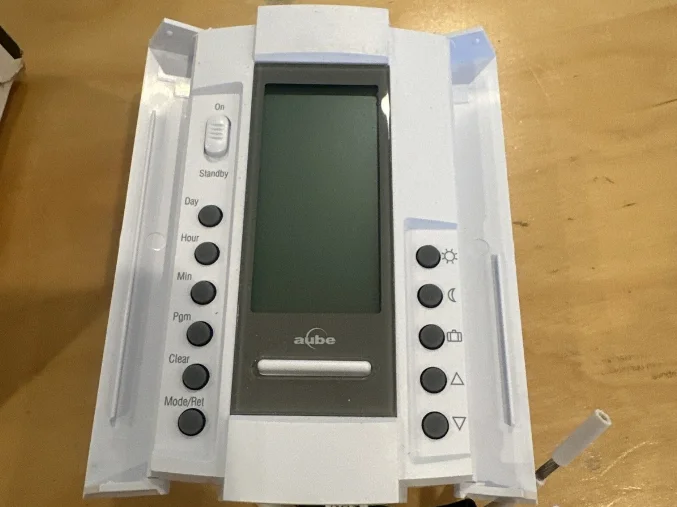

Aube Technologies TH115-A Programmable Thermostat
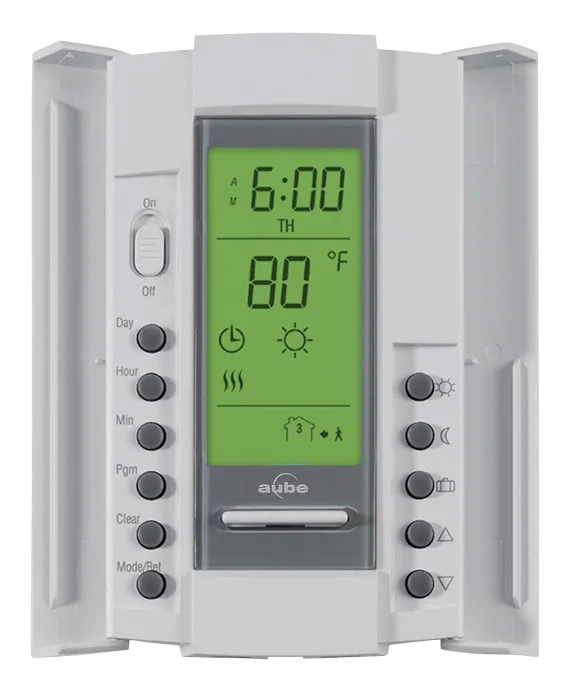
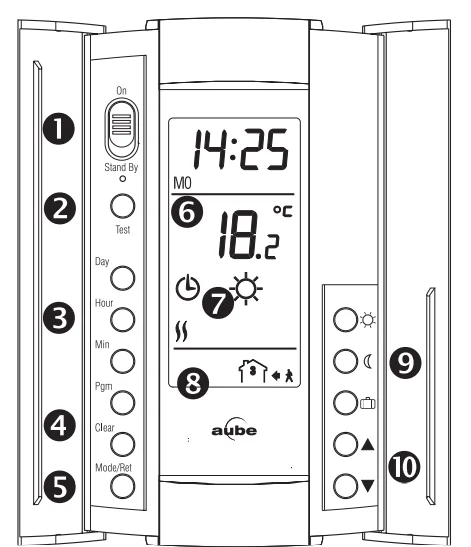
TH115 Description
Buttons and symbols
- On/Stand By Switch
Use this switch to put the thermostat in sleep mode when its use is no longer required (e.g. summer). This will not affect the clock or programming. - GFCI Warning Light and Test Button
- Day & Clock Settings
- Programming Mode
- Mode Selection/Exit Programming
- Room OR Floor Temperature
- Current Mode and Setpoint
- Current Program Number
- Setpoint definition/Pre-defined Setpoints
- Increase/Decrease Temperature
Models
- A Controls the Ambient temperature.
- AF controls the Ambient temperature and Floor temperature limit.
- F Controls the Floor temperature.
Switch Selection
This thermostat is factory-set to the following values:
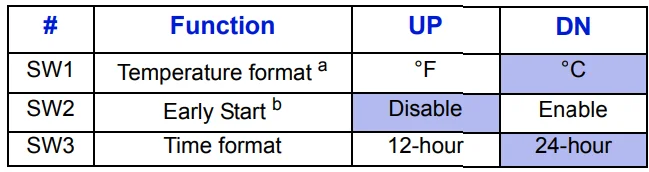
- If you switch from °F to °C or vice versa, the
 ,
, and
and set points may need to be redefined.
 - When using AUTO mode, the thermostat calculates the optimum start time to obtain the desired temperature by the set time. The heating system could be started a few hours prior to set time when required.
 ,
, and
and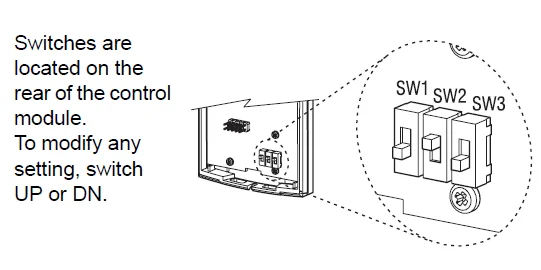
Control Module Installation
Align the bracket tabs on the control module with the holes located on top of the power base.
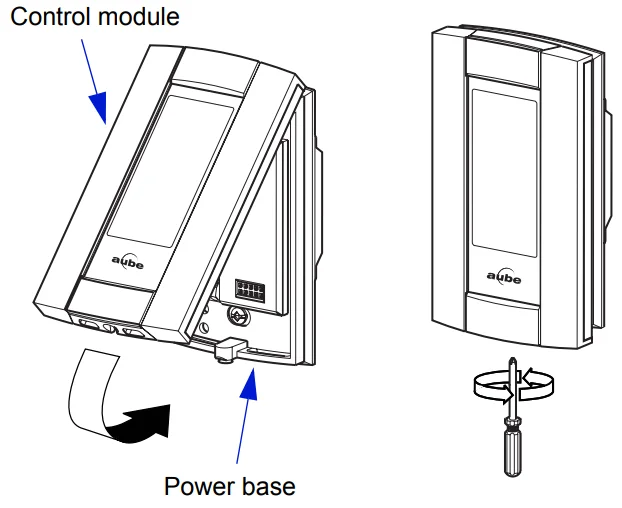
NOTE: Keep the thermostat’s air vents clean and free from obstructions.
NOTE: The screw cannot be removed completely.
First Power ON
When power is applied for the first time, the LCDs: 0:00, MO (Monday), and temperature (room/ floor).
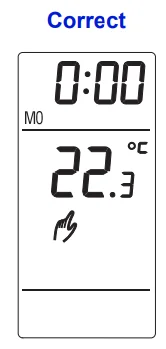
- Press HOUR – MIN to set the current time.
- Press DAY to set the current day.
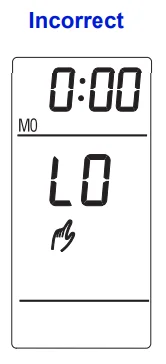
For AF and F models: one of the two following messages may be displayed if the installation is incorrect:- LO: The floor temperature is below 32°F (0°C), or the temperature sensor is defective, or not connected. The heating indicator
 is displayed, and the relay is closed (energized).
 - HI: The floor temperature is above 140°F (60°C), or the temperature sensor is defective.
- LO: The floor temperature is below 32°F (0°C), or the temperature sensor is defective, or not connected. The heating indicator
 is displayed, and the relay is closed (energized).
GFCI Test (GA & GB power base only)
The GFCI monitors the electrical flow for any loss of current; if there is one, the thermostat will cut off power to the heating system. We recommend you test the GFCI immediately after installing the control
module, and once a month thereafter to ensure it is operating properly. To test:
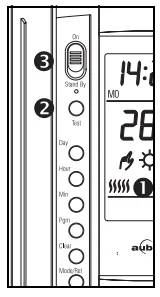
- Increase the temperature
 until the heating indicatoris displayed.
 - Press TEST:
- Successful: the TEST warning light is ON, and power to the heating system is cut off.
- Unsuccessful: the TEST warning light is OFF. Cut power to the heating system from the main power panel and call customer service.
- When successful, reset thermostat (Stand By/On) to power the heating system.
NOTE: If the test warning light comes ON during normal operation, cut power to the heating system from the main power panel and have an electrician verify the installation.
 until the heating indicator
Temperature Setpoint
The following temperature setpoints are pre-programmed:
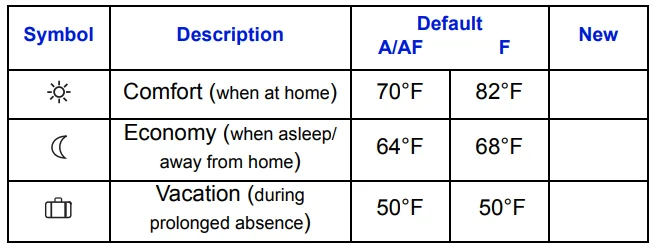
To modify a setpoint:
- Set the desired temperature using
 .
. - Press and Hold theororbutton until the symbol is displayed.
- Press RET to exit.
 .
.Floor temperature limit—The floor temperature limit is 82°F. To modify this limit:
- Pressand hold while switching from ON to Stand By, then back to ON.
- Set temperature
 .
. - Press RET to exit.
To avoid damaging your floor, we recommend you follow the supplier’s instructions.
Operating Modes
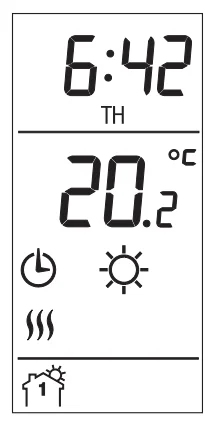
Automatic —Executes the schedule.
- Press MODE until
 is displayed. The current program number is displayed. You can temporarily bypass the current program by setting a specific temperatureor by pressing on a pre-defined setpoint button () . The new setpoint will be maintained until the beginning of the next program.
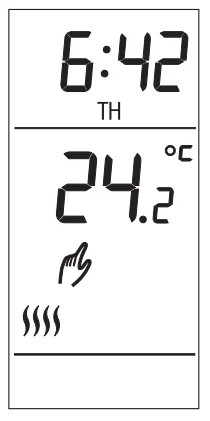
Manual —Maintains a constant temperature.
- Press MODE until
 is displayed.
 - Set temperature or press () to use the pre-defined setpoint.
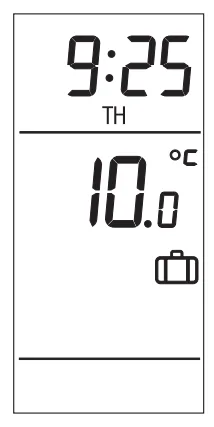
Vacation —Maintains the Vacation setpoint during a prolonged absence.
- Press until the icon
 is displayed.
Pre-programmed Schedule
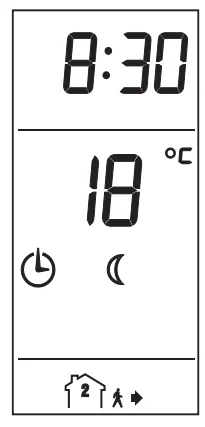
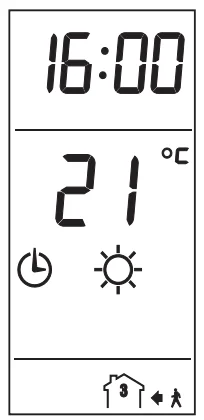
The TH115 programmable thermostat is pre-programmed with the following schedule:
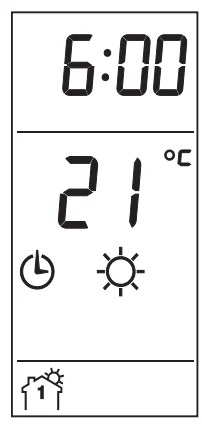
- The time you wake up and the desired temperature

- The time you leave and the temperature during your absence

- The time you return home and the desired temperature

- The time you go to bed and the overnight temperature
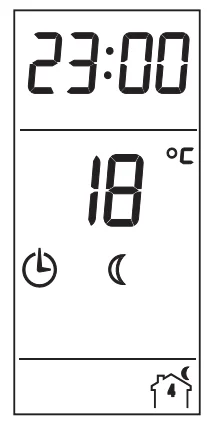
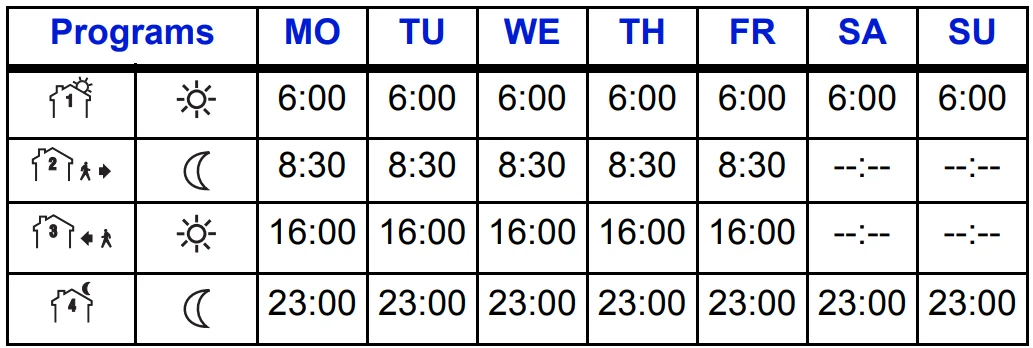
Modify the Schedule
Notes:
- You can program up to 4 different programs per day. Each day can have different programs.
- It is sometimes faster to program the same schedule for the entire week and then to modify the exception days.
To modify:
- Press PGM to access the programming mode
- Press DAY to select the day to be programmed (hold for 3 seconds to select all days of the week).
- Press PGM to select the program number.
- Press HOUR and MIN to set the time or press CLEAR to clear the time (–:– is disregarded).
- Repeat steps 2 to 4 for the remaining programs.
- When completed, press RET to exit mode.
NOTE: After 60 seconds of inactivity, the thermostat will automatically exit programming mode.
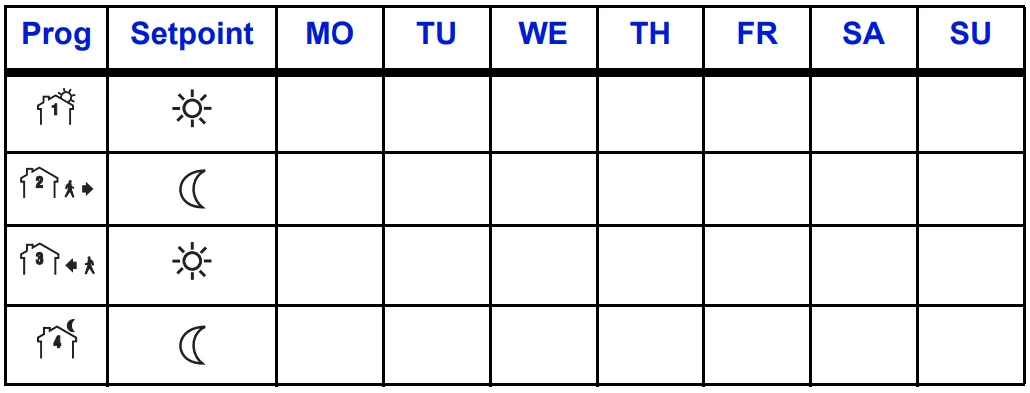
Custom Grid
Use this blank grid to record your new schedule.
- Model: A F AF
- Temperature display: °F °C
- Time display: 12hrs 24hrs
Remote Input
The TH115 is equipped with a remote input, which allows connection of a telephone controller (accessory Aube CT240) or any other remote control system. When a signal is received through this input, the TH115 will automatically switch from normal operating mode to Vacation mode (), and vice versa when the signal is removed.
Activating the Vacation mode
There are two ways to activate the Vacation mode:
- From the thermostat, see “Operating Modes” above.
- From a telephone (remote location). For details on how to activate using a telephone, refer to the CT240 Instruction Manual.
WARNING: When the Vacation mode is activated, Programs MO TU WE TH FR SA SU remotely, it must be deactivated remotely.
Temperature Control
The TH115 thermostat works differently from conventional electromechanical thermostats. It is equipped with a proportional integral adaptive (P.I.A.) controller, which determines heating cycles by analyzing
the temperature behavior history within the room. The P.I.A. controller reduces temperature variations, providing an accurate temperature control while increasing user comfort. The controller determines the amount of power required by the heating system to maintain the setpoint temperature.

Technical Specifications
- Model: TH115 A / AF / F
- Display range: 32°F to 140°F (0°C to 60°C)
- Setting range (ambient): 40°F to 86°F (5°C to 30°C)
- Setting range (floor limit): 40°F to 104°F (5°C to 40°C)
- Pre-programmed temperature setpoints:
- Comfort: A/AF: 70°F (21°C) and F: 82°F (28°C)
- Economy: A/AF: 64°F (18°C) and F: 68°F (20°C)
- Vacation: A/F/AF: 50°F (10°C)
- AF: 82°F (28°C)
- Accuracy: ± 0.9°F (0.5°C)
- Storage: -4°F to 120°F (-20°C to 50°C)
- Temperature control: Proportional integral adaptive, 15-minute or 15-second heating cycles according to the application and power base.
- Memory backup: In the event of a power failure, an internal circuit will maintain the programming. Only the time will have to be set if the power failure is more than two (2) hours. The thermostat will return to the same operating mode as set before the power failure.
Warranty
AUBE TECHNOLOGIES INC. ONE (1) YEAR LIMITED WARRANTY
This product is guaranteed against workmanship defects for one year following the initial date of purchase. During this period, AUBE Technologies Inc. will repair or replace, at our option and without charge, any defective product which has been used under normal conditions. The warranty does not cover delivery costs and does not apply to products poorly installed or randomly damaged following installation. This warranty cancels and replaces any other manufacturer’s express or implied warranty, as well as any other company commitment. AUBE Technologies Inc. cannot be held liable for related or random damages following the installation of this product. The defective product, as well as the purchase invoice, must be returned to the place of purchase or mailed, prepaid and insured, to the following address: Aube Technologies Inc. 705 Montrichard Saint-Jean-sur-Richelieu, Quebec, Canada J2X 5K8.
If you have any questions concerning the installation or programming of the TH115 programmable thermostat, call our technical support team at:
- Phone: Montreal area: (450) 358-4600 Canada / U.S.:1-800-831-AUBE (2823)
- Fax: (450) 358-4650
- Email: [email protected]
- Monday to Friday from 8:30 AM to 5:00 PM EST
- For more information on our products, visit us at: www.aubetech.com
For more manuals by Aube Technologies, visit ManualsLibraryy
Aube Technologies TH115-A Programmable Thermostat-FAQs
How do I set the temperature on the Aube Technologies TH115-A thermostat?
To adjust the temperature, press the ▲ (up) or ▼ (down) buttons until your desired setpoint appears on the screen. The thermostat will automatically activate heating when the room temperature drops below your selected level. You may hear a soft click as the system turns on. Always ensure the unit is in Heat mode before adjusting.
How do I program the TH115-A for daily or weekly schedules?
The TH115-A allows you to set a 7-day schedule. Press the Mode or Program button to enter scheduling mode, then set your preferred temperatures for wake, leave, return, and sleep periods. Save your settings to activate the program. Once configured, the thermostat automatically follows your schedule to improve comfort and energy savings.
How do I reset my Aube TH115-A thermostat?
To restore factory settings, press the Mode button until “Standby” appears. Then press and hold the button for about 6 seconds. The display will briefly show “rSt,” confirming the reset. Afterward, the thermostat returns to normal mode, and you’ll need to reprogram your clock and temperature settings.
Do Aube TH115-A thermostats require batteries?
Most models in the TH115 series are designed for electric heating systems and are typically battery-free, drawing power directly from the electrical circuit. However, always check your specific installation manual to confirm whether your model uses backup batteries.
Why is my thermostat not heating even though it’s set higher?
First, confirm that the set temperature is higher than the current room temperature displayed. Make sure the circuit breaker hasn’t tripped and that the heating system door or panel is securely closed. If “Heat On” is flashing, wait a few minutes—the thermostat may be in a safety delay mode.
What is the recommended temperature setting for comfort and savings?
For most homes, around 20°C (68°F) while awake is considered comfortable and energy-efficient. Lowering the temperature slightly while sleeping or away can reduce heating costs. Even a small adjustment of 1–2 degrees can make a noticeable difference in annual energy consumption.
Why does my thermostat show a different temperature than I set?
If the display shows a higher or lower temperature than expected, the thermostat may need recalibration. Air drafts, direct sunlight, or placement near heaters can also affect readings. Ensure the thermostat is installed on an interior wall away from vents and heat sources.
What happens if I press the reset button?
Pressing reset clears customized settings and restores factory defaults. The screen may go blank momentarily before restarting. After resetting, you must re-enter the time, preferred temperatures, and schedule to resume normal operation.
Why does my Aube thermostat keep turning off or restarting?
This can happen due to electrical interference, loose wiring, or voltage spikes. If the thermostat repeatedly resets, check wiring connections and ensure the system includes a proper contactor where required. Persistent issues may require professional inspection.
How do I switch between Celsius and Fahrenheit?
The TH115-A allows temperature display changes between °C and °F. Access the setup or configuration menu (refer to your manual), then select the preferred temperature scale. Once saved, the display updates automatically.