
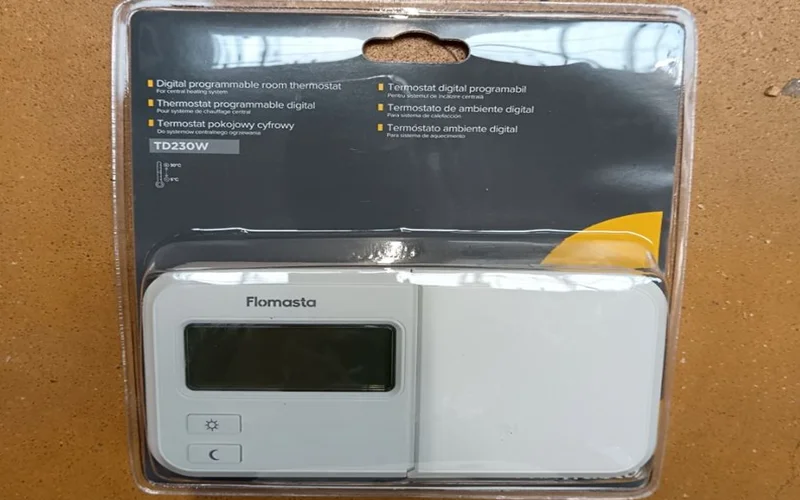

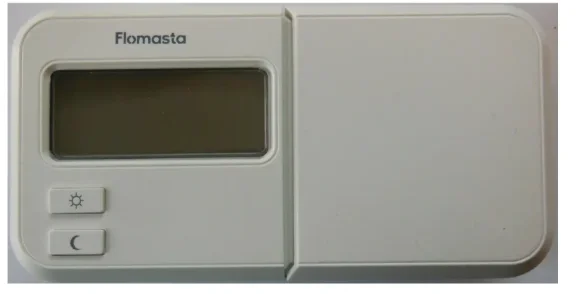
Flomasta TD230W Digital Thermostat
These instructions are for your safety. Please read through them thoroughly before installation and retain them for future reference.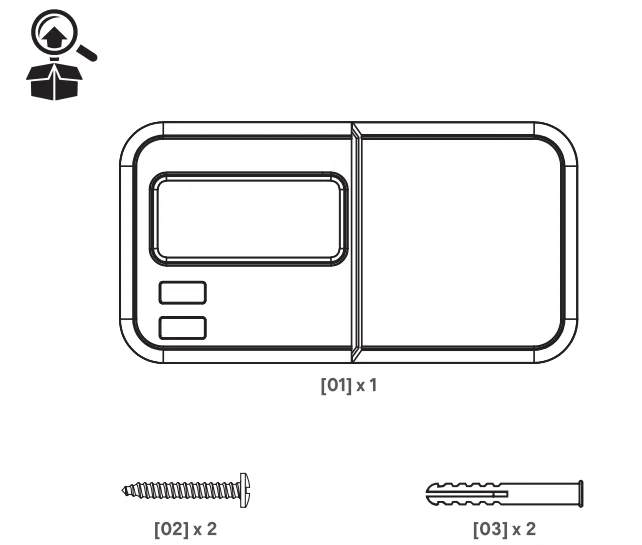
Product Description
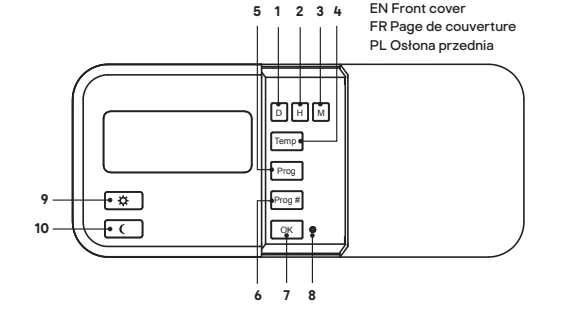
- D. Setting day
- H. Setting day
- M. Setting day
- Temp Setting temperature
- Prog: Display of the program for the specific day
- Prog# Program selection
- Ok Confirm selection
- Reset Clearing defined values
 Setting comfort temperature/navigation in the menu
 Setting the economy temperature/navigation in the menu
 Setting comfort temperature/navigation in the menu
 Setting the economy temperature/navigation in the menu
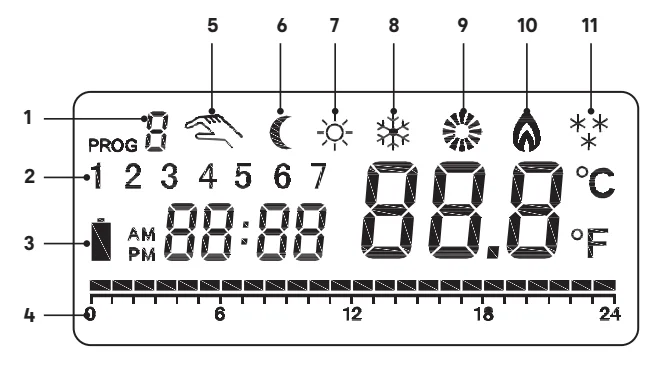
LCD display
- Program number
- Day indicator
- Battery low icon
- Time scale
- Manual override icon
- Econ. mode icon
- Comf. mode icon
- Anti-freezing icon
- Heat/cooler on icon
- Heat mode icon
- Cooler mode icon

Safety
Read the instructions before using the product. WARNING! Risk of electrical shock! Isolate the main supply before opening the unit and before wiring.
- All fittings must be installed by a competent person in accordance with local regulations.
- If you have any doubt about the installation or use of this product, consult a qualified electrician.
- Mount the product at eye level.
- Mount the receiver onto the wall; the location should be about 1.5 meters above the floor in the area and away from drafts, air ducts, and metal objects.
- This product is for indoor use only. It is not intended for areas constantly subject to moisture, such as a bathroom.
- The product can be securely fixed to the mounting surface using screws and wall plugs supplied. The screws and wall plugs supplied are suitable for masonry surfaces only. Fittings to suit other surfaces are not supplied and must be purchased separately.
- The wiring diagram is for reference only. Always refer to the terminal marking for wiring. Ensure that all electrical connections are tight and that no loose strands are left out of the terminal blocks.
- Do not cover the device, and do not hang anything from this product.
- Do not install near a direct heat source or in direct sunlight.
- Avoid moisture, extreme temperatures, vibrations, and impacts.
- Minimum interval output switch time is 15 seconds. Temperature gradient variation will reduce the contact life.
- Do not install in locations where the product can be affected by:
- Drafts or dead spots behind doors and in corners.
- Hot or cold air from the ventilation ducts.
- Sunlight or radiant heat from appliances.
- Concealed pipes or chimneys.
- Unheated/uncooled areas, such as an outside wall.
Battery warnings
- Only the recommended batteries should be used.
- Remove batteries from the product when not in use for long periods of time.
- Keep this product out of the reach of small children.
- Store unused batteries in the original packaging.
- Dispose of used batteries responsibly.
- An adult must carry out battery replacement and installation.
- Remove exhausted batteries from this product.
- Do not dispose of batteries in a fire; batteries may explode or leak.
- Do not short-circuit the battery terminals.
- Do not mix used and new batteries.
- Do not mix alkaline, standard, lithium, or rechargeable batteries.
- Do not use rechargeable batteries in this product.
- Do not recharge non-rechargeable batteries.
- Do not allow any part to come in contact with heat or direct flame.
- Do not allow water to come into contact with the batteries or wiring.
- Install carefully to prevent any damage to the batteries.
- When installing batteries in the battery compartments, ensure the batteries are placed as marked (+)(-).
- Do not ingest the battery.
- Keep new and used batteries away from children.
- If the battery compartment does not close securely, stop using the product and keep it away from children.
- If you think batteries may have been swallowed or placed inside any part of the body, seek immediate medical attention.
Installation
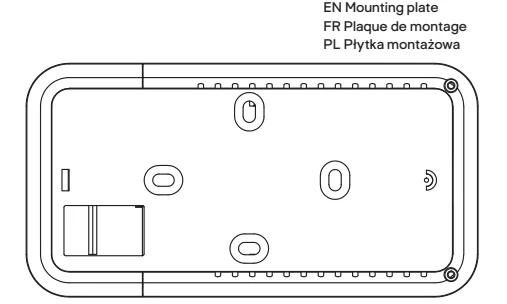
- Slide to the right, open, and remove the mounting plate from the back of the thermostat.
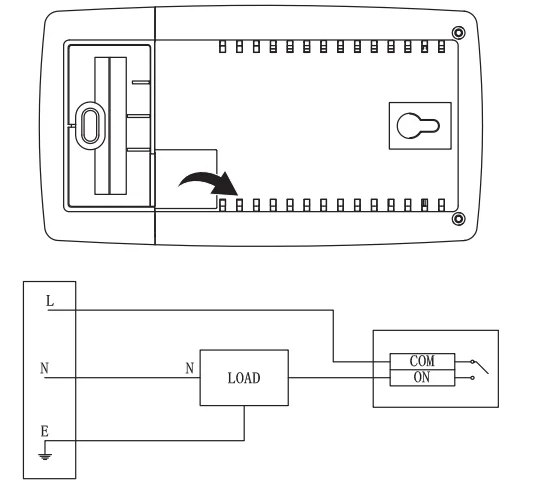
- Remove the cover on the back mounting and connect the wires (1.0–2.5 mm²) to the thermostat according to the diagram below.

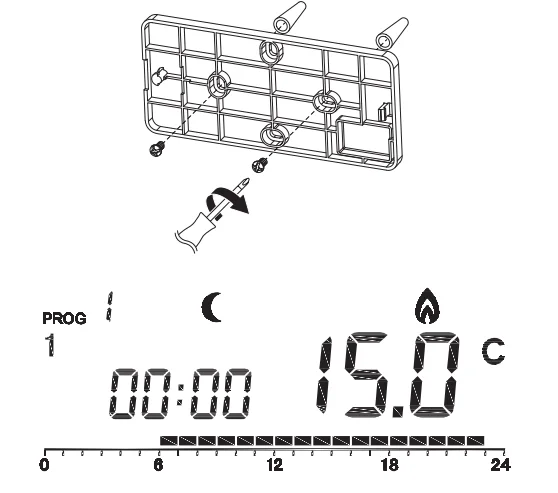
- Mark two mounting plate hole locations on the wall where the device is to be installed. Drill two 6 mm holes, insert the wall plugs provided, and mount the plate on the wall using two mounting screws. Place the device onto the plate through the holes on the back of the thermostat, then push the device to the right to fix it on the plate. NOTE: When mounting the thermostat on a wooden wall, drill two 2.7 mm holes instead of 6 mm, and no wall plugs are needed.
- Slide the front cover to the right and insert 2 alkaline AA batteries. The LCD will turn on. NOTE: When the BATTERY LOW icon is on, please change batteries.

Intended use
- This product is intended to be used for room temperature control of the heating system. This product maintains comfortable temperatures when you are in the room and energy savings when you are away.
- This product is intended for private use only. It is not intended for commercial use.
- This product is intended to be used in dry indoor areas only.
- No liability will be accepted for damages resulting from improper use or non-compliance with these instructions.
Time setting
- Slide the front cover to the right. Press D, H, and M to set day, hour, and minute. Press and hold these buttons for over 2 seconds to adjust quickly. Press any button to enter the normal operation mode.
Basic setting
- Press any button to enter the normal operation mode, press and hold the OK button for over 5 seconds to enter the basic setting interface, and the working mode (heat/cooler) icon flashes on the LCD.
- Press
 the button to select the required working mode.
 for heat mode and
 for cooler mode.
 - Press the OK button to confirm. The text ON/OFF flashes, press
 the button to turn on/off the delay function. When the delay function is on, the minimum interval time from an OFF to ON operation is 5 minutes; When the delay function is off, the minimum interval time from an OFF to ON operation is 15 seconds. Under cooler mode, the minimum interval time from an OFF to ON operation is always 5 minutes.
 - Press the OK button to confirm. Enter the span setting, press the
 button to select the temperature span from 0.4 °C, 0.8 °C. 1.4 °C and 1.8 °C. Span is the temperature difference between the turn-on and the off temperature. For example, in a heating system, if your setting temperature is 20 °C and span 0.4 °C, the device will operate when the room temperature drops to 19.6 °C and turn off when it reaches 20.4 °C.
 the button to select the required working mode.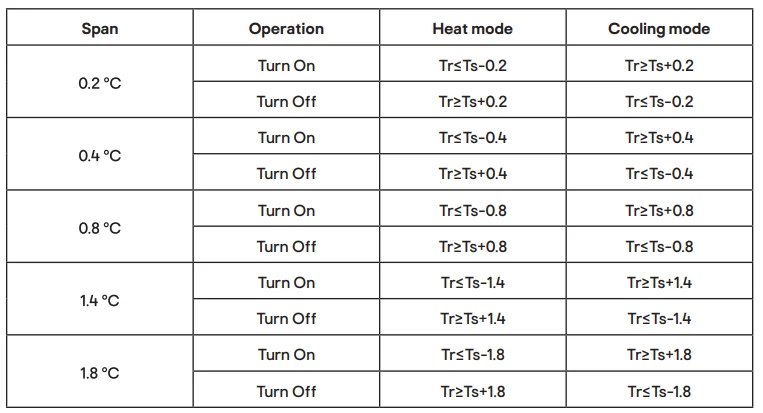
Program setting
- Press any button to enter the normal operation mode, press the Prog button, the day flashes on the LCD, keep pressing to select the day for the program.
- Press the Prog# button to select a different program for the selected day. The Program Number changes, and the first hour of the Control Profile Bar flashes. Keep pressing to select the program. PO-P5 are pre-defined, P6-P8 are user-defined, PO is an anti-freezing program, 7 °C for the whole day (the system will be shut down under cooler mode). The time bar is displayed on the bottom of the LCD., black block means comfortable mode, a blank means economic mode.
- If P7-P9 is selected, the LCD indicates the time, working mode, and the hour flashes on the time bar.
- Press the button to select the comfortable/economic mode hour by hour.
- Press the OK button to save the setting and return to normal operation mode.
- The setting procedure will terminate automatically when no button is pressed for 3 seconds.
Temperature setting
- Press any button to enter the normal operation mode, press the
 button to switch between comfortable and economy mode, and the related icon will show on the LCD.
 - Press the Temp button to set the temperature for the selected working mode; the temperature on the LCD flashes.
- Press the button to adjust the temperature under the selected mode. (Press
 to increase the temperature and to decrease the temperature).
 - Press the OK button to save the setting and return to normal operation mode. The setting procedure will terminate automatically when no button is pressed for 3 seconds. Valid operation temperature is from 5 °C to 30 °C.
- The room thermostat works by sensing the air temperature. It switches on the heating when the
The air temperature falls below the setting of the preferred temperature, and switches off once the set temperature has been reached.
Manual setting (temporary override)
- Press any button to enter the normal operation mode, and press
 the button to switch the working mode between comfortable and economy mode. If the mode is overridden, the MANUAL OVERRIDE icon will be on with your set working mode icon.
 - The device will keep working under the manual setting mode until it reaches the next working point. In mode switching, the MANUAL OVERRIDE icon will be off.
- Press the OK button to save the setting and return to normal operation mode.
- The setting procedure will terminate automatically when no button is pressed for 3 seconds.
Countdown mode
- Press any button to enter the normal operation mode, press and hold the button for over 2 seconds to enter the countdown setting under comfortable/economy mode. The time indicator shows 1, which means the selected mode will run for 1 hour.
- Press the same button again to set the countdown time, from 1 hour to 24 hours.
- Press the OK button to save the setting and return to normal operation mode.
- Under countdown mode, press the OK button or the other working mode button
 to cancel the countdown mode.
 - When the countdown mode is activated, press the selected working mode button
 to see the left countdown time, and keep pressing to adjust the countdown time.
Cooler mode
This thermostat can control the cooling system. Operation is similar to heat mode; below are some differences:
- Comfortable temperature is lower than the economy temperature.
- Under Anti-freezing mode, the system does not work, and no temperature is indicated. Another working mode is available by manual setting.
- Under cooler mode, the minimum interval time from an OFF to ON operation is always 5 minutes.
Backlight
- Press any button to turn on the backlight; it will switch off when there is no operation for 15 seconds.
Reset
- Press the Reset button to initialize the device to the factory settings.
NOTE: Please reset the device when the system crashes. Do not use a sharp object to press the Reset button, as it can damage the device.
Technical data
- Temperature display: 0°C to 40°C Tr ≥ Ts + 0.2
- Temperature setting: 5°C to 30°C
- Storage temperature: -20°C to 60°C Tr ≤ Ts – 0.2
- Span: 0.2, 0.4, 0.8, 1.4, 1.8°C Tr ≥ Ts + 0.4
- Program number: 6 pre-defined, 3 user-defined
- Power source: 2x AA (LR6) batteries (not included) Tr ≤ Ts – 0.4
- Receiver max. load: 230 V, 50 Hz, 5(3) A Tr ≥ Ts + 0.8
- Air conditioner cycle time: 30 seconds Tr ≤ Ts – 0.8
- Enclosure rating: IP30
Addresses
Manufacturer • Fabricant • Producent:
UK Manufacturer:
Kingfisher International Products Limited,
3 Sheldon Square, London, W2 6PX,
United Kingdom
EU Manufacturer:
Kingfisher International Products B.V.,
Rapenburgerstraat 175E,
1011 VM Amsterdam, The Netherlands
www.kingfisher.com/products
www.diy.com
www.screwfix.com
www.screwfix.ie
To view instruction manuals online,
For More Manuals By Flomasta, Visit ManualsLibraryy.
Flomasta TD230W Digital Thermostat-FAQs
Why is my Flomasta thermostat not communicating with the receiver?
Weak batteries, signal interference, or a lost pairing can stop communication. Replace the batteries and re-link the thermostat with the receiver using the manual’s pairing steps.
Why is my boiler not responding to the thermostat?
If your boiler doesn’t react, check the thermostat batteries first. Wireless thermostats rely entirely on battery power, and low batteries often stop the signal. Replacing them usually restores connection.
Can a boiler work without a thermostat?
Yes, the boiler can run, but you’ll need to turn it on and off manually. The thermostat controls room temperature, so without it the system becomes far less efficient.
How long do the thermostat batteries last?
Batteries typically last 8–12 months, but it’s best to replace them twice a year to avoid power loss.
What temperature should I set my thermostat to in winter?
A comfortable and energy-efficient winter setting is around 68°F (20°C) when you’re at home. Lower it slightly when you’re asleep or away.
What happens if the thermostat battery dies?
Your thermostat will turn off, the display will go blank, and it will stop controlling the heating system. Replace the batteries to restore operation.
Why is my thermostat touchscreen not responding?
An unresponsive screen is usually caused by dead batteries, a tripped breaker, loose wiring, or internal failure. Check power sources first.
What does a solid red light indicate on a thermostat or heating unit?
A continuous red light often signals a ground fault or system error. Have the wiring and heating system inspected by a qualified technician.
Can a thermostat work without Wi-Fi?
Yes. Your Flomasta TD230W will continue to control heating even if Wi-Fi fails. Only online or remote features (if applicable) stop working.
How do I reset my Flomasta thermostat?
Follow the reset instructions in the user manual. Usually, this involves holding specific buttons and re-pairing the thermostat with the receiver.
How do I know if my thermostat needs to be reset?
If your heating doesn’t start, temperatures seem inaccurate, or communication with the boiler drops, a reset may help.