
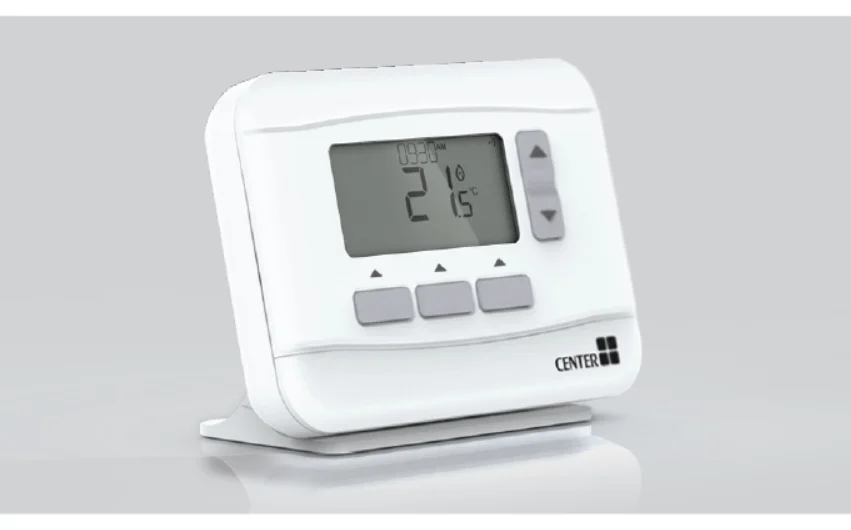

CENTER 340022 Programmable Thermostats
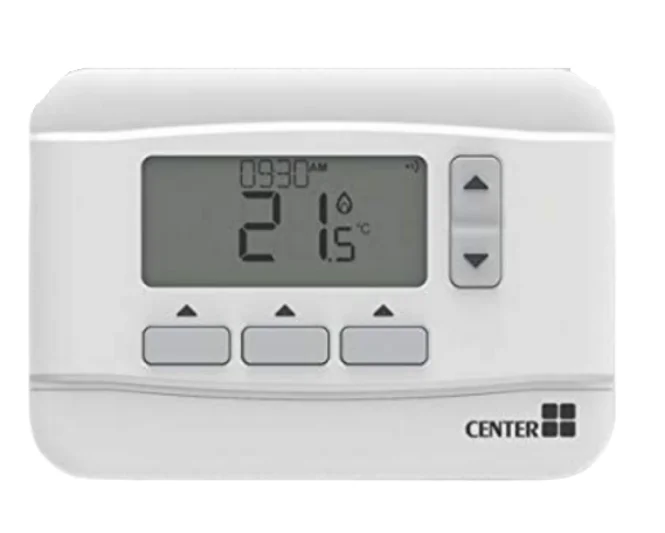
Thermostat Interface
Screen and Button Overview
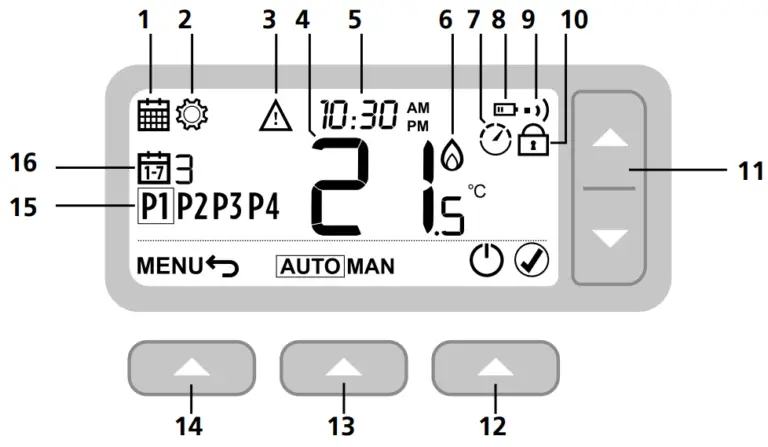
- Programming Menu
- Settings Menu
- Alert
- Room Temperature
- Current time
- Heat demand
- Optimisation
- Low battery
- Wireless signal
- Keypad Locked
- Temperature adjust
- Right button
- Middle button
- Left button
- Schedule period
- Day
Status Icons
 Temperature Override Active: Displayed if the programmed temperature has been manually adjusted.
 Low Battery: Power has reached approximately 10% (see Changing the Batteries on page 9).
 Heat Demand: Room temperature is below setpoint – indicating there is a demand for heating (boiler activity might occur).
 Optimization Active: Only displayed if optimization has been enabled in the installer settings.
 Wireless Signal: Thermostat (Wireless only) is connected to the Receiver Box.
 Temperature Override Active: Displayed if the programmed temperature has been manually adjusted.
 Low Battery: Power has reached approximately 10% (see Changing the Batteries on page 9).
 Heat Demand: Room temperature is below setpoint – indicating there is a demand for heating (boiler activity might occur).
 Wireless Signal: Thermostat (Wireless only) is connected to the Receiver Box.
Menu & Navigation Icons
MENU Options and settings of your Thermostat:
 Heating schedule
 Settings (Date & Time)
 Back: Return to the previous screen/menu.
 Confirm: Confirm a change or selection.
 Standby: Turns the heating on or off.
 Heating schedule
 Settings (Date & Time)
 Back: Return to the previous screen/menu.
 Confirm: Confirm a change or selection.
 Standby: Turns the heating on or off.
Navigating the Menu
- Press the MENU
 button to enter the main menu.
 - Press or buttons to select a menu item – the selected item will flash.
- Press to confirm the selection.
- Press or to adjust a setting and then press to save the change and advance to the next selection, or press
- to go back to the previous selection.
 button to enter the main menu.
Menu
Heating Schedule
Your Thermostat comes with the following default schedule. Follow the next steps to adjust the heating schedule.
Adjusting the Schedule
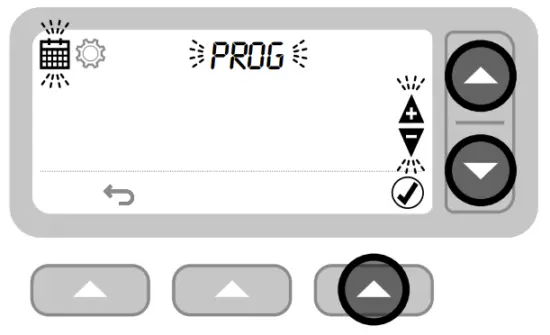
- Press to enter the main menu.

- Press
 or
or  to select the schedule menu and press .
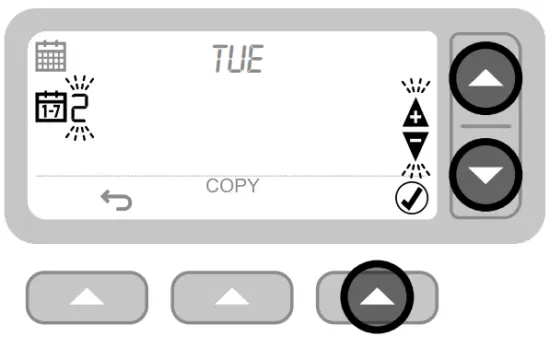
- Press or to select the day to be adjusted and press.

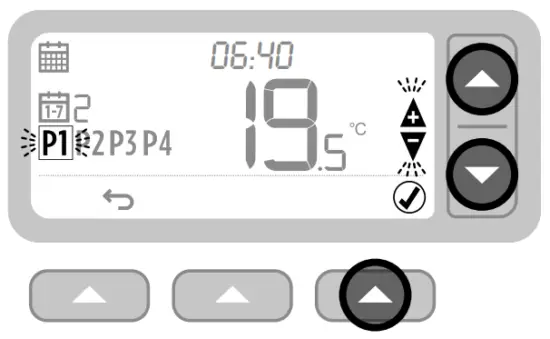
- Press or to select the period to be adjusted and press .

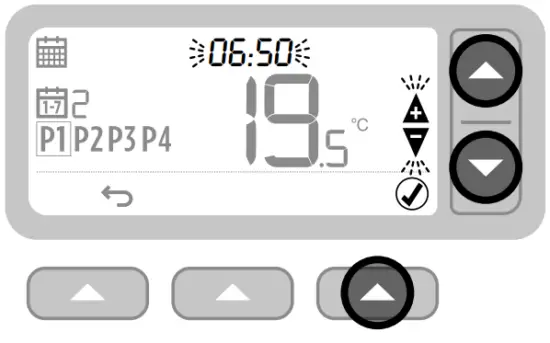
- Press or to adjust the time and press .

- Press or to adjust the temperature and press .

- Repeat steps 3-6 to make adjustments to the remaining periods and days, or press to save changes and return to the home screen.
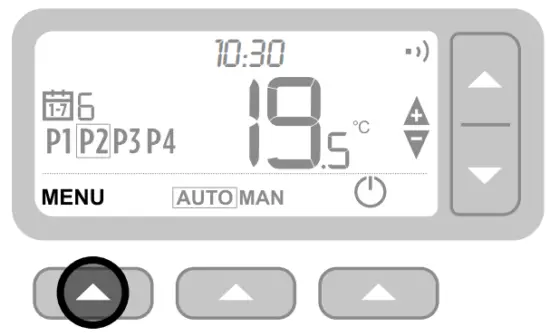
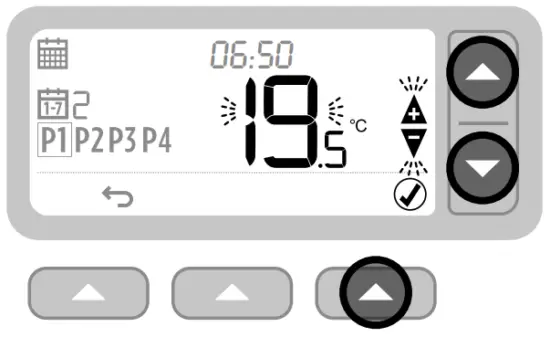
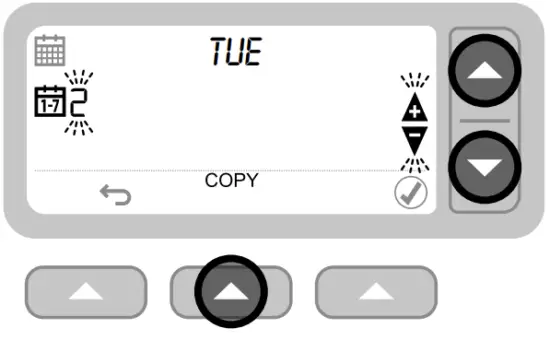
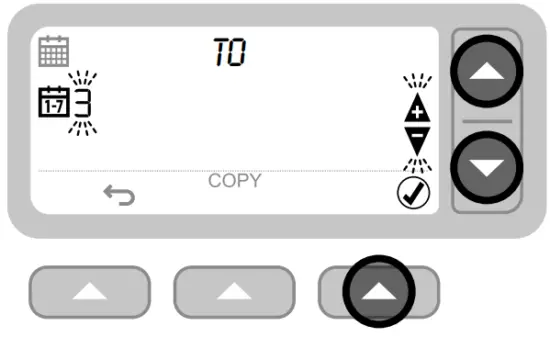
Copy Schedule
- Press or to choose the day you want to copy the schedule from, and press the .

- Press or to choose the day you want to copy the schedule to and press the .
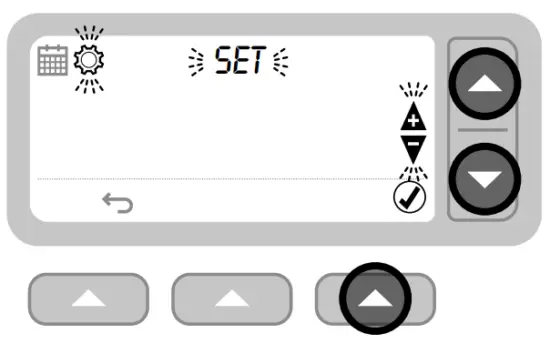
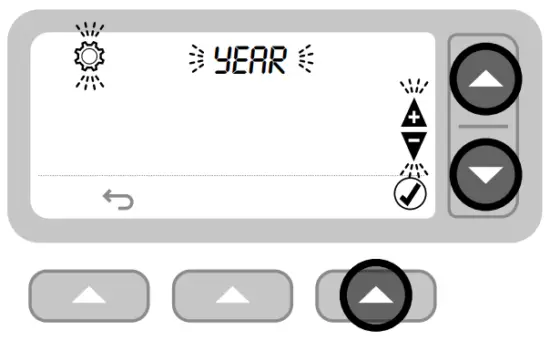
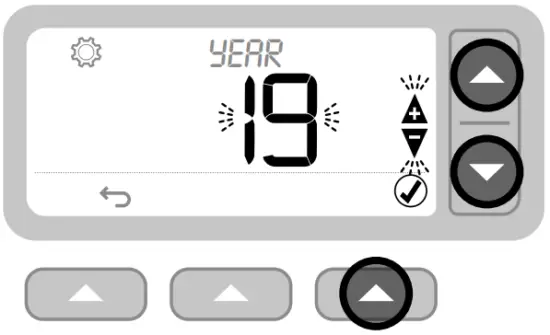
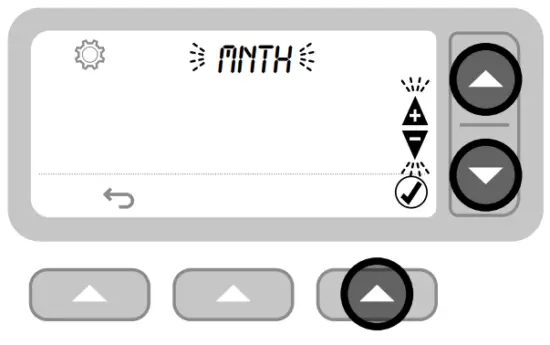
Settings (Date & Time)
- Press to enter the main menu.

- Press or to select the settings menu (indicated by a gear icon ⚙️) and press.

- Press to select YEAR (or press to skip forward to MONTH).

- Press or to adjust the YEAR and press .
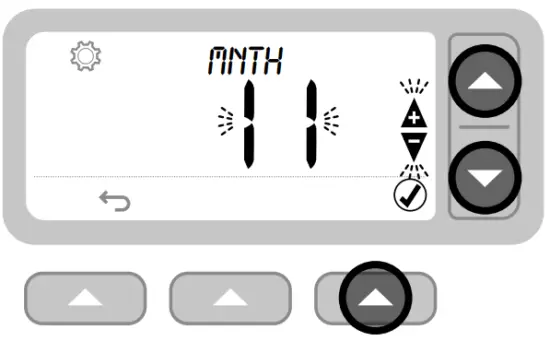
- Press to select MONTH (or press to skip forward to DAY).

- Press or to adjust the MONTH and press .

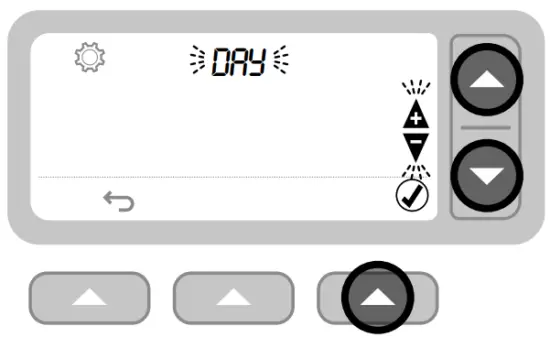
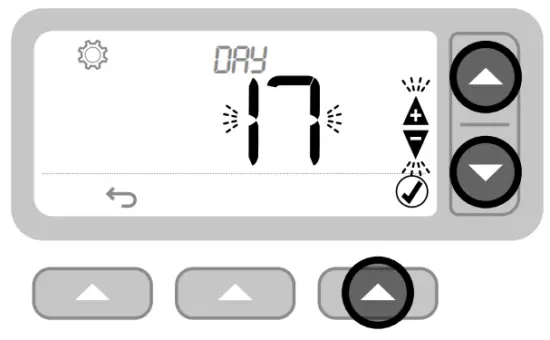
- Press to select DAY (or press to skip forward to HOUR).

- Press or to adjust the DAY and press .
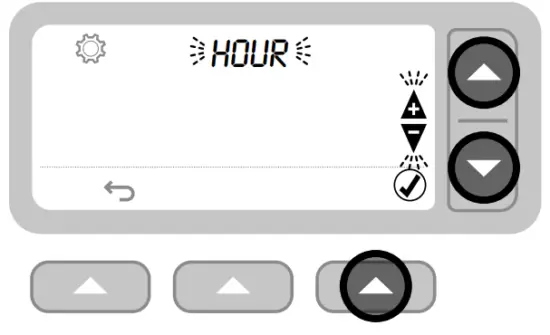
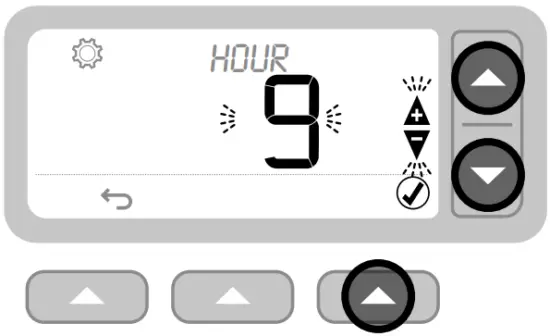
- Press to select HOUR (or press to skip forward to MINUTE).
- Press or to adjust the HOUR and press .
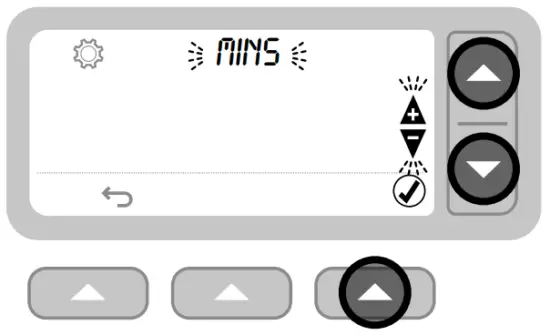
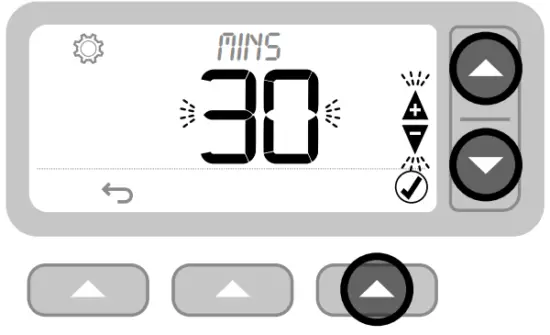
- Press to select MINUTE and press or to adjust the MINUTE and press
- Press or to adjust the minute and press.
- Press to exit SETTINGS and return to the home screen.
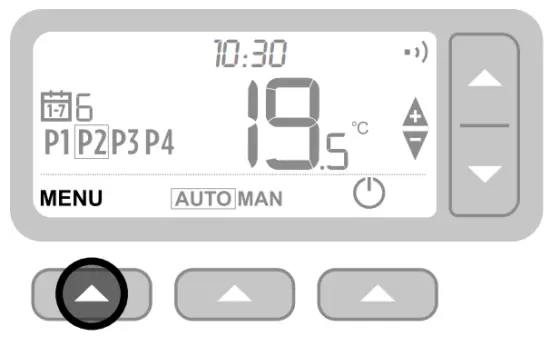
Device Modes
Automatic Operation
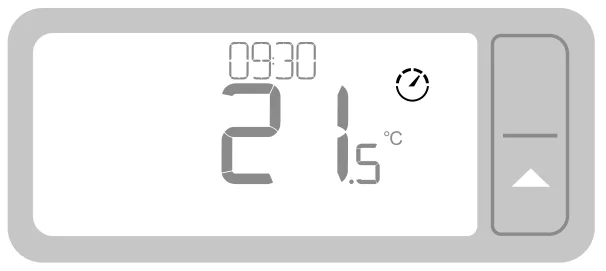
During normal use, your Thermostat will follow the programmed schedule, indicated by the  icon.
icon.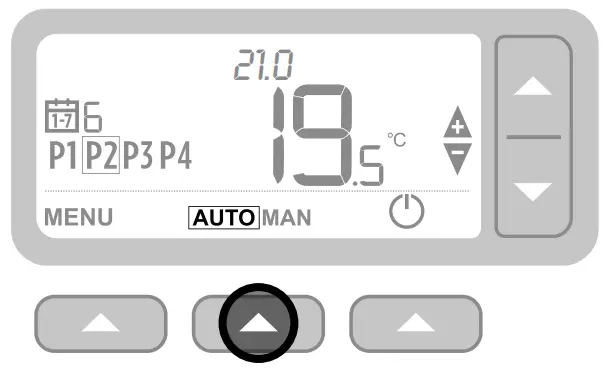
Manual Operation 
The set temperature is followed permanently, indicated by the  icon.
icon.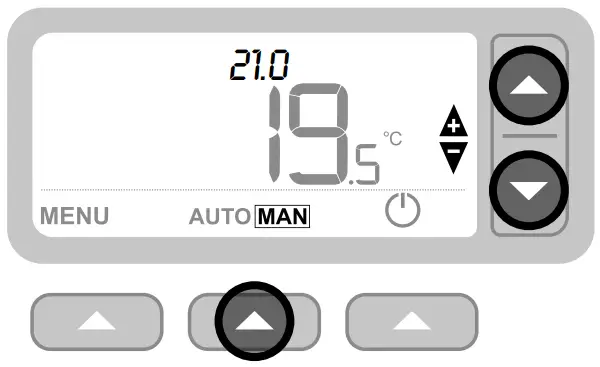
Temporary Override
Press the  or
or  buttons to set the new desired temperature. The programmed schedule will resume at the next programmed setpoint.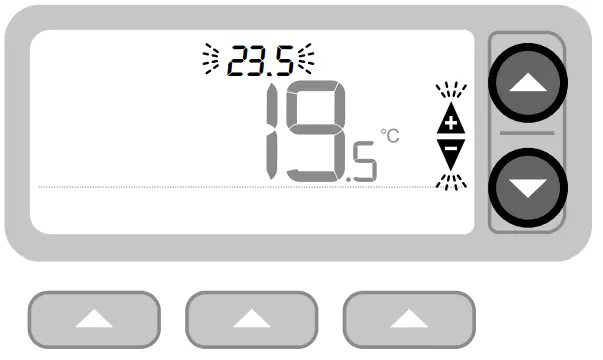
Permanent Override
Press the or buttons to adjust the set temperature. This temperature is set until manually changed again.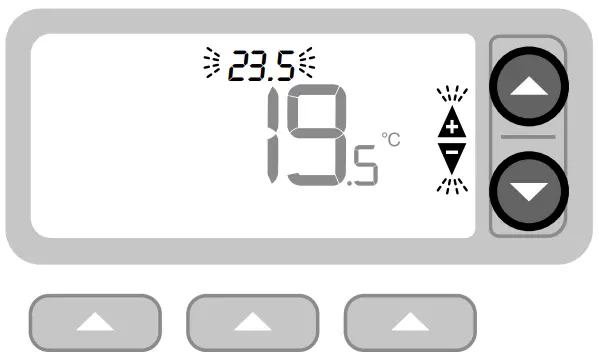
Standby mode (with frost protect) 
Save energy by switching the heating off when not required (e.g., during warmer summer months, or when doors and windows are open for extended periods). If the temperature drops to 5°C, the heating will come on to prevent the heating pipes from freezing.
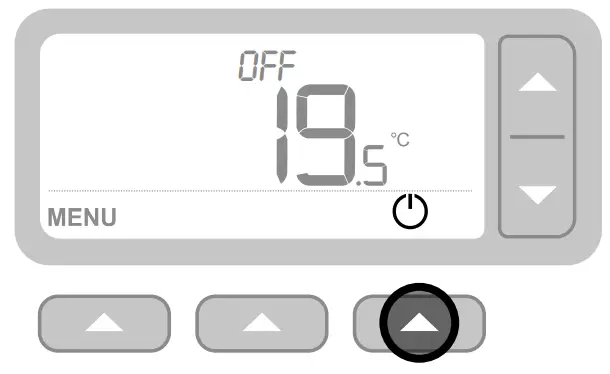
- Press the
 to switch the heating off – the display will show OFF.
 - Press the
 again to switch the heating on – the display will show AUTO or MAN.
Optimisation
Your Thermostat has optimisation functions that aim to save energy while maintaining suitable comfort levels. The Thermostat displays  during the optimisation period if set. By default, optimisation is disabled. See the installation guide for instructions on how to activate it.
- Optimum Start: Learns how long it takes your home to reach a set temperature and then turns the heating on a bit earlier to achieve that temperature at the programmed time.
- Optimum Stop: Saves energy by switching off a little bit earlier than the programmed time. If your home is up to temperature, you will not notice the effect on the temperature, but you should see a difference in your fuel bill.

Changing the Batteries
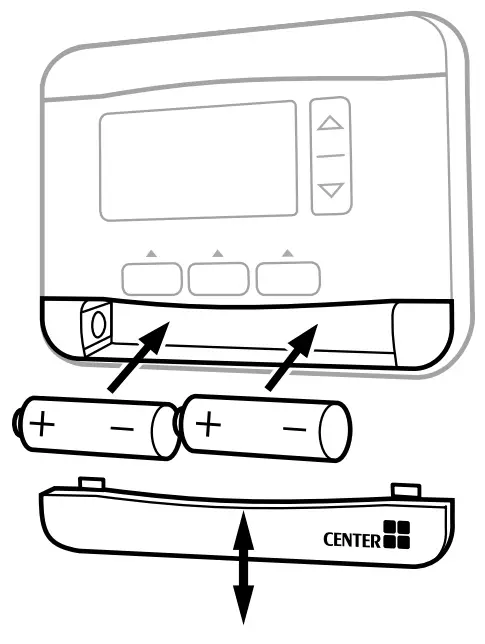
The Thermostat is powered by 2 x AA batteries. A battery icon is not shown on the display during normal use. The battery icon appears only when the batteries become low on power.
- The is displayed when battery power has reached approximately 10% – you should be prepared to change them soon.
- The
 +will flash when battery power has become critically low – you should change them immediately to ensure no disruption to your heating system.
 - Replace with 2 new 1.5V LR6 AA Alkaline batteries only. These should last approximately 2 years, depending on Thermostat use.

 +
+
Recycling Note: Please help to protect the environment by recycling old batteries in accordance with local regulations. ♻️
Troubleshooting
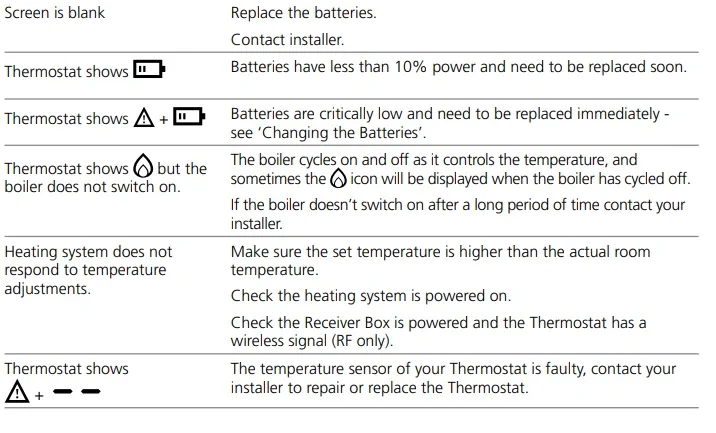
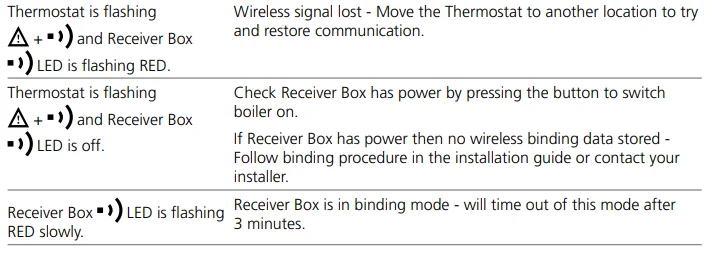
If you have difficulty with your Thermostat, try these suggestions. Most problems can be corrected quickly and easily.
All models
Wireless Thermostat & Receiver Box only
If during the installation or set up, you experience any issues, please call 0344 292 7060 for assistance.
- Manufactured for and on behalf of Wolseley UK Limited,
- 2 Kingmaker Court, Warwick Technology Park,
- Gallows Hill, Warwick, Warwickshire,
- United Kingdom, CV34 6DY
For further information, telephone 0344 292 7062. Whilst every care has been taken to ensure that the information included in this document was accurate at the time of printing, we reserve the right to change specifications at any time. The photographs reproduced in this publication are within the constraints of the printing process and are NOT to be used for matching purposes. E&OE. Website: www.wolseley.co.uk
For More Manuals By Wolseley, Visit ManualsLibraryy.
CENTER 340022 Programmable Thermostats-FAQs
What is the CENTER 340022 programmable thermostat used for?
The CENTER 340022 programmable thermostat is designed to control home heating systems by allowing users to set temperature schedules throughout the week. It helps maintain comfort while improving energy efficiency by automatically adjusting heating based on pre-set time and temperature preferences.
Does the CENTER 340022 support a 7-day heating schedule?
Yes, the thermostat supports a full 7-day programmable schedule, enabling users to set different temperatures for each day. It allows multiple daily time periods, helping users tailor heating to their routines and reduce energy usage when heating is not required.
How many temperature settings can be programmed each day?
The CENTER 340022 allows users to program up to four different temperature settings per day. These set points can be adjusted according to daily routines, ensuring heating is available when needed while minimizing energy waste during inactive periods.
What operating modes are available on the thermostat?
The thermostat includes automatic, manual, temporary override, and permanent override modes. Automatic mode follows the programmed schedule, while manual and override modes allow users to adjust temperatures as needed without permanently changing the schedule.
What is standby mode with frost protection?
Standby mode allows users to turn off heating when it is not needed, helping save energy. However, it includes frost protection, which automatically activates heating if the temperature drops to around 5°C, preventing pipes from freezing in cold conditions.
How does the optimization feature work?
The thermostat includes optimization features such as Optimum Start and Optimum Stop. These functions learn how quickly your home heats up and adjust heating times accordingly, ensuring the desired temperature is reached efficiently while reducing unnecessary energy consumption.
Is the CENTER 340022 thermostat wireless?
Yes, the 340022 model is an RF wireless thermostat that communicates with a receiver box connected to the boiler. This wireless setup allows flexible installation and positioning without the need for direct wiring between the thermostat and heating system.
How do you adjust the heating schedule on the thermostat?
Users can adjust the heating schedule through the menu by selecting the schedule option and modifying time and temperature settings for each day and period. Changes are saved directly, allowing personalized heating routines based on daily lifestyle needs.
What type of batteries does the CENTER 340022 use?
The thermostat is powered by two AA batteries, typically lasting around two years depending on usage. A low battery indicator appears when power is low, helping users replace batteries in time to ensure uninterrupted heating control.
What should you do if the thermostat is not working properly?
If the thermostat is not functioning correctly, check battery levels, ensure the set temperature is higher than the room temperature, and confirm the heating system is powered on. If issues persist, contacting a qualified installer is recommended for further inspection.