

Bissell 3515G CrossWave HydroSteam Deluxe Wet-Dry Vacuum
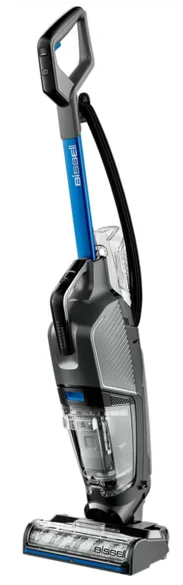
Product Overview
- Upper Handle
- Fingertip Controls
- Solution and Steam Spray Trigger
- Clean Water Tank
- Clean Out Cycle Button
- Dirty Water Tank Removal Button
- Dirty Water Tank with Filter and Strainer
- Control Panel
- Brush Roll Window
IMPORTANT SAFETY INSTRUCTIONS
WARNING
TO REDUCE THE RISK OF FIRE, ELECTRIC SHOCK, OR INJURY:
- Connect to a properly grounded outlet only. See grounding instructions. Do not modify the three-prong grounded plug.
- Do not leave the appliance when it is plugged in. Unplug from the outlet when not in use and before servicing.
- Use indoors only.
- Do not immerse. Use only on surfaces moistened by the cleaning process.
- Always install a float before any wet pick-up operation.
- Do not allow it to be used as a toy. Close attention is necessary when used by or near children.
- Do not use for any purpose other than described in this user guide. Use only the manufacturer’s recommended attachments.
- Do not use with a damaged cord or plug. If the appliance is not working as it should, has been dropped, damaged, left outdoors, or dropped into water, do not attempt to operate it and have it repaired at an authorized service center.
- Do not pull or carry by cord, use cord as a handle, close door on cord, or pull cord around sharp edges or corners. Do not run the appliance over the cord. Keep the cord away from heated surfaces.
- Do not unplug by pulling on the cord. To unplug, grasp the plug, not the cord.
- Do not handle the plug or the appliance with wet hands.
- Do not put any object into openings. Do not use with any opening blocked; keep openings free of dust, lint, hair, and anything that may reduce air flow.
- Keep hair, loose clothing, fingers, and all parts of the body away from openings and moving parts of the appliance and its accessories.
- Turn OFF all controls before plugging in or unplugging the appliance.
- Use extra care when cleaning on stairs.
- Do not use to pick up flammable or combustible materials (lighter fluid, gasoline, kerosene, etc.) or use in areas where they may be present.
- Do not pick up anything that is burning or smoking, such as cigarettes, matches, or hot ashes.
- Unplug from the outlet before filling, rinsing, or cleaning.
- Do not turn over the steam-cleaning nozzle or touch the surface of the nozzle when using the steam cleaner.
- Do not apply steam directly to any person or animal.
- Do not touch the steam-cleaning nozzle or adjacent surfaces when steam-cleaning or when the nozzle is heated.
- Use only manufacturer’s recommended attachments – use of attachments not provided or sold by BISSELL may cause fire, electric shock, or injury.
- Do not turn your appliance ON until you are familiar with all instructions and operating procedures.
- Keep the appliance on a level surface.
- Do not leave the steam cleaner unattended.
- Do not use the appliance in an enclosed space filled with vapors given off by oil-based paint, paint thinner, some moth-proofing substances, flammable dust, or other explosive or toxic vapors.
- Do not use to pick up toxic material (chlorine bleach, ammonia, drain cleaner, etc.)
- Do not pick up hard or sharp objects such as glass, nails, screws, coins, etc.
- Plastic film can be dangerous. To avoid the danger of suffocation, keep away from children.
What’s in the Box?
Standard accessories may vary by model. To identify what should be included with your purchase, please refer to the “Carton Contents” list located on the carton’s top flap.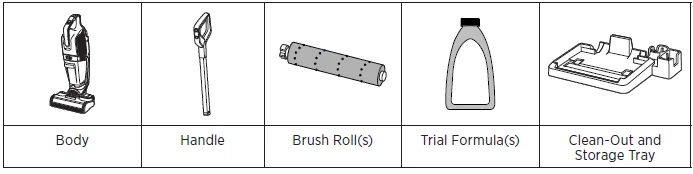
Assembly
Go to support.BISSELL.com for assembly videos.
- Insert the handle into the machine.
- Insert the clean water tank into the back of the machine.
- Wrap cord. To easily unwrap, turn the Quick Release™ Cord Wrap down.
Changing the Brush Roll
Visit BISSELL.com to purchase additional brush rolls.
- Multi-Surface Brush Roll: Microfibers mop, and nylon bristles help remove tough, sticky messes while picking up dry debris.
- Wood Floor Brush Roll: Soft-touch microfibers gently clean sealed hard floors.
- Area Rug Brush Roll: Bristles work on area rugs to pick up dry debris and pet hair.
- PET Multi-Surface Brush Roll: Microfibers mop and nylon bristles help remove tough, sticky messes while picking up pet hair and dry debris.
- Grab the front of the brush window and pull upward to remove.
- Remove the brush roll by pulling the tab.
- Reinstall by placing the end of the brush into the right side of the foot.
- Press the tab of the brush down so it locks into place.
- Replace the brush roll window by lining up tabs on the edges of the foot.
- Press the window back so it clicks into place.
Filling the Clean Water Tank
Go to support.BISSELL.com to watch additional how-to videos.
- The clean water tank is located on the back of the machine. To remove, grasp the tank and pull up.
- Open the top of the clean water tank by removing the screw cap
- Choose your formula. Visit BISSELL.com for formulas.
- The clean water tank has a Large Area volume and a Small Area volume. Pick the one that best suits the space that you would like to clean.
For large area cleaning (up to 700 sq ft)
- Fill the clean water tank with warm tap water to the second water fill line (24 fl. oz.).
- Then add formula to the second formula fill line (4 fl. oz.).
For small area cleaning (<350 sq ft)
- Fill the clean water tank with warm tap water to the first water fill line (12 fl. oz.).
- Then add formula to the first formula fill line (2 fl. oz.).

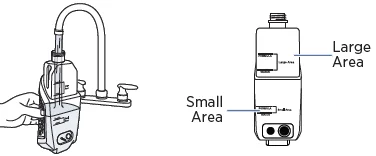
- Close the top of the clean water tank by replacing the screw cap.
Controls and Cleaning Modes
Fingertip Controls
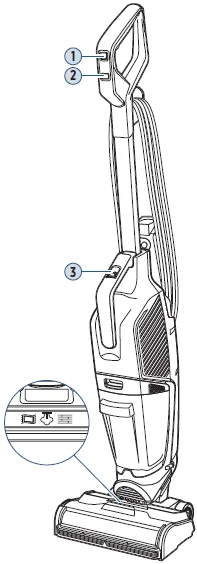
- Mode: Switch between SteamWash™ mode, hard floor mode, and area rug modes. Mode selection appears on the foot display.
- Power: Turn the machine ON and OFF.
- Clean Out Cycle: Automatic self-cleaning cycle.
Foot Display & Cleaning Modes
Mode selection appears on the foot display. When powered ON, it starts in SteamWash mode.
Area Rug Mode
Refresh area rugs and clean dry messes such as crumbs, dirt, hair, and more.
SteamWash™ Mode
Power through tough, stuck-on messes on hard floors and remove dirt on area rugs with the power of HydroSteam™ Technology.
Hard Floor Mode
Clean everyday messes on sealed hard floors such as tracked-in mud, spilled cereal and milk, coffee, and cooking splatters.
Cleaning Your Floors
For cleaning tips for stuck-on messes and more, visit support.BISSELL.com.
Note: Before cleaning area rugs, check the manufacturer’s tag and test an inconspicuous spot on the rug for colorfastness. Don’t use on silk or delicate rugs.
- Plug the machine into a properly grounded outlet. Press the power button to turn the machine ON and OFF. When powered ON, it starts in SteamWash mode.
- Press the mode button to switch between modes. See page 6 for cleaning mode information. Mode selection appears on the foot display. If you chose SteamWash™, wait 30 seconds for it to warm up. The steam ready light will illuminate.
- Recline the machine to start the brush roll spinning. When the machine is standing upright, the brush roll will not spin. Note: When returning to the upright position, continue to push the machine forward after the click until the machine is secured.
- Before each use, hold the solution spray trigger for 10 seconds to wet the brush roll. Note: Bubbles will appear in the brush roll window when the solution is flowing. Water on the floor during steam cleaning is normal.
- Hold the trigger to dispense formula for all cleaning modes and to dispense formula plus steam in SteamWash mode. Make forward and backward passes to clean your floors.
- To dry the floor, release the trigger to stop dispensing solution and steam. Make forward and backward passes to suction up excess water.
Sanitizing Hard Floors
Please read the Hard Floor Sanitize formula label prior to each use. Use on hard, nonporous floors only.
- Follow the cleaning instructions above to remove visible soils. To sanitize: Hold the trigger to apply the solution to the floor.
- Allow the floor to remain visibly wet with the formula for five minutes. This may require additional passes.
- With the trigger released, make forward and backward passes to extract the solution.
Emptying the Dirty Water Tank
- Press the button on the top of the dirty water tank, grab the front handle, and pull out.
- Hold the top of the tank near the sides of the filter and pull up to remove. Pull the strainer stem and remove it from the tank. Throw debris into the trash.
- Pour dirty water into a utility sink or similar wastewater receptacle. Thoroughly rinse the tank.
Using the Clean Out Cycle
Note: Empty the dirty water tank before beginning, and be sure the strainer and filter stay dry. Use the Clean Out Cycle after each use.
- Fill the clean tank with water and formula up to the Clean Out fill line. Optional: With the unit removed from the tray, add 2 fluid ounces of FreshStart™ formula to the Clean Out Tray.
- Plug the machine into a properly grounded outlet and place it on the tray. The Clean Out Cycle button on the handle will light up blue when ready.
- Press the Clean Out Cycle button to begin. Note: For best results, never run the cycle more than twice.
After-Cleaning Care
- Remove the brush roll following the steps on page 3. Pull the brush roll tab and place it in the tray to dry. Check the steam bar for clogs. Wipe steam nozzle with a cloth.
- Remove the machine from the tray and wipe excess water or dirt. Do NOT rinse under the faucet.
- Empty the dirty water tank and strainer following the steps on page 6.
- Remove the filter from the lid. Open the screen and remove debris.
- Wash the filter in warm water and mild detergent. Clean and dry the filter after each use. Replace every 3 months.
- Rinse the bottom of the tank cover to remove wet debris.
- Let parts air dry for 24 hours before next use.
- Reinstall the brush roll following the steps on page 3. Reinstall filter, strainer, and tank lid.
- Insert the bottom of the tank first. Pivot the top toward the machine until it clicks.
Storing Your Machine
When finished using the product, wrap the cord around the cord wrap for storage. Store the machine indoors in a dry location in an area where the product is not likely to get damaged.
NOTICE: To reduce the risk of a leaking condition, do not store the machine where freezing may occur. Damage to internal components may result.
Troubleshooting
Below are some of the issues you may run into. If you don’t see the issue you’re experiencing below, visit support.BISSELL.com.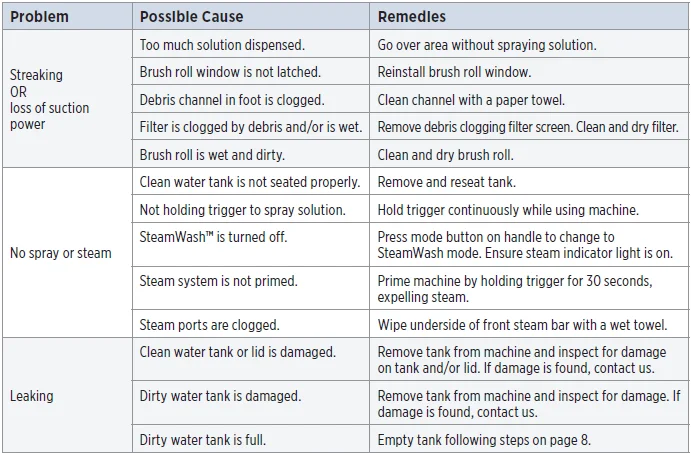
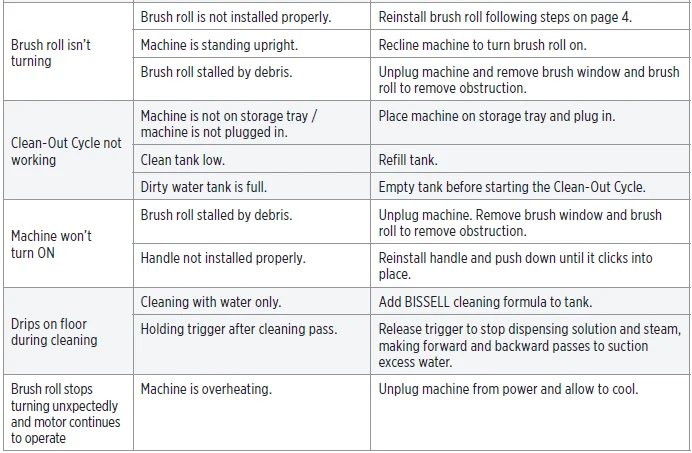
Note: Any other servicing should be performed by an authorized service representative.
Warranty
Limited 3-year warranty, may vary by state. Visit support.BISSELL.com or call 1-844-383-2630 for complete warranty information.
For more Manuals by Bissell, visit ManualsLibraryy
Bissell 3515G CrossWave HydroSteam Deluxe Wet-Dry Vacuum-FAQs
What are the most common problems with the CrossWave?
Common issues include the unit not powering on, the brush not spinning, water not dispensing, weak suction, or leaks from the clean water tank. These usually happen due to clogs, a loose tank, a dirty brush roll, or battery/charging problems.
Can the Bissell CrossWave vacuum without water?
It can technically vacuum dry debris, but it is not designed to work as a regular dry vacuum. For best results, use it with water and Bissell formula.
How do I use the CrossWave HydroSteam?
Recline the vacuum to activate suction and brush spinning. Hold the spray trigger to release water and solution. Allow about 15 seconds for the machine to fully prime and saturate the brush.
What surfaces can the HydroSteam clean?
It cleans multiple surfaces including sealed wood, tile, laminate, linoleum, rubber mats, and area rugs.
Do I need to clean the CrossWave after every use?
Yes. Empty the dirty tank, rinse the filter, clean the brush roll, and remove any trapped debris for best performance.
How often should I replace the CrossWave filter?
Replace the filter every 3–6 months or when suction decreases. Some filters are washable, but they still need regular replacement.
Can I leave cleaning solution in the clean water tank?
You can leave leftover solution in the tank, but it’s recommended to mix it with fresh hot water before the next use.
Where is the reset button on the CrossWave?
Some models have a reset function. Hold the mode button for 10 seconds until you hear two beeps.