
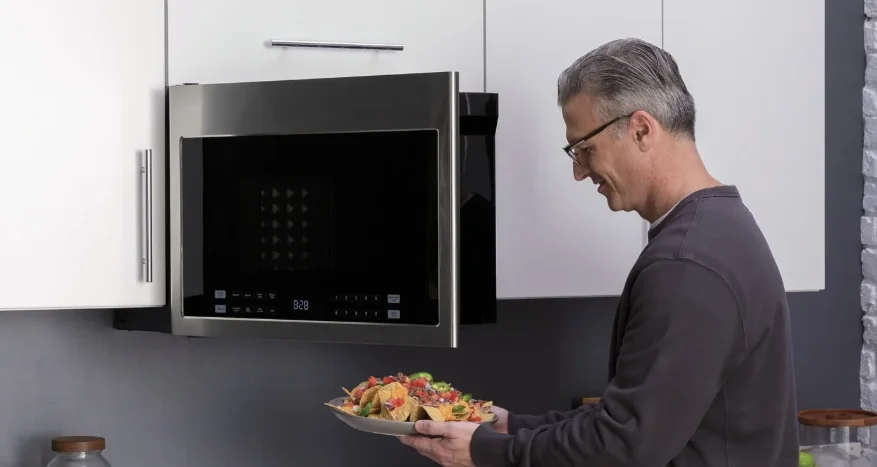

Haier HMV1472BHS Over-The-Range Microwave Oven
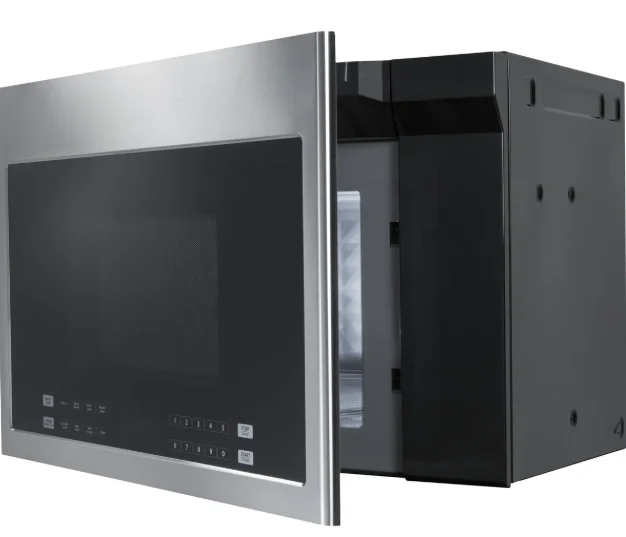
Parts and Features
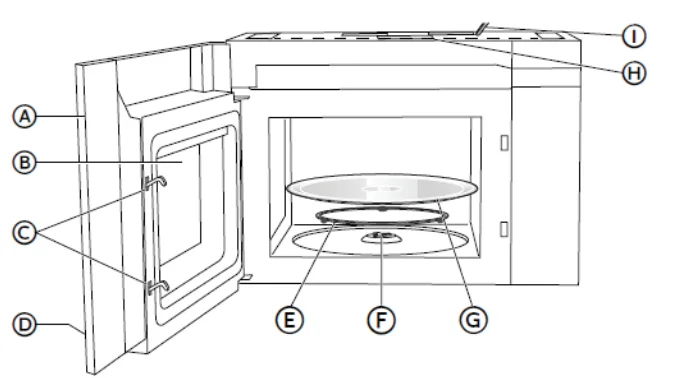
Front View
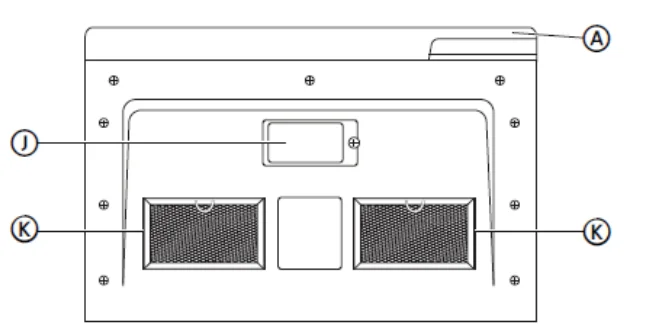
Bottom View
- Door
- Window
- Interlock System
- Control Panel
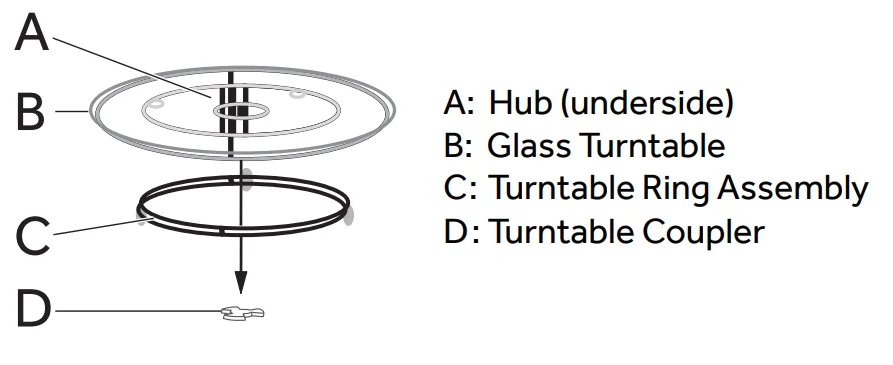
- Turntable Ring Assembly
- Turntable Coupler
- Glass Turntable
- Top Grille
- Power Cord
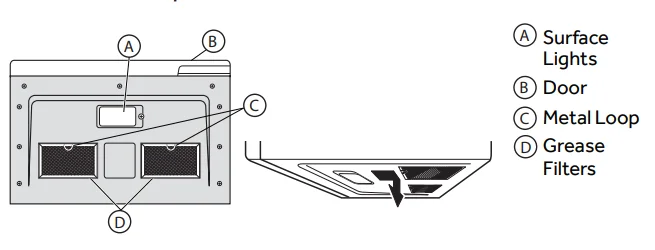
- Surface Lights
- Grease Filters
Parts and Features
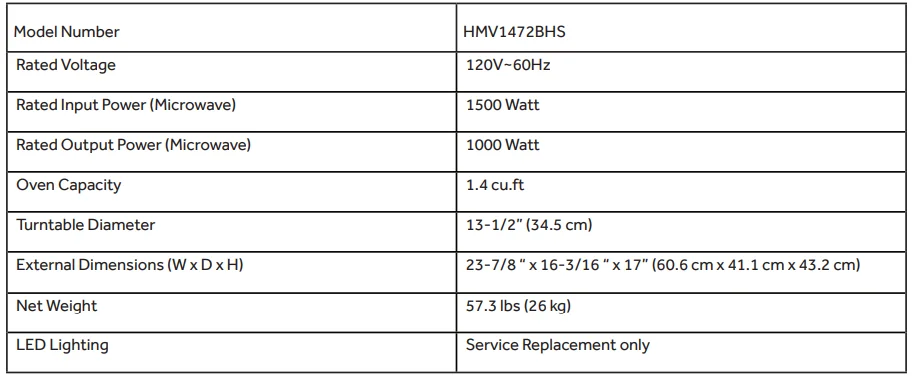
Specifications
Turntable
- The turntable ring assembly and the glass turntable must be used during cooking.
- If you are using large or oblong-shaped cookware that would touch the walls of the microwave when the turntable spins, you can turn off the turntable.
- Press TURNTABLE. “OFF” and the icon
 will appear in the display.
- Assemble the turntable as shown.

 will appear in the display.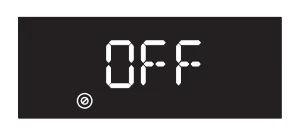
NOTE:
- Do not place the glass turntable upside down.
- The glass tray should never be restricted.
- Place all food and containers of food on the glass tray for cooking.
- If the glass turntable or turntable ring assembly cracks or breaks, contact the Customer Satisfaction Center at 1-877-337-3639 or the parts department at encompassparts.com.
Control Panel
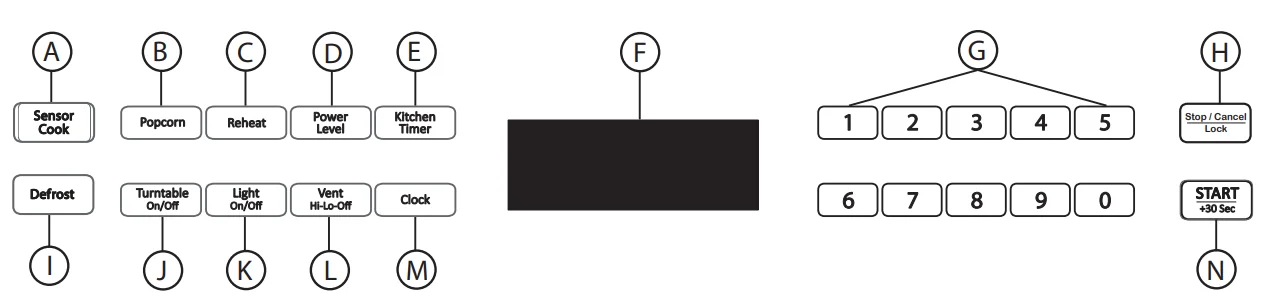
- Sensor Cook
- Popcorn
- Sensor Reheat
- Power Level
- Kitchen Timer
- Display
- Number Pads
- Stop
- Defrost
- Turntable On/OFF
- Light On/OFF
- Vent Hi-Lo-OFF
- Clock
- Start

Clock
Your model features a 12-hour clock.
SET TIME OF DAY
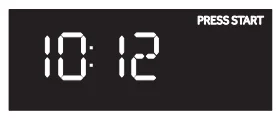
- Press CLOCK to enter the Clock Setting mode. “12:00 PRESS CLOCK ENTER TIME” will appear in the display.

- Press the number pads to enter the correct time of day. For example, if the time is 10:12, press the number pads “1, 0, 1, 2” to enter the time.

- Press START to confirm the time.

KITCHEN TIMER
The microwave features a convenient timer for your cooking needs.
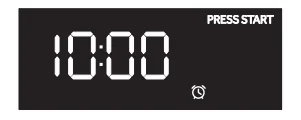
- Press KITCHEN TIMER. “ENTER TIME” will appear in the display.

- Press the number pads to input the desired cooking time. NOTE: The maximum cooking time is 99 minutes and 99 seconds.

- Press START to begin counting down the time. NOTE: When the set time has expired, “END” will appear in the display, and three long alert tones will sound.

- Press STOP to exit the Kitchen Timer Function.


Features
VENT FAN
- The vent fan feature allows you to exhaust heat and steam from the cooking surface below.
- Press VENT HI-LO-OFF to turn on/off the fan and to regulate the fan speed.
NOTE:
- The fan speed cannot be adjusted if the control panel is locked.
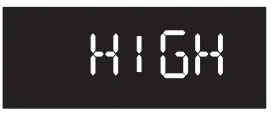
- When the control is pressed the first time, “High” appears in the display.

- High Speed – Press once
- Low Speed – Press twice
- OFF – Press three times
SURFACE LIGHTING
- The surface light feature illuminates the cooking surface below the microwave oven.
- Press LIGHT to toggle among High, Low, and OFF.
CHILD LOCKOUT
The Child Lock feature allows you to lock the microwave control panel for easy cleaning or to avoid unintentionally changing the settings or turning on the microwave oven. To Lock/Unlock the control panel:
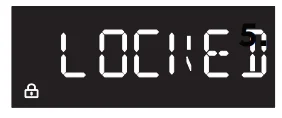
- Press STOP/CANCEL for 3 seconds. Two beeps will sound to indicate the lock has been activated/deactivated, and “LOCKED” or “UNLOCK” will appear in the display.

STATUS RECALL
The Status Recall feature allows you to check the Time and Power settings during microwave cooking.
- Press POWER LEVEL to display the set power level.
- Press CLOCK to display the time.
Microwave Oven Use
MICROWAVE COOKING/ TIMED COOKING
- Press the number pads to set the cooking time. For example, to cook for 10 minutes, press “1, 0, 0, 0” in turn.
- NOTE: The maximum cooking time is 99 minutes and 99 seconds.
- 100% power is the default. If you wish to cook at 100% power, skip steps 2 and 3 and go directly to Step 4.
- Press POWER LEVEL to activate Power mode.

- Press the number pads or press POWER LEVEL repeatedly to select the desired power level. See “Power Levels” chart later in this section.
- Press START to begin cooking. The time will count down.

- NOTE: When cooking is finished, an alert tone sounds 3 times and “End” appears in the display.

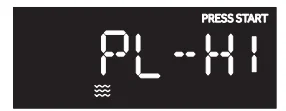
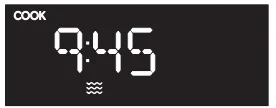

Variable power levels add flexibility to microwave cooking. The power levels on the microwave oven can be compared to the surface units on the range. Each power level gives you microwave energy a certain percentage of the time. Power level 7 is microwave energy 70% of the time. Power level 3 is energy 30% of the time. Most cooking will be done on High (power level 10), which gives you 100% power.
Power level 10 will cook faster, but food may need more frequent stirring, rotating, or turning over. A lower setting will cook more evenly and needs less stirring or rotating of the food. Some foods may have better flavor, texture, or appearance if one of the lower settings is used. Use a lower power level when cooking foods that have a tendency to boil over, such as scalloped potatoes and some casseroles.
Rest periods (when the microwave energy cycles off) give time for the food to “equalize” or transfer heat to the inside of the food. An example of this is shown with Power Level 3—the defrost cycle. If microwave energy did not cycle off, the outside of the food would cook before the inside was defrosted.
Here are some examples of uses for various power levels:
Power Levels
Ten power levels are available.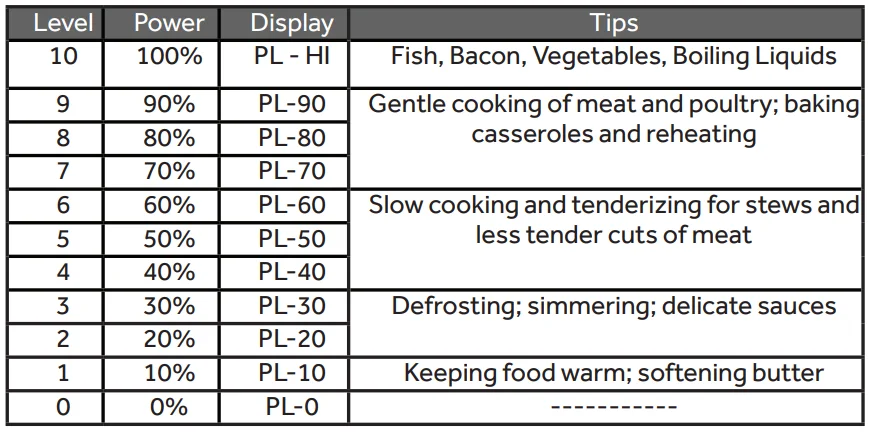
CONVENIENCE COOKING
- Press START/+ 30 SEC to begin cooking at 100% microwave power for 30 seconds.
- Press START/+ 30 SEC during microwave cooking to increase the cooking time in 30-second increments. NOTE: The maximum cooking time is 99 minutes and 99 seconds.
- Press the number pads from 1 to 9 to start cooking with 100% microwave power for 1 to 9 minutes. NOTE: During Convenience cooking, the microwave power level can be viewed, but not adjusted.
SENSOR COOK
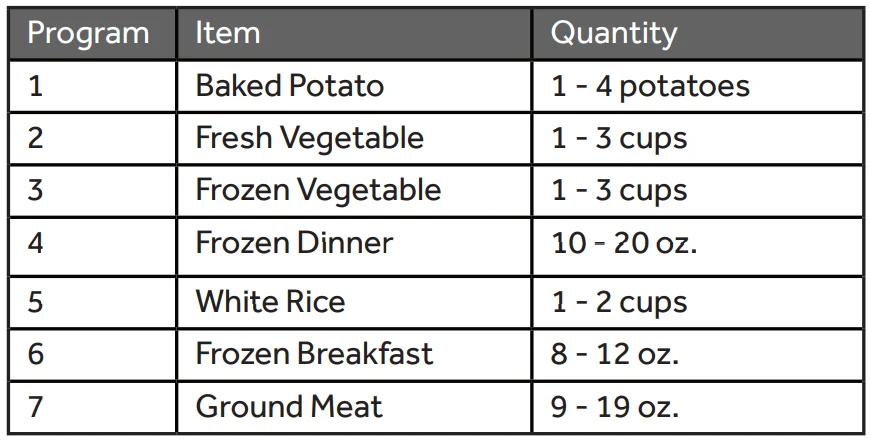
The Sensor Cook control automatically sets the appropriate cooking time calculated by sensing the moisture level of the food or beverage being cooked. The Sensor Cook control is programmed to cook the following items: Potato, Fresh Veggies, Frozen Veggies, Frozen Dinner, White Rice, Frozen Breakfast, and Ground Meat. For best results when using sensor cooking, use microwave-safe containers and cover the containers with vented lids or vented plastic wrap.
- Place the covered container in the microwave oven.
- Press SENSOR COOK once. “Potato” will appear on the display. Continue to press SENSOR COOK to toggle among the choices until the desired item appears in the display.

- Press START to confirm and begin cooking.
- Once Start is pressed, the Sensing process begins. When the Sensing process is completed, alert tones will sound, and the calculated cook time will begin to count down. NOTE: Do not open the door during the Sensing process. If you do, the Sensor Cook program will be cancelled.
- If the food is undercooked, use the Timed or Convenience Cooking function to cook the food to the desired degree.

Humidity Sensor
The Sensor Features detect the increasing humidity released during cooking. The oven automatically adjusts the cooking time to various types and amounts of food. Do not use the Sensor Features twice in succession on the same food portion—it may result in severely overcooked or burnt food. If food is undercooked after the countdown, use Time Cook for additional cooking time.
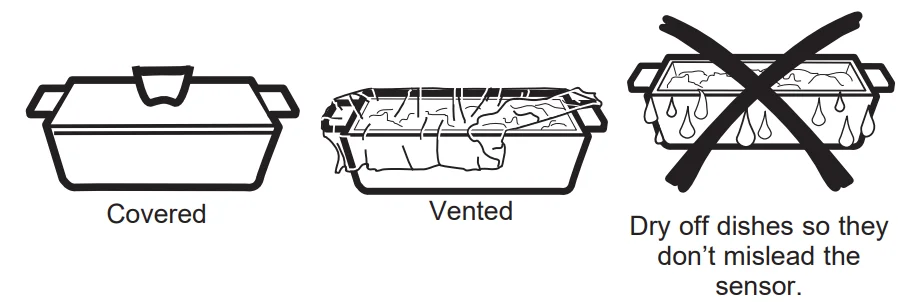
- The proper containers and covers are essential for the best sensor cooking.
- Always use microwave-safe containers and cover them with lids or vented plastic wrap. Never use tight-sealing plastic containers—they can prevent steam from escaping and cause food to overcook.
- Be sure the outside of the cooking containers and the inside of the microwave oven are dry before placing food in the oven. Beads of moisture turning into steam can mislead the sensor.

Sensor Cooking Programs
DEFROST
The Defrost function is programmed to automatically defrost select items by weight. The Defrost control allows you to select among the following items: Meat, Poultry, Fish, and Bread.
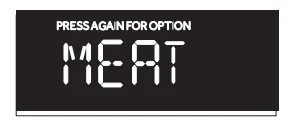
- Press DEFROST once. “Meat” will appear on the display.

- Continue to press DEFROST to toggle among the choices until the desired item appears on the display.
- Press START to confirm your item selection. “Enter Weight” will appear in the display.
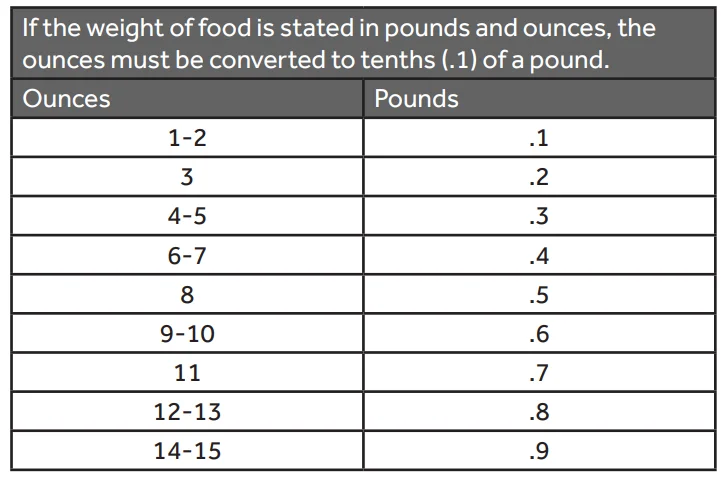
- Press the number pads to enter the weight of the item to be defrosted. For example, if the food weight is 1.2 lbs, press “1” and then “2” to enter the weight. NOTE: The weight of the food item should be between 0.1 to 6.0 lbs. The maximum weight that will be accepted is 6.0 lbs.
- Press START to begin defrosting.
Conversion Guide
Defrosting Tips
- Frozen foods in paper or plastic can be defrosted in the package. Closed packages should be slit, pierced, or vented after food has partially defrosted. Plastic storage containers should be partially uncovered.
- Family-size, prepackaged frozen dinners can be defrosted and microwaved. If the food is in a foil container, transfer it to a microwave-safe dish.
- For more even defrosting of larger foods, such as roasts, use Defrost Weight. Be sure large meats are completely defrosted before cooking.
- Foods that spoil easily should not be allowed to sit out for more than an hour after defrosting. Room temperature promotes the growth of harmful bacteria.
- When defrosted, food should be cool but softened in all areas. If still slightly icy, return to the microwave very briefly, or let it stand for a few minutes.
REHEAT
The Reheat function is programmed to reheat the following items: Beverage, Dinner Plate, Pizza, Soup/Sauce, and Casserole. The Reheat function sets the appropriate heating time automatically. Depending on the item being reheated, the heating time is calculated by either the amount of food or beverage (Timed Cooking) or by sensing the moisture level of the food or beverage (Sensor Cooking). For best results when reheating items that use Sensor Cooking, use microwave-safe containers and cover the containers with vented lids or vented plastic wrap.
NOTE:
- Do not use tight-sealing covers that would keep the steam from escaping and cause the food to overcook.
- Make sure the outside of the microwave-safe container and the inside of the oven are dry before placing the container in the microwave oven. Any moisture will turn into steam, which can mislead the sensors.
- Place the food or beverage item in the microwave oven.
- Press REHEAT once. “BEVERAGE” will appear on the display. Continue to press.

- Press START to confirm and begin reheating.

NOTE:
- If the heating time for your item is calculated by sensing moisture, the Sensing process begins once Start is pressed.
- Do not open the door during the Sensing process. If you do, the Reheat program will be cancelled.
- When the Sensing process is completed, alert tones will sound, and the calculated reheat time will begin to count down.
After removing food from the oven, stir, if possible, to even out the temperature. If the food is not hot enough, use Cook Time to reheat for more time. Reheated foods may have wide temperature variations. Some areas may be extremely hot. It is best to use Cook Time for these foods:
- Bread Products
- Foods that must be reheated must be covered.
- Foods that need to be stirred or rotated during reheating.
- Foods calling for a dry look or crisp surface after reheating.
Microwave Oven Care
CLEANING
- Before cleaning, make sure all controls are on and the microwave oven is cool. Always follow label instructions on cleaning products.
- To avoid damage to the microwave oven caused by arcing due to soil buildup, keep the oven cavity, top grille, and the area where the door touches the oven frame clean.
- Using warm water and a mild soap solution and a soft cloth or sponge, clean the oven cavity, frame, and oven exterior.
- Rinse with clean warm water and dry with a soft cloth. NOTE: Do not use scouring powder or rough scouring pads on the microwave. The glass turntable may be washed and dried in the dishwasher. For stainless steel models, a stainless steel cleaner may be used on the exterior.
GREASE FILTER(S)
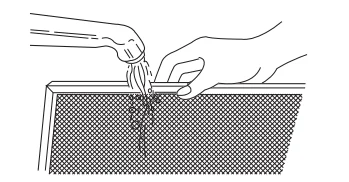
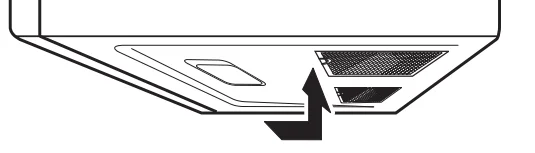
Grease filters are located on the underside of the microwave oven. The grease filters should be removed and cleaned often, generally at least once every month.
- Remove the grease filter. Grasp the metal ring, slide the filter toward the back, and then gently pull the filter downward. Repeat for the second filter.

- Soak the grease filters in hot water with a mild detergent added. Rinse well and shake to dry. NOTE: Do not use ammonia or wash in a dishwasher. The aluminum on the filter will corrode and darken.

- Reinstall the grease filter by inserting the back edge of the filter into the opening and gently pushing it up into place. Repeat for the second filter.

CHARCOAL FILTER
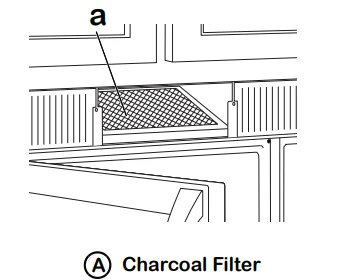
IMPORTANT: A charcoal must be installed in the microwave oven when it is used in a non-vented (recirculating) installation. Your microwave oven comes from the factory with the charcoal installed. The charcoal cannot be cleaned, so it must be replaced at least every 6 months or more often, depending on use. To order a replacement charcoal for your model, contact the Customer Satisfaction Center. See “Back Cover” for contact information.
- Unplug or disconnect power.
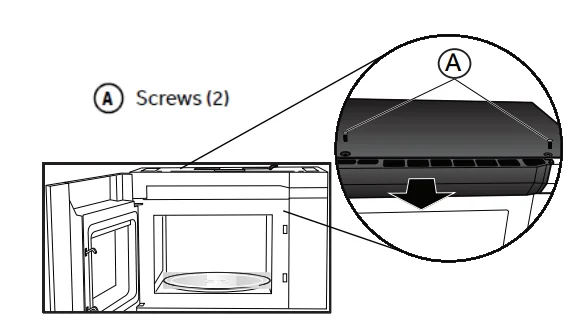
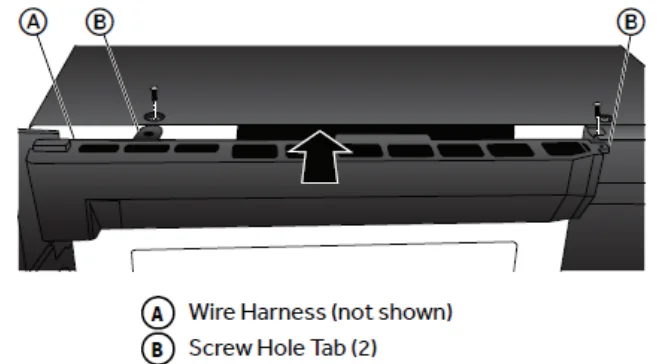
- Using a Phillips screwdriver, remove the screws from the top grille.
- Open the microwave door so you can grasp the top grille, and then pull the grille straight out to remove it.

- Remove the used charcoal from the back of the grille, and then discard the filter.
- Align the holes in the new charcoal filter with the five posts on the back of the grille, and gently press down to attach.

- Align the top edge of the grille so that when the grille is pushed into place, the screw holes align with the holes in the microwave cabinet. Gently push the grille until it snaps into place and the screw holes are aligned. NOTE: Make sure that the wire harness, located near the door hinge, is not pinched when you are replacing the top grille.

- Replace the two screws removed earlier, and tighten the screws completely.
LIGHTS
IMPORTANT: Your microwave oven features LED interior lighting as well as LED surface lighting. These lights are designed to last for the life of your microwave oven. However, if the lights stop illuminating, please contact a technician for replacement or the Customer Satisfaction Center for service. See the back cover for contact information.
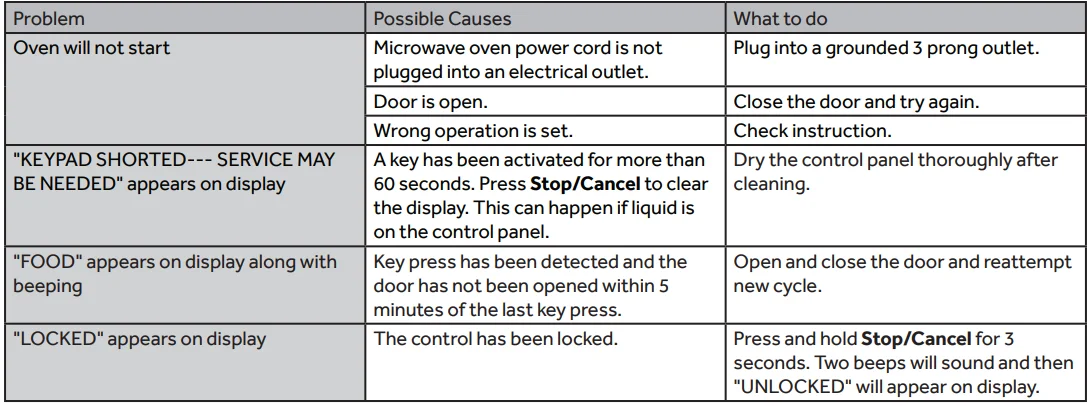
Troubleshooting Tips … Before you call for service
FEDERAL COMMUNICATIONS COMMISSION (U.S.A.)
RADIO FREQUENCY INTERFERENCE STATEMENT
This equipment generates and uses ISM frequency energy and, if not installed and used properly, that is in strict accordance with the manufacturer’s instructions, may cause interference to radio and television reception. It has been type tested and found to comply with limits for an ISM equipment pursuant to Part 18 of the FCC Rules, which are designed to provide reasonable protection against such interference in a residential installation.
However, there is no guarantee that interference will not occur in a particular installation. If this equipment does cause interference to radio or television reception, which can be determined by tuning the equipment off and on, the user is encouraged to try to correct the interference by one or more of the following:
- Reorient the receiving antenna of the radio or television.
- Relocate the microwave oven with respect to the receiver.
- Move the microwave oven away from the receiver.
- Plug the microwave oven into a different outlet so that the microwave oven and receiver are on different branch circuits.
The manufacturer is not responsible for any radio or TV interference caused by unauthorized modification to this microwave oven. It is the responsibility of the user to correct such interference.
For More Manuals By Haier, Visit ManualsLibraryy
Haier HMV1472BHS Over-The-Range Microwave Oven-FAQS
What are the key features of the Haier HMV1472BHS microwave?
The Haier HMV1472BHS offers powerful heating, multiple preset cooking modes, a built-in venting system, LED lighting, and intuitive touch controls designed for everyday convenience.
What common problems might occur with Haier microwaves?
Typical issues include the microwave not heating, unresponsive buttons, a faulty door switch, or a blown fuse—usually requiring inspection by a technician.
Can I bake in the Haier HMV1472BHS microwave?
You can bake certain items if your model supports convection features. Haier microwaves are capable of heating, steaming, and basic baking, though they cannot fully replace a traditional oven.
What types of Haier microwaves are available?
Haier offers over-the-range, countertop, built-in, and microwave drawer models.
Does the Haier HMV1472BHS have Sensor Cook?
Yes. Sensor Cook automatically adjusts time and power for meals like potatoes, vegetables, or reheating foods.
How does a microwave oven heat food?
Microwaves use electromagnetic waves that excite water molecules inside food, generating heat through molecular friction.
What are the disadvantages of using a microwave oven in general?
Microwaves may heat unevenly, cannot deep-fry or brown food easily, and may affect texture compared to conventional ovens.
How can I check if my microwave is heating properly?
Heat 1 quart of room-temperature water for 2 minutes 30 seconds on high. A temperature increase of around 15–22°C means the unit is working correctly.