
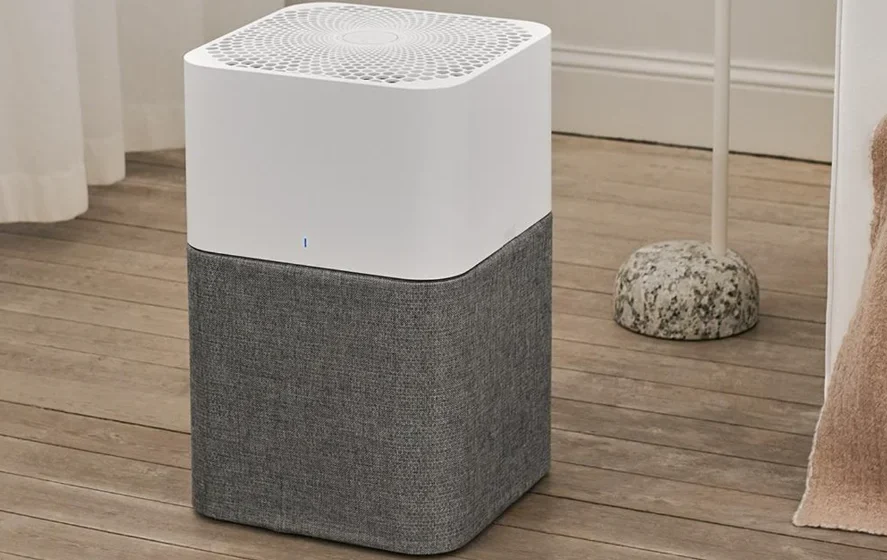

Blueair Blue Pure 211+ Auto Air Purifier
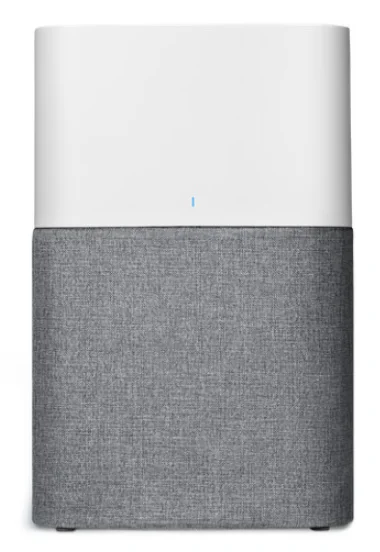
Blue Pure 211+ Auto
The air purifier has a pre-filter and a HEPASilentTM main filter to purify air. It has control functions and a built-in sensor.
The air purifier is mainly composed of a motor, a fan, and filters. The air purifier removes contaminants from the air in a room to improve indoor air quality.
You can change the air purifier settings at any time, using the control panel on the air purifier.
Recommendations for best performance
- Use the air purifier in a room that does not exceed the room size recommendation.
- Place the air purifier in a location where air can circulate freely in, out, and around the air purifier.
- Do not place the air purifier closer than 4”/10cm to another object.
- During operation, keep doors and windows in the room with the air purifier closed.
- Only use genuine Blueair filters.
- Change the main filter when the filter replacement indicator appears on the control panel.
- Follow the maintenance instructions in this user manual.

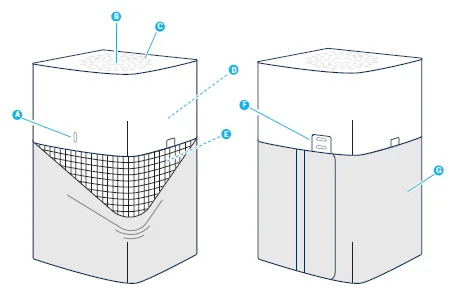
- Air quality indicator
- Touch button
- Air outlet
- Fan and motor
- Main filter
- Air quality sensor
- Pre-filter
- Power cable (not in picture)
- User Manual (not in picture)
Safety instructions
Blue Pure 211+ Auto air purifier is an electrical appliance for indoor use only. Take the necessary precautions to reduce the risk of fire, electric shock, or injury.
- This appliance is not intended for use by persons (including children) with reduced physical, sensory, or mental capabilities, or a lack of experience and knowledge, unless they have been given supervision or instruction concerning use of the appliance by a person responsible for their safety.
- Supervise children to ensure that they do not play with the appliance.
- Cleaning and user maintenance shall not be made by children without supervision.
- Always disconnect the appliance from the power supply before maintenance.
- Do not attempt to open or service the appliance yourself. Service must be done by the manufacturer, service agent, or similarly qualified personnel using only original Blueair spare parts.
- Ensure that the power cable and the power plug are not at risk of getting damaged. To avoid hazard, a damaged power cable must always be replaced by the manufacturer, service agent, or similarly qualified person.
- If the appliance is damaged or malfunctions, turn it off, disconnect it from the power supply, and contact Blueair.
- The power plug must be firmly inserted in the power socket.
- When disconnecting the unit from the power supply, do not pull on the power cord; pull on the power plug.
- Use the power cable provided with your Blueair air purifier to plug directly and firmly into an appropriate electrical outlet.
- Do not use an extension cord or a power strip. Refer to the rating label on your appliance.
- Do not alter the power plug in any way. If the plug does not fit into the outlet, contact qualified personnel to install the proper outlet.
- Do not use the included power cord for anything else but the appliance.
- Do not allow objects to enter or block the air inlets and air outlets, as this can cause electric shock or damage the appliance.
- Do not place any objects on top of or directly against the appliance.
- Do not sit on, stand, climb onto, or hang from the appliance.
- Keep the appliance, including the power cable, at a safe distance from heated surfaces and open fire.
- Keep the appliance and power plug away from water and other liquids.
- Keep the appliance and power plug away from chemicals such as pesticides and deodorants.
- Place the appliance on the floor. The appliance must be placed on a stable surface.
- Do not use the appliance outdoors or in wet environments such as bathrooms, laundry rooms, or pool areas.
Get started
- Step 1: Plug the power cable into a wall outlet.
- Step 2: Press the button to turn the air purifier on and adjust the fan speed mode.
On/Off and fan speed controls
Available settings: Auto, Night, Everyday, Boost, and Off.
The indicator lights on the touch button indicate the selected fan speed. The lights automatically dim down completely 5 seconds after pressing the touch button, indicating a deactivated fan speed control mode. Press the touch button once to reactivate the on/off and fan speed control. The indicator lights up, and you can adjust the fan speed mode again.
Autostart
The autostart feature automatically restarts the air purifier at the last set speed if it has been unplugged, used with a power switch timer, or if a power failure occurs.
Auto mode
In auto mode, the air purifier automatically controls the airflow based on air quality information from the sensor.
- On/Auto mode: Press once to turn the unit on and to set it to Auto mode.
- Night mode: Press twice to set to Night mode (low fan speed). All lights on the unit dim down after 5 seconds.
- Everyday mode: Press three times to set to Everyday mode (medium fan speed).
- Boost mode: Press four times to set to Boost mode (high fan speed).
- Off: Press five times to turn the unit off.
Air quality information
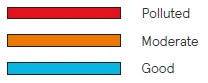
The air quality levels for particulate matter (PM) are indicated using a color scale on the air quality indicator. The air quality indicator is completely dimmed in Night mode.
PM2.5, Particulate matter, particles with a diameter of 2.5 micrometers or less.
Air quality level (PM 2.5)
Filters
The air purifier is delivered with a fabric pre-filter and a main filter. The filters purify the air from both particles and gases. For best performance, clean the pre-filter regularly and change the main filter when the air purifier indicates a filter change.
To find the right main filter for your air purifier, use the Blueair app or visit www.blueair.com.
The model number of your air purifier can be found on the rating label on the air purifier.
Note: Using a fabric pre-filter is optional.
Important! Always turn off and disconnect the appliance from the power supply before changing filters, cleaning, or carrying out maintenance procedures.
Blueair filter subscription program
Use the Blueair app or visit www.blueair.com to sign up for the Blueair filter subscription program.
Button control functions
Change filter
When the indicator light turns red (after 6 months of operation), you should change the main filter.
Filter replacement indicator
Press the button down for 7 seconds to reset the filter replacement indicator.
Clean and change the pre-filter
For best performance, clean the pre-filter regularly. Vacuum the exterior of the fabric prefilter with a soft brush attachment to remove dust. If the pre-filter requires a deeper clean, wash it in the washing machine according to instructions on the pre-filter´s label.
Important! Press the Velcro strips together on the pre-filter before machine washing.
- Turn the unit off and unplug it.
- Gently press the buttons on both sides of the unit simultaneously.
- Remove the top part from the unit.
- Open the pre-filter panel and remove the pre-filter.
- Wash the pre-filter in the washing machine according to instructions on the pre-filter´s label.
- Place the pre-filter back onto the unit. Adjust the pre-filter and the panel to hide the power cord in the back.
- Place the top back onto the unit and press until you hear a click.
- Plug in the unit.
Change the main filter
When changing the filter, vacuum any dust that may have accumulated inside the unit.
Important! Use only genuine Blueair filters suitable for the model to ensure proper function and performance of the air purifier, and to qualify for full warranty coverage.
- When the indicator light glows red, it’s time to change the main filter.
- Turn the unit off and unplug it.
- Gently press the buttons on both sides of the unit simultaneously.
- Remove the top part from the unit.
- Remove the old main filter from the unit. Unfold the new main filter and insert it into the unit.
- Place the top part onto the bottom part of the unit. Firmly press the top part onto the metal filter frame until you hear a click.
- Plug in the unit.
- Press the touch button for a duration of 7 seconds to reset the filter replacement timer. This lets the air purifier know that you have changed the filter. The indicator light flashes for 4 seconds, and then changes from red to white.
Care and maintenance
General
- Disconnect the air purifier from the power supply before maintenance.
- Do not allow foreign objects to enter the air inlets or air outlets. This may cause an electric shock or damage the air purifier.
- Never clean with gasoline, chemical solvents, or corrosive materials, as these agents may damage the air purifier.
- Make sure the air purifier is completely dry before connecting it to power.
- Do not wash the main filter. The main filter is not washable or reusable.
Cleaning
- Wash the pre-filter according to the instructions on the pre-filter´s label, or vacuum the pre-filter with a soft brush attachment.
- Wipe the exterior of the air purifier with a soft, clean, damp cloth.
- Clean and check the power cable and power plug for wear or damage.
- Clean the sensor when changing the main filter.
Clean the air quality sensor
The inlet for the air quality sensor is located at the back of the air purifier.
Important! Do not use fingers or any other non-recommended objects to clean inside the sensor inlet.
- Turn the unit off and unplug it.
- Gently press the buttons on both sides of the unit simultaneously.
- Remove the top part from the unit.
- Press the button on the inside of the unit to open the lid covering the sensor and remove the lid.
- Using circular motions, gently clean the sensor with a cotton swab, and attach the sensor lid.
- Place the top part onto the bottom part of the unit. Firmly press the top part onto the metal filter frame until you hear a click.
- Plug in the unit.
Disposal and recycling
This air purifier should be disposed of or recycled as electrical waste, and the filter may be recycled as plastic. If you have questions regarding the disposal and recycling of this air purifier, please contact your local recycling facility for availability or a Blueair dealer and ask for the correct method of recycling.
Help and support
If you have questions about your product, please visit www.blueair.com or contact your local Blueair retailer.
To contact Blueair for personalized support, please visit www.blueair.com/customer-support
Warranty information
The Blueair Limited Warranty applies only if the air purifier is installed, used, and maintained according to the instructions in this manual.
For warranty conditions, please visit www.blueair.com/warranty
Warranty and returns
If you purchased the air purifier at one of our authorized retailers, please contact the same store to request assistance.
For more Manuals by Blueair, visit ManualsLibraryy
Blueair Blue Pure 211+ Auto Air Purifier-FAQs
What is Auto Mode on the Blueair 211+?
Auto Mode adjusts the fan speed automatically based on real-time air quality. The built-in particle sensor detects pollution, and the fan increases or decreases speed to maintain clean air efficiently.
What are the benefits of Auto Mode?
It ensures optimal air purification, saves energy, and provides consistent air quality without manual adjustments.
What is Night Mode?
Night Mode runs the purifier at the lowest fan speed for quieter operation, ideal for sleeping.
What are the different fan modes available?
The Blueair 211+ Auto has Auto, Night, Everyday, Boost, and Off modes. Indicator lights show the selected mode, and they dim after 5 seconds for a distraction-free display.
How does Blueair purify the air?
It uses HEPASilent™ filters to trap particles like dust, pollen, mold spores, bacteria, and pet dander. Higher models use multiple filters for enhanced purification.
Can I leave my Blueair purifier running all the time?
Yes. Continuous operation is recommended for best air quality. Blueair purifiers are energy-efficient, so they’re designed for 24/7 use.
What size room is the Blueair 211+ suitable for?
It is ideal for medium to large rooms, providing strong airflow and effective purification.
How do I reset my Blueair 211+ Auto?
Press and hold the power button until all LEDs blink four times. This resets the purifier to factory settings and clears the filter indicator.
Is it safe to sleep in a room with the purifier on?
Yes. Running the purifier overnight ensures clean air throughout the night and generally does not disturb sleep.