
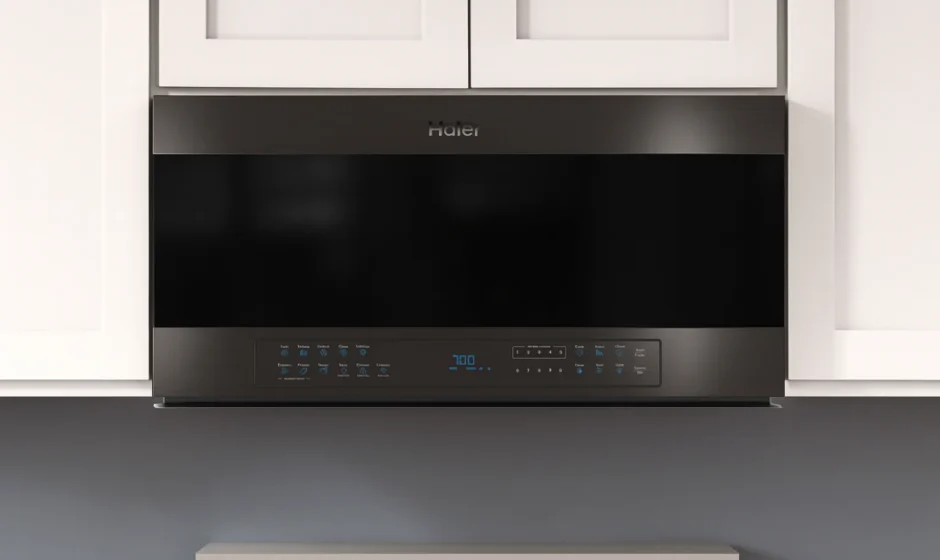

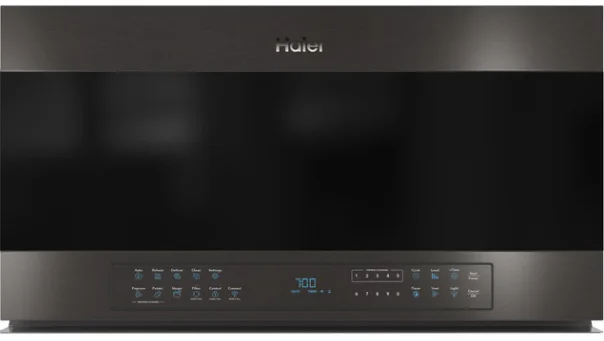
Haier QVM7167BNTS Smart Over-the-Range Microwave Oven
FEATURES
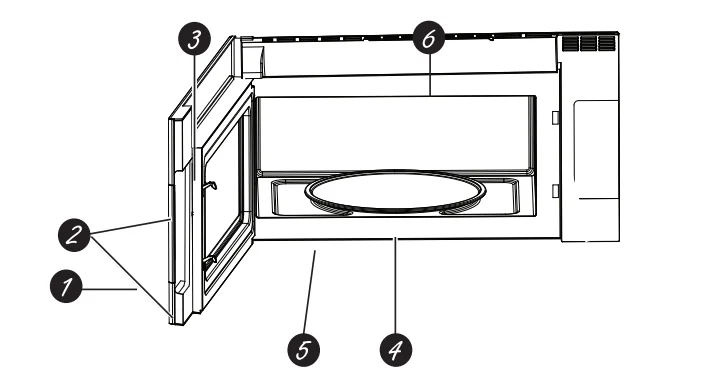
Throughout this manual, features and appearance may vary from your model.
- Door Handle
- Door Latches
- Window with Metal Shield. The screen allows cooking to be viewed while keeping the microwave confined in the oven.
- Removable Turntable. Do not operate the oven in the microwave mode without the turntable and turntable support seated and in place.
- Removable Turntable Support. Do not operate the oven in the microwave mode without the turntable and turntable support seated and in place.

ACCESSORIES
15” Cabinet Installation Kit
For use with cabinets deeper than 13 inches. Bring the microwave further out from the wall for improved ventilation, access, and appearance.
Bump-Out Kit
JX15BUMPBB
ABOUT THE FEATURES
Cooking Controls
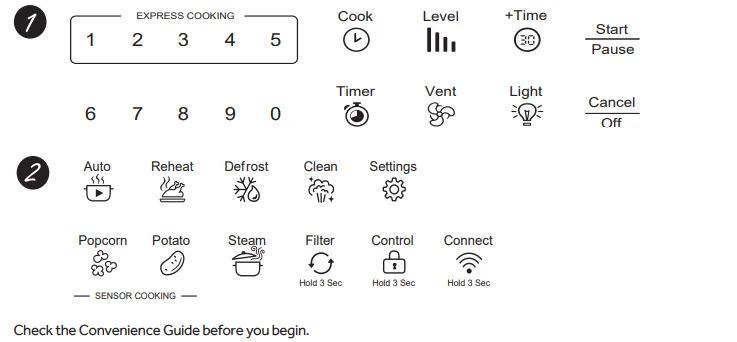
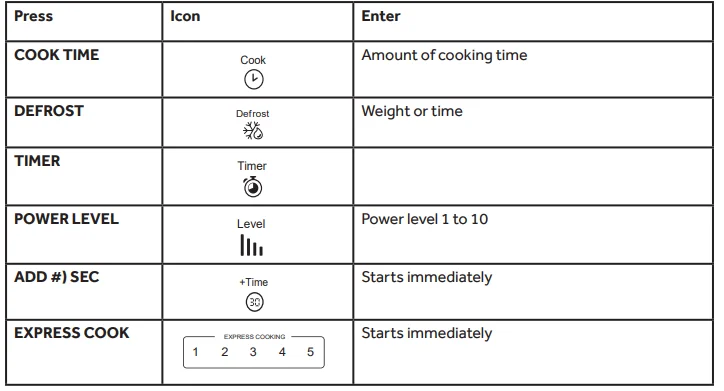
Time Features
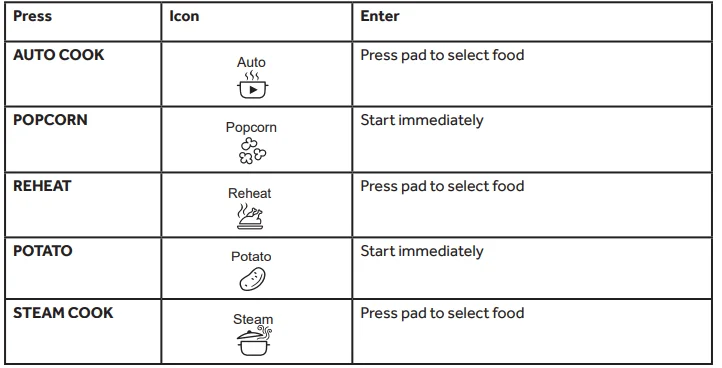
Sensor/Convenience Features
Cook Time
Allows you to microwave for any time up to 99 minutes and 99 seconds. Power level 10 (HIGH) is automatically set, but you may change it for more flexibility.
- Press Cook Time.
- Enter cooking time.
- Press START.
Cooking will start when the countdown begins in the display. You may open the door during Cook Time to check the food. Close the door and press START to resume cooking.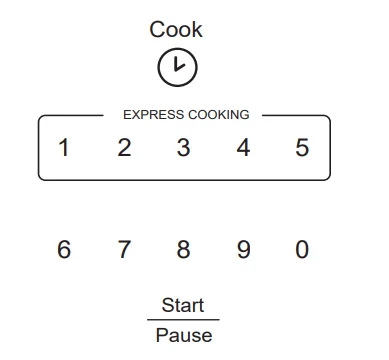
Express Cook
This is a quick way to set cooking time for 1-5 minutes.
- Press one of the Express Cook pads (from 1-5) for 1-5 minutes of cooking at power level 10. For example, press the 2 pad for 2 minutes of cooking time. The power level can be changed as time is counting down. Press POWER LEVEL and enter 1-10.
NOTE: The Express Cook function pertains to pads 1-5 only.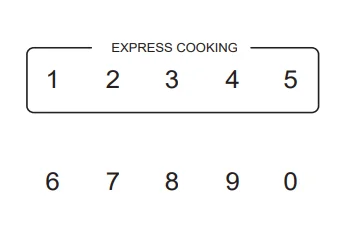
Add 30 Sec
This will add 30 seconds to the time counting down each time the pad is pressed. Each touch will add 30 seconds, up to 99 minutes and 99 seconds. Adding 30 seconds can also be used like an express 30-second button. The microwave oven will start immediately when pressed.
Weight Defrost
Use Weight Defrost for meat, poultry, and fish. Use Time Defrost for most other frozen foods (Time Defrost is explained on page 13).
- Press DEFROST once for Weight Defrost.
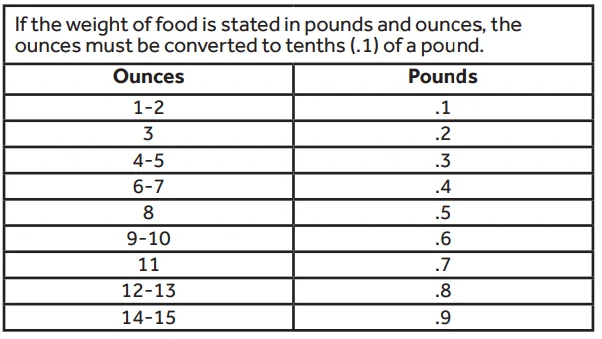
- Enter the weight in pounds.
- Press START. Cooking will start when the countdown begins in the display.

Defrosting Tips
- Remove meat from the package and place it on a microwave-safe dish.
- When the oven signals, turn the food over. Remove defrosted meat or shield warm areas with small pieces of foil.
- After defrosting, most meats need to stand 5 minutes to complete defrosting. Large roasts should stand for about 30 minutes.
Conversion Guide
Time Defrost
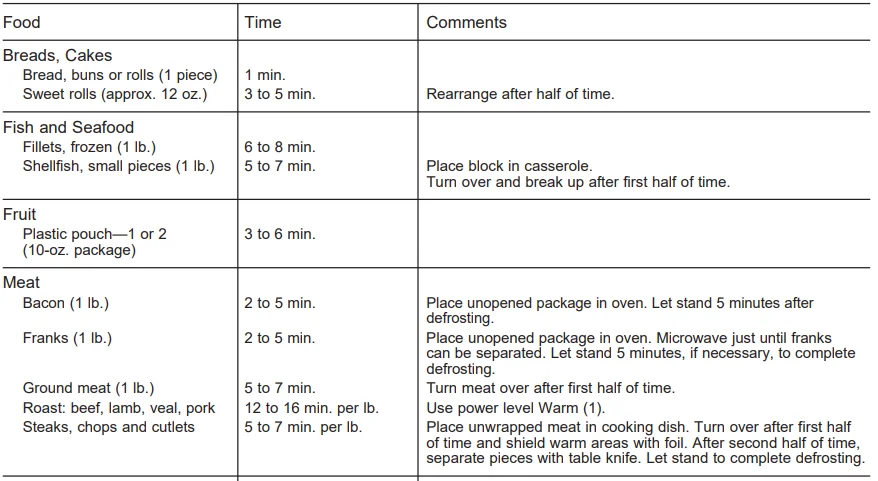
Allows you to defrost for a selected length of time. See the Defrosting Guide on page 11 for suggested times (Weight Defrost is explained on page 9).
- Press DEFROST twice for Time Defrost.
- Enter defrosting time in minutes and seconds.
- Press START.
Cooking will start when the countdown begins in the display. At one-half of the selected defrosting time, turn the food over and break apart or rearrange pieces for more even defrosting. Shield any warm areas with small pieces of foil. The oven will continue to defrost if you don’t open the door and turn the food. Noises may be heard during defrosting. This is normal when the oven is not operating at High power.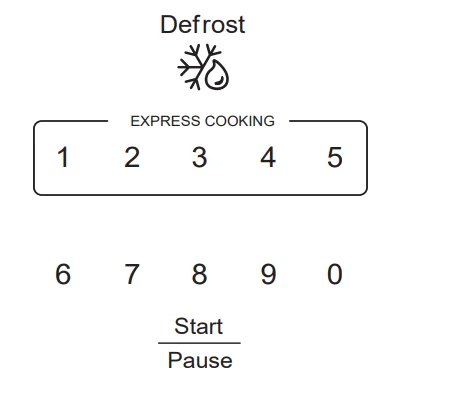
Defrosting Tips
- Frozen foods in paper or plastic can be defrosted in the package. Closed packages should be slit, pierced, or vented AFTER food has partially defrosted. Plastic storage containers should be partially uncovered.
- Family-size, prepackaged frozen dinners can be defrosted and microwaved. If the food is in a foil container, transfer it to a microwave-safe dish.
- Foods that spoil easily should not be allowed to sit out for more than one hour after defrosting. Room temperature promotes the growth of harmful bacteria.
- For more even defrosting of larger foods, such as roasts, use Time Defrost. Be sure large meats are completely defrosted before cooking.
- When defrosted, food should be cool but softened in all areas. If still slightly icy, return to the microwave very briefly or let it stand a few minutes.
Defrosting Guide
The Sensor Features detect the increasing humidity released during cooking. The oven automatically adjusts the cooking time to various types and amounts of food. Do not use the Sensor Features twice in succession on the same food portion. It may result in severely overcooked or burnt food. Be sure to let the oven cool down for 5-10 minutes before starting the next sensor cook. If food is undercooked after the countdown, use Cook Time for additional cooking time.
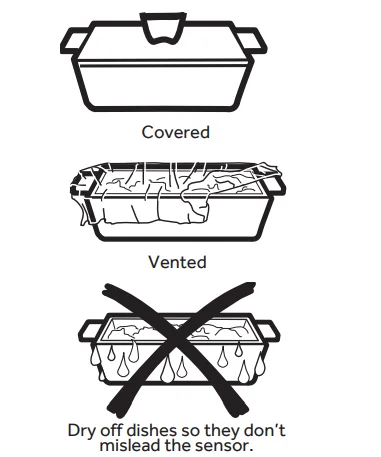
- The proper containers and covers are essential for the best sensor cooking.
- Always use microwave-safe containers and cover them with lids or vented plastic wrap. Never use tight-sealing plastic covers—they can prevent steam from escaping and cause food to overcook.
- Be sure the outside of the cooking container and the inside of the microwave oven are dry before placing food in the oven. Beads of moisture turning into steam can mislead the sensor.

How to Change the Automatic Settings
- To reduce time by 10%: Press 1 after the feature pad.
- To add 10% to cooking time: Press 9 after the feature pad.
Auto Cook
Allows you to microwave food choices with a sensor.
- Press the AUTO COOK button.
- Enter the food type code. See Cooking Guide for AUTO COOK below for codes or check the display for food types.
- Press START.
The oven signals when steam is sensed, and the time remaining begins counting down. Do not open the oven door until the time is counting down. If the door is opened before the time is counting down, 4 beeps are emitted while the display will scroll and cycle “SENSOR ERROR” until CANCEL is pressed. The sensor cook will be cancelled as well. If the door is opened during the countdown, close it and press START immediately.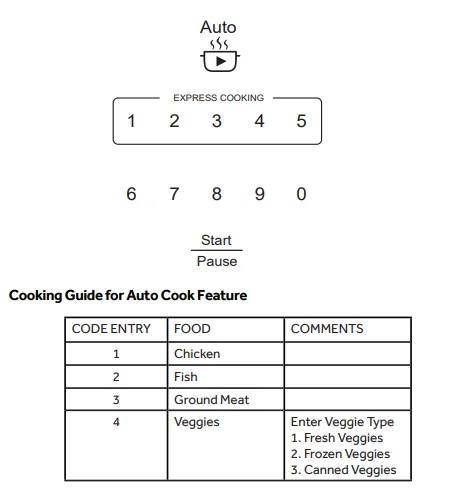
Popcorn
To use the Popcorn feature:
- Place the package of popcorn in the center of the microwave.
- Press POPCORN. The oven starts immediately.


Your popcorn bag may get stuck and stop rotating, but this will not affect the cooking performance. Do not open the door even if the bag is not rotating. Using the vent function in combination with the popcorn sensor feature may lead to overcooking.
How to Change the Automatic Settings
- To reduce time by 10%: Press 1 after the feature pad.
- To add 10% to cooking time: Press 9 after the feature pad. If food is undercooked after the countdown, use Cook Time for additional cooking time. We recommend 30 seconds and watching carefully.
Reheat
The Reheat feature reheats servings of previously cooked foods or a plate of leftovers.
- Press REHEAT.
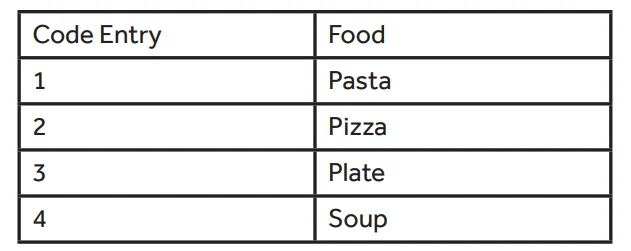
- Using the cooking guide below, enter the food code. For example, 1 for Pasta.
- Press START/PAUSE. The oven signals when steam is sensed, and the time remaining begins counting down.
Do not open the oven door until the time is counting down. If the door is opened before the time is counting down, 4 beeps are emitted while the display will scroll and cycle “SENSOR ERROR” until CANCEL is pressed. The sensor cook will be cancelled as well. If the door is opened during the countdown, close it and press START immediately.
After removing food from the oven, stir, if possible, to even out the temperature. If the food is not hot enough, use Cook Time to reheat for more time. Reheated foods may have wide temperature variations. Some areas may be extremely hot. It is best to use Cook Time for these foods:
- Bread products.
- Foods that must be reheated must be covered.
- Foods that need to be stirred or rotated during reheating.
- Foods calling for a dry look or crisp surface after reheating.
How to Change the Automatic Settings
- To reduce time by 10%: Press 1 after the feature pad.
- To add 10% to cooking time: Press 9 after the feature pad.
Cooking Guide for Reheat Feature:
Potato
To use the Potato feature:
- Place the potato in the center of the microwave.
- Press POTATO.
- The oven starts immediately.
Do not open the oven door until the time is counting down. If the door is opened before the time is counting down, 4 beeps are emitted while the display will scroll and cycle “SENSOR ERROR” until CANCEL is pressed. The sensor cook will be cancelled as well. If the door is opened during the countdown, close it and press START immediately.
How to Change the Automatic Settings
- To reduce time by 10%: Press 1 after the feature pad.
- To add 10% to cooking time: Press 9 after the feature pad.
Steam Cook
Use the Steam Cook feature to steam certain preprogrammed foods.
- Press the Steam Cook button.
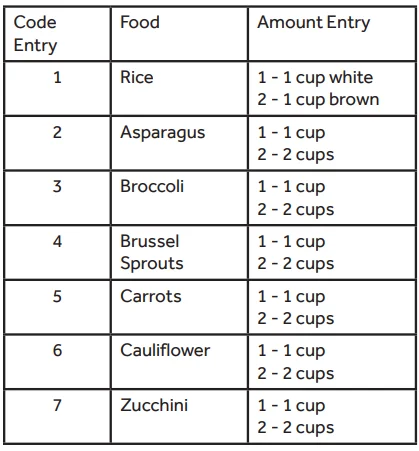
- Enter the food type code you wish to Steam Cook. See Cooking Guide for Steam Cook below for codes or check the display for food types.
- Place the steamer bowl with water, salt (if necessary), and food in the microwave with the steam vents on the steamer bowl in the OPEN position.
- Press the START button to begin cooking.
NOTE: The NordicWare Rice Cooker/Steamer Bowl should be used for the best cooking results.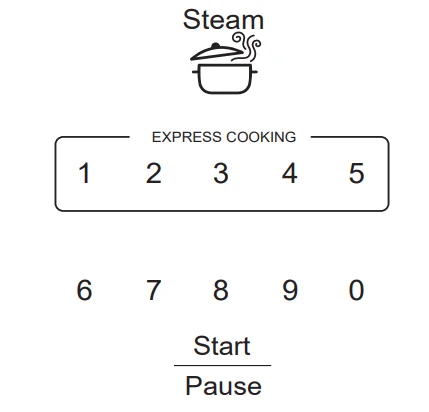
Cooking Guide for Steam Cook Feature
Changing the Power Level
The power level may be entered or changed before or during cooking. Power Level is set for Level 10 (High) unless it is changed.
- Press the Power Level button.
- Enter the new power level by using the number pads or pressing the Power Level button multiple times until you find the level you want.
- After you have selected the power level, wait five seconds. The display will go back to the Cook Time screen.
- Enter cooking time and press START. OR
- Press the Cook Time button.
- Enter your cooking time.
- Press the Power Level button.
- Enter the new power level by using the number pads or pressing the Power Level button multiple times until you find the level you want.
- After you have selected the power level, wait five seconds. The display will go back to the Cook Time (Enter Time) screen.
- Press START.
Variable power levels add flexibility to microwave cooking. The power levels on the microwave oven can be compared to the surface units on a range. Each power level gives you microwave energy a certain percentage of the time. Power level 7 is microwave energy 70% of the time. Power level 3 is energy 30% of the time. Most cooking will be done on High (power level 10), which gives you 100% power. Power level 10 will cook faster, but food may need more frequent stirring, rotating, or turning over. A lower setting will cook more evenly and need less stirring or rotating of the food.
Some foods may have better flavor, texture, or appearance if one of the lower settings is used. Use a lower power level when cooking foods that have a tendency to boil over, such as scalloped potatoes and some casseroles. Rest periods (when the microwave energy cycles off) give time for the food to “equalize” or transfer heat to the inside of the food. An example of this is shown with Power Level 3—the defrost cycle. If microwave energy did not cycle off, the outside of the food would cook before the inside was defrosted.
Here are some examples of uses for various power levels:
- High 10 (100%): Fish, bacon, vegetables, boiling liquids.
- Med-High 7 (70%): Gentle cooking of meat and poultry; baking casseroles and reheating.
- Medium 5 (50%): Slow cooking and tenderizing for stews and less tender cuts of meat.
- Low 2 or 3 (20% or 30%): Defrosting; simmering; delicate sauces.
- Warm 1 (10%): Keeping food warm; softening butter.
NOTE: You can also change the power level during many cooking modes by pressing the power level button and entering a valid power level.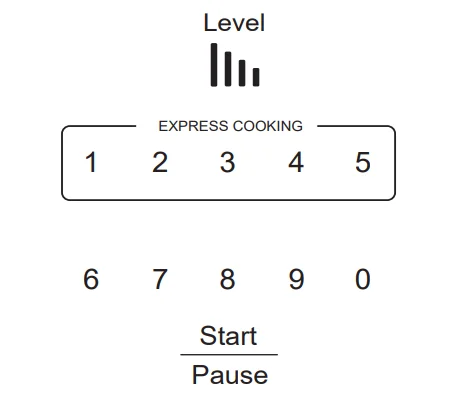
Insert Food Reminder
A reminder will show on the display if the user tries to start the cooking cycle without placing food inside the microwave oven within 5 minutes prior to starting the cooking cycle.
Cooking Complete Reminder
To remind you that you have food in the oven, the oven will display “Food is ready” and beep once a minute until you either open the oven door or press the CANCEL/OFF button.
REMOTE ENABLE ON/OFF FEATURE
Remote Enable is a feature that allows you to start the microwave from a remote source, such as the Haier Appliances Kitchen App or voice commands from Amazon Alexa or Google Assistant. When the Remote Enable feature is off, you will still receive messages from your microwave. You can turn off the microwave, or you can use the timer and clock from your smart device.
When the Remote Enable feature is on, you need to have opened the microwave door within the last 5 minutes. The 5-minute restriction is to help ensure food is in the microwave before starting the cooking cycle. To turn this feature on/off, select the Settings button on the control panel and then press “6” to select this feature. Press “1” for Remote Enable On and “0” for Remote Enable Off.
REMOTE ENABLE EQUIPMENT
This device complies with part 15 of the FCC Rules. Operation is subject to the following two conditions:
- This device may not cause harmful interference, and
- This device must accept any interference received, including interference that may cause undesired operation.
The wireless communication equipment installed on this microwave has been tested and found to comply with the limits for a Class B digital device, pursuant to part 15 of the FCC Rules. These limits are designed to: (a) provide reasonable protection against harmful interference in a residential installation. This equipment generates, uses, and can radiate radio frequency energy and, if not installed and used in accordance with the instructions, may cause harmful interference to radio communications.
However, there is no guarantee that interference will not occur in a particular installation. If this equipment does cause harmful interference to radio or television reception, which can be determined by turning the equipment off and on, the user is encouraged to try to correct the interference by one or more of the following measures:
- Reorient or relocate the receiving antenna.
- Increase the separation between the equipment and receiver.
- Connect the equipment into an outlet on a circuit different from that to which the receiver is connected.
- Consult the dealer or an experienced radio/TV technician for help.
- accept any interference received, including interference that may cause undesired operation of the device.
NOTE: Any changes or modifications to the wireless communication device installed on this oven that are not expressly approved by the manufacturer could void the user’s authority to operate the equipment.
RF Exposure – This device is only authorized for use in a mobile application. At least 20 cm of separation distance between the transmitting antenna device and the user’s body must be maintained at all times.
TROUBLESHOOTING
Things That Are Normal With Your Microwave Oven
- Steam or vapor escaping from around the door.
- Light reflection around the door or outer case.
- Dimming oven light and a change in the blower sound at power levels other than high.
- Dull thumping sound while the oven is operating.
- TV-radio interference might be noticed while using the microwave. Similar to the interference caused by other small appliances, it does not indicate a problem with the microwave. Plug the microwave into a different electrical circuit, move the radio or TV as far away from the microwave as possible, or check the position and signal of the TV/radio antenna.
Save time and money! Review the charts on the following pages first, and you may not need to schedule service. For more troubleshooting information, visit us at Haierappliances.com/support/microwaves.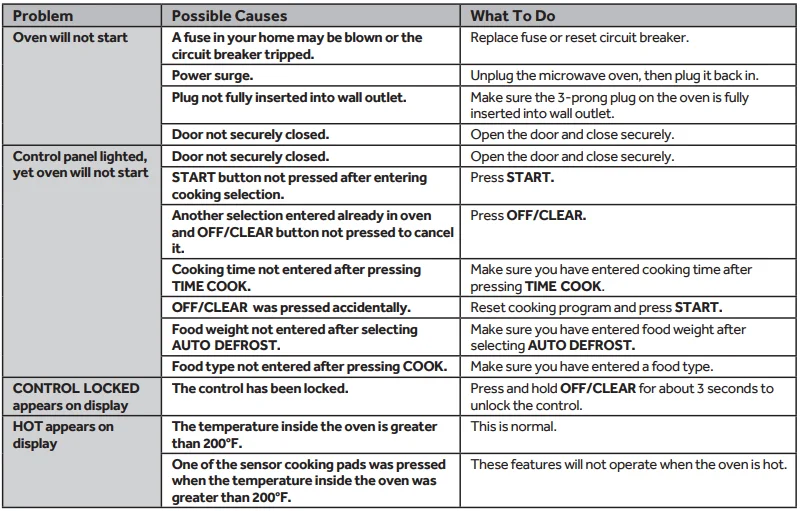
FEDERAL COMMUNICATIONS COMMISSION RADIO FREQUENCY INTERFERENCE STATEMENT (U.S.A. ONLY)
This equipment generates and uses ISM frequency energy, and if not installed and used properly, that is in strict accordance with the manufacturer’s instructions, may cause interference to radio and television reception. It has been type tested and found to comply with limits for ISM Equipment pursuant to part 18 of the FCC Rules, which are designed to provide reasonable protection against harmful interference in a residential installation.
However, there is no guarantee that interference will not occur in a particular installation. If this equipment does cause interference to radio or television reception, which can be determined by turning the equipment off and on, the user is encouraged to try to correct the interference by one or more of the following:
- Reorient the receiving antenna of the radio or television.
- Relocate the Microwave Oven with respect to the receiver.
- Move the microwave oven away from the receiver.
- Plug the microwave oven into a different outlet so that the microwave oven and the receiver are on different branch circuits.
The manufacturer is not responsible for any radio or TV interference caused by unauthorized modification to this microwave oven. It is the responsibility of the user to correct such interference.
For More Manuals By Haier, Visit ManualsLibraryy
Haier QVM7167BNTS Smart Over-the-Range Microwave Oven-FAQS
How do I set the time on my Haier microwave?
Press the number pads to enter the current time (e.g., for 10:12, press 1-0-1-2), then press START to confirm.
Why is my Haier microwave not heating food?
The most common reasons are a faulty thermostat, a damaged control board, or a broken door switch. These parts may need professional service.
How do I reheat or cook food in the Haier microwave?
Place food on the turntable, close the door, choose a Power Level, set the cooking time using 10 min / 1 min / 10 sec buttons, and press START.
How do I preheat a Haier oven (if my unit supports convection)?
Haier ovens typically preheat automatically. Allow 10–20 minutes for the oven to reach the desired temperature.
How do I set or reset the clock on a Haier microwave?
Press Clock/Timer (twice on some models), enter the time using the number pad, then press Clock/Timer again to save.
How do I reset my microwave?
Unplug it for 5 minutes to reset the internal system. Plug it back in and check the display. Some models also include a Clear or Reset button.
How can I check if the microwave is heating properly?
Heat a cup of water for 30 seconds. If the water isn’t warm, repeat. If it still doesn’t heat, the microwave may require repair.
What temperature range does the Haier microwave support in convection mode?
Haier convection microwaves generally offer a temperature range of 110°C to 200°C for baking and roasting.
Can I bake in a Haier microwave?
Yes. Convection models can bake cakes, pastries, and more. They can also steam and boil food evenly.
What foods should I avoid reheating in a microwave?
Avoid reheating fried foods, pizza, whole eggs, spicy peppers, and certain plastics, as they may become rubbery, explode, or release chemicals.