
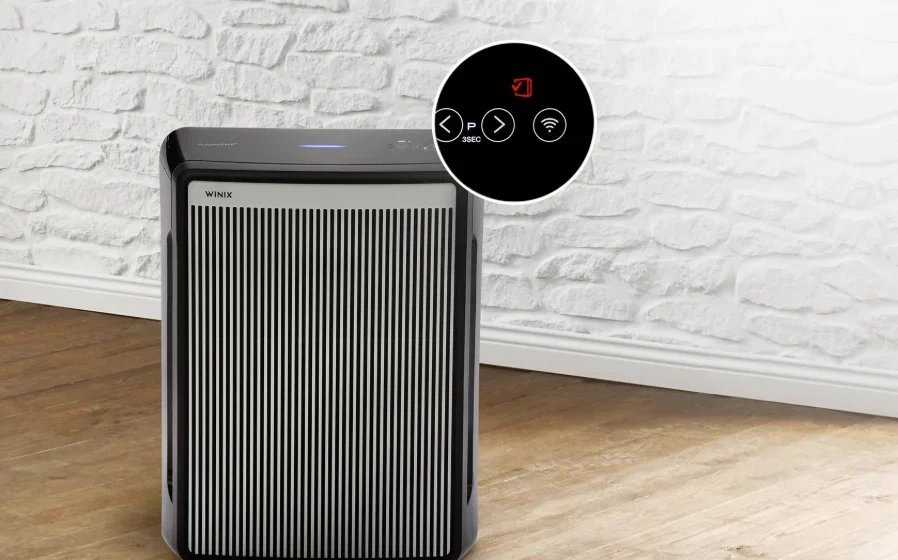

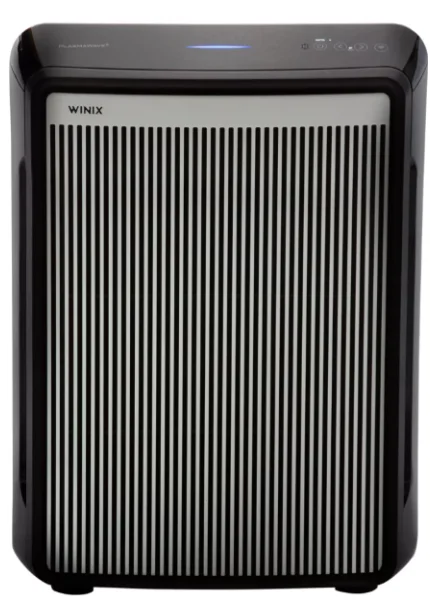
Winix 9800 4-Stage True Hepa Air Purifier
SAFETY INSTRUCTIONS
IMPORTANT CAUTIONS FOR USING YOUR AIR PURIFIER:
WARNING: Follow the instructions in this manual to reduce the risk of electric shock, short circuit, and/or fire.
- Do not repair or modify the unit. All repairs should be completed by a qualified technician.
- The plug for this unit is polarized with one blade wider than the other. Do not force the plug into an electrical outlet. Do not alter the plug in any way. If the plug does not fit into the outlet, reverse the plug. If it still does not fit, contact a qualified technician to install a proper outlet.
- Do not use if the power cord or plug is damaged or the connection to the wall outlet is loose.
- Use AC 120V only.
- Do not damage, break, forcefully bend, pull, twist, bundle, coat, pinch, or place heavy objects on the power cord.
- Periodically, remove dust from the power plug. This will reduce the risk of shock due to humidity buildup.
- Remove the power plug from the outlet before cleaning the unit. When removing the power plug, grasp it by holding the plug itself; never hold the cord.
- If the power plug is damaged, it must be replaced by the manufacturer or a qualified technician.
- Remove the power plug from the outlet when not in use.
- Do not handle the power plug with wet hands.
- Do not operate the unit when using indoor smoke-generating insecticides.
- Do not clean the unit with benzene or paint thinner. Do not spray insecticides on the unit.
- Do not use the unit where it is humid or where the unit may become wet, such as the bathroom.
- Do not insert fingers or foreign objects into the air intake or outlet.
- Do not use the unit near flammable gases. Do not use near cigarettes, incense, or other spark-creating items.
- Unit will not remove carbon monoxide emitted from heating appliances or other sources.
IMPORTANT PRECAUTIONS FOR USING YOUR AIR PURIFIER:
- Do not block the intake or outlet vents.
- Do not use near hot objects, such as a stove.
- Do not use where the unit may come into contact with steam.
- Do not use the unit on its side.
- Keep away from products that generate oily residue, such as a deep fryer.
- Do not use detergent to clean the unit.
- Do not operate without a filter.
- Do not wash and reuse the True HEPA Filter.
- Hold the handle on the back of the unit to transport.
- Do not hold the front panel.
- Do not stick any small objects into the air outlet vents or the fan.
SAFETY AND CAUTIONS
Before operating this equipment, carefully read and follow these safety cautions.
- Ensure filters are inserted before running the unit. Running the unit without filters can shorten the lifespan of the unit and cause electric shock or injury.
- Be sure foreign objects are NOT inserted into the vents on the unit. Objects can include pins, rods, and coins.
- Do not touch any part of the interior of the unit with wet hands. The high voltage may cause an electric shock.
- Ensure unit intake and outlet vents do not become blocked. Blockage may lead to increased internal temperatures, causing product failure and deformation.
- Do not use the unit as a step stool or place heavy objects on the unit. Personal injury may occur or a product failure and deformation.
WARNING: Follow these instructions to reduce the risk of serious injury or death and to reduce the risk of damaging the unit.
- If the power cord is damaged, it must be replaced with a special cord. Reassembly is available from the manufacturer or its service agent.
- This appliance is not intended for use by a person (including children) with reduced physical, sensory, or mental capabilities, or a lack of experience and knowledge of the unit, unless they have been given supervision or instruction concerning use of the appliance by a person responsible for their safety.
- Children should be supervised to ensure that they do not play with the appliance.
- This unit is not intended to be used to preserve documents or for art conservation.
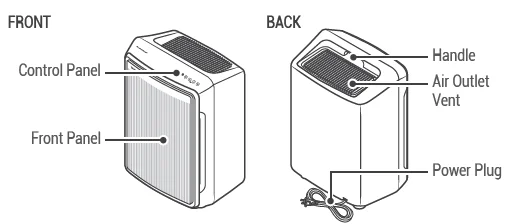
MODEL PART DIAGRAM
PACKAGE CONTENTS
- Unit
- (1) Pre-Filter, (4) Activated Carbon Filters, (1) True HEPA Filters
- User Manual
- Alexa Setup Guide / Wi-Fi Setup Guide
WHERE TO USE
- Allow 12 ~ 18 in. of space between TVs, radios, and other electronics. Electromagnetic interference from certain electronics may cause product malfunction.
- Place indoors away from direct sunlight. Direct exposure may cause product malfunction or failure.
- Only place on hard, flat surfaces. Flimsy or slanted surfaces may result in abnormal noise and vibrations.
- Allow at least 12 ~ 18 in. from walls for maximum air flow.
4-STAGE AIR PURIFICATION
Air Purification means it removes inanimate particles.
- Pre-Filter
- Activated Carbon Filter
- True HEPA Filter
- PlasmaWave®
CONTROL PANEL
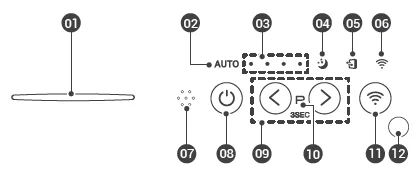
- Air Quality Indicator: Color coded LED light indicates one of three levels of Air Quality: Red (poor), Amber (fair), and Blue
(good). - Auto Mode Indicator: The LED “Auto” light will indicate when Auto Mode is activated.
- Fan Speed Indicator: Indicates the current fan speed.
- Sleep Mode Indicator: The LED “Sleep” light will indicate when Sleep Mode is activated.
- Filter Replacement Indicator/Filter Reset Button: Indicator: LED light indicates when it is time to change the filter. Button: After replacing the True HEPA Filter, press the Filter Reset button for at least 5 seconds until the Filter Replacement Indicator turns off.
- Wi-Fi Indicator: Enables or disables the Wi-Fi feature. When in the pairing state, the Wi-Fi LED flashes. When paired successfully, the Wi-Fi LED will be a solid white light.
- Smart Sensor: Detects the amount of odorous gas in the environment. When in Auto mode, the fan speed adjusts according to the detected amount of gas.
- Power Button: Turns the unit on or off. During the first 30 seconds of powering up, the Air Quality Indicator will cycle through Blue, Amber, and Red colors. Odor Sensor takes approximately 4 minutes to detect the air quality in the environment before normal operation begins.
- Fan Speed/Auto/Sleep Buttons: Use the Fan Speed arrow buttons to set the desired fan speed. Fan Speeds cycle over in this sequence: Auto, Low, Medium, High, Turbo, Sleep, Auto. Auto Mode: Auto Mode automatically adjusts fan speeds according to your indoor air quality. The fan speed will adjust to low when air quality is good, medium when fair, and to high when poor. Sleep Mode: When Sleep Mode is activated, the Air Quality Indicator LED light is disabled. Fan speed will automatically set to minimum speed (lower than ‘Low’), which will be nearly silent. When Sleep Mode is active, PlasmaWave® will be disabled, but it can be turned back on. PlasmaWave® Button: Press and hold the two arrow buttons < + > for 3 seconds. Press the Plasmawave® button when the unit is on to enable or disable this feature. By default, PlasmaWave® is enabled whenever the unit is powered on. “When the unit is running, you may hear a chirping or buzzing sound. The sound is from large particles passing through PlasmaWave®; it is normal and does not signify product failure.”
- PlasmaWave® Indicator: Indicates whether PlasmaWave® is enabled or disabled.
- Wi-Fi Button: Press for 3 seconds to activate pairing mode. When Wi-Fi is paired, press the button to turn Wi-Fi off or back on.
- Light Sensor: Detects the amount of ambient light in the environment. When in Auto Mode, the light sensor detects when to put the unit into Sleep Mode.
Winix Smart Wi-Fi Setup
Before you begin, make sure you have a wireless router that is 2.4Ghz or newer and have a Smartphone that is Android 5.0 and later or iOS 10.0 and later. Reference the Winix Smart Wi-Fi Set Up Guide for more details.
- Latest Phone Operating System requirements are subject to change based on future phone technology and app version updates.
- Make sure to disable any VPN networks before connecting your unit.
- Download the Winix Smart app on your device. Available via the Google Play Store or the iTunes App Store.
- Run the app and follow the setup guide to connect your device to the unit.
- Select “New Unit” and choose 9800 to connect to this model.
- Read the notice and select “OK”.
- Enter the password to your Wi-Fi network.
- Press and hold the Wi-Fi button on the unit’s control panel until it beeps. The Wi-Fi strength indicator will begin to blink.
- Connect to the Winix Smart network via your device’s network menu.
- Selecting “Next” will connect your unit to your device.
- Define the unit settings (Name and Location).
- When setup is complete, the Winix Smart Indicator will light up.
INITIAL OPERATION
- Remove the front panel by grasping its upper edge and gently pulling forward.
- Remove the Pre-Filter, then the bag of filters behind it.
- After removing the packing vinyl of the filter, insert the Activated Carbon Filter into the Pre-Filter.
- Install the filters until they fit securely in place.
- Pre-Filter (With Carbon Filter) (front)
- True HEPA Filter (back)

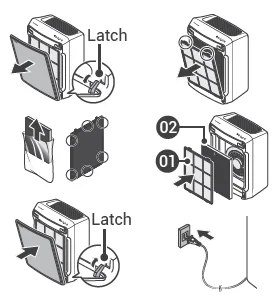
- After filters are installed, close the front panel.
- Insert the power cord into an electrical outlet.
MAINTENANCE
When to Replace Filters
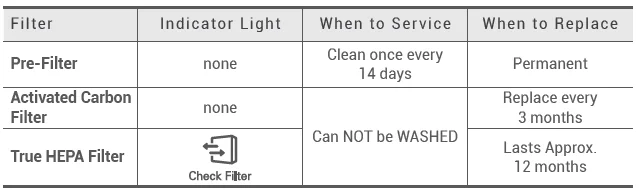
- When the Check Filter Indicator LED is flickering, it is time to replace the Filter.
- Intervals between filter replacement may vary depending on the environment.
REPLACING FILTERS
Resetting Filter Life:
After replacing your True HEPA Filter, place the Pre-Filter back in and close the Front Panel. While the unit is on, hold the Filter Reset Button for at least 5 seconds until you hear the beep. After the beep, the Filter Replacement Indicator will disappear.
Your Winix True HEPA is now reset.
CLEANING CARE
Cleaning the Filters:
Use a vacuum cleaner or soft brush to clean the Pre-Filter
- If it is excessively soiled, rinse in room temperature water.
- Do not use detergent or soap.
- Allow the filter to dry for 24 hours or more before using.
- Intervals between filter cleaning may vary depending on the air quality.
- Do not use hot water over 104°F or volatile fluids such as paint thinner.
Cleaning the Exterior & Interior:
Wipe with a soft, damp cloth using room temperature water.
- Afterwards, wipe it down with a clean, dry cloth. Open the front panel and clean the interior with a vacuum cleaner.
- For optimal performance, clean every 1 – 2 months.
NOTICE
- When cleaning the unit, always unplug the power cord first and then wait until the unit has cooled down.
- Never disassemble, repair, or modify the unit yourself.
- Do not use flammable sprays or liquid detergents.
- Do not allow children to clean or maintain the unit.
- Before cleaning or maintaining, ensure the unit is unplugged.
- Do not use benzene, alcohol, or other volatile fluids, which may cause damage or discoloration.
SPECIFICATIONS
- Model: 9800
- Voltage: AC 120 V / 60 Hz
- Power Rate: 95 W
- Verified Room Size: 500 sq ft.
- Dimensions: 16.5 in(W) × 11.8 in(D) × 23.2 in(H)
- Weight: 18.7 lbs
- Replacement: Filter Filter A / SKU: 115115
The exterior, design, and product specifications may be changed without prior notice to improve product performance.
Contact Winix for product-related inquiries and customer service
- Dedicated Call Center: (877) 699-4649
- Website: www.winixamerica.com
To expedite service, please specify the model name and number, the nature of the problem, your contact information, and your address.
For more Manuals by Winix, visit ManualsLibraryy
Winix 9800 4-Stage True Hepa Air Purifier-FAQs
What is the Winix 9800 4-Stage True HEPA Air Purifier?
The Winix 9800 uses a 4-stage filtration system—including a pre-filter, activated carbon filter, True HEPA filter, and PlasmaWave® technology—to remove airborne pollutants, odors, allergens, and particles as small as 0.01 microns.
What does the 4-stage filtration system include?
It includes a washable pre-filter, carbon filter, True HEPA filter (captures 99.97% of particles), and PlasmaWave® technology that helps break down airborne pollutants at a molecular level.
How does Winix’s PlasmaWave® Technology work?
PlasmaWave® releases safe ions that neutralize viruses, bacteria, odors, and chemical vapors without producing harmful ozone.
Is Winix a reliable brand for air purifiers?
Yes. Winix is known for high-performance air purifiers that offer excellent value, strong filtration, and durable build quality.
Can I sleep with the Winix 9800 running?
Yes. It is safe to run the purifier overnight, and doing so helps maintain clean air while you sleep.
Does an air purifier cool the room like an AC?
No, it does not cool the air. However, the airflow from the fan may make the room feel slightly fresher.
Can I run an AC and an air purifier at the same time?
Yes. Using them together keeps the air both clean and comfortable.
Does the Winix 9800 remove mold spores?
Yes. The True HEPA filter captures mold spores, and the activated carbon filter helps reduce musty odors.
Should I keep windows and doors closed when using the purifier?
Yes. Closed doors and windows help the purifier clean the indoor air more effectively.