
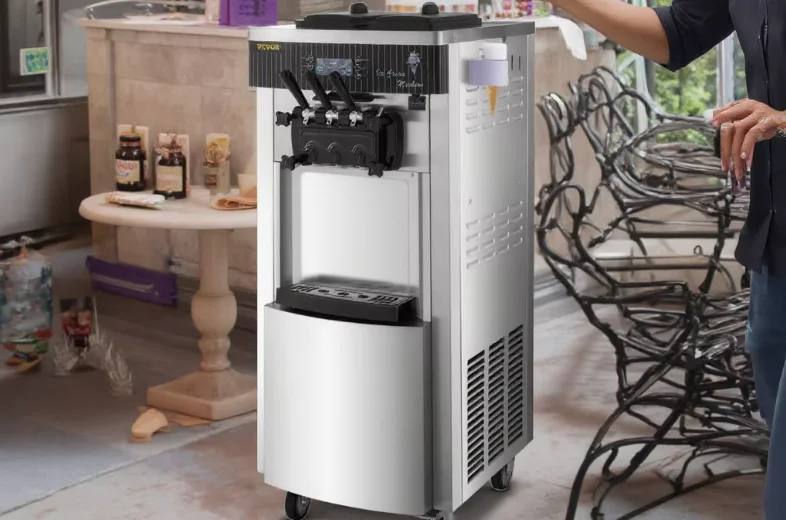

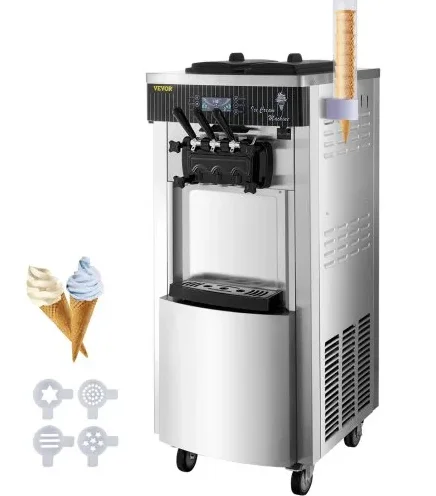
VEVOR YKF-8228H Soft Ice Cream Machine
1. Usage and features
With little investment and high returns, it is a wise choice for you to purchase our product. This series of products can be used in pubs, hotels, cold drink specialty shops, net bars, dancing halls, coffee houses, western restaurants, holiday villages, and other entertainment and leisure places. All of our commercial ice cream machines adopt the digital computer control system, with LCD or digital display.
As our commercial ice cream machines are made of high-quality and stable electrical elements, and matched with advanced production technology, it is easy, safe, and reliable to operate. In addition, our products are equipped with compressors of a world-famous brand, which ensures a stable and reliable refrigerating system, large production capacity, and low electricity consumption. The ice cream made by our machines tastes crispy and tender, with a high puffing rate.
2. Security precautions
- When you carry or move the machine, the tilting angle should not be more than 45°.
- As vibration cannot be avoided in the course of carrying the machine, it is better to place the machine for more than 4 hours before you use it.
- When the stirring shaft is in the empty cylinder, it is not allowed to switch on the automatic key, nor switch it on when there is water in the cylinder.
- Check the nameplate (technical parameters) on the back panel of the machine to see whether the voltage required is in conformity with that of the local power supply.
- Please ensure the power supply socket is effectively connected to the grounding line.
- When stopping the use of the machine, or dismantling its parts or cleaning the machine, please cut off the power supply.
- To prevent electric shock, please do not make the plug, motor, or other electrical parts wet or spill liquids on them.
- If the power cord is damaged, it must be replaced by the manufacturer, its service center, or other similar qualified professionals to avoid dangers.
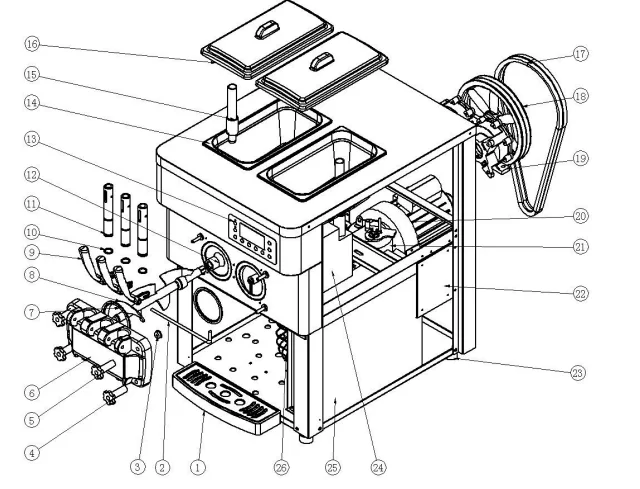
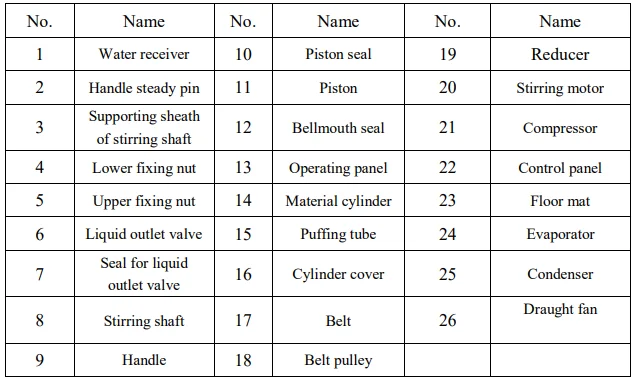
11. Product structure diagram
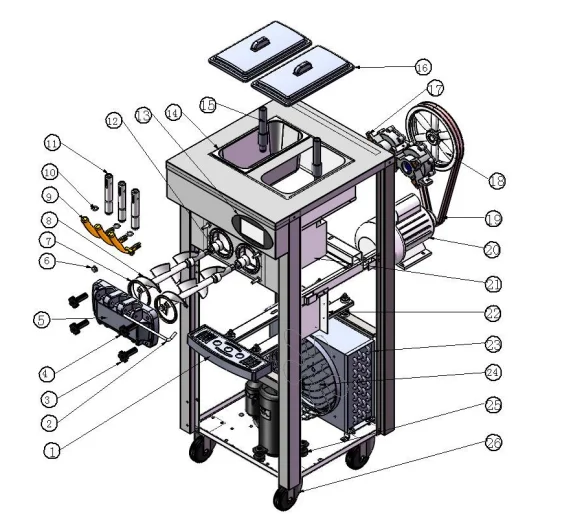
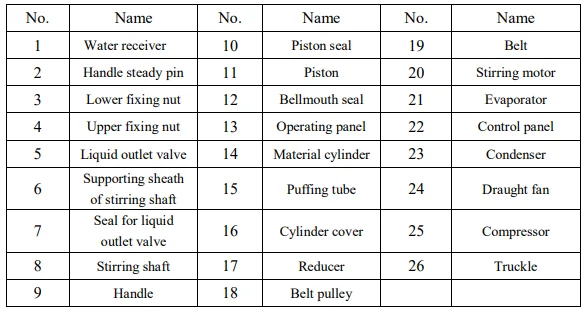
I. Structure diagram of vertical type


II. Structure diagram of table type
12. Installation and debugging
1) Installation
- Cut off and dismantle the packing belt of the fastened carton. Get rid of the carton and take down the packaging bag to check whether the appearance of the machine is damaged and whether the accessories are complete with reference to the list.
- The machine should be placed evenly and stably, and after that, please lock the brake of the front wheel tightly.
- Install the handle to the liquid outlet valve according to the product structure diagram. Then install the assembled liquid outlet valve on the machine and tighten it with the fixing nuts.
- Working conditions: Ambient temperature: 5–40℃; material feeding temperature: 2–35℃ (Note: The material feeding temperature will directly influence the refrigerating capacity and outputs.)
- Supply voltage: 200–400 V (The deviation of rated supply voltage cannot be too high or too low. If it is too high or too low, the machine will alarm (buzzing), and the machine cannot start.)
- Supply frequency: 50 ±1 Hz
- Placing conditions: The machine should be placed in a cool and ventilated location and avoid heat sources and direct sunshine. The distance between the air exhausting side of the machine and the wall or other similar obstacles should be over 1 m, and the rest of the sides of the machine should be over 0.3 m away from the wall or other similar obstacles, so that the cool air can flow into the machine and exhaust the hot gas to ensure the condensation cycle of the machine.
- The machine should not be located in a dusty place. Please keep the place clean and tidy, and regularly clear away the dust on the condenser.
- Requirements for power supply wiring: Please ensure the power supply circuit of the machine is equipped with short-circuit protection and earth leakage protection devices.
- Please ensure the power line is not less than 2.5 mm² and is a copper core wire (excluding exceptionally high-power machines, whose power line should not be less than 4.0 mm² and should be a copper core wire), and the power line should not be too long. When the power line is too small or too long, its load will become too large and cause a voltage drop, thus affecting the service life of the machine’s components.
2) Debugging
- Switch on the power plug and push the power switch to the “ON” position. Then you will hear a “Beep” sound, and the display screen will be on at the same time. The machine now enters the standby state.
- As you press the “Wash” key, the machine enters the washing state, and the stirring system begins to run at the same time. Press the “Stop” key, and the machine will stop running.
- As you press the “Auto” key, the machine enters the moulding stage, and the stirring system begins to run at the same time. After a 10-second delay, the refrigerating system also begins to start. Press the “Stop” key, and the machine will stop its operation.
3) Cleaning and disinfection
When the machine is used for the first time, the cleaning and disinfection work should be carefully done. The steps are as follows:
- Take about 10 L of warm water (40–50℃) and add an appropriate amount of foodstuff cleaning solution to the water, making it into disinfectant. Then pour the disinfectant into the two material cylinders and let the disinfectant flow into the refrigerating cylinder.
- Press the “Wash” key to run for 5 minutes. Pull down the handle to discharge the cleaning solution.
- Add clear water to the material cylinders and rinse 2–3 times. It is OK.
5. Operating instructions
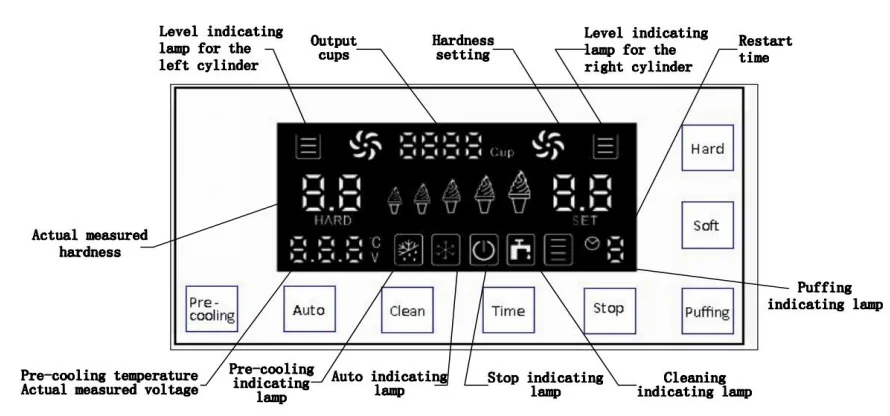
1) Common operation panel

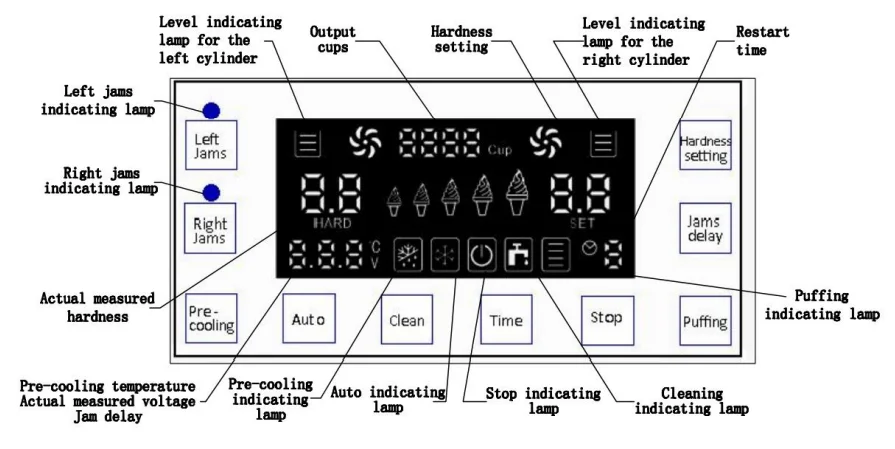
2) Operation panel of jams
a. The “Auto” key
As you press the “Auto” key, the buzzer will twitter a short sound, and the Auto indicating lamp will be on at the same time. The machine enters the automatic working state, and the stirring motor begins to run. The actual measured hardness shows the present current value of the stirring motor. After 10 seconds, the compressor, draught fan, and solenoid valve begin to work, and the machine enters the full automatic mode.
When the actual measured hardness reaches the set hardness, the machine will automatically stop and enter the auto-standby mode. When the stopping time reaches the set time, the machine begins to work again and repeats the same cycle. If you want to stop the machine, just press the “Stop” key.
b. The “Clean” key
As you press the “Clean” key, the buzzer will make a short sound, and the cleaning indicator lamp will be on at the same time. The machine enters the cleaning state, and the stirring motor begins to run. The actual measured hardness shows the present current value of the stirring motor. When you press the “Stop” key, the machine will stop its operation and enter the standby state.
c. The “Time” key
The restart time can be set by pressing the “Time” key. Each time you press it, the time will increase by 1 minute. The larger the value is, the longer the restart time. The cycle is 3–9 minutes. After the setting is finished, the time will be automatically saved after 5 seconds.
d. The “Stop” key
Whether the machine is in the cleaning state or automatic working state, as long as you press the “Stop” key, the machine will stop its operation and return to the standby state.
e. The “Pre-cooling” key
As you press the “Pre-cooling” key, the pre-cooling indicating lamp will be on, which means the pre-cooling function is enabled. When the temperature of the feed trough is above 15℃, the pre-cooling system begins to work; when the temperature of the trough is less than 8℃, the pre-cooling system will close. You can see the actual measured temperature displayed here.
f. The “Puffing” key
As you press the “Puffing” key, the puffing indicating lamp will be on, which means the puffing function is enabled. At this time, if you start the cleaning function, the puffing pump output will always be switched on. If the automatic function is enabled, the puffing pump will switch on for 1 minute and then close. If there is a knockout action, after the knockout is finished, the puffing pump will switch on after an 8-second delay and close after working for 1 minute. As you press the “Puffing” key again, the puffing function will be closed.
g. Level indicating lamp for the cylinders
When there are materials in the material cylinder, the level indicating lamp for the cylinder will be continuously on. When the cylinder is short of materials, the corresponding level indicating lamp will flash, and the buzzer will sound at the same time. After the material is fed, the above phenomena can be relieved.
h. Output cups
- Zero cleaning of output cups: As you press the “Stop” key and hold it for 5 s, you enter the menu for inputting the zero cleaning password (the initial zero cleaning password is 8888). At this time, as you press the Plus key, you can move the password, and as you press the Minus key, you can change the password value. After the password is correctly input, press the “Stop” key again. The zero cleaning of output cups is completed and exits.
- Revision of the zero cleaning password: Press the “Time” key and hold it for 5 s. Then you enter the menu for inputting the password. Input the initial zero cleaning password, and at this time, as you press the Plus key, you can move the password, and as you press the Minus key, you can change the password value. After you finish revising the password, press the “Time” key again. The zero cleaning password is saved and exits.
I. Hardness setting
- Common operation panel: As you press the “Hardness+” or “Hardness-” key and hold it for 2 s, the hardness setting LED flashes. At this time, you can adjust the hardness of the ice cream. The bigger the number is, the harder the ice cream, and vice versa. After the setting is finished, the hardness value will be automatically saved in 5 s.
- Operation panel of jams: As you hold the “Hardness setting” key for 2 s, the hardness setting LED flashes. At this time, you can adjust the hardness of the ice cream. The cycle time can be set as 4.0–7.0. The bigger the number is, the harder the ice cream, and vice versa. After the setting is finished, the hardness value will be automatically saved in 5 s.
- As you hold the “Jams delay” key for 2 s, the jams delay LED flashes. At this time, as you press the “Jams delay” key, you can change the value. The cycle time can be set as 0.0–0.9. The bigger the number is, the more jams when the ice cream tapers, and vice versa (generally it is suggested that the value be set at 0.3). After the setting is finished, it will be automatically saved in 5 s.
j. The “Jams” key
- When the machine is in the cleaning state, as you press the “Jams” key, the jams indicating lamp will be on and the jams pump begins to work at the same time. When you press the “Jams” key again, the jams indicating lamp will be off and the jams pump stops working.
- When the machine is in the automatic working state, as you press the “Jams” key, the jams indicating lamp will be on. As you pull down the handle, the corresponding jam pump begins to work. As you restore the handle position, the jam pump will stop working. You can only start one jam pump. In other words, when you start the left jam pump, the right one will automatically switch off, and vice versa. When you do not need the jams, please keep in mind to switch off the “Jams” key before making ice cream.
6. Ice cream making method
- At present, in China, ice cream is usually made by mixing the ice cream materials with water. Please mix them in strict accordance with the ratio printed on the ice cream bag (generally 1 kilogram of ice cream material should be mixed with 2.5–3 kilograms of purified water).
- Place the mixed ice cream pulp down for 15 minutes and then evenly pour it into the two material cylinders on the top of the machine. It is required that the pulp does not cake, so that it can smoothly flow into the refrigerating cylinder through the feeding hole of the puffing tube.
- Pull down the left and right handles to let the two discharge holes flow out 2–3 cups of ice cream pulp naturally. Then pour it into the top material cylinders to prevent water from freezing at the discharge mouth, as it will influence the making of ice cream.
- Switch on the power supply. As the machine enters the standby state, press the “Cleaning” key and let the machine run for about 3–5 minutes. After that, press the “Stop” key to stop the machine.
- Press the “Auto” key. As the machine enters the refrigeration and moulding state, press the “Soft or Hard” key to choose the hardness of the ice cream as you want (note: during the prior cleaning state, you must closely observe the current hardness value displayed. If the current value is displayed as 3.5, then the hardness of the ice cream should be set between 4.5 and 5.5. If it is displayed as 4.0, then the hardness should be set between 5.0 and 5.5.
- When the actual measured hardness of the ice cream reaches the set value, the machine will automatically stop operation and enter the standby state. At this time, you can press the “Time” key to set the time as required for the cycle of automatic refrigerating. The automatic refrigerating cycle is set at 3–9 minutes. Each time you press the key, 1 minute is increased. Until it reaches 9 minutes, if you press the key again, the machine will return to the 3-minute state (note: when it is hot, it is better to set the stop time shorter, and vice versa).
- Take one ice cream cone or cup and place it at the valve outlet. As you pull down the material discharge handle, the ice cream will be extruded. After a while, pull back the handle, and it is OK.
7. Maintenance and repair
To guarantee the health of ice cream consumers, improve the service life of the machine components, and avoid unnecessary troubles, you must clean the refrigerating cylinder once a day.
- The cleaning of the refrigerating cylinder
- Press the “Cleaning” key to discharge all the pulp inside the cylinder. Press the “Stop” key to stop the machine.
- Add an appropriate amount of disinfectant to warm water. Then pour the mixture into the two material cylinders respectively, each with basically the same amount of solution.
- Press the “Cleaning” key again and let the machine stir for about 5 minutes. Then, discharge the cleaning solution.
- Clean the machine 2–3 times with clear water and then stop the machine.
- Switch off the power supply. Dismantle the components and clean them.
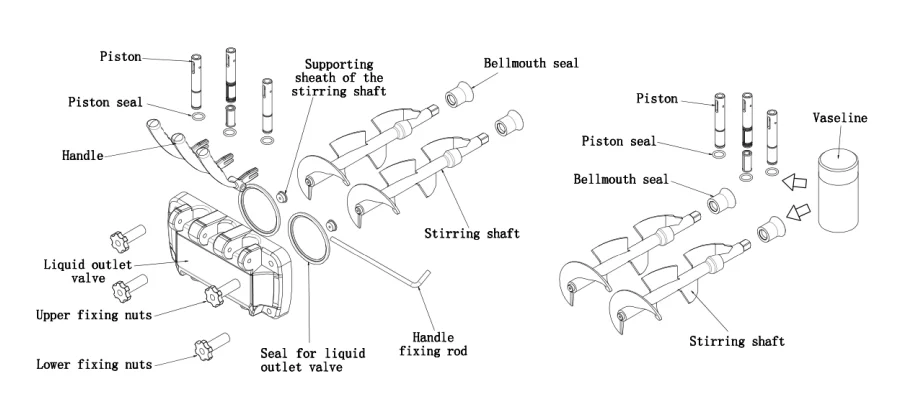
- Screw off the four nuts used to fix the liquid outlet valves and dismantle the valve components.
- Pull out the handle, steady pins, handle, piston, and valve seal in turn from the liquid outlet valve components.
- Pull out the stirring shaft from the refrigerating cylinder.
- Clean all the dismantled components and replace the damaged ones in time if there are any.
- After cleaning, apply Vaseline to the components that need lubrication according to the following diagram.
- Then assemble the components in the reverse order of dismantlement.

2) Body cleaning
Since consumers require a beautiful appearance and a clean and sanitary machine, please keep the appearance clean at all times. You can use a warm towel to scrub the body to remove dirt and spots, but avoid washing it directly with water in case the appliance breaks down.
3) Condenser cleaning
After the machine works for a period of time, the condenser will be covered with dust, thus affecting heat dissipation and making the refrigerating effect worse (which is embodied by the output of ice cream dropping at the same time or being hard to take shape). Please have it cleaned once every three months (if the working environment is poor, please clean it once every month) by professional workers. Before cleaning the condenser, please switch off the power supply and take care not to damage the condenser fins.
4) Adjustment of the belt
After the machine works for a period of time, the driving belt of the stirring system may be stretched longer, so timely adjustment of the belt should be made by professionals. Before adjustment, you must cut off the power supply. Then dismantle the enclosure plates to adjust the belt tension nuts and ensure appropriate tightness. If you still feel the belt is too loose after adjustment, please replace it with the same type of belt.
Notes: After a long time of use, it is normal for the driving belt to wear down, which is not included in the after-sales service of our products. When the driving belt becomes longer, the following phenomena may occur: the machine does not work, hardness changes, big noise, glue smell, etc. Please have it adjusted in time by yourself or by professionals. If necessary, please replace it. The time interval for adjustment and replacement depends on the machine’s utilisation rate.
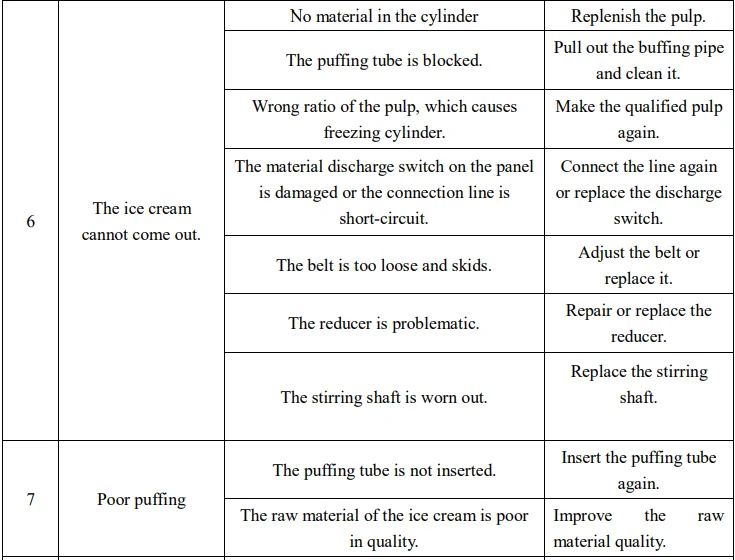
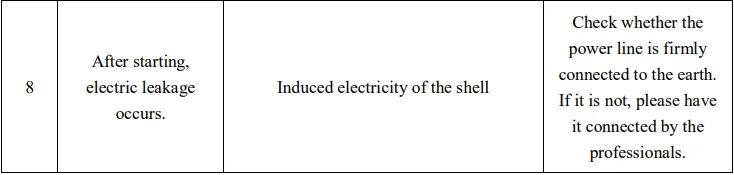
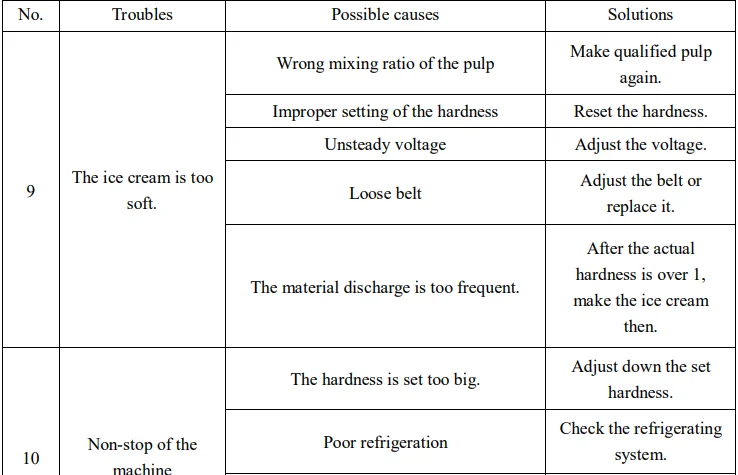
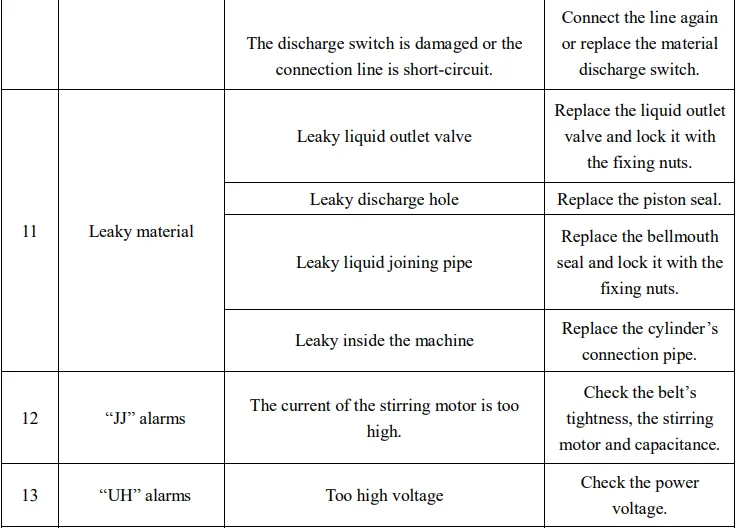
8. Common troubles and their solutions
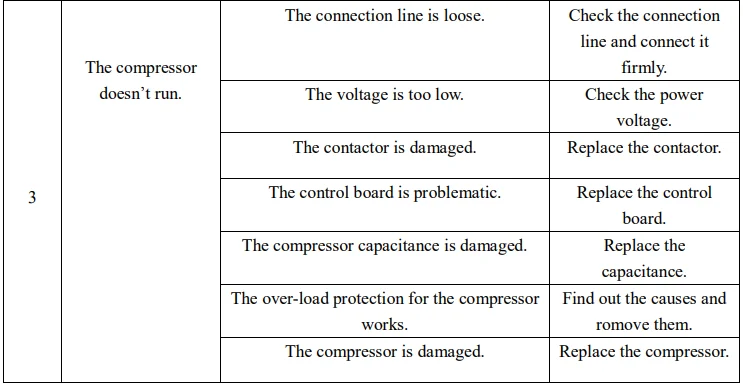
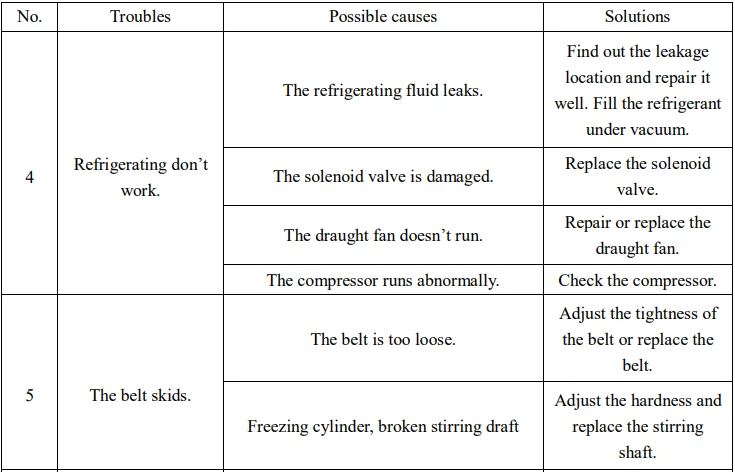
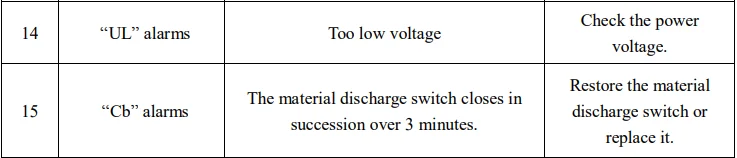
Thank you very much for choosing our equipment. The ice cream machine belongs to professional mechatronics equipment, integrating computer program control, mechanical transmission, and a highly efficient refrigerating system. The following table shows the common troubles that may occur with the machine, their causes, and solutions. Simple troubles can be treated according to the solutions listed in the table. If they still cannot be removed, please consult the dealer or the manufacturer for guidance. If the troubles are difficult and complex, please invite professionals to repair.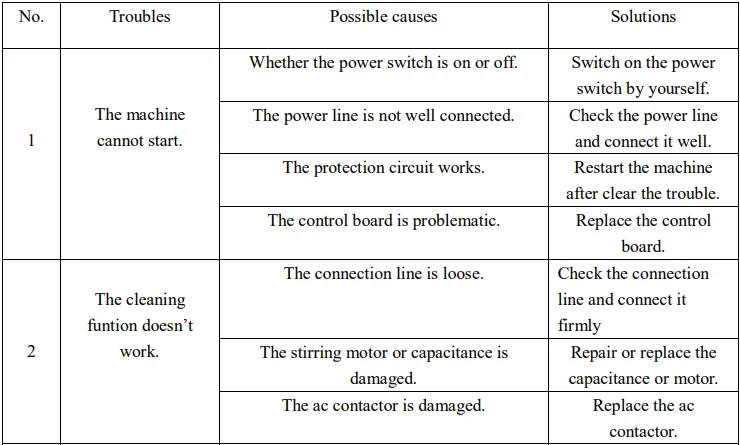
For More Manuals By VEVOR, Visit ManualsLibraryy.
VEVOR YKF-8228H Soft Ice Cream Machine-FAQS
How do you use the VEVOR YKF-8228H soft ice cream machine step by step?
First, prepare and chill your ice cream mix. Pour it into the machine’s hopper, close the lid, turn on the power, select the ice cream mode, and let the machine churn until soft-serve is ready.
How do I turn on the VEVOR ice cream machine?
Plug the machine into a stable power outlet, press the power button on the control panel, and wait for the display to light up before selecting a mode.
Why won’t my VEVOR ice cream machine turn on?
Check the power cord, outlet, and circuit breaker. If the display blinks but the unit won’t start, unplug it for 10 minutes to reset the control system.
How do I reset my VEVOR ice cream machine?
Turn the machine off, unplug it, wait 5–10 minutes, then plug it back in and power it on again.
What ingredients do I need for a soft ice cream machine?
Basic ingredients include milk, cream, sugar, and flavoring such as vanilla. Pre-mixed soft-serve powders can also be used.
What is the secret to making ice cream very creamy?
Using liquid sugars like corn syrup or invert sugar helps prevent ice crystals and improves creaminess and smooth texture.
Why is my ice cream not freezing properly in the machine?
The mixture may be too warm, the machine may be overloaded, or the freezing cylinder may need cleaning. Always pre-chill the mix.
What are common mistakes when making ice cream?
Overmixing, adding warm ingredients, and using incorrect sugar ratios can cause icy or runny ice cream.