
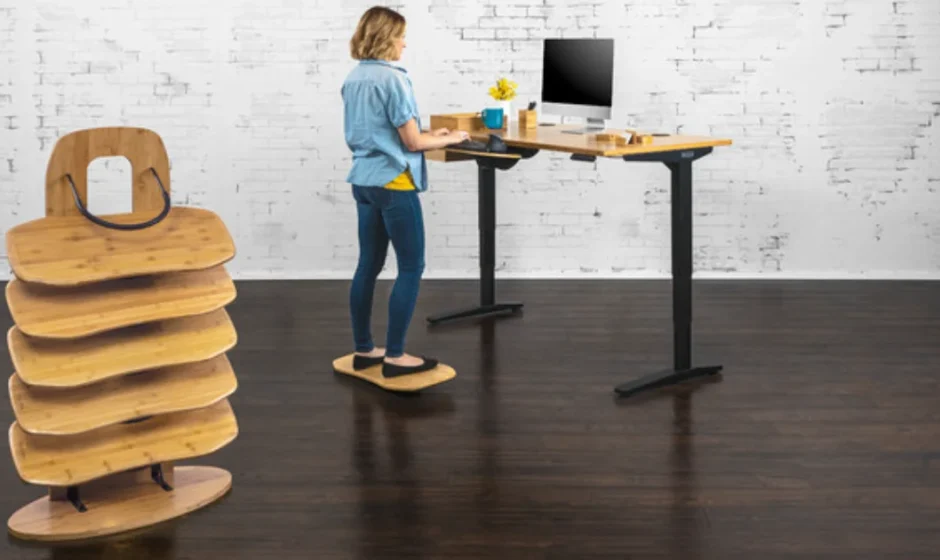

UPLIFT Desk Bamboo Motion-X Board
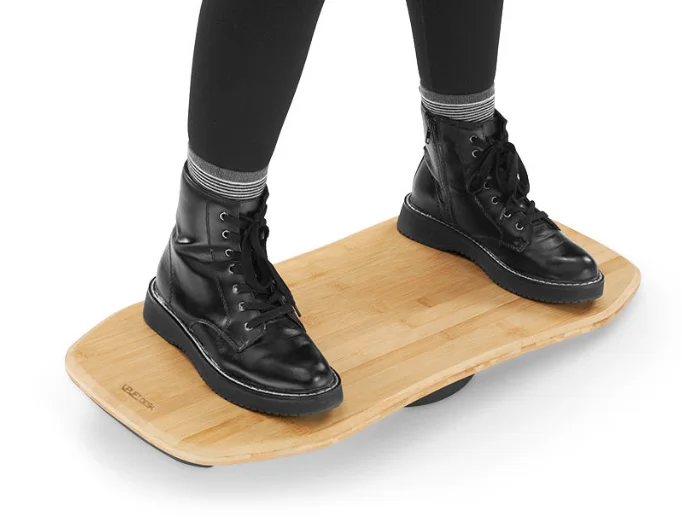
Package Contents

Product Description
UPLIFT Desk Bamboo Motion-X Board is a premium balance board crafted to elevate your standing desk experience with natural movement, improved posture, and active comfort. Designed for anyone who spends long hours working at a desk, this balance board encourages subtle motion throughout the day, helping to reduce stiffness, boost circulation, and promote better muscle engagement—all without disrupting your workflow.
Made with sustainably sourced bamboo, the UPLIFT Desk Bamboo Motion-X Board combines strength and style, offering a smooth and durable surface that complements modern office setups. Its curved bottom design allows for gentle rocking and dynamic shifts, which help keep your body active and alert while standing. This fluid motion support makes long-standing sessions more enjoyable and less fatiguing.
The board’s compact footprint fits easily at the base of most standing desks, and its non-slip surface ensures a secure footing during use. Whether you’re transitioning between sitting and standing or standing for extended periods, the Motion-X Board adds an element of ergonomic wellness to your routine.
Perfect for professionals, students, and health-conscious workers, the UPLIFT Desk Bamboo Motion-X Board is more than an accessory—it’s a tool that enhances comfort, encourages movement, and supports a healthier way to work.
A NOTE BEFORE USING
The standing surface on this motion board is flat. Wear shoes with a flat sole, like sneakers, walking shoes, etc. This board is NOT for use with high heels or socks. For sock or barefoot use, we recommend adding the ACC038-9MM Comfort Mat accessory.
Step 1
Set the board on a firm, flat surface. We highly recommend using a small, tightly woven rug with a rubber backing if using this board on a hardwood floor or another hard surface flooring to protect the board & your floor, and to prevent slipping.
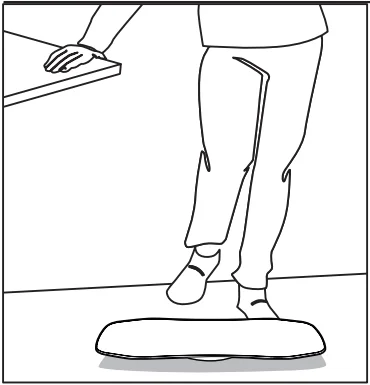
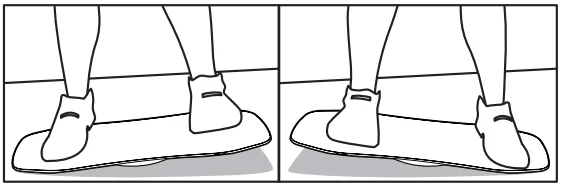
Warning: Hold on to a desk or a stable object as you step onto the board for the first time. Placing one foot on one side of the board will cause the other side of the board to rise. This is normal. To use, carefully step onto one side, and after confirming your stability, place your other foot onto the other side of the board. Keep your feet parallel, facing forward, and firmly on the board, evenly distributing your feet on the outer edges until you find your balance.
Give your body a few minutes to get used to the balancing motion of the Bamboo Motion-X Board. Keep your hands on something stable as you move. Do not attempt any swift or sudden movements until you find the points of balance on the board.
Step 2
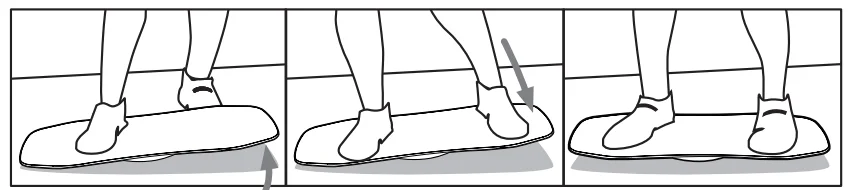
Use this board to add more movement to your workday. At your desk, we recommend trying these energizing moves:
Rock
Move side to side by pushing down on one side, or by using a similar motion to that of walking up a set of stairs. Right side down, left side up. Then left side down, right side up. Doing these motions in conjuction allow you to rock.
Tilt
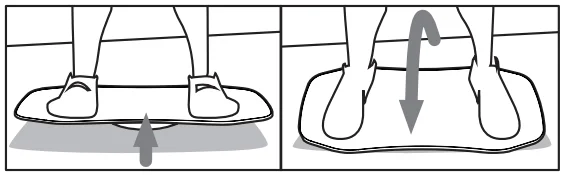
To try this move, push forward on the board with the ball of your foot and your toes, and then push back with your heels. Use the strength from your ankles and calves to push forward and backward to do the tilt. Now you’re moving!
Swivel
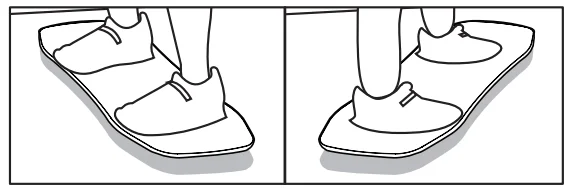
Once you’re balanced on the board, you’ll be able to swivel your hips and move your legs from side to side. Note: This is an advanced move. The board can move swiftly when you swivel with enough force. Hold on to a stable surface when practicing the swivel.
CAUTIONS & WARNINGS
 CAUTION: Read all Warnings and Cautions before using the Bamboo Motion-X Board.
- CAUTION: Consult a physician before beginning any exercise regimen.
- CAUTION: This product’s maximum weight capacity is 250 lb. DO NOT exceed the maximum weight capacity.
- WARNING: Do not jump or attempt to bounce on the board.
- CAUTION: If you do not understand any part of these warnings, cautions, or instructions, contact UPLIFT Desk for direction in the use of this product.
- CAUTION: If the product is damaged, contact UPLIFT Desk immediately. DO NOT use the product.
- CAUTION: Do not wear high heels when using this product. High-heeled shoes are less stable when standing, and heels may puncture and damage the board’s surface.
- CAUTION: UPLIFT Desk assumes no responsibility for any damage or injury caused by improper assembly or use of this product.
- CAUTION: To avoid falling or tipping, place the board on a firm, flat surface before stepping onto it. While getting your balance on the board, hold onto a stable surface. If needed, have someone nearby help you until you know the balance points of your Bamboo Motion-X Board.
- CAUTION: Always ensure the Bamboo Motion-X Board is securely positioned during use. For best results, use on hardwood floors or a small, tightly woven rug with a rubber backing to protect your floor and your board.
- CAUTION: Consult a physician before beginning any exercise regimen.
- CAUTION: By using the Bamboo Motion-X Board, you agree to assume and accept all risks of bodily injury due to your use of the device.
 CAUTION: Read all Warnings and Cautions before using the Bamboo Motion-X Board.
If you purchased the Optional Comfort Mat
You’re almost set for standing! To install the mat, peel and stick one side of the double-sided adhesive tape and apply it to the board.
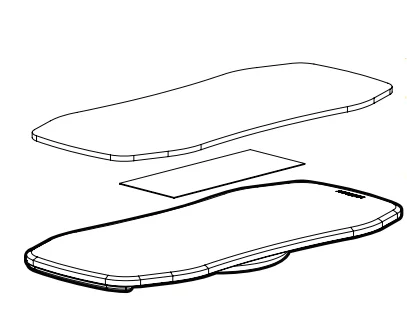
Peel off the exposed side of the Adhesive tape, and place the mat centered on the board. Press down firmly over the entire surface of the pad to stick it to the tape and secure it to the board.
Installing this mat on your board allows you to use the board with socks and will provide your body with even more support while standing and balancing.
Copyright Notice
This guide is a component of the UPLIFT Desk Bamboo Motion-X Board. This guide is a part of the scope of delivery, even if the item is resold. This guide is also available on the UPLIFT Desk website: upliftdesk.com. Excerpts or copies may not be forwarded to third parties or used in any other published form without the prior written consent of UPLIFT Desk. These instructions are subject to United States copyright law.
For more manuals by Blogs, visit ManualsLibraryy
UPLIFT Desk Bamboo Motion-X Board- FAQs
What is a Motion-X (Rocker) Board and how do I use it?
A Motion-X Board is a balance board designed for standing desk use. Step onto one side first, ensure your balance, then place your other foot on the opposite side. Keep your feet parallel, evenly on the outer edges, and adjust until you feel stable.
How long should I balance on a Motion-X Board?
For beginners, start with 5–10 minutes at a time. As your balance improves, increase to 15–20 minutes per session.
How do I program my UPLIFT standing desk?
Press the up paddle to cycle through sensitivity settings. Once the desired setting appears, hold the paddle down until the desk moves slightly up and down, then stops. The numeric height will display, indicating programming is complete.
How do I adjust my UPLIFT desk manually?
If the desk is stuck or not moving electrically, gently grip both sides of the tabletop and apply steady upward or downward pressure. Avoid forcing it to prevent damage.
How do I reset my UPLIFT desk settings?
Hold the down button until the desk reaches its lowest position. Release, wait a few seconds, and repeat if necessary. Once the display changes, the reset is complete.
How much weight can an UPLIFT desk hold?
The 2-Leg Frame can support up to 355 lbs, allowing it to lift fully loaded with computers and accessories.
What is the 20-8-2 rule for standing desks?
This guideline suggests: 20 minutes sitting, 8 minutes standing, 2 minutes moving, repeated throughout the day to maintain proper circulation and posture.
How long should I stand at my desk each day?
Aim for 2–4 hours total during an 8-hour workday, broken into short intervals to avoid fatigue. Even 30–90 minutes standing daily provides significant health benefits.
Should I leave my standing desk plugged in all the time?
Yes. Keeping it plugged in uses very little energy while ensuring the desk is always ready for electronic height adjustment.