


Halex ZETA Electronic Dartboard
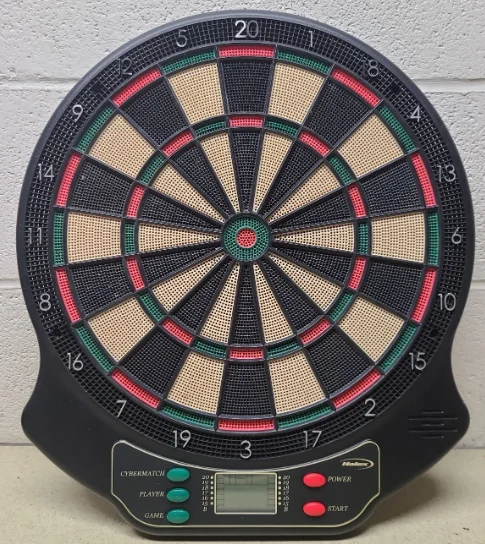
Unpacking the Game.
Unpack your new dartboard carefully, making sure all parts are included. The following components are included in this set:
- 1 Electronic Dartboard
- Soft tip replacement pack
- 6 Darts (unassembled)
- Owner’s Manual
Setup / Mounting Instructions.
Choose a location to hang the dartboard where there is about 10 feet of open space in front of the board. The “toe-line” should be 7’ 9 1/4” from the face of the dartboard. Since this dartboard is powered by 3 “AA” batteries (not included), you don’t need to mount it near an electrical outlet, so it can be mounted anywhere you have space.
However, you may choose to mount it close to an electric outlet in case you decide to purchase the optional A/C adapter. Locate a wall stud and place a mark 50.75” from the floor. Place another mark 15” directly above the first mark (65.75” from the floor). The center of Bullseye should be 5’ 8” from the floor. Insert 2 mounting screws in the center of the stud using the marks you made as guides.
Be sure the top screw is directly above the bottom screw to ensure the dartboard will be level. Mount the dartboard on the wall by lining up the holes on the back with the screws. It may be necessary to adjust the screws until the board fits snugly against the wall. Insert 3 “AA” batteries in the battery compartment on the front of the dartboard (diagram inside compartment).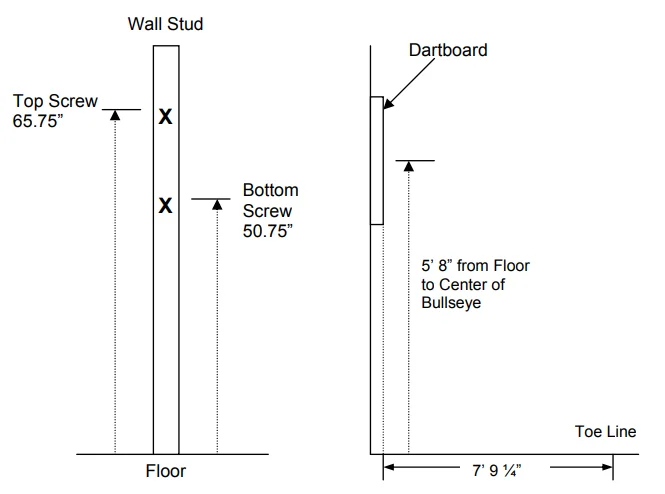
Dartboard Functions.
POWER button – Press to turn the game on or off. The dartboard has an automatic suspend mode to conserve power and battery life (if using batteries). The dartboard will make a sound effect and display “SLEEP” on the display after approximately 3 minutes of non-use. However, the scores are stored in memory and can be restored by pressing any button.
PLAYER/PAGE/SCORE button – This button is used at the start of each game to select the number of players you want to play the game. In addition, this button allows players to see other players’ scores if not on active display. This dartboard keeps track of up to 4 players’ scoring or 4 two-person teams. When playing with more than 2 players, some scores will not be visible when not active. This button allows you to page through all players’ scores as needed.
START button – This multi-function button is used to:
- START the game when all options have been selected.
- CHANGE to the next player when one player is finished with his round. This will put the dartboard in HOLD status between rounds to allow the player to remove darts from the target area.
GAME buttons – Press to page through the on-screen game menu.
CYBERMATCH button – Press to activate the Cybermatch feature, where you can play against the computer. Press continually to cycle through the 5 different skill levels.
Cybermatch Skill Levels:
- Level 1 (C1) Professional
- Level 2 (C2) Expert
- Cybermatch Skill Levels: Level 3 (C3) Advanced
- Level 4 (C4) Intermediate
- Level 5 (C5) Beginner
Electronic Dartboard Operation.
- Press the POWER button to activate the dartboard. A short musical introduction is played as the display goes through a power-up test.
- Press the GAME buttons until the desired game is displayed.
- Press the PLAYER button to select the number of players (1, 2, 3, 4, t 1-1, t 2-2, t 3-3, t 4-4). The default setting is 2 players.
- Press the START button to activate the game and begin play.
- Throw darts.
- The dart indicator display is located to the right of the score display. The number of darts displayed indicates the remaining throws for the active player.
- When all 3 darts have been thrown, a voice command will indicate “next player,” and the score will flash. The darts can now be removed without affecting the electronic scoring. When all darts are removed from the playing surface, press the START button to go to the next player. Voice command will indicate which player is up.
Team Play.
In addition to scoring for up to 4 players, this dartboard is capable of keeping score for team play up to a maximum of 4 two-person teams (8 individuals). To enter team play mode, press the PLAYER button continually until a “t” appears on the display. Each team option is illustrated below:
- t 2-2 2 teams, 4 individual players, (1st team-players 1&3, 2nd team-players 2&4)
- t 3-3 3 teams, 6 individual players, (1st team-players 1&4, 2nd team-players 2&5, 3rd team-players 3&6)
- t 4-4 4 teams, 8 individual players, (1st team-players 1&5, 2nd team-players 2&6, 3rd team-players 3&7, 4th team-players 4&8)
During team play, team members combine their scores to arrive at a team score.
Caring for your Electronic Dartboard.
- Never use metal-tipped darts on this dartboard. Metal-tipped darts will seriously damage the circuitry and electronic operation of this dartboard.
- Do not use excessive force when throwing darts. Throwing darts too hard will cause frequent tip breakage and cause excess wear on the board.
- Turn darts clockwise as you pull them from the board. This makes it easier to remove darts and extends the life of the tips.
- In place of batteries, an optional approved AC adapter (not included) may be used. Use only a genuine Halex AC adapter for this dartboard. Use of a non-AC adapter may cause electrical shock, fire, and damage to the electronic circuits, and will void your warranty.
- Remove the batteries when not in use or if using the optional A/C adapter. This will prolong the life of your batteries.
- Do not spill liquids on the dartboard. Do not use spray cleaners or cleaners that contain ammonia or other harsh chemicals, as they may cause damage.
Batteries.
If using battery power, insert three “AA” batteries into the battery compartment located on the back side of the dartboard toward the base. To remove the cover, press the latch upward while lifting gently. The batteries must be positioned as indicated inside the battery compartment to power the dartboard.
Automatic Suspend Mode Feature.
The dartboard will automatically suspend if no action occurs within approximately three minutes. This is designed to save power or battery life. A sound effect will play, and the LCD will indicate “SLEEP” (see below). All scores will be stored in memory, and play will resume when any button is pressed.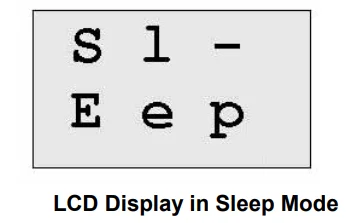
Game Rules.
Your electronic dartboard is loaded with games and options. The rules for each game are detailed below in the order they appear on the LCD when paging through the games. The game number is indicated next to each game for your reference.
301 (G01)
This popular tournament and pub game is played by subtracting each dart from the starting number (301) until the player reaches exactly 0 (zero). If a player goes past zero, it is considered a “Bust,” and the score returns to where it was at the start of that round.
For example, if a player needs a 32 to finish the game and he/she hits a 20, 8, and 10 (totals 38), the score goes back to 32 for the next round. In playing the game, the double-in / double-out option can be chosen (double out is the most widely used option).
- 401 (G02) Starting number 401
- 501 (G03) Starting number 501
- 601 (G04) Starting number 601
- 701 (G05) Starting number 701
- 801 (G06) Starting number 801
- 901 (G07) Starting number 901
CRICKET (G08)
Cricket is a strategic game for accomplished players and beginners alike. Players throw for numbers best suited for them and can force opponents to throw for numbers not as suitable for them. The object of Cricket is to “close” all of the appropriate numbers before one’s opponent while racking up the highest number of points. Only the numbers 15 through 20 and the inner/outer bullseye are used. Each player must hit a number 3 times to “open” that segment for scoring (refer to the Tournament Cricket Scoring section for explanation on how players’ marks are registered).
A player is then awarded the number of points of the “open” segment each time he/she throws a dart that lands in that segment, provided their opponent has not closed that segment. Hitting the double ring counts as two hits, and the triple ring counts as 3 hits. Numbers can be opened or closed in any order. A number is “closed” when the other player(s) hit the open segment 3 times. Once a number has been “closed”, any player for the remainder of the game can no longer score on it. Winning – The side closing all the numbers first and accumulating the highest point total is the winner.
If a player “closes” all numbers first but is behind in points, he/she must continue to score on the “open” numbers. If the player does not make up the point deficit before the opposing player(s) “closes” all the numbers, the opposing side wins. Play continues until all segments are closed – the winner is the player with the highest score.
Cricket Scoring Display
This dartboard utilizes a dedicated scoreboard within the LCD that keeps track of each player’s segment status when playing Cricket. When Cricket is selected, individual characters will be utilized to register marks. There are 3 separate lights within each number (15 through 20 and bullseye). During play, one of the status lights will turn on (black will appear) as a segment is hit. If a double or triple of an active number is hit, 2 or 3 lights will turn on, respectively.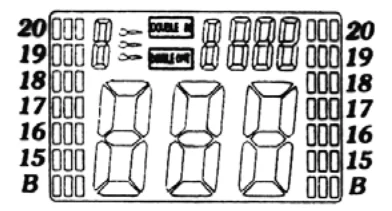
NO-SCORE CRICKET (G09)
Same rules as standard Cricket except there is no point scoring. The object of this version is to be the first to simply “close” all the appropriate numbers (15 through 20 and the bullseye).
SCRAM (G10) (For 2 players only)
This game is a variation of Cricket. The game consists of two rounds. The players have a different objective in each round. In round 1, player 1 tries to “close” (score 3 hits in each segment – 15 to 20 and bullseye). During this time, player 2 attempts to rack up as many points in the segments that the other player has not yet closed.
Once player 1 has closed all segments, round 1 is complete. In round 2, each player’s roles are reversed. Now, player 2 tries to close all the segments while player 1 goes for points. The game is over when round 2 is complete (player 2 closes all segments). The player with the highest point total is the winner.
CUT-THROAT CRICKET (G11)
Same basic rules as standard Cricket except once scoring begins, points are added to your opponent’s total. The object of this game is to end up with the fewest points. This variation of Cricket offers a different psychology to the players. Rather than adding to your own score and helping your own cause as in standard Cricket, Cut-Throat offers the benefit of racking up points for your opponent(s), digging them in a deeper hole. Competitive players will love this variation.
COUNT-UP 300 (G12)
The object of this game is to be the first player to reach the specified point total (300). The point total is specified when the game is selected. Each player attempts to score as many points as possible per round. Doubles and triples count 2 or 3 times the numerical value of each segment. For example, a dart that lands in the triple 20 segment is scored as 60 points. The cumulative scores for each player will be displayed on the LCD as the game progresses. Additional variations of this game are detailed below. The rules are the same, except the point total varies as indicated in the number.
- COUNT-UP 400 (G13)
- COUNT-UP 500 (G14)
- COUNT-UP 600 (G15)
- COUNT-UP 700 (G16)
- COUNT-UP 800 (G17)
- COUNT-UP 900 (G18)
- COUNT-UP 999 (G19)
High Score – 3 Rounds (G20)
The rules for this competitive game are simple – rack up the most points in three rounds (nine darts) to win. Doubles and triples count as 2x and 3x that segment’s score, respectively. Additional variations of this game are detailed below. The rules are the same, except the number of rounds varies as indicated in the number.
- High Score – 4 Rounds (G21)
- High Score – 5 Rounds (G22)
- High Score – 6 Rounds (G23)
- High Score – 7 Rounds (G24)
- High Score – 8 Rounds (G25)
- High Score – 9 Rounds (G26)
- High Score – 10 Rounds (G27)
- High Score – 11 Rounds (G28)
- High Score – 12 Rounds (G29)
- High Score – 13 Rounds (G30)
- High Score – 14 Rounds (G31)
ROUND-THE-CLOCK – r1 singles (G32)
Each player attempts to score in each number from 1 through 20 and the bullseye in order. Each player throws 3 darts per turn. If a correct number is hit, he/she tries for the next number in sequence. The first player to reach 20 is the winner. The display will indicate which segment you are shooting for. A player must continue shooting for a segment until it is hit. The display will then indicate the next segment you should shoot for. There are many difficulty settings available for this game. Each game has the same rules; the differences are detailed as follows:
- ROUND-THE-CLOCK 5 (G33) – Game starts at segment number 5
- ROUND-THE-CLOCK 10 (G34) – Game starts at segment number 10
- ROUND-THE-CLOCK 15 (G35) – Game starts at segment number 15
Since this game does not utilize point scoring, the double and triple rings count as single numbers. We have added some additional levels of difficulty to this game for those looking for a real challenge:
- ROUND-THE-CLOCK Double (G36) – Player must score a double in each segment from 1 through 20 in order.
- ROUND-THE-CLOCK Double 5 (G37) – Game starts at double segment 5
- ROUND-THE-CLOCK Double 10 (G38) – Game starts at double segment 10
- ROUND-THE-CLOCK Double 15 (G39) – Game starts at double segment 15
- ROUND-THE-CLOCK Triple (G40) – Player must score a triple in each segment from 1 through 20 in order.
- ROUND-THE-CLOCK Triple 5 (G41) – Game starts at triple segment 5
- ROUND-THE-CLOCK Triple 10 (G42) – Game starts at triple segment 10
- ROUND-THE-CLOCK Triple 15 (G43) – Game starts at triple segment 15
KILLER (G44)
This game will really show who your friends are. The game can be played with as few as two players, but the excitement and challenge build with even more players. To start, each player must select their number by throwing a dart at the target area. The LCD will indicate “SEL” at this point.The number each player gets is their assigned number throughout the game. No two players can have the same number. Once each player has a number, the action starts.
Your first objective is to establish yourself as a “Killer” by hitting the double segment of your number. Once your double is hit, you are a “Killer” for the rest of the game. Now, your objective is to “kill” your opponents by hitting their segment number until all their “lives” are lost. The last player to remain with lives is declared the winner. It is not uncommon for players to “team up” and go after the better player to knock him out of the game.
DOUBLE DOWN (G45)
Each player starts the game with 40 points. The object is to score as many hits in the active segment of the current round. In the first round, the player must throw for the 15 segments. If no 15s are hit, his score is cut in half. If some 15s are hit, each 15 (doubles and triples count) is added to the starting total. In the next round, players throw for the 16 segments and hits are added to the new cumulative point total.
Again, if no hits are registered, the point total is cut in half. Each player throws for the numbers as indicated in the chart below in order (the LCD screen will indicate the active segment in which to throw). The player who completes the game with the most points is the winner.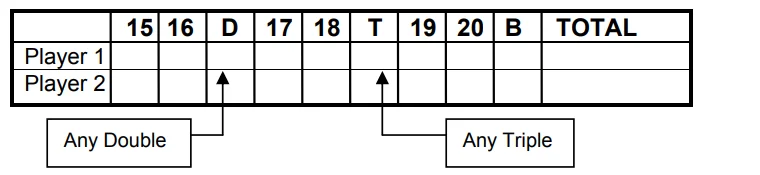
DOUBLE DOWN 41 (G46)
This game follows similar rules to standard Double Down as described above, with two exceptions. First, instead of going from 15 through 20 and bullseye, the sequence is reversed, which will be indicated on the LCD. Second, an additional round is included toward the end in which players must attempt to score three hits that add up to 41 points (20, 20, 1; 19, 19, 3; D10, D10, 1; etc.). This “41” round adds an extra level of difficulty to the game. Remember, a player’s score is cut in half if not successful, so the “41” round presents quite a challenge.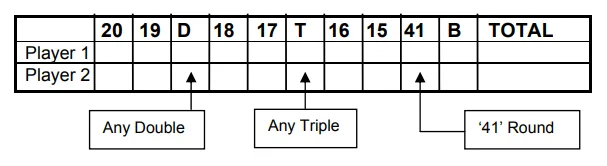
LIMITED-1 YEAR WARRANTY
This Halex product is warranted to be free from defects in workmanship or materials at the time of purchase for a period of one year. Should any evidence of defects appear within the limited warranty period after the date of purchase, Regent Sports will either send replacement parts or advise another course of action. A list of replaceable parts can be found on the parts order page of this manual. Parts not listed on this order form are not replaceable. This warranty covers normal consumer use and does not cover failures that result from alterations, accidents, misuse, abuse, or neglect.
For prompt warranty service and special offers, please register your Halex product by visiting our website at www.regent-halex.com or send in the warranty registration card provided. Please be sure to visit our website to order additional parts not covered under the warranty, as well as online instruction manuals and new product information. A purchase receipt or other proof of date of purchase will be required before warranty service is performed. Requests for warranty service can be provided by e-mailing the Customer Service Department at [email protected] or by calling customer service at:
- 877-516-9707 (Toll-Free)
- 10:30 AM to 6:30 PM EST. (Dec. through Feb.)
- 10:30 AM to 5:00 PM EST. (March through Nov.)
Or send a request in writing to: Regent Sports Corporation
- 45 Ranick Road
- Hauppauge, NY 11788
- Attn: Halex Customer Service
This warranty gives you specific legal rights, and you may have other rights which vary from state to state.
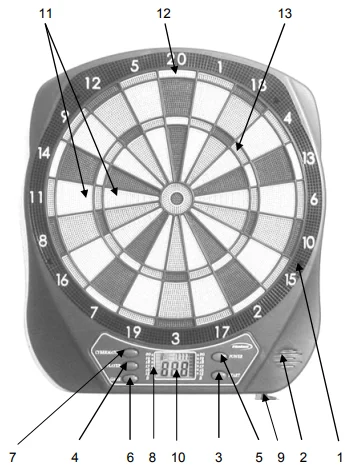
- Catch Ring
- Speaker
- Start/Hold Button
- Game Button
- Power Button
- Score/Player/Page Button
- CyberMatch Button
- Cricket Scoring
- Built-in Jack (for optional A/C adapter)
- LCD Display
- Singles Ring
- Doubles Ring
- Triples Ring

For More Manuals By Halex, Visit ManualsLibraryy.
Halex ZETA Electronic Dartboard -FAQs
What is the Halex ZETA Electronic Dartboard and who is it for?
The Halex ZETA Electronic Dartboard is a soft-tip electronic dartboard designed for casual home play, family game nights, and beginner players. It offers multiple game options with automatic scoring, up to 4 players (or up to 8 in team mode), and easy operation via buttons and an LCD display. It’s ideal for anyone wanting hassle-free dart playing without manual scorekeeping.
What comes in the box when I buy this dartboard?
The package includes the electronic dartboard unit, mounting hardware, and 6 soft-tip darts (unassembled). It may also include a spare soft-tip pack and an owner’s manual that explains setup, gameplay, and safety guidelines.
How do I set up and mount the dartboard?
First, choose a wall space with about 10 feet of clear throwing area in front. Mount the board 5’8″ from the floor to the bullseye, and place the toe line about 7’9¼″ away. Use the provided screws and keep balanced spacing so the board is secure and level.
What type of darts can I use with the Halex ZETA?
Use only soft-tip darts designed for electronic boards. Metal-tipped darts can damage the board’s sensors, scoring circuitry, and segments, leading to malfunction. Soft tips reduce wear and help maintain scoring accuracy.
How does the scoring and display work?
The board has an LCD display that automatically tracks game scores, player turns, remaining darts, and game status. After each throw, the display updates in real time with points and prompts for the next player or team play.
How many players or teams can play at once?
You can play with 1–4 individual players or enable team mode to include up to 4 two-person teams (8 people). Team play combines individual scores for a shared total, making it great for parties and group games.
What power options does the ZETA dartboard use?
It typically runs on 3 “AA” batteries (not included). An optional AC adapter can be used instead, but you should use the recommended Halex adapter only to avoid electrical issues.
Does the board save power if not used?
Yes — if no button is pressed or dart thrown for several minutes, the board enters sleep mode to conserve battery. All current scores and game progress are stored and resume when you start play again.
How do I care for and maintain the dartboard?
Avoid liquids and harsh cleaners on the board surface. Remove darts carefully by turning them clockwise to reduce tip damage. Regularly check soft tips for wear and replace them to keep game accuracy high.
What are common issues and solutions if it won’t turn on?
If the dartboard doesn’t power up, check the batteries (fresh and correctly inserted) or optional adapter connection. Ensure no dart tips or broken pieces are wedged into segments, as this can affect scoring circuits. Remove any obstruction gently.