
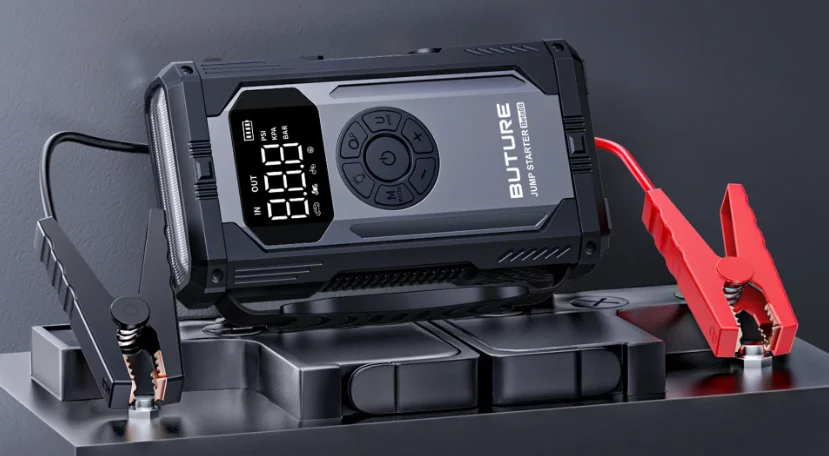

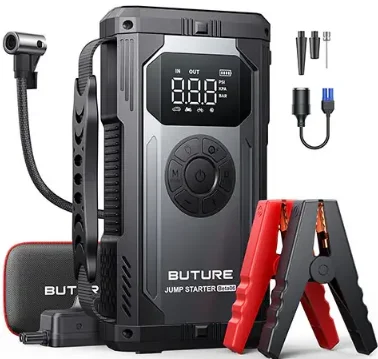
Buture Beta06 High-Power Jump Starter
IMPORTANT SAFETY WARNING
ATTENTION: Please read the following safety warning before using the product and take safety protection measures to avoid malfunctions caused by accidental operation.
Personal Safety
- Store in a cool and well-ventilated place out of reach of children and pets.
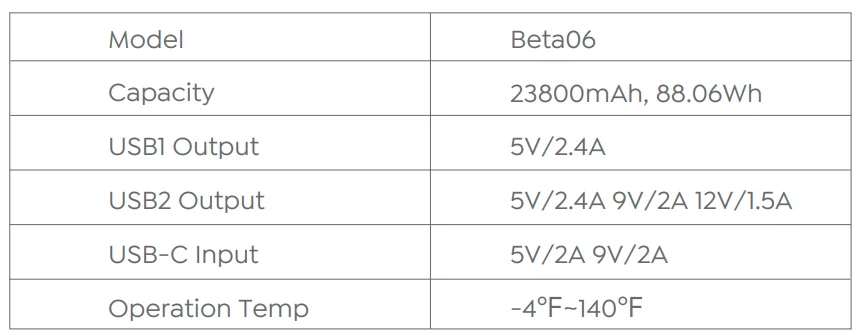
- Do not place the product in a high-temperature environment for a long time. The operation temperature of this product is -4°F~140°F. The storage temperature should not exceed 122°F.
Electrical Safety
- Only start vehicles with the smart jumper cable supplied by the manufacturer.
- Do not use the product if the clamp or cable is damaged.
- Do not connect the red and black clamps when the product is outputting.
- Do not connect the red and black clamps to the same piece of metal.
- Do not disassemble or modify this product.
- Do not use detergent to clean this product.
- Do not abuse this product and avoid heavy dropping or repeatedly hitting it.
- Do not operate the product in explosive environments such as flammable liquids, gases, or dusts.
- Do not immerse the product in water.
Battery Safety
- Do not litter the product, and it should be safely recycled.
- Do not incinerate the product or expose it to high temperatures, as it may explode.
- Only use replacement parts or accessories provided or recommended by the manufacturer.
WARRANTY
BUTURE provides customers with a warranty of 24 months from the date of purchase. For assistance or warranty cover claim, please contact us via email at [email protected] or visit https://ibuture.com.
PRECAUTIONS BEFORE USE
- Please use the included USB-C cable and a 5V/2A or above adapter for charging.
- Please make sure the device is fully charged before using the product for the first time.
- It is recommended to fully charge the device at least once every 3 months to help extend the life of the device.
SPECIFICATIONS
1. PRODUCT OVERVIEW
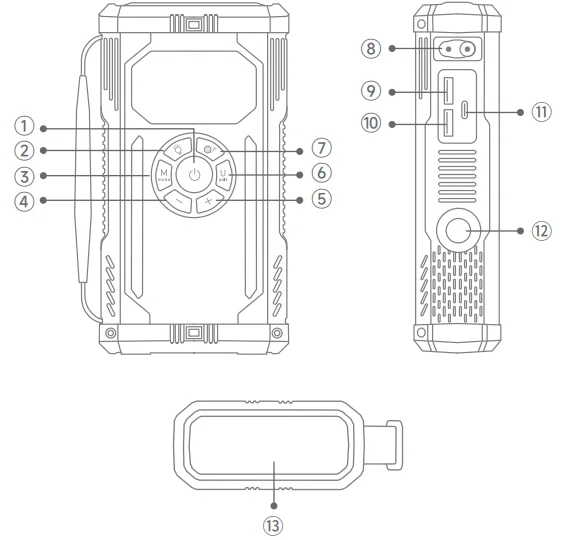
- Power Button
- Lighting Button
- Inflation Mode Switch Button
- Air Pressure Reduction Button (-)
- Air Pressure Increase Button (+)
- Pressure Unit Switch Button
- Inflation Start Button
- Jumpstart Port
- USB Output 1
- USB Output 2 (18W)
- USB-C Input
- Air Hose Interface
- LED Light

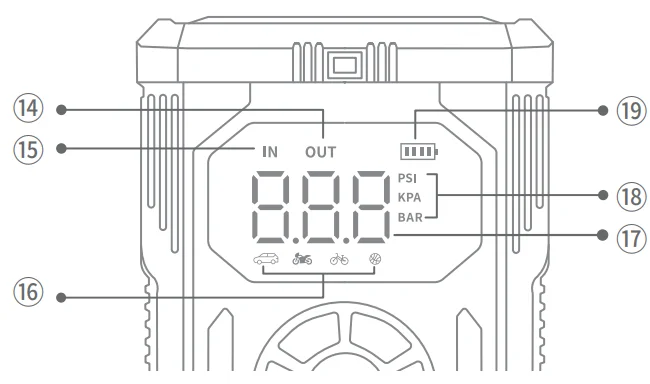
2. DISPLAY OVERVIEW
- Discharging
- Charging
- Inflation Mode (5 Types)
- Air Pressure Value
- Air Pressure Unit (3 Types)
- Battery Indicator

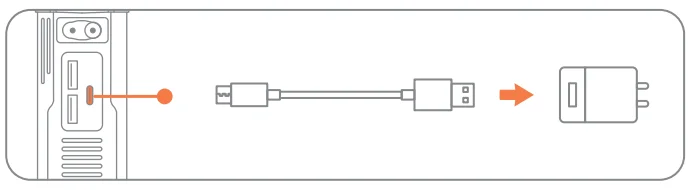
3. CHARGING YOUR JUMP STARTER
- Insert the charging cable into the USB-C port.
- Connect to a 5V/2A or above adapter (adapter not included).

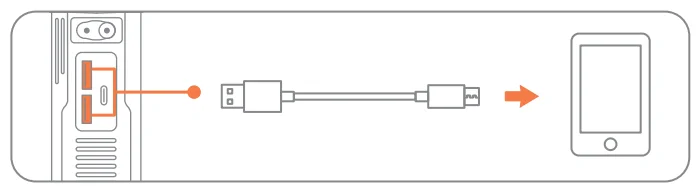
4. CHARGE ELECTRONIC DEVICES
- Plug the cable into the corresponding USB output port.
- Connect to electronics, such as smartphones, and then press the power on/off button.

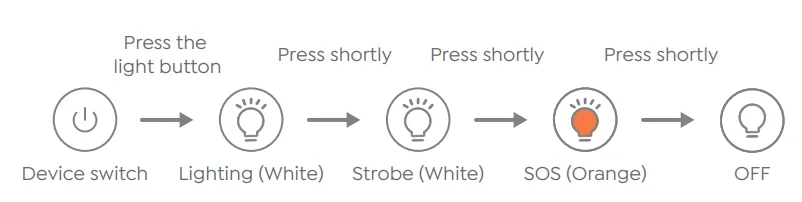
5. LED LIGHTING
6. INFLATE YOUR CAR TIRES
- Connect the air hose firmly to the product and tire, respectively, and tighten it.
- Set pressure. Short-press the power button
 to power on, select the inflation mode
  and air pressure unit
  , then optionally adjust the air pressure value with buttons “-” and “+”.
 - Long-press the inflation button
 to start. It will stop automatically when the air pressure reaches the preset value.
 to power on, select the inflation mode
  and air pressure unit
  , then optionally adjust the air pressure value with buttons “-” and “+”.
 to start. It will stop automatically when the air pressure reaches the preset value.
Tip: If used for a long time, it is recommended to stop every 10 minutes to cool down.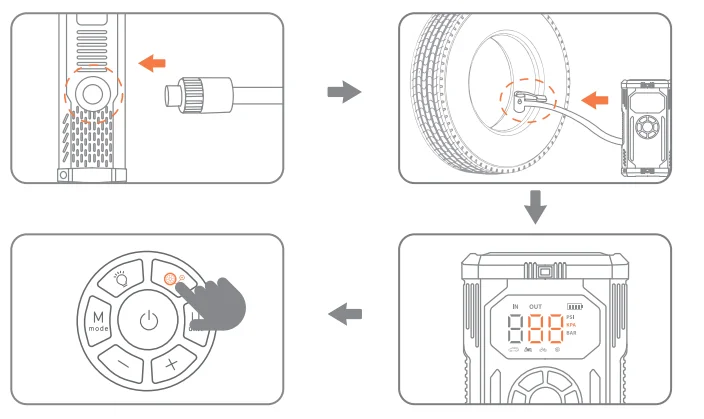
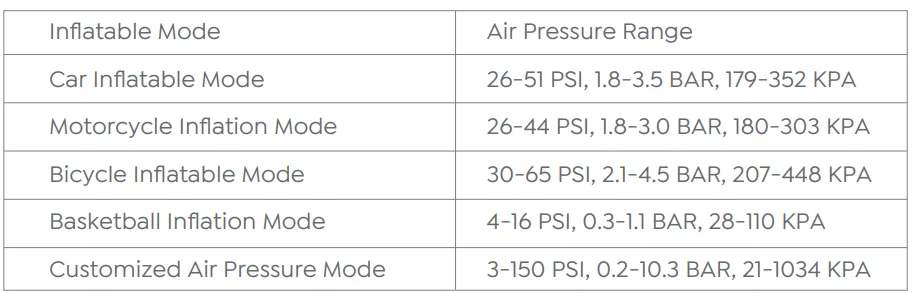
Supports 5 inflation modes, up to 150 PSI.
Checking your car’s tire pressure
- Short-press the power button
 to turn on the machine.
 - Connect the air hose connector to the tire nozzle and pay attention to press to the end and press firmly.
- The pressure shown on the display is the current tire pressure.
4. JUMP START YOUR CAR
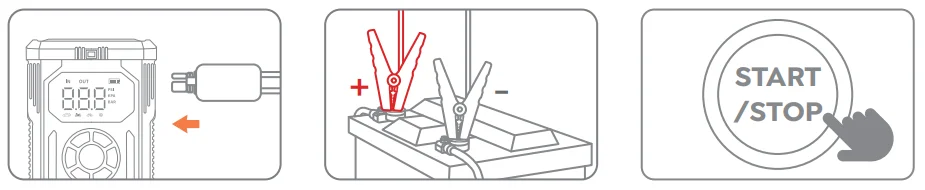
- Insert the jumper cable into the jump starter (20% power at least).
- Connect the clamps to the car battery (red to +, black to -).
- Start your car engine.

ABOUT THE FORCE START FUNCTION
If three attempts fail when the clamps are correctly connected to your car, you can use the Force Start Function to enter boost mode.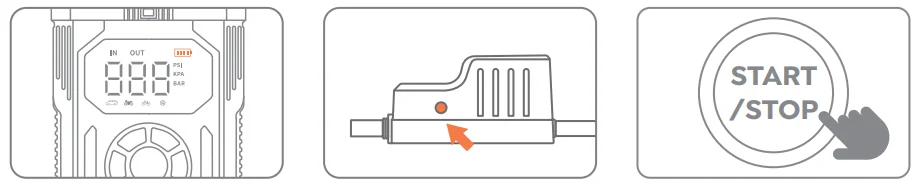
3 steps to fix the problem:
- Check the clamps’ connection and ensure the product’s battery is above 20%.
- Press the Force Start Button for 3 seconds.
- The indicator will be green, and go back to start engine ignition.
Caution: When using this function, auto-detection and safety features will be disabled temporarily.
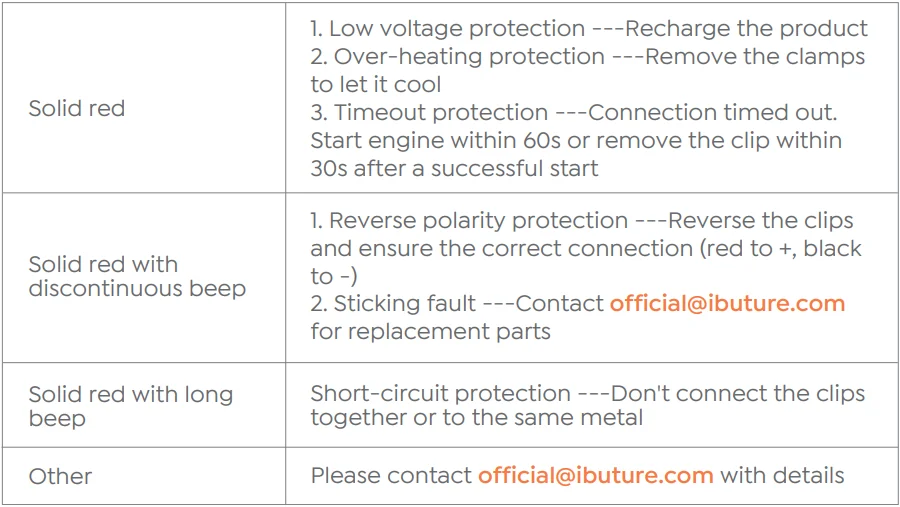
4. TROUBLESHOOTING ABOUT CLAMPS
In any of the following situations, the smart clamp will turn on protection: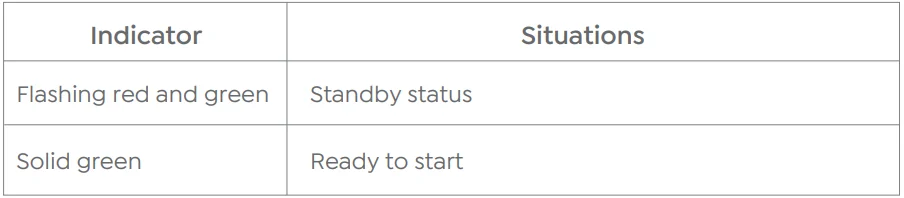
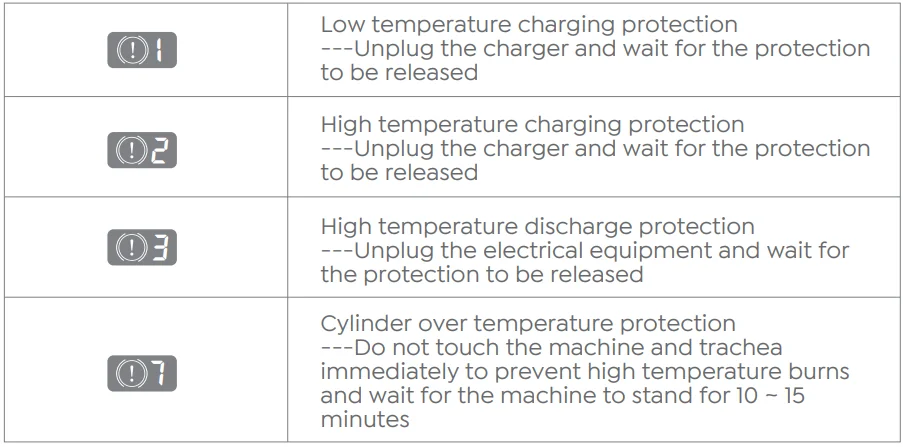
5. TROUBLESHOOTING ABOUT JUMP STARTER
For More Manuals By Buture, Visit ManualsLibraryy.
Buture Beta06 High-Power Jump Starter -FAQs
What is the Buture Beta06 High-Power Jump Starter used for?
The Buture Beta06 High-Power Jump Starter is a portable device designed to jump-start vehicles with dead or weak batteries without needing another car. It’s suitable for cars, SUVs, motorcycles, and some trucks, depending on engine size. In addition to jump-starting, it often functions as a power bank for charging USB devices and may include safety protections for reliable emergency use.
How long does it take to fully charge the Buture Beta06 jump starter?
The Buture Beta06 jump starter typically takes around 4 hours to fully recharge when using the included USB-C charging cable and a compatible power adapter. Charging time may vary slightly depending on the power source used. For best performance and battery health, it’s recommended to charge the unit fully before first use and after each jump-start.
How do I know when the Buture Beta06 is fully charged?
Most Buture jump starters include LED indicator lights that show charging progress. When all indicator lights turn solid or display 100%, the unit is fully charged. If your model does not clearly indicate charge status, a fully charged jump starter generally reaches around 12.6 volts. Always unplug the device once fully charged to protect long-term battery health.
Does the Buture Beta06 need to be fully charged to work?
Yes, it’s strongly recommended to fully charge the Buture Beta06 before using it to jump-start a vehicle. A low charge may not provide enough power to start the engine and could trigger warning alerts. Keeping the jump starter well charged ensures maximum output, better safety performance, and reliability during emergency situations.
What does it mean if my Buture Beta06 is beeping or showing a red light?
If the Buture Beta06 beeps or displays a red warning light, it usually indicates a problem such as reverse battery connection, short circuit, overheating, or insufficient charge. Immediately disconnect the clamps, allow the unit to cool if hot, and reconnect carefully with correct polarity. These alerts are built-in safety features designed to protect both the user and the vehicle.
Can the Buture Beta06 be overcharged?
While modern jump starters include protection circuits, overcharging or leaving the unit plugged in for long periods can still reduce battery lifespan over time. It’s best to unplug the jump starter once it reaches full charge. Following proper charging habits helps maintain battery capacity and ensures the jump starter remains reliable when you need it most.
How many times can the Buture Beta06 jump starter be used?
Buture jump starters are built with long-life lithium batteries and typically support over 1,000 recharge cycles, depending on usage and care. This means the Beta06 can last for several years if properly maintained. Regular charging, avoiding deep discharges, and storing it in a cool, dry place all help extend its usable lifespan.
Can the Buture Beta06 charge a completely dead car battery?
A jump starter like the Buture Beta06 does not fully charge a dead car battery. Its purpose is to provide a short burst of high current to start the engine. Once the engine is running, the vehicle’s alternator charges the battery. If the battery is deeply damaged or worn out, jump-starting may not solve the underlying issue.
Should I follow the 80/20 rule when charging the jump starter?
For daily storage, charging the Buture Beta06 to around 80% can help reduce long-term battery stress. However, for emergency readiness, charging it to 100% is recommended. Avoid letting the battery drop below 20% for extended periods. Balanced charging habits help maintain battery health while ensuring sufficient power during emergencies.
How often should I recharge the Buture Beta06 if it’s not in use?
If the jump starter is not used regularly, it’s recommended to recharge it every 1–3 months to prevent deep discharge. Lithium batteries naturally lose charge over time, even when idle. Keeping the Beta06 topped up ensures it’s ready for emergencies and helps preserve battery performance over the long term.