
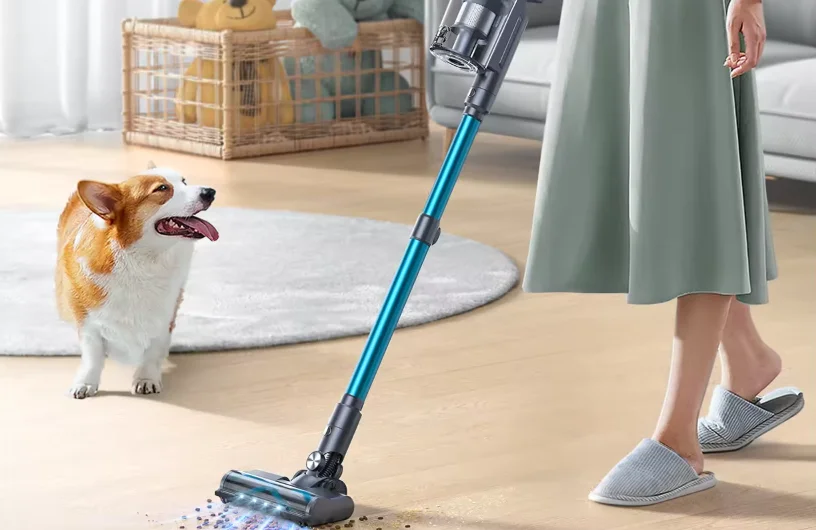

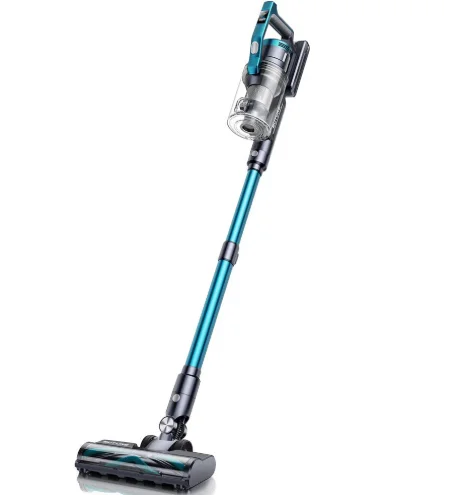
Buture VC60 Cordless Vacuum Cleaner
1. WARNING
Thank you for purchasing the SUTURE VC80 cordless vacuum cleaner. Before using this machine, please read the following safety warnings first and take safety protection measures to avoid malfunctions caused by improper operation.
- This BuTure appliance is not intended for use by persons (including children) with reduced physical, sensory, or mental capabilities, or lack of experience and knowledge, unless they have been given supervision or instruction by a responsible person concerning use of the appliance to ensure that they can use it safely.
- Suitable for dry locations only. Do not use or store outdoors or on wet surfaces. Do not handle any part of the plug or appliance with wet hands. Store properly in a dry place indoors.
- Do not use a damaged cable or plug. If the device or charger does not work properly, is dropped, damaged, missing, or dropped into water, please contact [email protected], BuTure after-sales team for support.
- Do not vacuum flammable or combustible liquids, such as petrol, or use in areas where liquids may be present.
- Turn off the power switch before plugging or unplugging the adapter.
- Do not vacuum anything that is burning or smoking, such as cigarettes, matches, or hot ashes.
- Do not use without filters or a dust cup to avoid damaging the motor and contaminating the air. Wash your hands after using the vacuum cleaner.
- FIRE WARNING: Do not place this product on or near a cooker or any other hot surface, and do not incinerate this appliance even if it is severely damaged. The battery might catch fire or explode.
- Unplug the charger from the power outlet before performing routine cleaning or maintenance.
- Battery leaks may occur under extreme conditions. If any liquid gets on your skin, wash quickly with soap and water. If liquid gets into your eyes, rinse with water for at least 15 minutes immediately. Seek medical attention immediately.
- Charge the unit with the charger we provided.
- Avoid using this product to vacuum hard, sharp objects, as this may cause damage.
Note: The vacuum cleaner adopted thermal protection technology to prevent overheating and will stop working when the item is overheated.
2. PACKAGE LIST
Please check and confirm the accessories and parts according to the following sheet before using.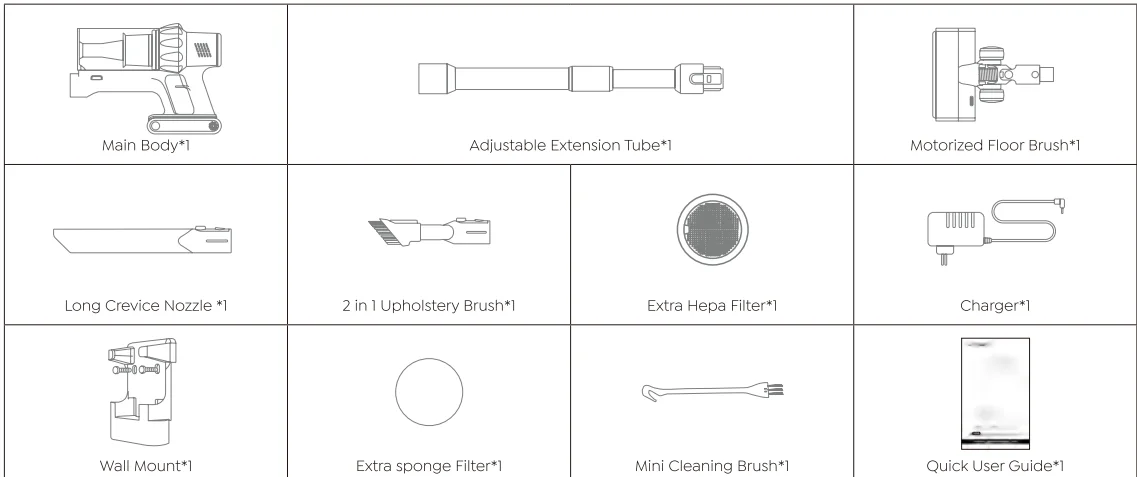
3. KNOW THE PRODUCT
3.1 Product Details
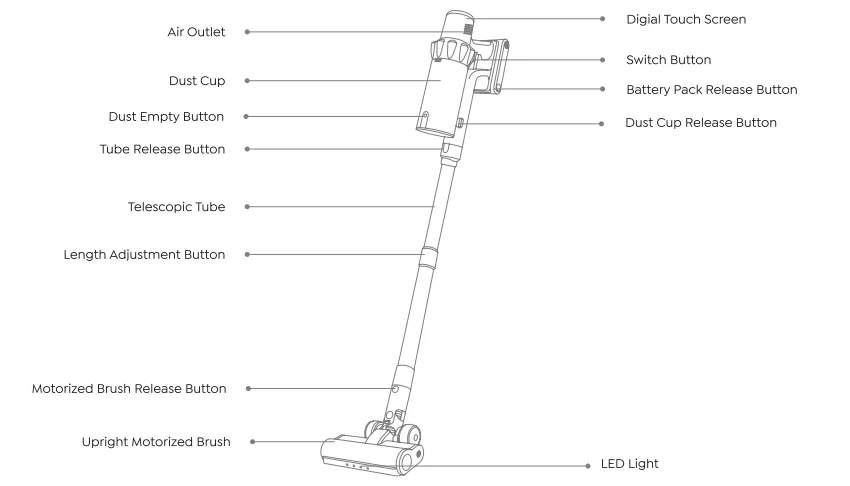
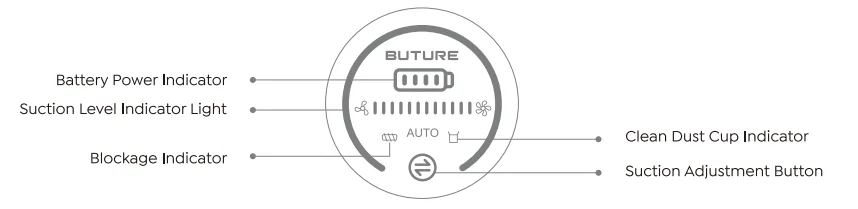
3.2 Digital Touch Screen
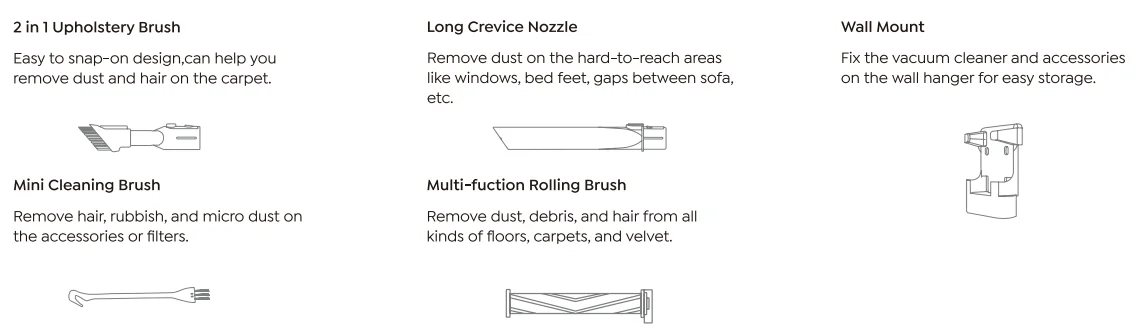
3.3 Accessories Function
4. PRODUCT ASSEMBLY
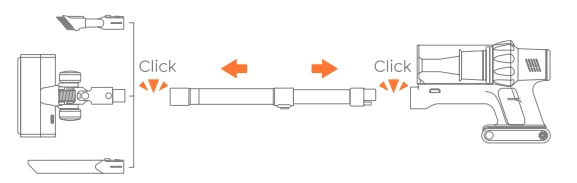
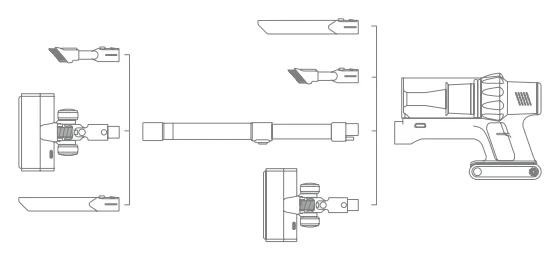
4.1 Install the Vacuum Cleaner
- Directly Install Cleaning Accessories

- Install Extension Tube & Cleaning Accessories

4.2 Install Wall Mount
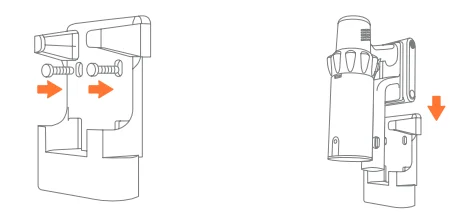
WARNING
- Please make sure there are no gas, water, or electrical cables and wires behind the mounting area.
- To avoid the dock dropping down, please make sure it is installed firmly.
- Store appropriately indoors in a dry place. Do not expose the machine to sunlight or freezing temperatures.
- Recommended temperature range: 39.2°F (4°C)–104°F (40°C).
5. HOW TO USE
5.1 Charging
- When using a new battery or using it for the first time after long-term storage, please fully charge the battery first.
- When storing and not using the vacuum cleaner for a long time, please ensure that it is charged and discharged at least once every three months.
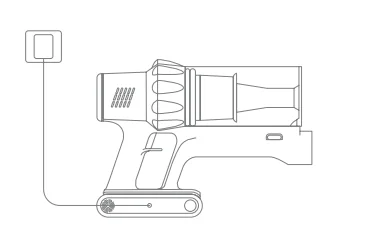
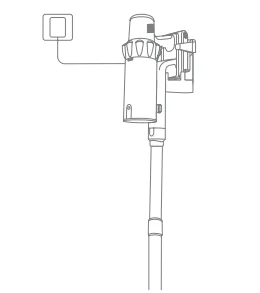
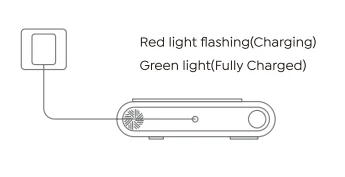
Charging Methods
- Connect the main body to charge.

- Hang on the wall mount to charge.

- Charge the battery directly.

5.2 Operating
Before each use, make sure that:
- The battery is fully charged and fixed in place.
- The dust cup and filters are cleaned and fixed in place.
Start To Work
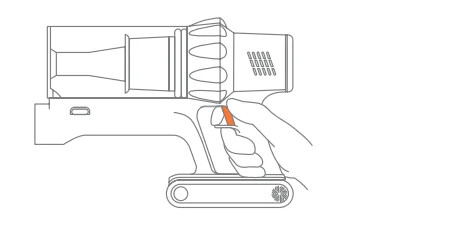
- Press the switch button to turn it on, and it will start MANUAL mode.

Select Cleaning Mode
- CD In MANUAL mode, touch the
 button to switch suction level. With the adjustment of the suction mode, the suction indicator light will change from gradient color to red in turn: MIN > MID > MAX.
 - After switching to the highest suction level in manual mode, continue pressing the button to switch to AUTO mode.

 button to switch suction level. With the adjustment of the suction mode, the suction indicator light will change from gradient color to red in turn: MIN > MID > MAX.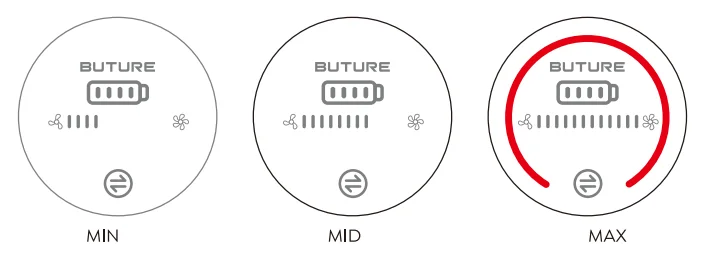
Abnormal Indicator
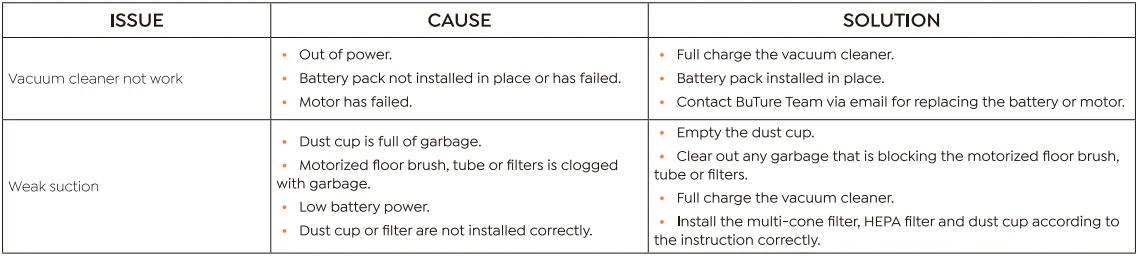
When the red light is flashing, and the motorized floor brush does not work, it means that the motorized floor brush/telescopic tube/dust cup is blocked. Please clean it immediately. When the floor brush is blocked, the red lock rotor prompt light will always be on, and when the ventilation port is blocked, the red lock rotor prompt light will flash 5 times. At the same time, the floor brush will stop working, and the main motor will continue to operate.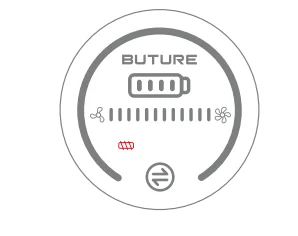
6. MAINTENANCE
Tip: Please clean the vacuum cleaner regularly to extend its lifespan.
6.1 Clean the Main Body
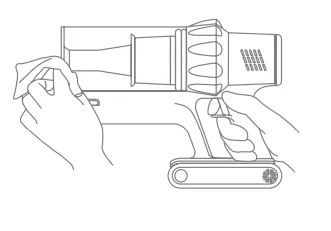
- Turn off the power before cleaning the body.
- Please use a neutral detergent and wipe the body with a half-wet cloth.
- Please avoid sun exposure and store in a cool and dry place.

6.2 Clean the Dust Cup/Filters
Empty Dust Cup
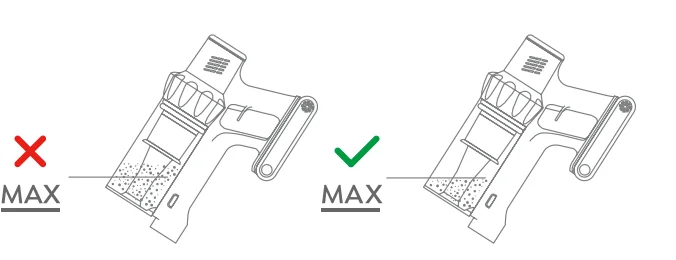
- When using, if the garbage in the dust cup exceeds the MAX Line, please empty it in time.

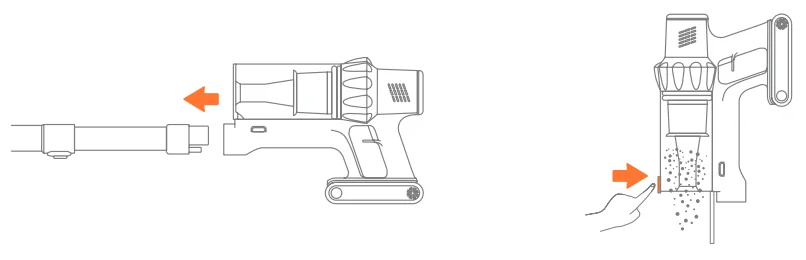
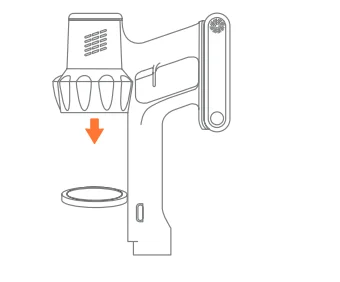
- Press the dust empty button to empty the dust.

6.3 Wash Dust Cup and Filters
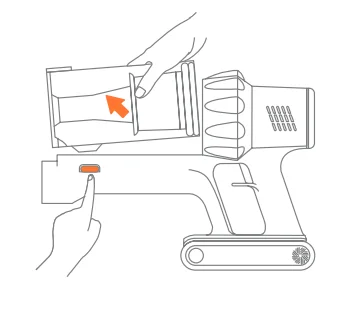
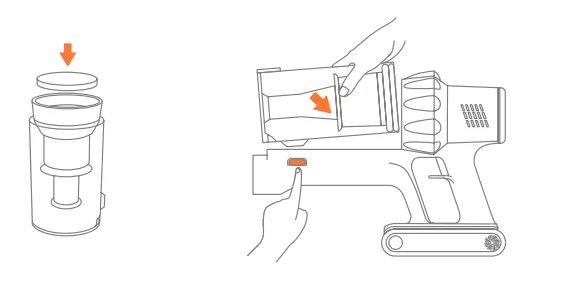
- Remove the dust cup from the main body. Press the dust cup release button on the main body, then get the dust cup released from the main body.

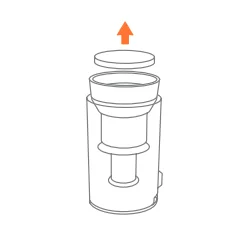
- Remove filters from the dust cup. First, lift the sponge filter, then lift the entire cyclone filter, including the multi-cone filter.

- Remove the HEPA filter from the main body. First, lift the sponge filter, then lift the entire cyclone filter, including the multi-cone filter.

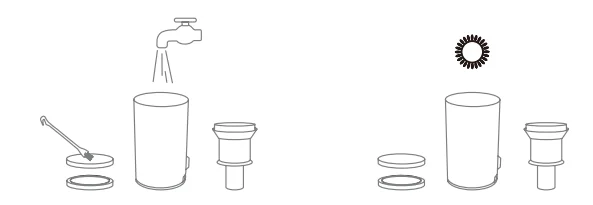
- Clean the dust cup and filters with water. Make sure that the dust cup and filters have dried before use.

- Install the multi-cone filter and HEPA filter clockwise, aligning the clips to install the cyclone filter. Then install the sponge filter and dust cup.

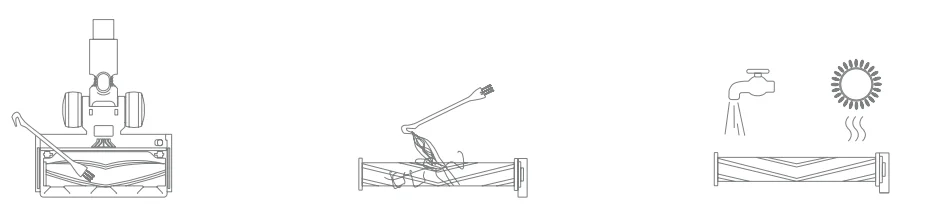
6.4 Clean the Brush Roller
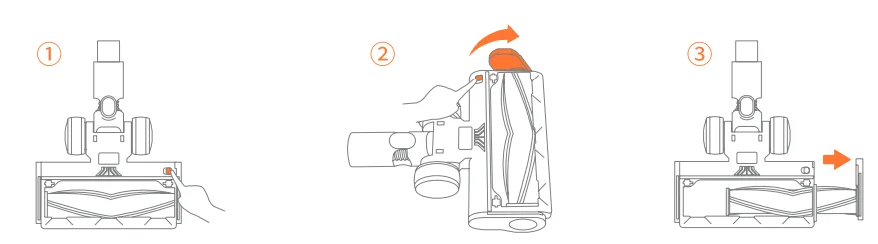
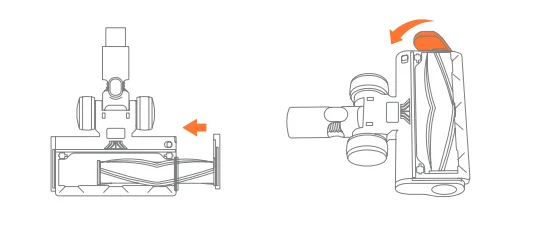
- Take out the roller brush.

- Remove any hair fibers that have been wrapped around it. Use the mini cleaning brush to clean it. Warning: You can clean it with or without water. Please remember to use the roller after it is completely dry.

- Install the roller brush.

7. SPECIFICATION
8. TROUBLESHOOTING
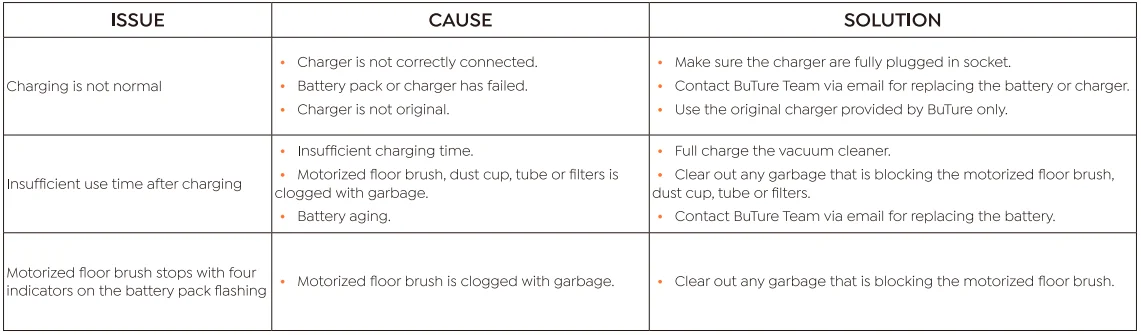
9. WARRANTY
9.1 The 2-Year Warranty
- Our BuTure machine has a 2-year warranty against original defects in material and workmanship when used for private household purposes in accordance with the BuTure Instruction Manual.
- This warranty provides, at no extra cost to you, all labor and parts necessary to ensure your machine is in proper operating condition during the warranty period.
9.2 What is covered?
- Only applies to purchases made from authorized retailers of BuTure.
- This warranty will only be valid if the machine is used in the country in which it was sold.
9.3 How to claim?
Please keep your proof of purchase. To make a claim under our warranty, you need to provide your original purchase receipt with the purchase date and order number on it. If your machine is not functioning properly, or you still have any questions after reading this manual carefully, please feel free to contact us. We will reply to you within 24 hours and try our best to provide you with a satisfactory solution. Email Our Customer Service: [email protected] or visit https://ibuture.com.
For More Manuals By Buture, Visit ManualsLibraryy.
Buture Beta06 High-Power Jump Starter -FAQs
What is the Buture VC60 Cordless Vacuum Cleaner?
The Buture VC60 is a lightweight, cordless stick vacuum designed to make everyday cleaning easier. With a brushless motor and detachable handheld mode, it can handle floors, carpets, furniture, stairs, and car interiors. Its cordless design means no tangled cords or outlet restrictions, giving users the flexibility to clean larger areas or hard-to-reach spots without being tethered to a socket.
How long does the battery last on the Buture VC60?
Battery life depends on the suction mode you choose. In Eco or standard mode, the VC60 can typically last around 30–45 minutes of continuous use, which is enough for most daily cleaning tasks. Switching to high power or Turbo mode can reduce runtime to about 10–15 minutes. The removable battery also makes it convenient to swap or charge separately if needed.
How long does it take to fully charge the VC60 vacuum?
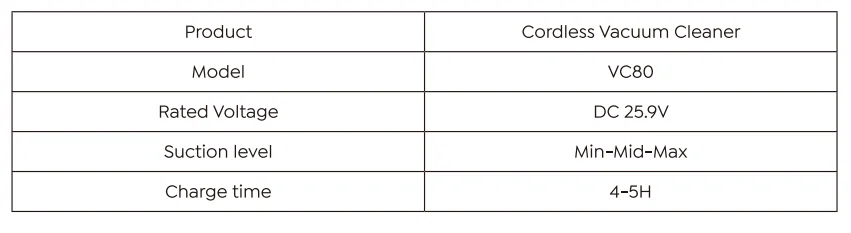
Charging time for the Buture VC60 usually takes about 4–5 hours with the included charger. For best results, plug it in after each major cleaning session rather than waiting for the battery to drain completely. Fully charging before first use and after long cleaning sessions helps maintain battery health over time.
What accessories come with the Buture VC60?
The VC60 typically comes with multiple attachments such as a crevice tool, brush head, motorized floor brush, and sometimes an upholstery tool. These accessories help you clean different surfaces like furniture, stairs, curtains, and tight corners more effectively. The vacuum’s handheld mode lets you switch tools quickly for versatile cleaning.
Is the Buture VC60 suitable for pet hair?
Yes, the Buture VC60 is well-suited for pet hair thanks to its powerful suction and motorized brush head. The brush helps loosen and lift embedded hair from carpets and upholstery. However, like most cordless vacuums, frequent cleaning of the brush and filters may be needed to prevent hair tangles and maintain optimal performance.
How do I clean and maintain the filters on the VC60?
To maintain suction power, empty the dust cup after each use and rinse the filters under running water every few weeks. Make sure all filters are completely dry before reinstalling them. Regular filter maintenance prevents clogs and ensures consistent airflow, which helps the vacuum perform at its best over the long term.
Can the VC60 be used on both hard floors and carpets?
Yes, the Buture VC60 works on a variety of surfaces. The motorized brush head and adjustable suction allow it to transition from hard floors to low-pile carpets effectively. For thicker or high-pile carpets, using higher suction settings can improve debris pickup. Always check the brush head regularly to remove tangled hairs or debris.
Is the Buture VC60 cordless vacuum easy to assemble and use?
Yes, the Buture VC60 is designed for quick assembly with tool-free attachment installation. Simply connect the stick to the desired brush or tool and snap into place. Its lightweight build and cordless convenience make operating the vacuum simple for users of all skill levels, even for cleaning ceilings, stairs, or tight corners.
How do I store the Buture VC60 when not in use?
Store the VC60 in a cool, dry place, ideally on its included wall mount or charging stand if one is provided. Keeping it upright protects the motor and attachments. Remove accessories and empty the dust bin before storing. Avoid storing it in damp areas like basements to protect the electronics and battery.
Does the Buture VC60 come with a warranty?
Most Buture cordless vacuums, including the VC60, come with a manufacturer’s warranty for parts and performance. Warranty terms vary by region and retailer, but typically cover defects in materials or workmanship for a specified period. Always register your product with the manufacturer and keep the purchase receipt to make warranty claims easier.