
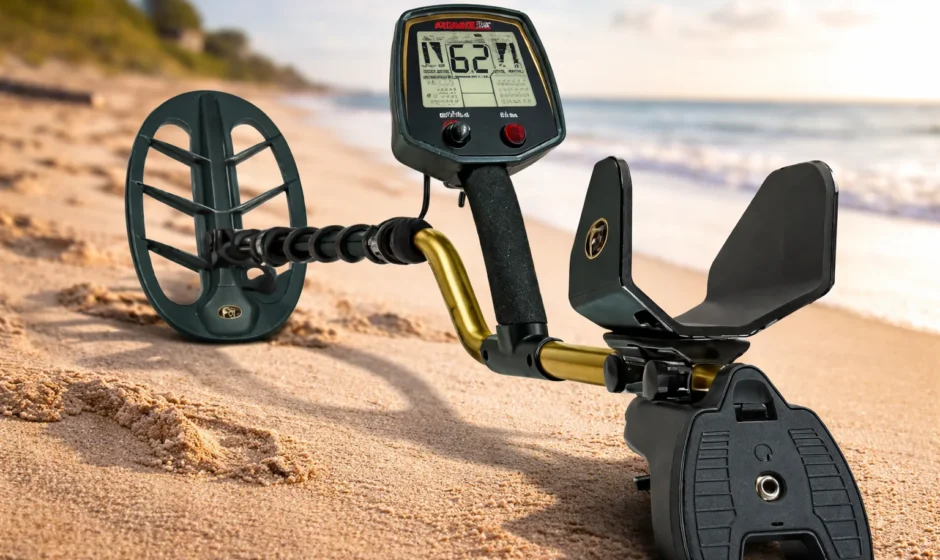

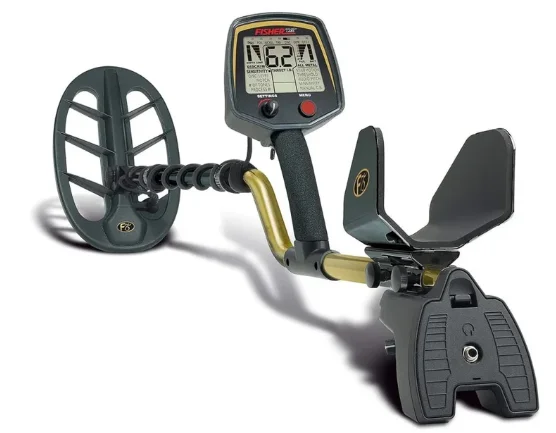
Fisher Labs F75 Special Edition Metal Detector
PRODUCT FEATURES
- Lightweight and well-balanced: best ergonomically engineered detector in the industry.
- Intuitive menu-driven user interface.
- Large LCD screen.
- Visual indicators of important values such as:
- Target Identification
- Target Confidence
- Target Depth (both running-depth and pinpoint-depth)
- Ground Mineralization
- Multiple Search Modes:
- Discrimination
- Static All Metal
- Motion All Metal
- Trigger-actuated FASTGRAB™ ground balancing with manual override.
- Waterproof 11-inch open-frame BiAxial™ searchcoil.
- Trigger-actuated target pinpointing with variable audio pitch.
- Fully adjustable armrest.
- Display backlight for night and low-light conditions.
- Notch and discrimination controls.
- Covers provided for both the control housing and battery box.
- Activate and deactivate DST Mode (Digital Shielding Technology) for the ultimate in EMI suppression.
- Fast Process – improves target separation.
- 4 levels of FeTone®, to quiet iron in iron-infested areas.
- Adjustable audio pitch in Discrimination Mode.
- Made in the USA from USA and imported parts.
If you have any questions or need assistance with your metal detector, call 1-915-225-0333 and ask for Fisher Hobby Technical Service.
Specifications
- Mechanical: S-rod with electronics housing mounted on handgrip, 3-piece breakdown, batteries under elbow, 2-way armrest adjustment — forward/backward and around forearm.
- Searchcoil: 11” (28 cm) open-frame elliptical double-D, waterproof.
- Batteries: 4 AA, alkaline (not included).
- Weight: 3.5 pounds (1.6 kg) with alkaline batteries installed.
- Static Balance: force in vertical plane normal to elbow 0.47 pounds (0.22 kg). Varies with adjustment and the user’s stance and arm/hand physiology.
- Dynamic Balance: axial moment, 0.29 foot-pounds (0.39 newton-meters). Varies with adjustment and the user’s stance and arm/hand physiology.
- Sweep Effort: lateral moment 5.2 foot-pounds (7.1 newton-meters).
- Operating Principle: VLF induction balance.
- Operating Frequency: nominal 13 kHz, quartz crystal timing reference 13158 Hz, 13100 Hz, 13043 Hz, 12987 Hz, 12931 Hz, 12876 Hz, 12821 Hz.
- Basic Sensitivity: 6 x 10⁹ root Hertz (detectivity).
- Lag Coefficient: 78 milliseconds.
- Reactive Overload: approximately 10,000 micro-cgs units (volume susceptibility), 40,000 micro-cgs units with sensitivity < 30.
- Resistive Overload: approximately 1,200 micro-cgs units (volume susceptibility), 4,800 micro-cgs units with sensitivity < 30.
- Ground Balancing Range: from ferrite to salt, inclusive.
- Discrimination Ground Suppression: a combination of second and third-order methods.
- ID Ground Suppression: third order.
- Battery Life: typically 40 hours with high-quality alkaline batteries. An estimated 80 hours with nickel oxyhydroxide batteries. An estimated 65 hours with lithium iron disulfide batteries.
- Operating Temp Range: 4 to +122 degrees F (-20 to +50 degrees C).
- Operating Humidity Range: 0–90% non-condensing.
Quick Start
Use your F75 right out of the box.
- Assemble the detector (see instructions beginning on page 4).
- Install four AA alkaline batteries. All positive (button-end) terminals point up.
- Turn the knob, located under the armrest, fully clockwise. This turns the machine on and sets the audio volume to maximum.
- The F75 on start-up will display units, then the digit serial number two digits at a time. You can skip the last set of digits by pressing the MENU key; it will display until released. This feature was added to help customers verify they have purchased an authentic unit.
- When first turned on, the F75 starts in the Discrimination Mode, with: Sensitivity preset to 60, Discrimination, Level preset to 15, Number of Tones preset to 3, Process # preset to dE, Sweep the searchcoil from side to side, parallel to the ground. Keep the searchcoil moving over the ground. If you stop moving the searchcoil, the sound will also stop. The probable target type will be indicated at the top of the LCD screen.
- If the searchcoil is not in motion and not close to metal, the detector should be silent.
- If you experience false signals from electrical interference, from the soil itself, or from lots of trash metal, press the MENU button. Sensitivity will be highlighted. Rotate the SETTINGS knob to the left (counterclockwise). Reduce the sensitivity setting until the false signals go away. After 7 seconds, the machine will exit the menu and return to normal operation.
- Find a patch of ground free of metal, toss a coin on the ground, and sweep back and forth over it a few times to get a feel for how the machine responds.
- You are now ready to search.
- Pull and hold the trigger switch with your index finger to pinpoint the exact location of targets, making them easier to unearth. When the trigger is pulled, PinPoint is engaged. The searchcoil need not be in motion to detect an object. The 2-digit numeric display indicates approximate target depth, in inches.
Assembly
Assembly is easy and requires no tools.
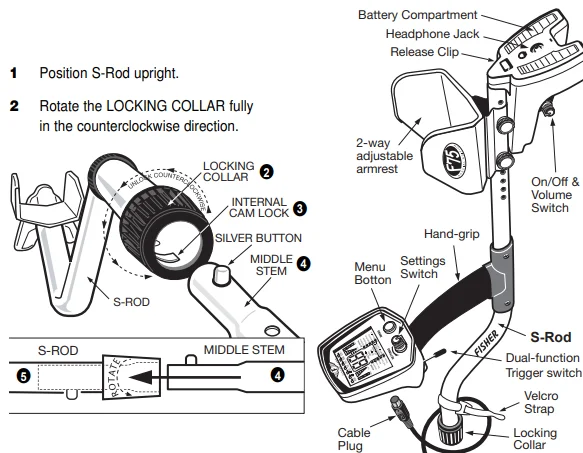
- Position S-rod upright.
- Rotate the LOCKING COLLAR fully in the counterclockwise direction.
- Insert your finger inside the tube and make sure the INTERNAL CAM LOCK is flush with the inside of the tube.
- Insert the MIDDLE STEM into the S-rod, with the SILVER BUTTON pointed upward.
- Rotate the MIDDLE STEM until the SILVER BUTTON is located in the hole.
- Twist the LOCKING COLLAR fully in the clockwise direction until it locks.
- Repeat this process on the LOWER STEM.
- Using the BOLT and KNURLED KNOB, attach the SEARCHCOIL to the LOWER STEM.
- Adjust the LOWER STEM to a length that lets you maintain a comfortable upright posture, with your arm relaxed at your side, and the SEARCHCOIL parallel to the ground in front of you.
- Wind the CABLE securely around the STEMS.
- Connect the CABLE PLUG to the housing. Do not twist the cable or plug. Turn the locking ring only. Use minimal finger pressure to start the threads. Do not cross-thread. When the locking ring is fully engaged over the threaded connector, give it a firm turn to make sure that it is very tight. When the locking ring is fully engaged over the threaded connector, it may not cover all of the threads.
- Tighten both LOCKING COLLARS.


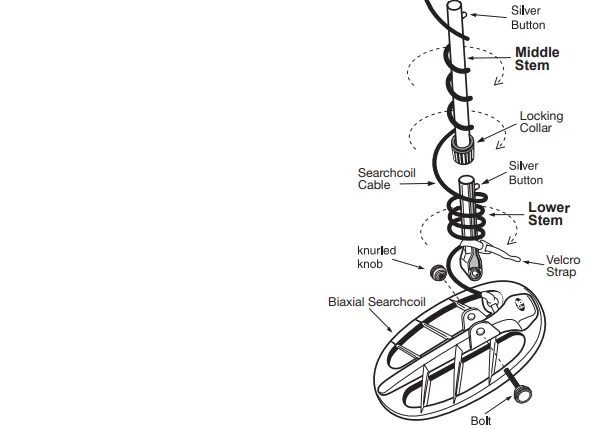
Note: Very tall users can purchase the optional Extended Lower Stem (TUBE5X) for extended reach.
Mechanicals
BATTERIES (not included)
The F75 requires four AA batteries. These non-rechargeable chemistries may be used: alkaline, nickel oxy-hydroxide (Panasonic Oxyride or Duracell PowerPix), lithium iron disulfide (Energizer L91). Nickel metal hydride chemistries may also be used. Zinc-carbon and so-called “heavy-duty” batteries may not work, especially in cold weather. Do not use these batteries. DO NOT MIX OLD AND NEW BATTERIES.
Expect 40 hours of service in the field with one set of alkaline batteries. Rechargeable batteries will usually deliver over 25 hours of service without recharging, but when they start running low, they die suddenly with little warning. Always install batteries that are of the same type and the same state of charge. Otherwise, battery life will be determined by the weakest battery, because the good batteries cannot deliver their power with a dead battery blocking the current. All four batteries are installed with the positive terminals facing upward.
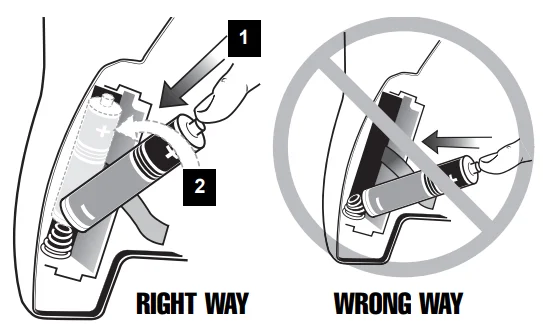
IMPORTANT: To avoid stressing the battery spring connection, install the batteries using this technique:
- Position the bottom (negative) side of the battery on top of the spring.
- Do not install the top of the battery into the compartment yet.
- Push down on the battery to compress the spring.
- With the spring compressed a bit, then tip the battery upright and push back into the compartment.

The LCD screen shows battery condition on the right.
ARMREST
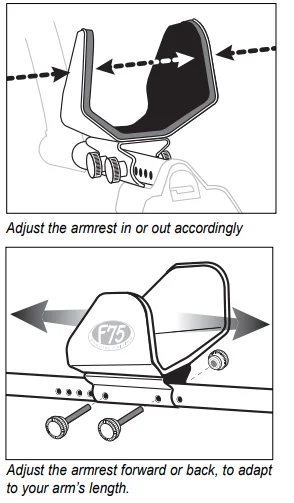
The armrest width and position are both adjustable.
Armrest Width: The sides of the armrest can be bent inward and outward. To best stabilize the detector to your arm and body movement, squeeze the sides of the armrest around your forearm. For a very secure fit, some users prefer to bend the armrest in tightly against the forearm such that you pry the sides loose each time you place your arm into the armrest.
Armrest Position on Pole: Remove the two bolts to position the armrest farther forward or back to adapt to your arm’s length.
- To reinsert the bolts, spin and twist them into place. Be careful not to damage the power cable that runs through the aluminum tube.
- Insert both bolts completely through both sides of the bracket before attaching the nut to the opposite side.
- After reinserting the bolts, tighten them very securely. You may need to use gloves for a firm grip. As you swing the detector from side to side, you want the bolts tight enough so that you do not feel any movement between the pole and armrest mounting bracket.

If you notice unwanted movement while swinging the detector, check the tightness of the locking collars. The locking collars must be rotated a full 270° to reach the locking position.
HEADPHONES (not included)
The F75 is equipped with a standard 1/4-inch stereo headphone jack at the rear of the unit, located under the elbow as you hold the detector for use. Any headphone with a stereo plug should work; headphones with a mono plug will not work. Using headphones (not supplied) improves battery life and prevents the sounds from annoying bystanders. It also allows you to hear subtle changes in the sound more clearly, particularly if searching in a noisy location. For safety reasons, do not use headphones near traffic or where other dangers, like rattlesnakes, are present. This device is to be used with interconnecting cables or headphone cables shorter than three meters.
Introduction to the Fisher F75
HIGH PERFORMANCE
The F75 is a multi-purpose, high-performance computerized metal detector. It has the high sensitivity and ground balancing control needed for professional gold prospecting, the discrimination responsiveness needed for serious relic hunting under difficult conditions, and visual Target-ID considered essential in searching for coins. The F75 operates at 13 kHz for good sensitivity to gold nuggets and jewelry, as well as to coins. The F75 comes with an 11-inch elliptical Bi-Axial searchcoil for maximum detection depth in mineralized soils.
USER COMFORT
The F75 is among the lightest and best-balanced of all high-performance metal detectors, so you can hold and swing it almost effortlessly. The armrest position is adjustable to fit your arm. The grip is durable, high-friction foam elastomer, and comfortable in any kind of weather. The controls are conveniently located and easy to learn how to use. Locking collars on the tubes eliminate rattling.
EASY-TO-USE AND INFORMATIVE INTERFACE
The entire menu is always visible on the LCD. The LCD indicates the electrical signature (Target-ID) of the detected metal object. The display provides continuous information on battery condition and on ground mineralization, which affects detection depth. Help messages are automatically displayed at the bottom of the display when necessary.
LOW OPERATING COST
The F75 is powered by four AA alkaline batteries, which will typically last for more than 40 hours of use before needing replacement.
DESIGNED BY MANY OF THE INDUSTRY’S MOST TALENTED ENGINEERS
The lead engineers on the F75 design team were John Gardiner and David Johnson. David Johnson’s previous Fisher design credits include the CZ-platform, the Gold Bug series, most of the 1200-series, Impulse Underwater Detector, CZ-20 Underwater Detector, FX3 magnetometer, the Gemini 2-box locator, the XLT-16 Acoustical Leak Detector, and the XLG-80 Ultrasonic Leak Detector. John and David were supported by fellow electrical engineers Jorge Anton Saad and Mark Krieger. The mechanical design was a collaboration among David Johnson, Brad Fulghum, John Griffin, and Tom Walsh.
MECHANICAL ENGINEERING
While the F75 is robustly engineered for outdoor use, it is not indestructible, and it is not waterproof.
RESET FUNCTION
The F75’s microprocessor saves all settings that you input, even after the power is turned off. If you wish to reset the settings to the factory preset, follow this process:
- Turn the detector off.
- Press and hold the red MENU button and push forward and hold the TOGGLE SWITCH.
- Turn the detector on while you are still holding the controls.
- At this step, you can turn DST on or off (see page 16 instructions).
- See the F symbol. When the F disappears, the detector is reset.
Controls
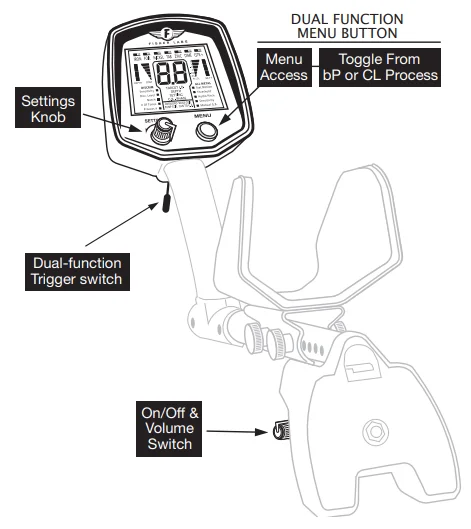
ON-OFF & VOLUME Knob (Under the elbow)
This knob turns the machine on or off, and controls speaker volume and headphone volume. Knob position does not affect the detector’s sensitivity or susceptibility to noise from electrical interference. The F75 has two controls on the front panel: MENU and SETTINGS.
MENU Pushbutton (red button on the right of the front panel)
Push the MENU button to:
- Step through the menu selections on the display. With each push of the button, the next menu selection will be highlighted. The SETTINGS knob then allows you to change values for the highlighted selection.
- Recall the last setting that you adjusted. After you have adjusted a setting, an indicator will remain highlighted next to this menu selection. One push of the button will recall that selection and display the stored value. This recall function is useful for a value you want to adjust frequently, such as the ground balance setting. In order to adjust a stored value with the SETTINGS knob, you must first press the MENU button to reactivate the user interface.
- Press and hold the MENU button to temporarily switch to the dE (default) process, only when operating in the bP or CL process. The dE process will only be engaged while the button is depressed. Releasing the button will return you to the process you were operating in. When using any processes other than BP or CL, pressing and holding the button will have no effect.
SETTINGS Knob (on the left of the front panel)
Rotate the SETTINGS knob to:
- Change the setting or value of the highlighted menu selection you have chosen.
- Select the operating mode when the top line of the menu is highlighted. When used to switch back and forth between the Discrimination Mode and All Metal Modes, the detector changes modes as soon as the corresponding selection is highlighted. The All Metal Modes are used to detect all metal objects, including small or deep objects. Use the Discrimination Mode to ignore trash metal such as nails, foil, or pull-tabs.
NOTE: When the menu selection highlight disappears, the SETTINGS knob is deactivated. If settings values do not change when the SETTINGS knob is rotated, press the MENU button to reactivate the user interface.
TRIGGER SWITCH (under the display in front of your hand)
While the trigger is pulled back, metal objects are temporarily detected without the need for searchcoil motion. This aids in pinpointing the exact location of objects that were found while searching in the Discrimination or motion All Metal Modes. When in static All Metal Mode, pulling the trigger zeroes the audio threshold to the signal level currently preset. If the searchcoil is up in the air away from metal, this maneuver corrects for threshold drift due to temperature changes.
When the trigger is pushed forward, FASTGRAB™ automatic ground balancing is activated. The internal computer measures the magnetic properties of the soil in order to cancel interference from naturally occurring minerals in the ground. After the detector measures the soil in this manner, the detector then uses this information to control operation in both the All Metal and Discrimination Search Modes. FASTGRAB™ can be used at any time during operation.
The Menu System
The entire menu is printed on the LCD display. The display highlights the mode and settings that are in use. There are three search modes: Static All Metal, Motion All Metal, and Discrimination. To change between an All Metal Mode and Discrimination Mode, the top line of the menu system must be highlighted. Press the MENU button until the top line of the menu is highlighted. When either All Metal or Discrimination is highlighted, rotate the SETTINGS knob to move between the two categories. Each search mode has several adjustable function settings:
- ALL METAL: Threshold (not adjustable in static mode), Audio Pitch, Sensitivity, and Manual Ground Balance.
- DISCRIMINATION: Sensitivity, Discrimination Level, Notch, Number of Tones, and Process Number.
To select a function, push the MENU button and continue pushing in order to move to the function you want. The word SETTING will pop up in the middle of the display, and the present setting of that function will be displayed as a number. To change a setting, rotate the knob.
- To increase a value, rotate to the right (clockwise).
- To decrease a value, rotate to the left (counterclockwise).
If you select a function and do not make a change to that function after 7 seconds, the detector will exit the menu system automatically, deactivate the SETTINGS knob, and resume normal operation. If you press the MENU button while the machine is in normal operation, the user interface will return to the last menu feature setting. This feature allows you to have quick access to a function that you want to adjust frequently.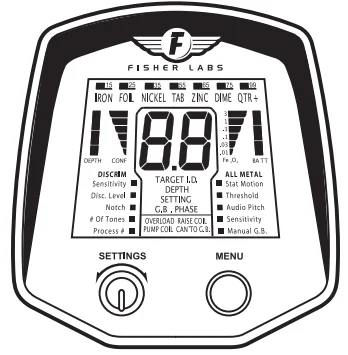
D.S.T. (DIGITAL SHIELDING TECHNOLOGY)
Traditional detector technology requires users to work into the noise at high gain settings to achieve maximum possible depth. The F75’s latest technological advance, Digital Shielding Technology (DST®), permits the use of maximum sensitivity settings with minimum background noise. This noise reduction reduces user fatigue and enhances the detection experience. The user may choose to operate with DST or without DST. The default setting at power-on employs DST.
To turn DST off, perform the following:
- Turn the detector off.
- Press and hold the grey MENU button, and push forward and hold the TOGGLE SWITCH.
- Turn the detector on while you are still holding the controls.
- Continue to hold the controls.
- See “90” displayed.
- Rotate the SETTINGS knob clockwise.
- See “91” displayed.
- Release the MENU button and TOGGLE SWITCH.
Upon release of the controls, the detector will operate without DST. DST status is saved to memory after the user performs this procedure. Each time the detector is powered back on, it will continue in the programmed setting. The same procedure is used to turn DST back on, except that the SETTINGS knob is turned counterclockwise to change “91” to “90”. DST can be turned on or off as desired, but each change requires the user to first power the detector off. FOR COMPLETE DETAILS VISIT WWW.FISHERLAB.COM.
For More Manuals By Fisher Labs, Visit ManualsLibraryy.
Fisher Labs F75 Special Edition Metal Detector-FAQs
What is the Fisher Labs F75 Special Edition Metal Detector?
The Fisher Labs F75 Special Edition is a high-performance VLF metal detector designed for relic hunting, coin shooting, gold prospecting, and general treasure detection. It operates at a 13 kHz frequency and features advanced signal processing, fast recovery speed, and multiple search modes. The Special Edition includes performance upgrades like Boost and Cache locating modes, making it suitable for detecting deeper and larger targets compared with standard versions.
What makes the Fisher F75 Special Edition different from the standard F75?
The Special Edition includes additional advanced modes and improved electronics. It features Boost Process mode for enhanced depth and Cache Locating mode for detecting large buried objects. It also often includes both 11-inch and 5-inch waterproof search coils, improving versatility in different environments. These upgrades provide better performance in mineralized soil and trash-heavy areas compared with the standard model.
Is the Fisher F75 Special Edition waterproof?
The detector’s search coils are waterproof, allowing use in shallow water, wet ground, and muddy terrain. However, the control housing is only weather-resistant and should not be submerged. This design allows the detector to perform well in damp conditions while requiring users to protect the electronics during heavy rain or underwater detecting.
How deep can the Fisher F75 Special Edition detect metal objects?
The F75 Special Edition offers impressive detection depth, especially when Boost mode is used. Under favorable soil conditions, it can detect coin-sized objects at significant depths and locate larger buried items even deeper. Boost mode increases sensitivity, while Cache mode is designed specifically to locate deeply buried metal masses such as treasure caches and relic containers.
Can the Fisher F75 Special Edition detect gold?
Yes, the F75 Special Edition can detect gold, including jewelry and small gold nuggets. Its 13 kHz operating frequency provides a balance between sensitivity to small low-conductive targets and deeper detection capability. Adjustable discrimination and ground balance help improve gold detection accuracy, particularly in mineralized soil conditions.
What search coils are included with the Fisher F75 Special Edition?
Most Special Edition packages include two waterproof coils — an 11-inch DD coil for general detecting and a 5-inch DD coil for better target separation in trashy areas or iron-rich soil. The availability of multiple coils allows users to adjust detection performance based on terrain and target type.
Is the Fisher F75 Special Edition suitable for beginners?
The detector can be used by beginners, but it is mainly designed for serious hobbyists and experienced detectorists. It includes advanced customization settings like sensitivity adjustment, discrimination controls, and multiple tone options, which require some learning. However, preset modes and automatic ground balance features help new users start detecting more easily.
How long does the battery last on the F75 Special Edition?
The detector typically runs on four AA batteries and can provide approximately 40 to 80 hours of operation, depending on settings and usage conditions. This long battery life makes it suitable for extended outdoor detecting sessions without frequent battery replacement.
What ground balancing features does the F75 Special Edition include?
The detector includes both automatic GroundGrab™ ground balancing and manual ground balance adjustments. These features allow the detector to adapt to varying soil mineralization levels, improving target accuracy and reducing interference. It also displays ground phase and mineralization readings to help users fine-tune performance.
Who should consider buying the Fisher F75 Special Edition Metal Detector?
The F75 Special Edition is ideal for relic hunters, treasure hunters, and serious hobbyists looking for depth, sensitivity, and advanced customization. Its lightweight ergonomic design allows long detecting sessions, while enhanced detection modes make it suitable for challenging ground conditions and professional-level detecting needs.