
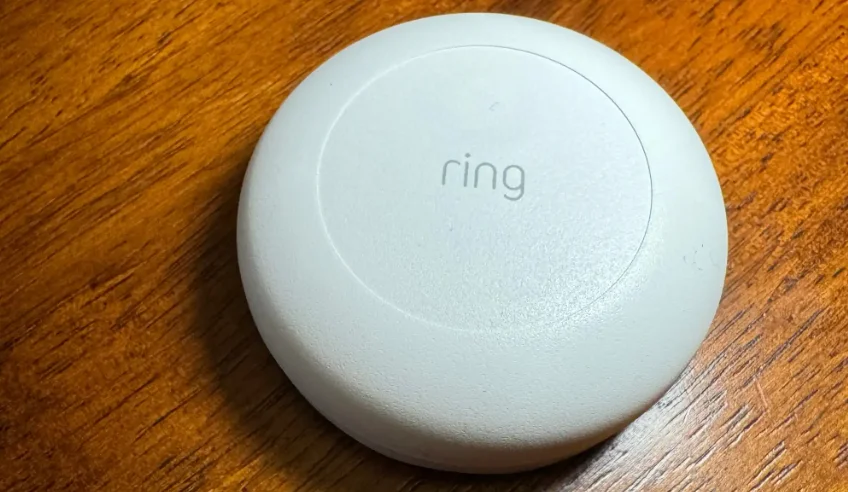

Ring Flood & Freeze Sensor
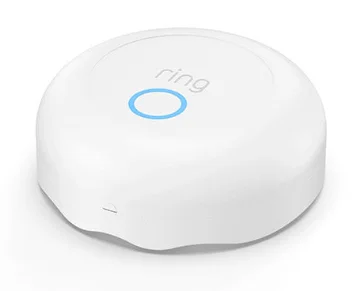
The Ring Alarm Flood & Freeze Sensor is a smart home device designed to help protect your property from costly water damage and extreme temperature drops. It sends real-time alerts to your phone whenever water is detected or when temperatures fall to a level that could cause pipes to freeze. Compact and easy to install, the sensor can be placed near sinks, water heaters, basements, or any area prone to leaks. When connected to a compatible Ring Alarm system, it integrates seamlessly into your home security setup, giving you added peace of mind whether you’re at home or away.
Prevent water and ice damage at home.
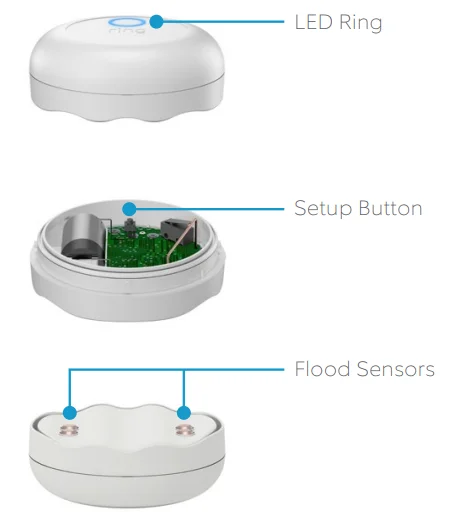
Ring Flood & Freeze Sensor is a smart sensor for your Ring Alarm system. Place it anywhere you want to monitor for flooding or freezing conditions. At the bottom of the Sensor, you’ll see flood sensors that can tell when water is present. Inside, a temperature sensor keeps watch for dangerously low temperatures (around 40 °F or 4.4 °C). When either of these conditions occurs, the Ring app notifies you so you can take care of the issue.
1. Say hello to your Ring Flood & Freeze Sensor.
Diagram
2. Set up your Ring Flood & Freeze Sensor in the Ring app.
Begin the setup process near your Ring Alarm Base Station.
To add devices to your Ring Alarm, it must be disarmed. If your Ring Alarm is armed, please disarm it now. In the Ring app, tap Set Up a Device and find Ring Flood & Freeze Sensor in the Security Devices menu. To complete the setup process, follow the in-app instructions.
When prompted, scan the QR Code or enter the PIN.
This begins the pairing process. The QR Code and PIN are on the back of your sensor and in the product packaging.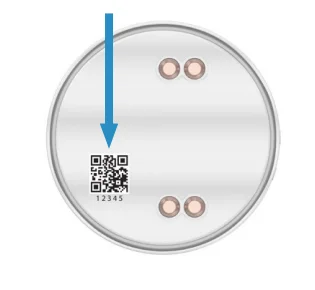
When prompted, open the lid and pull out the clear tab.
Twist the lid to the left to unlock, then lift it to remove. Next, pull out the clear battery tab. This turns on the Sensor. Your Base Station finds it automatically.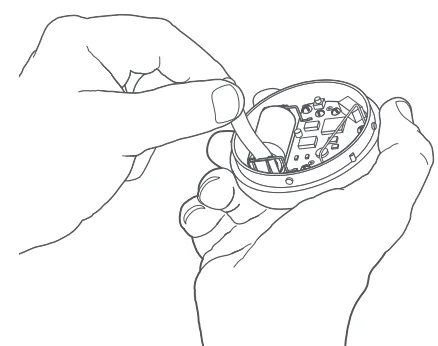
Can’t scan the QR code?
No problem! In the app, on the scanning screen, tap Not working? Enter a number instead. Then, enter the 5-digit PIN code you’ll see below the QR code. Next, you’ll put your Sensor in manual pairing mode. To do this, open the Sensor, then remove and reinstall the battery. Finally, press the Setup Button to begin pairing.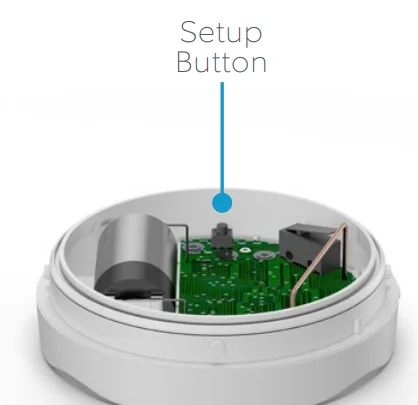
Watch your Sensor connect.
As your Sensor pairs to your Base Station, its LED ring blinks slowly, then quickly. Once the Sensor is paired, the LED glows blue for three seconds. Note: If the Sensor does not pair successfully, the LED ring glows red. To try the pairing process again, remove and reinstall the battery inside the Sensor.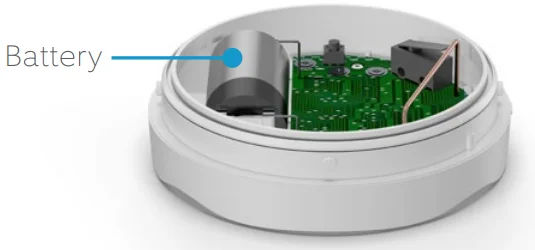
3. Place your Ring Flood & Freeze Sensor.
Test your Flood & Freeze Sensor.
Now that your Sensor is set up, bring it to the area you want to monitor. To ensure it remains connected to your Alarm Base Station in its new location, test the Sensor. To do this, push the Setup button inside the Sensor. If the LED blinks blue, the Sensor is connected and ready to place. If it blinks red, try the test again. You may find that repositioning the Sensor (even just a few inches) can improve reception. Note: If the Sensor cannot connect, try installing a Ring Range Extender between your Sensor and Base Station.
Close the lid.
Place the lid back on the Sensor, taking care to line up the semi-circle on the rim of the lid with the “open” semi-circle on the base. Twist the lid clockwise to lock it in.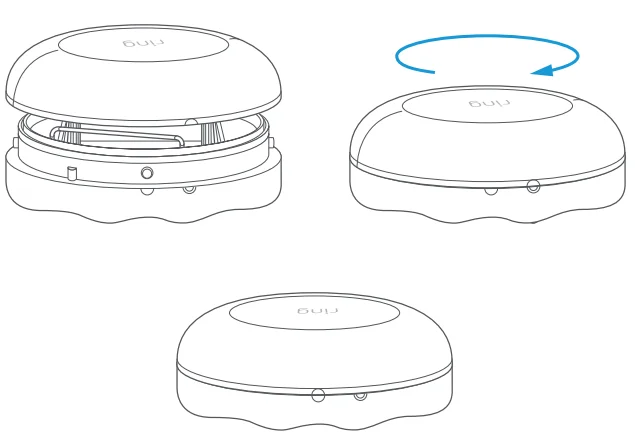
Place the Sensor on the ground.
Choose a spot next to a possible source of flooding, such as your water heater, sink, or refrigerator. Take care to place the Sensor in a location where it won’t be kicked or moved unintentionally. Note: If the surface you’re placing it on is not flat, try to place your Sensor at the lowest point.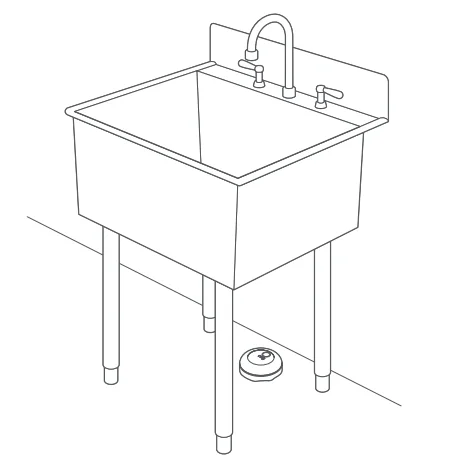
4. Additional information.
How to remove this Sensor from your system:
Open the side menu in the Ring app and tap Devices, then Base Station. Next, select your Sensor, then tap the gear-shaped icon, and tap Remove Device. When prompted, open the sensor and remove and reinstall the battery to complete the removal.
Having trouble with your Sensor?
If your Flood & Freeze Sensor stops working or can’t connect (even with a good battery), try a factory reset. To do this, press and hold the Setup button for 10 seconds. When the LED ring stops blinking, the Sensor has reset. Note: This process disconnects the Sensor from Ring Alarm. To begin using the Sensor again, repeat the setup process in the Ring app.
How to replace the battery:
Twist the lid on the Sensor counterclockwise and lift to remove. Replace the battery with a fresh CR123A cell. The Sensor then reconnects to your Ring Base Station automatically.
LED status patterns: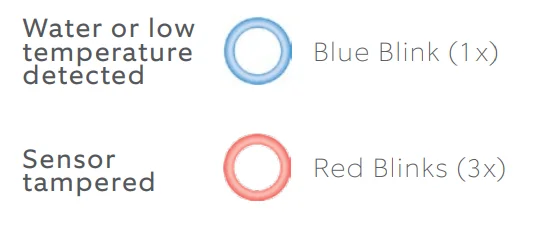
For info on other LED patterns, visit ring.com/help.
For More Manuals By Ring, Visit ManualsLibraryy.
Ring Flood & Freeze Sensor-FAQs
Is the Ring Flood & Freeze Sensor any good?
Yes, the Ring Flood & Freeze Sensor is generally well-reviewed and considered effective for early leak detection and low-temperature alerts. Many users report that it provides peace of mind by notifying them quickly when water or freezing conditions are detected. The easy setup and integration with the Ring Alarm system make it convenient for homeowners looking to prevent costly water damage repairs before problems escalate.
How does the Ring Flood & Freeze Sensor work?
The Ring Flood & Freeze Sensor detects water through metal contact points on the bottom of the device that trigger an alert when they come into contact with moisture. It also monitors temperature and sends notifications if it senses dangerously low temperatures that could lead to frozen pipes. When connected to the Ring Alarm system, alerts are sent directly to your smartphone through the Ring app.
Where should I place a Ring Flood & Freeze Sensor?
The sensor should be placed on the floor or a flat surface in areas where leaks or freezing are likely to occur. Common placement locations include under sinks, near water heaters, beside washing machines, behind refrigerators, or in basements. It is designed to sit directly on the ground so it can detect water pooling at floor level before significant damage spreads.
What type of battery does the Ring Flood & Freeze Sensor use?
The Ring Flood & Freeze Sensor is powered by a 3V CR123A lithium battery. This battery type allows for long-lasting performance and flexible placement since the device does not require wiring. Battery life depends on usage and environmental conditions, but the Ring app typically provides notifications when the battery level is low so you can replace it promptly.
Can the Ring Flood & Freeze Sensor prevent water damage?
The sensor cannot physically stop leaks or shut off water, but it can help prevent extensive damage by alerting you early. Quick notifications allow you to respond immediately, potentially minimizing repair costs. When paired with professional monitoring or additional smart devices like automatic water shut-off systems, it becomes part of a broader water damage prevention strategy.
Does the Ring Flood & Freeze Sensor work without a subscription?
You can receive real-time alerts without a paid Ring subscription as long as the device is connected to a Ring Alarm Base Station. However, certain advanced features, extended event history, or professional monitoring services may require a Ring Protect plan. Basic notifications and in-app alerts typically work without an ongoing subscription fee.
How is a flood sensor different from a floodlight camera?
A flood sensor detects water leaks and freezing temperatures, while a floodlight camera provides video surveillance with motion-activated lighting. The Ring Flood & Freeze Sensor is focused solely on environmental monitoring inside the home. In contrast, Ring Floodlight cameras are outdoor security devices designed to detect motion and record video footage.
How far can Ring motion devices detect activity?
Ring motion-enabled cameras and floodlight devices typically detect motion up to about 30 feet under standard conditions. However, the Flood & Freeze Sensor does not detect motion at all. Instead, it specifically monitors water presence and temperature changes. Motion detection range applies only to Ring cameras and floodlight models, not environmental sensors.
Is the Ring Flood & Freeze Sensor easy to install?
Yes, installation is simple and does not require professional assistance. After inserting the battery, you connect the sensor to your Ring Alarm system through the Ring app. Once paired, you simply place it on the floor in the desired location. Because it is wireless and compact, it can be positioned discreetly in tight or hidden spaces.