
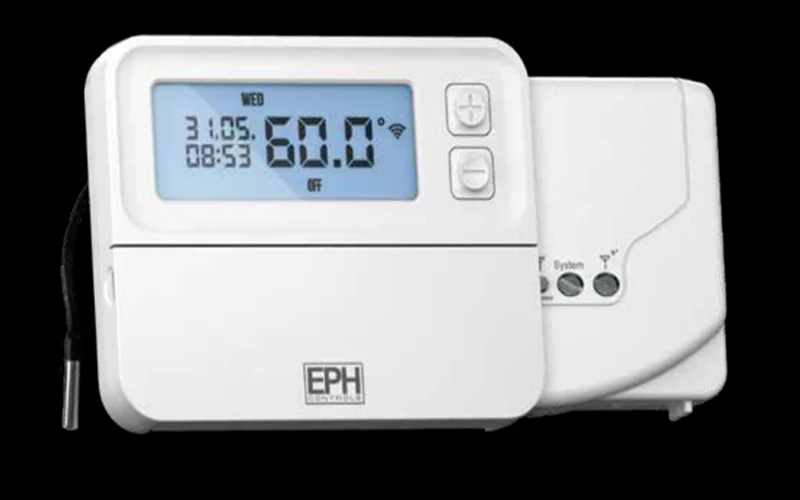

EPH CP4-HW-OT Programmable RF Cylinder Thermostat
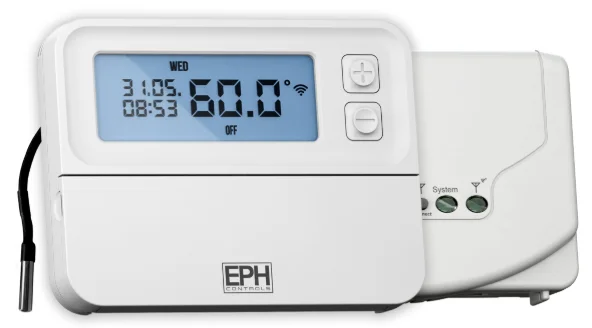
Factory Default Settings
- Temperature indicator: ˚C
- Switching differential: 5˚C
- In-built frost protection: 5˚C – Not adjustable
- Clock: 24 hours
- Keypad lock: OFF
- Operating mode: 5/2 days
- Default temperature setpoint: 60˚C
Frost Protection 5˚C
Frost protection is built into this thermostat. It is pre-fixed at 5°C and is not adjustable. It will only be activated when the thermostat is in the OFF mode, and the cylinder temperature falls below 5°C.
Specifications
- Power supply: 2 x AA Alkaline Batteries
- Power consumption: 2 mW
- Battery replacement: Once a year
- Temp. control range: 5 … 90˚C
- Ambient temperature: 0 … 45˚C
- Dimensions: 130 x 99 x 25mm
- Temperature sensor: NTC 100K Ohm @ 25˚C
- External sensor length: 1950mm ± 80mm
- Temperature indication: ˚C
- Switching differential: 5˚C
- Frost protection: Only operational in OFF mode
- Pollution degree: Pollution degree 2
How your cylinder thermostat works
When the thermostat is in the AUTO mode, it will operate according to the times that have been programmed. The user can select from 6 different programs per day, each with a time and a status of ON or OFF. When a program is scheduled to be ON, it will remain on until the next OFF program. During this time, the thermostat will remain ON until the temperature setpoint is reached. There is only one temperature setpoint, which is applied to all programs. The default temperature setpoint is 60˚C. 60˚C is the temperature level required in order to prevent the build-up of Legionella bacteria.
Mounting of the temperature sensor
- ON CYLINDER: To ensure accurate control of your cylinder, the temperature sensor should be mounted on the bottom 1/3 of the cylinder. It is essential that the sensing element is in direct contact with the cylinder and that there is no insulation between it and the cylinder. The temperature sensor can be fixed to the cylinder using the provided foil tape.
- ON PIPEWORK: To ensure accurate control, the temperature sensor should be mounted on the pipework as tightly as possible. It is essential that the sensing element is in direct contact with the pipework and that there is no insulation between it and the pipework. The temperature sensor can be fixed to the pipework using foil tape.
- IN THERMAL POCKET: To ensure accurate control, the temperature sensor should be inserted into the thermal pocket. It is essential that the sensing element is inserted as far as possible. The temperature sensor can be fixed using the provided foil tape.
Mounting & Installation
Caution!
- Installation and connection should only be carried out by a qualified person.
- Only qualified electricians or authorised service staff are permitted to open the thermostat.
- If the thermostat is used in a way not specified by the manufacturer, its safety may be impaired.
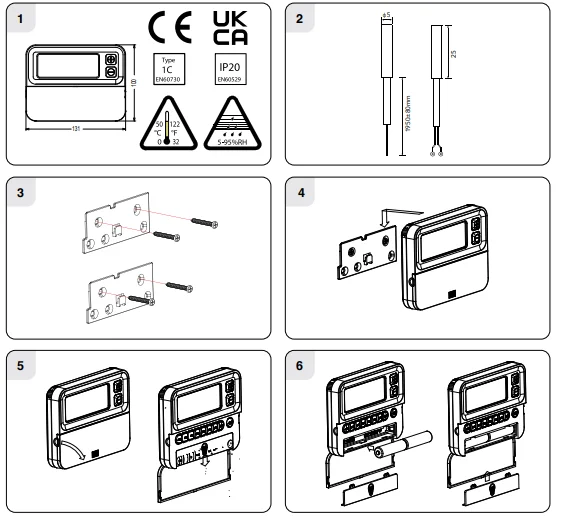
- Prior to setting the thermostat, it is necessary to complete all required settings described in the section. This thermostat can be mounted directly on the wall using the plate included.
- The mounting height should be 1.5 metres above the floor level.
- The place of installation should be chosen so that the sensor can measure the temperature as accurately as possible. Choose the mounting location to prevent direct exposure to sunlight or other heating/cooling sources when mounted.
- Fix the mounting plate directly to the wall with the screws provided.
- Attach the thermostat to the mounting plate.
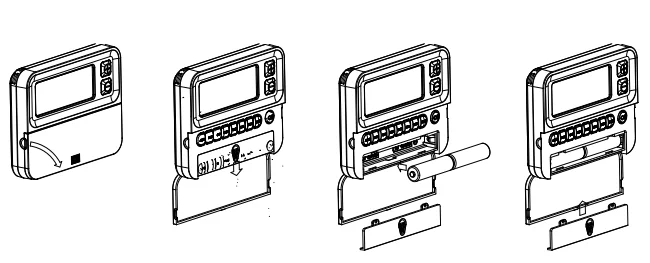
- Lower the flap at the front of the thermostat. There is a battery compartment located below the buttons. Apply downward pressure to remove the cover.
- Insert the 2 x AA batteries, and the thermostat will turn ON. Close the battery compartment.

Specifications & Wiring
- Power supply: 200 – 240Vac 50-60Hz
- Contact rating: 250 Vac 10(3)A
- Ambient temperature: 0 … 45˚C
- Automatic action: Type 1. C.Q
- Appliance classes: Class II appliance
- Pollution degree: Pollution degree 2
- IP Rating: IP20
- Rated Impulse Voltage: Resistance to voltage surge 2500V as per EN 60730
Internal wiring diagram for RF1A-OT
Mounting & Installation
- The RF1A-OT receiver should be wall-mounted in an area within 20 metres distance of the wireless thermostat. It is important that the receiver is mounted more than 300mm away from metal objects, as this will affect communication with the thermostat. The receiver should be installed at least 1 metre from any electronic devices such as radio, TV, microwave, or wireless network adaptor.
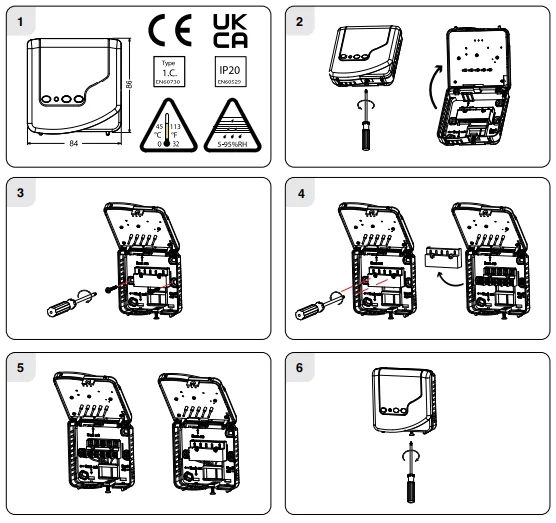
- Slacken the fastening screw on the bottom of the receiver with a Philips screwdriver. The receiver is hinged and can be opened 180 degrees.
- Screw the receiver to the wall with the screws provided.
- Remove the protective cover on the terminal block.
- Insert wires into the terminal block in accordance with the wiring diagram.
- Close the cover and tighten the fastening screw.

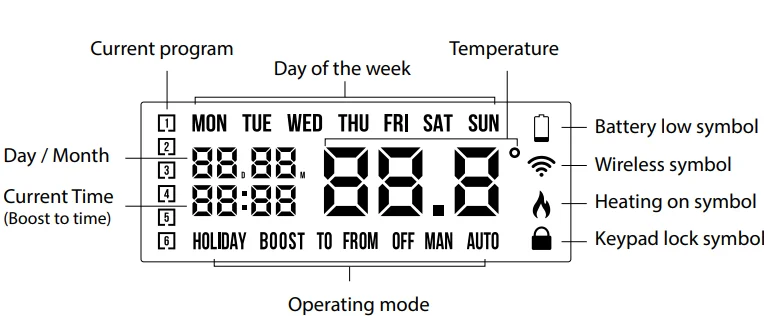
LCD Symbol Description
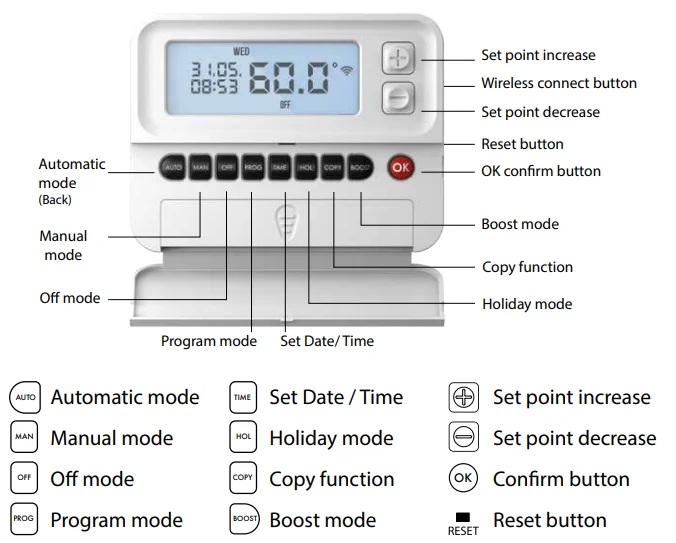
Button Description
Resetting the thermostat
- Press the
 button on the side of the thermostat. ‘rst no’ will appear on the screen.
 - Press the
 button. ‘rst yes’ will appear on the screen.
 - Press the
 button to reset the thermostat.
 button on the side of the thermostat. ‘rst no’ will appear on the screen.
 button. ‘rst yes’ will appear on the screen.
 button to reset the thermostat.
Keypad lock and unlock  OFF.
OFF.
 OFF.
OFF.- To lock the keypad, press and hold the
 buttons for 10 seconds.
  will appear on the screen. The keypad is now locked.
 - To unlock the keypad, press and hold the
 buttons for 10 seconds. will disappear from the screen. The keypad is now unlocked.
 will appear on the screen. The keypad is now locked.
Setting the date, time, and programming mode
- Press the
 button once, and the year will begin flashing.
 - Press the
 buttons to adjust the year. Press
  .
. - Press the
 buttons to adjust the month. Press .
 - Press the buttons to adjust the day. Press .
- Press the
 buttons to adjust the hour. Press .
 - Press the buttons to adjust the minute. Press .
- Press the buttons to adjust from 5/2d to 7d or 24h mode.
- Press the buttons to turn DST (Daylight Saving Time) ON or OFF.
- Press the
 button or wait 5 seconds, and the thermostat will return to normal operation.
 button once, and the year will begin flashing.
 button or wait 5 seconds, and the thermostat will return to normal operation.
Programming Modes
The RFRP-HW-OT Cylinder Thermostat has the following programming modes available:
- 5/2 Day mode Programming Monday to Friday as one block and Saturday and Sunday as a 2nd block. Each block can have 6 different times and a status of ON or OFF.
- 7 Day mode Programming all 7 days individually with different times and temperatures.
- 24 Hour mode Programming all 7 days as one block with the same times.
If 7d mode is selected, you can program each day of the week with 6 individual times. If 24H mode is selected, you can program each day of the week with the same 6 times.
Adjust the program setting in 5/2 Day mode.
Press the  button once.
Programming for Monday to Friday is now selected.
- Press the
 buttons to adjust the P1 time. Press .
 - Press the buttons to select ON or OFF. Press .
- Repeat this process to adjust P2 to P6 times. Press .
Programming for Saturday to Sunday is now selected.
- Press the buttons to adjust the P1 time. Press .
- Press the buttons to select ON or OFF. Press .
- Repeat this process to adjust P2 to P6 times.
- Press the
 button to return to automatic mode.
 - While in
 Mode, pressing the PROG button will jump from P1-P2, etc., without changing the time.
 - While in Mode, pressing the TIME button will jump to the next day (block of days).
Copy Function
Copy function may only be used if the thermostat is in the 7d mode.
- Set the times for the day that you wish to copy from in PROG mode.
- When still on the day, press the button.
- The day of the week that you have selected will be shown with ‘COPY’ below it.
- The next day will begin to flash on the top of the screen.
- Press the
 button to copy the times and temperatures to that day.
 - Press the– button to skip a day.
- You can copy to multiple days using the button.
- Press the button when copying has been completed.
 button.
Permanent Override
- Press the
 button to enter the manual mode (Permanent Override), ‘MAN’ will appear on the screen.
 - Press the buttons to adjust the temperature setpoint.
- Press , or after 5 seconds, the thermostat will operate in this permanent override.
- To cancel permanent override, press the button and then press the button to return to the automatic mode.
 button to enter the manual mode (Permanent Override), ‘MAN’ will appear on the screen.
 button and then press the
 Boost Function
- The thermostat can be boosted for 1, 2, or 3 hours while the thermostat is operating in all modes except for holiday mode.
- Press the
 button 1, 2, or 3 times; the time that the boost will be activated will flash on the screen.
 - If you do not press any other button, the boost will activate to the temperature displayed on the screen after 5 seconds.
- Press the button or wait for 5 seconds for the boost to activate.
- ‘BOOST TO’ will now be displayed on the screen, with the time that it is activated displayed above this text.
Press the button again to deactivate the boost.
 button 1, 2, or 3 times; the time that the boost will be activated will flash on the screen.
Holiday Function
This will switch your heating system off between the start and end times you select.
- Press the
 button, ‘HOLIDAY FROM’ will appear on the screen.
 - Press the buttons to adjust the year. Press .
- Press the buttons to adjust the month. Press .
- Press the buttons to adjust the day. Press .
- Press the buttons to adjust the hour. Press .
- ‘HOLIDAY TO’ will appear on screen.
- Press the buttons to adjust the day. Press .
- Press the buttons to adjust the month. Press .
- Press the buttons to adjust the year. Press.
- Press the buttons to adjust the hour. Press .
The thermostat will now return to the mode it was in before the Holiday settings were entered. To cancel Holiday mode, press the  button.
Backlight mode selection AUTO
There are two settings for selection. The factory default setting is AUTO.
- OFF The backlight is permanently OFF.
- AUTO On pressing any button, the backlight stays on for 5 seconds.
- To adjust the backlight setting, lower the cover on the front of the unit.
- Press the button for 5 seconds.
- Press either the buttons to select the OFF or AUTO mode.
- Press the button.
Battery low warning
- When the batteries are almost empty, the symbol
 will appear on the screen.
 - The batteries must now be replaced, or the unit will shut down.
 will appear on the screen.
Replacing the batteries
- Lower the flap at the front of the thermostat.
- There is a battery compartment located below the buttons.
- Apply downward pressure to remove the cover.
- Insert the 2 x AA batteries, and the thermostat will turn ON.
- Close the battery compartment.

PO 1 Operating Mode (Normal)
Nor (Normal Mode)
When the thermostat is in Normal mode, it will try to reach the target temperature after the program changes.
Example: P1 on the thermostat is for 06:30 am with a status of ON. The thermostat will start heating the hot water to the target temperature until the next programmed OFF time.
PO 3 Hysteresis HON and HOFF
- This menu allows the installer to change the switching differential of the thermostat when the temperature is rising and falling.
- HON is the fall in temperature – Default – 5.0°C. This will allow a fall of 5°C from the setpoint before the thermostat turns ON again.
- HOFF is the temperature rise – Default – 0.0°C. This will allow the temperature to rise 0°C above its setpoint.
PO 4 Calibrate the thermostat.
This menu allows the installer to recalibrate the thermostat. The current temperature will be displayed on the screen and can be adjusted by pressing the  buttons.
PO 5 Frost Protection 5˚C
- This menu allows the installer to activate or deactivate frost protection.
- When frost protection is activated, the thermostat will switch on the boiler when the temperature drops below 5˚C.
Exit
- This menu allows the installer to return to the main interface.
- It is also possible to exit the installer menu by pressing , or whilst in the installer menu.
PO 7 OpenTherm® Information
This menu allows the installer to view information received from the OpenTherm® boiler. It may take a few seconds to load information relating to each parameter. The information that can be shown from the boiler is outlined in the table below.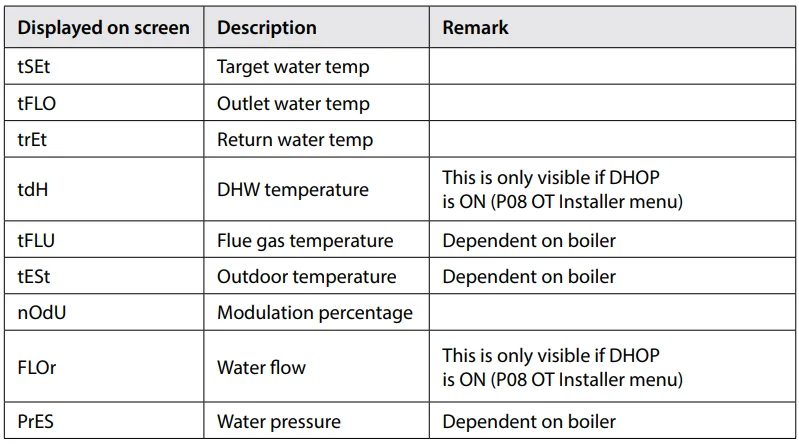
Exit
- This menu allows the installer to return to the main interface.
- It is also possible to exit the installer menu by pressing, or whilst in the installer menu.
To connect the RFRP-HW-OT thermostat to an RF1A-OT receiver
Please note that if you are installing a CP4-HW-OT, the RFRP-HW-OT thermostat & the RF1A-OT receiver will have a pre-established RF connection, so it is not necessary to carry out the RF connection process below.
On the RF1A-OT receiver:
- Press the
 Connect button.
 - The red light will begin to flash.
 Connect button.
On the RFRP-HW-OT thermostat:
- Press the
 button.
 - The thermostat will show ‘nOE’ followed by ‘—’.
- Once an RF connection has been established, the thermostat will show ‘r01’ on the LCD screen.
- Press the button to finish the process.
- The thermostat is now connected to the RF1A-OT receiver.
 button.
To disconnect the RFRP-HW-OT thermostat from an RF1A-OT receiver
This can be done from either the thermostat or the receiver.
On the RFRP-HW-OT thermostat:
- Press the button. The thermostat will begin to search through the RF channels.
- Press and hold the button for 10 seconds. ‘Adr’ will appear on the screen of the thermostat.
- Press the button twice to complete the unpairing process. The thermostat RFRP-HW-OT is now
- disconnected from the receiver RF1A-OT.
On the RF1A-OT receiver:
- Press the Connect button, and the red light will flash.
- If using as a hub receiver, the Red & Green lights will flash.
- Press and hold connect for 10 seconds, and the receiver will then stop flashing.
- The RF connection is now cleared.
EPH Controls IE
[email protected]
www.ephcontrols.com/contact-us
T +353 21 471 8440
EPH Controls UK
[email protected]
www.ephcontrols.co.uk/contact-us
T +44 1933 322 072
For More Manuals By EPH Controls, Visit ManualsLibraryy.
EPH CP4-HW-OT Programmable RF Cylinder Thermostat-FAQs
What is an EPH thermostat?
An EPH thermostat is a heating control device designed to regulate room or cylinder temperature efficiently. Models like the CP4-HW-OT use wireless RF technology to communicate with a receiver connected to your boiler or heating system. EPH thermostats are known for user-friendly programming, reliable performance, and the ability to manage single or multiple heating zones, depending on the setup.
What is the EPH CP4-HW-OT Programmable RF Cylinder Thermostat?
The EPH CP4-HW-OT is a programmable wireless thermostat designed specifically for hot water cylinder temperature control. It allows users to schedule heating times and set desired temperatures, helping improve energy efficiency and comfort. Because it operates via radio frequency, it does not require direct wiring between the thermostat and boiler, making installation more flexible.
How does an RF thermostat work?
An RF thermostat uses radio frequency signals to communicate wirelessly with a receiver connected to your heating system. When the thermostat detects that the temperature has dropped below the set level, it sends a signal to the receiver to activate the boiler. Once the desired temperature is reached, it signals the system to stop heating, maintaining consistent temperature control without hard wiring.
How do you manually reset the EPH CP4 thermostat?
To manually reset the EPH CP4 thermostat, press the reset button until the display shows “rst yes.” Confirm the reset by pressing the OK button. After resetting, you may need to reconfigure the time and date settings. Resetting is useful if the thermostat experiences technical issues or requires a fresh start after installation changes.
How do you connect an EPH RF thermostat to its receiver?
Most EPH RF thermostats come pre-paired with their receiver for quick installation. If pairing is required, you typically activate pairing mode on the receiver and then enable the RF connection function on the thermostat. Once linked, the devices communicate wirelessly. Always follow the manufacturer’s instructions to ensure correct pairing and stable communication.
What is the difference between programmable and non-programmable thermostats?
Programmable thermostats allow you to set temperature schedules for different times of the day or week, helping automate energy savings. Non-programmable thermostats require manual adjustment whenever you want to change the temperature. While programmable models offer greater convenience and efficiency, non-programmable options provide simpler operation for users who prefer manual control.
What does RF mean on a thermostat?
RF stands for radio frequency. On a thermostat, it indicates that the device communicates wirelessly with its receiver using radio signals rather than physical wiring. If you see a “No RF” message, it usually means the thermostat has lost connection with the receiver, which may require battery replacement or re-pairing to restore communication.
What is Auto mode on the EPH CP4 thermostat?
Auto mode allows the EPH CP4 thermostat to follow a pre-set daily schedule. Users can program multiple time and temperature periods throughout the day, enabling the heating system to adjust automatically. This mode is designed for convenience and energy efficiency, ensuring your hot water or heating system operates according to your routine without constant manual changes.
What are common problems with EPH thermostats?
Common issues include loss of RF connection, low batteries, incorrect time or temperature settings, and pairing problems with the receiver. In many cases, replacing batteries or resetting the device resolves the issue. Ensuring proper installation and a stable signal range between the thermostat and receiver also helps prevent communication failures.
Why is my boiler not communicating with my thermostat?
If your boiler is not responding, the issue is often related to low batteries in a wireless thermostat, signal interference, or incorrect pairing with the receiver. It could also result from incorrect programming settings. Checking battery levels, resetting the thermostat, and confirming that the receiver is powered and properly connected usually restores communication.