
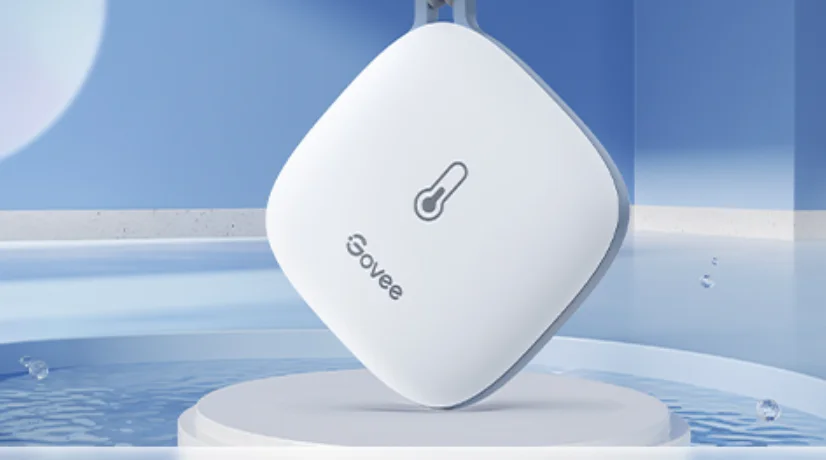

Govee H5179 Wi-Fi Thermo-Hygrometer
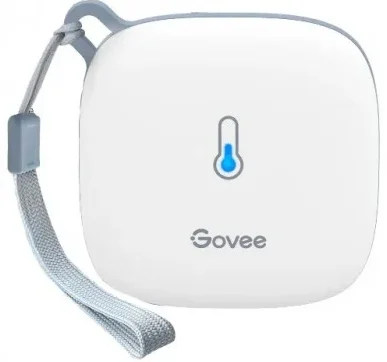
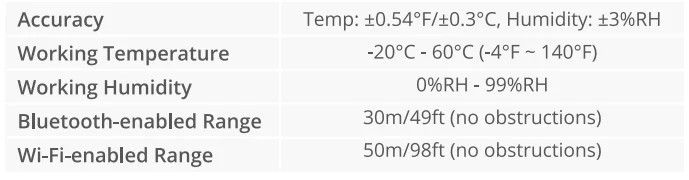
The Govee H5179 Wi-Fi Thermo-Hygrometer is a smart indoor climate monitor that tracks temperature and humidity in real time and sends data to your smartphone via the Govee Home app using 2.4 GHz Wi-Fi (plus Bluetooth for setup). It uses a high-precision sensor with accuracy around ±0.3 °C for temperature and ±3 % for humidity, refreshing readings every few seconds so you always see up-to-date conditions.
You can set custom alert ranges and receive app notifications when levels go outside your presets, and the app stores and lets you export historical data for trend tracking (up to about 2 years). Compact and easy to place with the included strap, it’s great for homes, greenhouses, wine cellars, refrigerators, garages, and other indoor spaces where monitoring climate matters.
At a Glance
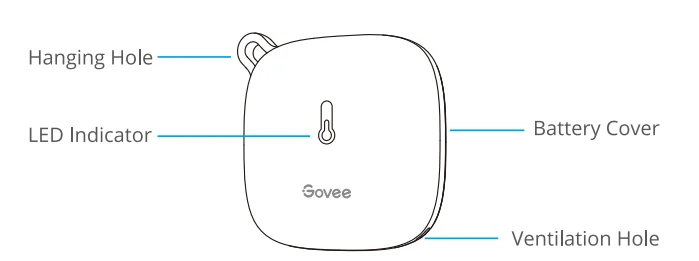
What You Get
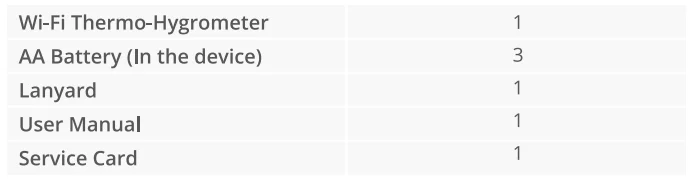
Specifications
Using the Device
Please take out the insulation sheet before using.
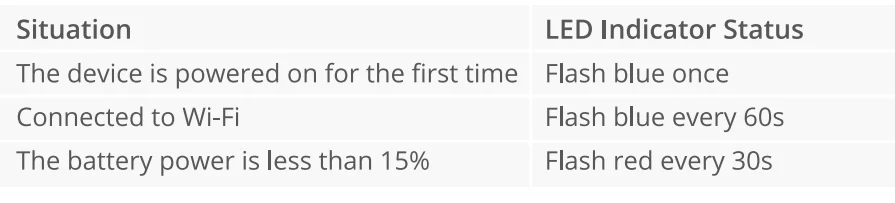
LED Indicator Status Guides
Downloading the Govee Home App
- Prepare a smartphone or tablet running iOS 9.3 (or above) or Android 4.3 (or above);
- Download the Govee Home app from the App Store (iOS devices) or Google Play (Android devices).

Connecting to the Wi-Fi Network
Notice:
- Make sure the Wi-Fi router supports 2.4GHz and 802.11 b/g/n bands;
- Turn on Bluetooth on your mobile phone.
- Open the Govee Home app, tap the “+” icon in the top right corner, and select “H5179.”
- Follow the instructions in the app to complete the connection.
- The LED indicator flashes blue every 60 seconds once the connection is completed.
- Please check the above steps and try again if the connection failed.
Using the Device with the Govee Home
°C/°F Switch
Switch the temperature unit between °C and °F.
Data Export
Export historical temperature and humidity records to CSV format after filling in the mailbox. (Notice: The unit of exported temperature readings is the same as that on the app.)
Alert Notification
The app pushes a notification once the temperature or humidity goes out of the preset range.
Calibration
Calibrate the temperature and humidity readings.
Upload Interval
The interval for Cloud data uploading.
Wi-Fi Settings
Connect to Wi-Fi again or change to a new Wi-Fi network.
Data Clear
Clear local and Cloud-stored data.
Troubleshooting
- Cannot receive alert notification. / Alert notification delayed.
- a. Make sure the Wi-Fi signal is stable.
- b. Keep the device as close to the router as possible.
- c. Keep as few obstructions as possible between the device and the router.
- Lost Wi-Fi connection frequently.
- a. Make sure the distance between the device and the router is less than 50m/98ft.
- b. Keep as few obstructions as possible between the device and the router.
- c. Check whether the battery is running low.
Warning
- The device should work in an environment with a temperature ranging from -20°C to 60°C and humidity from 0%RH to 99%RH.
- Do not disassemble the device violently.
- Do not immerse the device in water.
Customer Service
 Warranty: 12-Month Limited Warranty
 Support: Lifetime Technical Support
- Email: [email protected]
 Official Website: www.govee.com
 @Govee
 @govee_official
 @govee.official
- @Goveeofficial
 @Govee.smarthome
 Warranty: 12-Month Limited Warranty
 Support: Lifetime Technical Support
 Email:
  Official Website:
  @Govee
 @govee_official
 @govee.official
 @Goveeofficial
 @Govee.smarthome
For More Manuals By GoveeLife, Visit ManualsLibraryy.
Govee H5179 Wi-Fi Thermo-Hygrometer-FAQs
What is the Govee H5179 Wi-Fi Thermo-Hygrometer?
The Govee H5179 is a smart temperature and humidity monitor that lets you track environmental conditions in real time via the Govee Home app. It connects using both Bluetooth and 2.4 GHz Wi-Fi to send data remotely to your phone, making it useful for homes, refrigerators, greenhouses, or storage areas. The device refreshes readings frequently and supports alerts if values go outside your desired range.
How accurate are the temperature and humidity readings?
The H5179 uses high-precision sensors to measure temperature with an accuracy of about ±0.3 °C (±0.54 °F) and humidity within ±3 % RH. This level of precision is typical for smart environmental sensors, providing reliable data for most home and hobbyist monitoring needs. Frequent updates every couple of seconds help ensure you’re seeing near real-time conditions.
How do I set up the Govee H5179 with my Wi-Fi network?
To set up, install the Govee Home app on your smartphone, remove the device’s insulation strip, and then power it with batteries. Use Bluetooth through the app to find the device, and then follow the prompts to connect it to your 2.4 GHz Wi-Fi network. Note that it doesn’t support 5 GHz Wi-Fi bands, so your router must provide a 2.4 GHz network.
Can I view the data when I’m away from home?
Yes. Once connected to Wi-Fi, the H5179 uploads temperature and humidity data to the Govee cloud, allowing you to view current and historical readings from anywhere via the app. You can also set alerts for specific temperature or humidity thresholds so your phone notifies you if conditions change unexpectedly.
How long does the device store data, and can it be exported?
The Govee H5179 stores about 20 days of data online by default, and through the Govee Home app, you can export up to two years’ worth of historical temperature and humidity data in a CSV format. This makes it easier to analyze long-term trends and keep records for sensitive environments like wine cellars or plant rooms.
What types of places is this sensor useful for?
This thermo-hygrometer is versatile and suited for monitoring conditions in bedrooms, living spaces, greenhouses, wine cellars, pet enclosures, garages, or even refrigerators. Anywhere you need to maintain a specific temperature and humidity level, the H5179 can help you track those conditions and alert you when adjustments are needed.
Does the H5179 have any limitations with connectivity?
Some users find that although the device claims Wi-Fi connectivity, it may not appear directly on their home network scans despite functioning in the app. It’s also limited to the 2.4 GHz band, so routers set to only broadcast 5 GHz require adjustment. Bluetooth may be necessary for some setup steps and alert configuration.
How do notifications and alerts work on this device?
In the Govee Home app, you can set custom temperature and humidity thresholds. If the environment goes outside these ranges, the app sends a push alert to your phone. This proactive alert system helps you quickly respond to potentially harmful conditions, whether in a nursery, humidor, or anywhere precise climate control matters.
What battery type and power source does it use?
The H5179 is powered by three AA batteries, giving it a wireless setup that doesn’t require constant external power. This makes placement flexible, but you’ll need to replace batteries periodically. The device has an LED indicator that can show low battery status, so you know when it’s time for new cells.
Can the device be used with smart home systems beyond the Govee app?
While the H5179 works well within the Govee Home ecosystem, users have reported that integration with other smart home platforms like IFTTT or Google Home may be limited. Some features and automations that depend on third-party connectivity might not be supported directly and may require additional smart hubs or workarounds.