
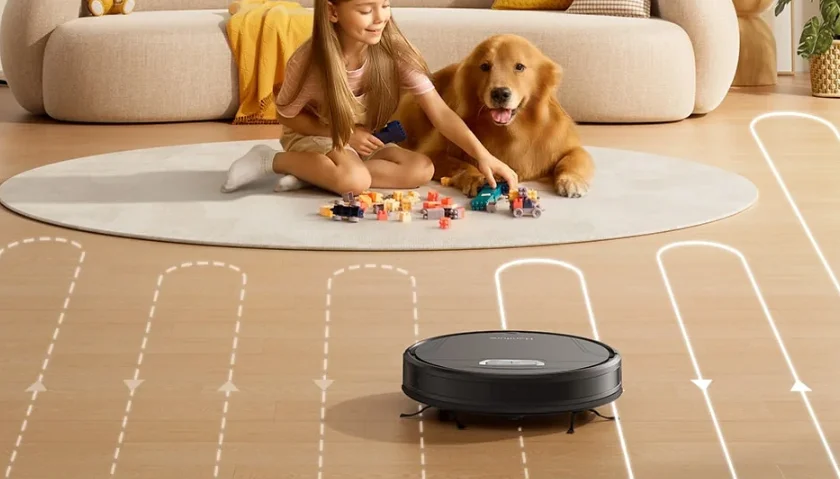

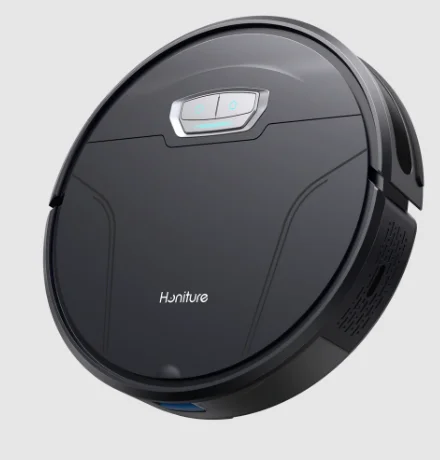
Honiture G20 Pro Robotic Vacuum
Safety Instructions
Use Restrictions
- This machine is only used for floor cleaning at home. Please do not use it outdoors (e.g., on an open balcony), on non-ground surfaces (e.g., a sofa), or in commercial or industrial environments.
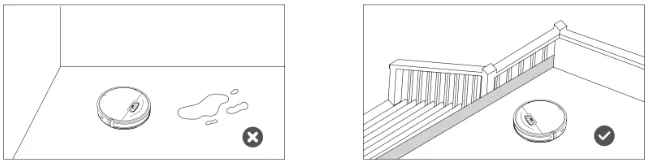
- Do not use the machine in suspended environments without protective fences, such as duplex floors, open balconies, and the top of the furniture.
- Do not use the product in an environment where the temperature is above 40° C or below 0° C, or where there are liquids and viscous objects on the ground.
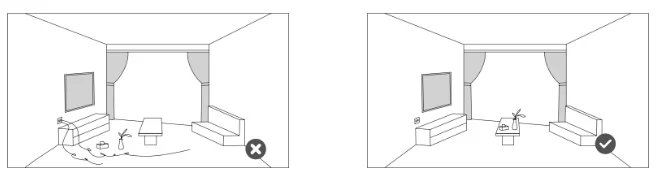
- Hang up the ground cable at home before use to avoid dragging the cable when the machine is running.
- Put away the fragile objects and sundries (such as vases and plastic bags) on the ground. Otherwise, the machine may be blocked, or a slight collision may cause damage to valuables at home.
- Keep the machine away from people (including children) with physical, mental, or sensory impairments.
- Do not allow children to use the machine as a toy. Please keep children and pets away from the machine when the machine is running.
- Keep the cleaning brush in a place that cannot be reached by children.
- Do not place any object (including children and pets) on the stationary or moving machine.
- When the machine is working, keep the hair of humans or pets, or fingers, far away from the suction port of the machine.
- Do not use the machine to clean burning objects, such as unextinguished cigarette butts.
- Do not use the machine to clean long-haired carpets. Some dark carpets may not be cleaned normally.
- Do not use the machine to vacuum hard or sharp objects, such as decoration waste, glass, and iron nails.
- Please clean or maintain the machine and docking station when the machine is powered off or when the power supply is disconnected.
- Do not use a damp cloth or any liquid to wipe any part of the machine.
- Do not use the mopping function on the carpet or the top of the furniture.
- Please follow the instructions in this manual when using the machine. The user should be liable for any loss and injury caused by improper use.
Battery and Charging
- Do not use any third-party batteries, docking stations, or chargers.
- Do not disassemble, repair, or modify the battery or docking station without permission.
- Do not place the docking station near heat sources, such as radiators.
- Do not use a damp cloth or wet hands to wipe or clean the docking station shrapnel.
- Dispose of used batteries properly, and send them to professional recycling agencies.
- If the power cord is damaged or broken, stop using it immediately and buy a new one through official channels.
- To transport the machine, ensure that the machine is powered off. It is recommended that you use the original box for packaging.
- If you do not use the machine for a long time, power it off and keep it in a dry and cool place. Charge the machine at least once every 3 months to avoid damage to the battery due to excessive discharge.
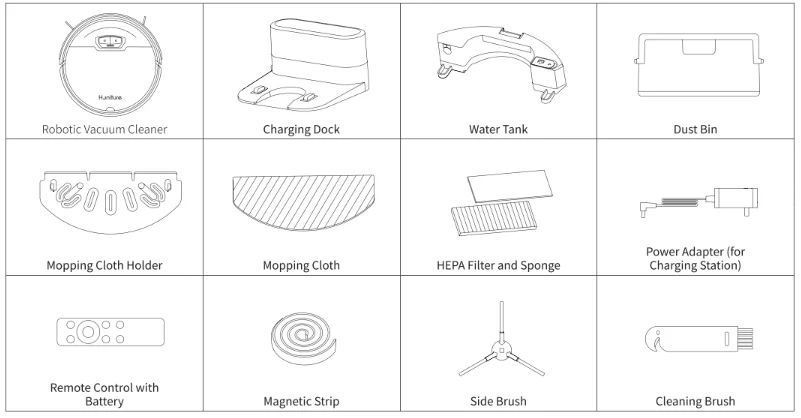
Packing List
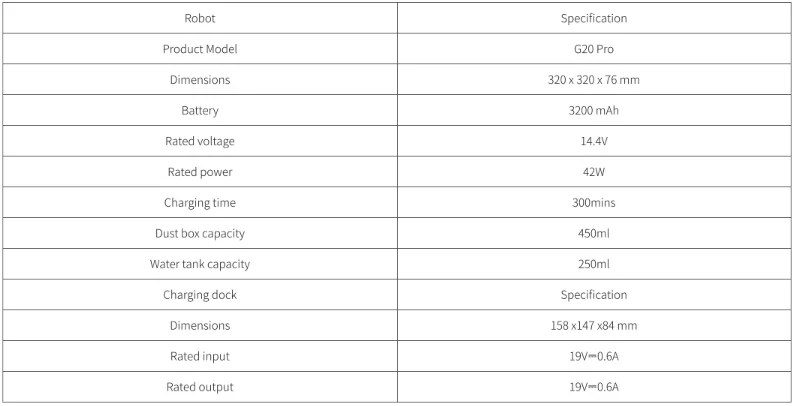
Basic Parameters
Product Introduction
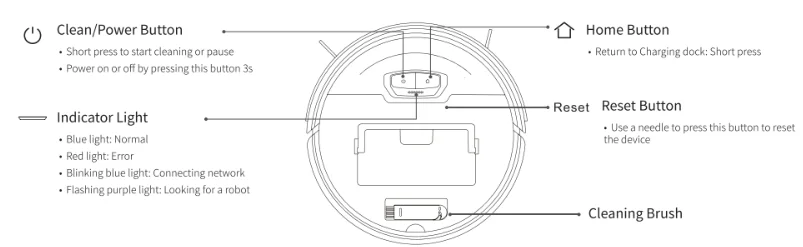
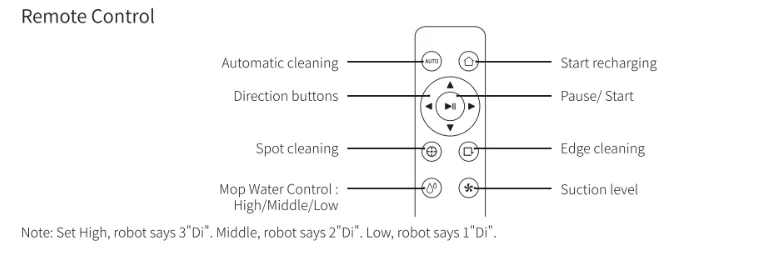
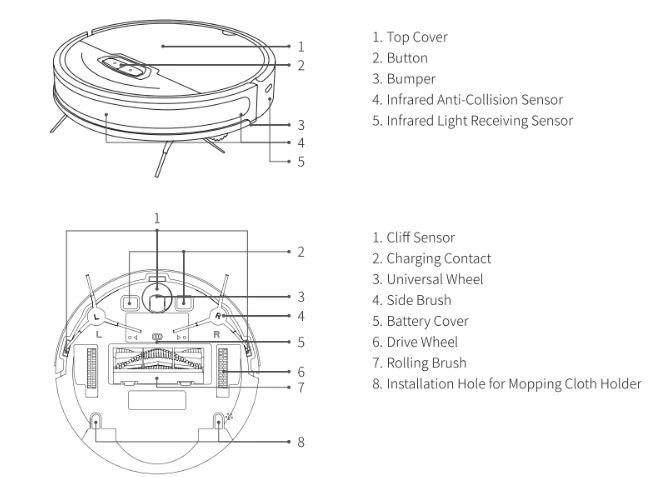
Sensor and its Structure
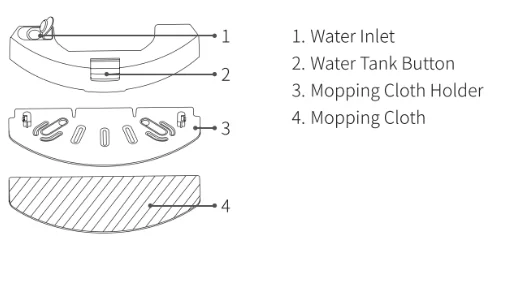
Electric Control Water Tank and Rag Components
Charging Station
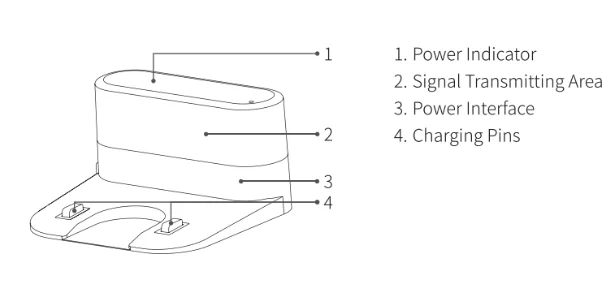
Preparation
Precautions
- Before starting the vacuum cleaner, clean up wires and sundries scattered on the ground, and remove easy-to-fall, fragile, valuable, and potentially dangerous items. Avoid being entangled, jammed, dragged, or knocked down by the robot; otherwise, personal or property damage may be caused.

- Do not use the robot to vacuum liquid. Otherwise, it will damage the fan and affect the performance of the robot.
- When used in a suspended circumstance, it shall be protected by rails to avoid accidental falling or pushing other articles from falling.

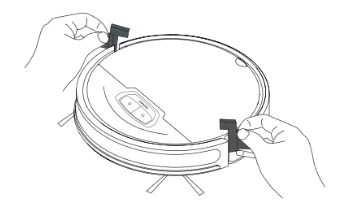
- Remove the protection material from both sides of the robot.

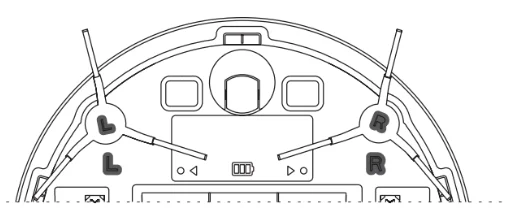
- Install side brushes. Put the left brush (L) and right brush (R) against the letters L and R on the bottom, respectively, and move down for “click” to finish installation.

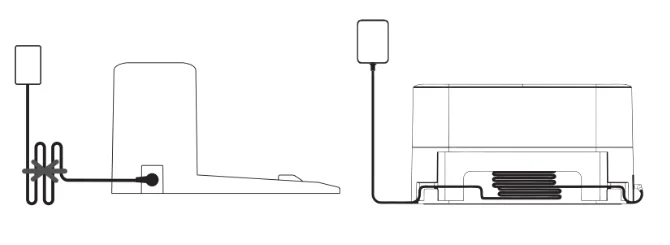
- Take out and place the dust collection charging base on a flat floor against the wall, and tidy up the redundant wires.

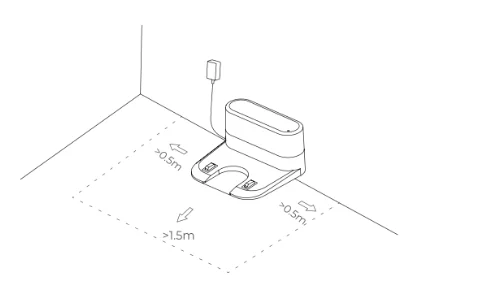
- Ensure a space of more than 0.5 m from the left and right of the charging base and 1.5 m in front of the charging base.
 Note: Ensure a space of more than 0.5 m from the left and right of the charging dock and 1.5 m in front of the charging dock.
- The power line perpendicular to the ground may be dragged by the robot, resulting in the dock powering off.
- The charging indicator is kept on when electrified.
- Do not move the charging base at will. Avoid direct sunlight on the charging base. Note: Sunlight may interfere with the signals of return-for-charging, and then the robot fails to return to the charging dock.

- Power on and charging. Hold the
 button to power on the machine. When the indicator is on, put the robot against the charging dock for charging. The voice of “start charging” prompts successful charging.
 Note: Ensure a space of more than 0.5 m from the left and right of the charging dock and 1.5 m in front of the charging dock.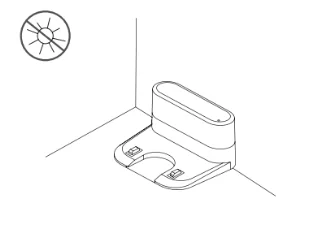
 button to power on the machine. When the indicator is on, put the robot against the charging dock for charging. The voice of “start charging” prompts successful charging.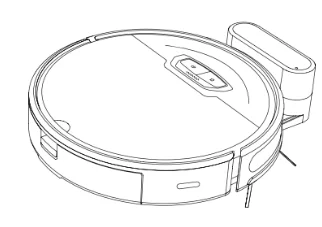
Note: The machine cannot power on in case of insufficient battery. Please place the robot on the dock to allow automatic power on.
Routine Maintenance
Roller brush (Recommended cleaning frequency: weekly)
- Flip the machine, press the buckle on the roller brush cover, and remove the roller brush cover.

- Remove the roller brush.

- Use the cleaning brush that comes with the machine to remove the dust in the main brush and the roller brush cavity, and then clean the objects entangled on the roller brush.

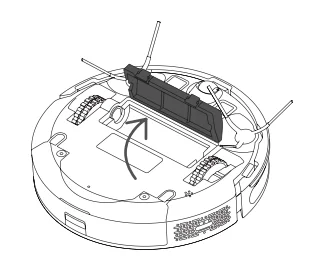
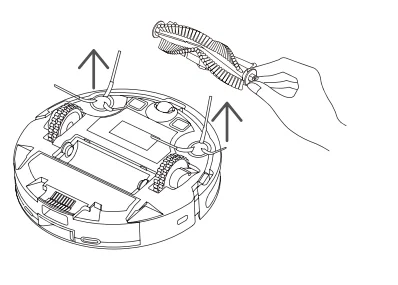
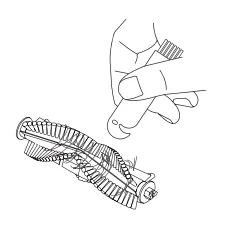
Side brush (Recommended cleaning frequency: weekly)
- Flip the machine, and pull out the side brushes vertically.
- Remove the entangled hair and dirt, and then reinstall the side brushes.
- Align the left side brush (L) and right side brush (R) with the letters L and R on the bottom cover, and press the side brushes to reinstall them.
Note: It is recommended that you replace the side brushes every 3 months to ensure the cleaning effect.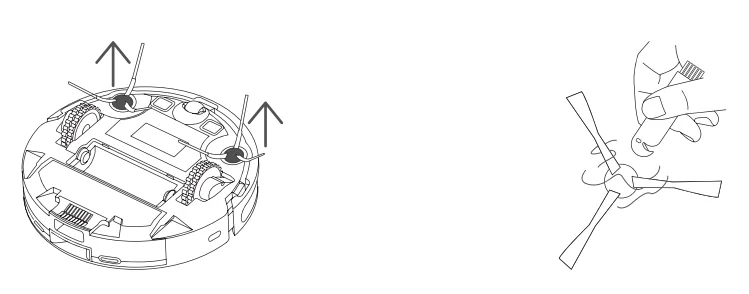
Dust box and filter (Recommended cleaning frequency: after each cleaning)
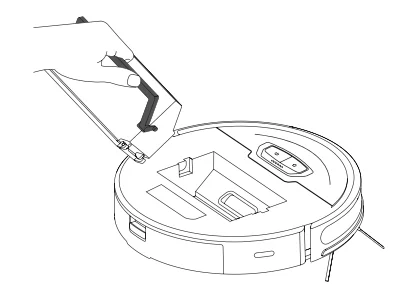
- Remove the machine cover, lift the handle of the dust box, and take out the dust box.

- Press the switch of the dust box, open the dust box, and dump.

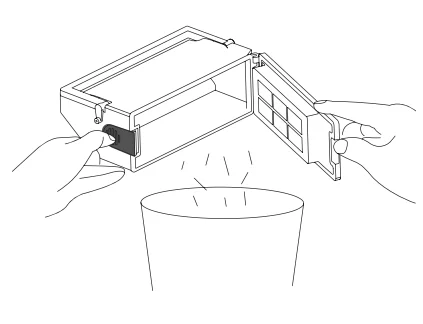
Clean the dust box
- After the machine is used for a long time, remove the filter gauze and HEPA filter.
- Put the removed prefilter and dust box under the faucet for washing (the HEPA filter cannot be washed with water).
- Remove the water droplets, and dry the filter and dust box thoroughly before use. Press the switch of the dust box, open the dust box, and dump.

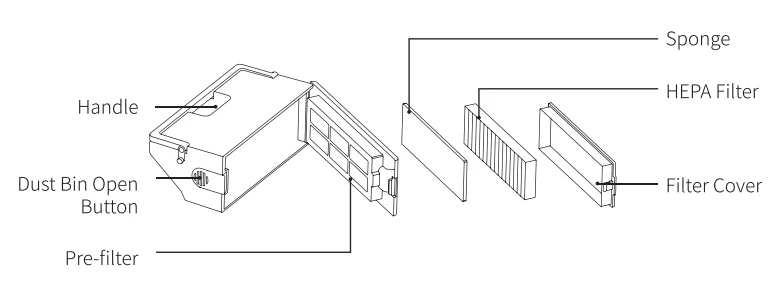
Note:
- Use clean water for washing, and do not add any detergent.
- Do not use a brush or fingers to clean the filter.
- Dry the filters thoroughly for at least 24 hours.
- It is recommended that you replace a set of filters every 3 months.
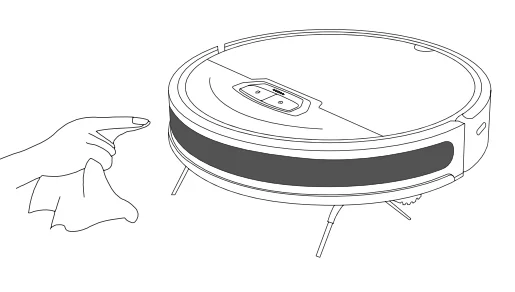
Clean the infrared anti-collision sensor (Recommended cleaning frequency: monthly)
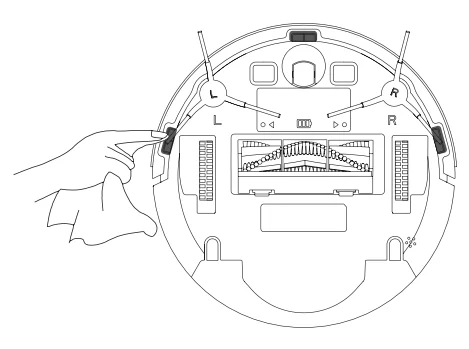
Clean the cliff sensor (Recommended cleaning frequency: monthly)
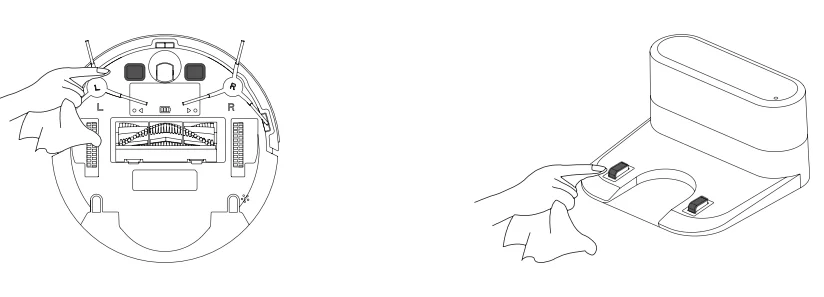
Clean the charging contact (recommended cleaning)
Upgrade the firmware
Start the smartphone app, and enter the firmware upgrade page. After the new firmware is detected, follow the instructions to upgrade the firmware. To upgrade the firmware, the power must be equal to or greater than 50%. It is recommended that you place the machine on the docking station for an upgrade.
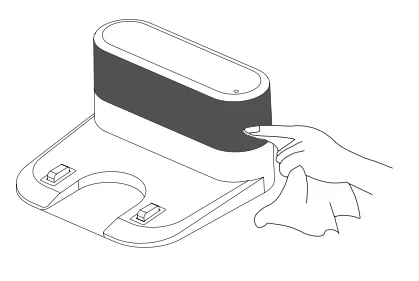
Clean the signal transmission zone (Recommended cleaning frequency: monthly)
Battery
- The machine is equipped with a high-performance rechargeable lithium battery pack. To maintain battery performance, keep the machine in a charging state during daily use.
- If you do not use the machine for a long time, power it off and store it properly. Charge the machine at least once every 3 months to avoid damage to the battery due to excessive discharge.
Troubleshooting
Visit www.honiture.com for more details.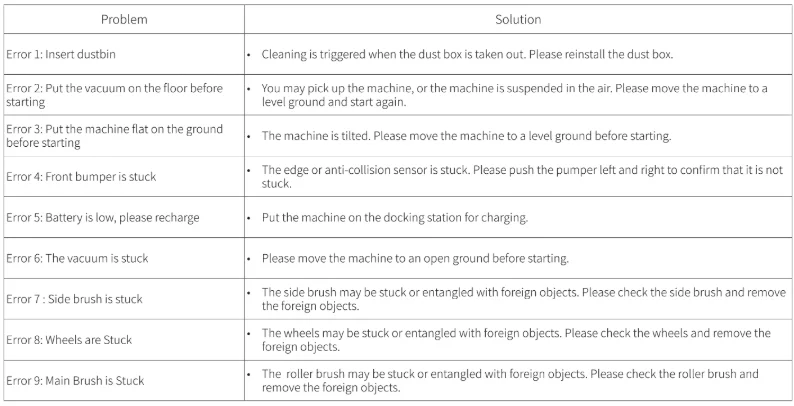
For More Manuals By Honiture, Visit ManualsLibraryy.
Honiture G20 Pro Robotic Vacuum-FAQs
Is the Honiture G20 Pro robot vacuum good for large homes?
Yes, the Honiture G20 Pro is well-suited for large homes thanks to its high-capacity 5200 mAh lithium-ion battery. On a full charge, the robot can run for up to 250 minutes, allowing it to clean areas of up to 400 square meters in a single session. This long runtime makes it practical for multi-room houses or large apartments where smaller robot vacuums might need frequent recharging.
What features make the Honiture G20 Pro stand out?
The Honiture G20 Pro combines vacuuming and mopping functions in one device, making it useful for everyday floor maintenance. It offers strong suction power, smart navigation, and app-based controls for scheduling and cleaning modes. The robot is designed to automatically navigate around furniture and obstacles while maintaining efficient cleaning paths, making it convenient for busy households that want hands-free floor cleaning.
How long does the battery last on the Honiture G20 Pro?
The G20 Pro robot vacuum includes a large battery that can deliver up to 250 minutes of cleaning time, depending on the selected power mode and floor type. This extended runtime allows the robot to clean large areas before needing to recharge. Once the battery gets low, the robot automatically returns to its charging dock and can resume cleaning later if necessary.
Does the Honiture G20 Pro work well on carpets and hard floors?
Yes, the Honiture G20 Pro is designed to clean a variety of surfaces, including hardwood floors, tile, laminate, and carpets. Its adjustable suction levels allow it to pick up dust, debris, and pet hair from different floor types. When transitioning between surfaces, the robot automatically adjusts its cleaning performance to maintain effective suction.
Can the Honiture G20 Pro vacuum and mop at the same time?
The G20 Pro is a vacuum-and-mop combo, meaning it can handle both dry debris and light mopping tasks during the same cleaning session. The vacuum collects dust and dirt, while the mop attachment helps wipe away light stains or surface grime. This dual functionality makes it suitable for maintaining clean floors between deeper manual cleaning sessions.
Where is Honiture as a brand based?
Honiture is a smart home appliance brand established in 2019. The company focuses on research, design, and manufacturing of smart cleaning devices such as cordless vacuums and robotic vacuums. While the brand’s headquarters and production operations are based in China, some design work and product development are connected to teams in the United States.
How noisy is the Honiture G20 Pro during cleaning?
Robot vacuums like the Honiture G20 Pro are generally designed to operate more quietly than traditional upright vacuums. While noise levels can vary depending on the suction setting and floor type, most users find them quiet enough to run while working, watching TV, or sleeping in another room. Lower power modes are typically quieter and suitable for daily maintenance cleaning.
How long do robot vacuums like the Honiture G20 Pro typically last?
Most robot vacuums have an average lifespan of about four to six years, depending on how often they are used and how well they are maintained. Regularly cleaning the brushes, sensors, and filters can help extend the life of the device. Replacing worn parts, such as filters or brush rollers, also helps maintain cleaning performance over time.
Can a robot vacuum replace a traditional vacuum cleaner?
For many households, a robot vacuum like the iRobot G20 Pro can handle daily floor maintenance and reduce the need for frequent manual vacuuming. However, traditional vacuums are still useful for deeper cleaning tasks, upholstery, stairs, or heavy debris. Many homeowners use robot vacuums for everyday cleaning and rely on a standard vacuum occasionally for thorough cleaning.
What warranty does Honiture offer on robot vacuums?
Honiture typically provides a 1-year limited warranty for its vacuum products starting from the purchase date. If the device has a manufacturing defect during this period, the company may repair or replace the unit at no additional cost. The warranty generally applies to the main device, while accessories or consumable parts such as filters may not be covered.