
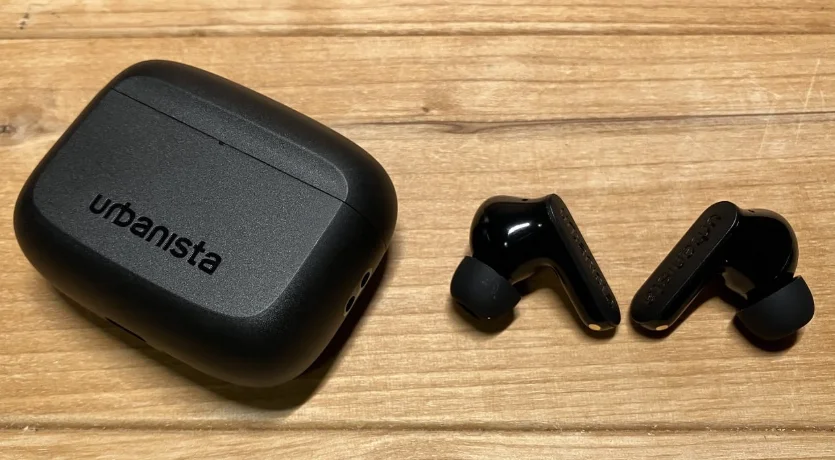

Urbanista Palo Alto True Wireless Earphones
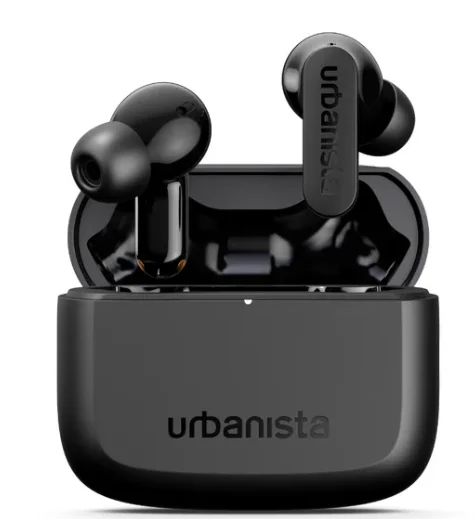
The Urbanista Palo Alto True Wireless Earphones are designed to deliver powerful sound, advanced noise cancellation, and long-lasting comfort for everyday listening. Featuring adaptive active noise cancelling up to 45 dB, the earphones intelligently detect and reduce surrounding noise so you can enjoy your music, podcasts, or calls without distractions. They are equipped with 10 mm dynamic titanium-coated drivers that produce clear audio with balanced mids, detailed highs, and deep bass for an immersive listening experience. With up to 45 hours of total playtime using the charging case, these earbuds are perfect for long days of use, while Bluetooth multipoint connectivity allows you to seamlessly switch between two devices.
The earbuds also include six built-in microphones for clearer calls, transparency mode to stay aware of your surroundings, and wireless or USB-C charging for added convenience. Designed with a comfortable in-ear fit, IP54 dust and water resistance, and a sleek, modern look, the Urbanista Palo Alto earphones combine style, durability, and high-performance wireless audio in one compact package.
WELCOME TO URBANISTA
Thank you for choosing Urbanista Palo Alto. This guide will help you get the most out of your new earphones.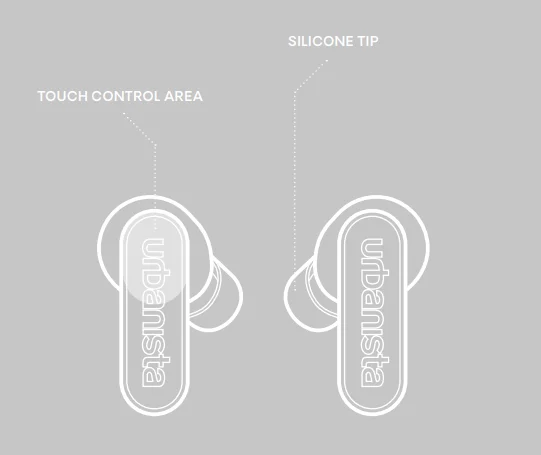
POWER ON AND OFF
The earphones automatically power on when opening the charging case lid. To turn off the earphones, put them back in the charging case and close the lid. The earbuds will automatically power off after 5 minutes of disconnection or 30 minutes of inactivity.
FIRST PAIRING AND RECONNECTION
Open the charging case lid to initiate first-time pairing. The LED will first indicate the charging case battery level, then start flashing to indicate pairing mode. Go to the Bluetooth settings on your device and select “Urbanista Palo Alto” to connect. The LED will stop flashing as the earphones successfully connect. The earphones will automatically try to reconnect to the last connected device(s) every time they are powered on.
BLUETOOTH MULTIPOINT CONNECTION
Palo Alto can be connected to two Bluetooth devices simultaneously through Bluetooth multipoint. This allows you to seamlessly switch between 2 connected devices, such as your phone and a computer, without disconnecting from one.
Pair and connect to a second device
Activate Bluetooth multipoint in 3 different ways, depending on your situation and need:
- Long-press left and right earphones simultaneously for 2 seconds.
Or
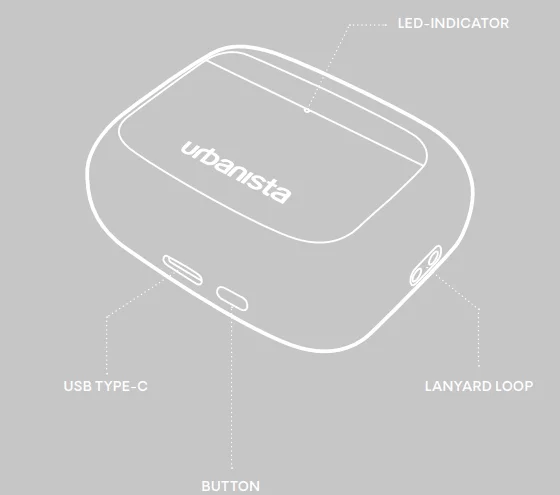
- Keep both earphones in the charging case. With the lid open, press the button on the bottom of the charging case for 2 seconds. The LED will start flashing to indicate that Bluetooth multipoint is activated.
Or
- Activate Bluetooth multipoint in the Urbanista app.
- When activated, go to the Bluetooth settings on your second device and select “Urbanista Palo Alto” to pair and connect.
- The earphones are now connected to both devices.
The earphones can pair with and store up to 8 devices and will connect to the last two devices every time they are powered on. Bluetooth multipoint does not allow audio from 2 devices to be played simultaneously. Pause the music on your first device before switching to your second device. You can also manage Bluetooth multipoint through the Urbanista app.
TOUCH CONTROLS
Use the double- and triple-tap commands to control music and calls. Left- and right-side long-press can be customized through the Urbanista app.
- Play/Pause: Double-tap the left or right side.
- Previous song: Triple-tap left side.
- Next song: Triple-tap right side.
- Answer/Hang-up: Double-tap left or right side.
- Reject a call: Long-press the left or right side.
- Activate voice assistant: Long-press the left side.
- Toggle sound mode between Default, ANC, and Transparency: Long-press right side.
CHARGING AND BATTERY
The earphones will automatically start charging when put back into the charging case. A “low battery” alert will notify you when the earphone battery level reaches 10%. When the batteries are empty, the earphones will automatically power off. Use a wireless charging pad or a qualified USB Type-C cable and adapter to charge your earphones. While charging, the LED indicates the battery status as follows:
- 0–30%: Amber LED pulses
- 30–100%: White LED pulses
- 100%: Solid white LED
To check the charging case battery level, single-press the button at the bottom. The LED turns amber if the battery level is below 30% and solid white if it exceeds 30%. Detailed battery information can be monitored in the Urbanista app.
SILICONE TIPS
The package contains silicone tips available in three sizes (S, M, L), with the medium size already attached to your product when it is new in the box. Select a size that fits your ears comfortably and ensures an effective seal for optimal ANC performance. Loose earbuds could disrupt the functionality of the in-ear sensor.
RESET
If you experience connection issues and the earphones become unstable or unresponsive, place the earphones back into the charging case and close the lid. After 10 seconds, reopen the case to attempt pairing or reconnecting with your device. If the issue persists, proceed with a full factory reset:
- Remove “Urbanista Palo Alto” from the Bluetooth settings on your device(s).
- While the earphones are in the charging case with the lid open, press the reset button for 10 seconds until the LEDs become solid. The earphones will restart and enter pairing mode.
- Follow the instructions in “First Time Pairing and Reconnecting” to reconnect your earphones.
DOWNLOAD THE URBANISTA APP!
Enhance your experience with the Urbanista app, available on both the App Store and Google Play. The app lets you personalize sound settings and customize the earphones’ features.
NEED SUPPORT?
For further assistance and FAQs, please visit www.support.urbanista.com.
For More Manuals By Urbanista, Visit ManualsLibraryy.
Urbanista Palo Alto True Wireless Earphones-FAQs
What are the key features of the Urbanista Palo Alto True Wireless Earphones?
Urbanista Palo Alto earphones are premium true wireless earbuds designed with adaptive active noise cancelling and advanced connectivity features. They include Bluetooth 5.3, multipoint connectivity, touch controls, and in-ear detection for automatic play and pause. The earbuds also feature 10 mm dynamic drivers for powerful sound and six microphones for clear calls. Additional features like wireless charging, transparency mode, and customizable EQ through the Urbanista app make them suitable for everyday music, calls, and commuting.
How effective is the noise-cancelling on Urbanista Palo Alto earphones?
Urbanista Palo Alto earphones use adaptive active noise-cancelling technology that can reduce background noise by up to 45 dB. The system continuously monitors surrounding sounds and adjusts noise cancellation levels automatically. This helps reduce distractions such as traffic, office chatter, or airplane noise, allowing users to focus on music or calls. The earbuds also include a transparency mode that lets outside sound in when needed for awareness of your surroundings.
What is the battery life of the Urbanista Palo Alto earbuds?
Urbanista Palo Alto earbuds offer up to 8 hours of listening time on a single charge when active noise cancelling is turned off. With the charging case, the total battery life can reach up to 45 hours of playback. When ANC is enabled, the earbuds provide about 6 hours of listening time and around 33 hours in total with the case. This extended battery capacity makes them suitable for travel, commuting, and all-day use.
Do Urbanista Palo Alto earphones support Bluetooth multipoint connection?
Yes, Urbanista Palo Alto earphones support Bluetooth multipoint connectivity. This feature allows the earbuds to stay connected to two devices at the same time, such as a smartphone and a laptop. Users can easily switch between devices without disconnecting and reconnecting each time. Multipoint connectivity is particularly useful for people who listen to music on one device but want to quickly answer calls from another.
How is the sound quality of Urbanista Palo Alto earphones?
Urbanista Palo Alto earphones use 10 mm titanium-coated dynamic drivers that deliver balanced and powerful sound. The drivers are designed to produce clear vocals, detailed mids, and deep bass for a more immersive listening experience. The earbuds also support customizable EQ presets through the Urbanista mobile app, allowing users to adjust sound profiles based on their preferences or the type of audio they are listening to.
Are Urbanista Palo Alto earphones good for phone calls?
Urbanista Palo Alto earphones include six built-in microphones with environmental noise cancellation technology. These microphones help isolate the user’s voice while reducing background noise during calls. This setup improves clarity when speaking in busy environments like streets, offices, or public transport. Because of this multi-microphone design, the earbuds are suitable for voice calls, video meetings, and voice assistant interactions.
Are Urbanista Palo Alto earbuds water-resistant?
Yes, Urbanista Palo Alto earbuds have an IP54 rating for dust and water resistance. This rating means they can handle sweat, light rain, and small splashes, making them suitable for workouts, outdoor walks, and everyday use. However, they are not designed to be fully waterproof, so they should not be submerged in water or used while swimming.
How do you charge Urbanista Palo Alto earphones?
Urbanista Palo Alto earphones can be charged using either a USB-C cable or wireless charging. The charging case holds a large battery that recharges the earbuds multiple times. A full wired charge typically takes around 1.5 hours, while quick charging allows about 2 hours of playback after only 10 minutes of charging. This flexible charging system makes it convenient to keep the earbuds powered throughout the day.
What connectivity and compatibility features do Urbanista Palo Alto earphones offer?
Urbanista Palo Alto earphones support Bluetooth 5.3 connectivity with a wireless range of about 10 meters. They are compatible with both Android and iOS devices and support common Bluetooth profiles for audio streaming and calls. The earbuds also work with voice assistants and allow customization through the Urbanista mobile app, where users can manage EQ settings, multipoint connections, and touch controls.
What should you do if Urbanista Palo Alto earphones are not working properly?
If Urbanista Palo Alto earphones stop working correctly, basic troubleshooting can often resolve the issue. Check that the earbuds and charging case are fully charged and ensure Bluetooth is enabled on the connected device. Cleaning the ear tips and speaker mesh can also improve sound if the volume is low. If problems persist, resetting the earbuds or reconnecting them through the Urbanista app can help restore normal operation.