
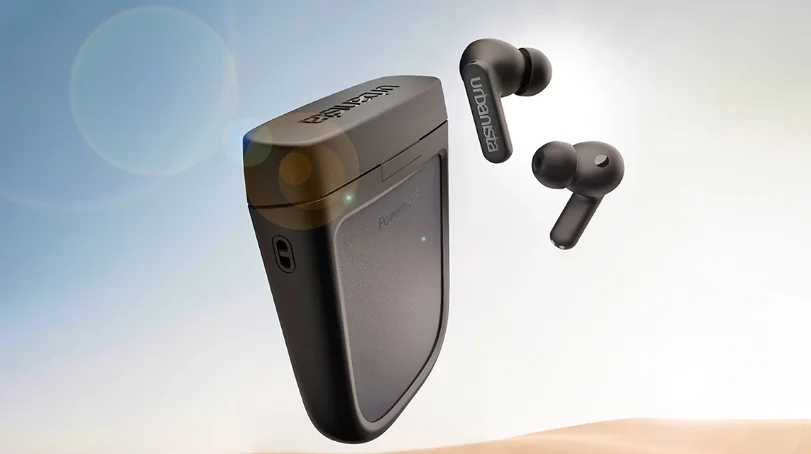

Urbanista Phoenix True Wireless Earphones
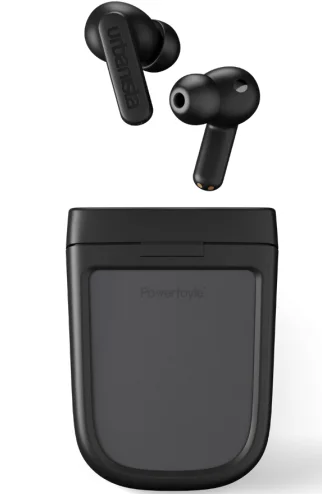
The Urbanista Phoenix True Wireless Earphones are innovative earbuds designed to deliver high-quality sound while introducing a unique solar-powered charging experience. These earbuds come with a self-charging case powered by Powerfoyle™ solar cell technology, allowing the case to recharge continuously when exposed to natural or artificial light, helping keep your earbuds ready to use without relying heavily on cables. They feature hybrid active noise cancellation (ANC) and transparency mode, allowing you to block out distractions or stay aware of your surroundings when needed.
Equipped with 10 mm dynamic drivers, the earphones provide clear audio with balanced sound and deep bass for music, calls, and podcasts. With up to 8 hours of playtime on the earbuds and around 34 hours of total battery life with the charging case, they are ideal for daily use and long listening sessions. The earbuds also include Bluetooth 5.2 connectivity, touch controls, six noise-reducing microphones for clear calls, and an IPX4 water-resistant rating, making them suitable for commuting, workouts, and everyday listening. Combining modern design, sustainable technology, and reliable performance, the Urbanista Phoenix earphones offer a smart and eco-friendly wireless audio experience.
URBANISTA PHOENIX
Thank you for choosing an Urbanista product.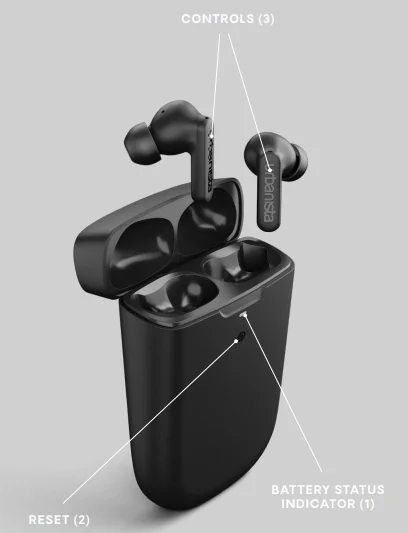
POWER ON AND OFF
The earphones automatically power on and off as you open and close the charging case lid. Five minutes of disconnect or 30 minutes of inactivity will automatically power off. If your earphones are automatically powered off outside the charging case, you can press the left and right sides separately for 5 seconds to power them on.
FIRST-TIME PAIRING AND RECONNECTING
Open the charging case lid to initiate first-time pairing. The LED will first indicate the charging case battery level, then start flashing to indicate pairing mode. Go to the Bluetooth settings on your device and select “Urbanista Phoenix” to connect. The LED will stop flashing as the earphones successfully connect. The earphones will automatically try to reconnect to the last connected device(s) every time they are powered on.
MULTIPOINT CONNECTION
Phoenix can be connected with two Bluetooth devices simultaneously through Multipoint Connection. It allows you to seamlessly switch between devices, such as a computer and phone, without having to disconnect first.
Pair and connect to a second device
- Open the charging case lid to activate pairing mode
- The earphones will connect to your first device but remain in pairing mode
- Go to the Bluetooth settings on your second device and select “Urbanista Phoenix” to pair and connect
- The earphones are now connected to both devices
The earphones can pair with and store up to 8 devices, and will multipoint connect to the last two devices every time they are powered on. Multipoint does not allow audio from two devices to be played at the same time.
TOUCH CONTROLS
Use the double- and triple-tap commands to control music and calls. Left and right side long-press can be customized through the Urbanista Audio app.
- Play/Pause: Double-tap the left or right side.
- Previous song: Triple-tap left side.
- Next song: Triple-tap right side.
- Answer/Hang-up: Double-tap left or right side.
- Reject a call: Long-press the left or right side.
- Activate voice assistant: Long-press the left side.
- Toggle between ANC and Transparency: Long-press right side
CHARGING AND BATTERY
Urbanista Phoenix has a built-in Powerfoyle™ solar cell that continuously charges your earphones’ charging case whenever exposed to light — outdoor or indoor — providing you with virtually infinite playtime. The stronger the light, the more effective the charging. The earphones will automatically start charging when put back into the charging case. A “low battery” voice prompt will notify you when there are 30 minutes of playtime remaining, after which the earphones will automatically turn off. Use the included USB Type-C cable connected to a power source to charge the case. The “Battery Status Indicator” (1) will pulse during charging and remain continuously lit when the case is fully charged.
- 0–30% – LED pulses amber
- 30–100% – LED pulses white
- 100% – LED turns solid white
THE URBANISTA AUDIO APP
The Urbanista Audio app is the perfect companion for your Urbanista Phoenix earphones, available for both iOS and Android. The app allows you to customize features and personalize the way you use and experience your Urbanista products. Use the app to track Phoenix’s light charging performance and history to better understand and optimize its battery life.
SILICONE TIPS
The included silicone tips come in three different sizes. Choose a size that comfortably fits your ears and provides an effective seal.
RESET
Should the earphones fail to connect, be unstable, or unresponsive, please follow the steps below:
- Put the earphones back in the charging case and close the lid. Reopen after 10 seconds to pair or reconnect to your device. Should the problem persist, please follow the steps below for a full reset:
- Delete “Urbanista Phoenix” from the Bluetooth settings on your device.
- With the earphones in the charging case, press the reset button (2) for 10 seconds until the LEDs turn solid. The earphones will restart and initiate pairing mode.
- Follow the instructions in “First-Time Pairing and Reconnecting” to reconnect to your earphones.
TROUBLESHOOTING
If you have any additional questions, please visit our online help center, where you will find our FAQs and an online version of this manual: https://support.urbanista.com/.
For More Manuals By Urbanista, Visit ManualsLibraryy.
Urbanista Phoenix True Wireless Earphones -FAQs
What makes the Urbanista Phoenix True Wireless Earphones unique?
Urbanista Phoenix earbuds stand out because they feature a solar-powered charging case that uses Powerfoyle technology to convert indoor or outdoor light into energy. This means the case can continuously recharge whenever exposed to light, helping extend battery life and reduce the need for wall charging. Along with this innovative feature, the earbuds include hybrid active noise cancelling, touch controls, and multipoint Bluetooth connectivity for convenient everyday listening.
How does the solar charging feature work on Urbanista Phoenix earbuds?
The charging case of the Urbanista Phoenix uses Powerfoyle solar cell material that converts both natural and artificial light into energy. When the case is exposed to light, it gradually charges the internal battery and keeps the earbuds powered. The stronger the light source, the faster the charging effect. This passive charging system helps maintain battery levels and can reduce how often you need to plug the case into a traditional power source.
What is the battery life of the Urbanista Phoenix earbuds?
Urbanista Phoenix earbuds provide about 8 hours of playback on a single charge, depending on usage and volume. The charging case adds extra battery capacity, bringing the total listening time to roughly 32–34 hours. Because the case also charges through ambient light, it can continue topping up the battery throughout the day, making the earbuds suitable for extended use without frequent charging.
Do Urbanista Phoenix earbuds support active noise cancelling?
Yes, Urbanista Phoenix earbuds include hybrid active noise-cancelling (ANC) technology. This feature uses internal and external microphones to detect and reduce surrounding noise, allowing users to enjoy clearer audio in busy environments such as public transport, offices, or crowded streets. The earbuds also provide a transparency mode that allows outside sounds to pass through when you need to stay aware of your surroundings.
How is the sound quality of the Urbanista Phoenix earbuds?
Urbanista Phoenix earbuds use 10 mm dynamic drivers designed to deliver balanced sound with clear vocals, detailed mids, and controlled bass. The earbuds also support preset EQ adjustments through the Urbanista mobile app, allowing users to customize sound profiles according to personal listening preferences. This setup helps provide an immersive audio experience for music, podcasts, and video streaming.
Are Urbanista Phoenix earbuds good for phone calls?
Urbanista Phoenix earbuds include six noise-reducing microphones that help capture voice clearly during phone calls. These microphones filter out background sounds and improve voice clarity when speaking in noisy environments. The combination of ANC, microphone noise reduction, and stable Bluetooth connectivity helps provide better call quality for voice calls, online meetings, and voice assistant interactions.
Do Urbanista Phoenix earbuds support Bluetooth multipoint connectivity?
Yes, the Urbanista Phoenix earbuds support Bluetooth multipoint connectivity, which allows them to connect to two devices simultaneously. This means you can listen to music on a laptop and quickly switch to answering a phone call from your smartphone without reconnecting the earbuds. Multipoint support is particularly useful for users who frequently switch between personal and work devices. water-resistant
Are Urbanista Phoenix earbuds water-resistant?
Urbanista Phoenix earbuds come with an IPX4 water resistance rating, meaning they can handle sweat and light splashes of water. This makes them suitable for workouts, walking in light rain, or everyday commuting. However, they are not fully waterproof and should not be submerged in water or used while swimming. Proper care helps maintain their performance and durability over time.
What connectivity and compatibility features do Urbanista Phoenix earbuds offer?
Urbanista Phoenix earbuds support Bluetooth 5.2 connectivity, ensuring stable wireless performance with compatible smartphones, tablets, and computers. They work with both Android and iOS devices and support voice assistants for hands-free control. Through the Urbanista mobile app, users can also customize touch controls, adjust EQ settings, and monitor the charging status of the solar-powered case.
Can Urbanista Phoenix earbuds be charged with a cable if needed?
Yes, even though the Phoenix earbuds feature solar charging, the case can also be charged using a USB-C cable when faster charging is required or when light exposure is limited. This dual charging approach ensures that users always have a reliable way to power the earbuds, whether through ambient light or a traditional wired connection.