


Treatlife Zigbee Door Sensor
Introduction
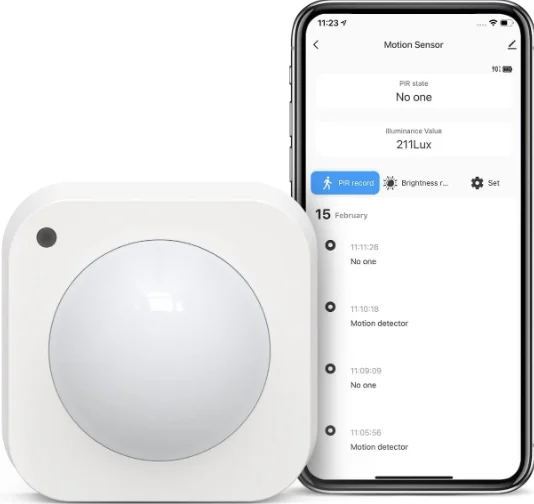
The door/window sensor detects the opening or closing of doors/windows, combined with other equipment to achieve intelligent application scenes. Make sure the door magnetic widget is on the side of the alignment sign.
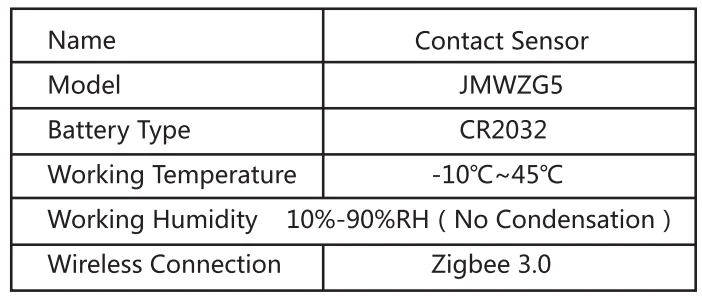
Specification
Connect Preparation
Connect your phone to WIFI. Smart Phone, WIFI Wireless Router, Smart Host, LAN Interface. LAN Interface.
- Ensure that the product is within effective coverage of the smart host (Gateway) ZigBee network to ensure that the product is effectively connected to the smart host (Gateway) ZigBee network.
- Make sure the gateway is added.
Download the TreatLife APP
Please scan the QR code or search “Treatlife” on the App Store/Google Play to download the APP.
- Registration or Log In
- Download the “TreatLife” Application.
- Enter the Register/Login interface; tap “Register” to create an account by entering your Email Address to get a verification code and “Set password”. Choose “Log in” if you already have a TreatLife account.
Network Settings
- Power the device on and ensure that the mobile phone has been connected to the network and has successfully added the smart gateway.
- Open the Treatlife app, on the “smart Hub” page, click the “Add subdevice” button, and select “Contact Sensor” on the “Select Device Type” page.
- Using the reset needle, press and hold the reset button for more than 5 seconds until the network indicator flashes. Add the device according to the APP instructions.
- Once added, you can find the device in the “My Home” list.
Packing List
- Door/Window Sensor 1
- Back Gum Paste 1
- Battery 1
- Reset Needle 1
- Product user manual 1
Please read the user manual carefully before using the product.
FCC Caution:
This device complies with part 15 of the FCC Rules. Operation is subject to the following two conditions:
- This device may not cause harmful interference, and
- This device must accept any interference received, including interference that may cause undesired operation. Any Changes or modifications not expressly approved by the party responsible for compliance could void the user’s authority to operate the equipment.
Note: This equipment has been tested and found to comply with the limits for a Class B digital device, pursuant to part 15 of the FCC Rules. These limits are designed to provide reasonable protection against harmful interference in a residential installation. This equipment generates uses and can radiate radio frequency energy and, if not installed and used in accordance with the instructions, may cause harmful interference to radio communications.
However, there is no guarantee that interference will not occur in a particular installation. If this equipment does cause harmful interference to radio or television reception, which can be determined by turning the equipment off and on, the user is encouraged to try to correct the interference by one or more of the following measures:
- Reorient or relocate the receiving antenna.
- Increase the separation between the equipment and receiver.
- Connect the equipment into an outlet on a circuit different from that to which the receiver is connected.
- Consult the dealer or an experienced radio/TV technician for help.
This equipment complies with FCC radiation exposure limits set forth for an uncontrolled environment. This equipment should be installed and operated with a minimum distance of 20cm between the radiator & your body.
ISEDC Warning:
This device complies with Innovation, Science, and Economic Development Canada’s licence-exempt RSS standard(s). Operation is subject to the following two conditions:
- This device may not cause interference, and
- This device must accept any interference, including interference that may cause undesired operation of the device.
The device is in compliance with RF exposure guidelines, and users can obtain Canadian information on RF exposure and compliance. The minimum distance from the body to use the device is 20cm.
For More Manuals By Treatlife, Visit ManualsLibraryy.
Treatlife Zigbee Door Sensor-FAQs
What is the Treatlife Zigbee Door Sensor, and how does it work?
The Treatlife Zigbee Door Sensor is a compact smart device that detects when a door or window opens or closes. It uses a magnetic contact system to monitor status changes and sends real-time alerts to your smartphone through the Treatlife app. When paired with a Zigbee hub, it becomes part of a smart home system, enabling automation and remote monitoring.
Does the Treatlife Zigbee Door Sensor require a hub?
Yes, this sensor requires a Zigbee hub to function, which is a common limitation many buyers overlook. Without the hub, the sensor simply won’t connect or work at all. The hub acts as the communication bridge between the sensor and your smartphone or smart home ecosystem, supporting multiple connected devices simultaneously.
What kind of alerts does the Treatlife Zigbee Door Sensor provide?
The sensor sends instant notifications to your phone whenever a door or window is opened or closed. These alerts are delivered in real time through the app, helping you monitor your home remotely. This feature is particularly useful for security, allowing you to detect unexpected entries or check if doors were left open.
Can the Treatlife Zigbee Door Sensor be used for home automation?
Yes, the sensor is designed for automation. You can create routines such as turning on lights when a door opens or switching off appliances when a door remains open for too long. It integrates with other smart devices, enabling customized scenarios that improve convenience, security, and energy efficiency in your home.
Is the Treatlife Zigbee Door Sensor compatible with Alexa or Google Assistant?
Yes, when connected through a compatible hub, the sensor works with voice assistants like Alexa and Google Assistant. This allows you to check door status using voice commands or include the sensor in smart routines. However, the integration depends on proper hub setup, so it’s not plug-and-play like WiFi-only sensors.
How easy is it to install the Treatlife Zigbee Door Sensor?
Installation is straightforward, typically involving adhesive mounting on the door frame and aligning the magnetic parts correctly. No wiring is required, making it suitable for most users. However, proper alignment is critical—if installed poorly, it may give inaccurate readings or fail to detect door movement reliably.
What are the main use cases for this door sensor?
The sensor can be used on doors, windows, cabinets, safes, or even garage doors. It’s commonly used for home security, child safety, and monitoring restricted areas. It can also help with automation tasks like turning lights on when you enter a room or sending alerts if a door is left open for too long.
How reliable is the Zigbee connection compared to WiFi sensors?
Zigbee sensors generally offer faster response times and better stability than WiFi sensors, especially in smart home setups with multiple devices. They consume less power and reduce WiFi congestion. However, their reliability heavily depends on the placement of the hub and overall network coverage, which can be a weak point in larger homes.
Does the Treatlife Zigbee Door Sensor store activity history?
Yes, the sensor logs open and close events within the app, allowing you to review activity over time. This is useful for tracking patterns, monitoring entry points, or checking whether a door was accessed while you were away. The level of detail and storage duration may vary depending on the app and system setup.
Is the Treatlife Zigbee Door Sensor worth buying?
It’s a solid option for users already invested in a Zigbee-based smart home, offering fast response, automation capabilities, and reliable alerts. However, it’s not ideal for beginners who don’t want to deal with hubs or setup complexity. If you want simplicity, a WiFi sensor may be easier, but for scalability and performance, Zigbee is the better long-term choice.