
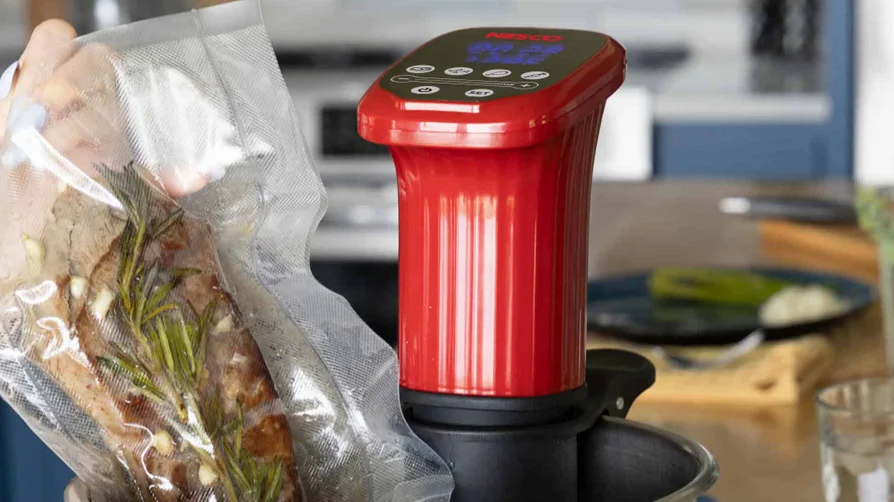

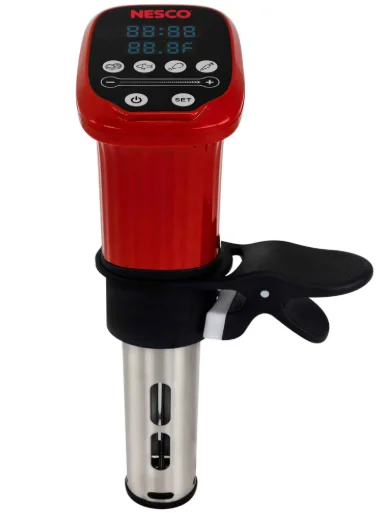
Nesco SVC-1000 Sous Vide Cooker
IMPORTANT SAFEGUARDS
When using electrical appliances, basic safety precautions should always be followed, including the following:
- READ ALL INSTRUCTIONS BEFORE USING THIS APPLIANCE.
- Do not touch hot surfaces. Use handles or knobs.
- To protect against electrical shock and personal injury, do not immerse this appliance, including cord and plug, in water or other liquid.
- This appliance is not intended for use by persons (including children) with reduced physical, sensory, or mental capabilities, or lack of experience and knowledge, unless they have been given supervision or instruction concerning use of the appliance by a person responsible for their safety.
- Close supervision is necessary when any appliance is used by or near children.
- Unplug from the outlet when not in use and before cleaning. Allow to cool completely before putting on or taking off parts, and before cleaning.
- Do not operate any appliance with a damaged cord or plug or after the appliance malfunctions or has been damaged in any manner. Call NESCO® Customer Service for assistance.
- The use of accessory attachments not recommended by the manufacturer may result in fire, electric shock, or injury to persons.
- Use the appliance in a safe indoor environment. Do not use outdoors.
- Do not let the cord hang over the edge of the table or counter, or touch hot surfaces.
- Do not place on or near a hot gas or electrical burner or in a heated oven.
- Do not use near explosive or flammable materials.
- Do not use the appliance for anything other than its intended use, as described in this manual.
- Operate the appliance only when all parts are fully engaged and secured.
- DO NOT use an extension cord with this product.
- Operate the appliance in water only. Keep the upper portion of the appliance dry. Never operate the appliance unless the water level is between the indicated “Min” and “Max” levels. Do not immerse the appliance cord, power box, or upper portion of the appliance. If the appliance or any of its parts become submerged, unplug the appliance immediately and discontinue use.
- Circulated water can be very hot. Use a trivet to protect your countertop from any container being used with the appliance. Use tongs to reach for anything inside the water bath.
- Extreme caution must be used when moving containers of hot water.
- To reduce the draw on the appliance, cover the water with cling wrap during cooking. Do not cover any part of the appliance with cling wrap.
PARTS AND FEATURES
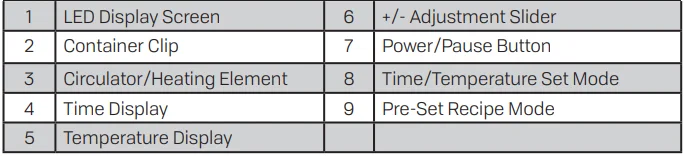
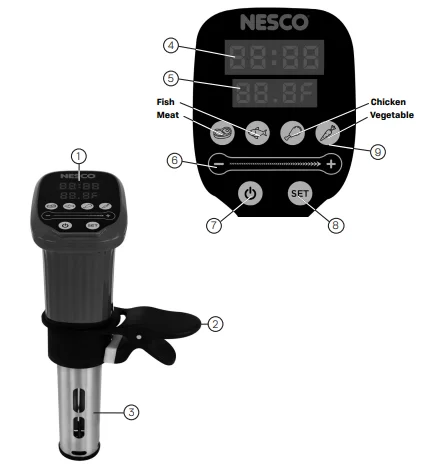
Press and hold the power button to turn the appliance on and off. To pause the cooking cycle at any time, press the power button once. To restart, press the power button again. The power button will illuminate red during pause mode.
Time/Temperature Set Mode:
- Press the SET button once to enter the setting mode. The SET button will illuminate red.
- Press the SET button twice to set the time by hour. Max hours: 99:00.
- Press the SET button 3 times to set the time by minutes. Max minutes: 00:59.
- Press the SET button 4 times to set the temperature. Max temperature 203 F°.
- Press the SET button 5 times to exit the setting mode. The SET button will illuminate blue.
- Temperature mode / F° and C°: Change the temperature to Celsius or Fahrenheit by pressing and holding the SET button approx. 5 seconds.
+/- Adjustable Slider:
Slide right to increase or left to decrease the temperature or time. The temperature and time will adjust as you slide along the indicator bar or press the “-” or “+” symbols to increase or decrease by individual increments.
Pre-Set Recipe Mode:
This appliance comes equipped with pre-set cook cycles. To enter recipe mode, press the food icon button once; the icon will illuminate. Press the power button one time to begin heating and circulating the water. When the pre-set temperature is reached, the appliance will beep 3 times and begin the cooking cycle countdown. Place food into the container. To exit recipe mode, press the power button once, then press the food icon, and it will no longer illuminate.
- Meat: Default cook time 1 hour, temperature 138 F°.
- Fish: Default cook time 20 minutes, temperature 125 F°.
- Chicken: Default cook time 1 hour, temperature 147 F°.
- Vegetable: Default cook time 45 minutes, temperature 185 F°.
Min and Max Fill Line/Auto Shut-Off:
This appliance will automatically shut off if the water level becomes too low during use. Always keep the water level in the container between the “Min” and “Max” levels as indicated on the appliance. NOTE: Only the heater/circulator portion should be under water.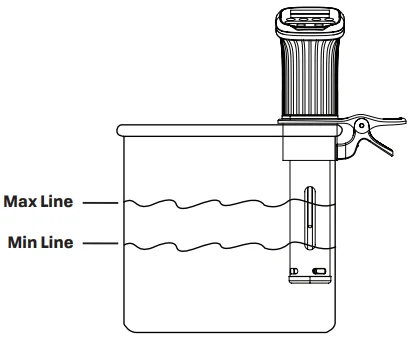
OPERATING INSTRUCTIONS
- Slide the container clip over the circulator/heating element so it is securely in place on the appliance. Attach the clip to the inside of a suitably sized plastic or metal container that is at least 10 inches deep to ensure proper appliance positioning (containers sold separately). Fill the container with water using the Min and Max water level indicator marks on the back of the circulator. The water level will rise when you add food into the container, so do not overfill the container with water. NOTE: As the water temperature increases, the water will begin to evaporate. The appliance circulator will automatically shut off if the water level becomes too low. Add additional water as needed.
- Plug the appliance into a 120V outlet. The appliance display screen will illuminate momentarily and beep once before going into standby mode.
- Press the power button and hold for 2 seconds. The appliance will display the default time and temperature. The power button will illuminate red. The SET button will illuminate blue.
- Press the SET button to choose the desired setting option. The SET button will illuminate red until the time and temperature are set.
- Press the + and – symbols or use the adjustment slider to set the time and temperature. When the desired time and temperature are set, press the SET button to exit set mode. The SET button will illuminate blue. To begin heating and circulating the water, press the red power button once. The power button will now illuminate blue, and the appliance will begin operating.
- When the water reaches the set temperature, the appliance will beep 3 times and begin the cooking cycle countdown. Place food inside the container. NOTE: To adjust the time or temperature at any point during operation, press the power button once to pause the appliance. Press the SET button once to enter set mode. Follow steps 4 and 5 above to continue the normal operation of the appliance.
- The appliance will beep for approx 30 seconds when the desired cooking time is achieved. The cooking cycle is now complete. NOTE: The appliance will continue to operate until it is turned off manually or powers off automatically once the water level becomes lower than the “Min” level.
- To turn the appliance off, press and hold the power button for two seconds.
CLEANING INSTRUCTIONS
Descaling should be done every month or more often if the appliance is used frequently.
- Attach the appliance to a container and fill with equal parts white vinegar and water to the “Max” level as indicated on the appliance.
- Set the appliance temperature to 158 F°.
- Allow the water to circulate for 20 minutes after 158 F° is reached.
- Turn off and unplug the appliance.
- When the appliance is cool, rinse the circulator in cold water and dry thoroughly before storing.
TROUBLESHOOTING
The appliance will not turn on.
- Make sure that the appliance is properly plugged into a grounded outlet.
- Check the power cord for damage. Do not use if the power cord is damaged.
- Make sure the appliance is on. The display screen will be in standby mode.
The display screen reads error code: E1.
- Ensure that the water level is between the “Min” and “Max” as indicated on the appliance. The appliance will power off when the water level drops below the minimum amount required for operation.
- Unplug the appliance and add the proper amount of water to the container before restarting.
The display screen reads error code: E3.
- The appliance will not operate. Contact customer service for support.
The display screen reads error code: E4.
- The appliance will need examination, repair, or adjustment. Contact customer service for support.
ONE-YEAR LIMITED WARRANTY
The Metal Ware Corporation warrants to the original purchaser that your product will be free from defects in material and workmanship for a period of one year from the date of purchase. Product must be used for personal or sole household usage in accordance with the instructions. Should your product prove defective within one year from the date of purchase, contact our customer service team at 1-800-288-4545 or email [email protected] with an explanation of the claim. If a viable warranty claim is determined, a customer service member will provide you with the necessary details to have your unit replaced.
Under this limited time warranty, we undertake to replace any parts found to be defective at our sole discretion. This limited-time warranty is void if the unit is connected to an unsuitable electrical supply, dismantled, interfered with in any way, or damaged through misuse. This warranty is not transferable.
LIMITATION OF REMEDIES AND DAMAGES: Except for the limited time warranty and remedies expressly stated above, the Metal Ware Corp shall not be liable to you, or to anyone claiming by or through you, for any obligations or liabilities, including, but not limited to, obligations or liabilities arising out of breach of contract, breach of warranty, statutory claims, negligence, or other tort or any theory of strict liability, with respect to the product or the Metal Ware Corp’s acts or omissions or otherwise.
Buyer agrees that in no event shall the Metal Ware Corp be liable for incidental, compensatory, punitive, consequential, indirect, special, or other damages. Warranty does not cover consequential or incidental damages, such as property damage, and does not cover incidental costs and expenses resulting from any breach of this warranty, even if foreseeable. Some states or provinces do not allow the exclusion or limitations of incidental or consequential damages, so the above limitation or exclusion may not apply to you depending on the state or province of purchase.
Register your product on our website: https://www.nesco.com/customer-service/warranty-registration or fill in your warranty card and return it within one week from the date of purchase, along with a copy of proof of purchase.
Send warranty card to:
SVC-1000 / NESCO Sous Vide Cooker
C/O MW
PO Box 237
Two Rivers, WI 54241-0237
For More Manuals By Nesco, Visit ManualsLibraryy.
Nesco SVC-1000 Sous Vide Cooker-FAQs
What is the Nesco SVC-1000 Sous Vide Cooker used for?
The Nesco SVC-1000 is used for sous vide cooking, a method where food is sealed in bags and cooked in a precisely controlled water bath. This technique ensures consistent doneness, enhanced flavor, and tender texture, making it ideal for meats, vegetables, and delicate dishes.
How does the Nesco SVC-1000 Sous Vide Cooker work?
It works by heating and circulating water to a precise temperature, allowing food sealed in vacuum bags to cook evenly. The immersion circulator maintains steady heat throughout the cooking process, preventing overcooking and ensuring consistent results every time.
What temperature range does the Nesco SVC-1000 support?
The cooker offers a temperature range of approximately 95°F to 203°F, giving flexibility for cooking various foods like steak, fish, eggs, and vegetables. This wide range allows precise control over cooking outcomes depending on the desired texture and doneness.
What power capacity does the Nesco SVC-1000 have?
The Nesco SVC-1000 operates at around 1000 watts, providing efficient heating and consistent temperature control. This level of power ensures the water reaches and maintains the set temperature quickly, even when cooking larger portions or using bigger containers.
Does the Nesco SVC-1000 include preset cooking programs?
Yes, it features pre-programmed settings for foods like meat, fish, chicken, and vegetables. These presets simplify cooking by automatically selecting suitable time and temperature combinations, making it easier for beginners to achieve reliable results without manual adjustments.
Is the Nesco SVC-1000 easy to use for beginners?
The cooker is designed with an illuminated LCD and touch controls, making it user-friendly even for beginners. Its simple interface and preset programs reduce guesswork, allowing users to start sous vide cooking with minimal experience or technical knowledge.
Can the Nesco SVC-1000 be used with any container?
Yes, it attaches to most pots or containers using a secure, adjustable clip. This flexibility allows users to choose the container size based on their cooking needs, making it suitable for both small meals and larger batch preparations.
Is the Nesco SVC-1000 quiet during operation?
The unit uses a quiet DC motor that circulates water efficiently while minimizing noise. This makes it suitable for long cooking sessions without causing significant disturbance, which is especially helpful when preparing meals that require several hours of cooking time.
What are the key features of the Nesco SVC-1000 Sous Vide Cooker?
Key features include a waterproof immersion circulator, touch control LCD, precise temperature settings, and automatic cooking programs. These features combine to provide accurate, convenient, and reliable sous vide cooking for a wide range of recipes.
Does the Nesco SVC-1000 require a vacuum sealer to use?
While a vacuum sealer is recommended for best results, you can also use resealable freezer bags with proper air removal techniques. Vacuum sealing helps lock in flavor and ensures even cooking, but alternative methods can still produce good results for home cooking.