
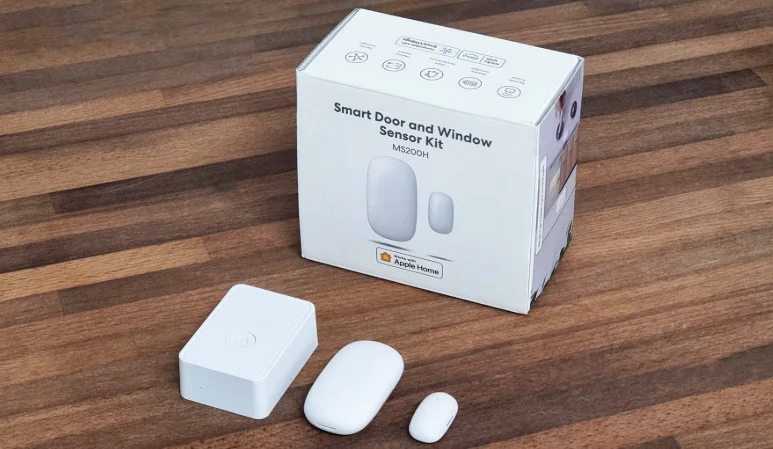

Meross MS200H Smart Door Sensor
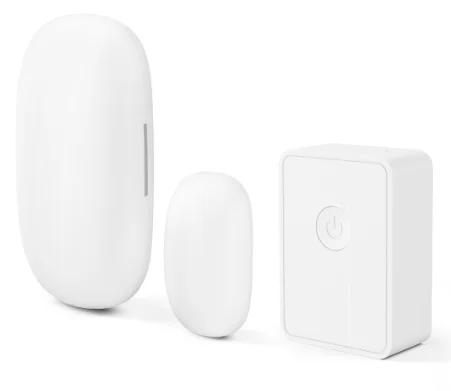
Safety Information
- Do not attempt to disassemble, repair, or modify the device.
- This product should not be exposed to direct sunlight.
- Please contact the seller for a replacement if there is any damage caused by transportation.
- Indoor use only.
Package Contents
If you find any part missing in the package, please contact us at https://www.meross.com/support/Email Support, and we will provide a proper solution for you.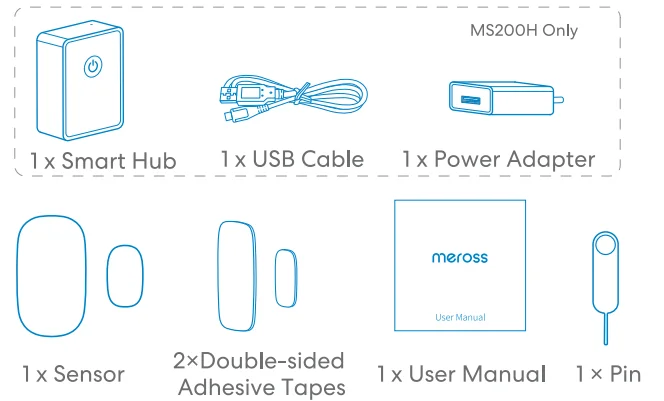
Installation Guide
- Download the Meross app.

2. Set up the device.
- Connect your smartphone or tablet to a 2.4 GHz Wi-Fi network.
- Make sure your smart hub is covered by a strong Wi-Fi signal.
- The smart hub supports iOS 13/ iPadOS 13 and later. It is recommended that you upgrade your iOS or iPadOS to the latest version before pairing with the smart hub.
- Launch the Meross app and log in to your account, or if you are a new user, tap Sign up to create a new account.
- Tap the “+” icon to select the type of smart device you want to add, then you can just follow the setup wizard to finish configuration.
- Relocation of the smart hub does not require additional operations, provided that it remains on the same network with a strong Wi-Fi signal.
NOTE:
- If this is not the first time you’ve added this smart hub, you’ll have to reset it before going any further.
- As long as you finish configuration, you’ll be able to manage the device in the Apple Home app.
- If the QR code does not work, please try to add the smart device to the Apple Home app.
- Find more at https://www.meross.com/support.
LED and Button Rules
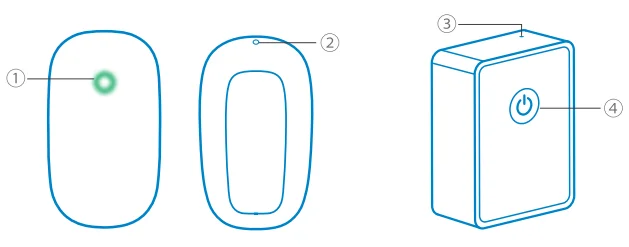
1 Status LED
- Flash green once: The device is powered on.
- Flash green rapidly: Pairing mode.
- Solid green: Successfully connected. LED will be OFF automatically in 5 seconds.
2 Button
Insert a pin into the hole and press the button once; the LED will flash twice. Within 5 seconds:
- Press the button once again to enter pairing mode.
- Then, press the button again and hold for 5 seconds to factory reset the device.
3 Status LED
- Solid amber: Initiating/Reset/Firmware upgrading.
- Flashing amber and green: Configuration mode.
- Flashing green: Pairing mode/Connecting to Wi-Fi/Disconnected from Wi-Fi.
- Solid green: Connected to Wi-Fi with an internet connection.
- Solid red: No internet connection.
How to Use
1. General Settings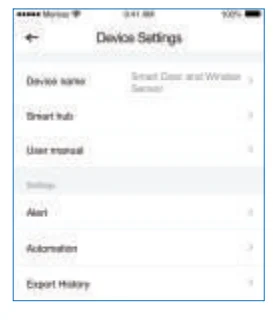
- Device name: Change device name.
- Smart hub: Set the smart hub and check the status.
- User manual: Check the user manual.
- Alert: Enable/disable push notifications.
- Automation: Set certain trigger conditions to allow presettings by other Meross smart devices.
- Export history: Export history records.
2. History Records
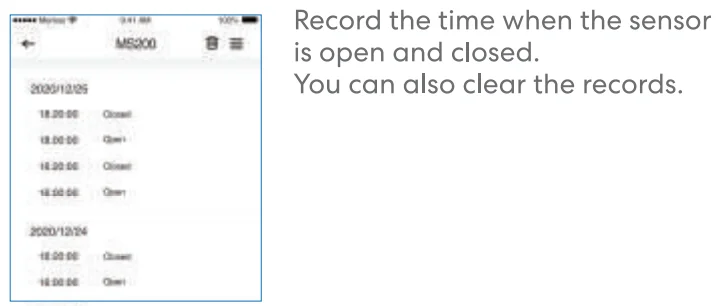
How to Install the Sensor
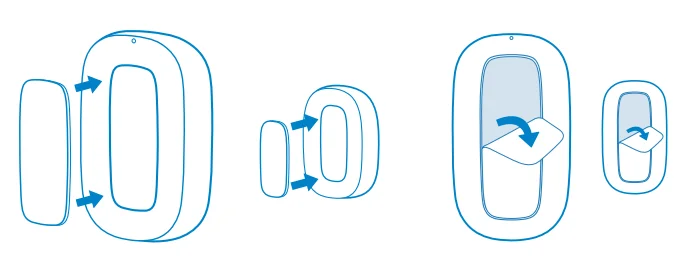
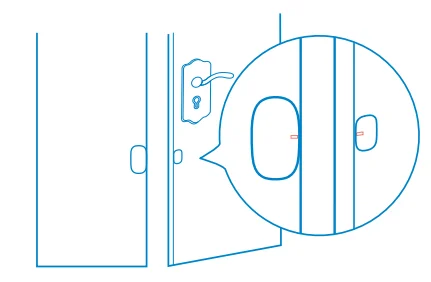
- Test at the location to be installed to ensure that the sensor can communicate with the hub normally.

- Take out the double-sided adhesive tape from the package and install it on the product.

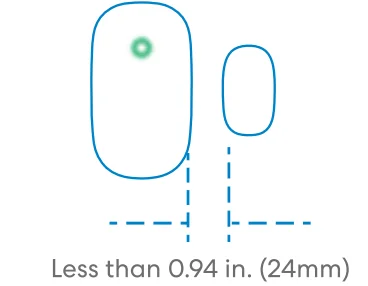
- When installing, try to align the installation marking lines on the side of the main body and the magnet. Please ensure that the surface of the paste location is clean and dry.

- It is recommended that the main body (large part) be installed on the fixed surface, and the magnet (small part) should be installed on the movable surface. The installation gap should be less than 0.94 in. (24mm) when the doors and windows are closed.
Replace Battery
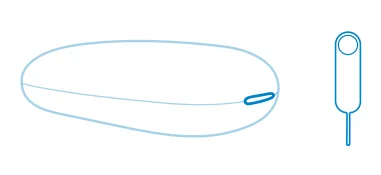
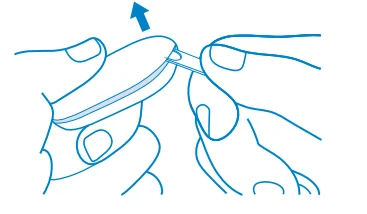
- Prepare the pin and the main body.

- Insert the pin into the gap.

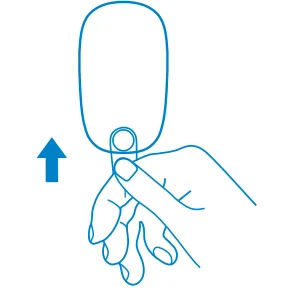
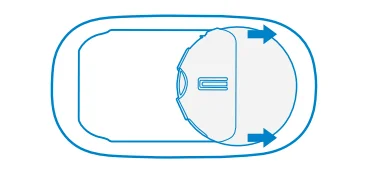
- Pry up hard to open the shell.

- Remove and replace the battery CR2450.

- It is recommended that you purchase a Panasonic battery for replacement, which supports smart devices to prevent rapid power depletion.
FAQ
At Meross, we strive to assure your satisfaction. Attached below is a non-exhaustive list of questions that users are mostly concerned about.
1. What should I do when my Meross app is unable to check the added smart sensor?
You can troubleshoot the following:
- Check the Wi-Fi internet connection.
- Make sure the Wi-Fi password hasn’t been changed.
- Make sure the device’s battery is not used up.
- Make sure the paired Smart Hub is still online. You can check its LED color; if it is not solid green, please power cycle it once; if it still does not work, please reset the Smart Hub and configure it with the Smart Sensor once more.
2. How to fix a HomeKit pairing failure?
Please visit https://www.meross.com/support/FAQ/230.html for a solution.
3. Why is my Meross smart device not responding in the Apple Home app?
This is an existing issue with the Apple Home app. You need to exit and reboot your Home app to fix this problem. To learn more, you can visit https://www.meross.com/support/faqs to find solutions for more frequently asked questions.
Warranty
Meross products are covered by a 12-month limited warranty from the date of purchase. Please visit https://www.meross.com/support/warranty for the detailed warranty policy and product registration. NOTE: The warranty does NOT cover the batteries supplied.
Disclaimer
- The function of this smart device is tested under a typical circumstance described in our specifications. Meross does NOT guarantee that the smart device shall perform the same as described under all circumstances.
- By using third-party services, including but not limited to Amazon Alexa, Apple HomeKit, and SmartThings, customers acknowledge that Meross shall not be held liable in any way for the data and private information collected by such parties. Meross’s total liability is limited to what is expressly covered in its Privacy Policy.
- Damages arising from ignorance of the SAFETY INFORMATION shall not be covered by Meross’s after-sales service, nor does Meross take any legal responsibility therefrom. Customers acknowledge their understanding of these articles clearly by reading this manual.
FCC Compliance Information Statement
Changes or modifications not expressly approved by the party responsible for compliance could void the user’s authority to operate the equipment. This device complies with Part 15 of the FCC Rules. Operation is subject to the following two conditions:
- This device may not cause harmful interference, and
- This device must accept any interference received, including interference that may cause undesired operation.
Note: This equipment has been tested and found to comply with the limits for a Class B digital device, pursuant to Part 15 of the FCC Rules. These limits are designed to provide reasonable protection against harmful interference in a residential installation. This equipment generates, uses, and can radiate radio frequency energy, and if not installed and used in accordance with the instructions, may cause harmful interference to radio communications.
However, there is no guarantee that interference will not occur in a particular installation. If this equipment does cause harmful interference to radio or television reception, which can be determined by turning the equipment off and on, the user is encouraged to try to correct the interference by one or more of the following measures:
- Reorient or relocate the receiving antenna.
- Increase the separation between the equipment and receiver.
- Connect the equipment into an outlet on a circuit different from that to which the receiver is connected.
Consult the dealer or an experienced radio/TV technician for help.
This equipment complies with FCC radiation exposure limits set forth for an uncontrolled environment. This equipment should be installed and operated with a minimum distance of 20cm between the radiator and your body. This transmitter must not be co-located or operating in conjunction with any other antenna or transmitter.
Canadian Compliance Statement
This device contains licence-exempt transmitter(s)/receiver(s) that comply with Innovation, Science and Economic Development Canada’s licence-exempt RSS(s). Operation is subject to the following two conditions:
- This device may not cause interference.
- This device must accept any interference, including interference that may cause undesired operation of the device.
For More Manuals By Meross, Visit ManualsLibraryy.
Meross MS200H Smart Door Sensor-FAQs
What is the Meross MS200H Smart Door Sensor used for?
The Meross MS200H is a smart door and window sensor that monitors whether doors, windows, or cabinets are open or closed. It sends real-time alerts to your smartphone, helping improve home security and enabling automation routines within a smart home ecosystem.
Does the Meross MS200H require a hub to work?
Yes, the MS200H requires a compatible Meross hub, such as the MSH300, to function properly. The hub connects the sensor to your Wi-Fi network and enables communication with apps and smart home platforms for monitoring, alerts, and automation.
Is the Meross MS200H compatible with smart home systems?
The sensor works with major platforms, including Apple HomeKit, Amazon Alexa, Google Assistant, and Samsung SmartThings. This compatibility allows you to integrate it into existing smart home setups and control or monitor it using voice assistants or mobile apps.
How does the Meross MS200H send notifications?
When the sensor detects that a door or window is opened or closed, it instantly sends notifications through the Meross app or connected smart home apps. This ensures you are always aware of activity in your home, even when you are away.
Can the Meross MS200H trigger smart home automations?
Yes, the sensor can trigger automations such as turning on lights when a door opens or activating alarms. It works seamlessly with other Meross devices, enabling you to create customized routines that improve convenience, security, and energy efficiency.
How long does the battery last in the MS200H sensor?
The Meross MS200H uses a replaceable CR2450 battery that typically lasts between 18 months and 2 years. Battery life depends on usage frequency, but its low-power consumption design ensures long-lasting performance with minimal maintenance.
Is the Meross MS200H easy to install?
Installation is simple and requires no wiring. The sensor can be attached to doors or windows using adhesive strips, and setup is completed through the Meross app. Pairing with the hub is quick and user-friendly, even for beginners.
Can the sensor track the history of door activity?
Yes, the MS200H records the history of door and window activity, allowing users to review past events. Some systems allow storing and exporting data for extended periods, which can help monitor patterns or enhance home security analysis.
How many sensors can be connected to one hub?
A single Meross hub can support up to 16 devices, including door sensors and other compatible accessories. This makes it suitable for monitoring multiple doors and windows throughout your home without needing additional hubs.
Is the Meross MS200H reliable for home security?
The sensor is generally reliable, offering accurate open and close detection along with instant alerts. Its compact design and stable connectivity through the hub make it a dependable option for basic home monitoring and smart automation needs.