
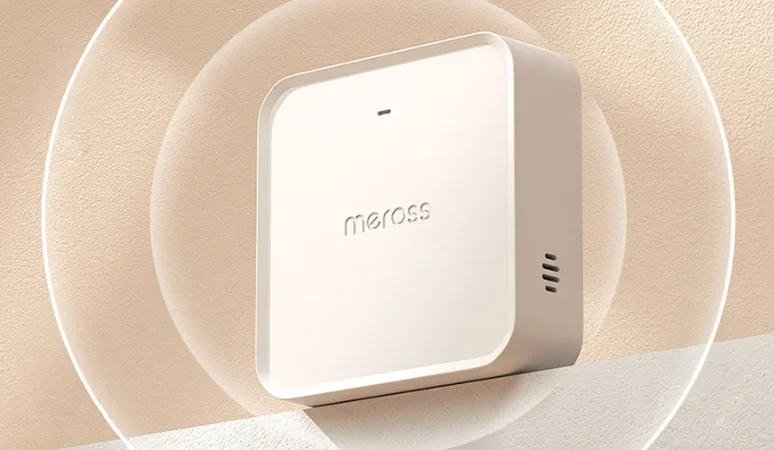

Meross MSH450 Smart Wi-Fi Hub
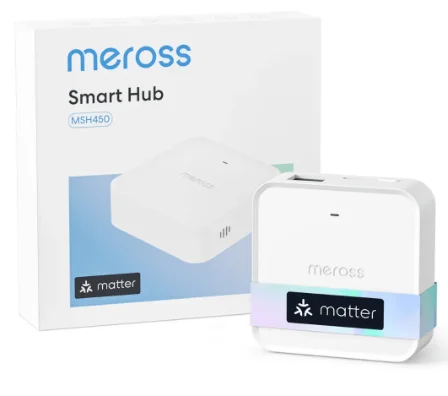
Quick Start Guide
Meross app
Package Contents
If you find any part missing in the package, please contact us at https://www.meross.com/support/Email_Support, and we will provide a proper solution for you.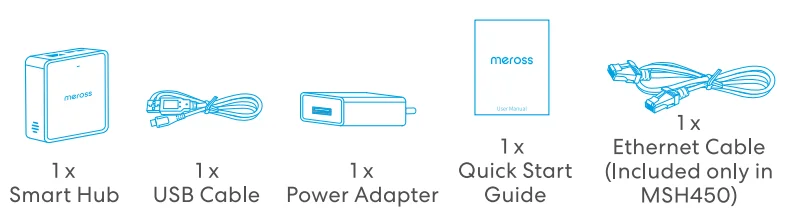
Installation Guide
- Download the Meross app.
- Follow the instructions in the Meross app to complete the setup.
LED and Button Rules
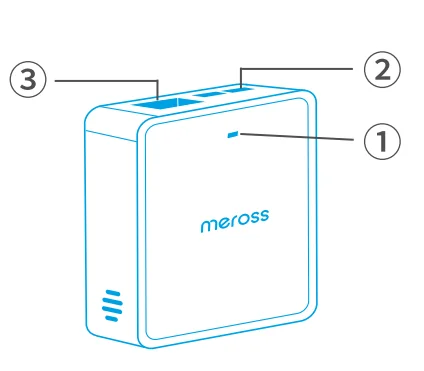
1 Hub Status LED
- Solid amber: Initiating/Reset/Firmware upgrading.
- Flashing amber and green: Configuration mode.
- Flashing green: Pairing mode/Connecting to Wi-Fi/Disconnected from Wi-Fi.
- Solid green: Connected to Wi-Fi with an internet connection.
- Solid red: No internet connection.
2 Hub Button
- Factory Reset: Press and hold for 5 seconds.
- Initiate Sub-device Pairing: Double-click the button.
3 Ethernet Port (Exclusive to MSH450)
- Upon Ethernet connection, the device seamlessly prioritizes Ethernet for enhanced connectivity.
- Before connecting to Ethernet for increased stability, it is recommended to first configure the device for Wi-Fi through the app’s guided process and complete the pairing procedure.
Safety Information
- Do not attempt to disassemble, repair, or modify the device.
- Please contact the seller for a replacement if there is any damage caused by transportation.
- Indoor use only.
Warranty
Please visit https://www.meross.com/support/warranty for the detailed warranty policy and product registration.
Support
For technical support, user guide, warranty, FAQs, and other information, please visit: https://www.meross.com/support.
Declaration of Conformity
Meross hereby declares that the device is in compliance with essential requirements and other relevant provisions of directives 2014/53/EU, 2009/125/EC, 2011/65/EU. The original EU Declaration of Conformity may be found at https://www.meross.com/support/eudoc. Meross hereby declares that the device is in compliance with the essential requirements and other relevant provisions of the Radio Equipment Regulations 2017. The original UK Declaration of Conformity may be found at https://www.meross.com/support/ukca.
Operating Frequency
No restrictions exist in the use of radio frequencies or frequency bands in all EU member states, EFTA countries, Northern Ireland, and Great Britain. Operating Frequency / Max Output Power: 2400MHz~2483.5MHz / 20dBm 433.050MHz~434.790MHz / 10dBm
Disclaimer
- The function of this smart device is tested under a typical circumstance described in our specifications. Meross does NOT guarantee that the smart device shall perform the same as described under all circumstances.
- By using third-party services, including but not limited to Amazon Alexa, Google Assistant, Apple HomeKit, and SmartThings, customers acknowledge that Meross shall not be held liable in any way for the data and private information collected by such parties. Meross’s total liability is limited to what is expressly covered in its Privacy Policy.
- Damages arising from ignorance of the SAFETY INFORMATION shall not be covered by Meross’s after-sales service, nor does Meross take any legal responsibility therefrom.
Customers acknowledge their understanding of these articles clearly by reading this manual.
FCC Compliance Information Statement
Changes or modifications not expressly approved by the party responsible for compliance could void the user’s authority to operate the equipment. This device complies with Part 15 of the FCC Rules. Operation is subject to the following two conditions:
- This device may not cause harmful interference, and
- This device must accept any interference received, including interference that may cause undesired operation.
Note: This equipment has been tested and found to comply with the limits for a Class B digital device, pursuant to Part 15 of the FCC Rules. These limits are designed to provide reasonable protection against harmful interference in a residential installation. This equipment generates, uses, and can radiate radio frequency energy, and if not installed and used in accordance with the instructions, may cause harmful interference to radio communications.
However, there is no guarantee that interference will not occur in a particular installation. If this equipment does cause harmful interference to radio or television reception, which can be determined by turning the equipment off and on, the user is encouraged to try to correct the interference by one or more of the following measures:
- Reorient or relocate the receiving antenna.
- Increase the separation between the equipment and receiver.
- Connect the equipment into an outlet on a circuit different from that to which the receiver is connected.
Consult the dealer or an experienced radio/TV technician for help.
This equipment complies with FCC radiation exposure limits set forth for an uncontrolled environment. This equipment should be installed and operated with a minimum distance of 20cm between the radiator and your body. This transmitter must not be co-located or operating in conjunction with any other antenna or transmitter.
Canadian Compliance Statement
This device contains licence-exempt transmitter(s)/receiver(s) that comply with Innovation, Science and Economic Development Canada’s licence-exempt RSS(s). Operation is subject to the following two conditions:
- This device may not cause interference.
- This device must accept any interference, including interference that may cause undesired operation of the device.
The device meets the exemption from the routine evaluation limits in section 2.5 of RSS 102, and compliance with RSS-102 RF exposure, users can obtain Canadian information on RF exposure and compliance.
For More Manuals By Meross, Visit ManualsLibraryy.
Meross MSH450 Smart Wi-Fi Hub-FAQs
What is the Meross MSH450 Smart Wi-Fi Hub used for?
The Meross MSH450 is a central smart home hub designed to connect and manage multiple Meross sensors and devices. It acts as a bridge between low-power devices and your network, enabling automation, alerts, and seamless communication across your smart home ecosystem.
Does the Meross MSH450 support Matter and smart home platforms?
Yes, the MSH450 supports the Matter protocol, allowing it to work with Apple HomeKit, Amazon Alexa, Google Home, and SmartThings. This broad compatibility makes it easy to integrate the hub into existing smart home setups without relying on a single ecosystem.
How many devices can connect to the Meross MSH450 hub?
The hub can support up to 32 compatible Meross devices, including sensors like smoke detectors, door sensors, and temperature monitors. This allows users to build a fully connected smart home system without needing multiple hubs.
Does the Meross MSH450 work without internet?
Yes, the hub supports local connections and can still communicate with connected devices even when offline. It can trigger alarms and maintain basic functionality, ensuring reliability during internet outages or network disruptions.
What connectivity options does the Meross MSH450 offer?
The MSH450 supports both 2.4GHz Wi-Fi and wired Ethernet connections. The Ethernet port provides a more stable and reliable network option, reducing connectivity issues and improving performance in larger or more complex home networks.
Does the Meross MSH450 include an alarm feature?
Yes, the hub has a built-in buzzer that can emit a loud alarm of up to 110 dB when connected devices detect issues like smoke or water leaks. It also includes a one-touch mute button for quickly silencing alarms when needed.
Is the Meross MSH450 easy to install and set up?
Setup is straightforward using the Meross app. Users simply power on the hub, connect it to Wi-Fi, and follow the in-app instructions. Additional devices can be paired easily using the hub’s button or through the app interface.
What types of devices work with the Meross MSH450?
The hub supports various Meross devices such as smoke detectors, door and window sensors, temperature sensors, and water leak detectors. It enables these low-power devices to connect to the internet and work together in automation routines.
Does the Meross MSH450 improve smart home automation?
Yes, by acting as a centralized controller, the hub enables faster response times and coordinated automation between devices. For example, it can trigger alarms or actions instantly when a connected sensor detects a specific condition, improving efficiency and safety.
What makes the Meross MSH450 different from other smart hubs?
The MSH450 stands out with Matter compatibility, dual connectivity options, and built-in alarm functionality. Its ability to support multiple devices and maintain local control makes it a flexible and reliable choice for modern smart home setups.