
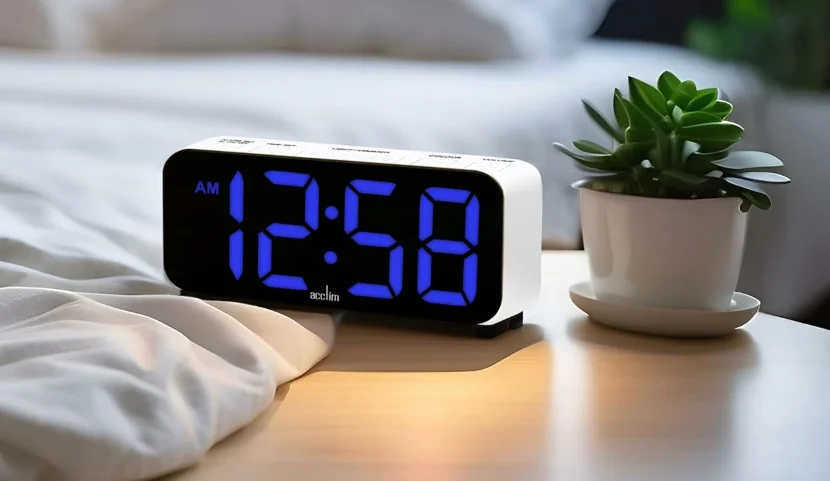

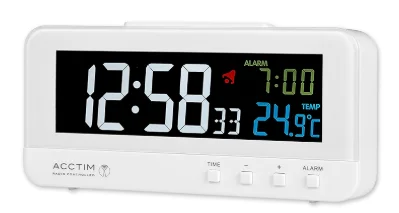
Acctim 71692 Rialto Digital Alarm Clock
INTRODUCTION
The Radio Controlled Mechanism fitted to your clock has a built-in receiver which is tuned into the National Physical Laboratory MSF transmitter based in Anthorn, Cumbria, UK.
The advantages of using this technology are:
- Automatically adjusts the clock for Summer/Winter time changes.
- Automatic precision.
- Fully automatic setup – simply plug into the power outlet.


GETTING STARTED
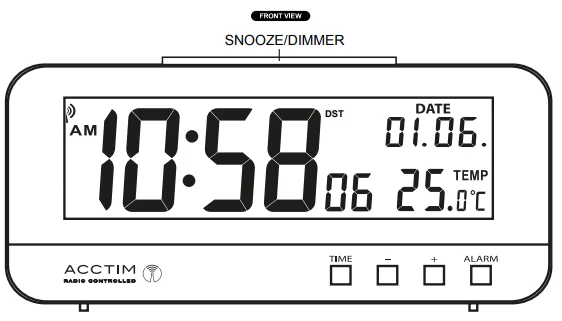
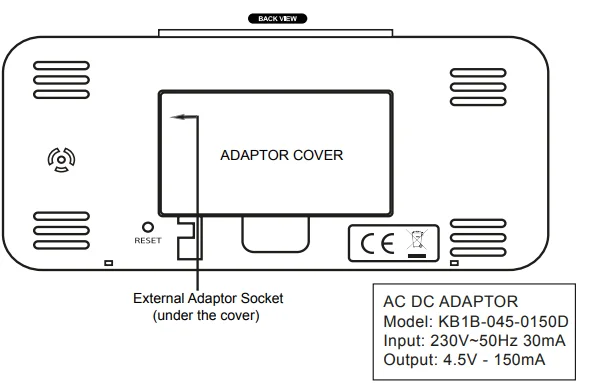
Open the adaptor cover and connect the end of the adaptor to the External Adaptor Socket. Replace the cover. Plug in the adaptor to a standard household outlet. If the clock is getting power, the time, date, and temperature will appear on the display.
- The clock will automatically search for the time signal, and the radio signal icon
 will flash.
 - If the clock receives the time signal, it will set automatically within 5 minutes, and the radio signal icon will remain on the display.
- If the clock does not receive the time signal, it can be set manually.
 will flash.
TO SET THE TIME, CALENDAR, 12/24 HR FORMAT, TEMPERATURE IN DEGREE °C/°F
- Press and hold the TIME button for 3 seconds, and the ’12h’ will flash. To select ’24h’ format, press -/+.
- Then press the TIME button once again, and the hour digits will flash. Press – / + button to set the hour (in 12-hour format, set AM and PM time correctly).
- Then press the TIME button once again, and the minute digits will flash. Press – / + button to set.
- Then press the TIME button once again, the year ‘2013’ will flash. Press – / + button to set.
- Then press the TIME button once again, and the month digits will flash. Press – / + button to set.
- Then press the TIME button once again, and the date digits will flash. Press – / + button to set.
- Then press the TIME button once again, and the °C will flash. To select temperature in °F, press – / +.
- Press TIME once to complete. Press and hold the ‘-‘ button for 3 seconds to manually force the clock to search for the time signal; the radio signal icon will flash.
DAYLIGHT SAVING TIME
To save having to reset the clock for DST (daylight saving time), your clock will automatically adjust to the Summer/Winter time changes. Summer time starts on the last Sunday in March and ends on the last Sunday in October. The summer time icon ‘DST’ will automatically appear above the display to indicate summer time.
SETTING THE ALARM
Press and hold the ALARM button for 3 seconds; the date display will change to alarm time digits, and the hour digits will flash. Press the – / + button to set the hour. Press the ALARM button once, and the minute digits will flash; press the – / + button to set. Press the ALARM button once again to complete.
TO TURN ON/OFF THE ALARM
Press the ALARM button once to turn on/off. When the alarm function is turned on, the alarm time with the bell icon will display. When the alarm activates, press any button (except the ‘Snooze’ button) to turn off the alarm; the alarm will activate at the same time the next day. Alarm duration: 2 minutes.
TO USE SNOOZE
Press the SNOOZE/DIMMER button to activate snooze during the alarm, after which the alarm will sound again approximately 5 minutes later.
BACKLIGHT
Press and hold the SNOOZE/DIMMER button on top of the clock to select a darker display or turn off the backlight, or select a brighter display.
TO VIEW SECONDS OR DAY OF WEEK DISPLAY
In normal time mode, press the TIME button once.
MSF RECEPTION DIFFICULTIES
Like any receiver, your clock needs a good signal to work properly. The main causes of reception failure are:
- Atmospheric and local interferences.
- Interference from electrical equipment, e.g., TV, computers, or radios.
- Location of the clock’s internal receiver within the building.
- Reduced local signal due to steel-framed structure.
- Outside the normal transmission.
The following suggestion may help improve reception of the MSF signal:
- Try rotating the clock as the internal receiver that picks up the signal is most effective when it is facing directly towards or away from Anthorn.
- Try moving your clock to a new location away from any electrical equipment, e.g., TV, computer, or radios, and start the setup again after 5.30 pm.
- Due to local interference, the signal is stronger between midnight & 5 am.
Note: The clock will automatically search for the time signal every day at 2:00. If it fails to receive the time signal at 2:00, it will search again at 3:00, 4:00, and 5:00 am. If the signal is weak and your clock does not set, move your clock to a new location, press and hold the ‘-‘ button for 3 seconds to start the radio-controlled signal search. If it fails to receive the signal, the signal icon will disappear and it will repeat the signal search again on the next full hour (e.g., signal search failed at 8:20 am, it will search again at 9:00 am).
TO RESET THE CLOCK
Press the RESET button once.
Interruption to the MSF signal
The Anthorn transmitter is periodically shut down for scheduled maintenance, resulting in no signal being transmitted. For dates of the scheduled maintenance, visit www.npl.co.uk/science-technology/time-frequency/products-and-services/time.msf-outages or call the NPL MSF recorded message on (0)20 8943 6493.
SAFETY
This electric clock may represent a hazard for young children. Keep this clock out of reach of small children to avoid risk of shock or a possible choking hazard from small parts. Please note that the clock has been designed to work only with the adaptor supplied.
CARE OF YOUR PRODUCT
- Place your clock on a stable surface, away from sources of direct sunlight, excessive heat, or moisture.
- Protect your furniture when placing your units on a natural wood and lacquered finish by using a cloth or protective material between it and the furniture.
- Clean your unit with a soft dry cloth. Make sure the unit is unplugged before cleaning.
YOUR GUARANTEE
Your clock is guaranteed for 12 months from the date of purchase against any faults arising from defective materials or manufacture. Damage caused through careless handling, misuse, or in transit is expressly excluded. Should this clock fail within 12 months, please return it in the first instance to your retailer.
If you have any queries, problems, or do not understand any part of these instructions, please contact:
Customer Help Line (01908) 449208 or Local 0845 1207208
Mon – Fri 9.00 am – 4.30 pm
email for service: [email protected] or visit www.acctim.com.
Environmental Protection
 Disposal of electrical & electronic equipment. Do not dispose of this product with household waste. For the proper treatment, recovery, and recycling, please take this product to the appropriate collection point. If you are unsure of where this is, contact your local authority. Improper disposal may be harmful to the environment.
For More Manuals By Acctim Clocks, Visit ManualsLibraryy.
Acctim 71692 Rialto Digital Alarm Clock-FAQs
What are the main features of the Acctim 71692 Rialto Digital Alarm Clock?
The Acctim 71692 Rialto offers a high-contrast VA display, radio-controlled timekeeping, indoor temperature display, and adjustable brightness. It also includes a beep alarm with snooze and battery backup, making it a reliable and modern bedside clock for everyday use.
How does the radio-controlled function work on this clock?
The clock automatically synchronizes with a radio time signal, ensuring accurate time without manual adjustment. It updates regularly and can also adjust for daylight saving time, providing consistent precision once connected to the signal source.
Does the Rialto alarm clock have a backup power option?
Yes, the clock is primarily mains powered but includes a battery backup using a CR2032 battery. This ensures the clock continues to keep time during power outages, so you don’t need to reset it after interruptions.
Is the display easy to read at night?
The Rialto features a high-contrast VA display with adjustable brightness settings. Users can switch between high and low brightness levels, making it comfortable to view at night without causing glare or disturbing sleep.
What information is shown on the display?
The display shows time, alarm status, snooze indicator, and indoor temperature. Its multifunction layout provides essential daily information clearly on one screen, making it convenient for quick reference throughout the day and night.
Does the clock include a snooze function?
Yes, the Acctim Rialto includes a snooze function that allows users to delay the alarm for a few extra minutes. This feature is helpful for those who prefer waking up gradually rather than immediately when the alarm sounds.
What are the dimensions of the Acctim Rialto clock?
The clock measures approximately 70 mm in height, 140 mm in width, and 34 mm in depth. Its slim and compact design makes it suitable for bedside tables, desks, or shelves without occupying much space.
Is the Acctim Rialto suitable for everyday home use?
Yes, its combination of clear display, automatic time setting, and reliable alarm features makes it ideal for everyday use. The mains-powered design ensures consistent operation, while the backup battery adds extra reliability.
Can the brightness of the display be adjusted?
Yes, the clock includes a hi/lo dimmer control that allows users to adjust brightness levels. This helps reduce light disturbance during sleep while still keeping the display visible when needed.
Is the Acctim 71692 Rialto Digital Alarm Clock good value for money?
The clock is considered good value due to its advanced features like radio-controlled accuracy, adjustable display, and battery backup. Its combination of functionality and reliability at a mid-range price makes it a popular choice among digital alarm clock users.