
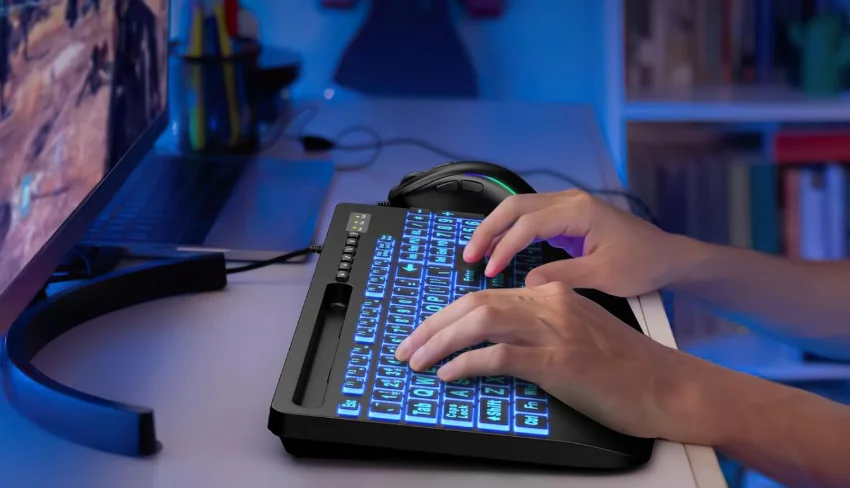

Sablute K21PRO Large Print Backlit Keyboard
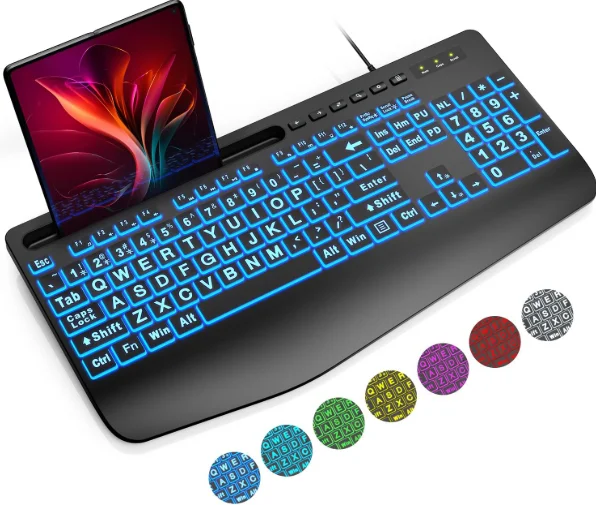
Product list
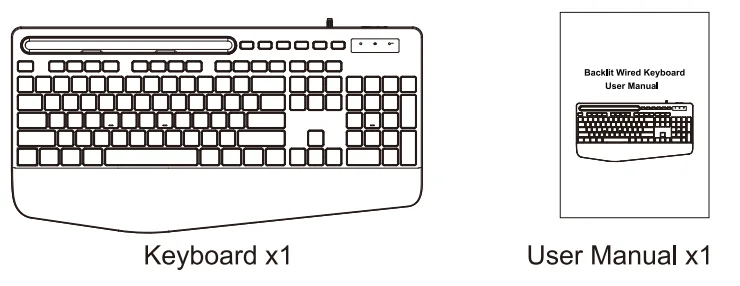
Product Specification
- Product Dimension: 430x215x33.5mm
- Product Weight: 900g
- Connectivity: Wired Connection
- Working Voltage: 5V
Functions of the Combined Key
 : Turn on/off backlight
 : Toggle backlight mode
 : Toggle backlight color
 : Regulate backlight brightness with the light on constantly (8 levels)
 : Regulate backlight speed in breathing/reactive/neon state (6 levels)
 : Toggle the backlight color (breathing mode)
 : Keep one backlight color
- : Backlighting while typing
 : Backlight color changes back and forth
 : Turn on/off backlight
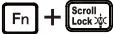 : Toggle backlight mode
 : Toggle backlight color
 : Regulate backlight brightness with the light on constantly (8 levels)
 : Regulate backlight speed in breathing/reactive/neon state (6 levels)
 : Toggle the backlight color (breathing mode)
 : Keep one backlight color
 : Backlight color changes back and forth
LED light indication
- Num: The Num Lock indicator will turn yellow when the function is activated.
- Caps: The Caps Lock indicator turns yellow when the function is activated.
- Scroll: The Scroll Lock indicator turns yellow when the function is activated.
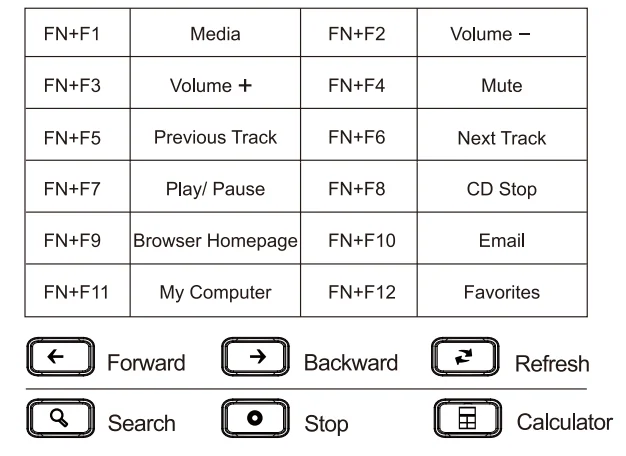
Multimedia Description
Customer service
Buy on SABLUTE, you will get:
 30-Day Money-Back Guarantee
- 90-Day Free Replacement
- Hassle-Free Warranty Without Returning
- Lifetime Customer Support
 30-Day Money-Back Guarantee
Contact Us
For FAQs and more information, please visit: sablute.com/pages/contact, [email protected].
FAQ
Q1: How to keep the keyboard backlit all the time?
A1: You can press the “FN+2” keys to make it just freeze on one color at a time.
Q2: What should I do if my keyboard doesn’t work?
A2: Please check whether the USB socket is loose or not connected.
Q3: What should I do if the keyboard light does not come on?
A3:
- Please check whether the light switch is turned on. Please press the “Fn+PrtSc SysRq” keys to turn on the backlight switch.
- If the backlight is on, maybe the light is too dim. Please press the “Fn+” keys to adjust the brightness of the light.
Q4: What should I do if the number keys on the right don’t work?
A4: Please try pressing the NL key (alphabetic lock key).
If you encounter the above problems and cannot solve them, please contact our customer service, and we will give you a satisfactory solution. We can provide you with a 90-day warranty replacement service.
Note
The multimedia keys are for Win 8 and Win 10. For other systems, there may be no function for some combined keys. This equipment has been tested and found to comply with the limits for a Class B digital device, pursuant to part 15 of the FCC Rules. These limits are designed to provide reasonable protection against harmful interference in a residential installation. This equipment generates, uses, and can radiate radio frequency energy and, if not installed and used in accordance with the instructions, may cause harmful interference to radio communications.
However, there is no guarantee that interference will not occur in a particular installation. If this equipment does cause harmful interference to radio or television reception, which can be determined by turning the equipment off and on, the user is encouraged to try to correct the interference by one or more of the following measures:
- Reorient or relocate the receiving antenna.
- Increase the separation between the equipment and receiver.
- Connect the equipment into an outlet on a circuit different from that to which the receiver is connected.
- Consult the dealer or an experienced radio/TV technician for help.
Changes or modifications not expressly approved by the party responsible for compliance could void the user’s authority to operate the equipment. This device complies with Part 15 of the FCC Rules. Operation is subject to the following two conditions:
- This device may not cause harmful interference.
- This device must accept any interference received, including interference that may cause undesired operation.
For More Manuals By Sablute, Visit ManualsLibraryy.
Sablute K21PRO Large Print Backlit Keyboard-FAQs
What is the Sablute K21PRO Large Print Backlit Keyboard?
The Sablute K21PRO is a wired USB keyboard designed with oversized, easy-to-read letters and adjustable backlighting. It is built for improved visibility, comfort, and everyday productivity, making it suitable for users who want a clearer typing experience in both bright and dim environments.
Is the Sablute K21PRO keyboard wired or wireless?
The Sablute K21PRO is a wired keyboard that connects via a USB cable. It does not support Bluetooth or wireless connectivity, ensuring a stable and lag-free typing experience without the need for batteries or charging during regular use.
How large are the keys on the Sablute K21PRO?
The keyboard features oversized keys with fonts approximately four times larger than standard keyboards. This design improves readability and reduces typing errors, making it especially useful for seniors, students, and users who prefer clearly visible key labels.
Does the Sablute K21PRO have backlighting options?
Yes, the Sablute K21PRO includes multiple backlighting options, offering several colors, brightness levels, and lighting modes. This allows users to customize visibility based on their environment, making typing easier in low-light or nighttime conditions.
Is the Sablute K21PRO suitable for people with vision issues?
The keyboard is specifically designed for users with visual challenges. Its large-print keys and illuminated backlight improve visibility significantly, helping reduce eye strain and making it easier to type accurately without constantly looking closely at the keyboard.
Does the Sablute K21PRO include ergonomic features?
Yes, the Sablute K21PRO includes ergonomic elements like a wrist rest and adjustable tilt stand. These features help maintain a natural typing posture, reducing wrist fatigue and discomfort during long working sessions or extended computer use.
Can the Sablute K21PRO be used with Mac and Windows?
The keyboard is compatible with multiple operating systems, including Windows, macOS, Linux, and Chrome OS. However, some multimedia keys may have limited functionality on Mac systems, depending on system support and configuration.
Does the Sablute K21PRO require software or drivers?
No additional software or drivers are needed for the Sablute K21PRO. It is a plug-and-play keyboard, meaning you can connect it to a USB port and start using it instantly without installation or configuration steps.
What extra features does the Sablute K21PRO offer?
The keyboard includes practical extras such as a built-in phone or tablet holder and a palm rest. These features improve multitasking and comfort, allowing users to watch content, attend video calls, or read while working on their computer.
Is the Sablute K21PRO worth buying?
The Sablute K21PRO is a strong choice for users who prioritize visibility, comfort, and simplicity. It offers large-print keys, customizable backlighting, and ergonomic support at an affordable price, though it may not appeal to users seeking wireless connectivity or advanced gaming features.