
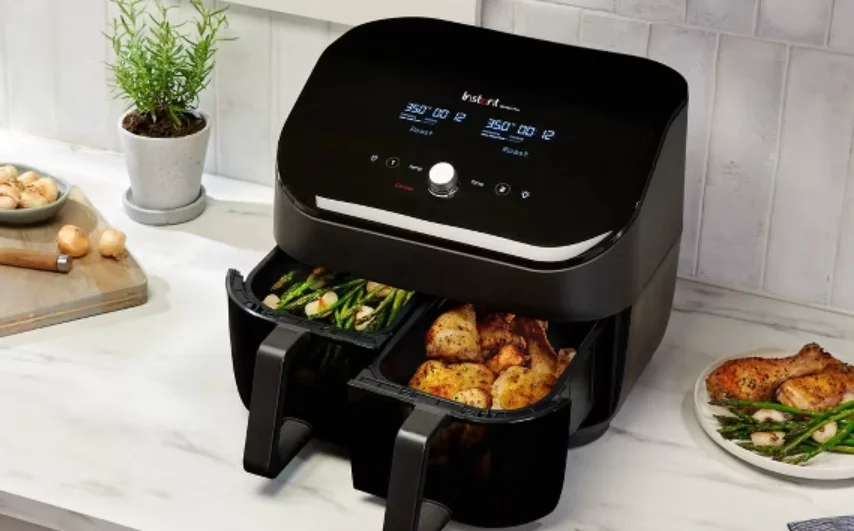

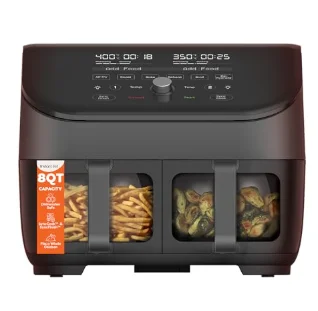
Instant Pot Vortex Plus 8QT ClearCook Air Fryer
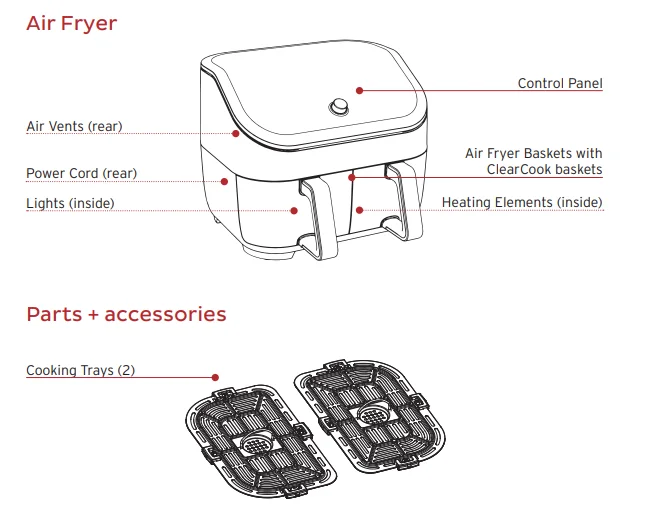
WHAT’S IN THE BOX
Remember to recycle!
We designed this packaging with sustainability in mind. Please recycle everything that can be recycled where you live. Be sure to keep this Guide, along with the Safety and Warranty insert, for reference.
USING YOUR VORTEX PLUS
Control panel
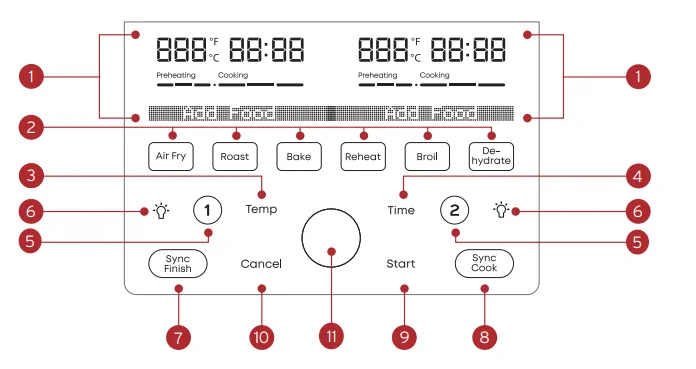
We’ve designed the control panel to be simple to use and easy to read.
- Left + Right Basket Status Display
- Cooking temperature
- Cooking time
- Messages
- Error codes
- Smart Programs
- Temperature Control
- Increase or decrease cooking temperature
- Time Control
- Increase or decrease cooking time
- Left (1) + Right (2) Basket Selectors
- Light
- SyncFinish
- Set separate programs to end at the same time
- SyncCook
- Match right and left basket settings
- Start
- Cancel
- Control Panel
Turning the sound on/off
You can set notification sounds to ON or OFF.
- When in Ready or cooking modes, press and hold Time and Temp for 5 seconds until the display shows Sound On or Sound Off.
- Error alerts cannot be turned off.
Choosing the temperature scale
You can display cooking temperature in either Fahrenheit or Celsius.
- When in Ready or Cooking modes, press and hold Temp for 5 seconds until the display shows °F or °C.
Reset Smart Programs to original settings.
Reset individual Smart Programs.
- Once you’ve selected the Smart Program, press and hold that Smart Program button for 3 seconds.
The Smart Program’s button blinks, and the cooking time and temperature are restored to the factory default setting.
Reset all Smart Programs
- With the cooker in Ready mode, press and hold the Control Dial for 3 seconds until the cooker beeps.
- All Smart Program cooking times and temperatures are restored to the factory default setting.
INITIAL SET UP
Unpack
- Remove your new Vortex Plus from the box.
- Remove all the packaging material from inside and around the air fryer.
- Make sure to remove all the accessories from inside the air fryer.
- Don’t remove the safety warning stickers or the rating label from the air fryer.
Clean before use
- Wipe the interior with a damp cloth. Use a clean, soft cloth to dry.
- Wash the accessories with hot water and dish soap. Rinse with warm, clear water and use a soft cloth to dry.
Placement
- Place your Vortex Plus on a stable, level surface, away from combustible material and external heat sources. Do not place your Vortex Plus on top of another appliance.
- Make sure to leave at least 5 in / 13 cm of space above and around all sides of the appliance to allow for sufficient airflow.
Test run
Before using your new Vortex Plus for the first time, perform a test run to ensure everything is working correctly.
To perform a test run:
- Follow the instructions for cooking on page 7.
- Insert the cooking basket, but do not add food.
- Select basket 1.
- The Air Fry program activates by default.
- Change the cooking temperature to 400°F / 205°C.
- Change the cooking time to 18 minutes.
- Select basket 2.
- The Air Fry program activates by default.
- Change the cooking temperature to 400°F / 205°C.
- Change the cooking time to 18 minutes.
- Press Start, and the air fryer starts the test run.
- When the display shows Add Food, just wait 10 seconds for the program to resume (do not add any food).
- When the display shows Turn Food, just wait 10 seconds for the program to resume.
- After the cooking session is done, let the unit cool.
Now you’re ready to cook a meal in your Instant Vortex Plus!
COOKING
The Vortex Plus uses rapid air circulation to crisp or cook food, giving your meals all the rich, crispy flavor of deep frying, with little to no oil.
What to cook in
- The cooking basket and cooking tray are perforated to allow air to flow under and around your food and should be used for most foods, like wings and cauliflower bites.
- You can place food right on the cooking tray, without using foil or other coverings.
- For the Baking program only, you can use a metal or glass baking dish to hold things like batter for cakes and dough for breads. Place the baking dish inside the cooking basket for baking.
How to cook
These instructions explain how to cook using one basket at a time. See below for information on using both baskets.
Prep
Thaw, cut, season, or batter your ingredients according to your recipe.
Preheat
- Insert the cooking basket into the air fryer.
- Press 1 (to cook in the left basket) or 2 (to cook in the right basket).
The Air Fry button blinks, and the display shows the default time and temperature. - If you want to select a smart program other than Air Fry, press the button for the program you want to use.
The default time and temperature are displayed for that smart program. - If you want to adjust the cooking time, press Time and use the Control Dial to increase or decrease it.
- If you want to adjust the cooking temperature, press Temp and use the Control Dial to increase or decrease it.
- Press Start to begin. The status bar shows Preheating.
- When the cooker reaches the target temperature, the display shows Add Food.
Note: Add Food applies to Air Fry, Roast, Bake, and Broil only.
Cook
- Remove the cooking basket and place your food into the basket.
- Insert the cooking basket into the air fryer.
- Cooking begins, and the cooking countdown timer starts.
Turn
- Partway through the cooking cycle, the display shows Turn Food.
If you do not remove the basket after the Turn Food displays, cooking will proceed after 10 seconds. - Remove the basket and carefully turn, flip, or rotate your food.
- Insert the basket again. Cooking continues.
Finish
- When the smart program completes, the air fryer beeps, and the display shows End.
- The air fryer beeps after 5 minutes, 20 minutes, and 60 minutes to remind you that cooking has completed.
Cooking in both baskets
Read the instructions for “using both baskets” on page 14 to learn how to:
- Use both baskets with different settings.
- Use both baskets with matching settings.
- Use both baskets with different settings and have both programs finish at the same time.
Changing the cooking time during cooking
You can change the cooking time after you’ve started a smart program:
- Press 1 or 2 to select the basket you want to change.
- Press Time and use the Control Dial to increase or decrease it.
- Then press the Control Dial to confirm the change.
- Press Start to continue cooking.
If you don’t press Start, cooking continues using the former settings.
Changing the cooking temperature during cooking
You can change the cooking time after you’ve started a smart program:
- Press 1 or 2 to select the basket you want to change.
- Press Temperature and use the Control Dial to increase or decrease it.
- Then press the Control Dial to confirm the change.
- Press Start to continue cooking.
If you don’t press Start, cooking continues using the former settings.
Cancel cooking during cooking.
You can cancel cooking at any time after you’ve started a smart program:
- Press 1 or 2 to select the basket you want to cancel.
- Press Cancel.
If you press Cancel without selecting a basket, both baskets will be canceled.
USING BOTH BASKETS
The Vortex Plus Dual Air Fryer lets you cook in both baskets at the same time, with 3 options:
Cook in both baskets.
Cook in both baskets at the same time, using different programs and settings.
SyncCook
Cook in both baskets at the same time, using the same program and settings for both.
SyncFinish
Cook in both baskets at the same time, using different programs and settings for each, but finish cooking at the same time.
How to cook in both baskets
- Follow the instructions for Cooking on page 7 and any specific instructions for the smart program you want to use.
- Set up your first program in the left basket (select 1), including any changes to time and temperature settings if you want.
- Press 2 to start setting up a second smart program in the right basket, including any changes to time and temperature settings if you want.
- Then press Start and continue following the instructions for Cooking.
You can also start the first program in the right basket (select 2) and then set up the left basket (select 1).
How to SyncCook
- Follow the instructions for Cooking on page 7 and any specific instructions for the smart program you want to use.
- After you’ve set up your first program (in either basket), but before pressing Start, press SyncCook. The SyncCook icon displays
 .
. - Then press Start and continue following the instructions for Cooking.
 .
.About SyncCook
- You can change the cooking time and temperature settings for both baskets (SyncCook will remain ON) by adjusting the cooking time or temperature.
- You can change the cooking time and temperature settings for either basket (SyncCook will turn OFF) by pressing 1 or 2 to select a basket to change and then adjusting the cooking time or temperature.
- If you remove one basket during cooking, the other basket will keep cooking. The display will still show the SyncCook icon, but the cooking times will be different in the two baskets.
How to SyncFinish
- Follow the instructions for Cooking on page 7 and any specific instructions for the smart program you want to use.
- Set up your first program in either basket (select 1 or 2), including any changes to time and temperature settings if you want.
- Press 1 or 2 to select the other basket and start setting up a smart program in that basket, including any changes to time and temperature settings if you want.
- Press SyncFinish. The SyncFinish icon displays
 .
. - Press Start and continue following the instructions for Cooking.
 .
.The air fryer will calculate the cooking times and start cooking each basket at the appropriate time so they finish together.
About SyncFinish
- If you need to remove one of the baskets during cooking, cooking in the other basket will pause to keep the two in sync.
Ending SyncCook
You can end SyncCook at any time to make changes to one or both cooking programs.
- Press 1 or 2 to select the basket you’d like to make changes to.
SyncCook stops, and the icon no longer displays. - Adjust the cooking time or temperature settings and press the Control Dial to confirm the changes.
- Press Start to continue cooking, with each basket cooking with its own program and settings.
Ending SyncFinish
You can end SyncFinish if you need to make changes to the cooking programs by pressing Cancel. After that, reselect a program and settings for each basket.
CLEANING
Clean your Instant Vortex Plus after each use. Always let all parts cool to room temperature before cleaning. Before use or storage, make sure all surfaces are dry.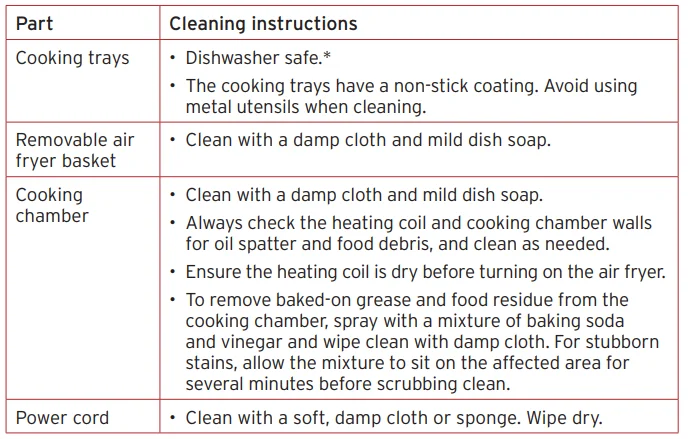
Some discoloration may occur after machine washing, but this will not affect the cooker’s safety or performance. In the manual for full details, read the User Manual, available at instanthome.com.
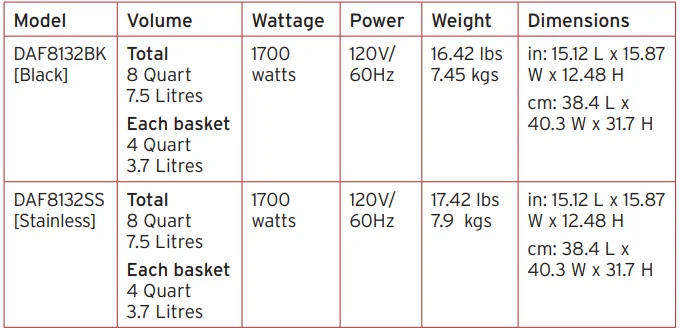
Product specifications
For More Manuals By Instant Pot, Visit ManualsLibraryy.
Instant Pot Vortex Plus 8QT ClearCook Air Fryer-FAQs
What is the Instant Pot Vortex Plus 8QT ClearCook Air Fryer?
The Instant Pot Vortex Plus 8QT ClearCook Air Fryer is a large-capacity kitchen appliance designed for healthier cooking with minimal oil. It features dual baskets, multiple cooking functions, and a ClearCook viewing window that lets you monitor food without opening the fryer.
What cooking functions does the Vortex Plus 8QT offer?
This air fryer typically offers multiple cooking modes such as air frying, roasting, baking, broiling, reheating, and dehydrating. These preset programs simplify meal preparation, allowing users to cook a wide variety of dishes with consistent results using a single appliance.
What is the benefit of the ClearCook window feature?
The ClearCook window allows you to check cooking progress without opening the basket, preventing heat loss and maintaining consistent cooking temperatures. This feature improves efficiency and helps ensure evenly cooked, crispy results while reducing the need for constant monitoring.
How large is the 8QT capacity, and who is it suitable for?
The 8-quart capacity is ideal for families or those preparing multiple servings at once. It can handle large portions or cook two different foods simultaneously using its dual-basket design, making it convenient for busy households or entertaining guests.
Does the air fryer require oil for cooking?
The Vortex Plus uses advanced air circulation technology to cook food with little to no oil. While a small amount of oil can enhance crispiness, it can still deliver crunchy results using up to 95% less oil compared to traditional deep frying.
Can you cook two different foods at the same time?
Yes, the dual-basket design allows you to cook two separate dishes simultaneously. Features like SyncCook and SyncFinish ensure both items cook at the correct settings and finish at the same time, making meal preparation more efficient and convenient.
Is the Instant Vortex Plus easy to clean?
Yes, the air fryer is designed for easy maintenance. Its non-stick baskets and trays are dishwasher-safe, reducing cleanup time and effort. This makes it a practical option for everyday cooking without the hassle of extensive cleaning afterward.
How powerful is the Vortex Plus 8QT air fryer?
The appliance typically operates at around 1700 watts, providing strong and consistent heating performance. This high power enables faster cooking times compared to conventional ovens, helping users prepare meals quickly without sacrificing texture or flavor.
Does the air fryer need preheating before use?
Yes, preheating is recommended for optimal results. It usually takes only a few minutes and ensures that food starts cooking immediately at the right temperature, which improves crispiness and overall cooking consistency for most recipes.
Is the Instant Pot Vortex Plus safe to use daily?
The air fryer includes built-in safety features such as overheat protection and automatic shut-off. These features help prevent accidents and make it suitable for regular use, giving users peace of mind while cooking meals frequently.