
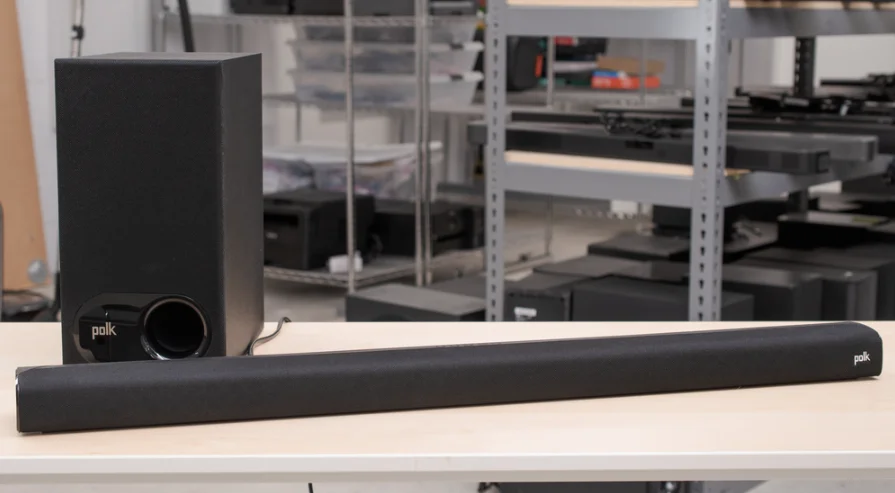

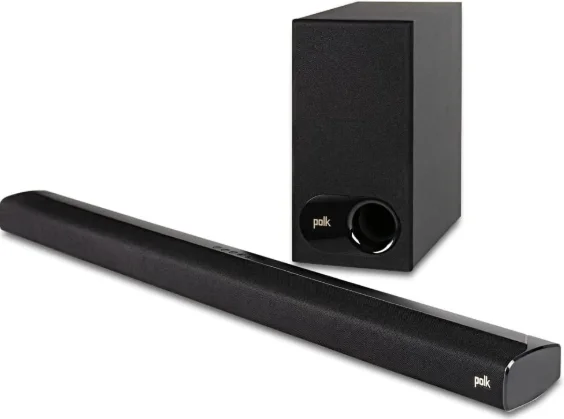
Polk Audio Signa S2 Sound Bar
Thank you for your Polk purchase. If you have a question or comment, please feel free to call or email us.
Technical Assistance
In North America, call Polk Customer Service at 800-377-POLK (7655) (M–F, 9 a.m.–5:30 p.m. EST). Outside the US, call +1-410-358-3600. Email: [email protected].
- Polk Audio
- 1 Viper Way
- Vista, CA 92081
The complete owner’s manual can be found online at www.polkaudio.com. In all other countries, please refer to [email protected].
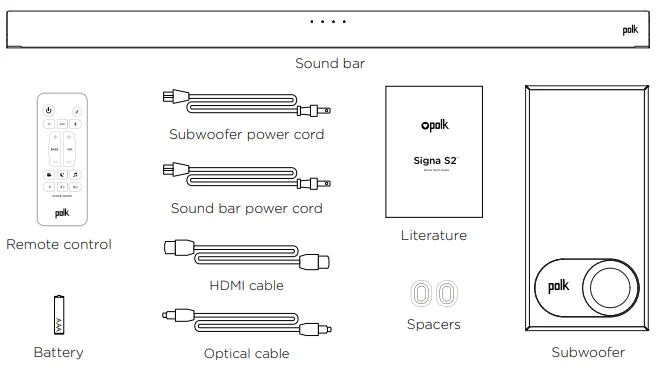
What’s in the Box
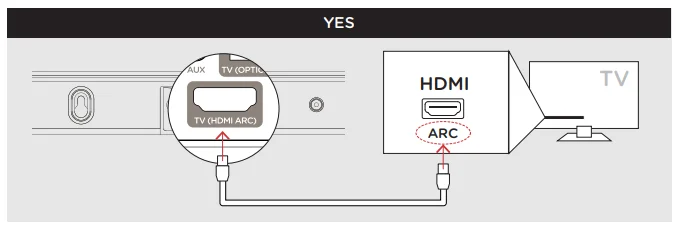
Connecting Your Signa S2 to Your TV
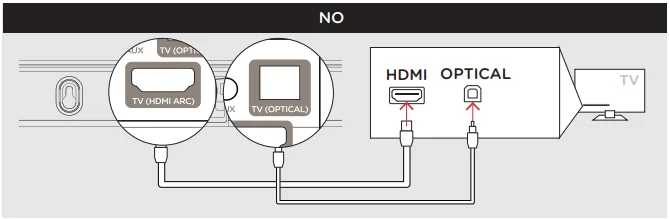
- Is an HDMI port on your TV labeled “ARC”? Connect the included HDMI cable to the HDMI ports labeled with “ARC” on both the TV and the sound bar.

- Connect the optical cable between the TV and the sound bar.

- Connect the included HDMI cable to any available HDMI port on the TV and to the “TV ARC” port on the sound bar. NOTE: HDMI (ARC) and optical support Dolby 5.1 decoding.
- Connect the optical cable between the TV and the sound bar.
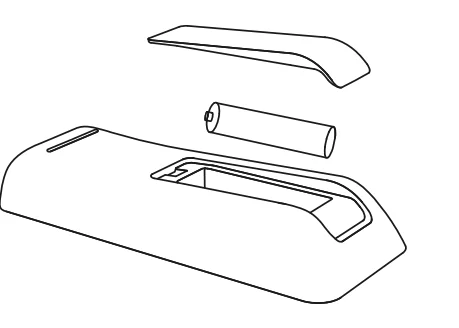
- Remote battery installation: Insert the provided AAA battery.

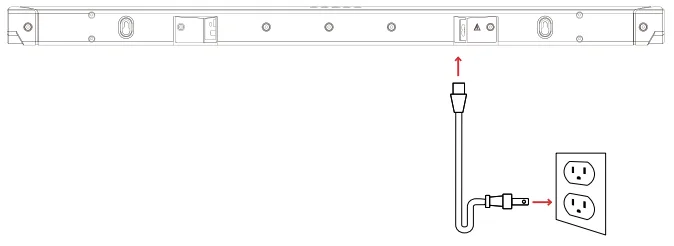
- Connect the sound bar power cord to an AC outlet.

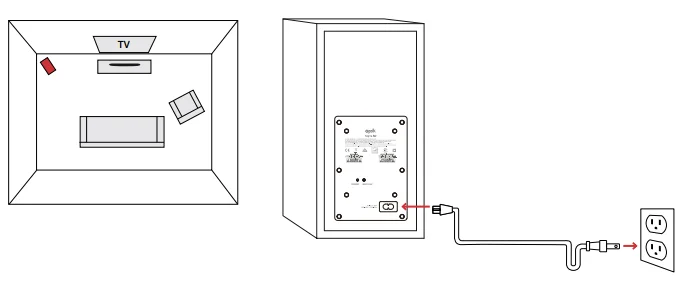
- Position the subwoofer and connect it to an AC outlet (for best performance, place it on the same wall as the TV). NOTE: The Signa S2 sound bar and wireless subwoofer are preset at the factory to work together. Should your wireless subwoofer stop receiving an audio signal, follow these instructions to re-establish the connection:

- Turn on your sound bar.
- Press and hold the BAR SYNC button on the back of the subwoofer for 3 seconds.
- Simultaneously press and hold the Bluetooth
 and VOL + buttons on the sound bar for 5 seconds. The sound bar will search for a connection while the first and second LEDs on the sound bar flash intermittently. The lights will stop flashing when the sound bar and subwoofer connect. If the sound bar and subwoofer fail to connect, the first and second LEDs will flash together 5 times. Repeat the steps above to establish a connection.
- Turn on your sound bar. Press the Power button
 on the sound bar or remote. NOTE: Make sure the TV’s internal speakers are off.
 and VOL + buttons on the sound bar for 5 seconds. The sound bar will search for a connection while the first and second LEDs on the sound bar flash intermittently. The lights will stop flashing when the sound bar and subwoofer connect. If the sound bar and subwoofer fail to connect, the first and second LEDs will flash together 5 times. Repeat the steps above to establish a connection.
 on the sound bar or remote. NOTE: Make sure the TV’s internal speakers are off.
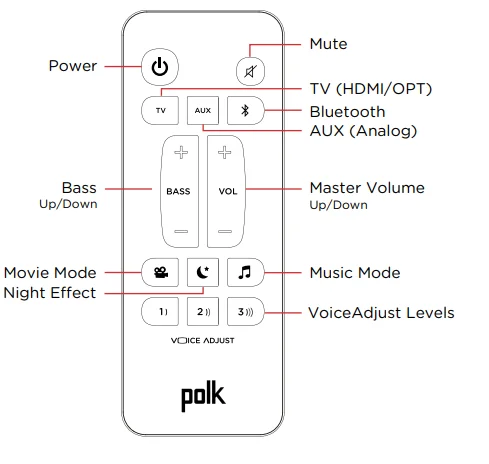
Remote Control
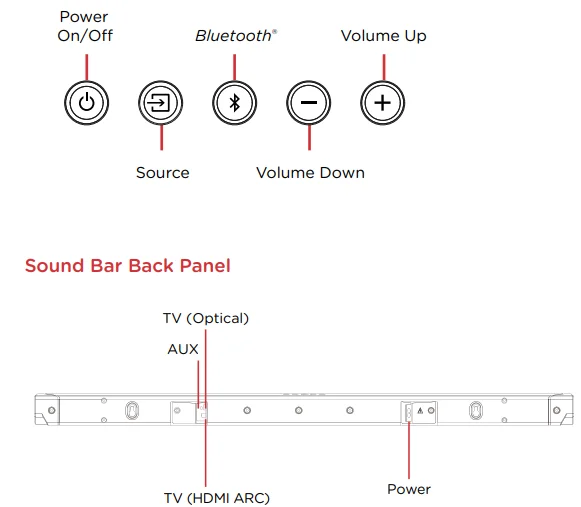
Sound Bar Top Panel
Sound Bar LEDs
The Signa S2 has a horizontal row of LED lights that provide status indications, like source, volume, and listening modes.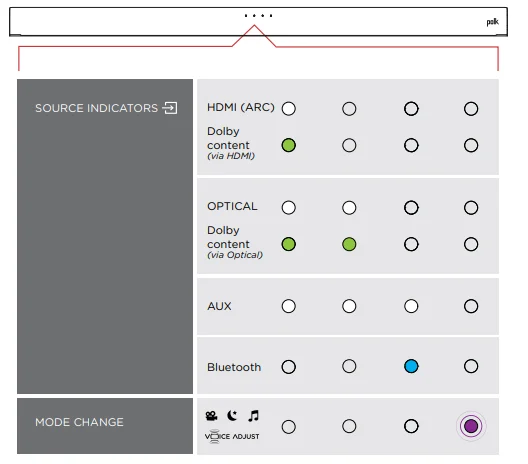
Optimizing Your Listening Experience
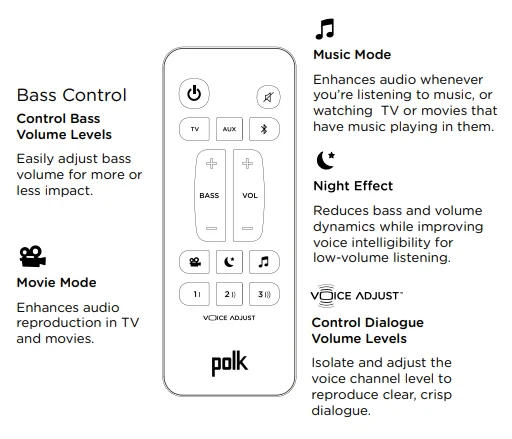
Music Listening
How to Set Up Bluetooth
- To enable Bluetooth , press the Bluetooth button on the sound bar or remote control. A blue LED will pulse on the sound bar.

- Go to the Bluetooth devices section on your phone, tablet, or computer and select Polk Signa S2. The LED is solid blue when Bluetooth is connected. NOTE: To take control when another device is connected, press the Bluetooth button.

How to hear your TV again: When you are finished using Bluetooth, press the source button on the sound bar or remote (TV, AUX).
Auto Standby
When there is no input signal and no operation for 15 minutes, this unit automatically enters standby mode.
Bluetooth Standby
When a Bluetooth connection is made from a registered Bluetooth device, this unit turns on automatically.
- Press and hold the [TV] button for approximately 5 seconds. (The default setting is “Off.)
Specifications
Sound bar
- Power supply: AC 100 – 230 V, 50/60Hz
- Operating temperature: 5°C – 35°C
- Power consumption: 40 W
- Power consumption in standby mode: 0.3 W
- Power consumption in Bluetooth standby: 1.6 W
Subwoofer
- Power supply: AC 100 – 230 V, 50/60Hz
- Operating temperature: 5°C – 35°C
- Power consumption: 40 W
- Power consumption in standby mode: 0.26 W
- Power consumption in Bluetooth standby: 1.1 W
For More Manuals By Polk Audio, Visit ManualsLibraryy.
Polk Audio Signa S2 Sound Bar-FAQs
What are the main features of the Polk Audio Signa S2 Sound Bar?
The Polk Audio Signa S2 is a 2.1-channel sound bar that includes a wireless subwoofer, HDMI ARC, optical and AUX inputs, Bluetooth music streaming, Dolby Digital decoding, and Polk’s VoiceAdjust technology for clearer dialogue. Its low-profile design fits easily under most TVs.
Does the Polk Audio Signa S2 come with a subwoofer?
Yes, the Signa S2 includes a wireless subwoofer with a 5.25-inch driver. It adds deeper bass for movies, TV shows, and music while allowing flexible placement anywhere near a power outlet, making it a significant upgrade over built-in TV speakers.
Is the Polk Audio Signa S2 good for dialogue clarity?
Yes, one of the standout features is Polk’s VoiceAdjust technology, which boosts vocal frequencies to make speech easier to understand. This is especially helpful for movies and TV shows where dialogue can otherwise be drowned out by background music and effects.
Does the Polk Audio Signa S2 support Dolby Atmos?
No, the Signa S2 supports Dolby Digital but not Dolby Atmos or DTS: X. It provides virtual surround sound for a more immersive experience, but it lacks the height-channel effects found in newer, more advanced sound bars.
Can I connect the Polk Audio Signa S2 to my TV with HDMI ARC?
Yes, the Signa S2 supports HDMI ARC, allowing audio and volume control through a single cable. This setup simplifies installation and lets you use your TV remote to control the sound bar if your television supports HDMI-CEC.
Is Bluetooth available on the Polk Audio Signa S2?
Yes, the sound bar includes Bluetooth connectivity, so you can stream music, podcasts, and other audio wirelessly from your smartphone, tablet, or laptop without needing additional cables or adapters.
How easy is it to set up the Polk Audio Signa S2?
The Signa S2 is designed for quick installation and includes both HDMI and optical cables in the box. Most users can complete the setup in just a few minutes and start using the sound bar immediately.
How easy is it to set up the Polk Audio Signa S2?
The Signa S2 is designed for quick installation and includes both HDMI and optical cables in the box. Most users can complete the setup in just a few minutes and start using the sound bar immediately.
Is the Polk Audio Signa S2 suitable for large rooms?
The Signa S2 performs best in small to medium-sized rooms. It gets loud enough for most living rooms, but because it is a 2.1-channel system, it does not create the same expansive surround effect as higher-end models.
What are the common issues with the Polk Audio Signa S2?
Some users report occasional subwoofer pairing issues or audio dropouts. Community discussions suggest that factory resets or re-pairing the subwoofer usually resolve these problems, though reliability experiences vary from user to user.
Is the Polk Audio Signa S2 worth buying?
Yes, the Signa S2 remains a strong value for shoppers seeking better TV sound, clear dialogue, and solid bass at a reasonable price. It lacks advanced formats like Dolby Atmos, but it delivers excellent performance for everyday viewing and music playback.