
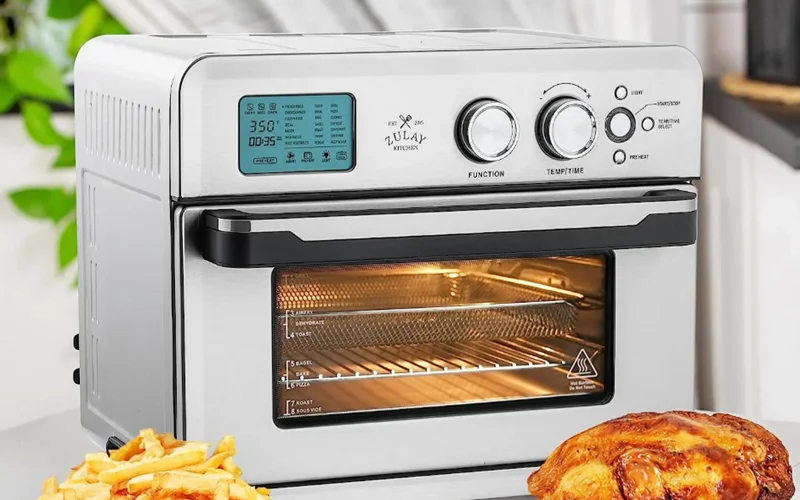

Zulay Kitchen Smart Convection Oven
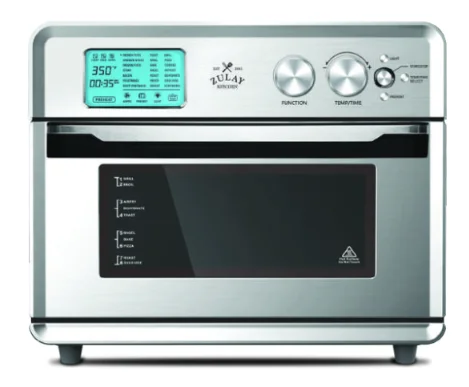
SAFETY INFORMATION
PLEASE READ ALL INSTRUCTIONS CAREFULLY BEFORE USING THIS PRODUCT. When using any electrically powered product, basic safety precautions should always be followed, including the following:
- Remove any packaging materials before using the oven for the first time and set them aside.
- To avoid choking hazards for young children, remove and safely dispose of the protective cover fitted on the power plug.
- Do not use the appliance near the edge of a countertop or table. Ensure the surface is stable, level, heat-resistant, and clean.
- Do not use on a cloth-covered surface, near curtains, or other flammable materials.
- Do not let the cord hang over the edge of a surface where the potential of child or pet interaction is present. This appliance should not be used by or near children and pets to avoid injury.
- Do not operate any appliance with a damaged cord or plug. If the appliance is dropped or damaged, please call the customer service team for proper inspection and repair.
- Do not immerse the cord, plug, or any other parts of the Smart Convection Oven in water.
- Do not leave the door standing open for extended periods of time.
- Do not store any items on top of the oven when it is in operation.
- Caution should be exercised when using lids in the oven, as pressure build-up in a covered pan or dish may cause hot ingredients to expel or the dish to crack. Do not place sealed or airtight containers in the oven.
- This appliance is for household use only. Do not use in any type of moving vehicle. Do not use the appliance outdoors, or for anything other than its intended use. Misuse can cause injury.
- This appliance is not intended for use by persons (including children) with reduced physical, sensory, or mental capabilities or lack of experience and knowledge, unless they have been given supervision or instruction concerning use of the appliance by a person responsible for their safety.]Close supervision is necessary when the appliance is used by or near children.
- Servicing should be performed by an authorized service representative.
- Do not place oversized food or utensils inside the Smart Oven, as these can be a cause of fire.
- Use safety gloves or included mitts when touching hot surfaces. To avoid burns, use extreme caution when removing accessories or disposing of hot grease.
- When storing in an appliance garage, always unplug the unit from the electrical outlet.
- Do not store any materials other than the included trays inside this appliance when not in use. Do not place any of the following materials in this appliance: cardboard, plastic, paper, or anything similar.
- Do not cover the Crumb Tray or any parts of the Smart Convection Oven with metal foil. This will cause overheating of the Smart Convection Oven.
- Unplug from the outlet when not in use and before cleaning. Allow to cool before cleaning or handling.
- Do not place near fire or electric burners.
- Do not rest utensils or baking dishes on the glass door.
- Only use a 25W maximum, 120V, type GS oven bulb.
- Always unplug the oven and let all parts (including the bulb housing, glass cover, and enclosure) cool completely before replacing the bulb.
- Always use a soft cloth when handling the bulb, and do not directly touch the surface as oil from your skin can damage the bulb.
- Do not clean with metal scouring pads.
Technical Specifications
MAIN COMPONENTS
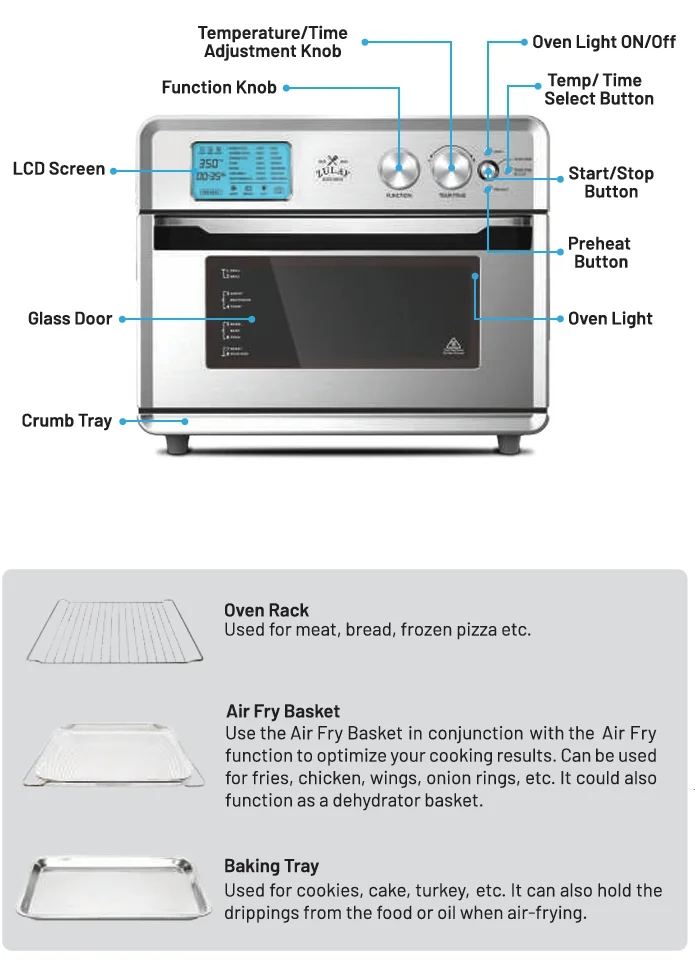
CONTROL PANEL
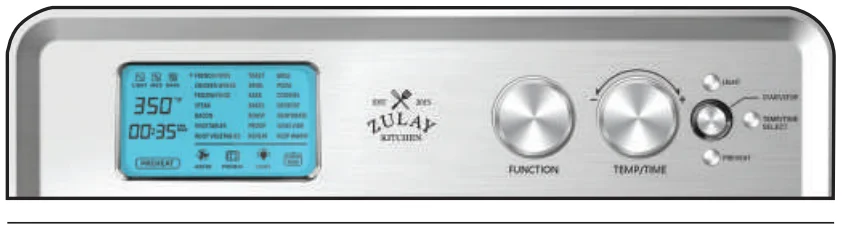
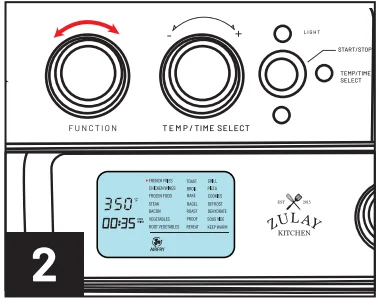
- FUNCTION KNOB: Rotate the function knob to navigate through the cooking menu.
- TEMP/TIME SELECT BUTTON: This button is used to confirm the cook function you have selected. Additionally, it is used to confirm the time or temp you have selected by using the TEMP/TIME adjustment knob. For more details, see page 08.
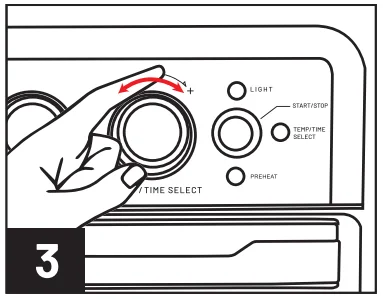
- TEMP/TIME ADJUSTMENT KNOB: Rotate (left – right +) the TEMP/TIME knob to select the exact desired temperature or time. This is confirmed by pressing the TEMP/TIME SELECT button. Once you are ready to start cooking, press the Start/Stop button.
- START/STOP BUTTON: Press the Start/Stop button to start or stop the cooking process. This button is also used to pause and resume the cooking process. Note: The button will illuminate red when the oven preheats or cooks. If the button is not illuminated, no cooking is taking place.
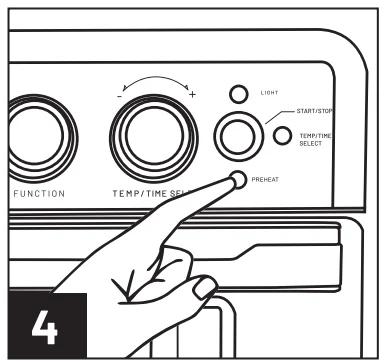
- PREHEAT: Press the Preheat button to start the preheating process. The smart oven will go to 300 degrees Fahrenheit. Please note that it is not required to press the Start/Stop button to begin the preheat function; it starts immediately once you press the Preheat button.
- LIGHT BUTTON: Press the Light button to turn the oven light on or off. The light will turn off automatically in 5 minutes to save energy.
- STANDBY MODE: When the screen light is not illuminated, simply interact with any of the knobs or buttons. The Smart Oven LCD screen will light up, letting you know that the system is now awake and ready for use.
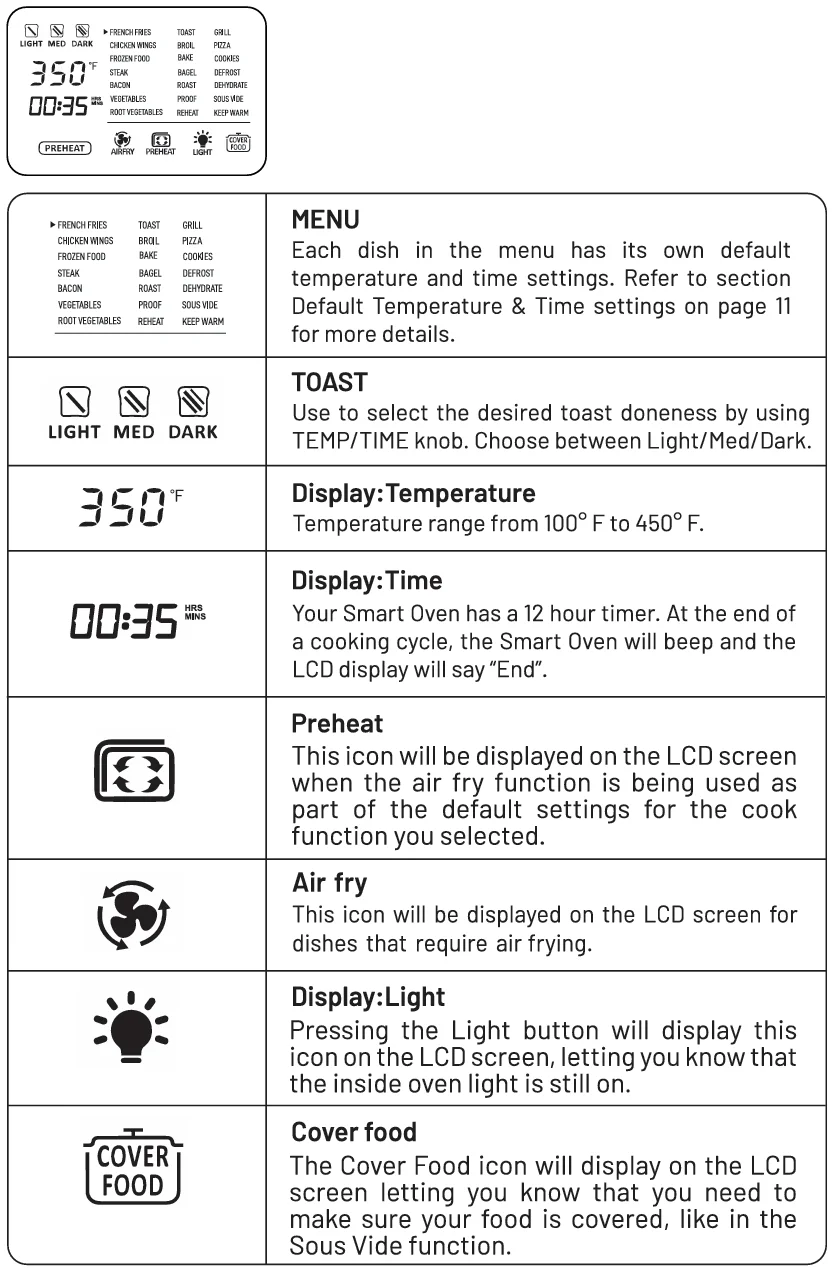
LCD SCREEN
FEATURES
By using all-new 360° HOT AIR CIRCULATION technology, the Smart Convection Oven can offer you more delicious and healthier cuisine.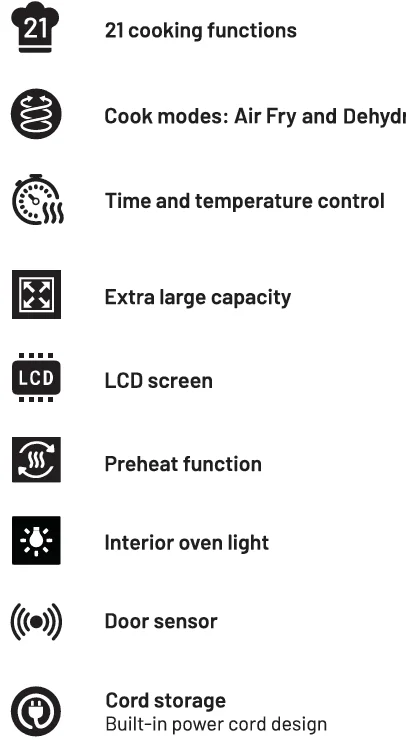
SETTING UP THE UNIT
- Remove all packaging around and inside the oven.

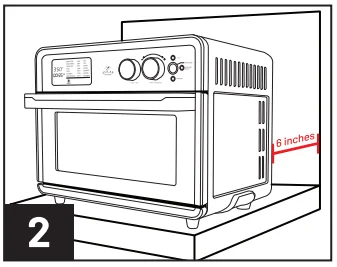
- Place on a stable, level, heat-resistant surface, away from anything that can be damaged by heat. Keep at least 6 inches of distance between the electrical outlet and the wall, furniture, etc.

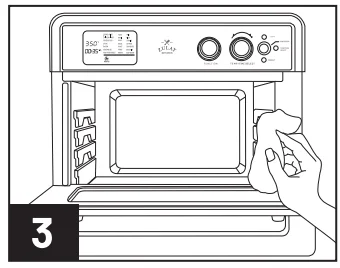
- Wash all accessories and clean the interior of the Smart Oven. Dry all parts with a clean cloth and place the trays into the oven.

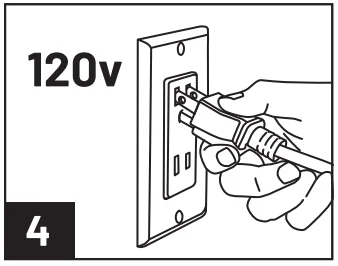
- Before use, ensure your outlet is rated for the oven. Refer to section Technical Specifications on page 2 for more details.

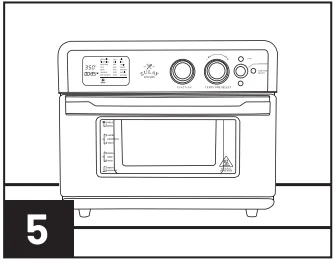
- Upon first use, it is necessary to run the oven for 20 minutes at 450°F in order to sterilize and remove any manufacturing odor. The Smart Oven may emit an odor or a little smoke during this cycle; this is totally normal. Once completed, your smart oven is ready to be used. If you have any questions, please contact customer service, see page 2.

OPERATION GUIDE
- Plug your Smart Oven into a properly rated outlet (Refer to section Technical Specifications on page 2 for more details). The Smart Oven will turn on, and the LCD screen will illuminate. The time and temperature of the initially selected menu item will be displayed.

- Rotate the Function Knob to choose your desired menu item. The LCD screen will display the default temperature and time for the selected item. Press the START/STOP button to begin cooking if the default temperature and time are applicable. The oven will preheat and start cooking.

- In case the temperature and time need to be adjusted, press the TEMP/TIME SELECT button. Temperature will be the first to adjust; simply rotate the TEMP/TIME ADJUSTMENT KNOB (left to decrease, right to increase). Then, press the TEMP/TIME SELECT button to confirm the temperature and go to the cooking time selection. Now, rotate the TEMP/TIME ADJUSTMENT KNOB to select the cooking time. Press TEMP/TIME SELECT to confirm the cooking time. Now press the START/STOP button to begin cooking.

- Preheat: Press the “PREHEAT” button to preheat the Smart Convection Oven. When the internal temperature reaches 300°F, the Smart Oven will beep 5 times and display “Add Food” on the LCD screen. After placing food into the oven, press the START/STOP button to begin cooking.


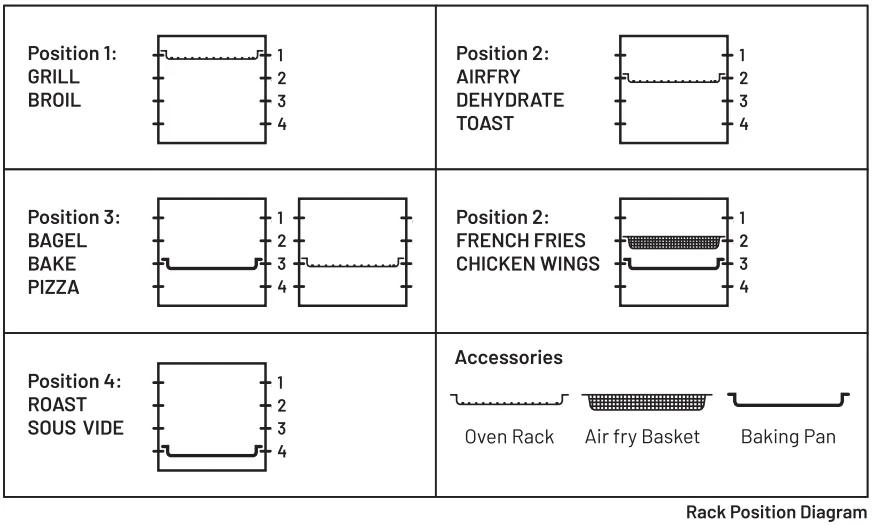
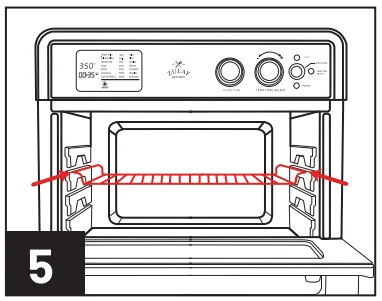
- Your Smart Oven has 4 rack positions to choose from. Please refer to the rack position guide above to properly position your rack.

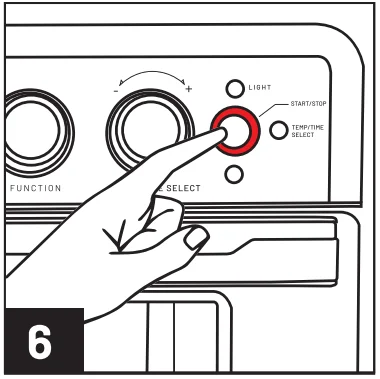
- Press the START/STOP button to begin cooking; the button backlight will illuminate red, and the LCD screen will begin the selected timer countdown. Your Smart Oven will beep 5 times, and the LCD screen will display “End” once the cooking process is complete.

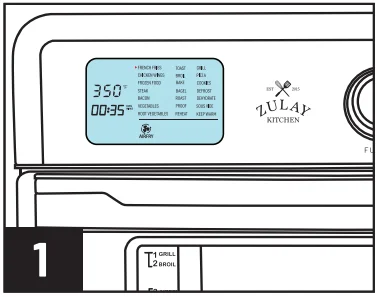
Note: Once cooking is complete, the START/STOP button will no longer be red, and the fan will turn on. The oven is cooling itself down. Please make sure that the door is closed for the oven to be able to cool down. The fan will not work with the door open. Please use caution as the oven will be hot after use.
CLEANING & STORAGE
Warning: Unplug the unit before cleaning and let it cool to prevent bodily harm.
CLEANING THE OUTER BODY AND DOOR
- Wipe the outer body with a soft, damp sponge or cleaning cloth. Use a non-abrasive liquid cleaner or mild cleaner solution spray to remove build-up or food stains. Do not spray directly on the stove; first spray onto a sponge or a cloth for best results. We recommend using an Apple Cider Vinegar cleaning solution of 50% part water and 50% Apple Cider Vinegar for all internal and external cleaning.
- To clean the glass door, use a glass cleaner or mild detergent and a soft, damp sponge or soft plastic scouring pad. Do not use an abrasive cleaner or metal scouring pad, as these will scratch the oven’s surface.
- Wipe the LCD screen with a soft, damp cloth. Do not apply the cleaner directly onto the LCD screen; instead, apply it to a cloth. Cleaning the LCD screen surface with a dry cloth and/or abrasive cleaners may produce scratches.
WARNING: To prevent electrocution, do not immerse the appliance or power cord in water or any other liquid.
CLEANING THE INTERIOR
- To clean any mess that may have occurred while cooking, wipe the walls with a soft, damp sponge. A non-abrasive liquid cleaner or mild spray solution may be used to avoid the build-up of stains. Apply the cleaner to the sponge, not the interior, before cleaning.
WARNING: Use extreme caution when cleaning the heating elements. Unplug the power cord from the wall and allow the oven to cool completely. Use a soft, damp sponge or cloth to gently rub the heating elements. Do not use any type of cleaner or cleaning agent. Let all the surfaces dry prior to plugging the oven back in.
CLEANING THE OVEN RACK, DEHYDRATE RACK, BAKING PAN, AND AIR FRY BASKET
- Wash all accessories in warm soapy water with a soft sponge or soft plastic scouring pad. Rinse and dry thoroughly. Do not use abrasive cleaners, metal scouring pads, or metal utensils to clean any of the accessories, as damage to the surface may occur.
- To extend the life of your accessories, we do not recommend cleaning them in the dishwasher.
CLEANING THE CRUMB TRAY
- After each use, slide out the Crumb Tray and discard the crumbs. Wipe the tray with a soft, damp sponge. A non-abrasive liquid cleaner or mild spray solution may be used to avoid the build-up of stains. Apply the cleaner to the sponge, not the tray, before cleaning. Dry thoroughly. Use caution, as the crumb tray may be hot. Let it cool before handling as needed.
- To remove baked-on grease, soak the tray in warm soapy water, then wash with a soft sponge or soft plastic scouring pad. Rinse and dry thoroughly.
- Always ensure to re-insert the Crumb Tray into the oven after cleaning and before inserting the power plug into a power outlet and turning the oven on.
STORAGE
- Ensure the oven and all trays are clean and dry.
- Ensure the door is closed.
- Store the appliance in an upright position, standing level, and on its supporting legs. Do not store the appliance when wet or hot. Do not store in a wet or hot environment.
TROUBLESHOOTING
If you have any questions about the unit or its operation, please call or email customer service.
• +1 (727) 386-9117 • [email protected] Mon-Fri 9:00 AM – 5:00 PM (EST)
- The oven does not work: The appliance is not plugged in. Make sure the oven is plugged in. The door is not closed properly. Make sure the door is closed well.
- Steam is coming out from the top of the oven door: You are cooking high-moisture-content foods. This is normal. The door is vented to release steam created from high-moisture content foods such as frozen breads.
- White smoke is coming out of the oven: This is normal for the first use. We strongly recommend setting the oven to the highest temperature and letting it run empty for 20 minutes. This is normal for cooking greasy foods, and it will not affect the cooking process. The Baking Tray, Crumb Tray, or the oven still contains grease or oil residue from previous cooking. Make sure each part is properly cleaned after each use. Please follow the cleaning instructions on pages 13-14.
- Food is not fully cooked: There is too much food in the oven. Reduce the amount of food in the oven. The set temperature is too low or the time is too short. Adjust the temperature or time. Please make sure to use the correct function for the type of food that is being cooked.
- Dark smoke is coming out of the oven: Food is burning. Press the Stop button, then use mitts to grab the tray and remove the food.
- Food is not evenly cooked: Please make sure the food is spread out evenly and not stacked or close to each other.
- Food is not crispy after air frying: The ingredients are too moist. Evenly spraying a small amount of oil on food can increase crispiness.
- The display shows Error Code “E1”: There is a short circuit. Unplug the power cord from the outlet and contact our customer service.
- The display shows Error Code “E2”: The temperature monitor or heaters are inoperative. Unplug the unit and plug it back in after 5 seconds. The oven should resolve this issue, but if you are still experiencing problems, please contact customer service.
If you have any questions about the unit or its operation, please call or email customer service.
• +1 (727) 386-9117 • [email protected] Mon-Fri 9:00 AM – 5:00 PM (EST)
For More Manuals By Zulay Kitchen, Visit ManualsLibraryy.
Zulay Kitchen Smart Convection Oven-FAQs
What is the Zulay Kitchen Smart Convection Oven used for?
The Zulay Kitchen Smart Convection Oven is a multifunctional countertop appliance designed for air frying, baking, roasting, broiling, dehydrating, reheating, and toasting. Its convection technology circulates hot air evenly, helping food cook faster while delivering crisp textures and more consistent cooking results.
How does the Zulay Kitchen Smart Convection Oven work?
The oven uses convection heating technology with multiple heating elements and circulating hot air to distribute heat evenly around food. This process helps reduce cooking time while improving browning and crispiness, making it suitable for air frying, roasting, and baking different types of meals.
What cooking functions are available on the Zulay Smart Convection Oven?
The oven includes 21 preset cooking functions for tasks like air frying, baking, broiling, dehydrating, reheating, roasting, and slow cooking. These presets simplify cooking by automatically adjusting temperature and timing settings for different foods and preparation methods.
Is the Zulay Kitchen Smart Convection Oven good for air frying?
Yes, the oven is designed with air frying functionality and 360-degree hot air circulation for crisp cooking results with less oil. Many users appreciate its ability to prepare fries, wings, and similar foods while reducing grease compared to traditional deep frying methods.
Is the Zulay Smart Convection Oven easy to clean?
The oven includes removable accessories like trays, racks, and crumb drawers that simplify cleaning after use. Its stainless steel interior and exterior can be wiped down easily, though regular maintenance is recommended to prevent grease buildup and maintain cooking performance over time.
What are the main benefits of a convection oven?
Convection ovens cook food faster and more evenly by circulating heated air continuously throughout the cooking chamber. This technology helps create crisp textures, improved browning, and consistent baking performance while often using less energy than traditional full-sized ovens.
Are there any drawbacks to the Zulay Kitchen Smart Convection Oven?
Some users report inconsistent cooking results and a slight learning curve when adjusting settings for different foods. Others mention that the controls may feel less intuitive initially, though many still consider the appliance convenient and versatile for everyday cooking needs.
Is the Zulay Kitchen Smart Convection Oven worth buying?
The oven is considered a good option for people wanting multiple cooking functions in one appliance. Its large capacity, preset cooking modes, and air frying abilities provide strong versatility, although users seeking highly precise cooking performance may need some experimentation with settings.
Can the Zulay Kitchen Smart Convection Oven replace a traditional oven?
For many small households, the oven can handle everyday cooking tasks usually performed by a traditional oven. It preheats faster, uses less energy, and supports various cooking methods, though larger meals or heavy baking sessions may still require a full-sized conventional oven.