
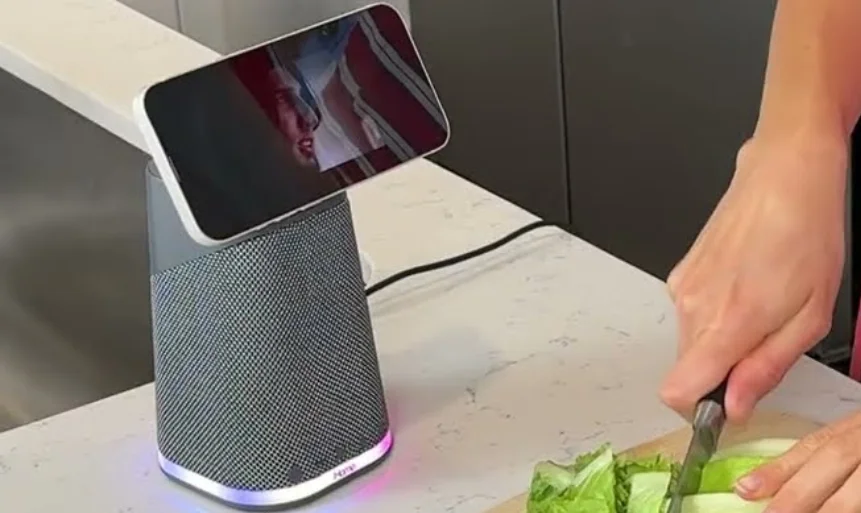

iHome iPBT70DG Wireless Charging Station
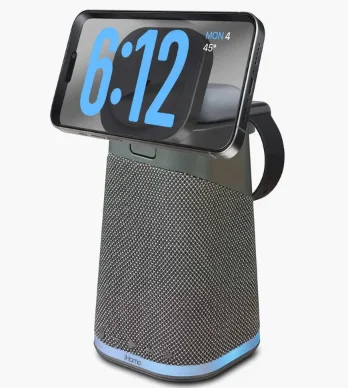
POWER TOWER Triple Charging Speaker
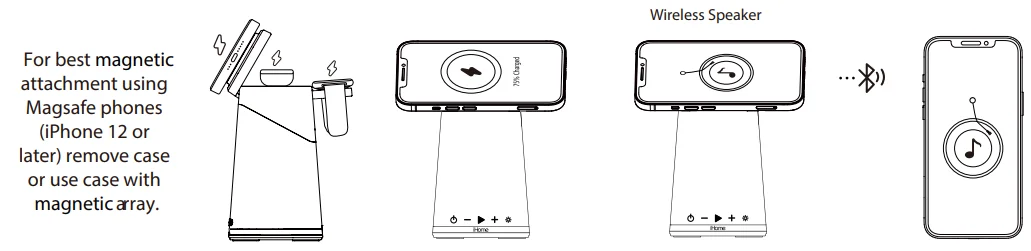
Charge your iPhone or mobile devices:

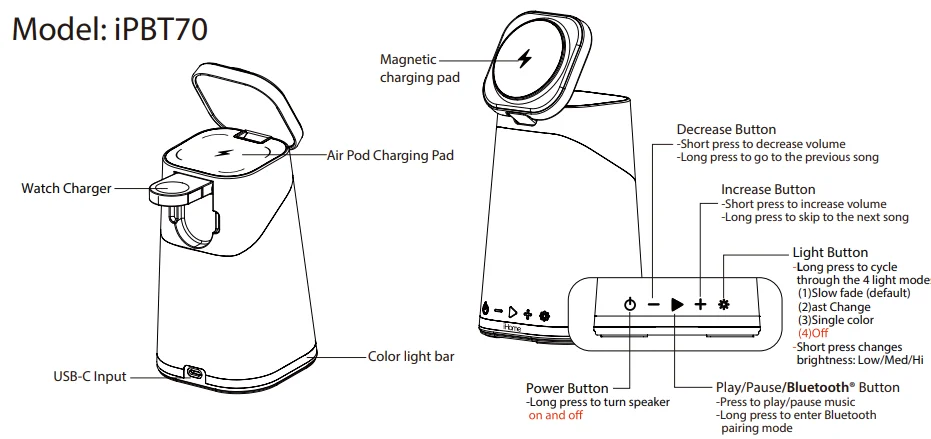
- Insert the USB-C cable into the USB-C port of the unit. Connect the other end to the 25W USB-C adaptor.
- When the iPBT70 is powered OFF, audible voice prompts for wireless charging are inactive, and only the color light bar will flash three times. It will flash red twice if a device is removed from the pad.

Note: When the iPBT70 is powered ON, audible voice prompts announce “charging” or “earbuds charging” or “watch charging” when a device is placed on the related charging pad. And if a device is removed from the pad, the iPBT70 will announce “charging interrupted” or “earbud charging interrupted” or “watch charging interrupted”.
Power Button and Bluetooth connection operation
- Turn on your Bluetooth device and make it ‘discoverable’ by turning on Bluetooth mode.
- Press and hold the Power Button on the iPBT70. The first time the unit is powered on, it will automatically enter Bluetooth pairing mode.
- Select ‘iHome iPBT70’ on your device to connect BT, and press the play/pause button to play or pause BT music.
- To manually pair with a new BT device, press and hold the play/pause button for 3 seconds.
- To reset the Bluetooth pairing table, press and hold the play/pause button for 10 seconds.
Light Button 

- Long-press the light button to cycle through the 4 light modes: Slow fade (default)⇒Fast Change⇒Single color⇒Off
- Short press changes brightness: Low/Med/Hi.
- Remembers the last used lighting mode.
- Note: Long-press the light button to activate the lights while the unit/BT is powered off.
For questions and additional information, please visit: support.ihomeaudio.com/support/.
IMPORTANT SAFETY INSTRUCTIONS
Please heed all warnings, read and follow all instructions, and keep these instructions handy for future reference.
- Do not use this product near water.
- Unplug the unit and clean only with a damp cloth. Stronger cleaning agents, such as Benzene, thinner, or similar materials, can damage the surface of the unit.
- Do not block any ventilation openings. Install in accordance with the manufacturer’s instructions.
- Heat – This product should be situated away from heat sources such as radiators, heat registers, stoves, or other appliances (including amplifiers) that produce heat.
- Only use attachments/accessories specified/supplied by the manufacturer.
- Unplug this product during lightning storms or when unused for long periods of time.
- Damage Requiring Service – This product should be serviced by qualified service personnel when:
- The plug has been damaged.
- Objects have fallen into or liquid has been spilled into the enclosure.
- The unit has been exposed to rain.
- The unit has been dropped or the enclosure damaged.
- The unit exhibits a marked change in performance or does not operate normally.
- No naked flame sources, such as lighted candles, should be placed on this product.
- Attention should be drawn to the environmental aspects of battery disposal. Many electronics retailers now recycle batteries and other electronic components at no charge. To find a drop-off location near you, visit www.call2recycle.com.
- This product is suitable for use in tropical and/or moderate climates.
WARNING:
- To reduce the risk of fire or electric shock, do not expose this product to rain or moisture.
- The mains plug of the power adaptor is used as the disconnect device; it shall remain readily operable.
FCC Information
This equipment complies with FCC RF radiation exposure limits set forth for an uncontrolled environment. This device complies with Part 15 of the FCC Rules. Operation is subject to the following two conditions:
- This device may not cause harmful interference, and
- This device must accept any interference received, including interference that may cause undesired operation.
Warning: Changes or modifications to this unit not expressly approved by the party responsible for compliance could void the user’s authority to operate the equipment.
NOTE: This equipment has been tested and found to comply with the limits for a Class B digital device, pursuant to Part 15 of the FCC Rules. These limits are designed to provide reasonable protection against harmful interference in a residential installation. This equipment generates, uses, and can radiate radio frequency energy and, if not installed and used in accordance with the instructions, may cause harmful interference to radio communications.
However, there is no guarantee that interference will not occur in a particular installation. If this equipment does cause harmful interference to radio or television reception, which can be determined by turning the equipment off and on, the user is encouraged to try to correct the interference by one or more of the following measures:
- Reorient or relocate the receiving antenna.
- Increase the separation between the equipment and receiver.
- Connect the equipment into an outlet on a circuit different from that to which the receiver is connected.
- Consult the dealer or an experienced radio/TV technician for help.
This equipment should be installed and operated with a minimum distance of 20 cm (8 inches) between the radiator and your body.
ISED Information
This equipment complies with IC RSS-102 radiation exposure limits set forth for an uncontrolled environment. This device contains licence-exempt transmitter(s)/receiver(s) that comply with Innovation, Science and Economic Development Canada’s licence-exempt RSS(s). Operation is subject to the following two conditions:
- This device may not cause interference.
- This device must accept any interference, including interference that may cause undesired operation of the device.
The device complies with ISED RF exposure requirements; users can obtain Canadian information on RF exposure and compliance. This equipment should be installed and operated with a minimum distance of 20 cm between the radiator and your body. Any changes or modifications not expressly approved by the party responsible for compliance could void the user’s authority to operate the equipment.
For More Manuals By iHome, Visit ManualsLibraryy.
iHome iPBT70DG Wireless Charging Station-FAQs
What devices can the iHome iPBT70DG Wireless Charging Station charge?
The iHome iPBT70DG can charge up to three devices simultaneously. It includes a 15W magnetic wireless charging pad for compatible smartphones, a built-in Apple Watch charger, and a 5W charging pad for AirPods or other wireless earbuds, making it ideal for Apple users with multiple devices.
Does the iHome iPBT70DG support MagSafe charging?
Yes, the iPBT70DG features a MagSafe-compatible magnetic charging pad that helps align supported iPhones for more secure and efficient charging. It works best with iPhone models that support magnetic attachment, though non-MagSafe Qi devices can also charge when placed correctly.
Can the iHome iPBT70DG be used as a Bluetooth speaker?
Yes, this charging station includes a built-in Bluetooth speaker that lets you stream music, podcasts, and audiobooks from your smartphone or tablet. It combines charging, audio playback, and bedside lighting in a single compact device for convenient everyday use.
Does the iHome iPBT70DG include a night light?
Yes, the unit features a color-changing LED night light with multiple lighting modes and adjustable brightness settings. It adds ambient lighting to a bedside table or desk while serving as a charging station and Bluetooth speaker.
Is the iHome iPBT70DG compatible with Apple Standby Mode?
Yes, the magnetic phone charger supports landscape viewing, making it convenient for Apple StandBy Mode on compatible iPhones. You can use your phone as a bedside display while it charges, showing widgets, photos, or a digital clock.
Does the iHome iPBT70DG come with a power adapter?
Yes, the iPBT70DG includes a 25W USB-C power adapter, which provides enough power to run all charging functions, the Bluetooth speaker, and the LED light simultaneously without needing to purchase an additional charger.
How far does the Bluetooth connection work on the iHome iPBT70DG?
The Bluetooth speaker offers a wireless range of up to approximately 100 feet in open spaces. Actual performance may vary depending on walls, interference, and the connected device, but it generally provides stable audio streaming throughout a room.
Can the iHome iPBT70DG charge devices through cases?
In most cases, yes. The wireless chargers work through many standard cases, especially those under about 3 to 5 mm thick. Metal accessories, wallets, or very thick cases may interfere with charging performance.
Is the iHome iPBT70DG a good bedside charging station?
Yes, it is well-suited for bedside use because it combines phone, watch, and earbud charging with a Bluetooth speaker and soft night light. This all-in-one design helps reduce cable clutter and saves space on a nightstand.
Is the iHome iPBT70DG worth buying?
The iHome iPBT70DG is a strong option for users who want a multifunction charging station with wireless charging, Bluetooth audio, and ambient lighting. It offers excellent convenience for Apple users who prefer an organized and compact charging setup.