
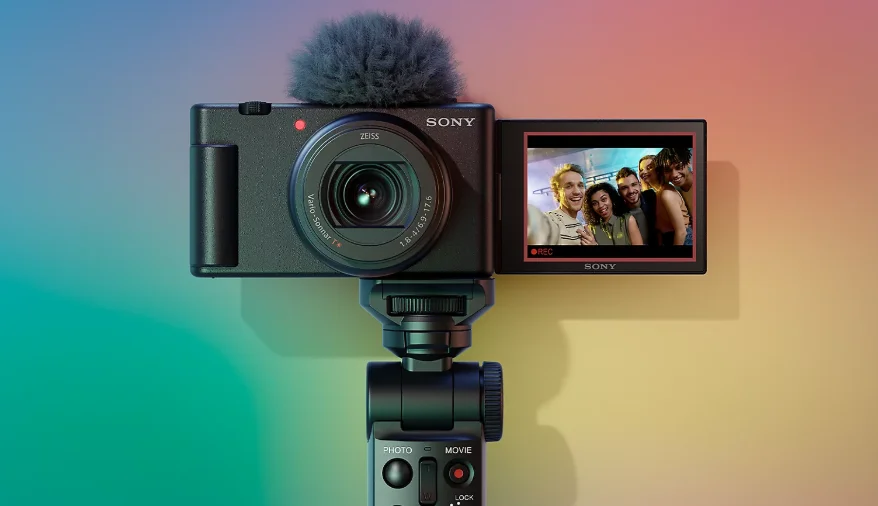

Sony ZV-1M2 Vlog Camera
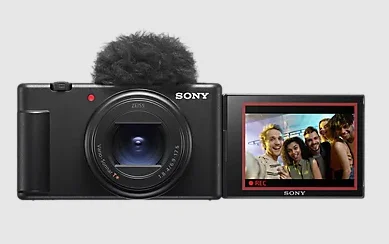
Preparations
Checking the supplied items
The number in parentheses indicates the number of pieces.
- Camera (1)
- Rechargeable battery pack NP-BX1 (1)
- Wind screen (1) (attached to the wind screen adaptor)
- Windscreen adaptor (1)
- Startup Guide (this manual) (1)
- Reference Guide (1)
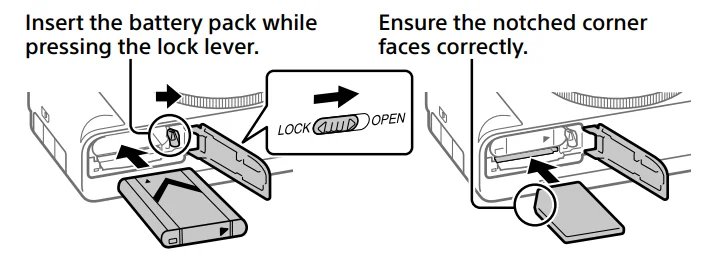
Insert the battery pack (supplied)/memory card (sold separately) into the camera.
- Open the battery/memory card cover, and insert the battery pack and a memory card into the camera. Then, close the cover.

- This camera is compatible with SD memory cards or Memory Stick media.
- When you use a memory card with this camera for the first time, format the card using the camera to stabilize the performance of the memory card.
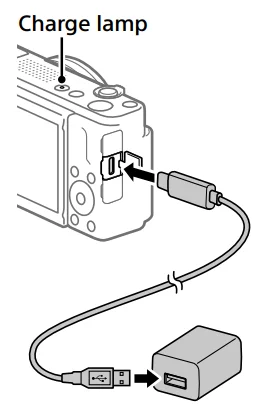
Charging the battery pack
- Turn the power off.
- If the camera is turned on, the battery pack will not be charged.
- Using a commercially available USB Type-C cable, connect the USB Type-C terminal on the camera to an external power source, such as a commercially available USB AC adapter or mobile battery.
- The charge lamp will light up when charging starts. When the charge lamp turns off, charging is completed.

- The charge lamp will light up when charging starts. When the charge lamp turns off, charging is completed.
Performing initial setup for the camera
By establishing a Bluetooth connection (pairing) between the camera and a smartphone, you can perform initial camera setup, such as date and time settings, from the smartphone. Install the dedicated application on your smartphone in advance, and then follow the steps 1 to 4 under “Procedures for initial camera setup.”
Installing the dedicated smartphone application
Install the application from the following website. Also, update to the latest version of the dedicated application. The specifications of the dedicated application may change without notice. https://www.sony.net/ca/.
Procedures for initial camera setup
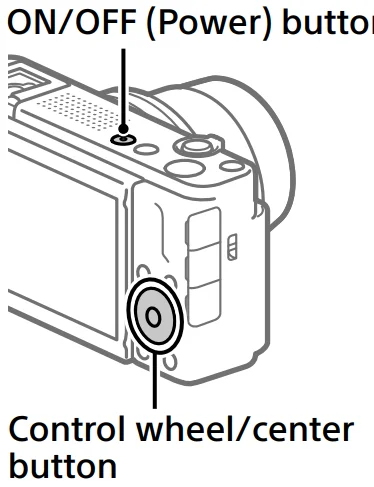
- Press the ON/OFF (Power) button to turn on the camera.
- Select the desired language and then press the center of the control wheel.
- The privacy notice screen will appear. Read the privacy notice regarding biometrics by opening the link using your smartphone, etc.
- Press the center of the control wheel.
- Follow the instructions on the camera screen to connect the camera with your smartphone and perform the initial setup.
- You can also configure or change the initial settings later from the MENU of the camera.

- You can also configure or change the initial settings later from the MENU of the camera.
Connecting (pairing) the camera with your smartphone later
For details on the connection method, refer to the following Help Guide URL: https://rd1.sony.net/help/dc/2310_pairing/h_zz/.
Shooting movies
- Press the Still/Movie/S&Q button to select the movie recording mode.
- Each time you press the button, the shooting mode switches in the order of still image shooting mode, movie recording mode, and slow-motion/quick-motion shooting mode.
- Press the MENU button and select (Shooting)
 [Shooting Mode] → [ Shoot Mode] the desired shooting mode.
 - Press the MOVIE (Movie) button to start recording.
- Press the MOVIE (Movie) button again to stop recording.

 [Shooting Mode] → [ Shoot Mode]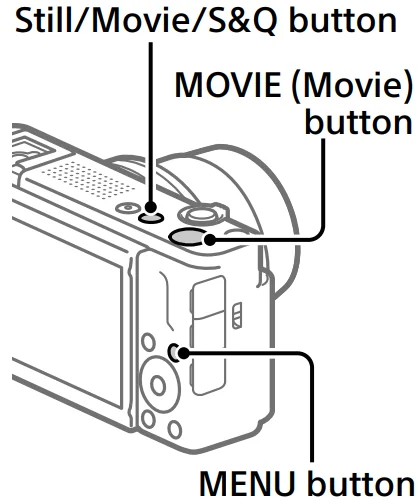
Using the windscreen (supplied)
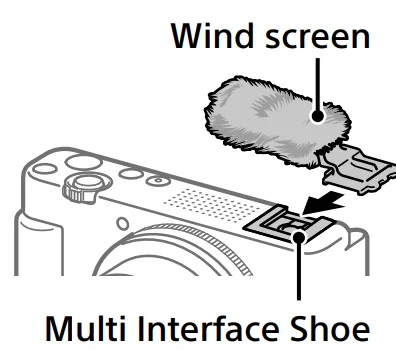
- Use the windscreen to reduce wind noise picked up by the internal microphone when recording a movie.
- Attach the wind screen to the Multi Interface Shoe.

Notes on use
Refer to “Precautions” in the “Help Guide” as well.
Notes on handling the product
- Do not leave the lens exposed to a strong light source such as sunlight. Because of the lens’s condensing function, doing so may cause smoke, fire, or a malfunction inside the camera body or the lens.
- If sunlight or other strong light enters the camera through the lens, it may focus inside the camera and cause smoke or fire. When shooting with backlighting, keep the sun sufficiently far away from the angle of view. Even if it is slightly off-angle, smoke or fire may still occur.
- This camera (including accessories) has magnet(s) which may interfere with pacemakers, programmable shunt valves for hydrocephalus treatment, or other medical devices. Do not place this camera close to persons who use such medical devices. Consult your doctor before using this camera if you use any such medical device.
- Increase the volume gradually. Sudden loud noises can damage your ears.
- Do not leave the camera, the supplied accessories, or memory cards within the reach of infants. They may be accidentally swallowed. If this occurs, consult a doctor immediately.
- If the monitor is damaged, stop using the camera immediately. The damaged parts may harm your hands, face, etc.
- When shooting still images continuously, the monitor may flash between the shooting screen and a black screen. If you keep watching the screen in this situation, you may experience uncomfortable symptoms such as feeling unwell. If you experience uncomfortable symptoms, stop using the camera and consult your doctor as necessary.
- When recording or streaming for long periods of time or recording 4K movies, if the same part of your skin touches the camera for a long period of time while using the camera, even if the camera does not feel hot to you, it may cause symptoms of a low-temperature burn, such as redness or blistering. Pay special attention to the following situations and use a tripod, etc.
- When using the camera in a high-temperature environment
- When someone with poor circulation or impaired skin sensation uses the camera
- When using the camera with [Auto Power OFF Temp.] set to [High]
Sony accessories
Using this unit with products from other manufacturers may affect its performance, leading to accidents or malfunctions.
How to turn off wireless network functions (Wi-Fi, etc.) temporarily
When you board an airplane, etc., you can turn off all wireless network functions temporarily using [Airplane Mode].
How to turn on or off the Wi-Fi function
Select MENU →  (Network) → [
  Cnct./PC Remote] → [Smartphone Connection], and then operate the function from the dedicated smartphone application.
How to turn on or off the Bluetooth function
Select MENU → (Network) →[Bluetooth] → [Bluetooth Function] → [On] or [Off].
For Customers in the U.S.A. and Canada
This equipment complies with FCC radiation exposure limits set forth for an uncontrolled environment and meets the FCC radio frequency (RF) Exposure Guidelines. This equipment has very low levels of RF energy that are deemed to comply without testing of the specific absorption rate (SAR).
The available scientific evidence does not show that any health problems are associated with using low-power wireless devices. There is no proof, however, that these low-power wireless devices are absolutely safe. Low-power wireless devices emit low levels of radio frequency energy (RF) in the microwave range while being used. Whereas high levels of RF can produce health effects (by heating tissue), exposure to low-level RF that does not produce heating effects causes no known adverse health effects.
Many studies of low-level RF exposures have not found any biological effects. Some studies have suggested that some biological effects might occur, but such findings have not been confirmed by additional research. This equipment has been tested and found to comply with ISED radiation exposure limits set forth for an uncontrolled environment and meets RSS-102 of the ISED radio frequency (RF) Exposure rules.
For Customers in the U.S.A.
For questions regarding your product or for the Sony Service Center nearest you, call 1-800-222-SONY (7669).
Supplier’s Declaration of Conformity
- Trade Name: SONY
- Model: WW198387
- Responsible Party: Sony Electronics Inc.
- Address: 16535 Via Esprillo, San Diego, CA 92127 U.S.A.
- Telephone Number: 858-942-2230
For Customers in Europe
Hereby, Sony Corporation declares that this equipment is in compliance with Directive 2014/53/EU. The full text of the EU declaration of conformity is available at the following internet address: https://www.compliance.sony.eu. Hereby, Sony Corporation declares that this equipment is in compliance with the UK relevant statutory requirements. The full text of the declaration of conformity is available at the following internet address: https://compliance.sony.co.uk.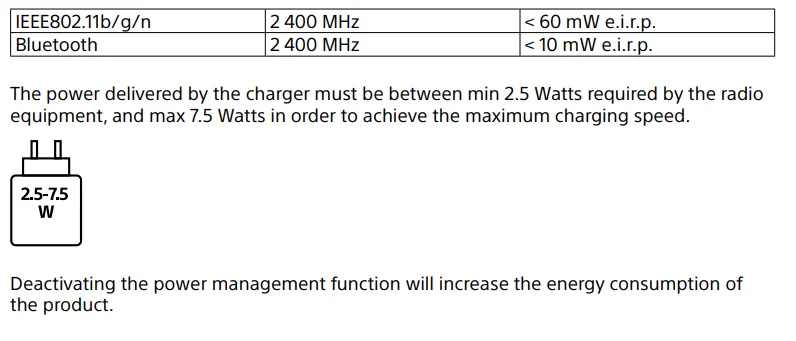
For Customers in the UK
STATEMENT OF COMPLIANCE
- Model No.: ZV-1M2
- Name and address of the manufacturer’s authorised representative: Sony Europe B.V., The Heights, Brooklands, Weybridge, Surrey KT13 0XW, United Kingdom
- This statement of compliance is issued under the sole responsibility of the manufacturer: Sony Corporation, 1-7-1 Konan, Minato-ku, Tokyo, 108-0075 Japan
- Object of the statement: Digital Camera
- The object of the statement described above complies with the applicable security requirements in Schedule 1 of S.I. 2023 No. 1007 (Product Security)
- Where applicable, references to the relevant standards used in relation to which compliance is declared:
- Defined support period for security updates: 2025-12-31
- Additional information: Note(s):
Signed for and on behalf of: Sony Europe B.V.
Specifications
Camera [System]
- Camera Type: Digital Camera
[Image sensor]
- Image format: 1.0 type, CMOS image sensor
- Effective pixel number of the camera: Approx. 20 100 000 pixels
- Total pixel number of the camera: Approx. 21 000 000 pixels
[General]
- Rated input: 3.6 V, 1.9 W
- Operating temperature: 0 to 40 °C (32 to 104 °F)
- Storage temperature: –20 to 55 °C (–4 to 131 °F)
- Dimensions (W/H/D) (Approx.): 105.5 × 60.0 × 46.7 mm (4 1/4 × 2 3/8 × 1 7/8 in.)
- Mass (Approx.): 292 g (0 lb 10.3 oz) (including battery pack, SD Card)
[Wireless LAN]
- Supported format: IEEE 802.11 b/g/n
- Frequency band: 2.4 GHz
[Eco and energy saving]
- Power consumption (Off mode): Not available
- Power consumption (Standby mode/Low power mode): 0.5 W
- Power consumption (Networked standby mode): 2.0 W (Bluetooth) / 2.0 W (all terminals and networks connected)
- Low power mode activated: Within 20 minutes (default)
- Networked standby mode activated: Within 20 minutes (default)
Rechargeable battery pack
- NP-BX1
- Rated voltage: 3.6 V=–
Recommended US AC adaptor
- Input: 100-240 V V, 50/60 Hz
- Output: 5 V= –, 1.5 A or more
- Design and specifications are subject to change without notice.
Compatible iPhone/iPad models
iPhone 15 Pro Max, iPhone 15 Pro, iPhone 15 Plus, iPhone 15, iPhone 14 Pro Max, iPhone 14 Pro, iPhone 14 Plus, iPhone 14, iPhone SE (3rd generation), iPhone 13 Pro Max, iPhone 13 Pro, iPhone 13, iPhone 13 mini, iPhone 12 Pro Max, iPhone 12 Pro, iPhone 12, iPhone 12 mini, iPhone SE (2nd generation), iPhone 11 Pro Max, iPhone 11 Pro, iPhone 11, iPhone XS Max, iPhone XS,
iPhone XR, iPhone X, iPhone 8 Plus, iPhone 8, iPad Air (3rd, 4th, and 5th generation), iPad (5th through 10th generation), iPad mini (6th generation), iPad Pro 12.9-inch (1st through 6th generation), iPad Pro 11-inch (1st through 4th generation), iPad Pro 10.5-inch, iPad Pro 9.7-inch, iPad mini (5th generation) (As of May 2024)
Trademarks/Licenses
- Apple, iPhone, and iPad are trademarks of Apple Inc., registered in the U.S. and other countries.
- USB Type-C® and USB-C® are registered trademarks of USB Implementers Forum.
- Wi-Fi, the Wi-Fi logo, and Wi-Fi Protected Setup are registered trademarks or trademarks of the Wi-Fi Alliance.
- The Bluetooth® word mark and logos are registered trademarks owned by Bluetooth SIG, Inc., and any use of such marks by Sony Group Corporation and its subsidiaries is under license.
- QR Code is a trademark of Denso Wave Inc.
- In addition, system and product names used in this manual are, in general, trademarks or registered trademarks of their respective developers or manufacturers. However, the ™ or ® marks may not be used in all cases in this manual.
IMPORTANT – Read the End User Software License Agreement before using your Sony product.
Using your product indicates your acceptance of the End User Software License Agreement. The software license agreement between you and Sony is available at the following URL: https://rd1.sony.net/help/di/el23/h_zz/.
- Use of the Made for Apple badge means that an accessory has been designed to connect specifically to the Apple product(s) identified in the badge, and has been certified by the developer to meet Apple performance standards. Apple is not responsible for the operation of this device or its compliance with safety and regulatory standards.
For More Manuals By Sony, Visit ManualsLibraryy.
Sony ZV-1M2 Vlog Camera-FAQs
What are the main features of the Sony ZV-1M2 Vlog Camera?
The Sony ZV-1M2 Vlog Camera features a 20.1MP 1-inch sensor, 18-50mm wide-angle zoom lens, advanced autofocus, and 4K video recording. It is designed specifically for vloggers and content creators who want portable performance, strong background blur, and easy-to-use creative shooting features for everyday content creation.
Is the Sony ZV-1M2 good for beginners?
Yes, the Sony ZV-1M2 is beginner-friendly because it includes automatic shooting modes, touch controls, face tracking, and easy background blur settings. New creators can start recording quickly without deep camera knowledge while still getting professional-looking video quality suitable for YouTube, TikTok, travel, and social media content.
Does the Sony ZV-1M2 record in 4K?
Yes, the Sony ZV-1M2 supports high-quality 4K video recording with detailed image processing and sharp results. The camera is optimized for vloggers who want cinematic-looking footage while maintaining a compact and lightweight design that works well for handheld shooting, travel videos, interviews, and daily content creation.
How is the autofocus performance on the Sony ZV-1M2?
The Sony ZV-1M2 delivers fast and reliable autofocus with real-time eye tracking and subject recognition. It quickly locks onto faces and moving subjects, making it useful for vloggers, streamers, and solo creators who frequently record themselves while walking, talking, or demonstrating products in front of the camera.
How is the autofocus performance on the Sony ZV-1M2?
The Sony ZV-1M2 delivers fast and reliable autofocus with real-time eye tracking and subject recognition. It quickly locks onto faces and moving subjects, making it useful for vloggers, streamers, and solo creators who frequently record themselves while walking, talking, or demonstrating products in front of the camera.
Is the Sony ZV-1M2 good for vlogging and YouTube videos?
Yes, the Sony ZV-1M2 is built specifically for vlogging and YouTube creators. Its wide-angle lens, flip-out screen, directional microphone, and lightweight body make it easy to record handheld videos, travel content, tutorials, interviews, and lifestyle footage with professional-looking quality and clear audio performance.
Does the Sony ZV-1M2 have good audio quality?
The Sony ZV-1M2 includes a built-in intelligent three-capsule microphone that captures clear voice recordings for vlogs and videos. It also comes with a windscreen accessory that helps reduce outdoor wind noise, making the camera more suitable for travel recording, street vlogging, and outdoor content creation.
What is the battery life like on the Sony ZV-1M2?
The Sony ZV-1M2 provides decent battery life for casual recording sessions, but heavy 4K video use may require extra batteries for longer shoots. Many vloggers and creators carry spare batteries or use USB charging during recording to extend shooting time for travel, events, or full-day content production.
Can the Sony ZV-1M2 be used as a webcam?
Yes, the Sony ZV-1M2 can function as a webcam through USB connectivity. This makes it useful for livestreaming, video calls, online meetings, and content creation with improved image quality compared to standard laptop webcams, especially for creators who want a more professional streaming setup at home.
Is the Sony ZV-1M2 good for photography as well as video?
The Sony ZV-1M2 performs well for casual photography with sharp images, strong autofocus, and natural colors. While it is mainly designed for video creators and vloggers, it still works effectively for travel photos, portraits, social media pictures, and everyday photography without needing interchangeable camera lenses.
Is the Sony ZV-1M2 worth buying?
The Sony ZV-1M2 is worth considering for creators who want a compact camera with strong video quality, excellent autofocus, and beginner-friendly controls. Although some users prefer interchangeable lens cameras, the ZV-1M2 remains a popular choice for portable vlogging, travel content, and everyday video production.