
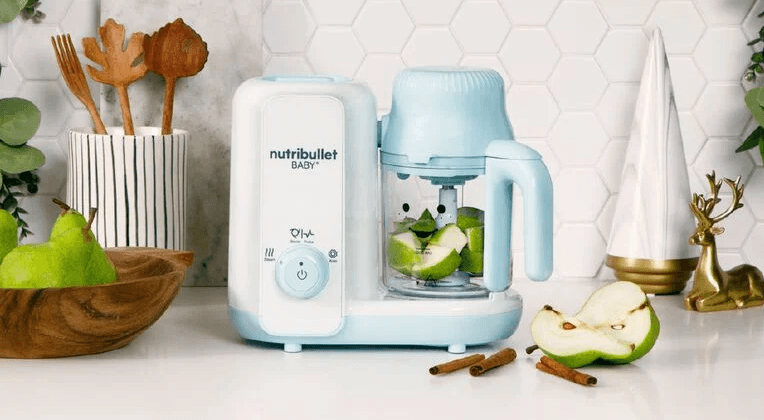

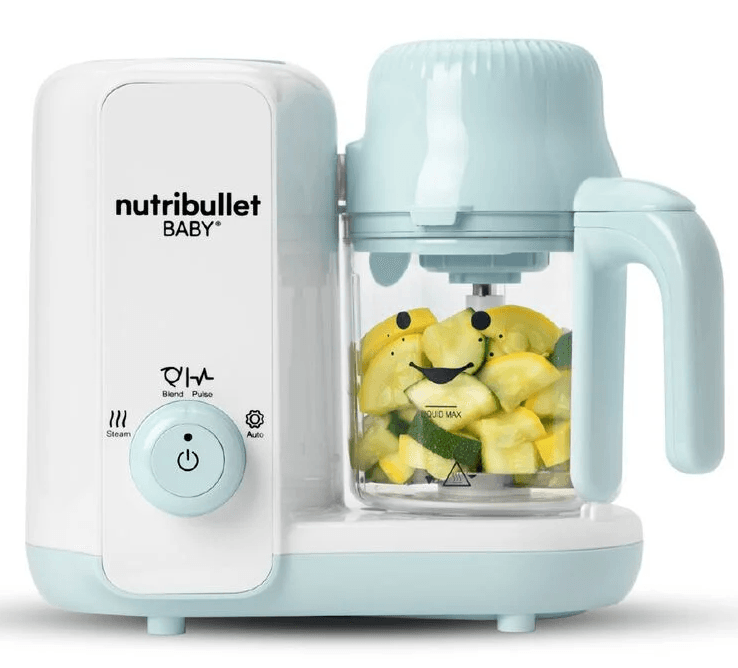
Nutribullet NBY50200 Baby Steam-Blend
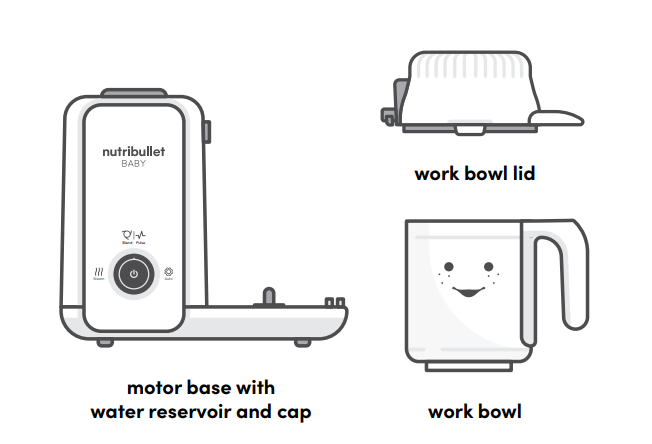
What’s included
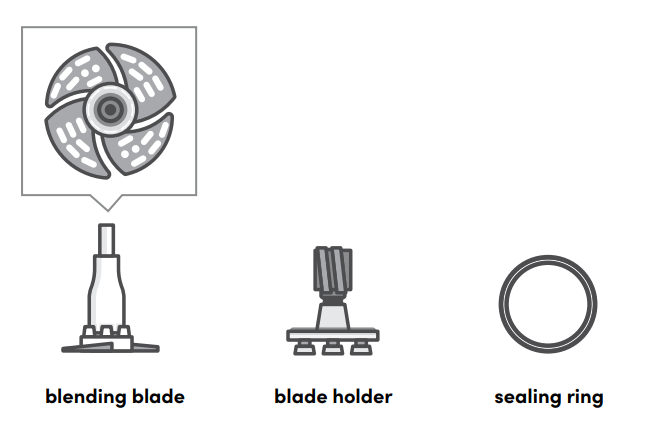
 WARNING! Blades are sharp. Handle carefully.
Assembly guide
Control panel.
This appliance can steam and blend vegetables and fruits (peeled and cored, with seeds removed) as well as meats and fish (with bones removed).
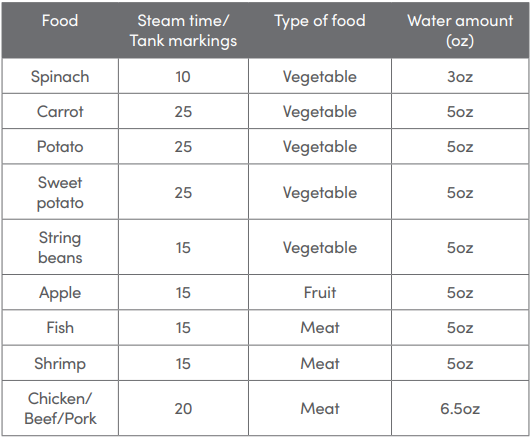
For cooking times, see Steaming and Blending Tips on page 27.
WARNING! For your child’s safety, always check food temperature before feeding.
WARNING! Always unplug after each use. Allow Work Bowl to cool for 10 minutes and make sure the Blending Blade has stopped rotating and the motor has completely stopped before disassembling.
POWER BUTTON
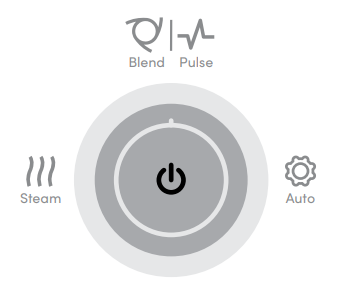
- Activates the selected setting.
- Reactivates Standby mode if pressed during operation.
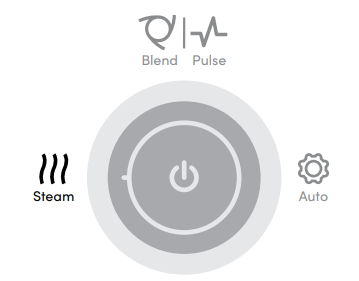
STEAM SETTING
- Steams food.
BLEND SETTING
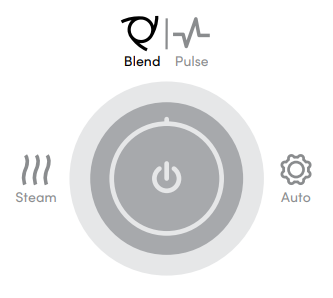
- Blends hot, steamed ingredients or other soft or cooked foods.
- The default blending time is 1 minute.
PULSE SETTING
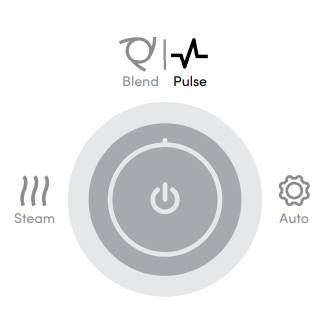
- Allows you to blend ingredients in short bursts to create coarser textures.
STEAM AND BLEND SETTING
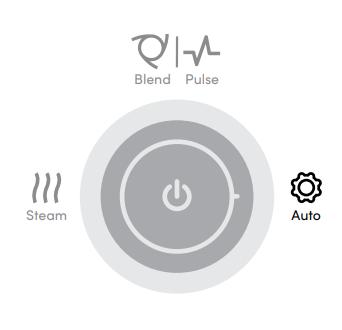
- Automatically steams and then blends food in one continuous process.
Assembly & use.
Before first use.
Before using your NutriBullet Baby® Steam + Blend for the first time, please take a moment to perform the steps below.
UNPACK
Open box. Remove the Motor Base and all attachments. Place all parts on a flat, dry surface.
CLEAN
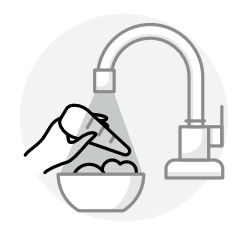
Wash the Blending Blade, Work Bowl, and Work Bowl Lid in soapy water, then let everything dry. Clean the Motor Base with a clean, damp cloth.
WARNING! The Blending Blade is extremely sharp. Handle with care. Never submerge the Motor Base in liquid. See Care & Maintenance instructions on page 31 for more detailed cleaning instructions.
Assembly.
Review all warning and caution statements in the Important Safeguards section (pages 3-7) and above before proceeding to Step 1.
- Place the Motor Base with Water Reservoir on a clean, dry, flat surface, like a countertop or table.

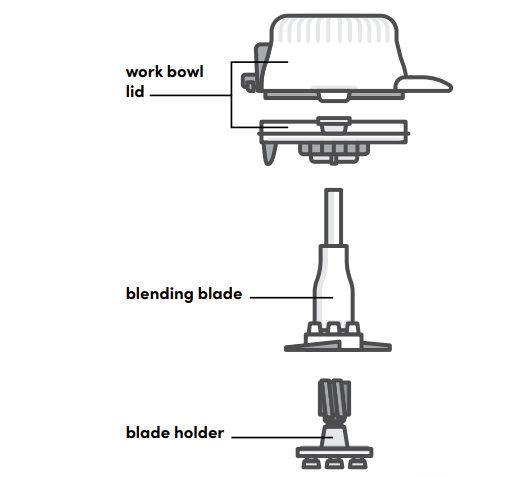
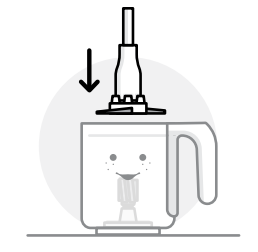
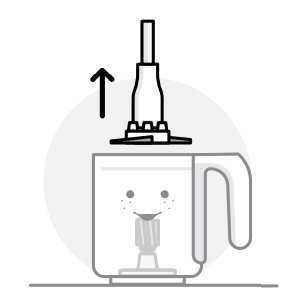
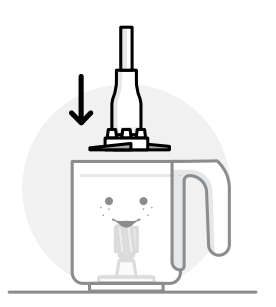
- Gently lower the Blending Blade vertically onto the Blade Holder in the center of the Work Bowl, securing it in place.

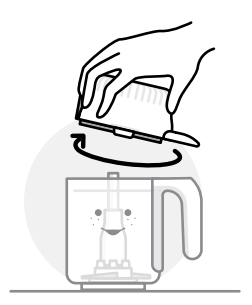
- Twist the Work Bowl Lid onto the Work Bowl by turning clockwise until it is securely in place.

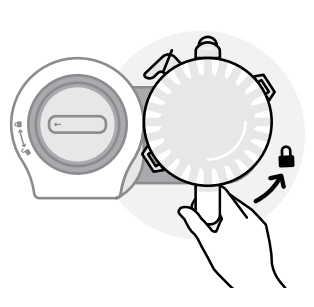
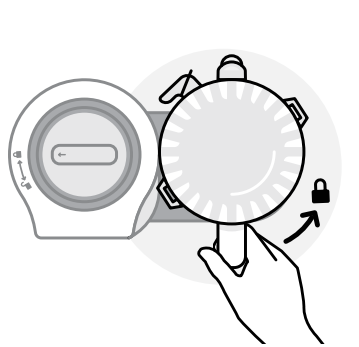
- Place the Work Bowl on the Motor Base by lining up the black arrow towards the bottom of the Work Bowl with the Unlock icon on the Motor Base. Use one hand to firmly hold down the Motor Base, and use your other hand to turn the Work Bowl counter-clockwise to lock the Work Bowl securely into place.

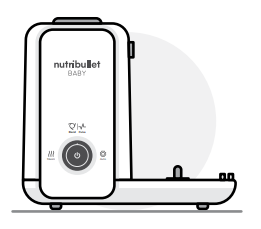
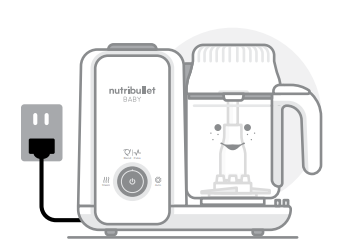
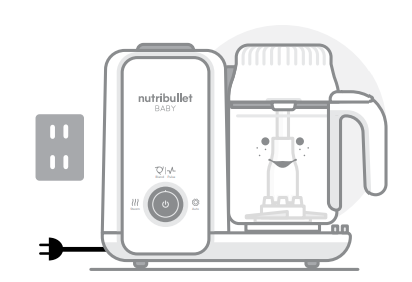
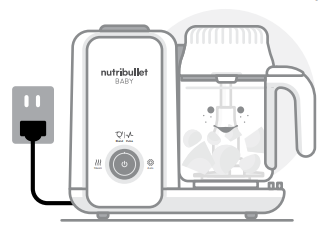
- Connect the Steam + Blend to a power source. The appliance will beep once, and the Indicator light will illuminate blue when it is ready for use.

Initial cleaning cycle.
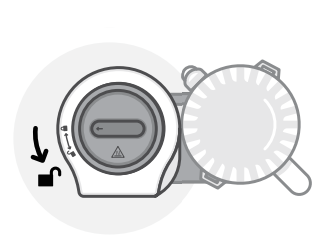
- Turn the Water Reservoir Cap counter-clockwise to unlock and remove.

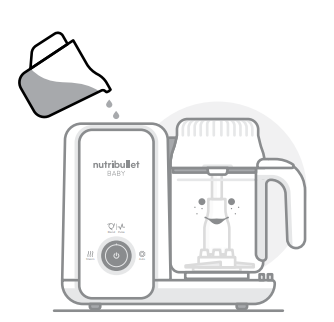
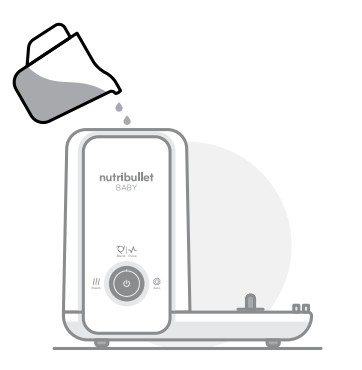
- Fill the Water Reservoir to the 25-minute line with water.

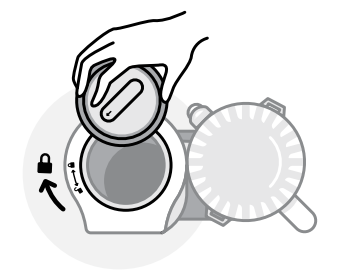
- Replace the Water Reservoir Cap and turn clockwise to close and lock.

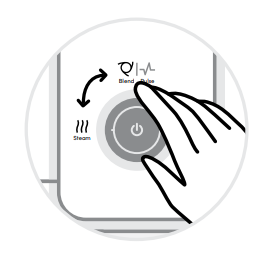
- Perform a Steam or Blending Cycle by following the steps explained in the Using the Steam + Blend section, page 18.

- After the Steam or Blending Cycle finishes, unplug the appliance and let it cool down completely.

- Gently lift the Blending Blade vertically out of the center of the Work Bowl using a mitt. Then, discard any remaining water from the Water Reservoir and Work Bowl.

The NutriBullet Baby® Steam + Blend is now ready to use. WARNING! The Blending Blade is extremely hot and sharp. Handle with care.
Using the Steam + Blend
- Gather your desired ingredients and wash them. Prepare the ingredients to be steamed by cutting, skinning, and removing any rinds, stems, or stone seeds.

- Fill the Water Reservoir with cold water. Twist the Water Reservoir Cap clockwise onto the Water Reservoir to secure it in place. Make sure it’s tightly sealed.

 WARNING! DO NOT add water while the unit is on or hot, as this may result in serious burn or scalding injuries.
NOTE: For the proper amount, refer to Steaming and Blending Tips on page 27. - Gently lower the Blending Blade vertically onto the Blade Holder in the center of the Work Bowl, securing it in place.

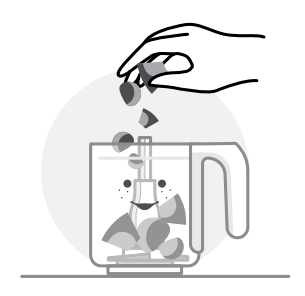
- Add prepped ingredients into the Work Bowl. Then, place the Work Bowl Lid onto the Work Bowl. Turn the lid clockwise to close and lock.

 WARNING! Do not block steam vents with food, as this may cause pressure buildup.
NOTE: Do not put food or liquid inside the Work Bowl Lid assembly. - Place the Work Bowl on top of the Motor Base. Turn the Work Bowl counterclockwise to lock into place.

NOTE: All settings can only run when the Work Bowl and Work Bowl Lid are properly assembled on the Motor Base. If they are not assembled correctly, the appliance will beep 6 times to alert you when you try to operate it. If this occurs, remove the Work Bowl from the Motor Base, reassemble, and then continue with the process. - Connect the Steam + Blend to a power source. The appliance will beep once, and the Indicator light will illuminate blue when it is ready for use.

 WARNING! Do not use a voltage converter or adapter — doing so could result in a fire hazard and will damage the product.
Steaming + Blending: Tips, Tricks, and FAQs
Tips.
The steaming times below indicate the number of minutes recommended for each food item, and are calculated for approximately 200ml or 1 cup of food.
All ingredients should be cut into roughly ½-inch [1-2cm] cubes before steaming.
Never exceed the MAX fill line on the Work Bowl.
WARNING! Always check that food is fully cooked and at a safe temperature before feeding it to your infant.
Troubleshooting
PROBLEM
The appliance won’t operate, and the Indicator light is not turning on.
SOLUTION
Unplugged: Make sure the appliance is plugged into a power source. When the power is connected, the appliance will beep once, and the Indicator light will illuminate blue.
PROBLEM
The appliance won’t operate, and the Indicator light is on.
SOLUTIONS
Work Bowl not properly positioned: Make sure the Work Bowl is installed in the proper position on top of the Motor Base.
Work Bowl Lid open or not fully closed: Make sure the Work Bowl Lid is properly positioned atop the Work Bowl, fully closed, and tightly sealed.
Water level low: Make sure the Water Reservoir contains enough water. Fill with room-temperature water.
PROBLEM
The Steam setting cannot be activated (appliance does not steam or doesn’t produce steam).
SOLUTIONS
Work Bowl not properly positioned: Make sure the Work Bowl is installed in the proper position on top of the Motor Base.
If it is not correctly installed, the appliance will beep 6 times to indicate that all settings cannot be activated.
Water level low: Make sure the Water Reservoir has enough water. Fill with room-temperature water.
PROBLEM
The Blend setting cannot be activated (appliance does not blend).
SOLUTION
Work Bowl not properly positioned: Make sure the Work Bowl is installed in the proper position on top of the Motor Base.
If it is not correctly installed, the appliance will beep 6 times to indicate that the Blend setting cannot be activated.
PROBLEM
My appliance was working, but it has now stopped.
SOLUTION
The Work Bowl Lid may have opened: The appliance will stop working if the Work Bowl Lid is opened during operation.
Close the Work Bowl Lid and press the Power button again to resume operation.
PROBLEM
My appliance was working, but it has now stopped. The Work Bowl and Work Bowl Lid are both positioned properly.
SOLUTION
The water level likely got too low: If the water level in the Water Reservoir gets too low during operation, the appliance will stop working.
The appliance will alert you that your water level is too low by beeping 3 times and flashing the blue Indicator light.
Add room-temperature water to the Water Reservoir, then press the Power button to resume operation.
After the appliance is refilled with enough water, the blue Indicator light will illuminate solidly. Resume operation by pressing the Power button.
FAQ.
What are the primary parts that are included with this appliance?
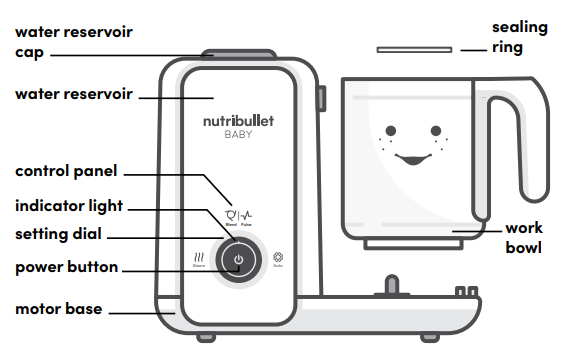
- Water Reservoir, Water Reservoir Cap
- Work Bowl with integrated handle, Work Bowl Lid
- Motor Base, Blending Blade, Blade Holder
How many blending speeds does the NutriBullet Baby® Steam + Blend have? Is there a Pulse setting?
The NutriBullet Baby® Steam + Blend has one blending speed. However, there are two ways to blend with the NutriBullet Baby® Steam + Blend.
Activate standard Blend mode by setting the dial to Blend, then pressing the Power button. You can either allow the blender to run its full 1-minute Blend cycle or press the Power button at any time to stop blending.
You can also change the blend setting so it will pulse ingredients by turning the Setting Dial to Blend and pressing the Power button for roughly 3 seconds. Once in Pulse mode, simply press and release the Power button in quick succession until food reaches the desired consistency. This helps create more textured purées.
What options do I have for Blending?
You have three blending options:
- Continuous Blend (push the Power button to start blending, push Power again to stop).
- Steam-and-Blend (run a Steam cycle first, then automatically start a Blend cycle).
- Pulse Blend (Hold the power button for 3 seconds to activate the pulse setting to start blending in quick bursts, in pulsing fashion).
Can you tell me more about how Pulse mode works?
To enter Pulse mode: turn the dial to Blend, then push and hold the Power button for about 3 seconds, until the appliance beeps 3 times.
Once in Pulse mode, simply press and release the Power button in quick succession until food reaches the desired consistency. This helps chop and mince food to create more textured purées.
Do I need to use the Blending Blade (place it in the Work Bowl) when I am just steaming (not blending)?
The Blending Blade is not required during steaming operation, but since it contains drainage holes, it can be used to keep excess water from mixing with steamed ingredients.
When is it safe to begin Disassembly?
Make sure the unit has cooled for 10 minutes, the Blending Blade has stopped rotating, and the motor has completely come to a stop before disassembling.
What should I do once I’m done steaming or blending?
Always make sure the appliance is turned off after each use. Unplug the appliance if you won’t be using it for a while.
To store the appliance, keep parts together and place the assembled appliance in a dry, cool place.
When should I unplug the appliance?
If you won’t be steaming or blending for a while after use, or you want to store the appliance, unplug the power cord from the electrical outlet.
Care & maintenance
Cleaning the NutriBullet Baby® Steam + Blend is quick and easy. All components attach and detach easily, and except for the Motor Base, Blending Blade, and Blade Holder, all are dishwasher safe.
STEP 1
Make sure the Motor Base is unplugged before you begin assembly, disassembly, cleaning, or storage of the appliance. Turn off the power, unplug the appliance, and let it cool down completely before cleaning.
STEP 2
Once food is emptied from the Work Bowl, rinse all parts except the Motor Base under running water. Right after steaming or blending, make sure to:
- Rinse the Work Bowl and Work Bowl Lid under running water.
- Rinse the Blending Blade under running water. Make sure to hold it by a non-sharp area.
- Be sure to properly clean the Blending Blade every time you blend, as minerals from fruits and vegetables (or other food residue) can cause buildup, which may inhibit optimal operation.
WARNING! The Blending Blade is extremely sharp. Handle with care.
STEP 3
To clean the Motor Base, wipe it down with a clean, damp cloth.
CLEANING TIPS AND BEST PRACTICES:
- Before first use, before each use, and after every use: wash the Work Bowl and Work Bowl Lid in warm soapy water or use a dishwasher (top shelf only) and dry thoroughly.
- Wash the Blending Blade and Blade Holder in warm, soapy water and dry thoroughly.
- To remove the Blade Holder from the Work Bowl, rotate the bottom of the Blade Holder. WARNING! The Blending Blade is extremely sharp. Handle with care.NOTE: The Blending Blade and Blade Holder are not recommended for the dishwasher
- After cooling, always clean the Work Bowl, Work Bowl Lid, and Blending Blade as soon as possible after steaming or blending.
If allowed to sit, food residue will dry and become more difficult to rinse or scrub off.
If this happens, let the part soak in hot water for 30 minutes to loosen the residue. - After every use, wipe the entire Motor Base with a damp cloth, but do not submerge it in water.
- All components except the Blending Blade, Blade Holder, and Motor Base are dishwasher-safe.
You may hand-wash all parts except the Motor Base with warm, soapy water.
DESCALING
- We recommend descaling every 4 weeks, but it may be needed sooner if you notice limescale buildup earlier.
- If descaling after a steam cycle, let the appliance cool down completely before beginning the descaling process.
- DESCALING PROCESS:
Discard any remaining water from the Water Reservoir. Purchase a suitable chemical-free descaler or pour 8oz of white vinegar into the Water Reservoir. Leave for at least 30 minutes, or up to 24 hours, depending on the extent of limescale buildup. Pour the white vinegar down the sink. Rinse the Water Reservoir with cool water to remove any buildup that came loose during descaling, then pour it down the sink. After descaling, boil with fresh water several times and discard the water. Repeat the process, if necessary, to remove any residual buildup or white vinegar. Follow the Initial cleaning cycle process in the Assembly section to run a final cleaning cycle. You may need to repeat this process if you find that limescale buildup is still present. - Alternatively, to reduce limescale buildup, use filtered water to fill the Water Reservoir.
Food and appliance storage
STORING FOOD
In your container.
Store the container upright in your refrigerator, with the lid tightly sealed.
Do not stack anything on top of the container lid.
For best taste and to avoid spoilage, consume all leftover food within 48 hours.
STORING THE APPLIANCE
Unplug the appliance if you won’t be steaming or blending for a while.
For longer-term storage, keep all the pieces of the Steam + Blend appliance together, and place the assembled appliance in a dry, cool place.
When storing the appliance, place it in a safe place where it will not be damaged and won’t cause harm.
Replacement parts.
To order additional parts and accessories, please visit our website at nutribullet.com/shop/accessories or feel free to contact Customer Service: 1 (800) 523-5993.
Nutribullet Baby® Steam + Blend one-year limited warranty.
LIMITED WARRANTY FOR NUTRIBULLET®
NutriBullet’s limited warranty obligations are confined to the terms set forth below:
Limited warranty terms and conditions for your nNutriBulletBaby® are set forth below: Capital Brands Distribution, LLC, the distributor of the NutriBullet Baby (“NutriBullet Baby”) | warrants the NutriBullet Baby against defects in materials and workmanship for one year from the date of original retail purchase. This limited warranty is valid only in the country in which the product is purchased and comes with the product at no extra charge (an additional four-year extended warranty can be purchased separately, please see details below); however, shipping and processing fees will be incurred for returns, replacements, and or refunds.
If a defect exists, and Capital Brands Distribution is obligated under this limited warranty, at its option Capital Brands Distribution will
- repair the product at no charge, using new or refurbished replacement parts,
- exchange the product with a product that is new or that has been manufactured from new or serviceable used parts and is at least functionally equivalent to the original product, or
- refund the purchase price of the product. A replacement product assumes the remaining warranty of the original product. A repaired product has a one-year warranty from the date of repair. When a product or part is exchanged, any replacement item becomes your property, and the replaced item becomes Capital Brands Distribution’s property. When a refund is given, your product becomes Capital Brands Distribution’s property.
OBTAINING WARRANTY SERVICE
For limited warranty service, simply call our customer service department at 1 (800) 523-5993 or contact us via email from our website. Simply click the Contact Us link, fill out and submit the customer contact form, and we will be glad to help you. When you contact our customer service department, you will be asked to furnish your name, address, telephone number, and provide proof of the original purchase (receipt) containing a description of the product(s), purchase date, and the appropriate NutriBullet Baby bar code(s). Before you send your product for limited warranty service, please make sure to keep a copy of all relevant documents for your files (receipt, etc.). It is always recommended to purchase product insurance and tracking services when sending your product for service. Remember, shipping and processing fees will be incurred and are not covered by the one-year limited warranty.
EXCLUSIONS & LIMITATIONS
- This NutriBullet Baby One-Year Limited Warranty applies only to NutriBullet Baby products distributed by Capital Brands Distribution that can be identified by the “NutriBullet Baby” trademark, trade name, logo affixed to it, and bar code. Nutribullet Baby’s One-Year Limited Warranty does not apply to any other product that may appear to be authentic, but was not distributed/sold by Capital Brands Distribution.
- Normal wear and tear is not covered by this limited warranty. This limited warranty applies to consumer use only and is void when the product is used in a commercial or institutional setting.
- This limited warranty extends only to the original consumer purchaser and is not transferable. In addition, proof of purchase must be demonstrated.
- Repair or replacement of the product (or, if repair or replacement is not feasible, a refund of the purchase price) is the exclusive remedy of the consumer under this limited warranty. Capital Brands Distribution shall not be liable for any incidental or consequential damages for breach of this limited warranty or any implied warranty on this product.
- This limited warranty gives you specific legal rights, and you may also have other rights which vary from state to state. Capital Brands Distribution is not liable for any damage to products not covered by this warranty (e.g., cups, books, Recipe Guide).
- This limited warranty does not apply: (a) to damage caused by accident, abuse, misuse, or misapplication; (b) to damage caused by improper maintenance (including unauthorized parts service); (c) to a product or a part that has been modified in any way; (d) if any nutribullet Baby bar code or trademark has been removed or defaced; and or (e) if the product has been used with an adapter/converter.
This limited warranty and the remedies set forth above are exclusive and instead of all other warranties, remedies, and conditions, whether oral or written, express or implied. Capital Brands Distribution specifically disclaims any implied warranties, including, without limitation, warranties of merchantability and fitness for a particular purpose. If Capital Brands Distribution cannot lawfully disclaim implied warranties under this limited warranty, all such warranties, including warranties of merchantability and fitness for a particular purpose, are limited in duration to the duration of this limited warranty.
No NutriBullett Baby reseller, agent, or employee is authorized to make any modification to this warranty.
Capital Brands Distribution is not responsible for direct, special, incidental, or consequential damages resulting from any breach of warranty or condition, or under any other legal theory, including but not limited to lost profits, downtime, goodwill, damage to or replacement of equipment and property. Capital Brands Distribution specifically does not represent that it will be able to repair any product under this limited warranty.
Some states and provinces do not allow the exclusion or limitation of incidental or consequential damages or exclusions or limitations on the duration of implied warranties or conditions, so the above limitations or exclusions may not apply to you. This warranty gives you specific legal rights, and you may also have other rights that vary by state or province.
Product registration
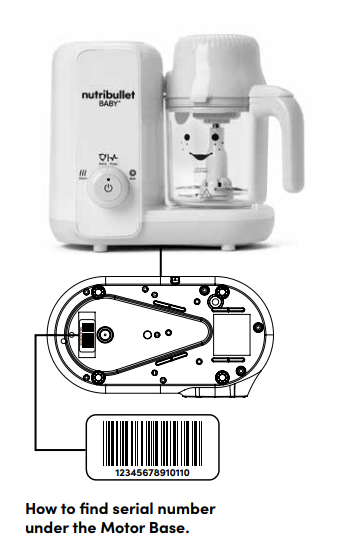
Please visit nutribullet.com/shop/accessories or call 1 (800) 523-5993 to register your NutriBullet Baby® Steam + Blend. You will be asked to enter the Serial Number* of your product, along with the purchase date and place of purchase.
The registration will enable us to contact you in the unlikely event of a product safety notification.
For more manuals by NutriBullet, visit ManualsLibraryy
Nutribullet NBY50200 Baby Steam-Blend- FAQs
What’s the difference between NutriBullet and NutriBullet Baby?
The regular NutriBullet is designed for making larger batches of smoothies and drinks. The NutriBullet Baby has smaller cups and is specially made for preparing small portions of baby food like purees, porridges, and shakes.
Why does my NutriBullet Baby make a beeping sound?
A beep sound indicates that the steaming cycle is complete. Your food is ready!
Are the NutriBullet Baby Steam + Blend parts dishwasher safe?
Yes. The bowl, lid, and blade are dishwasher safe. Just wipe the base clean with a damp cloth. Never immerse the power base in water.
Can I crush ice in the NutriBullet Baby?
Yes, you can blend ice and frozen fruits in the NutriBullet Baby to make smoothies or cool blends.
How long should I blend food in the NutriBullet?
Blending typically takes 30–60 seconds. If ingredients get stuck, stop the blender, shake the cup, or add a little more liquid.
Is the NutriBullet Baby steamer safe to use?
Yes, it’s made from BPA-free plastic and stainless steel. All food-contact parts are safe for baby food preparation.
What happens if the NutriBullet overheats?
The unit has a built-in thermal breaker that automatically shuts it off if it overheats. Once cooled and unplugged, it will reset and be ready to use again.
How can I tell if my NutriBullet is fully charged?
If the green light isn’t showing, it may have been plugged in for over 12 hours and is fully charged. Just press the power button to begin using it.