
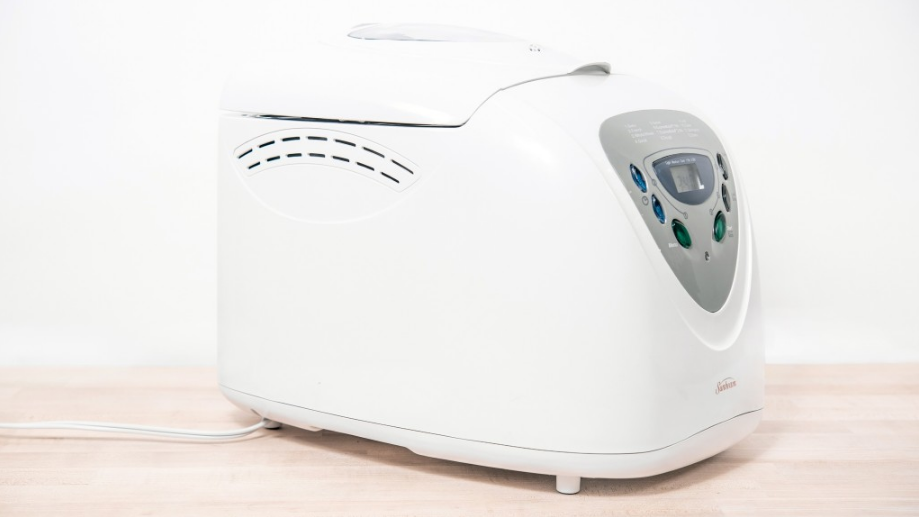

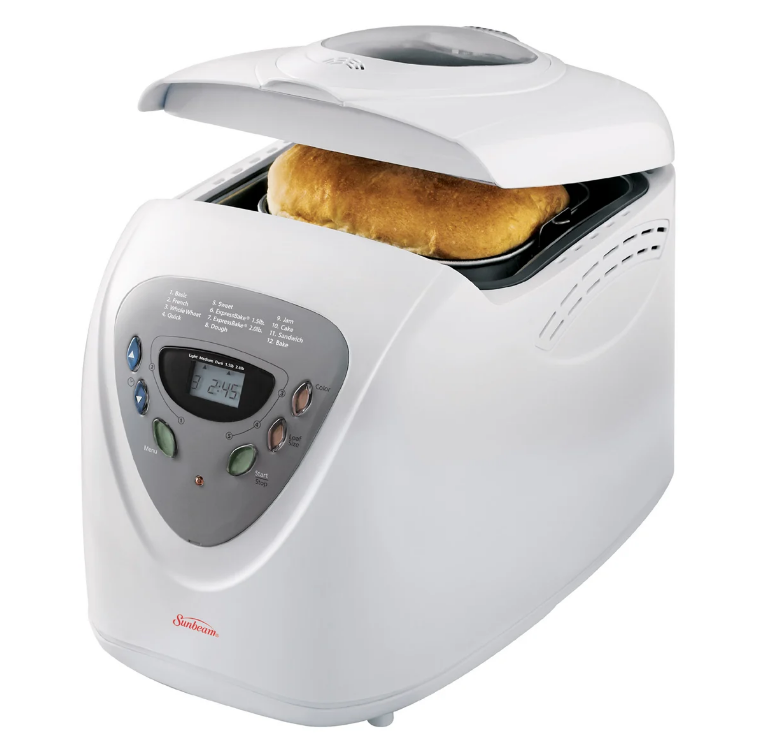
Sunbeam 5891 Programmable Bread Maker
IMPORTANT SAFEGUARDS
READ ALL INSTRUCTIONS, PRODUCT LABELS, AND WARNINGS BEFORE USING THE BREADMAKER.
When using electrical appliances, to reduce the risk of fire, electric shock, and/or injury to persons, basic safety precautions should always be followed, including the following:
- Do not touch hot surfaces. Always use oven mitts when handling hot materials, and allow metal parts to cool before cleaning. Allow the breadmaker to cool thoroughly before putting in or taking off parts.
- When the unit is not in use and before cleaning, unplug the breadmaker from wall outlet.
- To protect against risk of electrical shock, do not immerse the appliance or plugs in water or other liquids.
- Close supervision is always necessary when this or any appliance is used by or near children, or incapacitated persons.
- Do not allow anything to rest on the power cord. Do not plug in cord where people may walk or trip on it.
- Do not operate this or any appliance with a frayed or damaged cord or plug. After the appliance malfunctions, is dropped, or has been damaged in any manner. Take appliance to the nearest Authorized Service Facility for examination, repair, or electrical or mechanical adjustment.
- Do not let the cord dangle over the edge of a table or counter or touch hot surfaces. Do not place on an unsteady or cloth-covered surface.
- Avoid contact with moving parts.
- Do not use attachments not recommended by Sunbeam; they may cause fire, electric shock, or injury.
- Do not use outdoors or for commercial purposes.
- Do not place the appliance near a hot gas or electric burner, or in a heated oven.
- To unplug, press the “STOP” button, grip plug, and pull from wall outlet. Never pull on the cord.
- Electrical Power: If an electric circuit is overloaded with other appliances, your breadmaker may not operate properly. The breadmaker should be operated on a separate electrical circuit from other operating appliances.
SAVE THESE INSTRUCTIONS
Features of Your Breadmaker
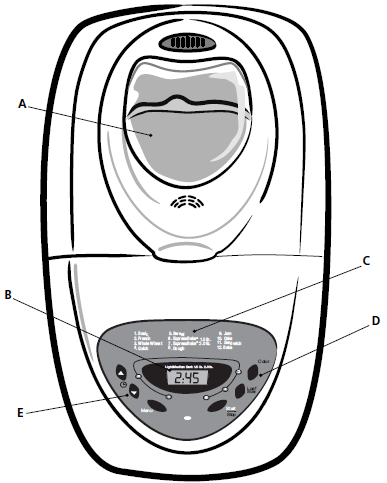
- Large viewing window to monitor the progress of your baking
- Easy-to-read LCD digital display
- 12 baking functions for a larger baking variety
- 3 shade selections for baking crust to your preference
- 13-Hour programmable delay bake for convenient baking any time
Dishwasher-safe, non-stick bread pan and kneading blade for easy cleaning – (inside the unit )
Overview of Breadmaker Features
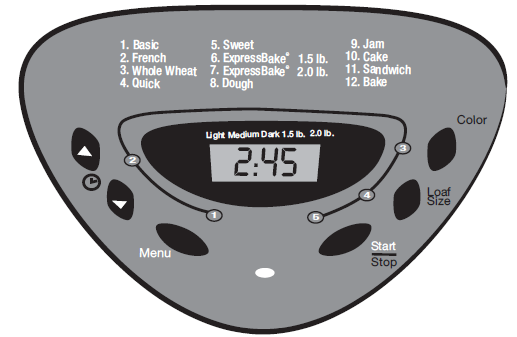
Menu
Press this button to select the kind of bread you want to make.
Each time you press the button, you will hear a beep. The display shows a number for each setting. For example, Basic is 1, French is 2, Whole Wheat is 3, etc.
Color Button
The Color button allows you to choose how light or dark to make the crust of the bread. Each time you press the Color button, the display will change as follows:
- L-Light = L
- P-Medium = P
- H-Dark = H
In addition, the display will show the cycle number before the color setting. For example, the Basic with a Medium crust reads “1P.” Or the French bread setting with a dark crust reads “2H.”
Display
The Display shows the following settings:
- The number of the bread setting cycle
- The color setting
- The time remaining while your bread is kneading or baking
Once you press the “Start/Stop” button to begin, the display will show the remaining time until your bread is baked. When the display reads “0:00,” the bread is baked.
Timer Set Buttons
Press these buttons to delay the time for your breadmaker to start.
For example, you can time your bread to be ready for dinner, or to bake while you are sleeping. You may delay up to 13 hours.
Start/Stop Button
Press this button to start and stop your breadmaker or begin countdown for delayed baking bread.
IMPORTANT: Do not press “Stop” when making bread because this will cancel the entire cycle, and you will need to start from scratch.
Breadmaker Settings
Your breadmaker can bake almost any kind of bread.
The recipes we provided clearly show you which setting you should use.
- Basic (Time: 3 hours)
- French (Time: 3 hours, 50 minutes)
- Whole Wheat ( Time: 3 hours, 40 minutes)
- Quick (Time: 1 hour, 43 minutes)
- Sweet (Time: 2 hours, 50 minutes)
- ExpressBake® 1.5-lb. (Time: 58 minutes)
- ExpressBake® 2.0-lb. (Time: 58 minutes)
- Dough (Time: 1 hour, 30 minutes)
- Jam (Time: 1 hour, 5 minutes)
- Cake (Time: 2 hours, 50 minutes)
- Sandwich (Time: 3 hours)
- Bake (Time: 1 hour)
Basic
This setting is probably used more than any other because it gives you the best results with just about any recipe.
French
Use this setting for making French breads. French bread takes longer to knead, rise, and bake, providing a heartier crust.
Whole Wheat
The whole wheat setting offers a longer rise time for breads that contain more than 50% whole wheat flour.
Quick
Use this setting for recipes that contain baking powder or baking soda rather than yeast to make bread or cake rise; only specially designed recipes are to be used for this setting.
Sweet
The sweet setting is for baking breads with high amounts of sugar, fats, and proteins, all of which tend to increase browning.
ExpressBake® (1.5-lb.)
Use this setting for baking bread in under 1 hour; this setting will only bake 1.5-lb. size loaves.
ExpressBake® (2.0-lb.)
Use this setting to quickly bake 2.0-lb. size loaves.
Dough
This setting lets you prepare dough for rolls, specialty breads, pizza, etc., which you shape by hand, allow to rise, then bake in a conventional oven.
Jam
This setting makes jam from fresh fruit.
Cake
Use this setting for making cakes.
Sandwich
This setting lets you prepare bread for sandwiches.
Bake
This setting is for baking dough that you may have prepared without using the previous settings.
IMPORTANT:
- Use the “Timer” button to delay the baking of your bread. You may delay the start time up to 13 hours.
- Press the “Start/Stop” button and your machine will start making bread. If delay bake is selected, the remaining time will count down in one-minute increments.
- The breadmaker has an automatic “keep warm” setting that will keep your bread warm for up to one hour. To turn warmer off, press the “Start/Stop” button and hold until you hear a beep. We recommend removing the bread from the breadmaker right away to preserve its freshness.
- Do NOT press the “Start/Stop” button while the breadmaker is making bread. This will cause the machine to turn off, and you will need to start over again, from scratch.
CAUTION: The breadmaker is very hot. Do not handle the machine while it is operating. Do NOT lift the lid while the breadmaker is baking bread.
Breadmaker Stages
It’s fun to watch your bread being made through the viewing window.
For the basic cycle, you can expect the following things to happen as the timer counts down to zero.
- At 3:00, the dough is kneaded for the first time. (10 minutes)
- At 2:50, the dough begins to rise. (20 minutes)
- At 2:30, the dough is kneaded for the second time. (15 minutes)
- At 2:15, the dough continues to rise. (20 minutes)
- At 1:55, the dough is “punched down.” (30 seconds)
- At 1:55, the dough rises for the final time. (55 minutes)
- At 1:00, the bread begins to bake. (50 minutes)
- At 0:00, the bread is finished.
CAUTION: Do not put your face near the lid when you open the breadmaker. Hot steam may escape that could burn you.
Getting Started
- Place the breadmaker on a counter where the plug will reach an outlet. DO NOT yet plug the machine into the wall outlet. You will be shown later when to do this. Make sure you can open the breadmaker top without hitting the top of kitchen cabinets.
- Open the lid and remove the baking pan. To do this, simply grasp the handle of the pan and twist out. Use a gentle, nonabrasive soap and wash, rinse, and dry the pan thoroughly.
- Attach the kneading blade to the baking pan, as shown.\ You will find the kneading blade in a small plastic wrap attached to the power cord.
- Set the pan aside. Do not yet place the pan into the breadmaker.
You’re ready to start!
Let’s Bake Bread
The simplest way to learn how to bake bread is to follow a basic recipe.
The following recipe is easy and the bread is delicious.
Before You Begin:
- Be sure to start with fresh ingredients.
- Be sure to have the following measuring equipment:
- Liquid measuring cup
- Dry measuring cups
- Measuring spoons
- You will need the following ingredients:
- Water
- Salt
- Butter/Margarine
Bread flour is specifically formulated and is preferred for electric bread machines.
- “Non-fat dry milk powder”
- Sugar
- Active, bread machine yeast
Measuring
The most important secret of making bread: “Exact measurements.”
That’s the key to successfully baking bread. “Exact measurements.”
With wet ingredients, use ONLY measuring cups with the cups/ounces marked clearly on the side. After filling the measuring cup, place it on a flat surface and view it at eye level to make sure the amount of liquid is exact. Then, double check.
With dry ingredients, use a spoon to place ingredients into the measuring cup, then “level off” the measurement with the back of a knife or spatula to make sure the measurement is exact.
Another helpful tip is to never use the cup to scoop the ingredients (for example, flour).
By scooping, you could add up to one Tbsp. of extra ingredients. Fill the measuring cup with a spoon before leveling off.
The SECOND most important secret of making bread:
Add ingredients into the bread pan in the exact order given in the recipe.
This means:
- FIRST, liquid ingredients
- SECOND, dry ingredients
- LAST, yeast
Also, make sure ingredients are at room temperature, unless otherwise noted (that is, between 75°–85°F or 24°–30°C). Temperatures too cool or too high can affect the way the bread rises and bakes.
Last, it’s a good idea to start with fresh ingredients (especially fresh flour and yeast).
Now, let’s try a simple (but really good) recipe.
Homestyle White Bread 1.5-Pound Loaf
- 1 cup + 2 Tbsp. water (75°–85°F or 24°–30°C)
- 1 Tbsp. butter or margarine, softened
- 2 Tbsp. sugar
- 1 Tbsp. non-fat dry milk powder
- 1-1/2 tsp. salt
- 3 cups bread flour
- 2-1/2 tsp. bread machine yeast
- Attach the kneading blade in the bread pan.
- Place ingredients into the bread pan in the following order: water, butter or margarine, sugar, milk powder, salt, and flour.
- With your finger, make a small indentation on one side of the flour. Add yeast to indentation, making sure it does not come into contact with the liquid ingredients.
- Carefully insert bread pan into breadmaker and gently close the lid.
- Plug the power cord into a wall outlet.
- Press the Menu button until the “Basic” program is selected.
- Press the Color button for the desired crust color.
- Press the Loaf button to select the desired size loaf (1.5-pound or 2.0-pound loaf).
- Press the Start button.
- When the baking cycle is complete, press the stop button.
- Open the lid and while using oven mittens, firmly grasp the bread pan handle and gently pull the pan straight up and out of the machine. CAUTION: The breadmaker and pan may be very hot! Always handle with care.
- Unplug the breadmaker and let bread cool before removing from baking pan.
- After the breadmaker and bread pan have cooled down.
- Use non-stick spatula to gently loosen the sides of the bread from the pan.
- Turn bread pan upside down onto a wire cooling rack or clean cooking surface and gently shake until bread falls out onto rack.
- Turn bread right side up and cool for about 20 minutes before slicing.
IMPORTANT: After a baking cycle, the breadmaker will not operate until it has cooled down.
ExpressBake® Setting: Making Bread In Under 1 Hour
Your SUNBEAM® breadmaker can bake great bread in under 1 hour. This is called the “ExpressBake®” setting. ExpressBake® loaves are a little different from loaves baked on other settings.
ExpressBake® Settings:
- These settings can bake bread in 58 minutes. The bread is a little more dense in texture with this setting.
- The ExpressBake® 1.5-lb. setting will only make a 1.5-lb. loaf.
- The ExpressBake® 2.0-lb. setting will only make a 2.0-lb. loaf.
There are a few things you should know about the ExpressBake® settings that are different than the other settings.
- ExpressBake® breads tend to have a darker, thicker crust than other kinds of bread. Sometimes there will be a crack in the top of the crust. This is because baking is done at higher temperatures. They also tend to be shorter, denser loaves.
- You CANNOT use the Delay Timer for the ExpressBake® settings. This would cool the liquid ingredients and affect the way that the bread rises.
- You CANNOT use the ”Color” option for ExpressBake® breads.
- DO NOT open the cover while making ExpressBake® breads.
- If the loaf is hard to remove from the pan, let it sit for about 5 minutes to cool. Gently shake the bread out of the pan and wait for 15 minutes before slicing.
- If you wish to bake another loaf of bread, you must let the breadmaker cool for 20 minutes with the cover open.
- YOU CAN use standard bread mixes for ExpressBake® breads, but the results may not be as good as the results when using the recipe within this booklet.
Troubleshooting
If you experience difficulties when operating the breadmaker, review the troubleshooting information in this section to find a solution. If you are unable to find a solution, please call our Consumer Relations Department at 800.528.7713.
If You Have a Power Outage
If the power goes out while you are using your breadmaker for not less than 30 minutes, your machine will resume its cycle when power is restored.
Troubleshooting Breadmaker Problems
If the breadmaker does not function as you think it should, review the chart below for some possible solutions.
Troubleshooting Baking Problems
If the bread does not turn out the way you expected or has some characteristic you don’t care for, review the chart below for some possible solutions.
BREADMAKER PROBLEM and SOLUTION
You see smoke or smell a burning odor from the back of the machine.
Ingredients have spilled out of the bread pan and into the machine itself. Stop the breadmaker and allow it to cool off. Clean the breadmaker before using it again.
The dough does not mix.
Make sure the baking pan and kneading blade are properly installed in the machine.
BAKING PROBLEM and SOLUTION
The bread has a floured top.
This is usually a result of using too much flour or not enough water. Try using less flour (a tsp. less at a time), or try using more water (1/4 tsp. more at a time).
The bread is too brown.
This is usually the result of adding too much sugar to the recipe. Try using less sugar (1 Tbsp. at a time). You can also try selecting a lighter crust color.
The bread is not brown enough.
This is usually the result of repeatedly lifting the lid of the bread machine or leaving the lid open while the bread is baking. Be sure the lid is shut while the breadmaker is in operation. You can also try selecting a darker crust color.
The sides of the bread collapse, and the bottom of the bread is damp.
There are several possible solutions. The bread may have been left in the bread pan too long after baking. Remove the bread from the pan sooner and allow it to cool. Try using more flour (a tsp. at a time), or less yeast (1/4 tsp. at a time), or less water or liquid (a tsp. at a time). This could also be the result of forgetting to add salt to the recipe.
The bread has a heavy, thick texture.
Try using less flour (a tsp. at a time), or more yeast (1/4 tsp. at a time). This could also be the result of using old flour or the wrong type of flour for the recipe.
The bread is not baked completely in the center.
Try using more flour (a tsp. more at a time), or less water or liquid (a tsp. less at a time). Do not lift the lid too often during baking.
For more Manuals by Sunbeam, visit ManualsLibraryy
Sunbeam 5891 Programmable Bread Maker-FAQs
How do I reset my Sunbeam bread maker?
Press and hold the Start/Stop button to reset. Let the machine cool before reuse.
Why won’t my bread maker start?
Ensure the bread pan is correctly inserted.
Check that the lid is securely closed.
Verify the power outlet is working.
Can I salvage failed bread?
Yes! Turn it into:
Croutons (toast with oil & herbs)
Breadcrumbs (blend or grate)
Bread pudding (soak in custard & bake)
Why is my bread dense or heavy?
Possible causes:
Too much flour (measure by weight, not volume).
Old or expired yeast.
Salt and yeast touching (kills yeast activation).
Under-kneading (use bread flour for better gluten development).
What’s the best yeast for bread machines?
Use instant dry yeast (no proofing needed). Avoid active dry yeast unless dissolved first.
What does “HHH” or “EEE” mean on the display?
This indicates a critical error (e.g., overheating or sensor failure). Unplug the machine and let it cool before retrying.
Should I use warm or cold water?
Room-temperature liquids (around 80°F/27°C) are ideal. Hot water can kill yeast; cold water slows fermentation.
Can I use milk instead of milk powder?
Yes! Replace powdered milk + water with an equal amount of fresh milk (adjust liquid slightly if needed).
When should I remove the kneading paddle?
After baking, gently lift the loaf and slide out the paddle to avoid damaging the bread.
Why does my bread collapse?
Too much yeast (reduce by ¼ tsp).
Over-proofing (use a shorter rise cycle).
High sugar content (weakens gluten).
Can I open the lid during rising?
Avoid opening during final rise or baking, but it’s safe to check dough consistency early in the cycle.