
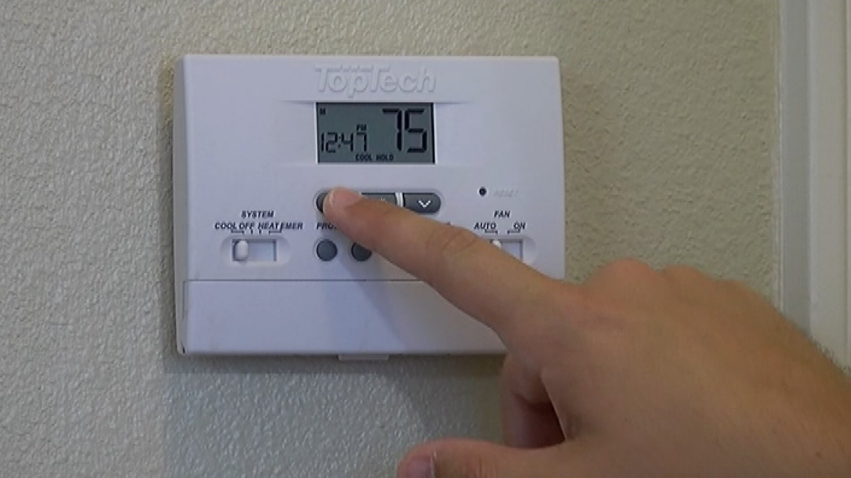

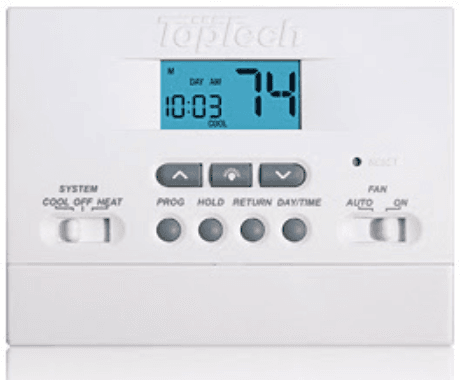
TopTech TT-P-411 Programmable Thermostat
Specifications
This thermostat is compatible with:
- Single-stage heat / cool conventional and heat pump systems
- Conventional systems up to 2 heat / 1 cool (TT-P-421 only)
- Single compressor heat pump systems with an auxiliary heat stage (TT-P-421 only)
- 250 – 750 millivolt heat only systems
Electrical and control specifications:
- Electrical Rating: 24 Volt AC
- 1 amp maximum load per terminal
- AC Power: 18 – 30 Volts AC
- DC Power: 3.0 Volt DC (2 “AA” Alkaline Batteries Included)
- Control Range: 45° – 90° F (7° – 32° C)
- Temperature Accuracy: +/- 1° F (+/- .5° C)
Terminations
- TT-P-411 – Rc, Rh, O, B, Y, W, G, C
- TT-P-421 – R, O, B, Y1, E/W1, G, W2, C
Installation
Warning: Disconnect power before beginning installation.
Thermostat Location
Install the thermostat approximately 4-5 feet (1.2 – 1.5m) above the floor in an area that has a good amount of air circulation and maintains an average room temperature.
Avoid installation in locations where the thermostat can be affected by drafts, dead air spots, hot or cold air ducts, sunlight, appliances, concealed pipes, chimneys, and outside walls.
Install your new TopTech thermostat in 5 basic steps:
- Install the Sub-Base
- Provide Power
- Connect Your Wires
- Set Installer Switches
- Attach Thermostat to Sub-Base
Install the Sub-Base:
- Remove the sub-base from the body of the thermostat.
- Mount the sub-base as shown below:

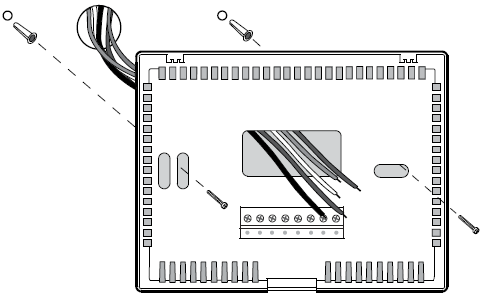
Drill 3/16” pilot holes in your desired location. Use supplied anchors for drywall or plaster.
Provide Power
- For 24 Volt AC power, you must connect the common side of the transformer to the C terminal on the thermostat sub-base.
- For primary or back-up power, insert the 2 supplied “AA” type alkaline batteries into the battery compartment located on the front of the thermostat near the bottom. Make sure to position the Positive (+) and Negative (-) sides of the batteries correctly with the +/- symbols in the battery compartment.
Connect Your Wires
Conventional Systems
Typical Wiring Configurations
NOTE: The “Installer Switch” option will be configured in the next step.
Heat Only or Millivolt
Set Installer Switch to NORM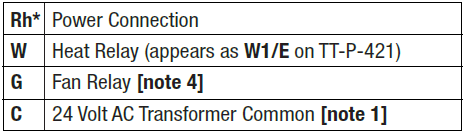
1 HEAT / 1 COOL Single or Dual Transformer
Set Installer Switch to NORM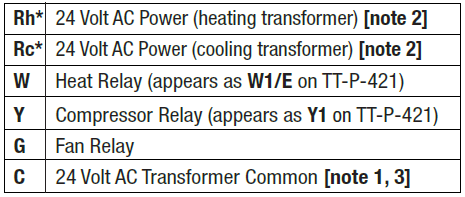
2 HEAT / 1 COOL Single Transformer (TT-P-421 Only)
Set System Type to NORM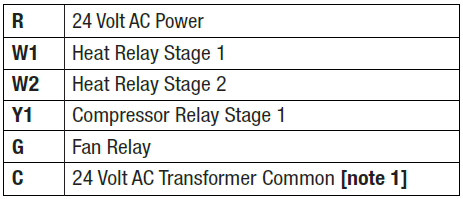
NOTES – Conventional Systems
- If batteries are installed, the 24 Volt AC common connection is optional
- Remove factory-installed jumper for dual transformer systems
- In dual transformer systems, transformer common must come from the cooling transformer
- If needed for system, provide disconnect and overload protection as required.
Heat Pump Systems
Typical Wiring Configurations
NOTE: The “Installer Switch” option will be configured in the next step.
1 HEAT / 1 COOL – No Auxiliary Heat
Set Installer Switch to HP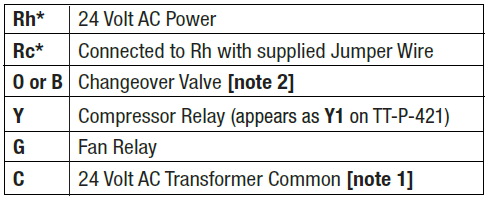
Appears as R on TT-P-421 (single transformer).
2 HEAT / 1 COOL – Including Auxiliary Heat (TT-P-421 only)
Set Installer Switch to HP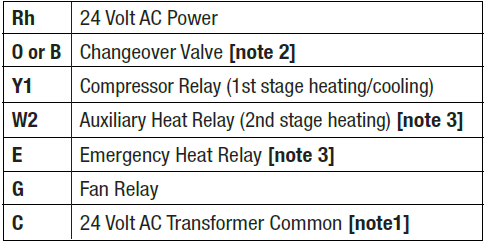
NOTES – Heat Pump Systems
- If batteries are installed, the 24 Volt AC common connection is optional.
- Select O for cool active or B for heat active.
- Install a field-supplied jumper between the W2 and E terminals if there is no separate emergency heat relay installed.
Provide disconnect and overload protection as required.
Set Installer Switches
The Installer switches are located on the back of the thermostat and must be properly configured for this thermostat to operate properly.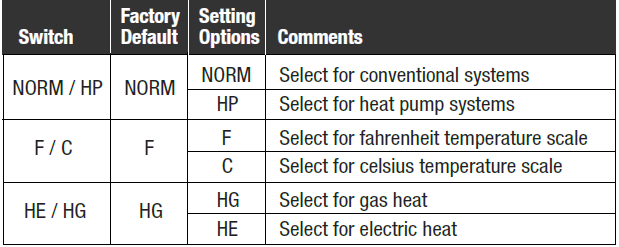
NOTE: The reset button must be pressed after making any changes to these switches.
Attach Thermostat to Sub-Base
- Line up the thermostat body with the sub-base.
- Carefully push the thermostat body against the sub-base until it snaps into place.
NOTE: The thermostat hinges from the top and latches at the bottom.
Setting User Options
Advanced User Options
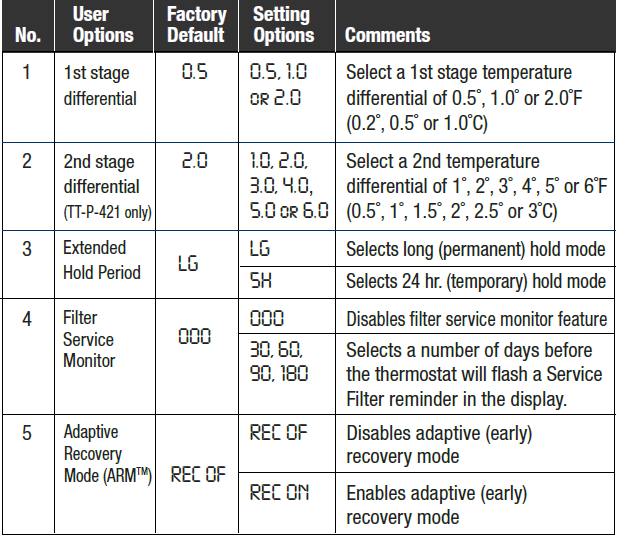
User options allow you to customize some of your thermostat’s features.
Most users will not need to make any changes to the settings in this section.
To access the User Options menu, hold down the RETURN button for approximately 3 seconds until the screen changes and displays the first User Option.
Press the UP or DOWN button to change the setting for the displayed User Option. After you have made your desired setting, press RETURN to advance to the next User Option.
The thermostat will return to normal mode after your last user option is made or after no keys have been pressed for 5 seconds.
Table of User Options
Setting Your Program Schedule
Setting the Time and Day
- In normal operating mode, press the DAY/TIME button. The display will switch to the day/time setting mode, and the hour will be flashing.
- Press UP or DOWN to adjust the hour. Press DAY/TIME.
- Press UP or DOWN to adjust the minute. Press DAY/TIME.
- Press UP or DOWN to adjust the day of the week. Press RETURN to exit.
Tips Before Setting Your Program Schedule
- Make sure your current time and day of the week are set correctly.
- When programming, make sure the AM and PM indicators are correct.
- Your NIGHT event cannot exceed 11:50 PM.
This thermostat comes pre-programmed with a default energy saving program. The following table outlines the pre-programmed times and temperatures for heating and cooling in each of your 4 daily weekday and weekend events. If you wish to use these settings, then no further programming is necessary.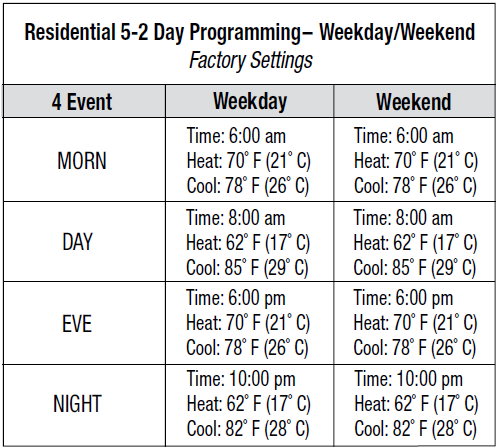
Programming a 5-2 Day Residential Schedule
The 5-2 day residential programming mode allows you to program Monday-Friday with one 4-event schedule and then allows you to change Saturday and Sunday with a different 4-event schedule.
- Touch the PROG button. The display will switch to programming mode. The days M, TU, W, TH, and F will be displayed, and the hour will be flashing.
- Move the SYSTEM switch to either the HEAT or COOL position.
- Press the UP or DOWN to adjust the hour for the MORN (morning) event. Press PROG.
- Press UP or DOWN to adjust the minute for the MORN event. Press PROG.
- Press UP or DOWN to adjust the temperature for the MORN event. Press PROG
- Repeat steps 3-5 for the DAY, EVE, and NIGHT events.
- Repeat steps 3-6 for the weekend (S, SU) program.
- If needed, repeat steps 2-7 to program the opposite mode (HEAT or COOL).
- Press RETURN to exit.
Operating Your Thermostat
Setting the System Control Mode
The System Control has several modes of operation that can be selected by moving the SYSTEM switch to one of three positions.
- COOL: Only your cooling system will operate
- OFF: Heating and cooling systems are off
- HEAT: Only your heating system will operate
Additional System Control Mode (Model TT-P-421):
EMER Operates a backup heat source (Emergency Heat) for heat pump systems only
NOTE: If your model TT-P-421was set to a conventional system (NORM), then you will not have the EMER (emergency heat) option, and “NO AUX SET” will flash in the display if EMER is selected with the system switch.
Setting the Fan Control Mode
The Fan Control has 2 modes of operation – AUTO and ON. The mode can be selected by moving the FAN switch.
- AUTO: The system fan will run only when your heating or cooling system is running
- ON: The system fan will stay on
Temperature Adjustment
Temporary Adjustment – Press and hold the or button to adjust the current set point temperature.
Extended Adjustment – Press the HOLD button so that HOLD appears in the display screen. Press or to adjust the current set temperature.
Status Indicators
Status indicators appear in the display to let you know if your system is heating, cooling, or off.
- HEAT: If flashing, it indicates that your heating system is running
- COOL: If flashing, it indicates that your cooling system is running
- FILT: Indicates that a service reminder has expired. Press RETURN button to reset timer and turn off FILT warning.
Additional status indicators (Model TT-P-421):
AUX Indicates that the auxiliary stage of heating is running (multi-stage systems only) or that the emergency heating system is running (heat pump systems only).
Program Event Indicators
Program Event Indicators appear in the display to let you know what part of your current program is active. The 4 different program event indicators are MORN, DAY, EVE, and NIGHT. These indicators will flash if a set point change is made. The flashing will stop at the next program event. NOTE: MORN, DAY, EVE, or NIGHT will not show while in hold mode.
Resetting the Thermostat
This thermostat provides you with a reset button that will erase all of your user settings and programming. To reset the thermostat, use a small object such as a toothpick or paperclip and gently press the button located inside the small hole on the front of the thermostat housing labeled “reset”.
Additional Operation Features
Compressor Protection
This thermostat includes an automatic compressor protection delay to avoid potential damage to your system from short cycling. This feature activates a short delay after turning off the system compressor.
Thermostat Maintenance
Changing the Batteries
Depending on your particular installation, this thermostat may be equipped with two (2) “AA” type alkaline batteries. If batteries are installed and they become low, a low battery indicator will appear in the display. You should change your batteries immediately when you see the low battery signal by following these instructions.
- Open the battery door located on the bottom of the thermostat.
- Remove old batteries and replace with new batteries.
- Make sure to correctly position the (+) and (-) symbols.
- Close the battery door.
NOTE: We recommend replacing the thermostat batteries annually or if the thermostat will be unattended for an extended period of time.
Thermostat Cleaning
Never spray any liquid directly on the thermostat. Using a soft, damp cloth, wipe the outer body of the thermostat. Never use any abrasive cleansers to clean your thermostat.
For more Manuals by TopTech, visit ManualsLibraryy
TopTech TT-P-411 Programmable Thermostat-FAQs
How do I test if my thermostat is working correctly?
Set the thermostat 5° higher/lower than room temp.
Listen for the HVAC system turning on/off.
Use a separate thermometer to verify accuracy.
Can I use this thermostat manually?
Yes! You can override programmed settings without affecting the schedule.
What’s the best temperature setting for energy savings?
Winter: 68°F (20°C) when home, lower when away.
Summer: 78°F (25°C) when home, higher when away.
What is a C-wire, and do I need one?
The C-wire (common wire) provides constant power for Wi-Fi/smart features.
If your thermostat keeps losing settings, you may need one.
How do I change the batteries?
Remove the thermostat faceplate.
Replace AA/AAA batteries (check manual for type).
Reattach and reprogram if needed.
Should I set the fan to AUTO or ON?
AUTO: Saves energy (fan runs only when heating/cooling).
ON: Runs continuously for better air circulation.
Why is my thermostat not reaching the set temperature?
Check for dirty filters, blocked vents, or HVAC issues.
Recalibrate the thermostat if readings are inaccurate.
How do I know if my thermostat is broken?
Signs include:
HVAC system not turning on/off.
Incorrect temperature readings.
Short-cycling (frequent on/off).
How long does a thermostat last?
Typically 10 years. If older, consider replacement for efficiency.
How do I clean my thermostat?
Gently wipe with a soft, dry cloth.
Use a soft brush to remove dust inside.