


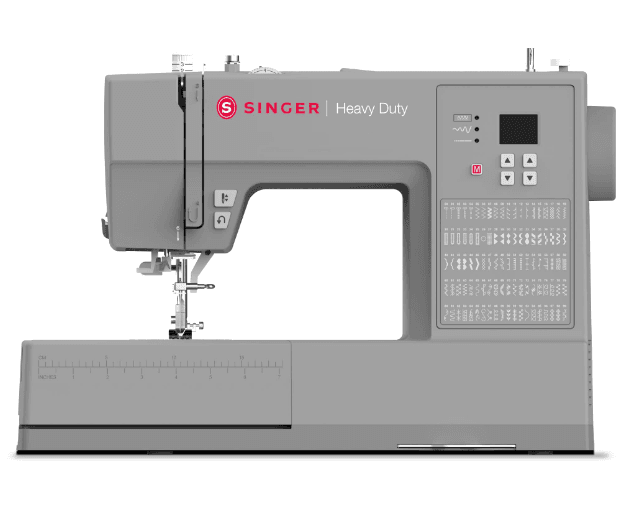
Singer HD6360 Sewing Machine
IMPORTANT SAFETY INSTRUCTIONS
When using an electrical appliance, basic safety precautions should always be followed, including the following: Read all instructions before using this household sewing machine. Keep the instructions in a suitable place close to the machine. Make sure to hand them over if the machine is given to a third party.
- Never operate the sewing machine with any air openings blocked. Keep ventilation openings of the sewing machine and foot control free from the accumulation of lint, dust, and loose cloth.
- Keep fingers away from all moving parts. Special care is required around the sewing machine needle.
- Always use the proper needle plate. The wrong plate can cause the needle to break.
- Do not use bent needles.
- Do not pull or push fabric while stitching. It may deflect the needle, causing it to break.
- Wear safety glasses.
- Switch the sewing machine off (” “) when making any adjustment in the needle area, such as threading the needle, changing the needle, threading the bobbin, or changing the presser foot, etc.
- Never drop or insert any object into any opening.
- Do not use outdoors.
- Do not operate where aerosol (spray) products are being used or where oxygen is being administered.
- To disconnect, turn all controls to the off (” “) position, then remove the plug from the outlet.
- Do not unplug by pulling on the cord. To unplug, grasp the plug, not the cord.
- The foot control is used to operate the machine. Avoid placing other objects on the foot control.
- Do not use the machine if it is wet.
- If the LED lamp is damaged or broken, it must be replaced by the manufacturer or its service agent, or a similarly qualified person, in order to avoid a hazard.
- If the supply cord connected with the foot control is damaged, it must be replaced by the manufacturer or its service agent, or a similarly qualified person, in order to avoid a hazard.
- This sewing machine is provided with double insulation. Use only identical replacement parts. See instructions for Servicing of Double-Insulated Appliances.
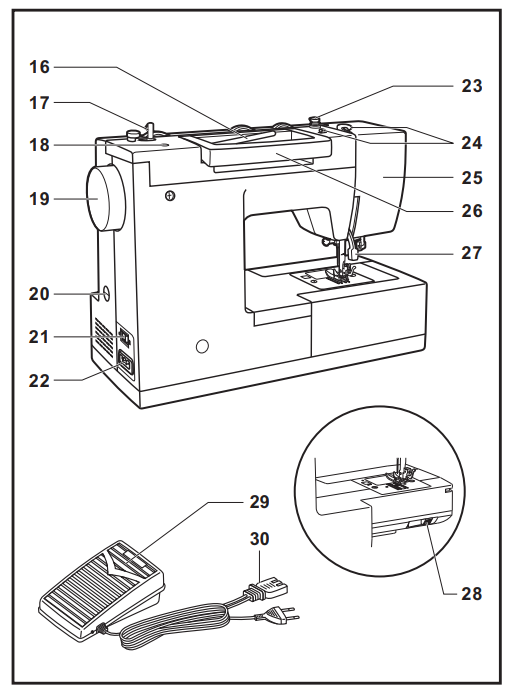
Principal Parts of the Machine
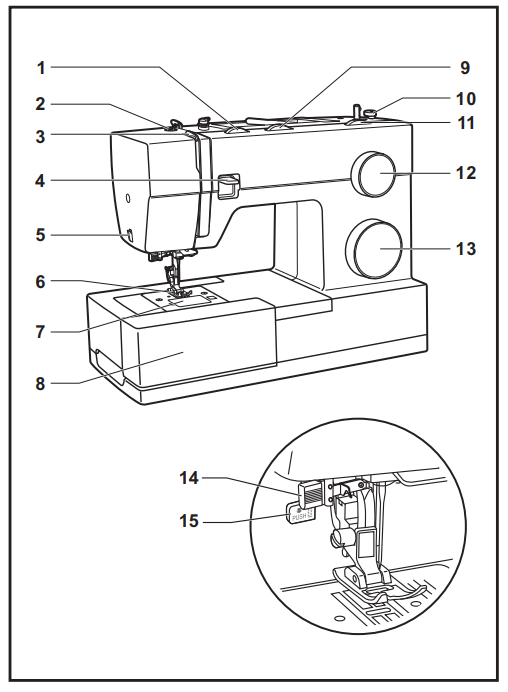
- Thread tension dial
- Presser foot pressure adjustment
- Thread take-up lever
- Reverse sewing lever
- Thread cutter
- Presser foot
- Needle plate cover
- Removable extension table/ accessory storage
- Three-needle position dial
- Bobbin stopper
- Stitch width dial
- Stitch length dial
- Pattern selector dial
- Automatic threader
- One-step buttonhole lever

- Horizontal spool pin
- Bobbin winding spindle
- Hole for second spool pin
- Handwheel
- Buttonhole stitch balance adjustment slot
- Power and light switch
- Main plug socket
- Bobbin thread guide
- Upper thread guide
- Face plate
- Handle
- Presser foot lifter
- Drop feed control
- Foot speed control
- Power cord
Connecting the Machine to the Power Source
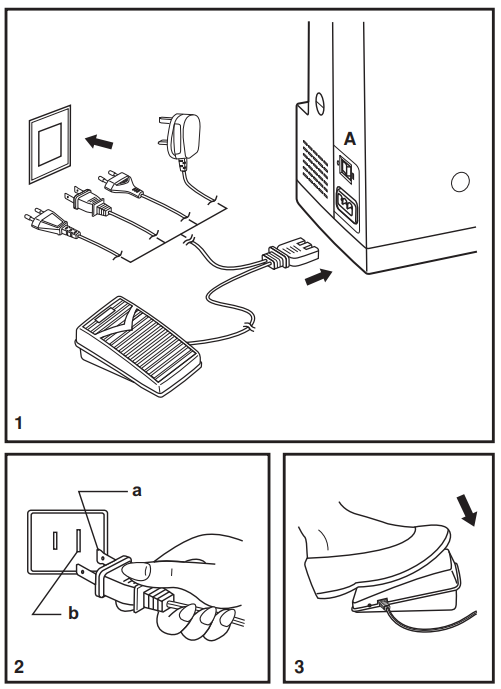
Connect the machine to a power source as illustrated. (1) This appliance is equipped with a polarized plug that must be used with the appropriate polarized outlet. (2)
Foot control
The foot control pedal regulates the sewing speed. (3)
Sewing light
Press main switch (A) to ” l ” for power and light
- a. Polarized attachment plug
- b. The conductor is intended to be grounded
Two-Step Presser Foot Lifter
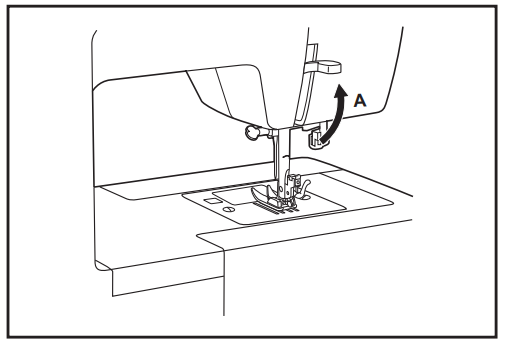
When sewing several layers or thick fabrics, the presser foot can be raised to a higher position for easy positioning of the work. (A) The presser foot will remain raised as long as you hold up the presser foot lifter. As soon as you release it, the presser foot will drop back down to the intermediate position
Adjusting Presser Foot Pressure
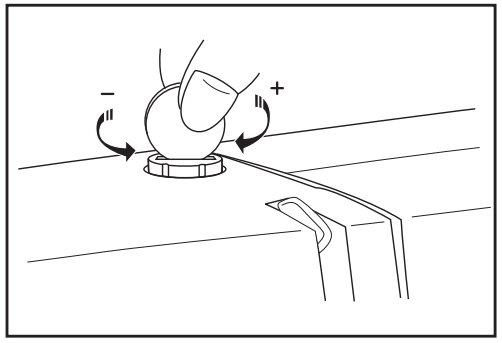
The presser foot pressure of the machine has been pre-set and requires no particular readjustment according to the type of fabric (light or heavy weight). However, if you need to adjust the presser foot pressure, turn the presser adjusting screw with a coin. For sewing very thin fabric, loosen the pressure by turning the screw counterclockwise, and for heavy fabric, tighten it by turning it clockwise. It is suggested that you turn the screw in one-quarter inch
increments so that it can be easily reset to factory settings.
Accessories
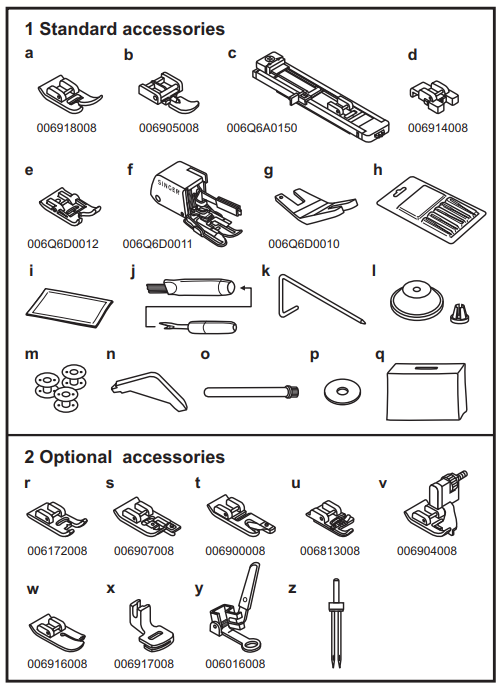
Standard accessories (1)
- a. All-purpose foot
- b. Zipper foot
- c. Buttonhole foot
- d. Button sewing foot
- e. Non-stick foot
- . Even feed/walking foot
- g. Clearance plate
- h. Needles (#16 x 5)
- i. Needles (#14 x 3)
- j. Seam ripper/brush
- k. Edge/quilting guide
- L. Spool holders (L & S)
- m. Bobbin (3x)
- n. L-screwdriver
- o. Auxiliary spool pin
- p. Spool pin felt
- q. Soft cover
Optional accessories (2)
(These 10 accessories are not supplied with this machine; they are, however, available for purchase from your authorized retailer.)
- r. Satin stitch foot
- s. Overcasting foot
- t. Hemmer foot
- u. Cording foot
- v. Blind hem foot
- w. Quilting / straight stitch foot
- x. Gathering foot
- y. Darning/embroidery foot
- z. Twin Needle
Winding the Bobbin
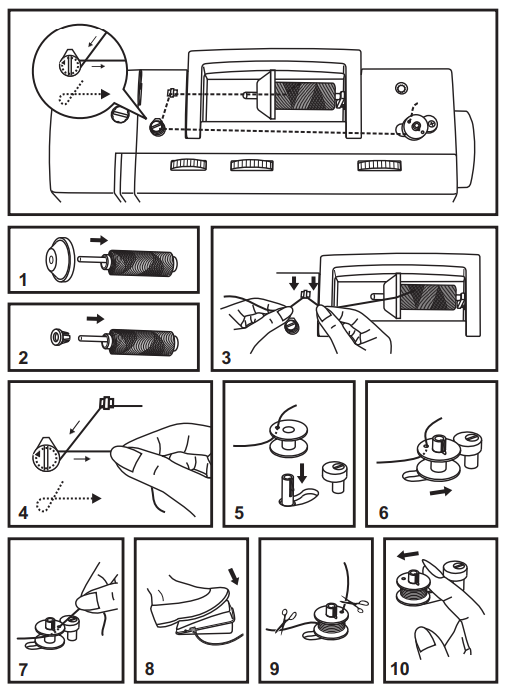
- – Place the thread and the corresponding spool holder onto to spool pin. (1/2)
- – Snap the thread into the thread guide. (3)
- – Wind the thread clockwise around the bobbin winder tension discs. (4)
- – Thread the bobbin as illustrated and place it on the spindle. (5)
- – Push the bobbin spindle to the right. (6)
- – Hold the thread end securely. (7)
- – Step on the foot control pedal. (8)
- – Trim the thread close to the bobbin & then continue winding
until the bobbin is full. (9) - – Cut thread, push the bobbin spindle to the left (10), and remove.
Inserting the Bobbin
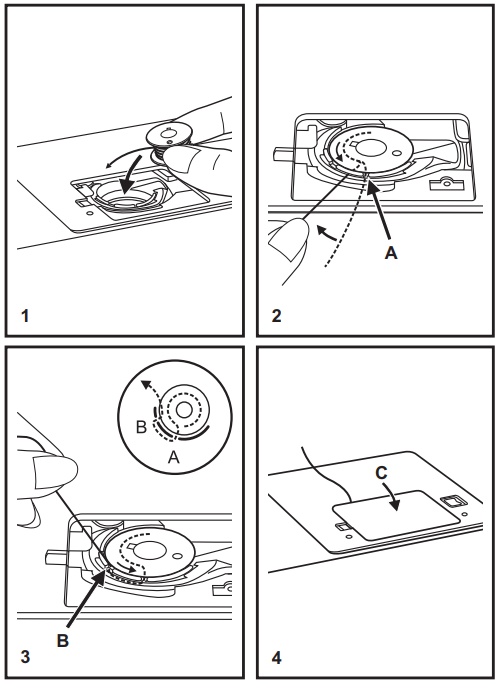
When inserting or removing the bobbin, raise the presser foot & make sure the needle is fully raised.
- Remove the bobbin cover plate by pushing the small tab to the right of the cover towards the right.
- Insert the bobbin in the bobbin case with the thread running counterclockwise (arrow).
- Pull the thread through the slit (A).
- Draw the thread clockwise until it slips into the notch (B),
while holding the bobbin down with the tip of your finger. - Pull out about 15 cm (6 inches) of thread towards the back of the plate and attach the bobbin cover plate. (C)
Threading the Upper Thread
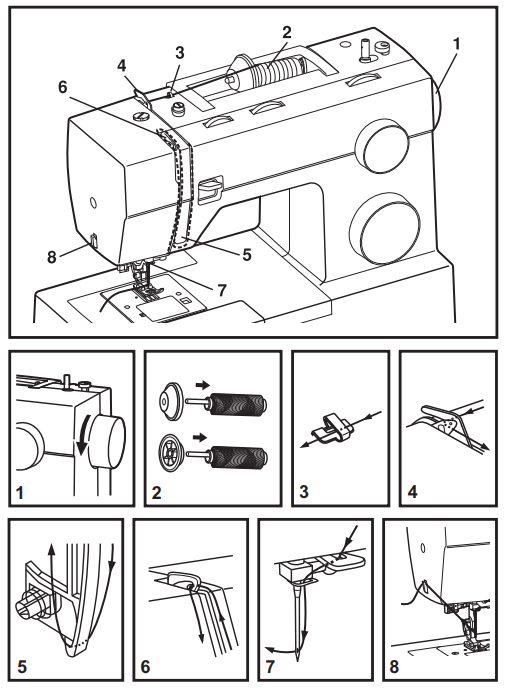
This is a simple operation, but it is important to carry out correctly as
by not doing so.
- – Start by raising the needle to its highest point (1), and continue turning the handwheel* counterclockwise until the needle just slightly begins to descend. You must raise the presser foot to release the tension discs. For safety, it is strongly suggested you turn off the power before threading.
- – Lift the spool pin. Place the spool of thread on the holder with
the thread coming off the spool from the back as shown, and
place the appropriate spool holder next to the spool. For small
thread spools, place the small side of the spool holder next to the spool. (2) - – Draw thread from spool through the upper thread guide (3) and pull thread through pre-tension spring as illustrated. (4)
- – Thread tension module by leading the thread down the right channel. (5) During this process, it is helpful to hold the thread between the spool and thread guide, as this will help to seat the thread between the tension discs.
- – At the top of this movement, pass the thread from right to left through the slotted eye of the take-up lever and then downwards again. (6)
- – Now pass the thread behind the horizontal thread guide, and
Then, behind the thin wire needle clamp guide (7), and then down to the needle, which should be threaded from front to back. - – Pull about 6 – 8 inches of thread under the presser foot to the rear beyond the needle eye. Trim thread to length with built-in thread cutter. (8)
- Never turn the handwheel away from you, as this may cause the
timing to be disrupted. Always turn the handwheel counterclockwise (towards you).
Automatic Needle Threader
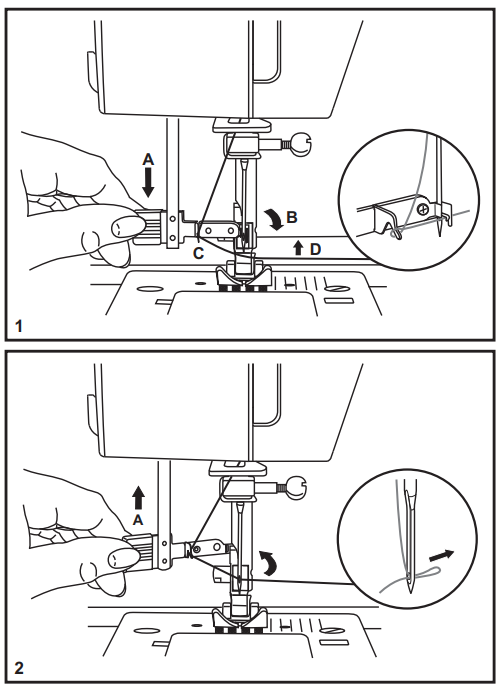
- – Adjust the Thread upper tension of the machine up to the thin wire in front of the needle clamp.
- – Raise the needle to its highest position.
- – Set the machine to straight stitch.
- – Press lever (A) down as far as it will go, and gently insert
the hook of the threader into the eye of the needle by swinging the lever towards you when it is fully lowered. - – The threader automatically swings to the threading position
(B). - – Pass thread under thread guide (C), from left to right.
- – Pass the thread in front of the needle around the hook (D)
from bottom to top. - – Release lever (A), by swinging it away from you & then pushing it back up to the resting position.
- – Pull the thread through the needle eye.
Raising the Bobbin Thread
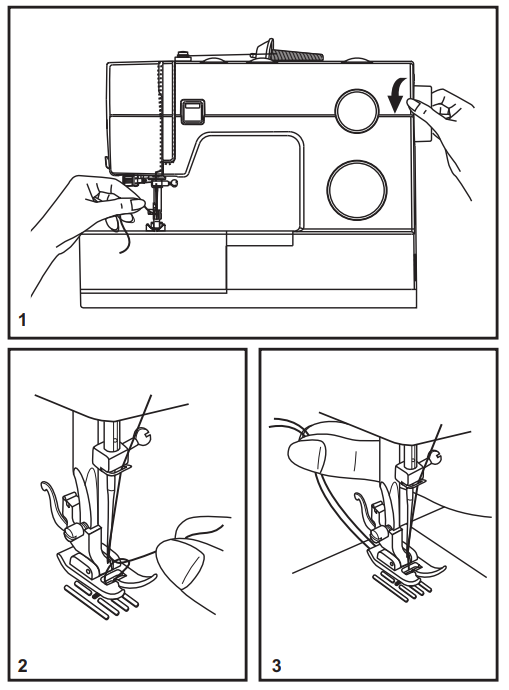
- Hold the upper thread with the left hand. Turn the handwheel
(1) towards you (counterclockwise) lowering, then raising
needle. - Gently pull on the upper thread to bring the bobbin thread up
through the needle plate hole. (2) - Lay both threads to the back under the presser foot. (3)
Thread Tension
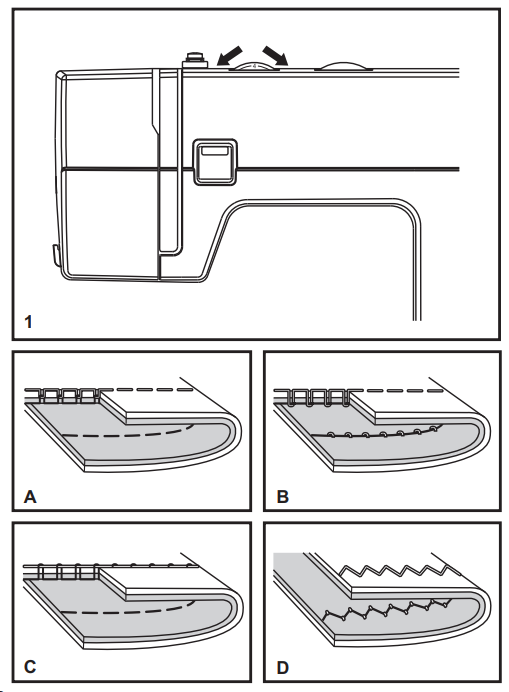
Upper thread tension
- Normal thread tension for straight stitch sewing.
- B. The thread tension is too loose for straight stitch sewing. Turn the dial to a higher number.
- C. The thread tension is too tight for straight stitch sewing. Turn the dial to the lower number.
- D. Normal thread tension for zig-zag and decorative sewing.
Correct thread tension is when a small amount of the upper thread appears on the bottom side of the fabric.
How to Choose Your Pattern
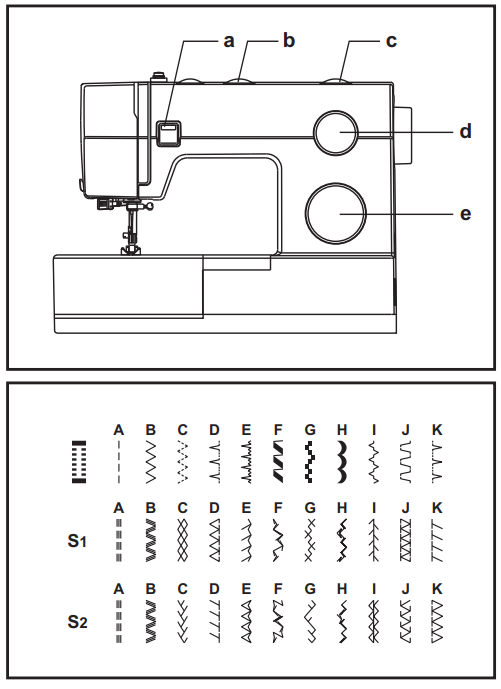
The diagram on this page displays the stitch patterns available
on the machine. Stitches at the top of the diagram are indicated on the pattern selector dial in gray. To select the patterns indicated with the gray color, turn the pattern selector dial. (e) Use the stitch length dial (d) to adjust the stitch length as desired for the project. Use the stitch width dial (c) to adjust the width of the stitch as desired. Instructions for setting the stitch width & the stitch length dials can be found on page 28. To obtain the other patterns, turn the stitch length dial to “S1” or “S2”, select the pattern desired with the pattern selector dial, and adjust the stitch width with the stitch width dial.
The pattern selector dial may be turned in either direction.
- a.Reverse sewing lever
- b. Three-needle position dial
- c. Stitch width dial
- d.Stitch length dial
- e Pattern selector dial
Three-Needle Position Dial
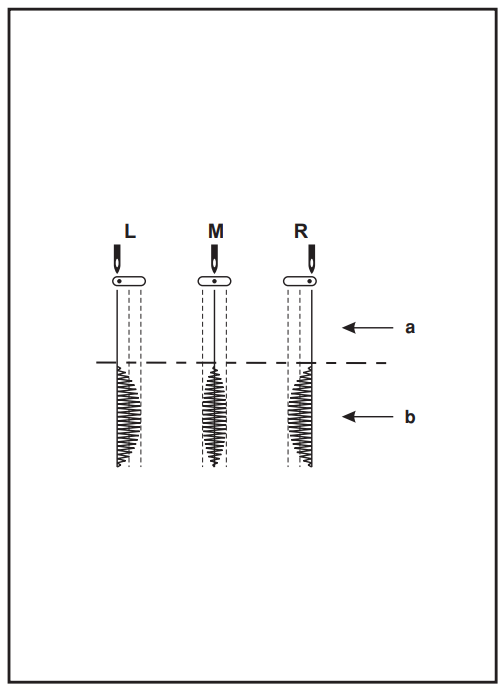
The needle position can be altered with the “Three-needle position dial”. For normal work, the needle position is middle. For edge stitching or sewing parallel lines of top stitch, select the needle position left or right. For twin needle stitching, the needle position is middle.
- a. Straight
- b. Zig-zag
- L. Left Needle Position
- M. Middle Needle Position
- R. Right Needle Position
Stitch Width Dial & Stitch Length Dial
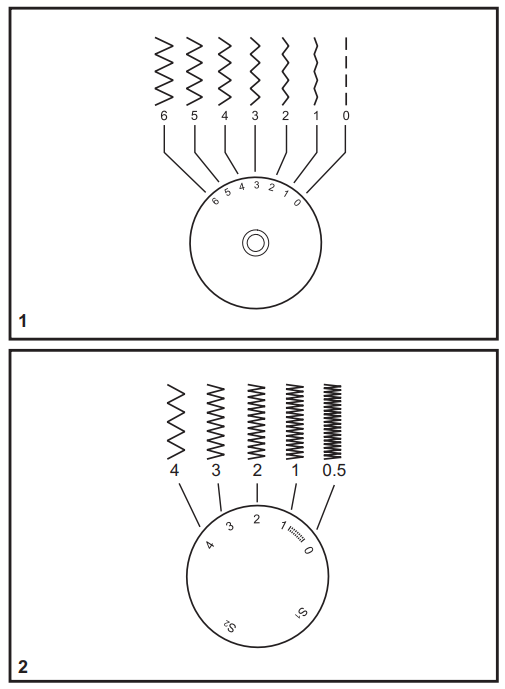
Function of the stitch width dial
When doing a zig-zag or a decorative pattern, you can alter the width from 1mm to 6mm. To obtain a very narrow stitch, set the dial to 1; to obtain the maximum 6mm width, set the dial to 6. When the dial is set to 0, you will obtain a straight stitch. (1)
Function of the stitch length dial while zig-zag stitching
Set the pattern selector dial to zig-zag or any other decorative pattern. The density of zig-zag or decorative stitches increases as the
setting of the stitch length dial approaches “0”. The smaller the number, the closer or denser the stitches will be. Standard zigzag stitches are usually achieved at “3” or below. (2) Dense zig-zag stitches are called satin stitches. (2)
Function of the stitch length dial for when straight stitching
For straight stitch sewing, turn the pattern selector dial to the
straight stitch setting. Turn the stitch length dial, and the length of the individual stitches will decrease as the dial approaches “0”. The length of the individual stitches will increase as the dial approaches “4”. Generally speaking, use a longer stitch length when sewing heavier-weight fabrics or when using a thicker needle or thread. Use a shorter stitch length when sewing lighter-weight fabrics or when using a finer needle or thread
Sewing Straight Stitch
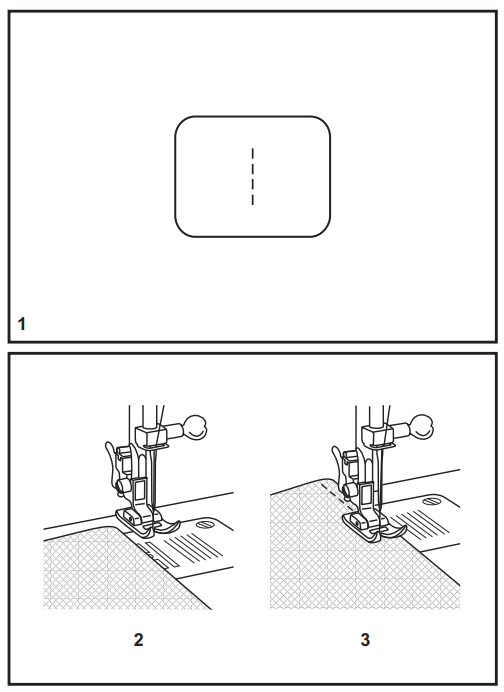
- To begin sewing, set the machine for straight stitch. (1) Set the stitch length to between 2 and 3.
- Place the fabric under the presser foot with the fabric edge lined up with the desired seam guide line on the needle plate.
(2) - Lower the presser foot lifter, and then step on the foot controller to start sewing. (3)
Chart needle/ Fabric/ Thread
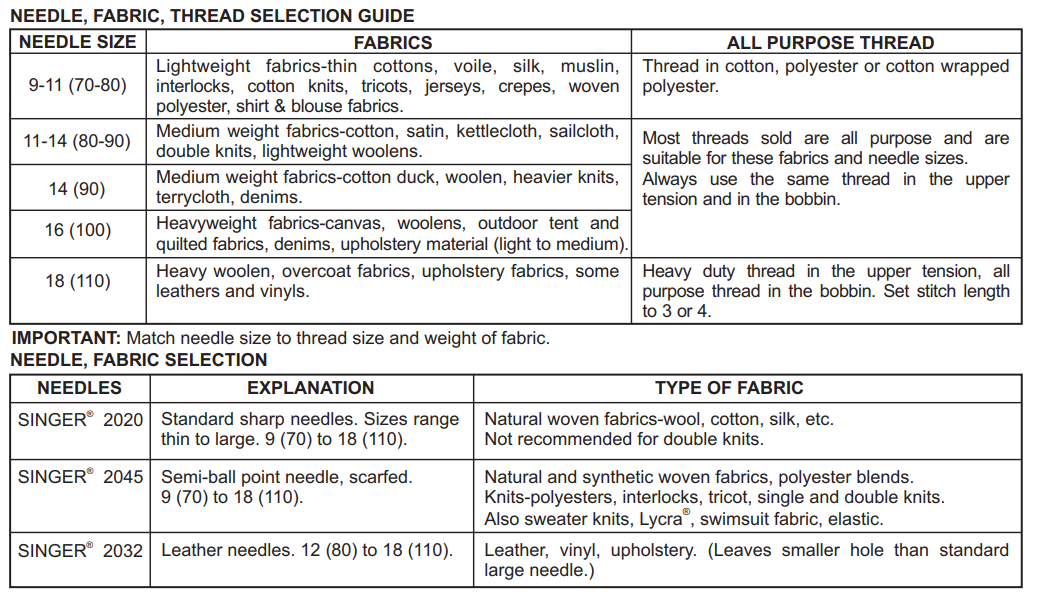
Troubleshooting
Problem
Upper thread breaks
Cause
- The machine is not threaded correctly.
- The thread tension is too tight.
- The thread is too thick for the needle.
- The needle is not inserted correctly.
- The thread is wound around the spool holder pin.
- The needle is damaged.
Correction
- Read the machine.
- Reduce the thread tension. (lower number)
- Select a larger needle.
- Remove and reinsert the needle. (flat side towards the back)
- Remove the reel and wind the thread onto the reel.
- Replace the needle
Lower thread breaks
cause:
- The bobbin case is not inserted correctly.
- The bobbin case is threaded wrong.
Correction
- Remove and reinsert the bobbin case and pull on the thread.
- The thread should pull easily. 2. Check both the bobbin and bobbin case.
Skipped stitches
Cause
- The needle is not inserted correctly.
- The needle is damaged.
- The wrong size needle has been used.
- The foot is not attached correctly.
Correction
- Remove and reinsert the needle. (flat side towards the back
- Insert a new needle.
- Choose a needle to suit the thread and fabric.
- Check and attach correctly.
Needle breaks
Cause
- The needle is damaged.
- The needle is not correctly inserted.
- Wrong needle size for the fabric.
- The wrong foot is attached.
Correction
- Insert a new needle.
- Insert the needle correctly. (flat side towards the back)
- Choose a needle to suit the thread and fabric.
- Select the correct foot.
FOR MORE MANUALS BY SINGER, VISIT MANUALSLIBRARYY
Singer HD6360 Sewing Machine-FAQs
What fabrics can the Singer HD6360 handle?
Lightweight: Chiffon, silk (use fine needles).
Medium: Cotton, linen (universal needles).
Heavy: Denim, canvas (heavy-duty needles).
Why is my thread bunching underneath?
Bobbin issues: Check threading, tension, or lint buildup.
Top thread tension too tight: Loosen slightly.
How do I fix a jammed needle?
Turn off the machine.
Remove the bobbin case and clear tangled threads.
Insert a new needle if bent.
What is the reverse lever for?
It backstitches to secure seams at the start/end of sewing.
How do I adjust stitch length?
Turn the stitch length dial (higher numbers = longer stitches).
“0” setting stops fabric feeding (for button sewing).
Why won’t my needle move?
Machine jammed? Check for thread tangles.
Bent needle? Replace it.
Bobbin case misaligned? Reinsert properly.
How do I troubleshoot thread breaking?
Top thread: Rethread, check tension, use quality thread.
Bobbin thread: Ensure correct insertion and tension.
What’s the best needle for thick fabrics?
Use size 90/14 or 100/16 needles for denim, leather, or multiple layers.
Can the Singer HD6360 sew leather?
Yes, but use a heavy-duty needle and slow stitching speed.