
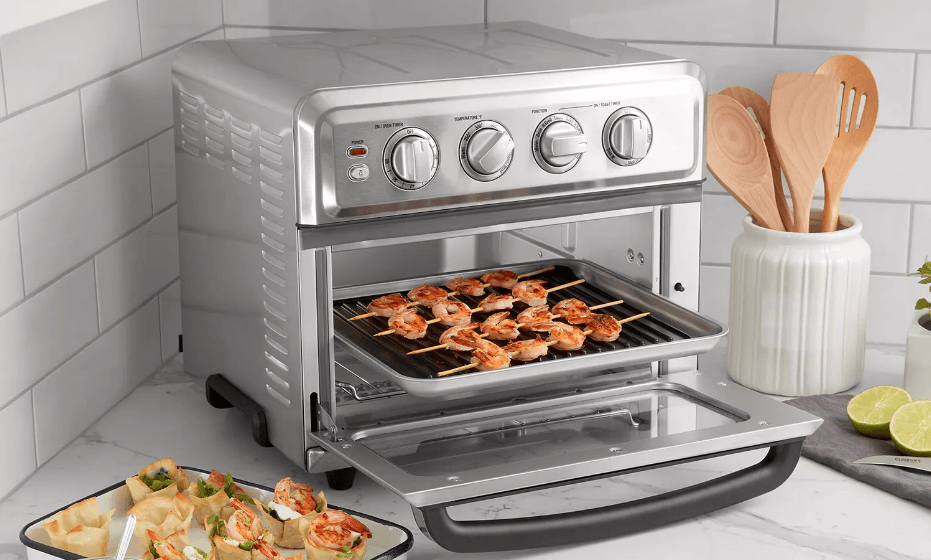

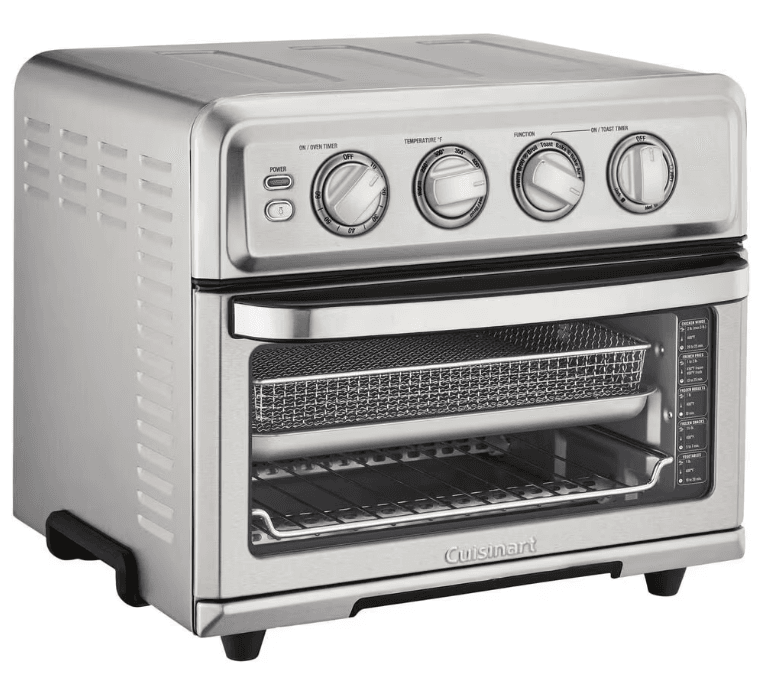
Cuisinart CTOA-130PC2 Digital Airfryer Toaster Oven
IMPORTANT SAFEGUARDS
When using an electrical appliance, especially when children are present, basic safety precautions should always be taken, including the following:
- Read all instructions.
- UNPLUG FROM THE OUTLET WHEN NOT IN USE AND BEFORE CLEANING. Allow to cool before cleaning or handling and putting on or taking off parts.
- Do not touch hot surfaces. Use handles or knobs.
- To protect against electric shock, do not place any part of the Digital AirFryer Toaster Oven in water or other liquids. See instructions for cleaning.
- This appliance should not be used by or near children or individuals with certain disabilities.
- Do not operate any appliance with a damaged cord or plug, or after the appliance has malfunctioned or has been dropped or damaged in any way, or has been dropped in water. Return the Digital AirFryer Toaster Oven to the store or retailer where purchased for examination or repair, or adjustment.
- The use of accessory attachments not recommended by Cuisinart may cause injury.
- Do not use outdoors.
- Do not let the cord hang over the edge of the table or countertop where it could be pulled on inadvertently by children or pets, or touch hot surfaces, which could damage the cord.
- Do not place the AirFryer Toaster Oven on or near a hot gas or electric burner or in a heated oven.
- Do not use this AirFryer Toaster Oven for anything other than its intended purpose.
- Extreme caution should be exercised when using containers constructed of materials other than metal or glass in the oven.
- To avoid burns, use extreme caution when removing AirFryer Toaster Oven accessories or disposing of hot grease.
- When not in use, always unplug the unit. Do not store any materials other than the manufacturer’s recommended ovenproof accessories in this AirFryer Toaster Oven.
- Do not place any of the following materials in the AirFryer Toaster Oven: paper, cardboard, plastic, and similar products.
- Do not cover the Crumb Tray or any part of the oven with metal foil. This will cause overheating of the oven.
- Oversized foods, metal foil packages and utensils must not be inserted in the AirFryer Toaster Oven, as they may pose a risk of fire or electric shock.
- A fire may occur if the AirFryer Toaster Oven is covered or touches flammable materials such as curtains, draperies, or walls when in operation. Do not store any items on top of the appliance when in operation. Do not operate under wall cabinets.
FEATURES AND BENEFITS
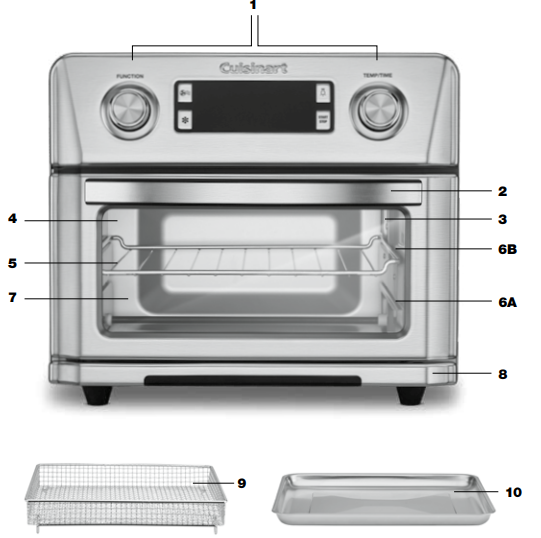
- Control Panel
Large Digital Display, dials, and intuitive buttons make the unit easy to use (see details on page 5). - Cool-Touch Handle
Handle designed to stay cool during cooking. - Interior Light
An interior light to easily view food while cooking. - Viewing Window
Large viewing window to check progress. - Oven Rack
It can be used in two positions. - Rack Positions
A. Position 1 is the bottom position, and this is recommended when cooking larger foods (e.g., a whole chicken).
B. Position 2 has a 50% stop feature, so the rack stops halfway out of the oven. The oven rack can be removed from Position 2 by lifting the front of the rack and sliding it out.
NOTE: Refer to page 7 for suggested rack positions with different functions. - Easy-Clean Interior
The sides of the oven’s interior have a nonstick coating. - Pull-Out Crumb Tray
The Crumb Tray comes already positioned in your oven. The tray slides out from the lower front of the oven to clean. - AirFryer Basket
Use the basket when using the AirFry, Broil, or Dehydrate functions to optimize your cooking results. We recommend setting the AirFryer Basket in the Baking/Drip Pan. - Baking/Drip Pan
A Baking/Drip Pan is included for your convenience. Use alone when baking or Roasting. Use a Baking/Drip Pan with the AirFryer Basket when AirFrying, Broiling or Dehydrating.
GETTING TO KNOW YOUR CONTROL PANEL
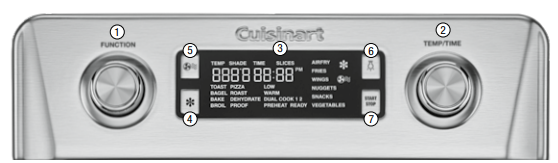
- Function Dial
Rotate the Function Dial to scroll through the function options on the Digital Display screen. Press the center of the dial to confirm the selection. - Temp/Time Dial
Rotate the Temp/Time Dial to scroll through temperature, time, shade, and slice options on the Digital Display screen. Press the center of the dial to confirm the selection. - Digital Display Screen
Displays cooking functions, toast shade and slices, temperature, cooking/countdown timer, clock time, fan speed, and defrost. - Defrost Button
For use with Toast, Bagel, Pizza, and certain AirFry presets. When activated, the defrost icon will display on the Digital Display screen. - Fan Speed Button
To change the fan speed from Low to High, press the Fan Speed Button. When the fan icon is displayed on the Digital Display screen, the fan speed is set to High. The icon will disappear for Low fan speed. - Light Button
To turn on/off the interior oven light, press the light icon. The interior light will turn off automatically after 20 seconds. - Start/Stop Button with Indicator Light
Use to start and stop cooking. The indicator will illuminate when cooking.
BEFORE FIRST USE
- Place your Digital AirFryer Toaster Oven on a flat, level surface.
- Move oven 2 to 4 inches away from the wall or from any objects on the countertop. Do not use on heat-sensitive surfaces.
NOTE: OBJECTS SHOULD NOT BE STORED ON TOP OF THE OVEN. IF THEY ARE, REMOVE ALL OBJECTS BEFORE YOU TURN ON YOUR OVEN. THE EXTERIOR WALLS GET VERY HOT WHEN IN USE. KEEP OUT OF REACH OF CHILDREN. - Check that the Crumb Tray is in place and that there is nothing in the oven.
- Plug the power cord into the wall outlet.
SETTING THE CLOCK
Clock can be set when the unit is first plugged in. Alternatively, the clock can only be set when the oven is not cooking, and the time is displayed on the screen. To set the clock:
- If the Digital Display is not displaying the clock, scroll through the function menu until the clock is displayed.
- Press and hold the Temp/Time Dial for 3 seconds.
- The clock hour will flash; turn the Temp/Time Dial to set the hour, then press the Temp/Time Dial to confirm.
- The clock minutes will flash; turn the Temp/Time Dial to set minutes, then press the Temp/Time Dial to confirm.
- PM will flash; turn the Temp/Time dial to select AM or PM. Be sure the PM indicator is on if a PM time is desired. Press Temp/Time Dial to confirm.
- Turn the Function Dial to exit clock setting and return to the function menu.
NOTE: When setting the clock, if nothing is pressed after 10 seconds, the clock will automatically set to the currently displayed time.
OVEN TONE VOLUME
The tone volume can only be adjusted when the time is displayed on the screen.
- Press the Defrost and Fan buttons simultaneously for 3 seconds.
- The number 1 (default setting) or currently selected setting will display.
- Use Time/Temp Dial to set preferred tone level: 0 (off/tones deactivated), 1 (low), or 2 (high).
- Once your selection is displayed, press Time/Temp Dial to confirm.
GENERAL OPERATION
To operate the oven, follow these simple steps:
- Place the appropriate rack, pan, and/or basket in the position recommended in the chart on page 7.
- Use the Function Dial to scroll through functions.
- When the desired function is flashing, press the Function Dial to confirm. The Start/Stop button will flash, and the Digital Display screen will display the last selected or default temperature and time (shade and slices for Toast and Bagel settings).
- a. To use displayed settings, press Start/Stop to begin operation. The start/Stop button will illuminate, indicating the unit is cooking.
b. To change settings:- Turn the Time/Temp Dial to choose the desired temperature (or shade)
- Press Time/Temp Dial to confirm; time (or slices) will flash
- Turn the Time/Temp Dial to choose the desired time (or slices)
- Press the Time/Temp Dial to confirm
- If desired, press the Defrost Button or the Fan Speed Button
- Press Start/Stop to begin operation. The button will illuminate, indicating the unit is cooking.
NOTE: Bake and Pizza have a preheating stage during which the display will show “Preheat”; once preheat is complete, the oven will beep and the display will show “Ready”; the countdown timer will begin.
- When the countdown timer reaches 0:00, the oven will beep three times and the heaters will turn off.
NOTE: The Cooking process can be canceled before the countdown timer reaches 0:00 by pressing Start/Stop.
NOTE: AFTER COOKING, THE FAN WILL REMAIN ON FOR COOLING PURPOSES. TO CHANGE TIME, TEMPERATURE, OR FUNCTION DURING COOKING CYCLE- To change time: During the cooking cycle, use the Time/Temp Dial to add or decrease time. The new countdown time will be displayed, and cooking will continue.
- To change temperature: During the cooking cycle, press the Time/Temp Dial until the current temperature flashes. Turn the Time/Temp Dial to the desired temperature, and cooking will continue at the new temperature.
- To change function: You must press Start/Stop to stop the current program. Then turn the Function Dial and press it to select another function. Press Start/Stop again to continue the cooking cycle.
USING AIRFRYER PRESETS
In addition to being able to program the temperature and time for AirFrying, the Cuisinart® Digital AirFryer Toaster Oven has convenient, easy-to-use presets for your fried favorites—French fries, chicken wings, chicken nuggets, snacks, and vegetables. To use AirFryer presets, follow these steps:
- Scroll through the function menu and select AirFry.
- Turn the Function Dial to scroll through preset functions. When the desired preset is flashing, press the Function Dial to confirm selection.
- The preset temperature and time will display.
- To use the displayed settings, press Start/Stop to begin
- To change settings, see General Operation on page 6
NOTE: Most presets can be used with frozen or fresh foods. See below for details:- Fries……………. The default is for frozen fries. Fresh is for hand-cut potatoes.
- Wings…………. The default is for fresh chicken wings. Frozen setting is intended for uncooked frozen chicken wings.
- Nuggets………. The default is for frozen, precooked nuggets. Fresh setting is for uncooked nuggets.
- Snacks……….. The default is for frozen, precooked snacks.
- Vegetables….. The default is for fresh vegetables.
NOTE: Fan speed cannot be changed for AirFryer presets; it is always on High.
TOAST
Toast shade can be set from 1 to 7 using 1 to 6 slices. This function is used to toast bread and other items; both fresh and frozen items can be used.
- Default: Shade 4; 3 to 4 slices; no Defrost
- For best results and more evenly toasted items:
- If toasting 2 pieces, center them in the middle of the oven rack
- 4 pieces should be evenly spaced—2 in front, 2 in back
- 6 pieces should be evenly spaced—3 in front, 3 in back
- If the toast is lighter than you like, time can be added by turning the Temp/Time Dial before the toast is complete
- Shade Guide: Light (1, 2) • Medium (3, 4, 5) • Dark (6, 7)
WARNING: Always use Position 2 for toasting. Do not invert the rack in Position 2 as this may result in burning.
BROIL
Broil is fixed at 450ºF for up to 2 hours. The broiling function can be used for beef, chicken, pork, fish, and more. It can also be used to top-brown casseroles and gratins.
- Default: 450°F; 5 minutes
- For best results, use the provided AirFryer Basket fitted into the Baking/Drip Pan to broil
- Never use glass oven dishes to broil
- Be sure to keep an eye on food items can brown quickly when broiling
PIZZA
Pizza can be used at 350ºF – 450ºF for up to 2 hours. This function can be used to cook fresh or frozen pizza.
- Default: Fresh – 450°F; 10 minutes Convection (High Speed fan)
- Frozen – 400°F; 10 minutes Convection (High Speed fan)
- For best results, place frozen pizza on an inverted rack in Position 1, and for fresh pizza, place the dough directly on the Baking/Drip Pan in rack Position 1
- Pizza can also be cooked on the pizza stone available for purchase at www.cuisinart.com
- Pizza recipe ideas can also be found on the Cuisinart website
ROAST
Roast can be used at 200ºF – 450ºF for up to 2 hours.
- Default: 375°F; 45 minutes
- High fan speed works well with Roast – roasting time is significantly reduced, and meats and poultry are perfectly cooked – browned on the outside, moist and juicy on the inside
- Dress up vegetables by roasting them; as they caramelize, they become sweet and delicious
- Because some foods roast faster, begin checking progress at least 5 to 10 minutes before the end of the suggested cooking time
DEHYDRATE
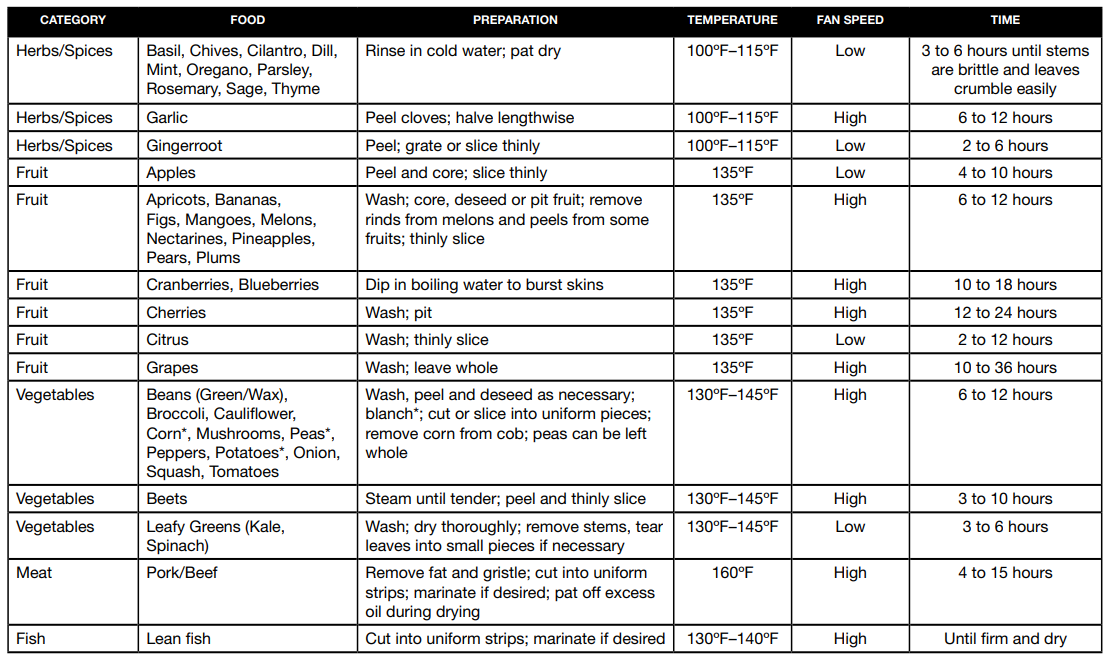
Dehydration can be used at 100°F – 200°F for up to 72 hours. This function turns your Cuisinart® Digital AirFryer Toaster Oven into a dehydrator that lets you dry or dehydrate food. The built-in fan and low heat are used to create a flow of hot air that reduces the water content found in fresh foods. Dehydrated food will continue to retain the vast majority of its original nutritional value.
- Default: 130°F; 2 hours
- Lemon juice can be used to pretreat fruits and vegetables to prevent browning
- Drying times can greatly vary due to the thickness of cuts and relative humidity (see chart on page 11)
- Check foods often for dryness
- Do not overcrowd; foods should be arranged in a single layer with little to no overlap
PROOF
Proof can be used at 80°F – 100°F for up to 2 hours. Use this function to proof bread or pizza dough.
- Default: 90°F; 45 minutes
- Allow dough to complete at least one rise at room temperature
- Shape dough and place on the Baking/Drip Pan or a separate baking dish, such as a loaf pan, and then put directly in the oven in Position 1. For best results, cover the pan with plastic wrap when proofing.
- Dough is ready when doubled in size. Start checking around 20 minutes
- Once time elapses, complete dough preparation and bake according to the recipe
The chart below lists recommendations on how to dehydrate different foods. These are guidelines only. Drying times can vary due to thickness of cuts and relative humidity.
DEHYDRATE CHART
CLEANING AND MAINTENANCE
- Always unplug the oven from the electrical outlet and allow it to cool completely before cleaning.
- Do not use abrasive cleaners, as they will damage the finish. Simply wipe the exterior with a clean, damp cloth and dry thoroughly. Apply the cleansing agent to a cloth, not directly onto the toaster oven, before cleaning.
- To clean interior walls, use a damp cloth and a mild liquid soap solution or a spray solution on a sponge. Remove any residue from cleaners with a clean, damp rag. Never use harsh abrasives or corrosive products. These could damage the oven surface. Never use steel wool pads, etc., on the interior of the oven.
- Cleaning the accessories:
- Oven Rack and Crumb Tray should be hand-washed in hot, sudsy water, or use a nylon scouring pad or nylon brush, and thoroughly rinse. These items are NOT dishwasher safe.
- Baking/Drip Pan and AirFryer Basket are dishwasher safe or can be hand-washed in hot, sudsy water, or use a nylon scouring pad or nylon brush, and thoroughly rinse.
- After cooking greasy foods and once your oven has cooled, always clean the top of the oven interior. If this is done on a regular basis, your oven will perform like new. Removing the grease will help to keep toasting consistent, cycle after cycle.
- To remove crumbs, slide out the front Crumb Tray and discard crumbs. Wipe clean and replace. To remove baked-on grease, soak the tray in hot, sudsy water or use nonabrasive cleaners. Never operate the oven without the Crumb Tray in place.
- Any other servicing should be performed by an authorized service representative.
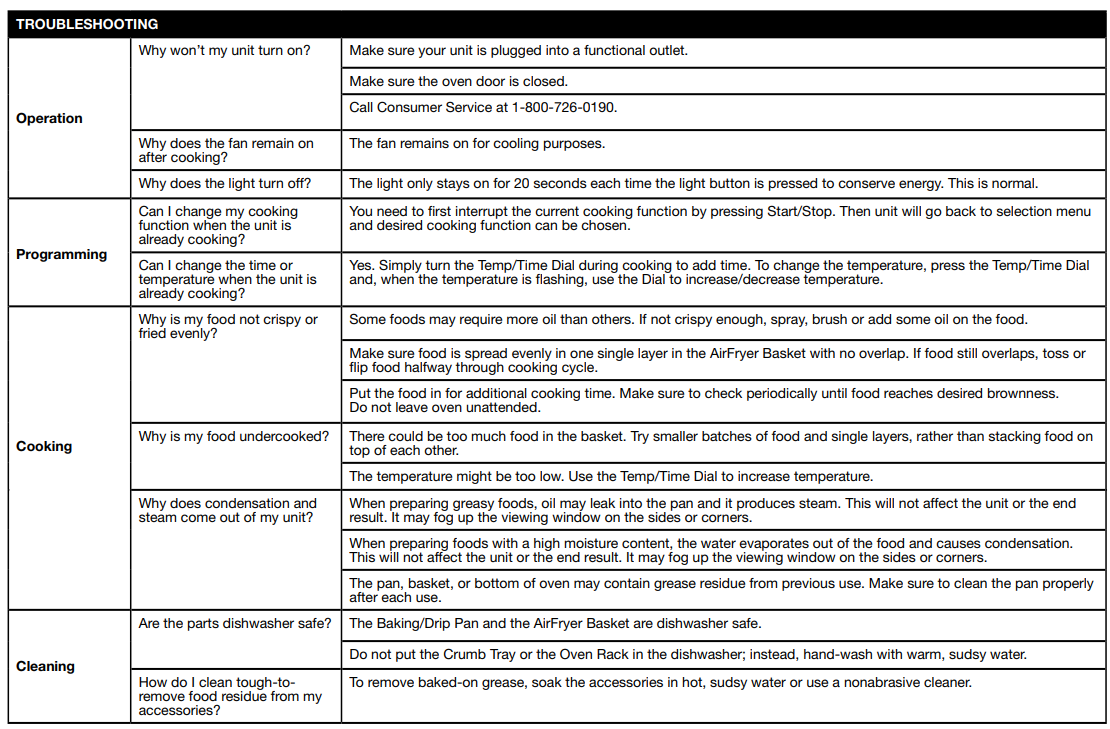
TROUBLESHOOTING
WARRANTY
Limited Three-Year Warranty
This warranty is available to U.S. consumers only. You are a consumer if you own a Cuisinart® Digital AirFryer Toaster Oven that was purchased at retail for personal, family or household use. Except as otherwise required under applicable law, this warranty is not available to retailers or other commercial purchasers or owners. We warrant that your Cuisinart® Digital AirFryer Toaster Oven will be free of defects in materials and workmanship under normal home use for 3 years from the date of original purchase. We recommend that you visit our website, https://cuisinart.registria.com/, for a fast, efficient way to complete your product registration. However, product registration does not eliminate the need for the consumer to maintain the original proof of purchase in order to obtain the warranty benefits. In the event that you do not have proof of purchase date, the purchase date for purposes of this warranty will be the date of manufacture.
CALIFORNIA RESIDENTS ONLY
California law provides that for In-Warranty Service, California residents have the option of returning a nonconforming product (A) to the store where it was purchased or (B) to another retail store that sells Cuisinart products of the same type. The retail store shall then, according to its preference, either repair the product, refer the consumer to an independent repair facility, replace the product, or refund the purchase price less the amount directly attributable to the consumer’s prior usage of the product. If neither of the above two options results in the appropriate relief to the consumer, the consumer may then take the product to an independent repair facility, if service or repair can be economically accomplished. Cuisinart and not the consumer will be responsible for the reasonable cost of such service, repair, replacement, or refund for nonconforming products under warranty. California residents may also, according to their preference, return nonconforming products directly to Cuisinart for repair or, if necessary, replacement by calling our Consumer Service Center toll-free at 1-800-726-0190. Cuisinart will be responsible for the cost of the repair, replacement, and shipping and handling for such nonconforming products under warranty.
APPETIZERS AND SMALL BITES
Traditionally deep-fried favorites are transformed into lighter, healthier versions in the Cuisinart® Digital AirFryer Toaster Oven, which requires only a few spritzes of oil to AirFry. Plus, we offer many interchangeable dipping sauces that can be enjoyed with more than just the recipes they accompany.
Spring Egg Cups
Sophisticated and sure to impress your brunch guests.
Makes 6 individual servings
- Nonstick cooking spray
- 6 slices prosciutto
- 5 large eggs
- ¼ cup half-and-half
- ¼ teaspoon kosher salt
- Freshly ground black pepper as desired
- ¼ cup goat cheese, crumbled
- 2 teaspoons finely chopped fresh dill
- 2 to 3 asparagus spears, sliced lengthwise into thin ribbons using
- a peeler or mandoline
- Lightly coat a 6-cup muffin pan with nonstick cooking spray. Press one slice of prosciutto into each muffin cup to entirely line the bottom and sides, leaving some overhang. Mend any cracks.
- In a bowl, whisk together the eggs, half-and-half, salt, and pepper. Stir in crumbled goat cheese and the chopped dill. Divide asparagus ribbons evenly among the muffin cups.
- Fill each cup two-thirds of the way with the egg mixture.
- Place the muffin pan into the Cuisinart® AirFryer on the Baking/Drip Pan in rack Position 2. Select AirFry, and set the temperature to 325°F for 8 to 10 minutes, cooking until egg cups are set and no longer runny. Run a knife along the edge of each cup to loosen from the pan. Serve warm.
For more manuals by Cuisinart, visit ManualsLibraryy
Cuisinart CTOA-130PC2 Digital Airfryer Toaster Oven-FAQs
What’s the best oil for air frying?
Oils with a high smoke point work best:
Avocado oil (best)
Canola oil
Light olive oil
How much electricity does it use?
Power: 1800W
Cost: ~17p per 30-minute use (cheaper than an oven).
Can I bake a cake in it?
Yes! Use a cake pan or silicone mold and adjust baking time.
Can I put glass or ceramic dishes inside?
Yes, as long as they’re heat-safe and fit properly.
What foods should I avoid cooking in an air fryer?
Wet batter (can drip and make a mess)
Leafy greens (may fly around)
Cheese (can melt unevenly)
Can I cook frozen food in it?
Yes! It’s great for frozen fries, nuggets, and pizza—just adjust cooking time.
Is air frying healthier than deep frying?
Yes! It uses little to no oil, reducing fat and calories.
Can I cook steak or chicken breast in it?
Yes!
Steak: 10–15 mins at 400°F
Chicken breast: 18–20 mins at 375°F
Should I buy an air fryer or a microwave?
Air fryer: Better for crispy, roasted, or baked foods.
Microwave: Faster for reheating & defrosting.