
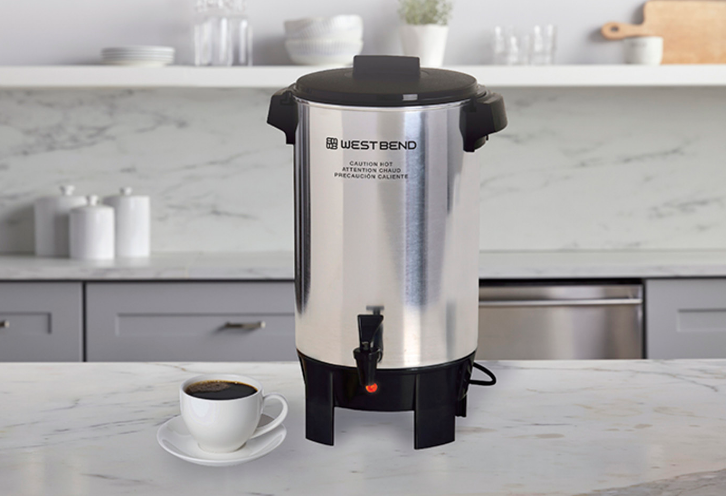

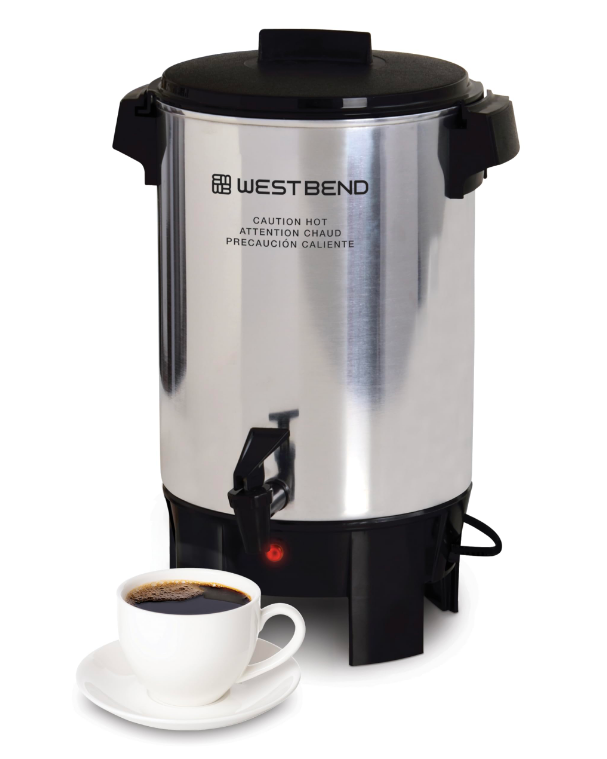
West Bend 58030 Commercial Coffee Urn and Beverage Dispenser
IMPORTANT SAFEGUARDS
To prevent personal injury or property damage, read and follow all instructions and warnings. When using electrical appliances, basic safety precautions should always be followed, including the following:
- Read all instructions.
- Do not use the appliance for anything other than its intended use.
- Do not place on or near a hot gas or electric burner, or in a heated oven.
- Do not operate when the appliance is not working properly or when it has been damaged in any manner. For service information, see the warranty page.
- The use of accessory attachments not recommended by West Bend may result in fire, electric shock, or injury to persons.
- Do not attempt to repair this appliance yourself.
- Do not use this appliance on the stovetop, under a broiler, in the oven, or in the refrigerator or freezer.
- Do not touch hot surfaces. Use handles and knobs where provided. Use hot pads or oven mittens when handling hot surfaces.
- Extreme caution must be used when moving an appliance containing hot oil or other hot liquids.
- Make sure the cover, basket, and stem are properly assembled before the appliance is plugged in (see “Instructions for Making Coffee” section). No part of the appliance should be removed during the brewing cycle, as scalding could occur.
- Scalding may occur if the lid is removed during the brewing cycle.
- To protect against fire, electric shock, and injury to persons, do not immerse the cord, plugs, or other electric parts in water or other liquids.
- Do not operate any appliance with a damaged cord or plug.
- Do not use this appliance outdoors.
- Always attach the plug to the appliance first, then plug the cord into the wall outlet. To disconnect, turn any control to “OFF,” then remove the plug from the wall outlet.
- Be sure the switch is turned to “OFF” before plugging the cord into the wall outlet. If the appliance does not have a switch, be sure the appliance contains water or brewed coffee before plugging it in. Do not leave the appliance plugged in when it is not being used.
- Always unplug from the outlet when not in use and before cleaning. Allow to cool before putting on or taking off parts and before cleaning.
- A short power-supply cord is provided to reduce risks resulting from becoming entangled in or tripping over a longer cord.
- Longer extension cords are available, but care must be exercised in their use. While the use of an extension cord is not recommended, if you must use one, ensure that the marked electrical rating of the extension cord is equal to or greater than that of the appliance. If the plug is of the grounded type, the extension cord must be a grounding-type 3-wire cord. To avoid pulling, tripping, or entanglement, position the extension cord so that it does not hang over the edge of the counter, table, or other area where it can be pulled on by children or tripped over.
- Do not use an outlet or extension cord if the plug fits loosely or if the outlet or extension cord feels hot.
- Keep the cord away from hot parts of the appliance and hot surfaces during operation.
- Close supervision is necessary when this appliance is used by or near children.
- Do not let the cord hang over the edge of the table or counter, or touch hot surfaces.
- For household use only.
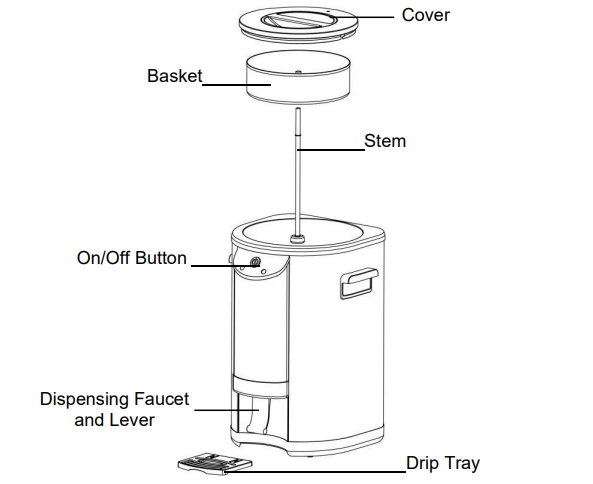
Parts & Features
INSTRUCTIONS FOR MAKING COFFEE
- Before first use, clean the coffeemaker thoroughly following the cleaning instructions.
- Always use the coffeemaker on a dry, level, heat-resistant surface, away from any edge.
- With the basket and stem removed, fill the coffeemaker with COLD water to the desired cup level. The marks on the inside of the coffeemaker show cup levels. Do not fill past the maximum cup level. Never make more than the maximum or less than the minimum amount of coffee, as indicated by the markings inside your coffeemaker, for your model of coffeemaker.
- Place the stem and basket in the coffeemaker. Insert the stem in the opening in the basket, then hold the top part of the stem to guide the stem into the heating well in the bottom of the coffeemaker. Use the measuring lines on the basket to add ground coffee to the basket, or use the chart below for the amount to use, depending on the cup level. Spread the grounds evenly in the basket. Use standard measuring cups to measure the grounds. Do not let any grounds fall into the stem opening. Do not use finely ground coffee because the basket can flood. The amount of ground coffee recommended will make mild-strength coffee, which most people prefer, and can be adjusted to suit your preference.
- Place the cover on the coffeemaker, with the vent hole to the back, and turn to lock. Note the arrows on the cover for the locking position. Note: While moving an appliance containing hot liquids is not recommended, if you must move the coffeemaker, extreme caution should be used because the cover only temporarily reduces coffee from spilling if the coffeemaker is tipped over.
- Plug the cord into a 120-volt AC grounded electric outlet ONLY. Press the
 on/off button. The
 on/off and
  “brew” lights will illuminate.
 - The coffeemaker will stop perking automatically (each cup requires no longer than 1 minute brewing time). Coffee is ready when the green
 “ready” light glows. Coffee will remain at serving temperature as long as the coffeemaker is plugged in and the power is on. Before serving, remove the coffee basket and stem using a hot pad. If the coffee basket and stem are not removed, bitter oils from the extracted grounds will drip into the coffee. Replace the cover, making sure it is completely locked.
 - Press a sturdy cup against the dispensing lever to dispense coffee.
- When about 3 cups of coffee remain in the coffeemaker, press the
 on/off button to turn the coffeemaker off and unplug the cord from the electrical outlet. Note: Liquid must cover the inside bottom of the appliance at all times. Falling below the minimum level could cause overheating and damage to internal components, and will void the warranty.
 “brew” lights will illuminate.
 “ready” light glows. Coffee will remain at serving temperature as long as the coffeemaker is plugged in and the power is on. Before serving, remove the coffee basket and stem using a hot pad. If the coffee basket and stem are not removed, bitter oils from the extracted grounds will drip into the coffee. Replace the cover, making sure it is completely locked.
SPECIAL NOTE ON GRINDING COFFEE BEANS
If you grind your own coffee beans, grind to medium coarseness for best results. DO NOT grind too fine (powder-like) as this can cause the basket to flood. DO NOT make more than the maximum or less than the minimum amount of coffee, as indicated by the markings inside your coffeemaker, for your model of coffeemaker.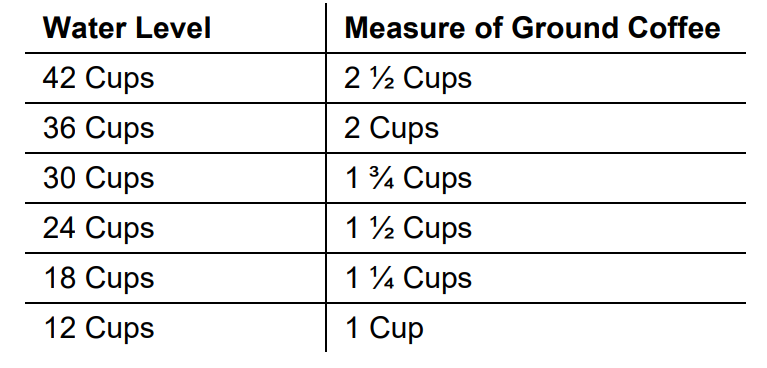
INSTRUCTIONS FOR HEATING WATER FOR INSTANT BEVERAGES
Plain water may be heated in your coffeemaker for use with instant beverages. Simply fill the clean coffeemaker with cold water to the desired cup level, insert the stem and empty basket into position the same as for making coffee. Secure the cover in place and plug the coffeemaker in. Press the on/off button. Heat the water until perking stops and the light on the base glows. Remove the cover, lift out the basket and stem with a hot pad, and replace the cover, making sure it is locked in place. Unplug the coffeemaker when less than 3 cups of water remain. The inside of the coffeemaker may darken after heating water, which is normal and does not affect the coffeemaker or the water heated. Other than making coffee or heating water, no other liquid should be heated in the coffeemaker because damage to the heating unit can occur.
HELPFUL HINTS
- Never make less than the minimum or more than the maximum amount of coffee for your coffee urn.
- Do not use soft water, as flooding of the basket may occur.
- Use regular electric perk grind coffee or coffee grounds for all coffeemakers for best results. Do not use finely ground coffee, as flooding of the coffee basket can occur. If grinding your own coffee beans, grind to medium coarseness for best results. Do not grind coffee too finely, powder-like, as this can cause the coffee basket to flood.
- Do not use paper filters in your basket. If you find that grounds are falling through, wet the basket before adding coffee grounds.
- Remove the coffee basket with grounds as soon as the brewing cycle is completed. This also helps maintain the coffee flavor. Use the coffee maker cover as a drip tray when disposing of wet grounds.
- Liquid must always cover the inside bottom of the appliance at all times. Falling below the minimum level could cause overheating and damage to internal components, and will void the warranty.
- A small amount of smoke or odor may occur upon heating due to the release of manufacturing oils – this is normal.
- Some minor expansion or contraction sounds may occur during heating and cooling – this is normal.
- Do not allow ground coffee to fall into the stem.
- If more coffee is immediately desired, partially fill the coffeemaker with cold water to reset the thermostat. Empty the water out of the coffeemaker, then repeat the step.
CLEANING YOUR COFFEE URN
- Unplug the coffeemaker and allow it to cool. Drain any coffee out of the coffeemaker.
- Wash the basket, stem, and cover in warm, soapy water with a dishcloth or sponge. Rinse and dry. Coffee stains on the metal can be removed with a non-metallic scouring pad. The basket and stem may be cleaned in an automatic dishwasher, top rack only.
- Clean the inside of the coffee maker by filling it with warm water about one-third of its capacity. Add dish soap and wash with a sponge or cloth. Scour the heating unit well (where the stem fits) with a scouring pad. Twist the pad inside the heating unit well to clean it. The heating unit well must be kept clean for the coffeemaker to work properly. Dispense warm, soapy water through the faucet to clean. Rinse with warm water and dry.
- Clean the outside of the coffeemaker with a damp cloth and dry with a soft cloth. Do not use abrasive metal scouring pads or cleansers on the outside of the coffeemaker because scratching will occur. This appliance has no user-serviceable parts.
SPECIAL CLEANING – EVERY TWO WEEKS
If the coffeemaker is used daily, a special cleaning every 2 weeks, or every week if it is used for heating water, is necessary to thoroughly clean the heating unit well. If not kept clean, the coffeemaker will not work properly.
- Fill the coffeemaker with 1 quart EACH of water and white distilled vinegar. (If a white mineral buildup has formed on the inside of the coffeemaker, use an additional 2 cups of vinegar.) Place the stem and empty basket in place and lock the cover onto the coffeemaker. Press the
 on/off button. Allow the coffeemaker to complete the perking cycle, then let it stand for 20 minutes.
 - Press the on/off button to turn the coffeemaker off and unplug the cord from the outlet. Drain the coffeemaker and allow it to cool. Wash the inside and the parts following the regular cleaning instructions, making sure to thoroughly clean the heating unit well.
PRODUCT WARRANTY
Appliance 1 Year Limited Warranty
West Bend® (“the Company”) warrants this appliance from failures in the material and workmanship for one (1) year from the date of original purchase with proof of purchase, provided that the appliance is operated and maintained in conformity with the Instruction Manual. Any failed part of the appliance will be repaired or replaced without charge at the Company’s discretion. This warranty applies to indoor household use only. This warranty does not cover any damage, including discoloration, to any non-stick surface of the appliance. This warranty is null and void, as determined solely by the Company, if the appliance is damaged through accident, misuse, abuse, negligence, scratching, or if the appliance is altered in any way.
THIS WARRANTY IS IN LIEU OF ALL IMPLIED WARRANTIES, INCLUDING WARRANTIES OF MERCHANTABILITY, FITNESS FOR A PARTICULAR PURPOSE, PERFORMANCE, OR OTHERWISE, WHICH ARE HEREBY EXCLUDED. IN NO EVENT SHALL THE COMPANY BE LIABLE FOR ANY DAMAGES, WHETHER DIRECT, INDIRECT, INCIDENTAL, FORSEEABLE, CONSEQUENTIAL, OR SPECIAL, ARISING OUT OF OR IN CONNECTION WITH THIS APPLIANCE.
If you think the appliance has failed or requires service within its warranty period, please contact the Customer Care Department through our website at www.westbend.com “Support” > “Contact Us”. A receipt proving the original purchase date will be required for all warranty claims; handwritten receipts are not accepted. You may also be required to return the appliance for inspection and evaluation. Return shipping costs are not refundable. The Company is not responsible for returns lost in transit. Valid only in the USA and Canada
REPLACEMENT PARTS
Replacement parts, if available, may be ordered online at www.westbend.com.
For More Manuals By West Bend, Visit ManualsLibraryy.
West Bend 58030 Commercial Coffee Urn and Beverage Dispenser-FAQs
How do I make coffee in the West Bend 58030 coffee urn?
Fill the urn with cold water up to the desired level, place the stem and basket inside, add the correct amount of coffee grounds, then cover and plug in. The unit will automatically brew and keep coffee hot.
How much coffee should I use in a coffee urn?
A good rule is 1 cup of ground coffee per 25 cups of water. For a 100-cup urn, use about 3½–4 cups of ground coffee. Adjust slightly depending on desired strength.
How long does it take to brew coffee in a 100-cup urn?
A full 100-cup batch usually takes about 60 minutes to brew. Smaller amounts will brew faster.
Do I need to use paper filters in the West Bend coffee urn?
No. The basket comes with a built-in metal filter. You may use a paper filter if you prefer easier cleanup, but it is not required.
Can I use the urn for beverages other than coffee?
Yes. The urn can be used to serve hot water for tea, hot chocolate, cider, or other hot drinks. Avoid dairy-based liquids (like milk) since they may scorch and are harder to clean.
What temperature does the urn keep coffee at?
The urn automatically keeps beverages at a safe serving temperature of around 180–190°F (82–88°C).
How do I clean the West Bend coffee urn?
Unplug and let it cool.
Empty any liquid.
Wash the basket, stem, and interior with warm soapy water.
For deep cleaning, use a 50/50 mix of white vinegar and water. Run half through the brewing cycle, let sit 30 minutes, then run the rest. Rinse thoroughly with fresh water.
How often should I clean the coffee urn?
Clean after every use to prevent buildup of coffee oils and residue. Descale with vinegar or a descaling solution every 1–2 months, depending on water hardness.
What is descaling, and do I need to do it?
Descaling removes mineral deposits (limescale) caused by hard water. Use a vinegar-water solution or a commercial descaler to keep the urn heating efficiently.