
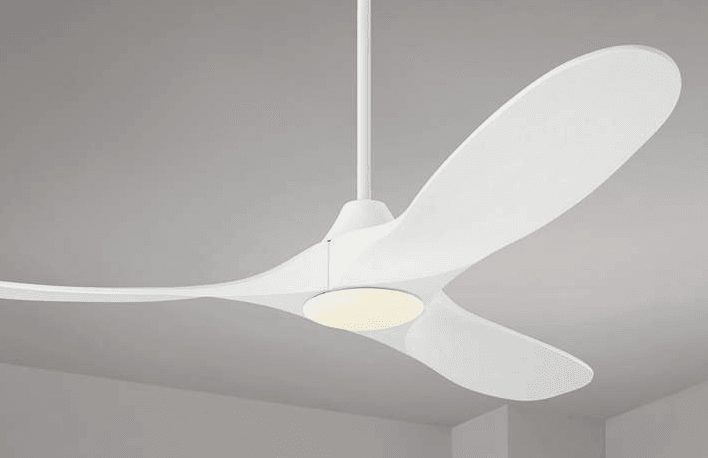

Visual Comfort 3MAVSM52D Maverick Smart LED Ceiling Fan
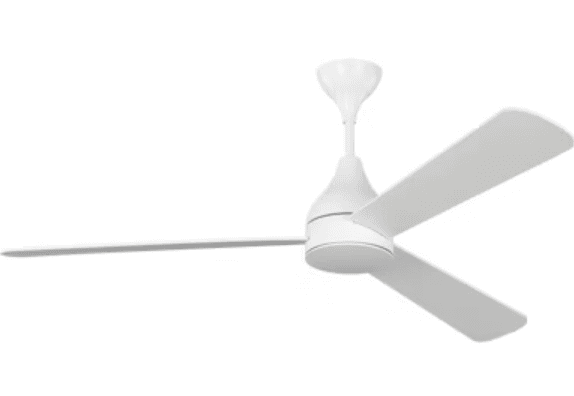
Cautions and Warnings
WARNING: TO REDUCE THE RISK OF FIRE, ELECTRIC SHOCK, OR INJURY TO PERSONS, OBSERVE THE FOLLOWING. READ AND SAVE THESE INSTRUCTIONS.
- Installation work and electrical wiring must be done by qualified person(s) in accordance with applicable codes and standards (ANSI/NFPA 70), including fire-rated construction. Use this unit only in the manner intended by the manufacturer. If you have any questions, contact the manufacturer.
- After making the wire connections, the wires should be spread apart with the grounded conductor and the equipment-grounding conductor on one side of the outlet box and the ungrounded conductor on the other side of the outlet box. The splices, after being made, should be turned upward and pushed carefully up into the outlet box.
- WARNING: Before you begin installing the fan, servicing or cleaning the unit, switch the power off at the service panel and lock the service disconnecting means to prevent power from being switched on accidentally. When the service disconnecting means cannot be locked, securely fasten a prominent warning device, such as a tag, to the service panel.
- Be cautious! Read all instructions and safety information before installing your new fan. Review the accompanying assembly diagrams. When cutting or drilling into the wall or ceiling, do not damage electrical wiring and other hidden utilities. Make sure the installation site you choose allows the fan blades to rotate without any obstructions. Allow a minimum clearance of 7 feet from the floor to the trailing edge of the blade.
- WARNING: To reduce the risk of fire, electric shock, or personal injury, mount to the outlet box marked “Acceptable for Fan Support of 15.9 kg (35 lbs) or less” and use mounting screws provided with the outlet box.
- WARNING: To reduce the risk of personal injury, do not bend blade holders during installation to the motor, balancing, or during cleaning. Do not insert foreign objects between rotating blades.
- CAUTION: For compliance with local codes and regulations, if installing the secondary support safety cable in the U.S., do not remove knockouts in the outlet box. Mount the secondary support safety cable through the reserved nail/screw hole on the outlet box to the building structure (or the ceiling joist).
- Attach the mounting bracket using only the hardware supplied with the outlet box.
- WARNING: To reduce the risk of electric shock, this fan must be installed with a general-use, isolating wall control/switch.
- WARNING: To reduce the risk of fire or electric shock, this fan should only be used with the fan speed control part no. JY1156H-LD-F1-EO manufactured by Chungear Industrial Co. Ltd.
- WARNING: To reduce the risk of fire or electric shock, do not use this fan with any other solid-state fan speed control device or variable speed control.
- If this unit is to be installed over a tub or shower, it must be marked as appropriate for the application. Never place a switch where it can be reached from a tub or shower.
- The combustion airflow needed for safe operation of fuel-burning equipment may be affected by this unit’s operation. Follow the heating equipment manufacturer’s guideline safety standards, such as those published by the National Fire Protection Association (NFPA), the American Society for Heating, Refrigeration and Air Conditioning Engineers (ASHRAE), and the local code authorities.
- CAUTION: To reduce the risk of electric shock, disconnect the electrical supply circuit to the fan before installing the light kit.
- CAUTION: The light source is designed for this specific application and can overheat if serviced by untrained personnel. If any servicing is required, the product should be returned to an authorized service facility for examination or repair.
- WARNING: If unusual oscillating movement is observed, immediately stop using the ceiling fan and contact the manufacturer, its service agent, or suitably qualified persons.
- CAUTION: The replacement of parts of the safety suspension system device shall be performed by the manufacturer, its service agent, or suitably qualified persons.
- WARNING: To reduce the risk of fire, electric shock, or injury to persons, do not use replacement parts that have not been recommended by the manufacturer (e.g., parts made at home using a 3D printer).
- All set screws must be checked and re-tightened where necessary before installation.
- Note: Suitable for use in damp locations. Install the fan under covered or enclosed patios or porches. Use only with light kits marked “Suitable for use in damp locations.”
Tools required for assembly (not included): Electrical tape, Phillips screwdriver, pliers, safety glasses, stepladder, and wire strippers.
Customer Service
800-969-3347
Customer Service Center
7400 Linder Ave.
Skokie, IL 60077
www.visualcomfort.com
Before you begin installing the fan, switch the power off at the service panel and lock the service disconnecting means to prevent power from being switched on accidentally. When the service disconnecting means cannot be locked, securely fasten a warning device, such as a tag, to the service panel. Use AC 120V/60Hz power supply only.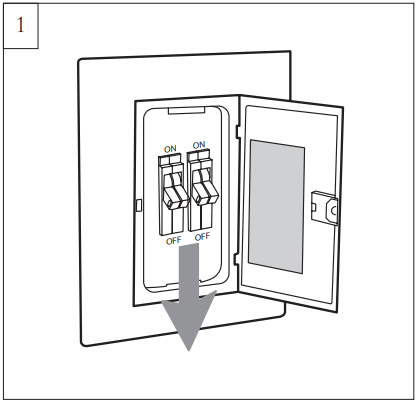
Before installing this fan, make sure the outlet box is properly installed to the house structure. Ensure the outlet box is securely fastened by at least two points to a structural ceiling member (a loose box will cause the fan to wobble). To reduce the risk of fire, electric shock, or personal injury, mount to an outlet box or a supporting system acceptable for fan support. (Mounting must support at least 35 lbs.)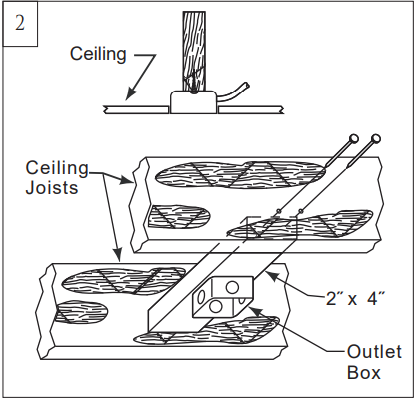
Partially loosen one screw corresponding to the round hole on the canopy and remove the other preassembled screw from the mounting bracket. Save the screw. Remove the canopy from the mounting bracket. Use a metal outlet box suitable for fan support and use only the screws provided with the outlet box (must support 35 lbs). Remove the two outlet box screws provided with the box, aligning the holes of the mounting bracket with the holes of the outlet box. Reinstall the 2 outlet box screws securely.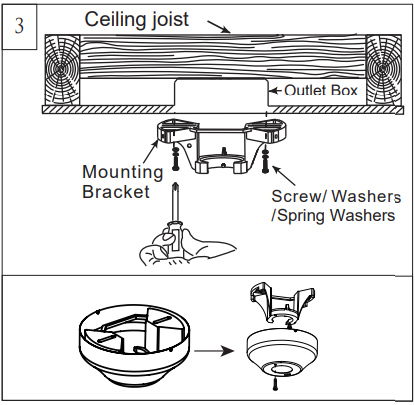
Safety cable must be installed into the house structure using 3” lag screws, washers, and lock washers provided, required for outdoor applications and in Canada (all fans installed in Canada), and for USA fan and light kit combinations over 35 lbs. Note: If installing the secondary support safety cable in the U.S., do not remove knockouts in the outlet box.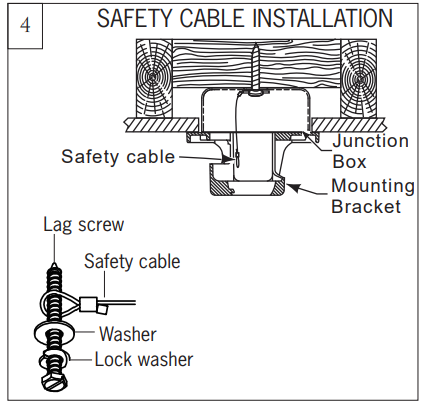
Note: Make sure the side with a label “This side up” is installed upward. Align the holes on the blade and the screw holes on the blade bracket as shown in the illustration, and then partially install the set screws with the blade rubber plug. Screws provided. Tighten the screws securely after the 2 set screws are installed. Repeat this process for the remaining blades. Caution: Make sure the blade rubber plug is in position.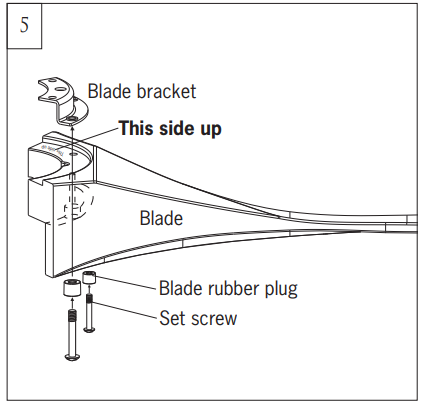
Place the motor assembly on a suitable area of paper pulp for the installation of the blade assembly. Align the holes on the blade bracket with the screw holes on the motor, and then partially install the blade assembly onto the motor with the set screws provided. Repeat this process for the remaining blade assemblies. Tighten all set screws securely after all the blade assemblies are installed on the motor. Note: For precise installation of the blade bracket with the motor, the set screws are made with a little interference fit. It is a normal condition.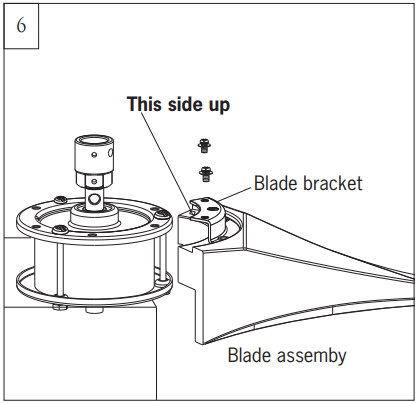
Remove the downrod set screws from the yoke on top of the motor assembly. Keep the screws.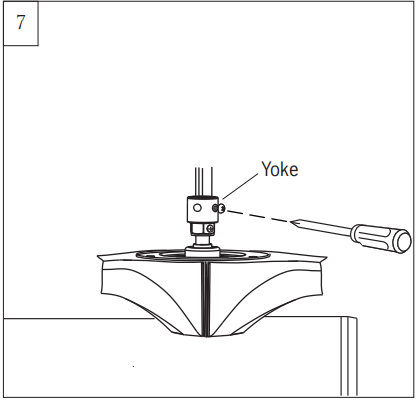
Remove the hanger ball from the downrod by loosening the set screw and removing the pin as shown in the illustration. Keep parts.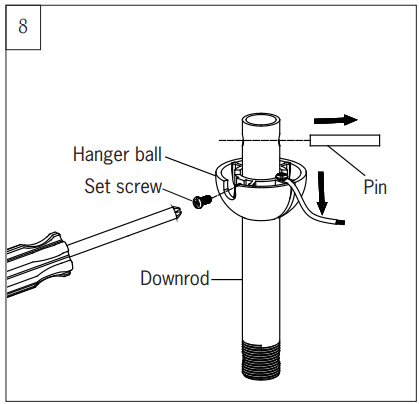
Thread the lead wires and safety cable from the motor assembly through the downrod. Note: If installing an extension downrod (it is not provided) on the fan, refer to the next installation step and align the hole on the extension downrod with the groove on the yoke. Adjusting a little to level a large hole on the downrod at the countersunk hole on the yoke may be necessary.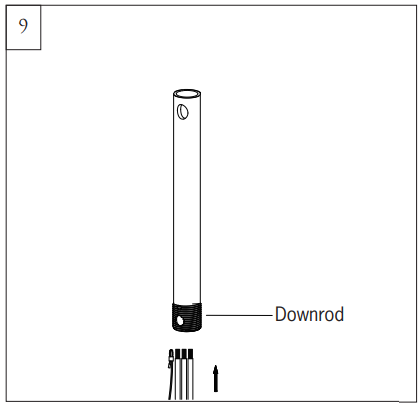
Spin the downrod into the yoke on top of the fan until the hole with the arrow mark on the downrod is close and aligned with the groove on the top edge of the yoke, and then reinstall the screws securely. Warning: The set screw in the countersunk hole must fit through the wall of the downrod. The screw head should be recessed (or semi-recessed) in the countersunk hole. Caution: To avoid damaging lead wires from downrod installation, make sure the lead wires and safety cable are not twisted when installing the downrod.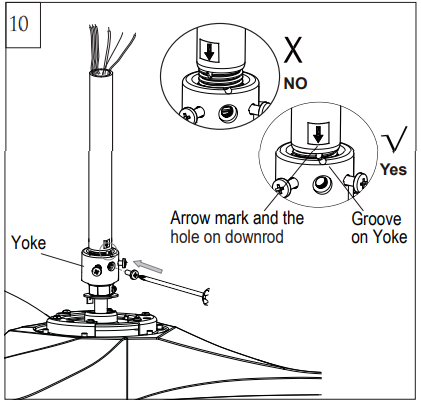
Place the yoke cover, canopy bottom cap, and canopy over lead wires, safety cable, and downrod.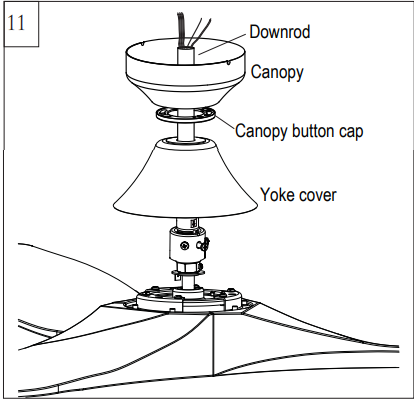
Replace the hanger ball with a pin and set screw. Tighten it securely. Warning: Make sure the pin is installed well on the hanger ball with the downrod.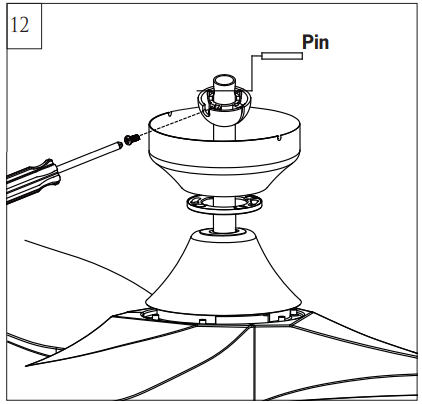
Install the ball end of the downrod into the mounting bracket opening. Align (engage) the slot on the ball with the tab on the mounting bracket. Warning: Failure to align the slot on the ball with the tab may result in serious injury. Important: If using the angle mount, make sure the open end of the mounting bracket is installed facing the higher point of the ceiling, and make sure the ceiling angle is not steeper than 15º.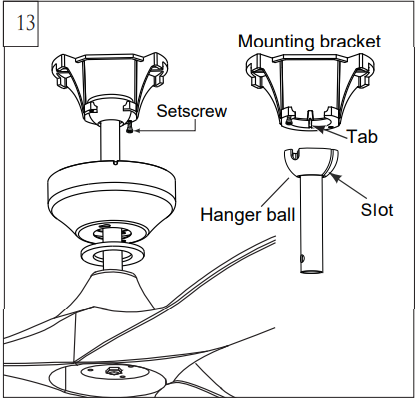
Connect the safety cable from the fan to the ceiling support cable. Slide the cable clamp onto the safety cable from the fan. Place the end of the cable through the loop of the ceiling support cable, and then feed the end of the cable into the clamp hole and firmly tighten the set screw. Cut off excess safety cable. Make sure that when the safety cable is fully extended, the lead wires are longer than the cable and no stress is placed on the lead wires.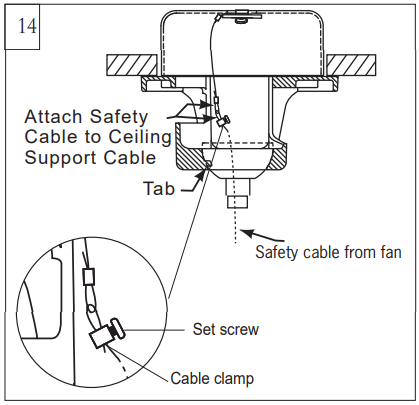
Make wiring connections using the wire connectors provided as indicated above.
- Brown wire from fan to brown wire from receiver marked Motor U.
- Gray wire from fan to gray wire from receiver marked Motor V.
- Blue wire from fan to blue wire from receiver marked Motor W.
- White (Neutral) wire from house to white wire from remote marked AC IN N.
- Black (Live) wire from house to black wire from remote marked AC IN L.
- Connect all green grounded wires to the grounded wire from the house.
- Make sure that no filaments are outside of the wire connectors.
- Insert the remote receiver into the mounting bracket.
After making the wire connections, the wires should be spread apart with the grounded conductor and the equipment-grounding conductor on one side of the outlet box and the ungrounded conductor on the other side of the outlet box. The splices, after being made, should be turned upward and pushed carefully up into the outlet box. Align the U-shaped groove on the top edge of the canopy and place the Wi-Fi antenna outside the canopy, then stick/fix it onto the ceiling. Caution: The installation has to be complete before operating the fan. The receiver has to be used on the fan and cannot be bypassed.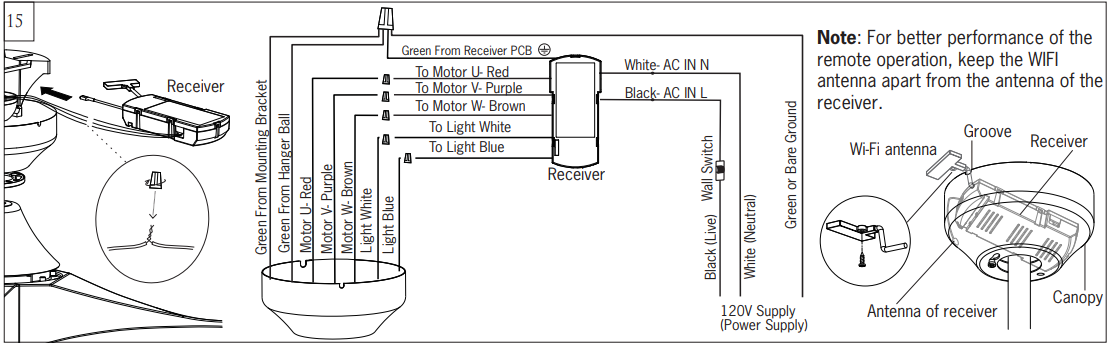
Lift the canopy up, aligning its keyhole slot with the preassembled screw on the mounting bracket, and twist clockwise to lock in place. Reinstall the screw removed in step 3 and tighten all screws securely. Do not over-tighten it.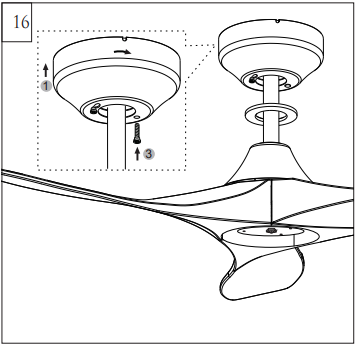
Attach the canopy bottom cap onto the canopy by aligning its notch with the screws on the mounting bracket and twist clockwise till tight.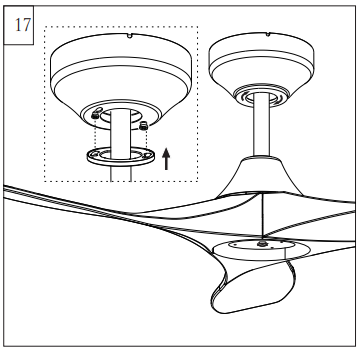
Loosen 2 and remove 1 preassembled screw from the plate on the motor. Save the screw for later use.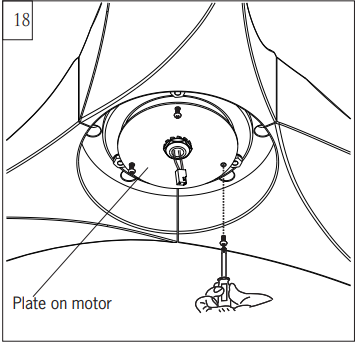
Place the light pan over the lead wires and attach it to the plate on the motor, aligning the keyhole slots on the light pan with the preassembled screws on the plate. Twist clockwise till it locks. Reinstall the screw removed in step 18. Tighten all screws securely.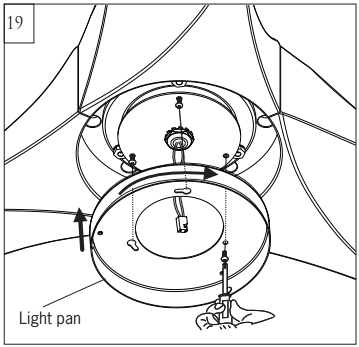
Loosen 2 and remove 1 preassembled screw from the light pan. Save the screw for later use.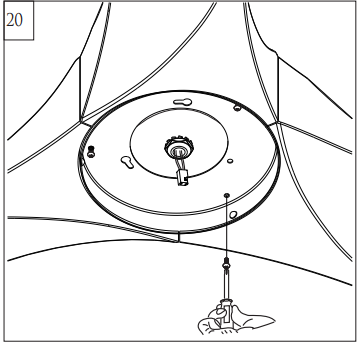
Connect the light lead wires from the fan to the lead wires from the LED light fixture with quick connectors. Make sure the quick connectors are firmly clasped.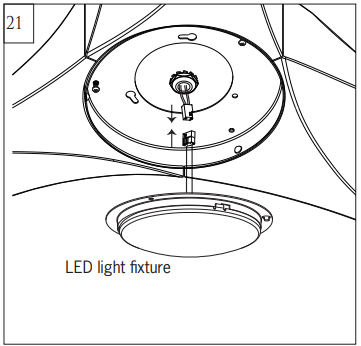
Attach the LED light fixture to the light pan, aligning the keyhole slots on the LED light fixture with the preassembled screws on the light pan. Twist clockwise till the lock. Reinstall the screw removed in step 20. Tighten all screws securely. Caution: Tuck the lead wires into the plate of the LED light fixture as shown in the inset, and make sure the light lead wires are not pinched between the light pan and the LED light fixture.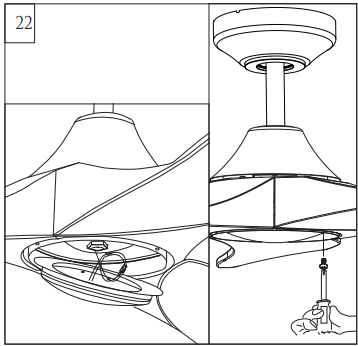
Attach the glass by locating dimples in the light pan with grooves on the glass and twist clockwise until tight.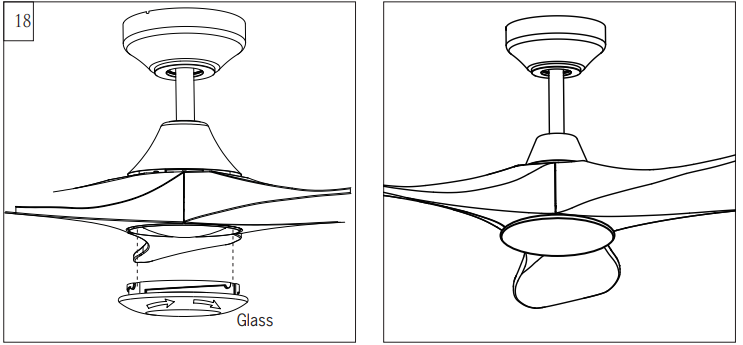
Remote Controller Operation
Remove the battery cover from the remote control transmitter and install batteries. Replace the cover. This remote uses 2 1.5V/AAA batteries. Note: If not using for long periods of time, remove the batteries to prevent damage to the remote controller, and store the remote controller away from excess heat or humidity.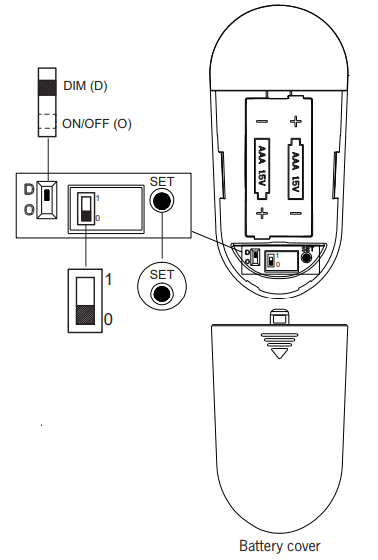
The batteries will weaken with age and should be replaced before they leak or corrode, as this will damage the controller. Dispose of the used batteries properly. Always keep batteries out of the reach of children. Note: Refer to page 9 for fan operation with the Bond app.
Dimming, Non-Dimming Setting (only available for fans with light)
In the dimming mode, it is a light dimming selection and it is to be used with dimmable luminaries. The remote controller is set with a dimming function at the factory.
In ON/OFF (non-dimming mode), it is for light ON/OFF only (non-dimming function).
Universal Mode and Learning Mode
Your remote controller has two options: “Universal Mode” (mark “0”) and “Learning Mode” (mark “1”). If choosing “Universal Mode,” simply move the switch to the LOWER position (mark “0”). Your fan with the remote controller is ready to use.
Note: If using Universal Mode, your fan can be controlled with other remote controllers with the same settings. To control the fan with a specific remote controller, choose “Learning Mode” by moving the switch to the UPPER position (mark “1”) and then follow the Learn Mode steps below.
Learn Mode
Important: Turn the power on for ONLY the specific fan you wish to pair with the remote controller. Make sure to turn the power off for all other fans with which you use the same remote controller. Restore power to your fan, press and hold the “SET” button to pair the transmitter and receiver. You must press the “SET” button within 60 seconds of restoring power to the fan.
Note: The Fan will at first operate at minimum speed, and the light will blink (if your fan has a light) after you’ve chosen Learn Mode. Note: If the power is already on, you must turn the power off and then back on for the remote control setting. Note: If you reset the controller to Universal Mode (mark “0”) and later want to pair the controller again to a specific fan, you have to repeat the Learn Mode steps.
The remote control buttons control the fan speed as follows:
- minimum speed
- low speed
- medium low speed
- medium speed
- medium high speed
- high speed

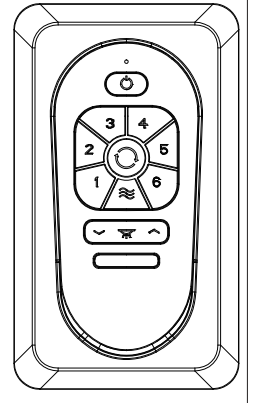
 This button turns the fan off.
 Forward/Reverse button: This button is used to control the direction of fan rotation. Press once to change the direction of the fan rotation. The fan must be running in reverse.
 Light button: Press this button to turn the light on or off.
 Light button: Press this button to the desired brightness, dim to bright.
 Light button: Press this button to the desired brightness, from bright to dim.
 Breeze: Press the Breeze button, the fan will operate randomly among minimum, low, and medium low speeds at intervals of 30 seconds until the breeze mode is canceled. Breeze mode can be erased by pressing either the power or speed control buttons.
 This button turns the fan off.
 Forward/Reverse button: This button is used to control the direction of fan rotation. Press once to change the direction of the fan rotation. The fan must be running in reverse.
 Light button: Press this button to turn the light on or off.
 Light button: Press this button to the desired brightness, dim to bright.
 Light button: Press this button to the desired brightness, from bright to dim.
 Breeze: Press the Breeze button, the fan will operate randomly among minimum, low, and medium low speeds at intervals of 30 seconds until the breeze mode is canceled. Breeze mode can be erased by pressing either the power or speed control buttons.
Note: This remote controller has auto auto-resume function. The fan will maintain the last setting when turned back on, with the exception of Breeze mode.
Install the transmitter wall mount cradle with the 2 screws provided.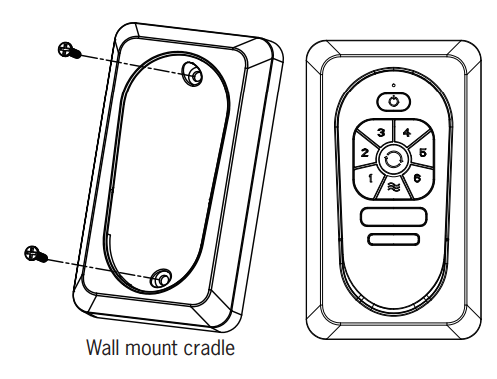
Useful tips:
- The remote transmitter can be removed by pressing it upward from the lower half.
- The remote transmitter can be held on magnetic metal materials by a magnet built into the transmitter.
The receiver provides the following protective functions:
- Lock protection: The DC motor has a built-in safety feature against blade obstruction during operation. If something obstructs the fan blades, the motor will stop operating after about 20 seconds of interruption. Please remove obstacles and reset it by turning the power off and then turning the power back on.
- Over 40W protection: When the receiver detects motor power consumption that is greater than 40W, the fan RPM will automatically lower to prevent it from overloading.
User Tips
- If your fan is operating automatically after installation, it is still using the factory setting. Follow the settings for Learn Mode above to reset.
- If the fan or light isn’t working, reset power (turn the power off, then turn the power back on) and follow the Universal Mode or Learn Mode remote control settings. Note: Make sure to learn the setting, either you change it from universal mode to learn mode or change it back to universal mode from learn mode.
- If two or more fans in the same remote signal range are on the same power supply, they cannot be operated separately by remote control. Use a separate power supply for each fan, such as an individual wall switch, and restrict the power supply to only the fan that you are pairing with its transmitter in order to use the remote controller.
- When the fan is turned on to oscillate in either forward or reverse direction, it may shudder briefly until fully engaged. This is a normal operation for this fan; the shuddering will quickly cease as movement is engaged.
Troubleshooting
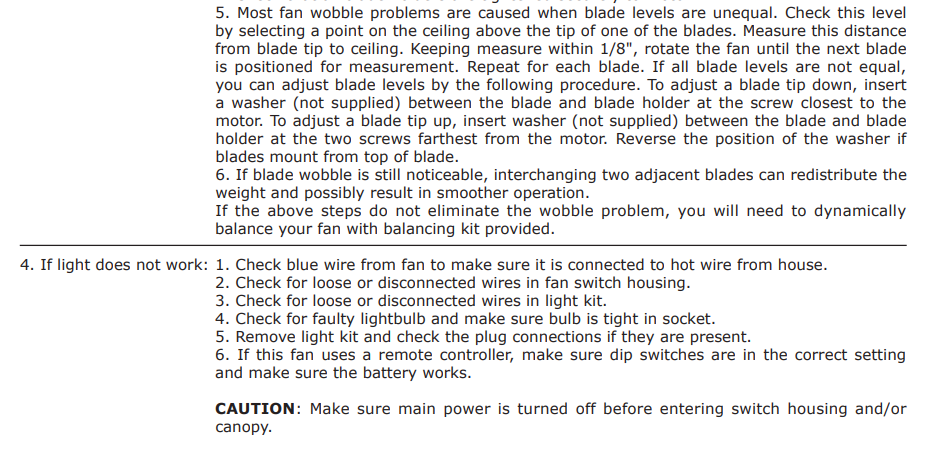
If you have difficulty operating your new ceiling fan, it may be the result of incorrect assembly, installation, or wiring. In some cases, these installation errors may be mistaken for defects. If you experience any faults, please check this Troubleshooting Chart. If a problem cannot be remedied, or you are experiencing difficulty in installation, please call our Customer Service Center at the number printed on your parts list insert sheet.
Warning: Before you begin installing, servicing, or cleaning the fan unit, switch the power off at the service panel and lock the service panel to prevent the power from being switched back on accidentally. If the service panel cannot be locked to prevent the power from being switched on accidentally, securely fasten a warning sign to the service panel.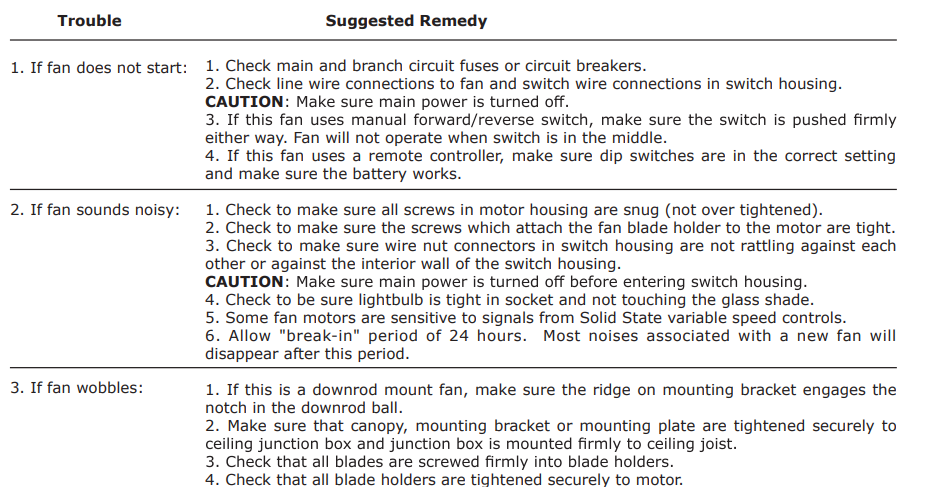
For More Manuals By Visual Comfort, VisitManualsLibraryy.
Visual Comfort 3MAVSM52D Maverick Smart LED Ceiling Fan-FAQs
Q1. What are common problems with ceiling fans?
Improper wiring, old age, or worn-out components can cause issues such as unusual noises, reduced performance, or safety risks.
Q2. What features make a ceiling fan “smart”?
Smart ceiling fans can be controlled via mobile apps, voice commands, or automation. They offer customizable settings, energy-saving modes, and seamless integration with smart home systems.
Q3. Why is my LED fan remote not working?
First, replace the batteries and reset the fan by turning off the power for 30 seconds. If it still doesn’t work, the dimmer button or receiver module may be faulty.
Q4. Where are Visual Comfort ceiling fans manufactured?
Visual Comfort fans, formerly known as Monte Carlo Fans, are based in Riverside, New Jersey, with additional facilities in Texas and Nevada.
Q5. What is Visual Comfort known for?
The brand is recognized for its artistry, craftsmanship, and premium lighting designs. Each piece is made with high-quality materials and hand-applied finishes.
Q6. How long does a ceiling fan typically last?
A well-maintained ceiling fan generally lasts around 10 years, depending on its build quality and usage.
Q7. How can I check if my fan remote is working?
If the remote has an indicator light, make sure it turns on. Also, check that the batteries are inserted correctly and still have power.
Q8. Can I use the fan without its remote?
Yes, most ceiling fans can still be controlled using a wall switch or through a compatible smart home app if paired.
Q9. How much electricity does a ceiling fan use in 24 hours?
On average, a ceiling fan consumes about 1.8 kWh in 24 hours, though energy-efficient models use less.