
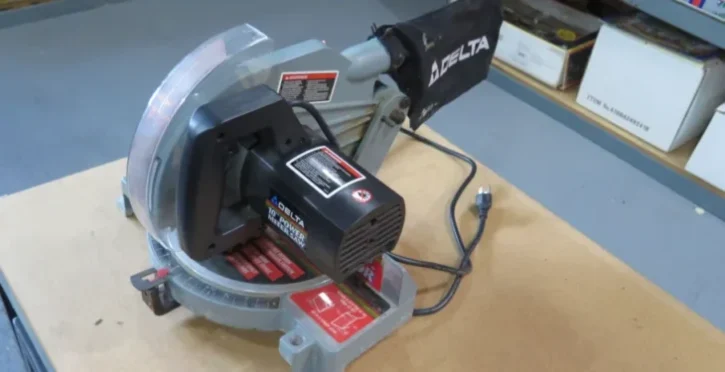

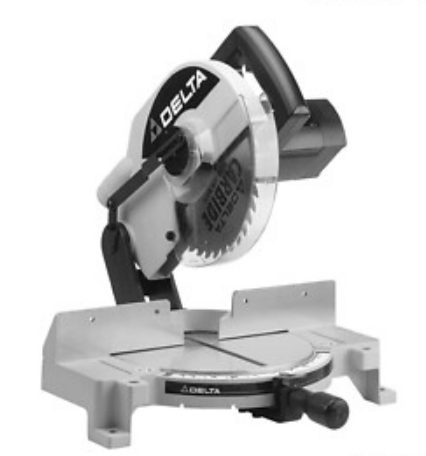
Delta 36-070 10-inches Power Miter Saw
SAFETY RULES FOR MITER SAWS
- USE ONLY CROSS-CUTTING SAW BLADES. WHEN USING CARBIDE-TIPPED BLADES, MAKE SURE THEY HAVE A NEGATIVE HOOK ANGLE. DO NOT USE BLADES WITH DEEP GULLETS AS THEY CAN DEFLECT AND CONTACT THE GUARD.
- DO NOT OPERATE the miter saw until it is completely assembled and installed according to the instructions.
- IF YOU ARE NOT thoroughly familiar with the operation of compound miter saws, obtain advice from your supervisor, instructor, or other qualified person.
- DO NOT perform any operation freehand. Secure or clamp the orkpiece firmly against the fence.
- KEEP HANDS OUT OF THE PATH OF the saw blade. If the workpiece you are cutting would cause your hand to be within the hazard zone of the saw blade, the workpiece should be clamped in place before cutting.
- BE SURE the blade is sharp, runs freely, and is free of vibration.
- ALLOW the motor to come up to full speed before starting the cut.
- KEEP motor air slots clean and free of chips.
- ALWAYS MAKE SURE all clamp handles are tight before cutting, even if the table is positioned in one of the positive stops.
- BE SURE blade and flanges are clean and that the arbor screw is tightened securely.
- USE only the blade flanges specified for your saw.
- NEVER use blades larger or smaller in diameter than ten inches.
- NEVER apply lubricants to the blade when it is running.
- ALWAYS check the blade for cracks or damage before operation. Replace cracked or damaged blades immediately.
- NEVER use blades recommended for operation at less than 6000 RPM.
- DO NOT operate the saw without guards in place.
- ALWAYS keep the lower blade guard in place and operating properly.
- NEVER reach around or behind the saw blade.
- MAKE SURE the blade is not contacting the workpiece before the switch is turned on.
- NEVER lock the switch in the “ON” position.
UNPACKING
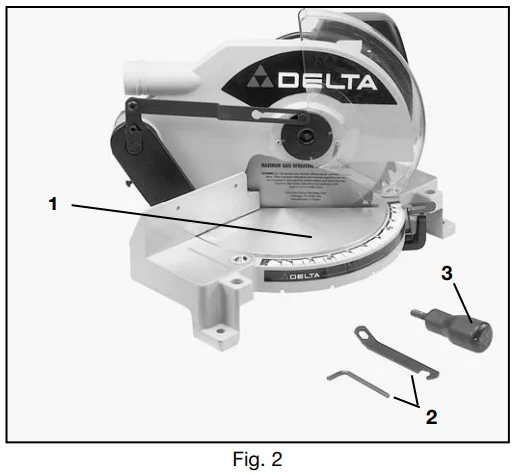
- Remove the miter saw and all loose items from the carton. IMPORTANT: DO NOT LIFT THE MITER SAW BY THE SWITCH HANDLE AS THIS MAY CAUSE MISALIGNMENT. ALWAYS LIFT THE MACHINE BY THE BASE OR CARRYING HANDLE. Fig. 2 illustrates the machine and all loose items after they have been removed from the carton.

- Miter Saw
- Wrenches for changing the blade
- Table lock handle
ASSEMBLY INSTRUCTIONS
MOVING THE CUTTERHEAD TO THE UP POSITION
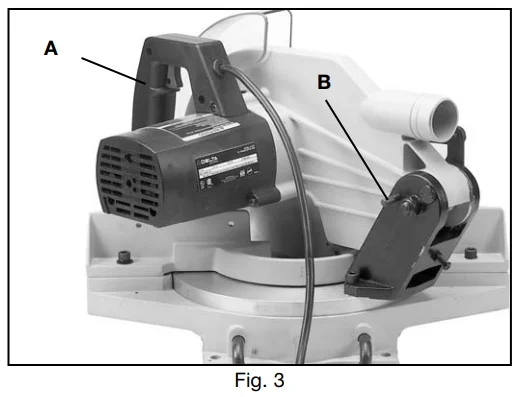
- Push down on the switch handle (A), Fig. 3, and pull out the cutting head lockpin (B).

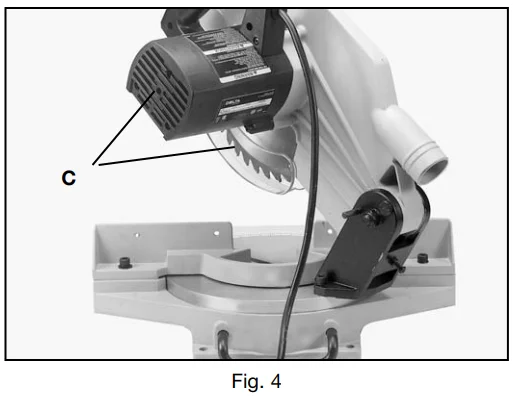
- The cutting head (C) can then be moved to the up position, as shown in Fig. 4.

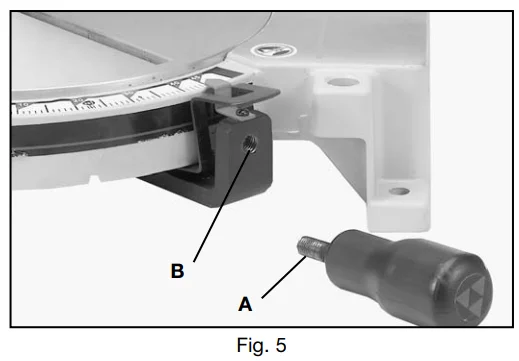
ASSEMBLING TABLE LOCK HANDLE
- Thread the table lock handle (A), Fig. 5, into the threaded hole (B) of the arm bracket.

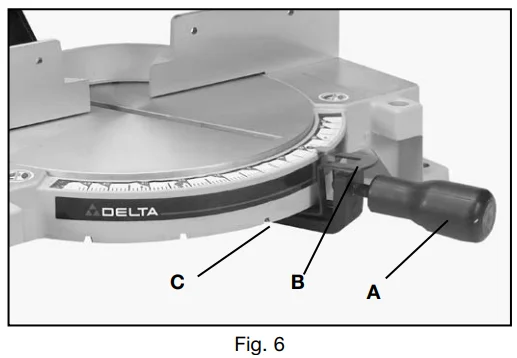
ROTATING TABLE TO 90 DEGREE POSITION
- Loosen table lock handle (A), Fig. 6, one or two turns and depress the index lever (B) to release the 45-degree positive stop.

- Rotate the table to the left until a 90-degree engagement with the 90-degree positive stop (C). Fig. 6. Then tighten table lock handle (A).
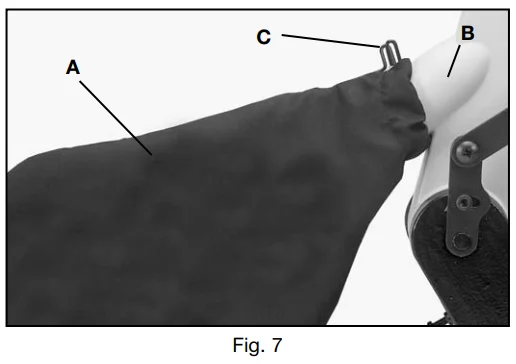
ASSEMBLING DUST BAG (OPTIONAL)
- Assemble the dust ba,,g (A) Fig. 7, to the dust spout (B), making sure the wire ring (C) is engaged with the groove in the spout.
FASTENING MITER SAW TO SUPPORTING SURFACE
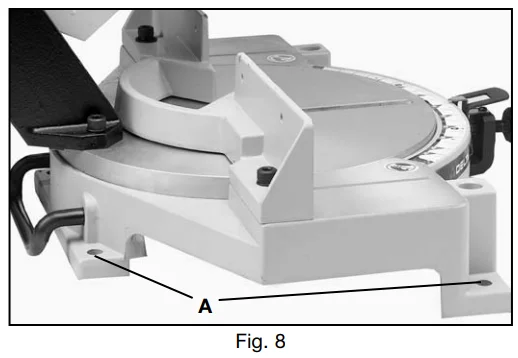
Before operating your compound miter saw, make sure it is firmly mounted to a sturdy workbench or other supporting surface. Four holes are provided, two of which are shown at (A) Fig. 8, for fastening the saw to a supporting surface. When frequently moving the saw from place to place, we suggest that the saw be mounted to a 3/4″ piece of plywood. The saw can then be easily moved from place, place, and the plywood clamped to the supporting surface using “C” clamps.
CONNECTING SAW TO POWER SOURCE POWER CONNECTIONS
A separate electrical circuit should be used for your tools. This circuit should not be less than #12 wire and should be time-lagged with a 20 Amp time lag fuse. If an extension cord is used, use only 3-wire extension cords that have 3-prong grounding type plugs and 3-pole receptacles that accept the tool’s plug. Before connecting the motor to the power line, make sure the switch is in the “OFF” position and be sure that the electric current is of the same characteristics as indicated on the tool. All line connections should make good contact. Running on low voltage will damage the motor.
MOTOR SPECIFICATIONS: Your miter saw is wired for 110-120 volt, 60 HZ alternating current. Before connecting the miter saw to the power source, make sure the switch is in the “OFF” position. The motor provides a no-load speed of 5200 RPM.
OPERATING INSTRUCTIONS
FOREWORD: Delta Model 36-070 is a 10″ Power Cross-cutting to miter-cutting cutting and miter cutting are easy and accurate. It can crosscut up to 2-1/4″ x 5-3/4″, miter at 45 both left and right, 2-1/4″ x 4-1/8″. It has positive miter stops at 0, 22.5, and 45 degrees, both left and one-half, and is accurate to one half degree.
STARTING AND STOPPING MACHINE
To start the machine, depress the switch trigger (A), Fig. 12. To stop the machine, release the switch trigger. This miter saw is equipped with an automatic electric blade brake. As soon as the switch trigger (A) Fig.2 is released, the electric brake is activated and stops the blade in seconds.
LOCKING SWITCH IN THE “OFF” POSITION
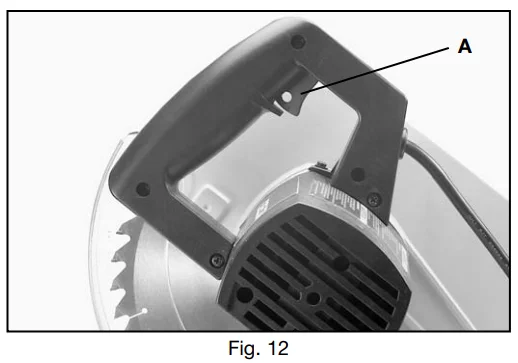
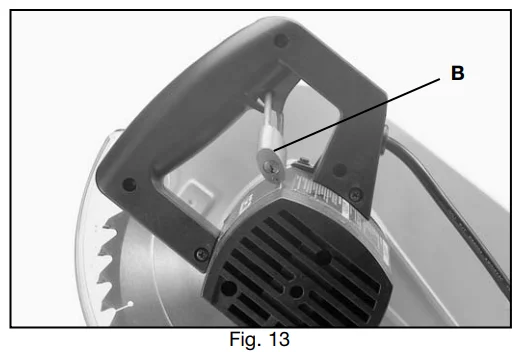
IMPORTANT: When the miter saw is not in use, the switch should be locked in the “OFF” position using a padlock (B) Fig. 13, (with 3/16″ diameter shackle) through the two holes (A )Fig. 12 in the switch plate, as shown in (A) Fig. 12. NOTE: Padlock shown is available as an accessory Model 50-325.
ROTATING TABLE FOR MITER CUTTING
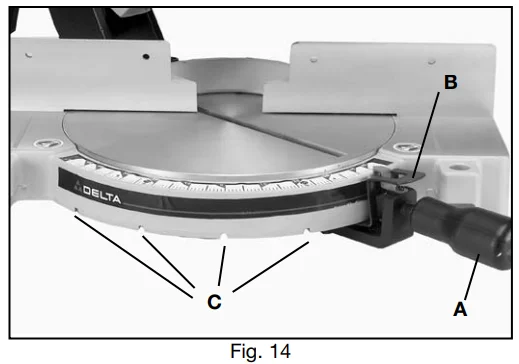
Your miter saw will cut any angle from a straight 90-degree cut to 47 degrees right and left. Simply loosen the lock handle (A), Fig. 14, one or two turns, depress he index lever (B) and move the control arm to the desired angle. THEN TIGHTEN LOCK HANDLE (A). The miter saw is equipped with positive stops at the 0,22-1/,2 and 45-degree right and left positions. Simply
loosen the lock handle (A), Fig. 14, and move the control arm until the bottom of the index lever (B) engages one of the positive stops, four of which are shown at (C). THEN TIGHTEN LOCK HANDLE (A). To disengage the positive stop, depress the index lever (B).
POINTER AND SCALE
A pointer (A) Fig. 15, is supplied which indicates the actual angle of cut. Each line on the scale (B) represents 1/2 degree. In effect, when the pointer is moved from one line to the next on the scale, the angle of cut is changed by 1/2 degree.
ADJUSTMENTS
ADJUSTING THE DOWNWARD TRAVEL OF THE SAW BLADE
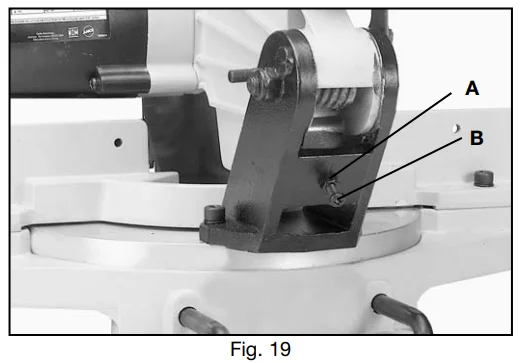
The downward travel of the saw blade can be limited to prevent the saw blade from contacting any metal surfaces of the machine. Before adjusting downward travel, DISCONNECT THE MACHINE FROM THE POWER SOURCE and lower the
blade as far as possible. Rotate the blade by hand to make certain the teeth do not contact any metal surfaces. This adjustment is made by loosening the lock nut (A), Fig. 19, and turning the adjusting screw (B) in or out until the blade lowers to the desired position. Then tighten the lock nut (A).
ADJUSTING BLADE PARALLEL TO TABLE OPENING
- DISCONNECT THE SAW FROM THE POWER SOURCE.
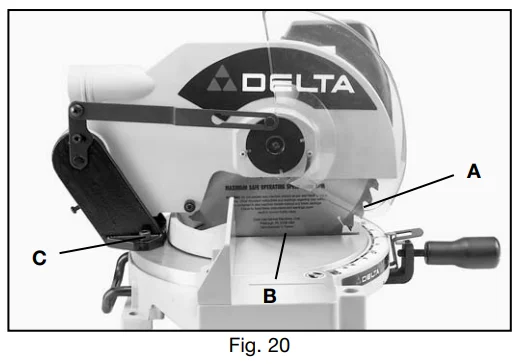
- Lower the cutting head and check to see if the saw blade (A, Fig. 20) is parallel to the left edge (B) of the table opening.
- If an adjustment is necessary, loosen two screws, one of which is shown at (C) Fig. 20, and move the t-cutting head dead until the blade (A) is parallel with the left edge (B) of the table opening. Then tighten two screws (C).
ADJUSTING FENCE 90 DEGREES TO BLADE
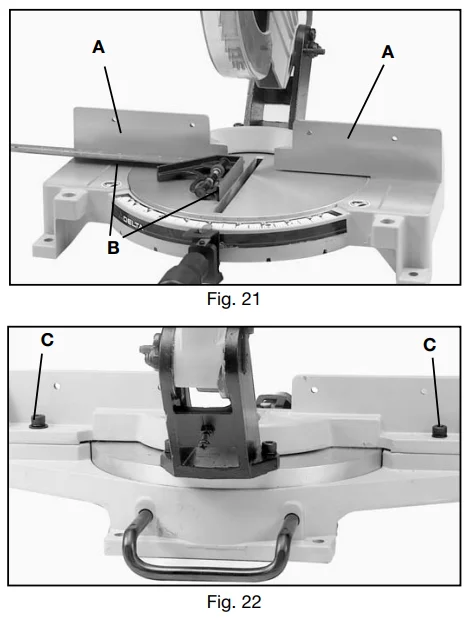
If the fence (A), Fig. 21, is ever removed from the saw, it should be adjusted so it is 90 degrees to the blade when it is replaced, as follows:
- DISCONNECT THE SAW FROM THE POWER SOURCE.
- This adjustment should be made only after the blade has been adjusted parallel to the table opening, as previously explained.
- Using a square (B), Fig. 21, place one end of the square against the fence (A) and the other end against the slot in the table as shown.
- If an adjustment is necessary, loosen the two screws (C) Fig. 22, and adjust the fence 90 degrees to the table opening. Then tighten the two screws (C).
TYPICAL OPERATIONS AND HELPFUL HINTS
- Before cutting, make certain the table is set at the correct angle and firmly locked in place.
- Before cutting, determine that the workpiece is the right size for the saw.
- Place the workpiece on the table and hold it firmly against the fence.
- For best results, cut at a slow, even cutting rate.
- If the workpiece you are cutting causes your hand to be within 4 inches of the saw blade, the workpiece must be clamped to the fence before cutting.
- Never attempt any freehand cutting (wood that is not held firmly against the fence and table).
USING ACCESSORY 36-221 WORK CLAMP
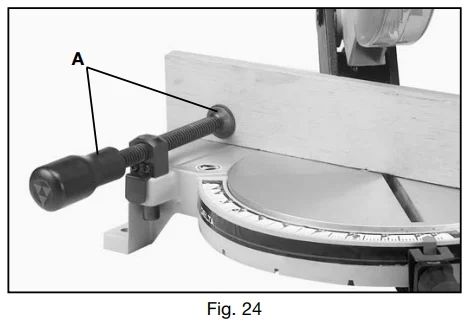
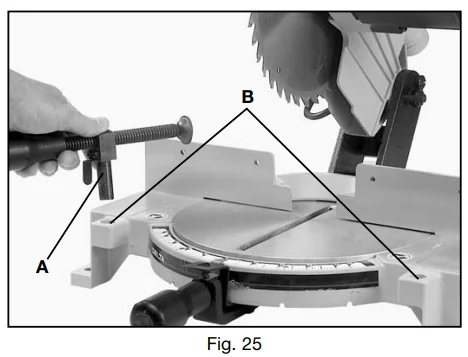
- An ideal accessory for use with your miter saw is the 36-221 Work Clamp, shown at (A) Fig. 24.

- Two holes (B), Fig. 25, the miter slot, in the base of the miter saw, enabling you to use the clamp (A) on either the right or left-hand side of the saw blade.

GENERAL CUTTING OPERATIONS
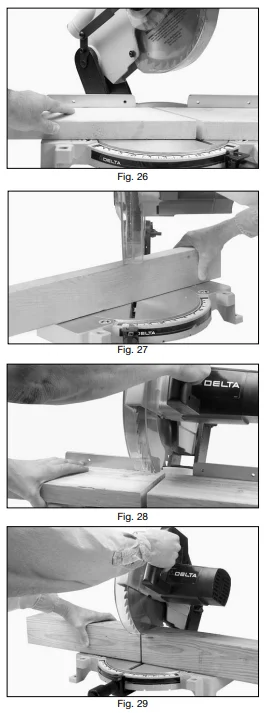
- Your miter saw has the capacity to cut standard 2 x 4’s lying flat or on edge, at the 45-degree right and left miter angles as shown in Figs. 26 and 27.
- A standard 2 x 6 can easily be cut in the 90-degree straight cut-off position in one pass, as shown in Fig. 28.
- Cutting a standard 4 x 4 is easily accomplished with your miter saw in one pass, as shown in Fig. 29.
- Cutting various sizes of plastic pipe is an easy job with the miter saw, as shown in Fig. 30.
CUTTING ALUMINUM
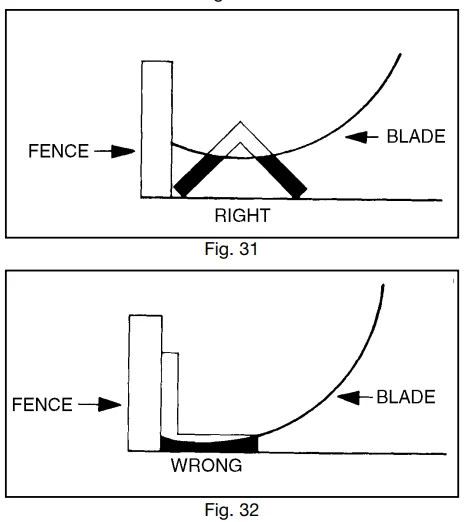
Aluminum extrusions, such as those used for making aluminum screens and storm windows, can easily be cut with your
miter saw. When cutting aluminum extrusions, or other sections that can be cut with a saw blade and are within the capacity of the machine, position the material so the blade is cutting through the smallest cross-section, as shown in Fig. 31. The wrong way to cut aluminum angles is illustrated in Fig. 32. Be sure to apply a stick wax (similar to Johnson’s stick wax #140) to the blade before cutting any aluminum stock. This stick wax is available at most industrial mill supply houses. The stick
wax provides proper lubrication and keeps chips from adhering to the blade. NEVER APPLY A LUBRICANT TO THE BLADE WHILE THE MACHINE IS RUNNING.
CUTTING BOWED MATERIAL
When cutting flat pieces, first check to see if the material is bowed. If it is, make sure the material is positioned
on the table as shown in Fig. 33. If the material is positioned the wrong way, as shown in Fig. 34, the workpiece will pinch the blade near the completion of the cut.
CUTTING CROWN MOULDINGS
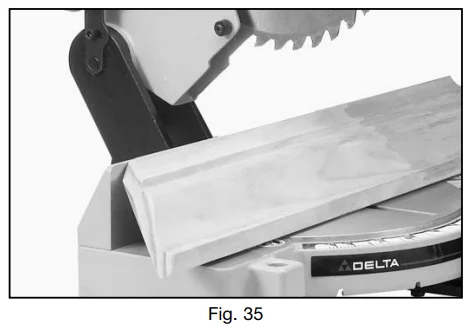
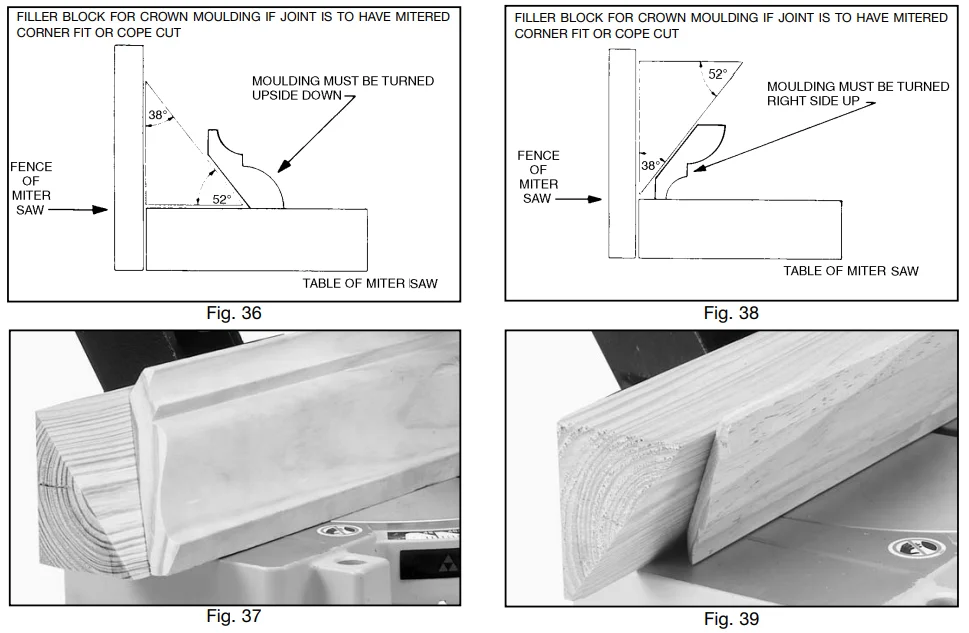
- Several methods can be used to cut crown moldings on the miter saw. The method shown in Fig. illustrates the contact surfaces (the surfaces that contact the wall and ceiling) of the crown molding held firmly against the fence and table of the miter saw. This method is acceptable when making a small number of cuts, but would not be practical for a production application, as it may be difficult to firmly hold the work in this position. Also, this molding means that the crown molding must be posiupside-downhe table in upside-down.
- When a large number of repetitive cuts of crown molding are required, we suggest the use of filler blocks, as shown in Fig. 36 through Fig.. The majority of crown mouldings have contact surfaces at 52 and 38 degrees molding,e, ar surface of the moulding and these angles must be utilized when jointing the face of the filler block. For crown molding with different angles, appropriate filler blocks can be produced.
- Fig. 36 and Fig. 37 illustrate the filler block fastened to the miter saw fence, with the face of the filler block extending outward from the top of the fence and down to the surface of the table. When the filler block is positioned in this manner, the crown molding must be positioned on the table in the upside-down position. This means that the surface of the molding that contacts the ceiling is against the table.
- Fig. 38 and Fig. 39 illustrate the filler block fastened to the miter saw fence, with the face of the filler block extending inward toward the fence from the top to the bottom. When the filler block is positioned in this manner, crown molding is placed on the table in the same position as it would be when nailed between the ceiling and wall.

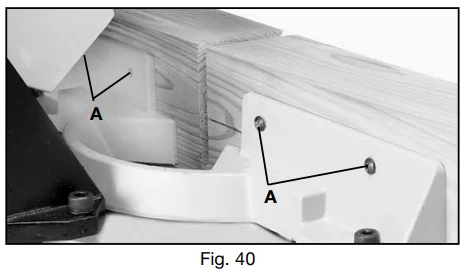
- Fasten the filler blocks to the fence using wood screws (A) through the two holes provided on each fence half, as shown in Fig. 40. This enables you to easily remove the filler blocks when not in use and quickly reassemble them to the fence when needed.

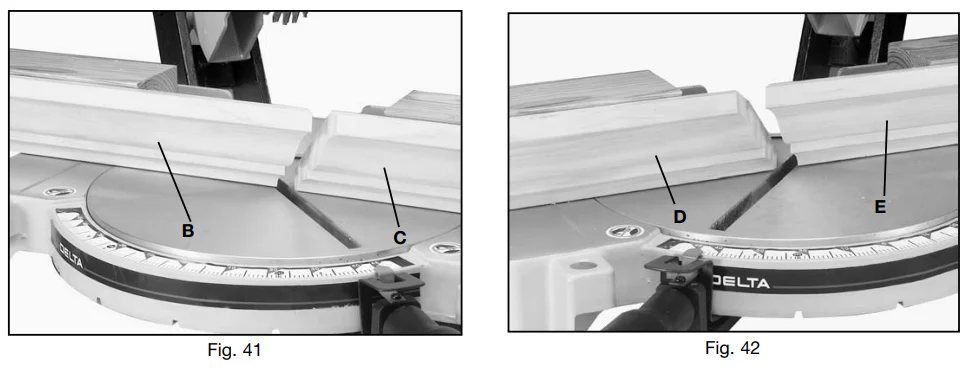
- Fig. 41 illustrates45-degreer saw arm in the 45 degree right miter position and the filler blocks fastenemolding fence so that the moulding will be in the same position as it would be when nailed between the ceiling and, wamoldingmaking this cut the moulding (B) on the left of the saw blade wi, , ll be fomoldingside corner and the moulding (C) on the right of the saw blade will be for an inside corner. To cut the mating pieces for mouldings (B) and (C) Fig. 41, simply rotate the miter saw arm to the 45 degree left miter position and cut, as shown in Fig. 42. In this case the moulding (D) on the left of the saw blade will be for an inside corner and the moulding (E) on the right of the saw blade will be for an outside corner.
MAINTENANCE
CHANGING THE BLADE
- DISCONNECT THE MACHINE FROM THE POWER SOURCE.
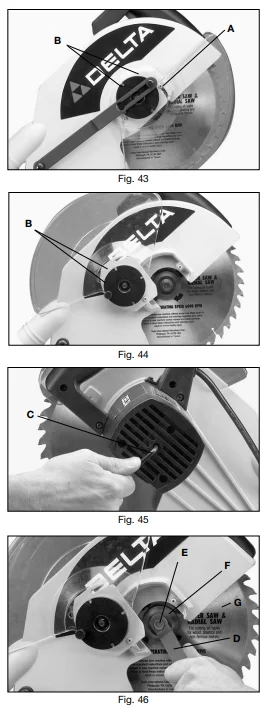
- Loosen screw (A) Fig. 43, and rotate cover (B) to the rear as shown in Fig. 44.
- To remove the saw blade, insert the hex wrench (C) Fig. 45 into the hex hole located on the rear end of the arbor shaft, to keep the shaft from turning.
- Using wrench (D), Fig. 46, loosen the arbor screw (E) by turning it clockwise.
- Remove arbor screw (E), Fig. 46, outside blade flange (F), and saw blade (Ga ) from saw arb or.
- Assemble the enewsawbladee.Certainn TEETH OF SAW BLADE ARE POIreassembleATthe THE FRONT and re-assemble outside bththeadeflange (F) Fig. 46, and arbor screw (E) by turning it counterclockwise using wrench (D) Fig. 46. At the same timeuse a hex wrench (C) Fig. 45, to keep the arbor from turning.
- Replace the screw and cover that was rotated to the rear in STEP 2.
BRUSH INSPECTION AND REPLACEMENT
Brush life varies. It the load on the motor.Check the brushes after the first 50 hours of use for a new machine or after a new set of brushes has been installed. After the first check, examine them after about 10 hours of use until such time that replacement is necessary. To inspect the brushes, proceed as follows:
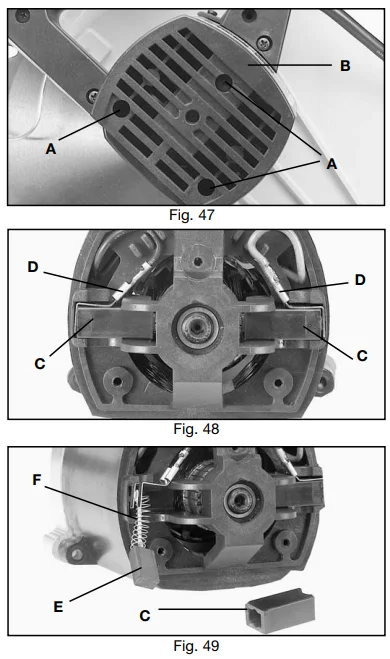
- Remove three screws (A) Fig. 47, and remove motor cover (B).
- The brushes are located in the two holders (C), Fig. 48. Remove spade spade-type terminal the connector (D) and pull out brush holders (C).
- Fig. 49illustrates one of the brushes (E) removed from the holder (C). When the carbon on either brush (E) is worn to 3/16″ in length or if either spring (F) or shunt wire is burned or damaged in any way, replace both brushes. If the brushes are found serviceable after removal, reinstall them in the same position as removed.
TABLE HAZARD AREA
FOR MORE MANUALS BY DELTA MACHINERY, VISIT MANUALSLIBRARYY
Delta 36-070 10-inches Power Miter Saw-FAQs
1. How do I unlock the Delta 36-070 miter saw?
To unlock your Delta 36-070, gently press down on the saw arm while pulling out the locking pin located near the pivot joint. The arm will rise automatically once unlocked.
2. How do I use a miter saw safely?
Always wear safety glasses and hearing protection. Secure your material firmly, keep hands at least six inches away from the blade, and allow the saw to reach full speed before cutting.
3. How large of a wood piece can a 10-inch miter saw cut?
A 10-inch miter saw can typically cut a 2×6 board at 90° and a 2×4 board at 45°. Larger materials may require a 12-inch or sliding miter saw.
4. Can a 10-inch miter saw cut a 4×4 post?
Yes, a 10-inch miter saw can cut through a 4×4 in most cases, though you may need to rotate the wood and make a second cut for a complete pass.
5. How do I change the blade on the Delta 36-070 saw?
Unplug the saw, press the spindle lock button to hold the blade in place, and loosen the arbor bolt with a wrench. Replace the blade, then tighten the bolt securely before use.
6. What is a spindle lock, and where is it located?
The spindle lock is a small button near the blade guard or motor housing. It prevents the blade from rotating while you change it, ensuring safe blade replacement.
7. How do I adjust the cutting angle on my miter saw?
Lift the miter handle or press the release lever, rotate the saw table to your desired angle (e.g., 45°), and lock it into position before cutting.
8. How do I calibrate my miter saw for accuracy?
Use a digital angle finder or carpenter’s square to check for perfect 90° and 45° cuts. If the cuts are off, adjust the fence, bevel, and miter scale until aligned correctly.
9. What does “31.6° miter and 33.9° bevel” mean on a miter saw?
These settings are used for cutting crown molding. Setting the saw to a 31.6° miter and 33.9° bevel helps achieve precise corner joints on angled trim pieces.