
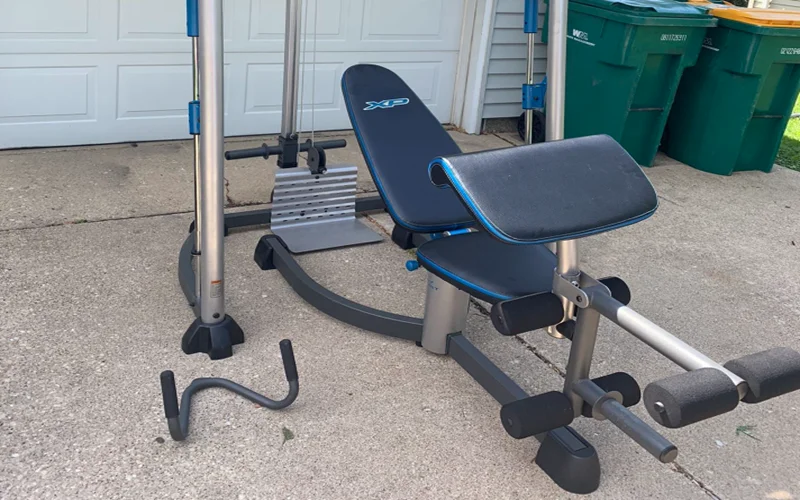

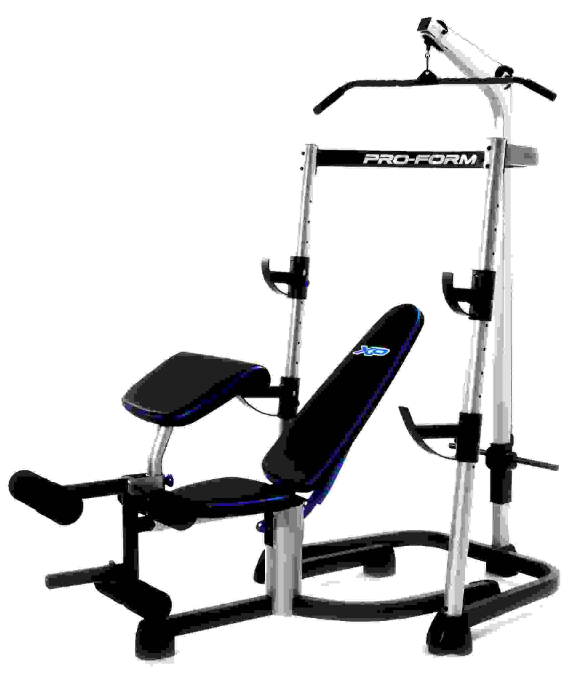
Pro-Form XP 300 Weight Bench Machine
BEFORE YOU BEGIN
Thank you for selecting the versatile PROFORM® XP 300 weight bench. The weight bench is designed to help develop every major muscle group of the body. Whether your goal is to tone your body, build dramatic muscle size and strength, or improve your cardiovascular system, the weight bench will help you achieve the specific results you want. For your benefit, read this manual carefully before using the weight bench.
If you have questions after reading this manual, call the telephone number on the warranty card accompanying this manual. To help us assist you, please note the product model number and serial number before calling. The model number is PFANBE3525.0. The serial number can be found on a decal attached to the weight bench (see the front cover of this manual). Before reading further, please review the drawing below and familiarize yourself with the parts that are labeled.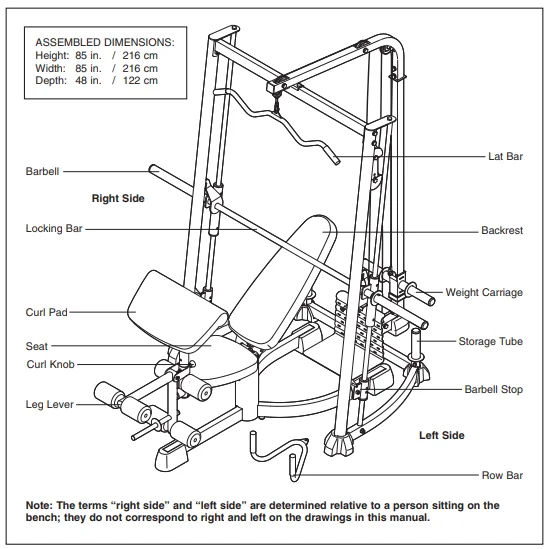
ASSEMBLY
Make Things Easier for Yourself
Everything in this manual is designed to ensure that the weight bench can be assembled successfully by anyone. Most people find that setting aside plenty of time helps assembly go smoothly.
Before beginning assembly, carefully read the following information and instructions:
- The Assembly requires two people.
- Make sure that there is enough clearance to walk around the weight bench as you assemble it.
- Place all parts in a cleared area and remove the packing materials. Do not dispose of the packing materials until assembly is completed.
- As you assemble the weight bench, make sure all parts are oriented as shown in the drawings.
- Tighten all parts as you assemble them, unless instructed to do otherwise.
- For help identifying small parts, use the PART IDENTIFICATION CHART.
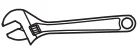
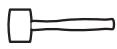
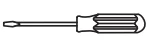
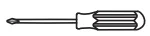
The included hex keys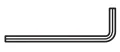 and the following tools (not included) may be required for assembly:
- Two adjustable wrenches

- One rubber mallet

- One standard screwdriver

- One Phillips screwdriver

- Clear tape or masking tape, and soapy water
Assembly will be more convenient if you have a socket set, a set of open-end or closed-end wrenches, or a set of ratchet wrenches.
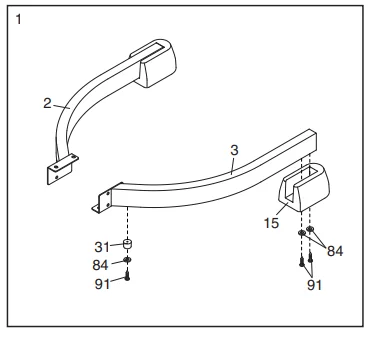
- Before beginning assembly, make sure you understand the information presented in the box above. Make sure that the Left Seat Base (3) is oriented as shown. Attach a Seat Base Bumper (31) to the Left Seat Base with an M4 x 16mm Self-tapping Screw (91) and an M4 Washer (84). Attach a Bench Foot (15) to the Left Seat Base (3) with two M4 x 16mm Self-tapping Screws (91) and two M4 Washers (84). Repeat this step with the Right Seat Base (2). Make sure that the Right Seat Base is oriented as shown.

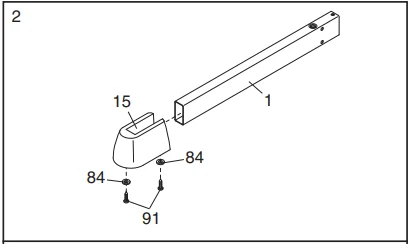
- Attach the Bench Foot (15) to the Seat Base (1) with two M4 x 16mm Self-tapping Screws (91) and two M4 Washers (84).

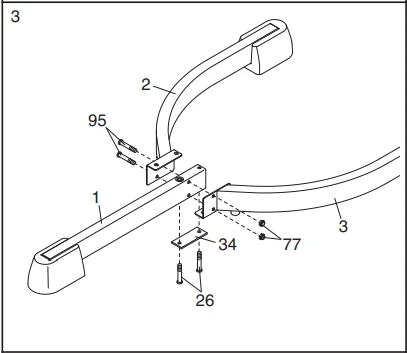
- Insert two M10 x 100mm Screws (26) up through the Base Plate (34), the Seat Base (1), and the Right and Left Seat Bases (2, 3). Attach the Right and Left Seat Bases (2, 3) to the Seat Base (1) with two M10 x 58mm Button Bolts (95) and two M10 Nylon Locknuts (77).

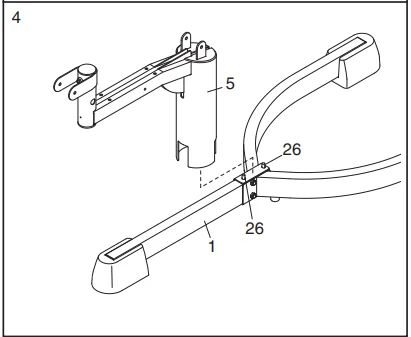
- Attach the Seat Frame (5) to the Seat Base (1) with the indicated two M10 x 100mm Screws (26).

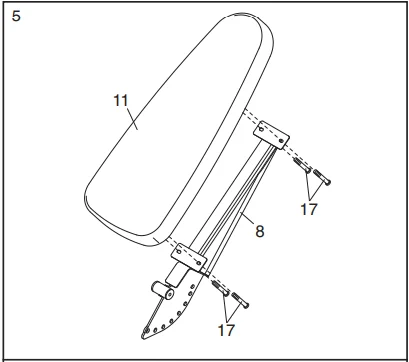
- Attach the Backrest (11) to the Backrest Frame (8) with four M6 x 15mm Button Screws (17).

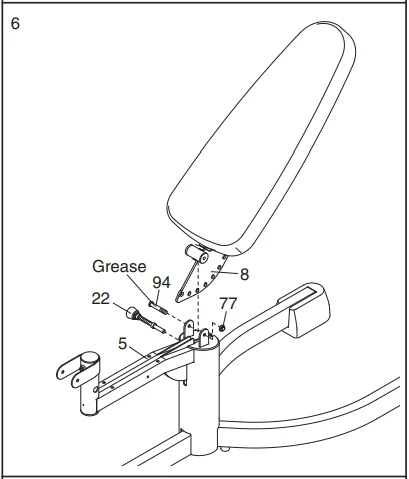
- Grease the M10 x 87mm Button Bolt (94). Attach the Backrest Frame (8) to the Seat Frame (5) with the Bolt and an M10 Nylon Locknut (77). Do not overtighten the Locknut; the Backrest Frame must be able to pivot easily. Engage the Backrest Frame (8) with the Backrest Knob (22) and fully tighten the Knob into the Seat Frame (5).

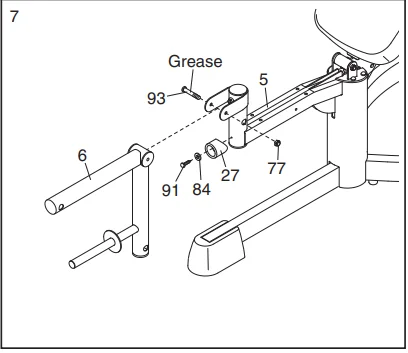
- Attach the Seat Bumper (27) to the Seat Frame (5) with an M4 x 16mm Self-tapping Screw (91) and an M4 Washer (84). Grease an M10 x 82mm Button Bolt (93). Attach the Leg Lever (6) to the Seat Frame (5) with the Bolt and an M10 Nylon Locknut (77). Do not overtighten the Locknut; the Leg Lever must be able to pivot easily.

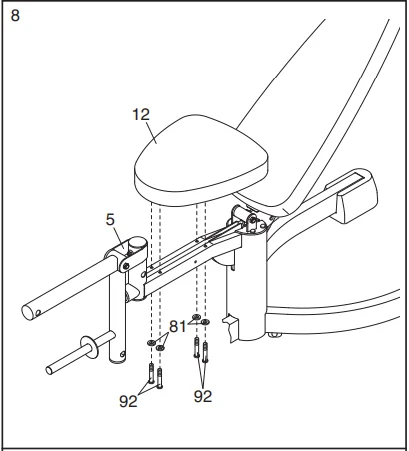
- Attach the Seat (12) to the Seat Frame (5) with four M6 x 63mm Button Screws (92) and four M6 Washers (81).

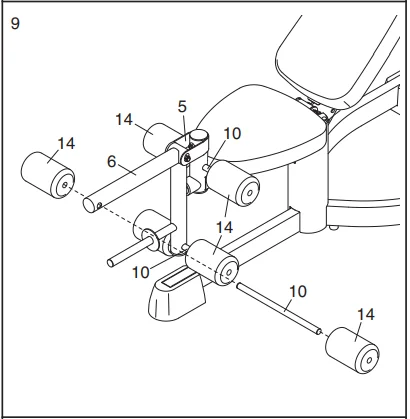
- Insert a Pad Tube (10) into the Leg Lever (6). Slide two Foam Pads (14) onto the Pad Tube. Assemble the other two Pad Tubes (10) to the Leg Lever (6) and the Seat Frame (5) in the same manner.

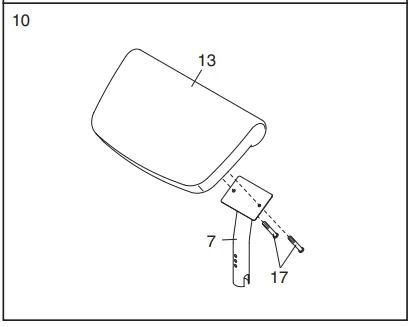
- Attach the Curl Pad (13) to the Curl Post (7) with two M6 x 15mm Button Screws (17).

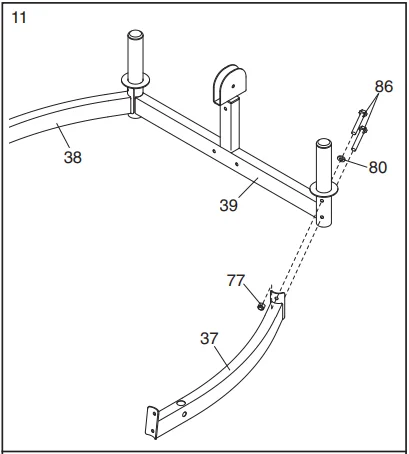
- Attach the Left Rack Base (37) to the Center Rack Base (39) with two M10 x 67mm Bolts (86), an M10 Washer (80), and an M10 Nylon Locknut (77). Do not tighten the Bolts. Repeat this step with the Right Rack Base (38).

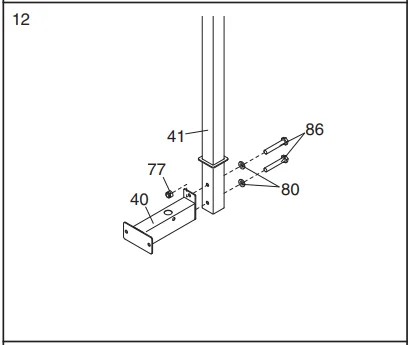
- Attach the Rear Rack Base (40) to the Rear Upright (41) with two M10 x 67mm Bolts (86), two M10 Washers (80), and an M10 Nylon Locknut (77). Do not tighten the Bolts.

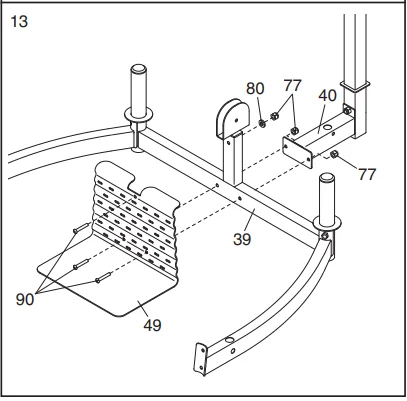
- Attach the Foot Plate (49) and the Rear Rack Base (40) to the Center Rack Base (39) with two M10 x 63mm Button Bolts (90) and two M10 Nylon Locknuts (77). Do not tighten the Locknuts. Attach the Foot Plate (49) to the Center Rack Base (39) with an M10 x 63mm Button Bolt (90), an M10 Washer (80), and an M10 Nylon Locknut (77). Do not tighten the Locknut.

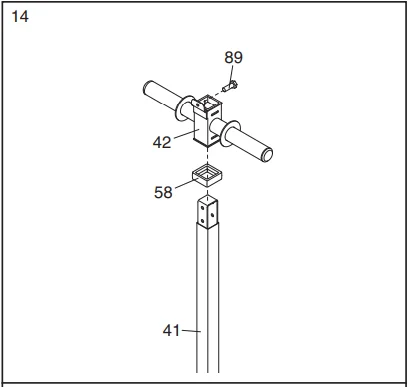
- Insert the M10 x 20mm Bolt (89) into the Weight Carriage (42) from the side shown. Slide the Weight Carriage Stop (58) onto the Rear Upright (41). Slide the Weight Carriage (42) onto the Rear Upright.

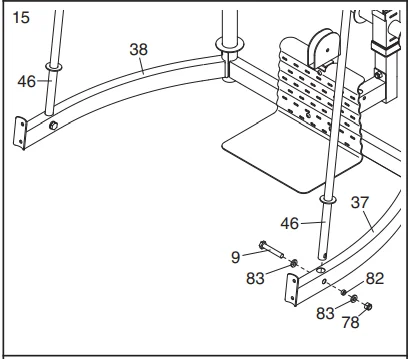
- Attach a Guide Rod (46) to the Left Rack Base (37) with an M8 x 53mm Bolt (9), two M8 Washers (83), an 11mm x 8mm Spacer (82), and an M8 Nylon Locknut (78). Do not tighten the Locknut. Attach a Guide Rod (46) to the Right Rack Base (38) in the same manner.

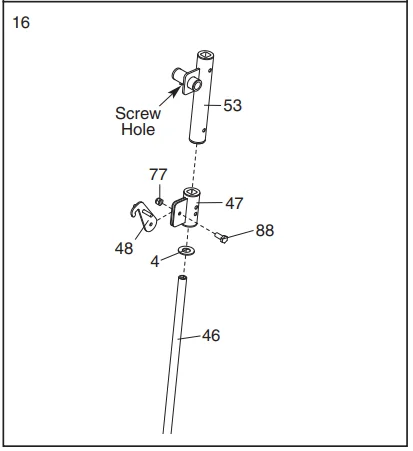
- Attach a Barbell Stop Hook (48) to a Barbell Stop (47) with an M10 x 25mm Bolt (88) and an M10 Nylon Locknut (77). Do not overtighten the Locknut; the Stop Hook must be able to pivot easily. Slide a Bumper (4) and the Barbell Stop (47) onto the right Guide Rod (46). Identify the Right Barbell Guide (53) by the location of the screw hole. Slide the Barbell Guide onto the right Guide Rod (46). Repeat this step with the left Guide Rod (not shown).

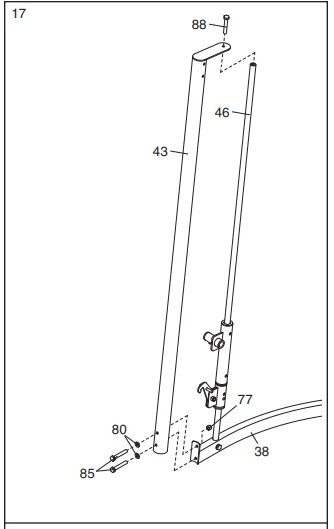
- Attach a Front Upright (43) to the Right Rack Base (38) with two M10 x 82mm Bolts (85), two M10 Washers (80), and an M10 Nylon Locknut (77). Do not tighten the Bolts. Attach the Front Upright (43) to the right Guide Rod (46) with an M10 x 25mm Bolt (88). Repeat this step with the other Front Upright (not shown).

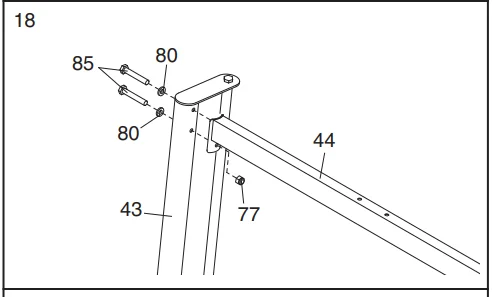
- Attach the Cross Frame (44) to the right Front Upright (43) with two M10 x 82mm Bolts (85), two M10 Washers (80), and an M10 Nylon Locknut (77). Do not tighten the Bolts. Repeat this step with the left Front Upright (not shown).

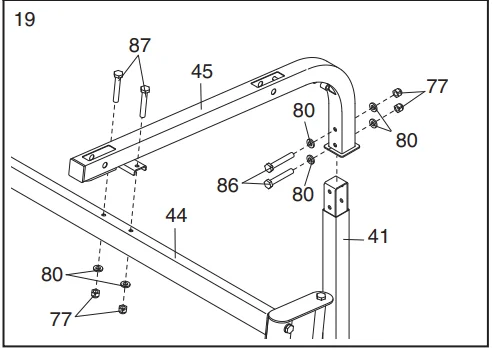
- Attach the Top Frame (45) to the Rear Upright (41) with two M10 x 67mm Bolts (86), four M10 Washers (80), and two M10 Nylon Locknuts (77). Do not tighten the Locknuts. Attach the Top Frame (45) to the Cross Frame (44) with two M10 x 78mm Bolts (87), two M10 Washers (80), and two M10 Nylon Locknuts (77). Do not tighten the Locknuts.

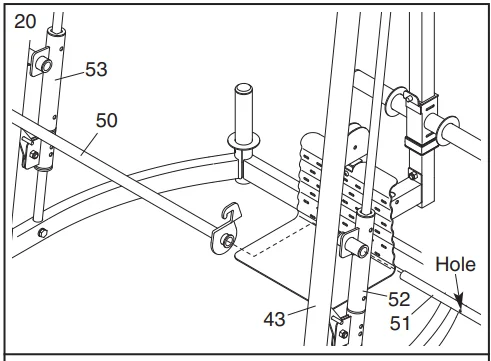
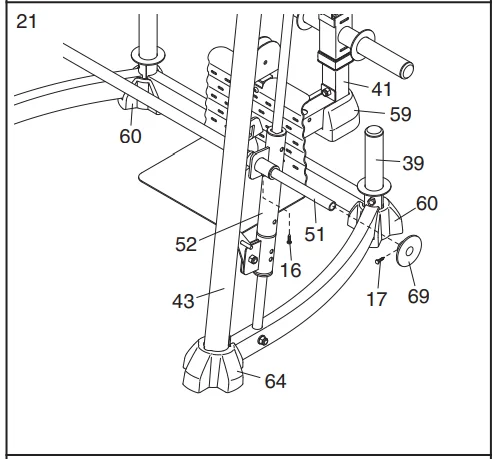
- Orient the Locking Bar (50) as shown. Slide the Barbell (51) through the Left Barbell Guide (52), the Locking Bar, and the Right Barbell Guide (53). Make sure that the Barbell is centered in the Barbell Guides. Engage the Locking Bar into the Uprights (43) at the lowest position.

- Hand-tighten an M8 x 20mm Button Screw (16) into the Left Barbell Guide (52). Slide a Weight Stop (69) onto the Barbell (51). Hand-tighten an M6 x 15mm Button Screw (17) into the Weight Stop. Make sure that the Screw is tightened enough to engage the hole in the Barbell. Repeat this step on the other side of the Barbell (51). Tighten the screws used in this step, and the bolts and locknuts used in steps 11–15 and 17–19. Press two Center Base Feet (60) onto the Center Rack Base (39). Press the Rear Upright Foot (59) onto the Rear Upright (41). Press two Front Upright Feet (64) onto the Front Uprights (43).

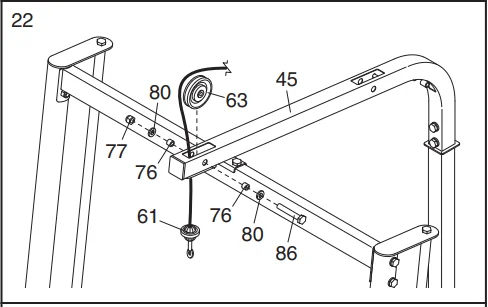
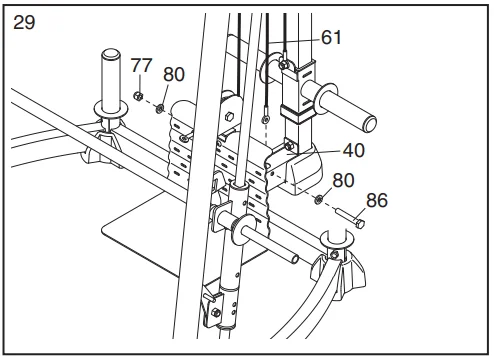
- Route a Cable (61) up through the Top Frame (45) and over a Pulley (63). Attach the Pulley inside the Top Frame with an M10 x 67mm Bolt (86), two M10 Washers (80), two 16mm x 12.5mm Spacers (76), and an M10 Nylon Locknut (77).

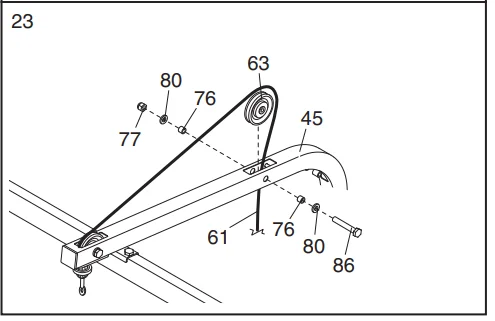
- Route the Cable (61) over a Pulley (63) and down through the Top Frame (45). Attach the Pulley inside the Top Frame with an M10 x 67mm Bolt (86), two M10 Washers (80), two 16mm x 12.5mm Spacers (76), and an M10 Nylon Locknut (77).

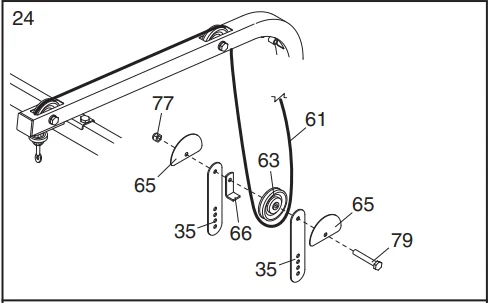
- Route the Cable (61) under a Pulley (63). Attach the Pulley, a Cable Trap (66), and two Half Finger Guards (65) to the two Pulley Plates (35) with an M10 x 50mm Bolt (79) and an M10 Nylon Locknut (77). Make sure that the Cable Trap is oriented to hold the Cable in the groove of the Pulley.

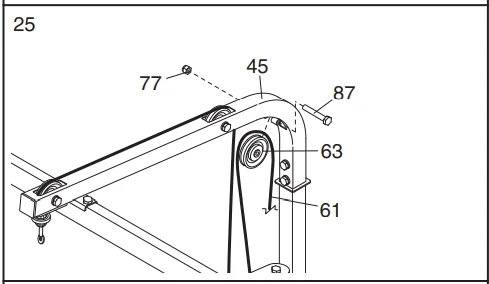
- Route the Cable (61) over a Pulley (63). Attach the Pulley inside the Top Frame (45) with an M10 x 78mm Bolt (87) and an M10 Nylon Locknut (77).

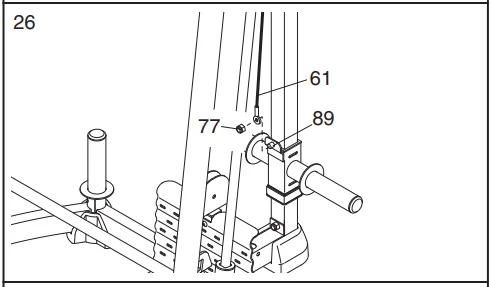
- Attach the Cable (61) to the M10 x 20mm Bolt (89) with an M10 Nylon Locknut (77). Make sure that the Cable can pivot easily on the Bolt.

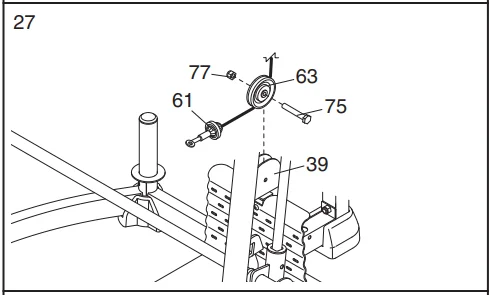
- Route the second Cable (61) under a Pulley (63). Attach the Pulley to the Center Rack Base (39) with an M10 x 45mm Bolt (75) and an M10 Nylon Locknut (77).

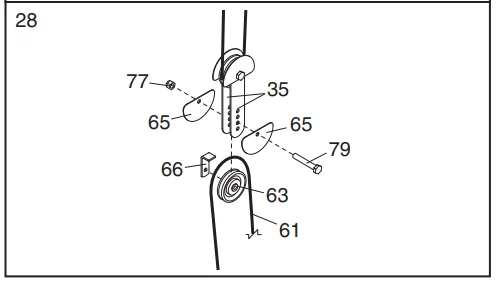
- Route the Cable (61) over a Pulley (63). Attach the Pulley, a Cable Trap (66), and two Half Finger Guards (65) to the two Pulley Plates (35) at the indicated hole with an M10 x 50mm Bolt (79) and an M10 Nylon Locknut (77). Make sure that the Cable Trap is oriented to hold the Cable in the groove of the Pulley.

- Attach the Cable (61) to the Rear Rack Base (40) with an M10 x 67mm Bolt (86), two M10 Washers (80), and an M10 Nylon Locknut (77).

- Make sure that all parts are properly tightened. The use of the remaining parts will be explained in ADJUSTMENTS, starting below.

ADJUSTMENTS
This section explains how to adjust the weight bench. See the EXERCISE GUIDELINES on page 18 for important information about how to get the most benefit from your exercise program. Also, refer to the accompanying exercise guide to see the correct form for each exercise. Make sure all parts are properly tightened each time the weight bench is used. Replace any worn parts immediately. The weight bench can be cleaned with a damp cloth and a mild, non-abrasive detergent. Do not use solvents.
ATTACHING THE CURL PAD
Remove the 56mm Round Cap (20) from the Seat Frame (5). Secure the Curl Post (7) in the Seat Frame with the Curl Knob (23). Replace the 56mm Round Cap (20) in the Seat Frame (5) when the Curl Pad (13) is not being used.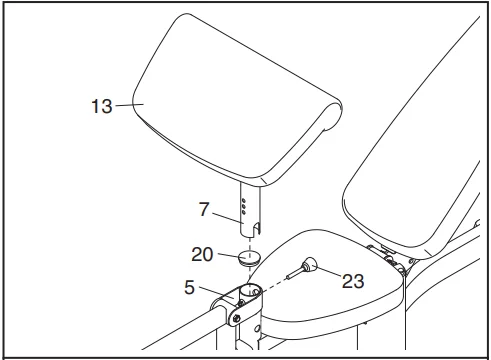
ADJUSTING THE BACKREST
Hold the top of the Backrest (11) with one hand and pull out the Backrest Knob (22). Move the Backrest to the desired position and re-engage the Knob into the Backrest Frame (8).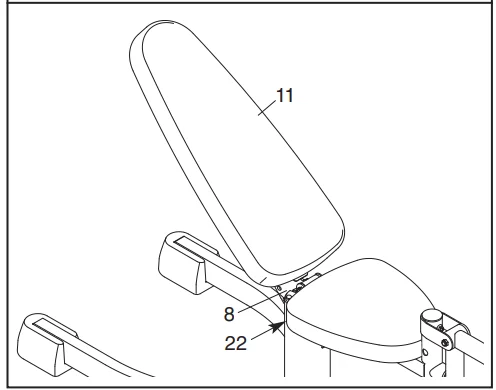
ATTACHING ACCESSORIES
The Lat Bar (55) can be attached to a Cable (61) with a Cable Clip (71). For some exercises, the Chain (24) should be attached between the Cable and the Lat Bar with two Cable Clips. The other accessories can be attached to the Cables (61) in the same manner.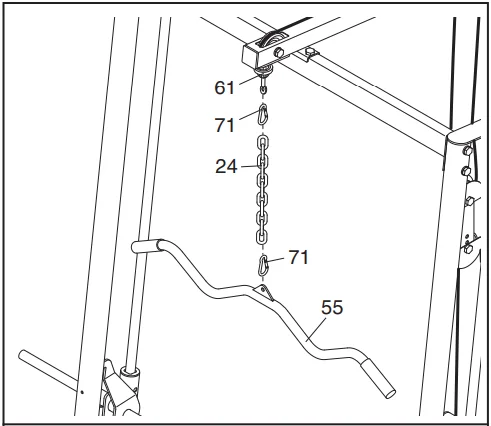
ATTACHING THE BARBELL ADAPTER
Slide the Barbell Adapter (54) onto the Barbell (51) and secure it in place with an M8 x 10mm Set Screw (62). Repeat this process on the other side of the Barbell.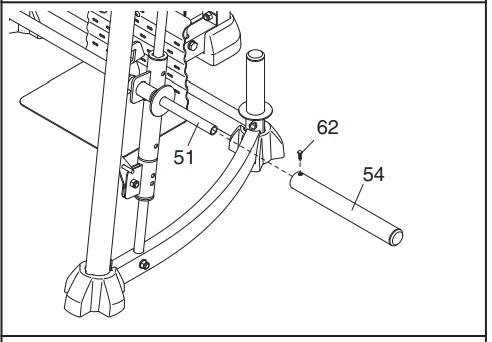
ADDING WEIGHT
Slide the desired amount of weight (not included) onto the Weight Carriage (42). Secure the weight with the Spring Clips (72). Add weight to the Barbell (51) or Leg Lever (not shown) in the same manner. Weights can be stored on the Center Rack Base (39) when they are not being used.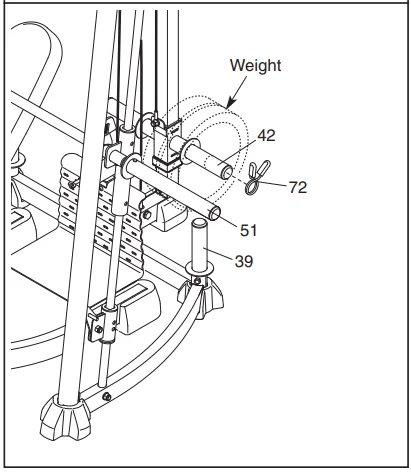
ADJUSTING THE BARBELL STOPS
Hold the handle on the Barbell Stop Hook (48) and disengage the Hook from the Front Upright (43). Move the Barbell Stop (47) to the lowest point you want the Barbell (51) to go during the exercise. Re-engage the Hook into the Upright. Repeat with the other Barbell Stop.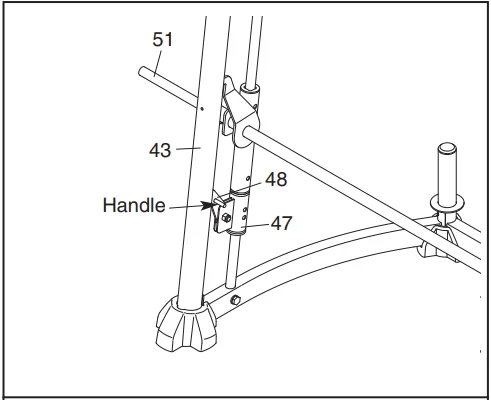
USING THE BARBELL
First, attach the desired amount of weight to the Barbell (51) (see ADDING WEIGHT above). Then, adjust the barbell stops (see ADJUSTING THE BARBELL STOPS above). Finally, lift the Locking Bar (50) and disengage it from the Front Uprights (43). When finished with the exercise, re-engage the Locking Bar into the Uprights.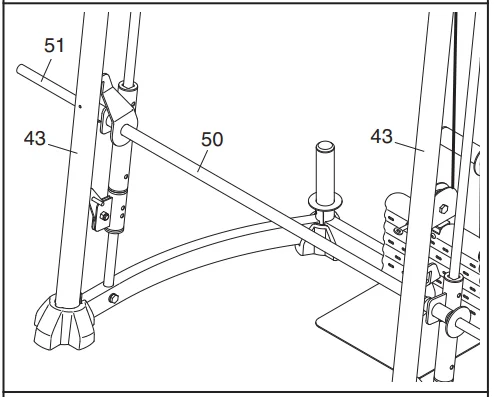
ADJUSTING THE CABLE
Woven cable, the type of cable used on your weight rack, can stretch slightly when it is first used. You can remove slack from the Cable (61) by moving the lower Pulley (63) closer to the upper Pulley. Remove the M10 x 50mm Bolt (79) from the Pulley (63), the two Pulley Plates (35), the two Half Finger Guards (65), the Cable Trap (66), and the M10 Nylon Locknut (77). Reattach the Pulley, Cable Trap, and Finger Guards using a higher set of holes in the Pulley Plates with the Bolt and Locknut.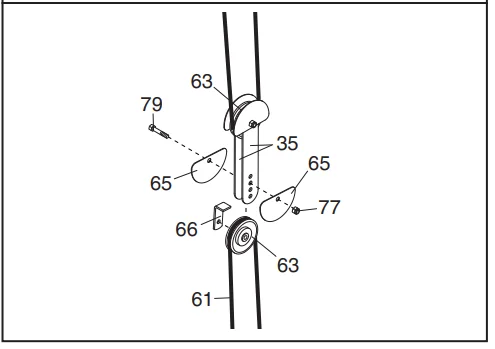
CABLE DIAGRAM
The cable diagram shows the proper routing of the Cables (61). Use the diagrams to make sure that the cables and the cable traps have been assembled correctly. If the cables have not been correctly routed, the weight bench will not function properly, and damage may occur. The numbers show the correct route for each cable. Make sure that the cable traps do not touch or bind the cables.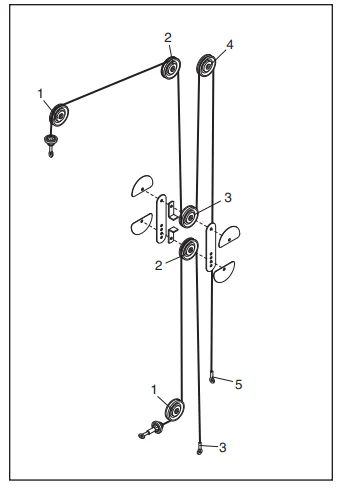
EXERCISE GUIDELINES
THE FOUR BASIC TYPES OF WORKOUTS
Muscle Building
To increase the size and strength of your muscles, push them close to their maximum capacity. Your muscles will adapt and grow as you progressively increase the intensity of your exercise. You can adjust the intensity level of an individual exercise in two ways:
- By changing the amount of weight used
- By changing the number of repetitions or sets performed. (A “repetition” is one complete cycle of an exercise, such as one sit-up. A “set” is a series of repetitions.)
The proper amount of weight for each exercise depends on the individual user. You must gauge your limits and select the amount of weight that is right for you. Begin with 3 sets of 8 repetitions for each exercise you perform. Rest for 3 minutes after each set. When you can complete 3 sets of 12 repetitions without difficulty, increase the amount of weight.
Toning
You can tone your muscles by pushing them to a moderate percentage of their capacity. Select a moderate amount of weight and increase the number of repetitions in each set. Complete as many sets of 15 to 20 repetitions as possible without discomfort. Rest for 1 minute after each set. Work your muscles by completing more sets rather than by using high amounts of weight.
Weight Loss
To lose weight, use a low amount of weight and increase the number of repetitions in each set. Exercise for 20 to 30 minutes, resting for a maximum of 30 seconds between sets.
Cross Training
Cross-training is an efficient way to develop a complete and well-balanced fitness program. An example of a balanced program is:
- Plan strength training workouts on Monday, Wednesday, and Friday.
- Plan 20 to 30 minutes of aerobic exercise, such as running on a treadmill or riding on an elliptical or exercise bike, on Tuesday and Thursday.
- Rest from both strength training and aerobic exercise for at least one full day each week to give your body time to regenerate.
The combination of strength training and aerobic exercise will reshape and strengthen your body, plus develop your heart and lungs.
PERSONALIZING YOUR EXERCISE PROGRAM
Determining the exact length of time for each workout, as well as the number of repetitions or sets completed, is an individual matter. It is important to avoid overdoing it during the first few months of your exercise program. You should progress at your own pace and be sensitive to your body’s signals. If you experience pain or dizziness at any time while exercising, stop immediately and begin cooling down. Find out what is wrong before continuing. Remember that adequate rest and a proper diet are important factors in any exercise program.
WARMING UP
Begin each workout with 5 to 10 minutes of stretching and light exercise to warm up. Warming up prepares your body for more strenuous exercise by increasing circulation, raising your body temperature, and delivering more oxygen to your muscles.
WORKING OUT
Each workout should include 6 to 10 different exercises. Select exercises for every major muscle group, emphasizing areas that you want to develop most. To give balance and variety to your workouts, vary the exercises from session to session. Schedule your workouts for the time of day when your energy level is the highest. Each workout should be followed by at least one day of rest. Once you find the schedule that is right for you, stick with it.
EXERCISE FORM
Maintaining proper form is an essential part of an effective exercise program. This requires moving through the full range of motion for each exercise, and moving only the appropriate parts of the body. Exercising in an uncontrolled manner will leave you feeling exhausted. In the exercise guide accompanying this manual, you will find photographs showing the correct form for several exercises, and a list of the muscles affected.
Refer to the muscle chart on the next page to find the names of the muscles. The repetitions in each set should be performed smoothly and without pausing. The exertion stage of each repetition should last about half as long as the return stage. Proper breathing is important. Exhale during the exertion stage of each repetition and inhale during the return stroke. Never hold your breath.
Rest for a short period of time after each set. The ideal resting periods are:
- Rest for three minutes after each set for a muscle-building workout.
- Rest for one minute after each set for a toning workout.
- Rest for 30 seconds after each set for a weight loss workout.
Plan to spend the first couple of weeks familiarizing yourself with the equipment and learning the proper form for each exercise.
COOLING DOWN
End each workout with 5 to 10 minutes of stretching. Include stretches for both your arms and legs. Move slowly as you stretch and do not bounce. Ease into each stretch gradually and go only as far as you can without strain. Stretching at the end of each workout is an effective way to increase flexibility.
STAYING MOTIVATED
For motivation, keep a record of each workout. List the date, the exercises performed, the resistance used, and the number of sets and repetitions completed. Record your weight and key body measurements at the end of every month. Remember, the key to achieving the greatest results is to make exercise a regular and enjoyable part of your everyday life.
For More Manuals By ProForm, Visit ManualsLibraryy.
Pro-Form XP 300 Weight Bench Machine-FAQs
What is the weight limit of the Pro-Form XP 300?
The Pro-Form XP 300 supports up to 300 lbs of user weight.
How do I use the XP 300 weight bench safely?
Adjust the bench to the desired incline or flat position, secure your weights, and perform exercises with proper form. Always start with lighter weights to avoid injury.
Can I perform multiple exercises on this bench?
Yes, the XP 300 supports various exercises including bench press, dumbbell workouts, and seated shoulder exercises.
How do I adjust the bench incline or decline?
Use the adjustment lever or pins under the seat/backrest to set the bench to flat, incline, or decline positions.
Is Pro-Form a good brand for home gym equipment?
Yes. Pro-Form offers reliable, space-saving machines with solid build quality, making it ideal for home use.
How do I maintain my Pro-Form XP 300?
Keep the bench clean, tighten bolts regularly, and inspect moving parts for wear. Avoid dropping weights on the frame.
Can I use the XP 300 without additional equipment?
Yes, bodyweight exercises like push-ups and sit-ups can be done, but for strength training, dumbbells or barbells are recommended.
How long will the Pro-Form XP 300 last?
With proper care and maintenance, the bench can last several years. Regular inspection of bolts and padding helps prolong its life.
How do I assemble the Pro-Form XP 300?
Follow the included user guide step-by-step, ensure all bolts are tight, and check stability before first use.
Is this bench suitable for beginners?
Absolutely. The XP 300 is user-friendly, adjustable, and ideal for both beginners and intermediate users.