
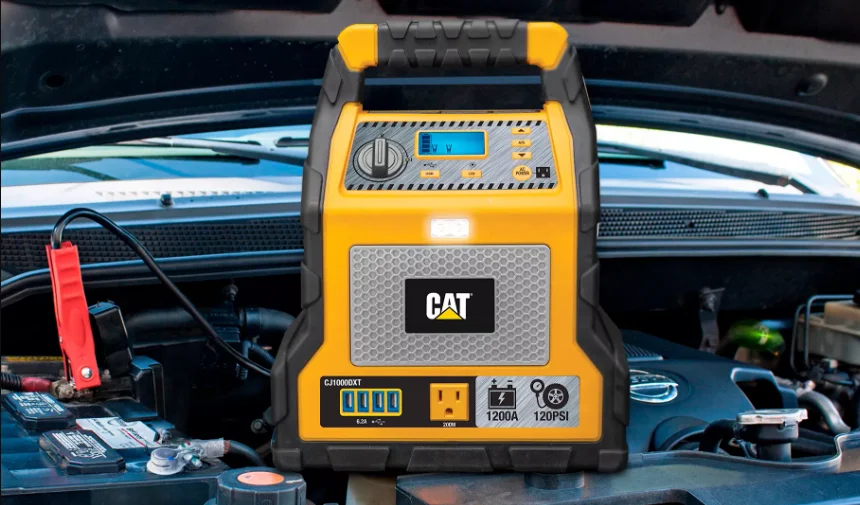

CAT CJ1000DXT Digital Jump Starter-Compressor
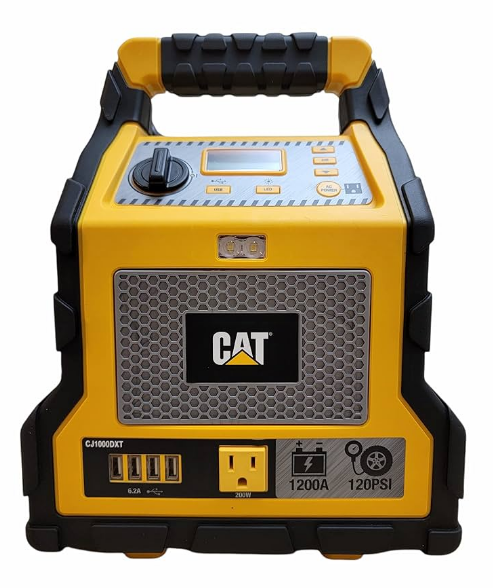
FEATURES
- Rubber Grip Handle
- Backlit LCD Screen
- Increase Compressor Pressure Control Button (+)
- Jump Starter Power Switch
- USB Power Button
- Compressor Power Button
- Decrease Compressor Pressure Control Button (–)
- AC Power Button
- Area Light Power Button
- 2-LED Built-in Area Light
- Three-Prong 120 Volt AC Outlet
- Air Hose and Sure Fit® Nozzle
- Negative (–) Black Clamp
- Positive (+) Red Clamp
- USB Charging Ports
- USB Power/Fault Indicators
- Built-in 120 Volt AC Charger (under protective cover)
- Nozzle Adapter
- Air Hose Storage
- Nozzle Adapter Storage
- AC Extension Cord (may be sold separately)


This device complies with part 15 of the FCC rules. Operation is subject to the following two conditions:
- This device may not cause harmful interference, and
- This device must accept any interference received, including interference that may cause undesired operation.
This equipment has been tested and found to comply with the limits for a Class B digital device, pursuant to part 15 of the FCC Rules. These limits are designed to provide reasonable protection against harmful interference in a residential installation. This equipment generates, uses, and can radiate radio frequency energy and, if not installed and used in accordance with the instructions, may cause harmful interference to radio communications.
However, there is no guarantee that interference will not occur in a particular installation. If this equipment does cause harmful interference to radio or television reception, which can be determined by turning the equipment off and on, the user is encouraged to try to correct the interference by one or more of the following measures:
- Reorient or relocate the receiving antenna.
- Increase the separation between the equipment and receiver.
- Connect the equipment into an outlet on a circuit different from that to which the receiver is connected.
- Consult the dealer or an experienced radio/TV technician for help.
Changes or modifications not approved by the party responsible for compliance could void the user’s authority to operate the equipment. This class B digital apparatus complies with Canadian ICES-003. CAN ICES-3(B) / NMB-3(B).
OVERVIEW
Common Actions and Unit Responses. The following actions turn the unit on and activate the LCD screen: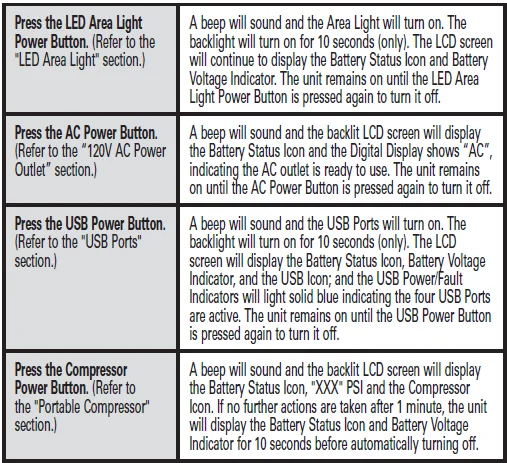
VIEWING BATTERY STATUS
The Battery Status Icon and Battery Voltage Indicator indicate the battery charge level as follows.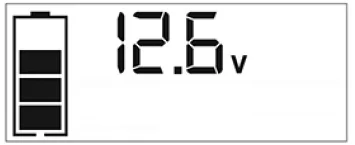
- If the battery charge level is at full capacity, four solid bars will display.
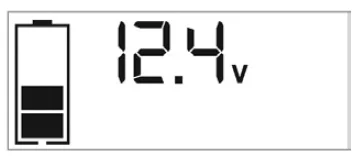
- If the battery is partially charged, two or three solid bars will display.
- If the battery is nearly empty, one solid bar will display. The unit should be charged at this time.
- If the battery is empty, four blank bars will display. The unit MUST be charged at this time, or the unit’s built-in low-voltage protection will activate. The empty Battery Status Icon will flash for a short period of time before automatic shutdown. The unit will not operate until the battery is recharged.
CHARGING/RECHARGING
This unit is delivered in a partially charged state – you must fully charge it before using it for the first time. Initial AC charge should be for 40 hours or until the Battery Status Icon shows 4 solid bars. Lead-acid batteries require routine maintenance to ensure a full charge and long battery life. All batteries lose energy from self-discharge over time and more rapidly at higher temperatures. Therefore, batteries need periodic charging to replace energy lost through self-discharge. When the unit is not in frequent use, the manufacturer recommends that the battery be recharged at least every 30 days and after each use.
CAUTION – RISK OF PROPERTY DAMAGE: Failure to keep the battery charged will cause permanent damage and result in poor jump-starting performance.
IMPORTANT NOTES:
- Recharging the battery after each use will prolong battery life; frequent heavy discharges between recharges and/or overcharging will reduce battery life.
- Make sure all other unit functions are turned off during recharging, as this can slow the recharging process.
- If you know the unit is discharged, but the battery icon displays four solid bars as if the unit is fully charged when connected to a charging power source, this may be due to the internal battery having high impedance. The manufacturer suggests leaving the unit charging for a period of 40 hours using the built-in AC charger before use.
Charging/Recharging Using the Built-In 120 Volt AC Charger and AC Extension Cord (may be sold separately)
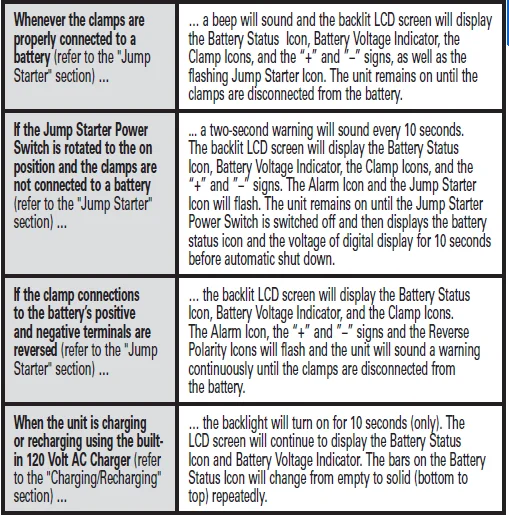
- Lift the protective cover of the built-in 120 Volt AC Charger (refer to the “Features” section to locate). Connect an extension cord to the unit. Plug the other end of the cord into a standard 120‑volt AC wall outlet. When the unit is properly connected to an AC power source, the LCD screen will display the following: The bars on the Battery Status Icon represent the charge level of the unit’s internal battery. The bars on the Battery Status Icon will change from empty to solid (bottom to top) repeatedly to indicate the unit is charging. The backlight will turn on for 10 seconds (only).

- Charge for approximately 40 hours or until the Battery Status Icon shows 4 solid bars.
- When charging is complete, unplug the AC extension cord from the AC outlet and then disconnect it from the unit.
JUMP-STARTER
This unit is equipped with a jump starter power switch that allows energy to flow only when proper connections are made to the battery and frame.
- For negative-grounded systems, connect the positive (red) clamp to the positive ungrounded battery post and the negative (black) clamp to the vehicle chassis or engine block away from the battery. Do not connect the clamp to the carburetor, fuel lines, or sheet-metal body parts. Connect to a heavy-gauge metal part of the frame or engine block.
- For positive-grounded systems, connect the negative (black) clamp to the negative ungrounded battery post and the positive (red) clamp to the vehicle chassis or engine block away from the battery. Do not connect the clamp to the carburetor, fuel lines, or sheet-metal body parts. Connect to a heavy-gauge metal part of the frame or engine block. IMPORTANT: Make sure the Compressor Power Button has been turned off before attempting to use the unit as a Jump Starter. WARNING – TO REDUCE THE RISK OF SERIOUS INJURY OR PROPERTY DAMAGE:
- Follow all safety instructions found in the “Specific Safety Instructions for Jump Starters” section of this instruction manual.
- Never touch red and black clamps together. This can cause dangerous sparks, power arcing, and/or explosion.
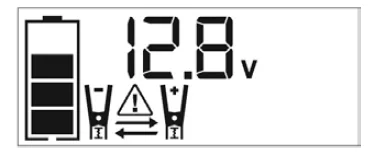
- If the clamps are connected incorrectly about the polarity, the unit will sound a continuous alarm until the clamps are disconnected. The backlit LCD Screen will display the Battery Status Icon, the Battery Voltage Indicator, and the Clamp Icons. The “+” and”–” signs above the Clamp Icons, the Arrow Icons, and the Alarm Icon will flash. The backlit LCD screen will display the following:

- CAUTION: The unit will suffer permanent damage if the Jump Starter Power Switch is turned on while the clamps are connected with reverse polarity. Disconnect the clamps and reconnect to the battery with correct polarity.
- If the Jump Starter Power Switch is turned on and the unit detects that the clamps are not connected to a battery, a two-second warning will sound every 10 seconds. The LCD screen will display the Battery Status Icon, the Battery Voltage Indicator, and the Clamp Icons with the “+” and”–” signs. The Alarm Icon and the Jump Starter Icon will flash. The backlit LCD screen will display the following:

- Turn off the Jump Starter Power Switch; connect the clamps to the battery, making sure the clamps are connected with correct polarity; then turn the Jump Starter Power Switch back on.
- Always disconnect the negative (black) jumper cable first, followed by the positive (red) jumper cable, except for positive-grounded systems.
Procedure
Take the following steps, observing all cautions and warnings in the “Important Safety Instructions” section at the front of this manual.
- Turn off the vehicle ignition and all accessories (radio, A/C, lights, connected cell phone chargers, etc.). Place the vehicle in “park” and set the emergency brake.
- Make sure the jump-starter power switch is in the off position.
- Remove the jumper clamps from the clamp tabs. Connect the red clamp first, then the black clamp.
- Procedure for jump-starting a NEGATIVE GROUNDED SYSTEM (negative battery terminal is connected to chassis) (MOST COMMON)
- Connect the positive (+) red clamp to the vehicle battery’s positive terminal.
- Connect the negative (–) black clamp to the chassis or a solid, non-moving, metal vehicle component or body part. Never clamp directly to the negative battery terminal or a moving part. Refer to the automobile owner’s manual.
- Procedure for jump-starting POSITIVE GROUND SYSTEMS. NOTE: In the rare event that the vehicle to be started has a Positive Grounded System (positive battery terminal is connected to chassis), replace steps 4a and
- Above with steps 5a and 5b, then proceed to step 6.
- Connect the negative (–) black clamp to the vehicle battery’s negative terminal.
- Connect the positive (+) red clamp to the vehicle chassis or a solid, non-moving, metal vehicle component or body part. Never clamp directly to the positive battery terminal or a moving part. Refer to the automobile owner’s manual.
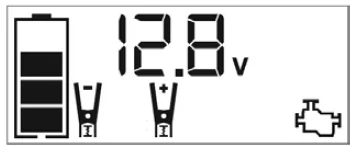
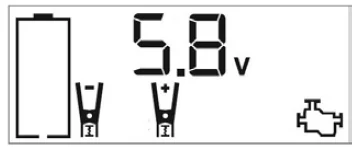
- When the clamps are connected properly, the backlit LCD screen will display the following to indicate the unit is ready to jump-start: The Battery Status icon, Battery Voltage Indicator, Clamp Icons, and the “+” and”–” signs light solid. The jump starter icon will flash to indicate the clamps are properly connected.

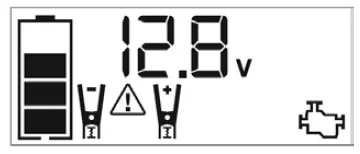
- Turn the Jump-Starter Power Switch on. When the Jump-Starter Power Switch is turned on, the Engine Icon lights solid, indicating it is time to start the vehicle. Turn on the ignition and crank the engine in 5-6 second bursts until the engine starts. The backlit LCD screen will display the following: The Battery Status Icon, the Battery Voltage Indicator, the Jump Starter Icon, the Clamp Icons, and the “+” and”–” signs lit solid to indicate the unit is jump-starting.

- Turn the Jump-Starter Power Switch off.
- Disconnect the negative (–) engine or chassis clamp first, then disconnect the positive (+) battery clamp.
IMPORTANT: Always turn the unit off when not in use. Recharge this unit fully after each use.
CAUTION – TO REDUCE THE RISK OF PROPERTY DAMAGE:
- Vehicles that have on-board computerised systems may be damaged if the vehicle battery is jump-started. Before jump-starting this type of vehicle, read the vehicle manual to confirm that external-starting assistance is advised.
- Excessive engine cranking can damage the vehicle‘s starter motor. If the engine fails to start after the recommended number of attempts, discontinue the jump-start procedure and look for other problems that need to be corrected.
- If the vehicle fails to start, turn off the ignition, turn off the Jump-Starter Power Switch, disconnect the jump-start system’s leads, and contact a qualified technician to investigate why the engine did not start.
LED AREA LIGHT
The built-in LED Area Light consists of two LEDs on the front of the unit. It is controlled by the Area Light Power. Button on the control panel (refer to the “Features” section to locate).
- Press the Area Light Power Button once to turn the light on.
- Press the Area Light Power Button again to turn the area light off.
When the Area Light Power Button is pressed to turn it on, a beep will sound. The backlit LCD screen will turn on for 10 seconds (only) and will then continuously display the Battery Status Icon and the Battery Voltage Indicator Periodically check the unit’s battery status on the backlit LCD screen. Four solid bars in the battery icon indicate a full battery. When the battery level is nearly empty with only one solid bar or empty with 4 empty bars, the unit must be recharged at this time, or the unit’s built-in low voltage protection will activate. The empty Battery Status Icon will flash for a short period of time before automatic shutdown.
IMPORTANT: Make sure the Area Light is turned off when the unit is being recharged or stored.
120 VOLT AC POWER OUTLET
Rated Versus Actual Current Draw of Equipment.
Most electrical tools, appliances, electronic devices, and audio/visual equipment have labels that indicate the power consumption in amps or watts. Be sure that the power consumption of the item to be operated is below 200 watts. If the power consumption is rated in amps AC, simply multiply by the AC volts (120) to determine the wattage.
Resistive loads are the easiest for this unit to run; however, it will not run larger resistive loads (such as electric stoves and heaters), which require far more wattage than the unit can deliver on a continuous basis. Inductive loads (such as TVs and stereos) require more current to operate than do resistive loads of the same wattage rating.
Power Inverter Output Waveform
The AC output waveform of this unit is known as a modified sine wave. It is a stepped waveform that has characteristics similar to the sine wave shape of utility power. This type of waveform is suitable for most AC loads, including linear and switching power supplies used in electronic equipment, transformers, and small motors.
Protective Features
The inverter monitors the following conditions: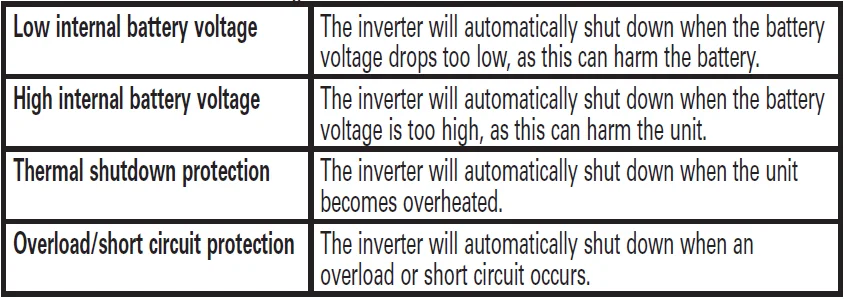
Using the USB Ports
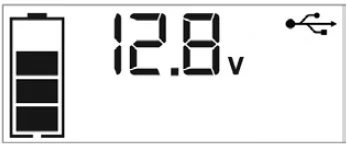
- Press the USB Power Button to turn on all of the USB Ports. A beep will sound, and the USB Power/Fault Indicators around each of the USB Ports will light blue. The backlight will turn on for 10 seconds (only). The backlit LCD screen will continuously display the following: The Battery Status Icon and Battery Voltage Indicator will light solid, as well as the USB Icon, indicating the USB ports are ready to use.

- Plug the USB-powered device into the USB power port(s) and operate normally.
- Press the USB Power Button again to turn off the USB Ports.
- Periodically check the unit’s battery status on the backlit LCD screen. Four solid bars in the battery icon indicate a full battery. When the battery level is nearly empty with only one solid bar or empty with 4 empty bars, the unit must be recharged at this time, or the unit’s built-in low voltage protection will activate. The empty Battery Status Icon will flash for a short period of time before automatic shutdown.
IMPORTANT: Make sure the USB Ports are turned off when the unit is being recharged or stored.
PORTABLE COMPRESSOR
The built-in 12-volt DC compressor is the ultimate compressor for all vehicle tires, trailer tires, and recreational inflatables. A nozzle adaptor is supplied that screws onto the end of the Sure Fit® nozzle at the free end of the compressor hose. The compressor hose with tire fitting is stored in the compressor hose storage compartment. Refer to the “Features” illustration for locations of the compressor hose.
The Compressor Power Button and Increase (+) and Decrease (–) Compressor Pressure Control Buttons are located on the control panel on the front of the unit. Before proceeding, check the unit’s battery status on the LCD screen. Four solid bars in the battery icon indicate a full battery. When the battery level is nearly empty with only one solid bar, the unit MUST be recharged before use, or the unit’s built-in low voltage protection will activate.
The empty Battery Status Icon will flash for a short period of time before automatic shutdown. The compressor is capable of inflating up to 120 pounds per square inch (psi) pressure. The compressor can operate long enough to fill up to 3 average-sized tires before the battery must be recharged. Return the hose to the storage compartment after use.
IMPORTANT: Make sure the Jump Starter Power Button has been turned off before attempting to use the unit as a Compressor.
WARNING – TO REDUCE THE RISK OF SERIOUS INJURY OR PROPERTY DAMAGE: Follow all safety instructions found in the “Specific Safety Instructions for Compressors” section of this instruction manual.
CAUTION – TO REDUCE THE RISK OF SERIOUS INJURY OR PROPERTY DAMAGE: When the compressor is operated at a low PSI, the unit may start in low and gradually rev up. When the compressor is operated at higher PSIs, the unit may operate normally for several minutes, then rev down for a few minutes before returning to normal operation.
This feature protects the unit from overheating during normal use. In any event, do not operate the compressor continuously for longer than 10 minutes, as it may overheat. This could damage the compressor. If the compressor must be operated for longer periods, every 10 minutes, press the Compressor Power Button to turn the compressor off, then restart after a cooling-down period of approximately 30 minutes.
TROUBLESHOOTING


FULL ONE-YEAR HOME USE WARRANTY
The manufacturer warrants this product against defects in materials and workmanship for a period of ONE (1) YEAR from the date of retail purchase by the original end-user purchaser (“Warranty Period”). If there is a defect and a valid claim is received within the Warranty Period, the defective product can be replaced or repaired in the following ways: (1) Return the product to the manufacturer for repair or replacement at the manufacturer’s option. Proof of purchase may be required by the manufacturer. (2) Return the product to the retailer where the product was purchased for an exchange (provided that the store is a participating retailer).
Returns to the retailer should be made within the time period of the retailer’s return policy for exchanges only (usually 30 to 90 days after the sale). Proof of purchase may be required. Please check with the retailer for their specific return policy regarding returns that are beyond the time set for exchanges. This warranty does not apply to accessories, bulbs, fuses, and batteries; defects resulting from normal wear and tear, accidents; damages sustained during shipping; alterations; unauthorised use or repair; neglect, misuse, abuse; and failure to follow instructions for care and maintenance for the product.
This warranty gives you, the original retail purchaser, specific legal rights, and you may have other rights which vary from state to state or province to province. This product is not intended for commercial use. Please complete the Product Registration Card and return it within 30 days from purchase of the product to: Baccus Global LLC, One City Centre, 1 North Federal Highway, Suite 200, Boca Raton, FL 33432. Baccusglobal.com.
For More Manuals By CAT Power Tools, Visit ManualsLibraryy
CAT CJ1000DXT Digital Jump Starter-Compressor-FAQS
How long does it take to charge the CAT CJ1000DXT?
The full charging time is up to 40 hours using the AC charger.
How do I know when the jump starter is fully charged?
The digital display or status LEDs will indicate when charging is complete. Solid indicators usually mean the battery is fully charged.
Can the CAT CJ1000DXT start a completely dead battery?
It can start a battery that is deeply discharged, but if the battery is permanently damaged or cannot hold any charge, replacement may be required.
Can I overcharge the CAT jump starter?
Yes. Leaving it plugged in longer than recommended may reduce battery life. Disconnect once fully charged.
Is the CAT CJ1000DXT also a battery charger?
No. It is designed to jump-start vehicles, not slowly recharge car batteries like a traditional charger.
How many jump starts can I get on one full charge?
You can typically get multiple jump starts, depending on vehicle size, battery condition, and ambient temperature.
Can I leave the jump starter plugged in overnight?
It is not recommended unless specified by the manufacturer. Unplug once fully charged to avoid battery stress.
Can the built-in compressor inflate tires?
Yes. The integrated air compressor can inflate car, bike, and sports equipment tires using the digital pressure display.