
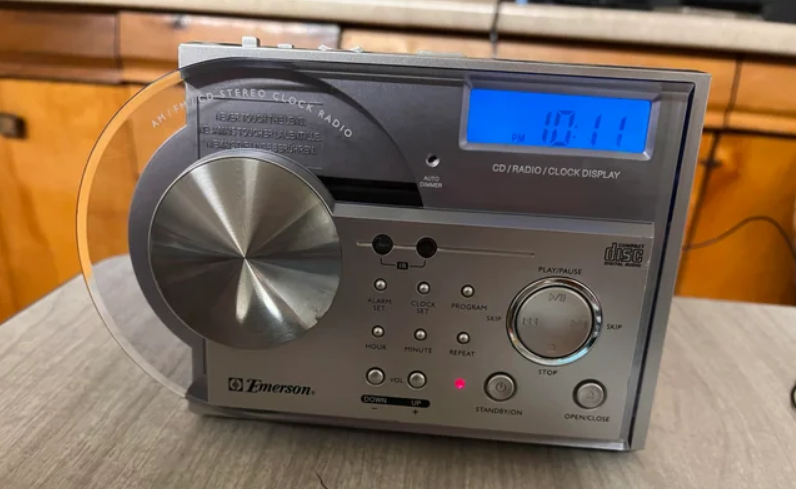

Emerson CKD2328 CD Stereo Clock Radio
FCC INFORMATION
This equipment has been tested and found to comply with the limits for a Class B digital device, pursuant to Part 15 of the FCC Rules. These limits are designed to provide reasonable protection against harmful interference in a residential installation. This equipment generates, uses, and can radiate radio frequency energy and, if not installed and used in accordance with the instructions, may cause harmful interference to radio communications.
However, there is no guarantee that interference will not occur in a particular installation. If this equipment does cause harmful interference to radio or television reception, which can be determined by turning the equipment off and on, the user is encouraged to try to correct the interference by one or more of the following measures:
- Reorient or relocate the receiving antenna.
- Increase the separation between the equipment and receiver.
- Connect the equipment into an outlet on a circuit different from that to which the receiver is connected.
- Consult the dealer or an experienced radio/TV technician for help.
This device complies with Part 15 of the FCC Rules. Operation is subject to the following two conditions:
- This device may not cause harmful interference, and
- This device must accept any interference received, including interference that may cause undesired operation.
UNPACKING AND SETUP
- Carefully remove the main unit and the accessories from the display carton. Remove all the packing material from the unit and verify that you have the following items: Main unit, external AM antenna, and remote control (for model CKD2330 only).
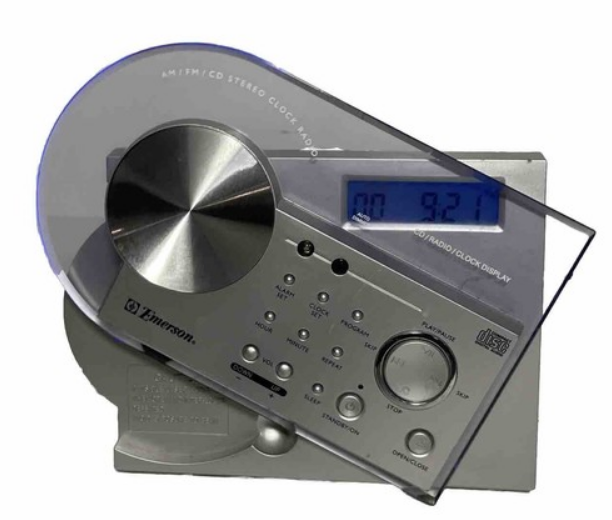
- Carefully remove any small strips of tape that may have been used to prevent the Power Panel from moving in transit.
- Unwind the AC power cord and extend it to its full length.
- Unwind the lead wire FM antenna and extend it to its full length.
- This unit was shipped with a dummy CD transit card in the CD player. This dummy CD prevents the laser pickup from moving during shipment. This card must be removed before you can insert your own CDs. However, to remove the card, the unit must be connected to the AC outlet, and the Power Panel must be opened electronically. Please refer to the instructions on page 18 of this manual. TO AVOID DAMAGING YOUR UNIT, DO NOT ATTEMPT TO MANUALLY OPEN THE POWER PANEL.
- Place the unit on a flat, level surface such as a table, desk, counter, shelf, etc., convenient to a 120V 60 Hz AC outlet, out of direct sunlight, and away from sources of excess heat, dust, moisture, or strong magnetic fields.
External AM Antenna
This unit utilizes an external AM loop antenna instead of a built-in ferrite bar antenna.
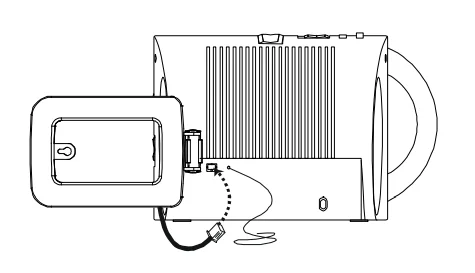
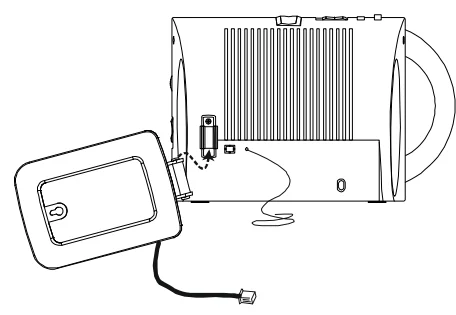
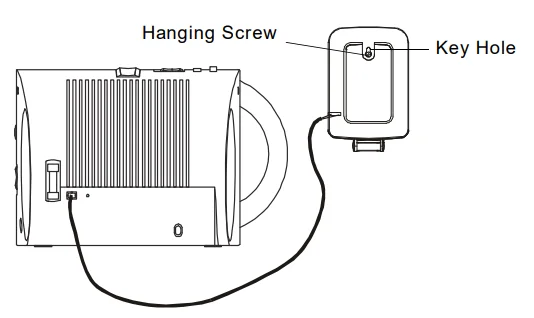
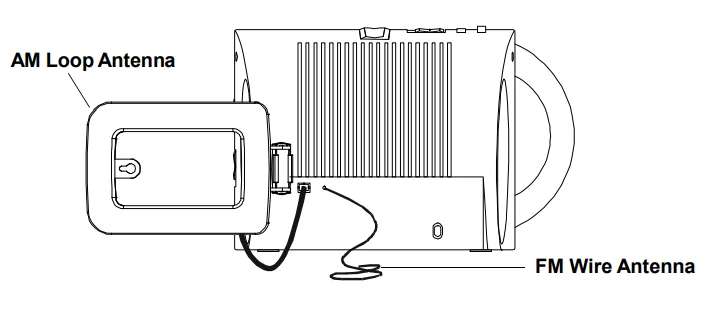
- Insert the small white plug from the AM loop antenna into the AM antenna jack on the back of the radio. The plug can only be inserted one way.

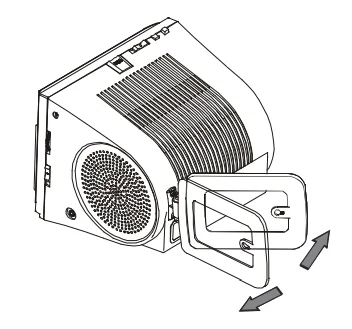
- Attach the AM loop antenna to the antenna bracket on the back of the radio as shown.

- Adjust the angle of the loop antenna until you find the position that provides the best AM reception.

- Note: If you find that AM reception is still unsatisfactory, you can remove the loop antenna from the antenna mounting bracket and attach it to the wall with a thumbtack or small nail through the “keyhole” opening on the antenna frame.

Battery Back Up System
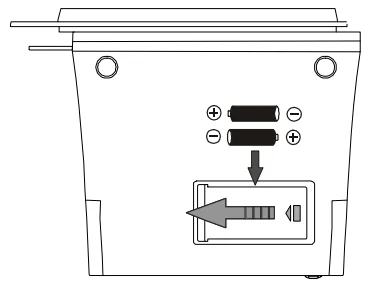
This model includes a battery backup circuit that will maintain the clock and alarm settings in the event of a temporary power interruption. The battery backup system requires two “AA” batteries, not included. The battery compartment is located at the bottom of the cabinet.
- Turn the radio upside down. Slide the battery door in the direction of the arrow and remove the door.
- Insert two fresh “AA” alkaline batteries in the compartment. Be sure to observe the polarity markings engraved in the compartment. If the batteries are inserted incorrectly, the backup system will not work.

- Replace the battery door and turn the radio right side up. If the power is interrupted, the display will go off, and the radio will not work. However, the batteries will maintain the clock and alarm settings in memory. When the power is restored, the display will come on again, and the clock and alarm settings will be correct. The life of the batteries will depend on the frequency and length of the power interruptions that you experience. For best results, we suggest you install fresh batteries every 9 to 12 months. Always change both batteries together with a well-known brand of alkaline batteries. Do not mix old and new batteries, or different types of batteries such as alkaline and carbon-zinc batteries.
Remote Control (Model CKD2330 Only)
Model CKD2330 includes a credit card-sized 10-button remote control that allows you to operate the CD player, control the volume, and switch the system ‘On’ and ‘Off’ from across the room. The remote control operates on one button-style lithium battery (Type CR2032 or equivalent), included. We have placed a clear plastic spacer between the battery and the battery contact plate so that the battery will remain fresh until you are ready to use the remote. Pull on the end of the spacer tab to remove the spacer from the remote and activate the battery.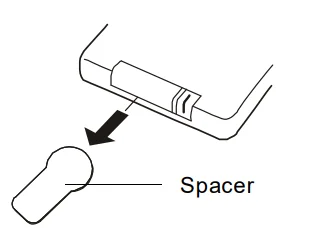
To use the remote control, point the remote at the remote sensor on the front panel of the radio and press the appropriate buttons on the remote. The effective operating range of the remote is approximately 15 feet at an angle of no more than 15 degrees to the left or right of ‘dead center’. When the remote control no longer works or the operation becomes intermittent, it is time to change the battery. Press downward on the locking tab and slide the battery holder out of the remote as shown. Remove the exhausted CR2032 battery from the holder, insert a fresh battery into the holder with the “+” side facing up, and slide the holder back into the remote.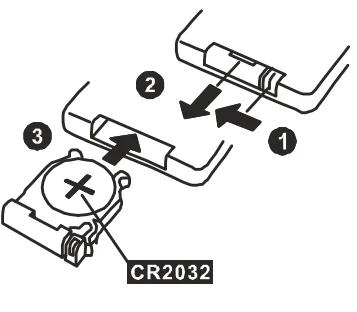
IMPORTANT BATTERY PRECAUTIONS:
- Do not leave the exhausted battery lying around where a child or pet might play with or swallow it.
- If the battery is swallowed, contact a physician immediately.
- Do not attempt to open the battery, and do not dispose of the battery in a fire.
PROTECT YOUR FURNITURE !!
This model is equipped with non-skid rubber ‘feet’ to prevent the product from moving when you operate the controls. These ‘feet’ are made from non-migrating rubber material specially formulated to avoid leaving any marks or stains on your furniture. However, certain types of oil-based furniture polishes, wood preservatives, or cleaning sprays may cause the rubber ‘feet’ to soften and leave marks or a rubber residue on the furniture.
To prevent any damage to your furniture, we strongly recommend that you purchase small self-adhesive felt pads, available at hardware stores and home improvement centers everywhere, and apply these pads to the bottom of the rubber ‘feet’ before you place the product on fine wooden furniture.
POWER SOURCE
This radio is designed to operate on 120V 60Hz AC only. Attempting to operate this radio on any other power source could cause damage to the unit, and such damage is not covered by your warranty.
Make sure the radio is connected to an AC outlet that is always “live”. Do not connect the radio to an outlet that is controlled by a wall switch.
NOTE: This unit has a polarized AC plug with one wide blade and one narrow blade. This plug will only fit into a matching polarized AC outlet. This is a safety feature to reduce the possibility of electric shock. If this plug will not fit in your AC outlet, you probably have an outdated non-polarized outlet. You should have your outdated outlet changed by a qualified, licensed electrician. Do not file the wide blade on the plug or use an adapter to make the plug fit into your outlet. This defeats the safety feature and could expose you to electric shock.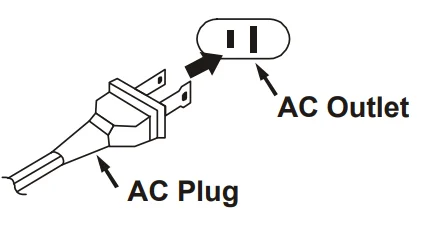
LOCATION OF CONTROLS AND INDICATORS
- CD Power Panel (Flashing Blue Light When Opening).
- Mute Indicator (Red).
- ALARM SET Button.
- Snooze Sensor.
- CLOCK SET Button.
- Display AUTO DIMMER.
- PROGRAM Button.
- LCD Display.
- TUNING Control.
- Remote Sensor.
- Reverse SKIP/Search
 Button.
 - PLAY/PAUSE
 Button.
 - Forward SKIP/Search
 Button.
 - STOP
 Button.
 - REPEAT Button.
- OPEN/CLOSE
 Button.
 - Standby LED Indicator.
- STANDBY/ON
 Button.
 - SLEEP Button.
- MINUTE Button.
- VOL (Volume) UP/+ Button.
- VOL (Volume) DOWN/– Button.
- HOUR Button.
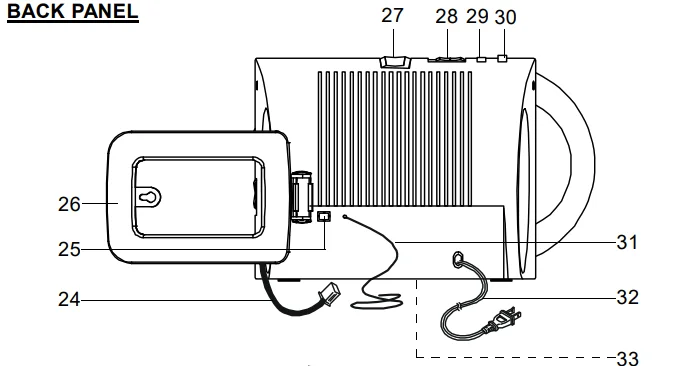
- AM Antenna Plug.
- AM Antenna Socket.
- AM Loop Antenna.
- SNOOZE Button.
- CD/RADIO Selector Switch.
- ALARM ON/OFF Button.
- ALARM MUSIC
 /BUZZER
  Switch.
 - FM Wire Antenna.
- AC Power Cord.
- Backup Battery Compartment (Bottom Cabinet).
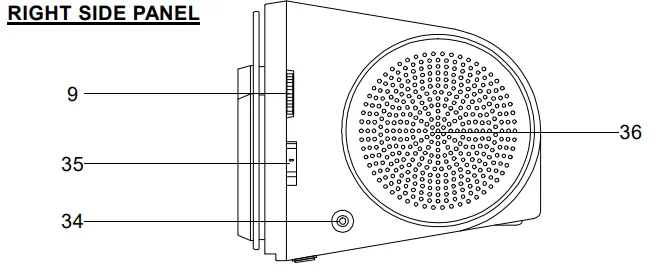
- Phone
 Jack.
Jack. - M/FM/FM ST. Selector Switch.
- Right Speaker.


 Button.
 Button.
 Button.
 Button.
 Button.
 /BUZZER
  Switch.
 Jack.
Jack.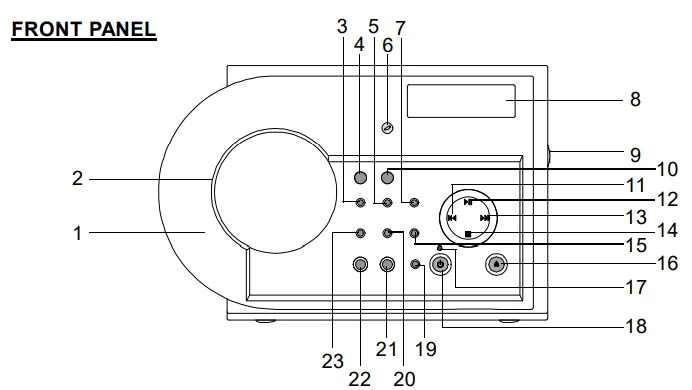
REMOTE CONTROL (Model CKD2330 Only)
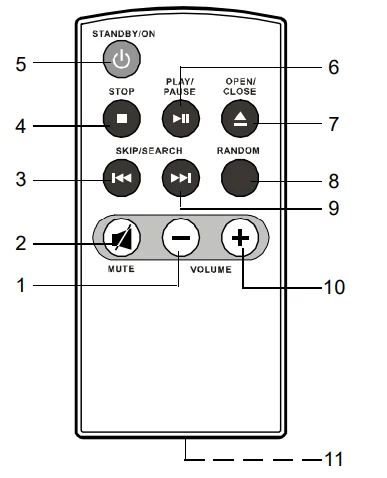
- VOLUME – Button.
- MUTE Button.
- Reverse SKIP/SEARCH Button.
- STOP
 Button.
 - STANDBY/ON
 Button.
 - PLAY/PAUSE
 Button.
 - OPEN/CLOSE
 Button.
 - RANDOM Button.
- Forward SKIP/SEARCH
 Button.
 - VOLUME + Button.
- Battery Compartment (Back Cabinet).

OPERATING INSTRUCTIONS
- Make sure you have installed the backup batteries in the battery compartment.
- Make sure you have installed the AM loop antenna and extended the FM lead wire antenna to its full length.
- Make sure you have removed the remote control battery spacer from the remote handset (Model CKD2330 only).
- Connect the AC power cord plug to a 120V 60Hz AC outlet.
SETTING THE CLOCK
When the radio is connected to the AC outlet for the first time, the red Standby indicator will come on, and the main display will light. The display will show AM hour “12:00”. Do not press the STANDBY/ON  button. It is easier to set the clock while the unit is in the Standby mode (Standby indicator is ‘On’).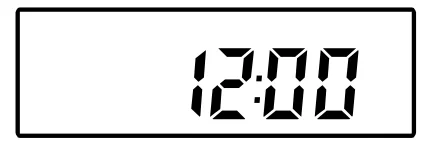
- Depress and hold the CLOCK SET button and repeatedly press the HOUR button to adjust the display to the correct hour, AM or PM.
- Continue to depress the CLOCK SET button and repeatedly press the MINUTE button to adjust the display to the correct minute.
- When the display shows the correct time, release all the buttons.
The display will show the correct time whenever the unit is in the Standby mode (Standby indicator is ‘On’) or when the CD function is selected. To see the time when the Radio function is selected, press the CLOCK SET button.
SETTING THE WAKE-UP TIME
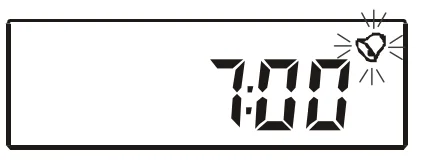
- Depress and hold the ALARM SET button. The display will change from clock time to wake-up time and show “7:00”. Repeatedly press the HOUR button to adjust the display to the correct wake-up hour, AM or PM.

- Continue to depress the ALARM SET button and repeatedly press the MINUTE button to adjust the display to the correct wake-up minute.
- When the display shows the desired wake-up time, release all the buttons. To check the wake-up time, just press the ALARM SET button at any time. The display will show the wake-up time as long as the ALARM SET button is depressed.
LISTENING TO THE RADIO
- Slide the CD/RADIO selector switch, located on the top cabinet, to the RADIO position.
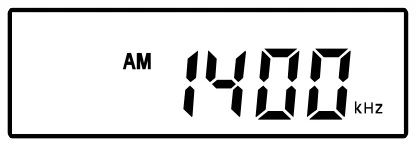
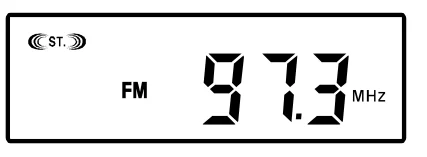
- Press the STANDBY/ON button on the front panel or the remote control (Model CKD2330 only) to turn the system ‘On’. The Standby indicator goes off, and an AM or FM radio frequency appears on the display.
- Select the desired band – AM, FM, or FM ST. – by sliding the Band selector, located on the right side, to the appropriate position.

- Tune to the desired station by slowly rotating the TUNING control on the right side. The digital frequency display will move up or down the band as you rotate the tuning control. If you tune to an FM Stereo station, the (((ST))) indicator will appear in the display. Note: This is a manual tuning radio with a digital frequency display. Slowly rotate the TUNING control until you find the best reception, even if the display does not indicate the exact frequency of the station.

- Press the VOLUME + or – buttons on the front panel or the remote control (Model CKD2330 only) to adjust the volume to the desired level.
- When you are finished listening, press the STANDBY/ON
 button on the front panel or the remote control (Model CKD2330 only) to return the system to the Standby (Power ‘Off’) mode. The Standby indicator comes ‘on’ again, and the display changes from radio frequency to correct time.
Hints For Better Reception
- FM – Adjust the position and direction of the FM lead wire antenna until you find the position and direction that provides the best reception.

- AM – Adjust the direction of the AM loop antenna that you connected to the back of the radio. If this does not provide sufficient improvement, try removing the loop from the antenna bracket and moving it further away from the radio cabinet (as far as the wire will allow). You may also attach the loop to the wall with a thumbtack or small nail through the “keyhole” on the antenna frame.
PLAYING COMPACT DISCS
NOTE: Although this CD player can read CD-R and CD-RW discs, in addition to normal CDs, the playability of CD-R and CD-RW discs may be affected by the type of software that was used to create the discs, as well as the quality and condition of the blank media you are using. 100% playability cannot be guaranteed. This is not an indication of a problem with the player.
IMPORTANT: THIS MODEL HAS A MOTORIZED ELECTRONIC CD DOOR. DO NOT ATTEMPT TO OPEN THE DOOR MANUALLY. THIS COULD CAUSE DAMAGE TO THE DOOR OPENING MECHANISM.
- Slide the CD/RADIO selector switch on the top cabinet to the CD position.
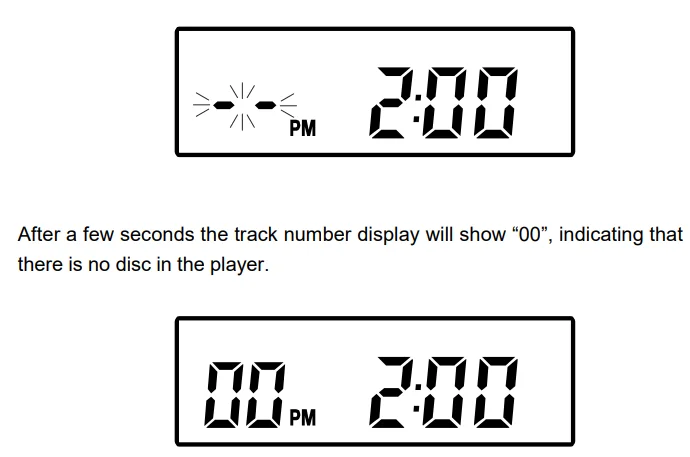
- Press the STANDBY/ON button on the front panel or on the remote control (Model CKD2330 only). The display will show two flashing dashes (“- -”) in the track number display.

- Press the OPEN/CLOSE
 button on the front panel or on the remote control (Model CKD2330 only) once.
IMPORTANT! THERE WILL BE A PAUSE OF APPROXIMATELY TWO SECONDS BEFORE THE POWER PANEL OPENS. PLEASE WAIT. DO NOT PRESS THE OPEN/CLOSE BUTTON AGAIN.
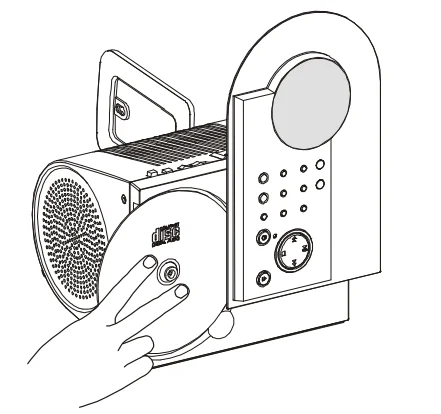
 - The Power Panel will rotate 90 degrees to allow you to load your disc in the CD player. Before loading your own disc, be sure to remove the dummy CD transit card from the player and discard it.
- Place your disc on the center spindle with the printed label side facing you. Gently press on the disc near the center hole to ensure that the disc is properly ‘seated’ on the spindle.

- Press the OPEN/CLOSE
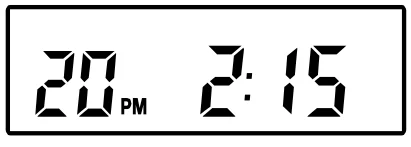
 button on the front panel or on the remote control (Model CKD2330 only). The Power Panel will return to its closed position. The disc will spin for a few seconds while the player reads the TOC (Table of Contents) on the disc. Then the disc will stop spinning, and the display will show the total number of tracks on the disc.
- Press the PLAY/PAUSE
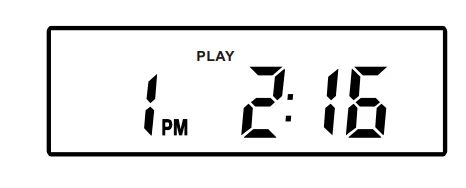
 button on the front panel or on the remote control (Model CKD2330 only). Playback begins on track 1, and the PLAY indicator appears in the display. Adjust the VOLUME controls to the desired level.
- Playback will continue until the last track has played, then the disc stops, the PLAY indicator disappears, and the display again shows the total number of tracks on the disc. To stop playback before the disc ends, press the STOP
 button on the front panel or on the remote control (Model CKD2330 only) at any time. The disc stops, and the display shows the total tracks on the disc.
 - If you are finished listening, press the OPEN/CLOSE button on the front panel or on the remote control (Model CKD2330 only), wait for the two-second delay before the Power Panel opens. When the panel opens, gently remove your disc from the player, and then press the OPEN/CLOSE button again to close the Power Panel.
- To listen to the radio, slide the CD/RADIO selector switch back to the Radio position, or press the STANDBY/ON button to return the system to the Standby (Power Off) mode.
LIMITED WARRANTY
Emerson Radio Corp. warrants manufacturing defects in original material, including original parts and workmanship, under normal use and conditions, for a period of ninety (90) days from the date of original purchase in the U.S. With your dated proof of purchase, we will provide repair service at no charge for labor and parts at an authorized Depot Repair Facility, or replace the product in our discretion. For repair or replacement, pack your unit in a padded box, enclose your check or money order payable to Emerson Radio Corp. in the amount of $9.00 (not required by California residents) to cover shipping and handling costs, and enclose a copy of your proof of purchase. Send your unit to:
Emerson Radio Corp.
1901 Diplomat Drive.
Farmers Branch, TX 75234.
This warranty does not cover damage from negligence, misuse, abuse, accident, failure to follow operating instructions, commercial use, rental, repairs by an unauthorized facility, or products purchased, used, serviced, or damaged outside of the United States. THIS WARRANTY GIVES YOU SPECIFIC LEGAL RIGHTS, AND YOU MAY ALSO HAVE OTHER RIGHTS WHICH VARY FROM STATE TO STATE. Visit our website at www.emersonradio.com.
For More Manuals By Emerson, Visit ManualsLibraryy
Emerson CKD2328 CD Stereo Clock Radio-FAQS
What is the Emerson CKD2328 CD Stereo Clock Radio?
The Emerson CKD2328 is a multifunction clock radio that combines a CD player, AM/FM radio, and dual alarm clock in one compact bedside unit.
How does the Emerson SmartSet clock work?
The built-in SmartSet system automatically sets the correct year, date, day, and time as soon as you plug it in, even after a power outage.
How do I set the time manually on the Emerson CKD2328?
Press and hold the TIME button, then use the ▲ or ▼ buttons to adjust hours and minutes. Release the TIME button when finished.
Do I need to set the time zone?
Yes. The clock defaults to Eastern Time. To change it, hold the TIME ZONE button and press SET + or SET − until your correct zone appears.
Does the clock adjust automatically for daylight saving time?
Yes. The SmartSet system automatically updates the clock for daylight saving time changes.
How do I set the alarm on the Emerson CKD2328?
Press and hold the ALARM button until the alarm time flashes. Use the ▲ or ▼ buttons to set the desired alarm time, then release the button to save.
How do I play a CD on this clock radio?
Insert a CD into the player, press CD, then press PLAY/PAUSE to start playback.
Does the Emerson CKD2328 have a snooze function?
Yes. Press the SNOOZE button to temporarily silence the alarm for a few minutes.
How do I turn off or stop the alarm?
Press the ALARM OFF or POWER button when the alarm sounds. To disable the alarm completely, turn off the alarm indicator.