
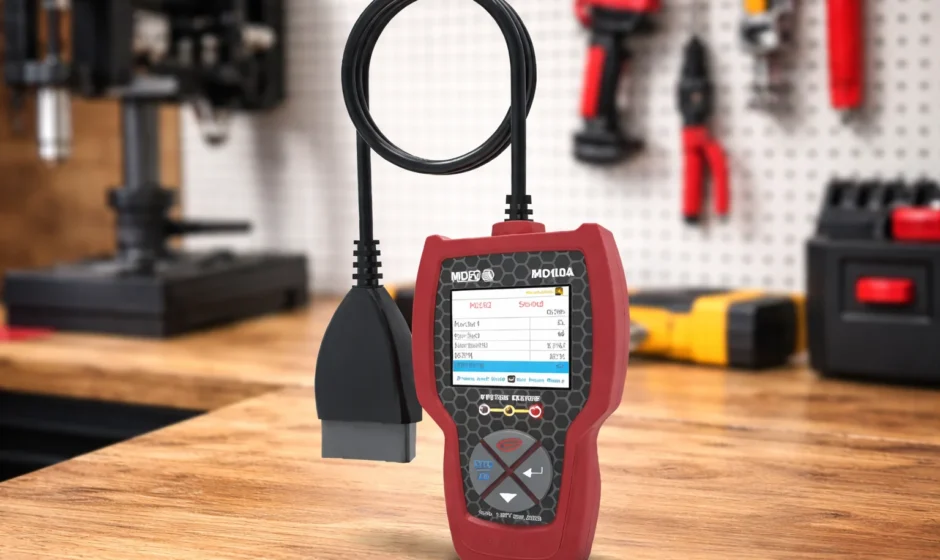

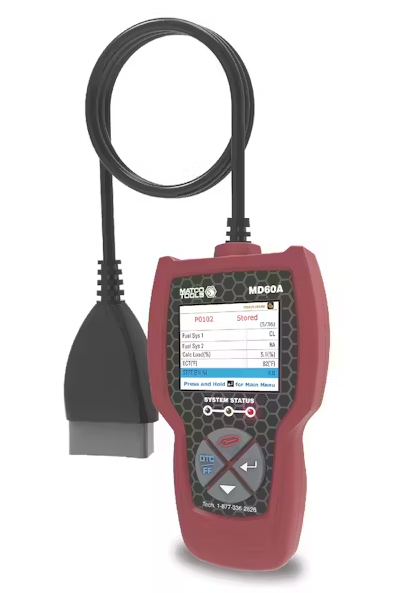
MATCO TOOLS MD60 OBD2 Code Reader
CONTROLS AND INDICATORS
See Figure 1 for the locations of items 1 through 9, below.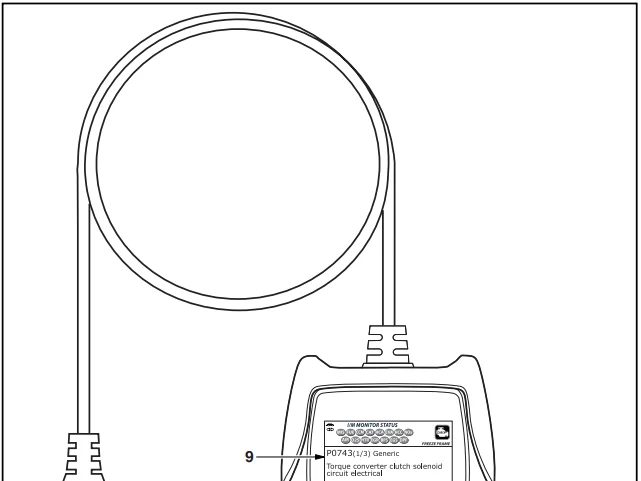
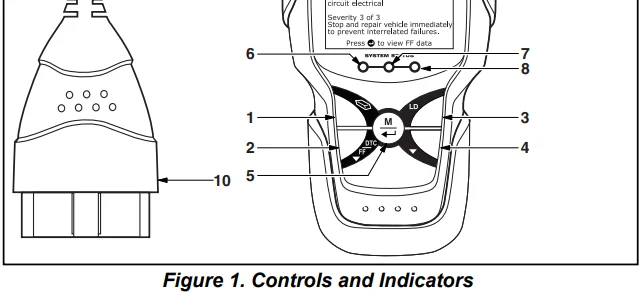
 ERASE button – Erases Diagnostic Trouble Codes (DTCs) and “Freeze Frame” data from your vehicle’s computer, and resets Monitor status.
- DTC/FF button – Displays the OBD2 DTC View screen and/or scrolls the LCD to view DTCs.
- LD button – When pressed while linked to a vehicle, places the Scan Tool in Live Data mode.
 DOWN button – When in MENU mode, scrolls down through the menu options. When LINKED to a vehicle, scrolls down through the current display screen to display any additional data.
 MENU/ENTER button – Press and hold to display the Main Menu. When in Menu mode, press to confirm the selected option or value. When viewing the “Priority” code, press to view Freeze Frame data.
- GREEN LED – Indicates that all engine systems are running normally (all Monitors on the vehicle are active and performing their diagnostic testing, and no DTCs are present).
- YELLOW LED – Indicates there is a possible problem. A “Pending” DTC is present, and/or some of the vehicle’s emission monitors have not run their diagnostic testing.
- RED LED – Indicates there is a problem in one or more of the vehicle’s systems. The red LED is also used to show that DTC(s) are present. DTCs are shown on the Scan Tool’s LCD. In this case, the Malfunction Indicator (“Check Engine”) lamp on the vehicle’s instrument panel will light steadily on.
- Display – Displays test results, Scan Tool functions, and Monitor status information. See DISPLAY FUNCTIONS, below, for details.
- CABLE – Connects the Scan Tool to the vehicle’s Data Link Connector (DLC).
 ERASE button – Erases Diagnostic Trouble Codes (DTCs) and “Freeze Frame” data from your vehicle’s computer, and resets Monitor status.
 DOWN button – When in MENU mode, scrolls down through the menu options. When LINKED to a vehicle, scrolls down through the current display screen to display any additional data.
 MENU/ENTER button – Press and hold to display the Main Menu. When in Menu mode, press to confirm the selected option or value. When viewing the “Priority” code, press to view Freeze Frame data.
DISPLAY FUNCTIONS
- I/M MONITOR STATUS field – Identifies the I/M Monitor status area.
- Monitor icons – Indicate which Monitors are supported by the vehicle under test, and whether or not the associated Monitor has run its diagnostic testing (Monitor status).
- A solid green icon indicates the Monitor has completed both “Since DTCs Cleared” and “This Driving Cycle” testing.
- A flashing red icon indicates the Monitor has not completed “Since DTCs Cleared” testing.
- A flashing green/gray icon indicates the Monitor has not completed “This Driving Cycle” testing.
- A flashing red/gray icon indicates the Monitor has been disabled for “This Driving Cycle.”
 Vehicle icon – When visible, indicates that the scan tool is being powered through the vehicle’s DLC connector.
 Link icon – When visible, indicates the scan tool is communicating with the vehicle’s computer.
 Computer icon – When visible, indicates the scan tool is linked to a personal computer.
- DTC Display Area – Displays the Diagnostic Trouble Code (DTC) number. Each fault is assigned a code number that is specific to that fault. The DTC number is color-coded as follows:
- RED – Indicates the currently displayed DTC is a STORED or PERMANENT DTC.
- YELLOW – Indicates the currently displayed DTC is a PENDING DTC.
- GREEN – In cases where no codes are retrieved, a “No DTCs are presently stored in the vehicle’s computer” message is shown in green.
- Code Number Sequence – The scan tool assigns a sequence number to each DTC that is present in the computer’s memory, starting with “1.” This number indicates which code is currently displayed. Code number “1” is always the highest priority code, and the one for which “Freeze Frame” data has been stored.
- Code Enumerator – Indicates the total number of codes retrieved from the vehicle’s computer.
- Test Data Display Area – Displays DTC definitions, Freeze Frame data, and other pertinent test information messages.
- SYSTEM icon – Indicates the system with which the code is associated.

- FREEZE FRAME icon – Indicates that there is Freeze Frame data from “Priority Code” (Code #1) stored in the vehicle’s computer memory.
- Code type – Indicates the type of code being displayed: Generic Stored, Generic Pending, Generic Permanent, etc.
- Severity – Indicates the level of severity for the priority code (code number “1”), as follows:
- Service should be scheduled and repairs made when convenient. This DTC typically has no immediate threat to essential system components in the short term.
- Repair immediately if drivability issues are present. Threat to essential system components if not repaired as soon as possible.
- Stop and repair the vehicle immediately to prevent interrelated failures. Harmful and damaging to essential system components.
 Bluetooth icon – Indicates communication status with a compatible mobile application (please visit matco.carscan.com for more information). A solid blue icon indicates that an active Bluetooth connection has been established. A solid grey icon indicates Bluetooth is not connected.
 WiFi icon – Indicates WiFi communication status. When ON, it indicates the scan tool is linked to a WiFi network. When OFF, indicates there is no WiFi connection.
 Vehicle icon – When visible, indicates that the scan tool is being powered through the vehicle’s DLC connector.
 Link icon – When visible, indicates the scan tool is communicating with the vehicle’s computer.
 Computer icon – When visible, indicates the scan tool is linked to a personal computer.
 Bluetooth icon – Indicates communication status with a compatible mobile application (please visit
  WiFi icon – Indicates WiFi communication status. When ON, it indicates the scan tool is linked to a WiFi network. When OFF, indicates there is no WiFi connection.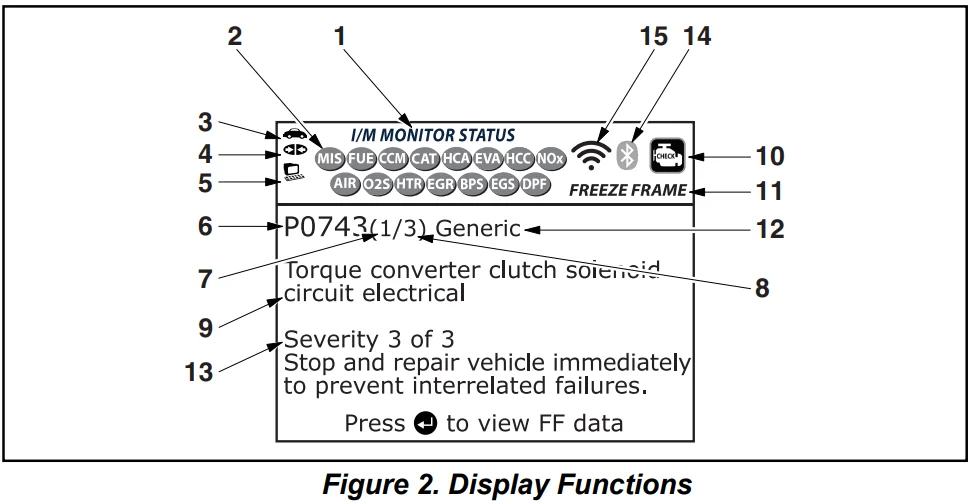
INITIAL ADJUSTMENTS
The first time the unit is connected to a vehicle, you must select the desired display language (English, French, or Spanish), unit of measurement (USA or Metric), and Smog Check or I/M Program Location as follows:
- Select the desired display language, then press MENU/ENTER
 .
. - The Select Unit screen displays.
- Select the desired unit of measurement, then press MENU/ENTER.
- The Select Smog Check or I/M Program Location screen displays.
- Select the appropriate location from the options provided, then press MENU/ENTER
 . If you do not wish to specify a Select Smog Check or I/M Program Location at this time, select Exit, then press MENU/ENTER.
 - The Version Information screen displays briefly, then the Scan Tool begins communication with the vehicle.
Note: After the initial language, unit of measurement, and Smog Check or I/M Program Location selections are performed, these, as well as other settings, can be changed as desired. Proceed to Additional Functions on page 33 for further instructions.
COMPUTER ENGINE CONTROLS
The Introduction of Electronic Engine Controls.
As a result of increased air pollution (smog) in large cities, such as Los Angeles, the California Air Resources Board (CARB) and the Environmental Protection Agency (EPA) set new regulations and air pollution standards to deal with the problem. To further complicate matters, the energy crisis of the early 1970s caused a sharp increase in fuel prices over a short period. As a result, vehicle manufacturers were not only required to comply with the new emissions standards, but they also had to make their vehicles more fuel-efficient. Most vehicles were required to meet a miles-per-gallon (MPG) standard set by the U.S. Federal Government.
Precise fuel delivery and spark timing are needed to reduce vehicle emissions. Mechanical engine controls in use at the time (such as ignition points, mechanical spark advance, and the carburetor) responded too slowly to driving conditions to properly control fuel delivery and spark timing. This made it difficult for vehicle manufacturers to meet the new standards. A new Engine Control System had to be designed and integrated with the engine controls to meet the stricter standards. The new system had to:
- Respond instantly to supply the proper mixture of air and fuel for any driving condition (idle, cruising, low-speed driving, high-speed driving, etc.).
- Calculate instantly the best time to “ignite” the air/fuel mixture for maximum engine efficiency.
- Perform both these tasks without affecting vehicle performance or fuel economy.
Vehicle Computer Control Systems can perform millions of calculations each second. This makes them an ideal substitute for the slower mechanical engine controls. By switching from mechanical to electronic engine controls, vehicle manufacturers are able to control fuel delivery and spark timing more precisely. Some newer Computer Control Systems also provide control over other vehicle functions, such as transmission, brakes, charging, body, and suspension systems.
The Basic Engine Computer Control System
The on-board computer is the heart of the Computer Control System. The computer contains several programs with preset reference values for air/fuel ratio, spark or ignition timing, injector pulse width, engine speed, etc. Separate values are provided for various driving conditions, such as idle, low-speed driving, high-speed driving, low load, or high load. The preset reference values represent the ideal air/fuel mixture, spark timing, transmission gear selection, etc., for any driving condition. These values are programmed by the vehicle manufacturer and are specific to each vehicle model.
Most on-board computers are located inside the vehicle behind the dashboard, under the passenger’s or driver’s seat, or behind the right kick panel. However, some manufacturers may still position it in the engine compartment.
Vehicle sensors, switches, and actuators are located throughout the engine and are connected by electrical wiring to the on-board computer. These devices include oxygen sensors, coolant temperature sensors, throttle position sensors, fuel injectors, etc. Sensors and switches are input devices. They provide signals representing current engine operating conditions to the computer. Actuators are output devices. They perform actions in response to commands received from the computer.
The on-board computer receives information inputs from sensors and switches located throughout the engine. These devices monitor critical engine conditions such as coolant temperature, engine speed, engine load, throttle position, air/fuel ratio, etc.
The computer compares the values received from these sensors with its preset reference values, and makes corrective actions as needed so that the sensor values always match the preset reference values for the current driving condition. The computer makes adjustments by commanding other devices such as the fuel injectors, idle air control, EGR valve, or Ignition Module to perform these actions.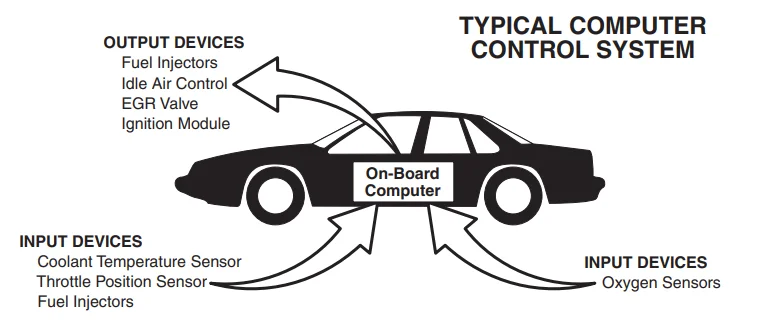
Vehicle operating conditions are constantly changing. The computer continuously makes adjustments or corrections (especially to the air/fuel mixture and spark timing) to keep all the engine systems operating within the preset reference values.
On-Board Diagnostics – First Generation (OBD1)
Beginning in 1988, California’s Air Resources Board (CARB) and later the Environmental Protection Agency (EPA) required vehicle manufacturers to include a self-diagnostic program in their on-board computers. The program would be capable of identifying emissions-related faults in a system. The first generation of On-Board Diagnostics came to be known as OBD1.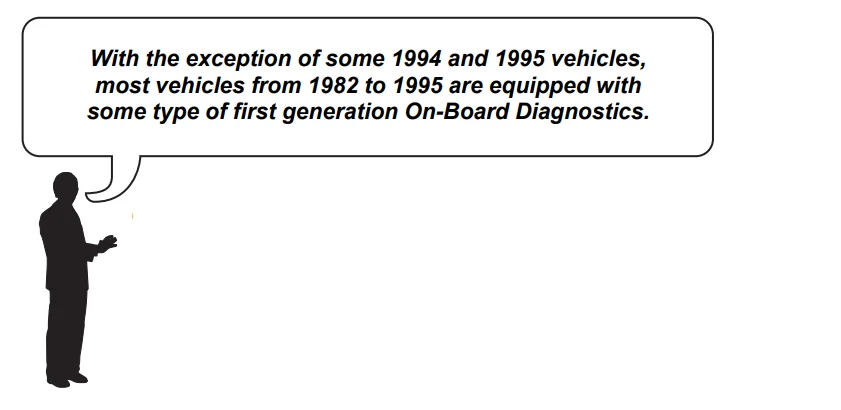
OBD1 is a set of self-testing and diagnostic instructions programmed into the vehicle’s on-board computer. The programs are specifically designed to detect failures in the sensors, actuators, switches, and wiring of the various vehicle emissions-related systems. If the computer detects a failure in any of these components or systems, it lights an indicator on the dashboard to alert the driver. The indicator lights only when an emissions-related problem is detected.
The computer also assigns a numeric code for each specific problem that it detects, and stores these codes in its memory for later retrieval. These codes can be retrieved from the computer’s memory with the use of a “Code Reader” or a “Scan Tool.”
On-Board Diagnostics – Second Generation (OBD2)
In addition to performing all the functions of the OBD1 system, the OBD2 system has been enhanced with new diagnostic programs. These programs closely monitor the functions of various emissions-related components and systems (as well as other systems) and make this information readily available (with the proper equipment) to the technician for evaluation. The California Air Resources Board (CARB) conducted studies on OBD1-equipped vehicles. The information that was gathered from these studies showed the following:
- A large number of vehicles had deteriorating or degraded emissions-related components. These components were causing an increase in emissions.
- Because OBD1 systems only detect failed components, the degraded components were not setting codes.
- Some emissions problems related to degraded components only occur when the vehicle is being driven under a load. The emission checks being conducted at the time were not performed under simulated driving conditions. As a result, a significant number of vehicles with degraded components were passing emissions tests.
- Codes, code definitions, diagnostic connectors, communication protocols, and emissions terminology were different for each manufacturer. This confused the technicians working on different makes and model vehicles.
To address the problems made evident by this study, CARB and the EPA passed new laws and standardization requirements. These laws required vehicle manufacturers to equip their new vehicles with devices capable of meeting all of the new emissions standards and regulations. It was also decided that an enhanced on-board diagnostic system, capable of addressing all of these problems, was needed. This new system is known as “On-Board Diagnostics Generation Two (OBD2).” The primary objective of the OBD2 system is to comply with the latest regulations and emissions standards established by CARB and the EPA.
The main objectives of the OBD2 system are:
- To detect degraded and/or failed emissions-related components or systems that could cause tailpipe emissions to exceed by 1.5 times the Federal Test Procedure (FTP) standard.
- To expand emissions-related system monitoring. This includes a set of computer-run diagnostics called Monitors. Monitors perform diagnostics and testing to verify that all emissions-related components and/or systems are operating correctly and within the manufacturer’s specifications.
- To use a standardized Diagnostic Link Connector (DLC) in all vehicles. (Before OBD2, DLCs were of different shapes and sizes.)
- To standardize the code numbers, code definitions, and language used to describe faults. (Before OBD2, each vehicle manufacturer used their own code numbers, code definitions, and language to describe the same faults.)
- To expand the operation of the Malfunction Indicator Lamp (MIL).
- To standardize communication procedures and protocols between the diagnostic equipment (Scan Tools, Code Readers, etc.) and the vehicle’s on-board computer.
OBD2 TERMINOLOGY
The following terms and their definitions are related to OBD2 systems. Read and reference this list as needed to aid in the understanding of OBD2 systems.
- Powertrain Control Module (PCM) – The PCM is the OBD2 accepted term for the vehicle’s “on-board computer.” In addition to controlling the engine management and emissions systems, the PCM also participates in controlling the powertrain (transmission) operation. Most PCMs can also communicate with other computers in the vehicle (ABS, ride control, body, etc.).
- Monitor – Monitors are “diagnostic routines” programmed into the PCM. The PCM utilizes these programs to run diagnostic tests and to monitor the operation of the vehicle’s emissions-related components or systems to ensure they are operating correctly and within the vehicle’s manufacturer specifications. Currently, up to fifteen Monitors are used in OBD2 systems. Additional Monitors will be added as the OBD2 system is further developed. Not all vehicles support all fifteen Monitors.
- Enabling Criteria – Each Monitor is designed to test and monitor the operation of a specific part of the vehicle’s emissions system (EGR system, oxygen sensor, catalytic converter, etc.). A specific set of “conditions” or “driving procedures” must be met before the computer can command a Monitor to run tests on its related system. These “conditions” are known as “Enabling Criteria.” The requirements and procedures vary for each Monitor. Some Monitors only require the ignition key to be turned “On” for them to run and complete their diagnostic testing. Others may require a set of complex procedures, such as starting the vehicle when cold, bringing it to operating temperature, and driving the vehicle under specific conditions before the Monitor can run and complete its diagnostic testing.
- Monitor Has/Has Not Run – The terms “Monitor has run” or “Monitor has not run” are used throughout this manual. “Monitor has run” means the PCM has commanded a particular Monitor to perform the required diagnostic testing on a system to ensure the system is operating correctly (within factory specifications). The term “Monitor has not run” means the PCM has not yet commanded a particular Monitor to perform diagnostic testing on its associated part of the emissions system.
- Trip – A Trip for a particular Monitor requires that the vehicle be driven in such a way that all the required “Enabling Criteria” for the Monitor to run and complete its diagnostic testing are met. The “Trip Drive Cycle” for a particular Monitor begins when the ignition key is turned “On.” It is completed when all the “Enabling Criteria” for the Monitor to run and complete its diagnostic testing are met by the time the ignition key is turned “Off.” Since each of the fifteen Monitors is designed to run diagnostics and testing on a different part of the engine or emissions system, the “Trip Drive Cycle” needed for each Monitor to run and complete varies.
- OBD2 Drive Cycle – An OBD2 Drive Cycle is an extended set of driving procedures that takes into consideration the various types of driving conditions encountered in real life. These conditions may include starting the vehicle when it is cold, driving the vehicle at a steady speed (cruising), accelerating, etc. An OBD2 Drive Cycle begins when the ignition key is turned “On” (when cold) and ends when the vehicle has been driven in such a way as to have all the “Enabling Criteria” met for all its applicable Monitors. Only those trips that provide the Enabling Criteria for all Monitors applicable to the vehicle to run and complete their individual diagnostic tests qualify as an OBD2 Drive Cycle. OBD2 Drive Cycle requirements vary from one model of vehicle to another. Vehicle manufacturers set these procedures. Consult your vehicle’s service manual for OBD2 Drive Cycle procedures. Note: Do not confuse a “Trip” Drive Cycle with an OBD2 Drive Cycle. A “Trip” Drive Cycle provides the “Enabling Criteria” for one specific Monitor to run and complete its diagnostic testing. An OBD2 Drive Cycle must meet the “Enabling Criteria” for all Monitors on a particular vehicle to run and complete their diagnostic testing.
- Warm-up Cycle – Vehicle operation after an engine-off period where engine temperature rises at least 40°F (22°C) from its temperature before starting, and reaches at least 160°F (70°C). The PCM uses warm-up cycles as a counter to automatically erase a specific code and related data from its memory. When no faults related to the original problem are detected within a specified number of warm-up cycles, the code is erased automatically.
SERVICE PROCEDURES
If you have any questions, require technical support, or information on UPDATES and OPTIONAL ACCESSORIES, please contact your local store, distributor, or the Service Center.
USA & Canada:
(877) 336-2826 (6:00 AM-6:00 PM PST, Monday through Saturday)
All others: (714) 241-6802 (6:00 AM-6:00 PM PST, Monday through
Saturday)
FAX: (714) 241-3979 (24 hr.)
Web: matco.carscan.com
For More Manuals By MATCO TOOLS, Visit ManualsLibraryy
MATCO TOOLS MD60 OBD2 Code Reader-FAQS
Can the MATCO TOOLS MD60 read ABS codes?
No. The MD60 is a basic OBD2 code reader designed mainly for engine and emissions-related trouble codes. It does not access ABS systems.
What is the difference between an OBD2 code reader and an OBD2 scanner?
A code reader can read and erase engine fault codes, while an advanced scanner provides live data, ABS/SRS access, and deeper system diagnostics.
Can a basic OBD2 code reader diagnose all car problems?
No. Basic readers like the MD60 are limited to engine and emissions faults and cannot diagnose transmission, ABS, or airbag issues.
Will the MD60 read transmission codes?
No. Reading transmission codes requires a multi-system diagnostic scanner, which goes beyond the capabilities of standard code readers.
Can the MD60 clear the check engine light?
Yes. The MD60 can clear engine fault codes, which may turn off the check engine light if the issue has been resolved.
Can it read codes even if the check engine light is off?
Yes. Stored and pending trouble codes can still be retrieved even when the warning light is not illuminated.
Is the MATCO TOOLS MD60 suitable for DIY users?
Yes. It’s ideal for beginners and DIY car owners who want quick engine diagnostics without complex features.
Can I use the MD60 while the car is running?
Yes. The tool can be used with the ignition on or while the engine is running, depending on the diagnostic task.
Does this code reader work with smartphones or Bluetooth?
No. The MD60 is a standalone, wired diagnostic tool and does not connect to phones or apps.
Do I need special software to use the MD60?
No. The device is plug-and-play and works directly through the vehicle’s OBD2 port.