
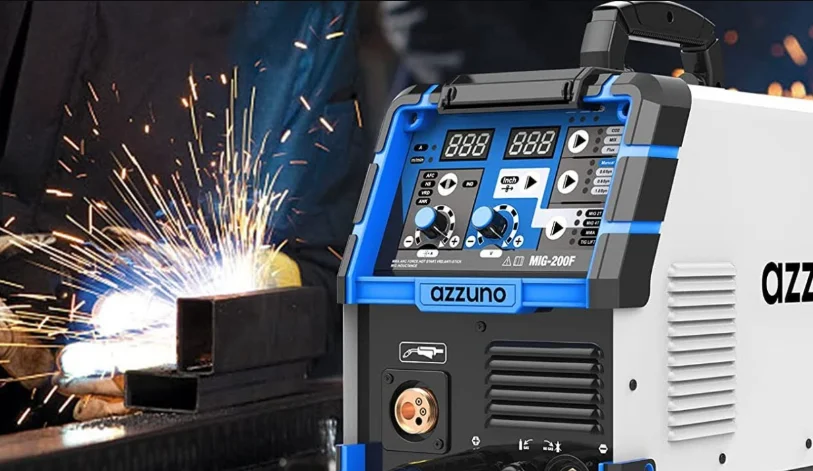

Azzuno 200A MIG Welder CONTENTS
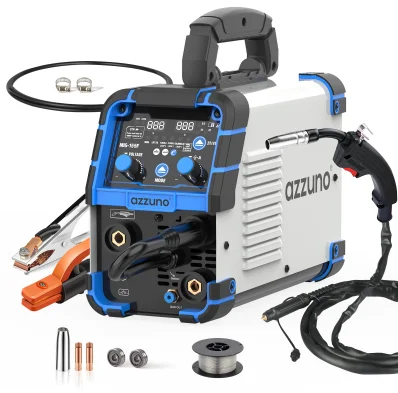 CONTENTS
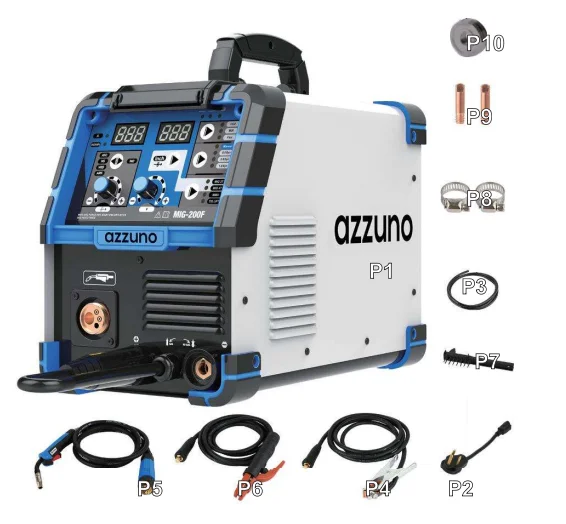
- MIG-200F Dual-Voltage, Multi-Process Welder
- Adapter Cord
- Shielding Gas Hose
- Ground Clamp with 10′ [3 m] Cable
- MIG Torch with 10′ [3 m] Cable (.030″/0.8 mm contact tip installed)
- Electrode Holder with 10′ [3 m] Cable
- Brush/Hammer
- Hose Band *2
- 0.8 mm/.030″, 0.9 mm/.035″ Contact Tip
- V Knurl Groove Drive Roller *1: .030″/.035″

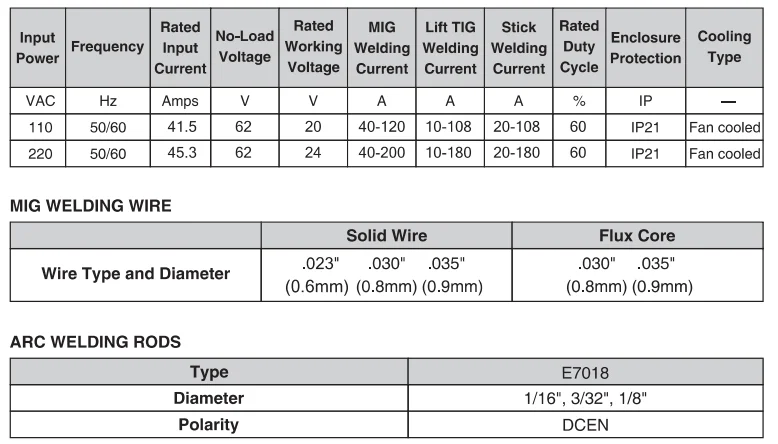
SPECIFICATIONS
CONTROL AND DISPLAY PANEL
The Azznuo MIG-200F front panel is equipped with 5 function controls, two digital displays, and sixteen LED indicators (FIG 1). They are as follows: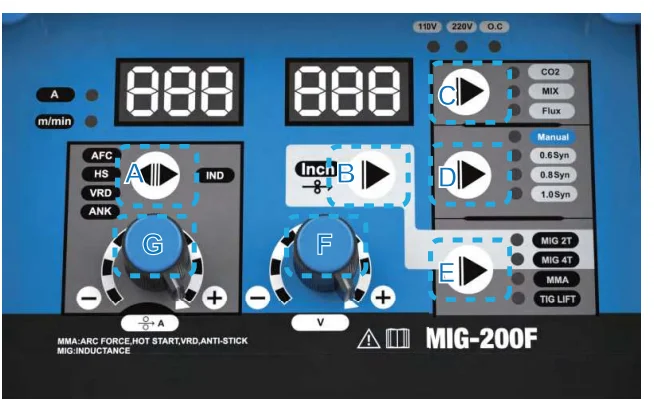
FUNCTION CONTROLS
Button C: CO2/MIX/Flux MIG Selector; used to choose Gas or Gasless MIG weld mode.
- “CO2” means MIG welding with solid wire and protection gas is 100% pure CO2 gas.
- “MIX” means MAG welding with solid wire and protection gas is mixed gas (normally 25% CO2 gas and 75% Argon gas).
- “Flux” means MIG welding with flux wire, no need for gas.
Button D: Manual/0.6Syn/0.8Syn/1.0Syn MIG Selector;
- “Manual” means you could adjust the Current knob (F) and Voltage knob (H) by hand.
- “0.6Syn” means when you want to weld with 0.6 solid wire, you choose this. “Syn” means Synergy — when you choose this, the machine will offer a suggested current and the matched voltage value for welding 0.6 wire. (0.6 mm wire is normally solid wire; flux wire doesn’t have 0.6 mm.)
- “0.8Syn” means when you want to weld with 0.8 solid wire or flux wire, you choose this. “Syn” means Synergy — the machine will offer a suggested current and matched voltage value for welding 0.8 wire.
- “1.0Syn” means when you want to weld with 1.0/0.9 solid wire or flux wire, you choose this. “Syn” means Synergy — the machine will offer a suggested current and matched voltage value for welding 1.0/0.9 wire.
Button E: MIG 2T/MIG 4T/MMA/TIG LIFT Welding Mode Selector;
- “MIG 2T” means to choose MIG welding. 2T means that when you press the switch of the MIG torch to start welding, you must always hold the switch. When you release the switch, the wire feeder and welding will stop.
- “MIG 4T” means to choose MIG welding. 4T means when you press the switch of the MIG torch to start welding, you can release the switch, and the wire feeder will keep working, and welding will continue. To stop welding, press the switch again and then release it. Welding will stop. NOTE: When you choose “MIG 2T” or “MIG 4T,”
 inductance will be adjustable. The following sections will explain its function.
 - “MMA” means to choose MMA welding. When you choose this, four functions will be selectable and adjustable. The following sections will explain their functions.
- “TIG LIFT” means to choose LIFT TIG welding.
 inductance will be adjustable. The following sections will explain its function.
Button B: Inch Selector;
- “Inch” is only usable under MIG welding mode. It is used to check the wire feed. When you first connect the MIG torch to the welding machine, press this button to feed the wire very fast.
Button A: AFC/HS/VRD/ANK/IND Selector;
- “AFC” means ARC FORCE, only usable and adjustable under MMA mode. You can choose from “0” to “10” with the knob (G). “0” means 0 Amp for arc force, and “10” means 180 Amp for arc force current.
- “HS” means HOT START, only usable and adjustable under MMA mode. You can choose from “0” to “10” with the knob (G). “0” means 0 Amp and “10” means 180 Amp for hot start current.
- “VRD” means protection against electric shock when you stop welding but keep the power on. It is only usable under MMA mode. You can choose ON or OFF with the knob (G).
- “ANK” means ANTI STICK, only usable under MMA mode. You can choose ON or OFF with the knob (G).
- “IND” means inductance, only usable and adjustable under MIG mode. You can choose from “-3.0” to “+3.0” with the knob (G). “-3.0” means the arc will be the softest during welding (suitable for a very thin metal plate). “+3.0” means the arc will be the hardest during welding (suitable for thick metal plate).
A Indicator
- “A”: When you choose “MMA” or “LIFT TIG,” this light will turn on, and you can adjust the current with the knob (G).
“m/min” Indicator
- “m/min” means the speed to feed the wire. When you choose “MIG 2T” or “MIG 4T” and “Manual,” this light will turn on, and you can adjust the wire feed speed. This speed equals the welding current — the bigger the wire feed speed value, the bigger the welding current.
Example 1: You use 0.8 mm (.030″) flux-cored wire. First set button (E) to 2T/4T. Then set button (C) to FLUX. Then set button (D) to 0.8Syn. Turn the knob (G) and adjust the welding ampere according to the welding chart. The voltage and wire speed will be auto-fitted according to the welder data.
Check: wire 0.8 mm (.030″), V-type roller 0.8 mm (.030″), no gas, torch tip 0.8 mm (.030″). Make sure all is correct. Remove the torch tip and nozzle, press the torch trigger or long-press button (B) to feed the wire out of the torch neck. Set up the torch tip and nozzle. (Button B = fast wire feed.) Turn knob (F) to micro-adjust welding voltage from -5 to +5. If there is large spatter or the weld penetration is not enough, set button (A) to IND and adjust with knob (G) from -10 to +10 (soft to hard arc sparking).
Example 2: You use 0.9 mm (.035″) flux-cored wire. First set button (E) to 2T/4T. Then set button (C) to FLUX. Then set button (D) to 1.0Syn. Turn the knob (G) and adjust the welding ampere according to the welding chart. The voltage and wire speed will be auto-fitted according to the welder data.
Check: wire 0.9 mm (.035″), V-type roller 0.9 mm (.035″), no gas, torch tip 0.9 mm (.035″). Make sure all is correct. Remove the torch tip and nozzle, press the torch trigger or long-press button (B) to feed the wire out of the torch neck. Set up the torch tip and nozzle. Turn knob (F) to micro-adjust welding voltage from -5 to +5. If there is a large spatter or the weld penetration is not enough, set button (A) to IND and adjust with knob (G) from -10 to +10.
Example 3: You use CO2 100% with 0.8 mm (.030″) solid wire. First set button (E) to 2T/4T. Then set button (C) to CO2. Then set button (D) to 0.8Syn. Turn the knob (G) and adjust the welding ampere according to the welding chart. The voltage and wire speed will be auto-fitted according to the welder data.
Check: wire 0.8 mm (.030″), V-type roller 0.8 mm (.030″), CO2 100%, torch tip 0.8 mm (.030″). Make sure all is correct. Remove the torch tip and nozzle, press the torch trigger or long-press button (B) to feed the wire out of the torch neck. Set up the torch tip and nozzle. Turn knob (F) to micro-adjust welding voltage from -5 to +5. If there is a large spatter or the weld penetration is not enough, set button (A) to IND and adjust with knob (G) from -10 to +10.
Example 4: You use CO2 100% with 0.9 mm (.035″) solid wire. First set button (E) to 2T/4T. Then set button (C) to CO2. Then set button (D) to 1.0Syn. Turn the knob (G) and adjust the welding ampere according to the welding chart. The voltage and wire speed will be auto-fitted according to the welder data.
Check: wire 0.9 mm (.035″), V-type roller 0.9 mm (.035″), CO2 100%, torch tip 0.9 mm (.035″). Make sure all is correct. Remove the torch tip and nozzle, press the torch trigger or long-press button (B) to feed the wire out of the torch neck. Set up the torch tip and nozzle. Turn knob (F) to micro-adjust welding voltage from -5 to +5. If there is a large spatter or the weld penetration is not enough, set button (A) to IND and adjust with knob (G) from -10 to +10.
Example 5: You use a mixed gas with 0.8 mm (.030″) solid wire. First set button (E) to 2T/4T. Then set button (C) to MIX. Then set button (D) to 0.8Syn. Turn the knob (G) and adjust the welding ampere according to the welding chart. The voltage and wire speed will be auto-fitted according to the welder data.
Check: wire 0.8 mm (.030″), V-type roller 0.8 mm (.030″), Ar80% CO2 20% (or Ar75%, CO2 25%), torch tip 0.8 mm (.030″). Make sure all is correct. Remove the torch tip and nozzle, press the torch trigger or long-press the button (B) to feed the wire out of the torch neck. Set up the torch tip and nozzle. Turn knob (F) to micro-adjust welding voltage from -5 to +5. If there is a large spatter or the weld penetration is not enough, set button (A) to IND and adjust with knob (G) from -10 to +10.
Example 6: You use a mixed gas with 0.9 mm (.035″) solid wire. First set button (E) to 2T/4T. Then set button (C) to MIX. Then set button (D) to 1.0Syn. Turn the knob (G) and adjust the welding ampere according to the welding chart. The voltage and wire speed will be auto-fitted according to the welder data.
Check: wire 0.9 mm (.035″), V-type roller 0.9 mm (.035″), Ar80% CO2 20% (or Ar75%, CO2 25%), torch tip 0.9 mm (.035″). Make sure all is correct. Remove the torch tip and nozzle, press the torch trigger or long-press the button (B) to feed the wire out of the torch neck. Set up the torch tip and nozzle. Turn knob (F) to micro-adjust welding voltage from -5 to +5. If there is a large spatter or the weld penetration is not enough, set button (A) to IND and adjust with knob (G) from -10 to +10.
Stick Welding
Set button (E) to MMA. Set button (A) to ARC FORCE (Arc Force Current, easier for arc starting on thick workpiece) and HOT START (Hot Start Time — easier for arc start on cellulose electrode), VRD ON/OFF (Voltage Reduce function to avoid leakage of voltage in a humid environment), and ANK ON/OFF. In MMA mode, the button (F) is invalid; you can only adjust the button (G).
Lift TIG Welding
Set button (E) to LIFT TIG. Set up the Lift TIG torch (not included). In LIFT TIG mode, the button (F) is invalid; you can only adjust the button (G). Note: 1.0Syn setting covers 0.9 mm (.035″). So, you can use 0.9 mm wire on 1.0Syn.
MIG WELDING SET-UP AND OPERATION
SET UP FOR MIG WELDING
Installing the MIG Welding Gun
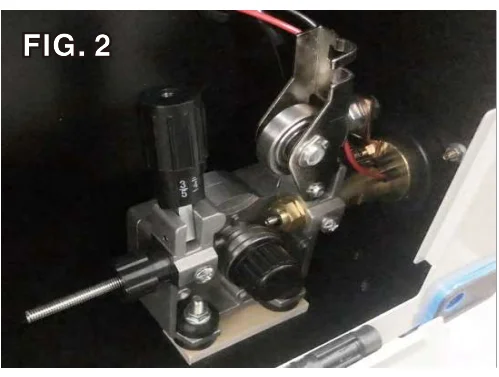
- Open the side door of the welder and loosen the Torch Tensioner Wing Screw located on the side of the brass, hex-shaped member of the Drive Motor Assembly (FIG 2).

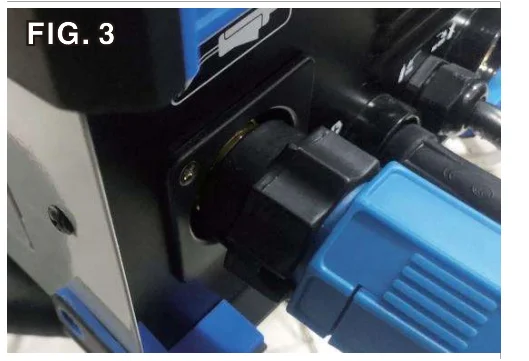
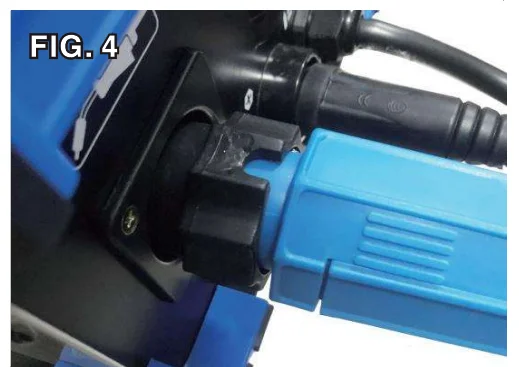
- Plug the brass body end of the welding gun line into the designated socket (FIG. 3). IMPORTANT NOTE: The brass body end must be fully seated against the base of the drive assembly socket, or gas may either leak or not be able to pass through the connections to the end of the welding gun (FIG. 4).


- Tighten the Torch Tensioner Wing Screw finger tight (FIG 3).
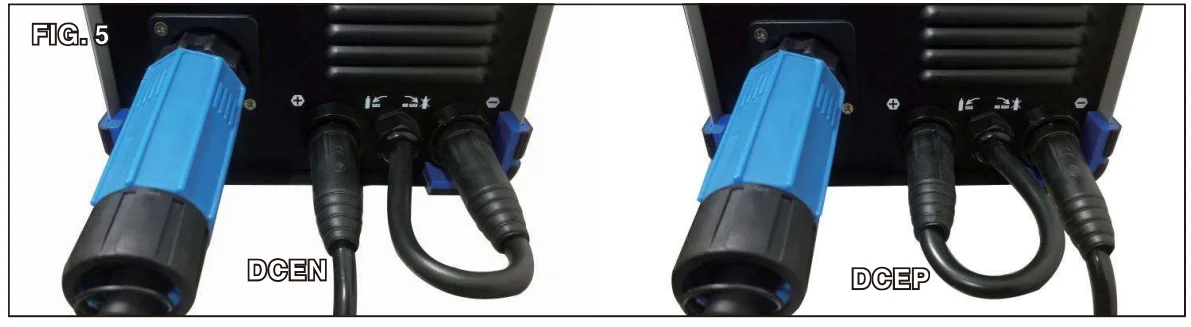
- Connect the male metal plug to the female cannon plug connection on the front of the welder (FIG. 5). FLUX (DCEN) CO2 100% (DCEP) Ar/CO2 Mix (DCEP)

- Set the Selector button (C) located on the front panel to the MIG (Flux, CO2 100% or Ar/CO2 Mix) position (FIG 1).
INSTALLING THE GROUND CABLE AND CLAMP
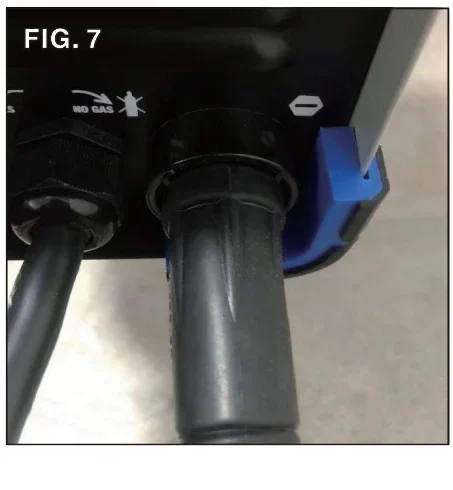
Locate the ground clamp with cable and connect the plug on the cable end to the negative connector (-) on the welder (DCEP @ CO2 100% or Ar/CO2 Mix). Connect to the positive connector (+) on the welder (DCEN @ Flux). Align the key of the brass ferrule with the notch of the receptacle at the 12:00 position (FIG 6), insert the plug, and twist clockwise 1/2 turn until it is tight (FIG 7).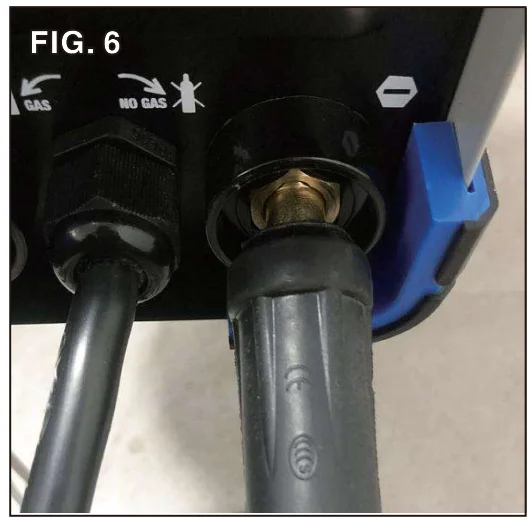
INSTALLING THE SHIELDING GAS SUPPLY
- Shut off the shielding gas supply when not in use.
- Always ventilate confined spaces or use an approved air-supplied respirator.
- Always turn your face away from the valve outlet when opening the cylinder valve.
- Protect compressed gas cylinders from excessive heat, mechanical shocks, physical damage, slag, open flames, sparks, and arcs. Keep away from any welding or other electrical circuits.
- Install cylinders in an upright position by securing to a specifically designed rack, cart, or stationary support to prevent falling or tipping over.
- Never weld on a pressurized cylinder or explosion will occur.
- Use only correct shielding gas cylinders, regulators, hoses, and fittings designed for the specific application; maintain them and all related components in good condition.
- Keep protective cap in place over valve except when cylinder is in use.
- Use proper equipment, procedures, and have adequate help when moving or lifting cylinders.
A shielding gas bottle is NOT included with your Azznuo MIG-200F, but is necessary to weld using solid wire. It can be bought at most local welding supply stores. Azznuo recommends the use of 80% Argon / 20% CO2 or 75% Argon / 25% CO2 for shielding gas when MIG welding steel.
- Place the Azznuo MIG-200F in its dedicated area or on a welding cart.
- Secure your shielding gas bottle to a stationary object or mount it to your welding cart if it is equipped to hold one, so that the cylinder cannot fall over.
- Remove the cap from the shielding gas bottle.
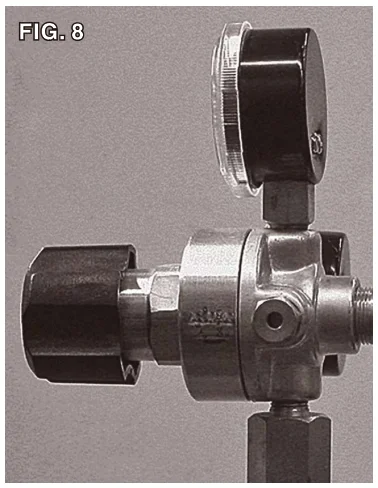
- Install the regulator knob on the shielding gas regulator (FIG. 8).

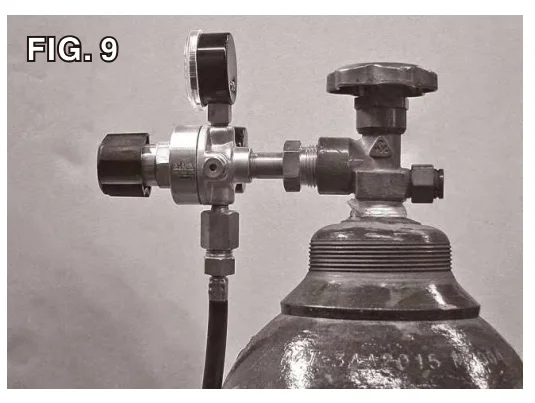
- Insert the large brass male fitting on the shielding gas regulator into the female fitting on the shielding gas bottle (FIG. 9).

- Tighten the fitting with a wrench until snug; do not overtighten.
- Connect either end of the gas line included with your Azznuo MIG-200F to the fitting on the regulator and wrench-tighten until snug (FIG 9).
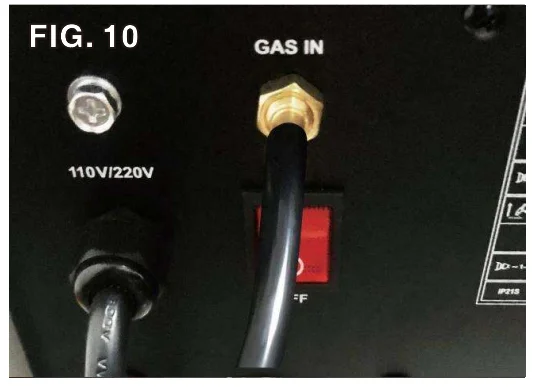
- Connect the other end of the gas line to the fitting on the rear of the Azznuo MIG-200F and wrench-tighten until snug (FIG 10).

- Check the gas line for leaks by slowly opening the valve on the gas bottle. When welding, the valve on the bottle should always be fully open.
POSITIONING THE DRIVE ROLLER
The Azznuo MIG-200F Wire Drive Roller has twin grooves to accommodate both .030″/.035″ [0.8 mm/0.9 mm] wire. The MIG-200F drive roller is factory set and ready to use .030″/.035″ [0.8 mm/0.9 mm] wire.
IMPORTANT NOTE: In this position, the wider .030″/.035″ [0.8 mm/0.9 mm] groove is inboard, under the wire, while the 0.8/0.9 marking is visible on the outward face of the drive roller (FIG 11). .030″ [0.8 mm] or .035″ [0.9 mm] wire can be used with the drive roller in this position.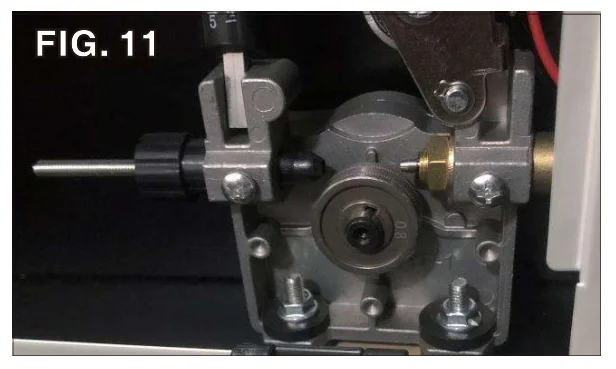
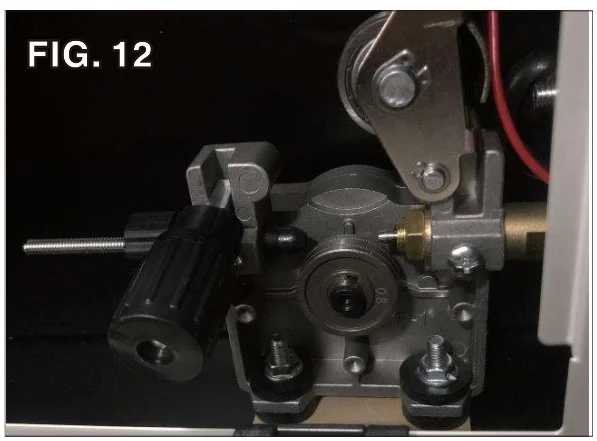
- Open the side door of the welder to access the drive motor compartment (FIG. 12).

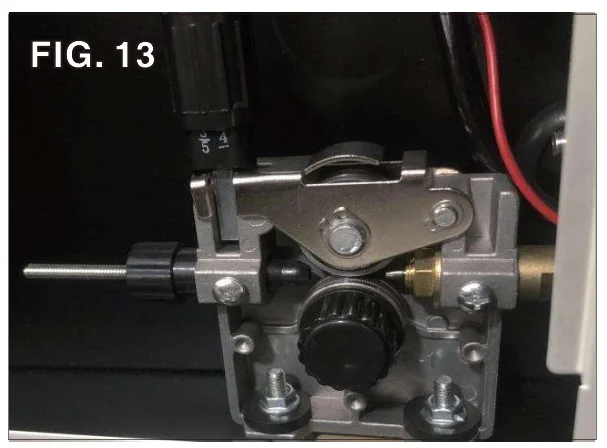
- Push the pressure adjuster rearward, pivot it down and out of the way, then pivot the tension arm up away from the drive roller (FIG. 13).

- Loosen and remove the drive roller retaining knob (FIG. 11).
- Remove the drive roller and view the wire sizes stamped on each side of the roller.
- Install the drive roller in the orientation so that the chosen wire size stamping is facing outward, making sure the shaft key aligns with the drive roller keyway (FIG. 11).
- Reinstall the drive roller retaining knob on the shaft.
- Replace the tension arm and re-latch the pressure adjuster.
INSTALLING THE WIRE SPOOL
The Azznuo MIG-200F can be used with either a 4″ or an 8″ wire spool.
SETTING THE WIRE PRESSURE ADJUSTER
- To set the tension on the wire, incrementally tighten the Spool Retaining Wingnut until there is a slight resistance to spinning the wire spool on the spindle. If the tension is set too loose, the wire spool will freely spin on the shaft and unspool all the wire. If the tension is too tight, the Drive Roller will have difficulty pulling the wire off the spool, and some slipping may occur.
THREADING WELDING WIRE THROUGH THE DRIVE MOTOR TO THE WELDING GUN
This welder uses wire sizes ranging from .030″ to .035″ (0.8 mm to 0.9 mm). To safely and correctly install the welding wire, follow the procedure in the sequence outlined below:
- Turn the power switch on the upper back panel to the “OFF” position and unplug the welder from the power supply.
- Set the Process Selector Switch [A] on the front panel to “MIG.”
- Remove the contact tip and nozzle from the end of the torch.
- Ensure that the drive roller is installed in the proper “face-out position” in accordance with the wire size being used (FIG. 11).
- Push the Pressure Adjuster rearward, pivot it down and out of the way, then pivot the Tension Arm up away from the Drive Roller (FIG 13).
- Pull out the welding wire from the wire spool carefully. IMPORTANT NOTE: Do not let go of the wire, or the entire spool could unravel.
- Cut off the small piece of the curved segment at the front of the welding wire and straighten the welding wire approximately 3.0″ long.
- Thread the welding wire through the Guide Pipe and over the Wire Drive Roller and into the Torch Hole (FIG 14).
![Azzuno 200A MIG Welder User Manual 16]](data:image/svg+xml;base64,PHN2ZyB4bWxucz0iaHR0cDovL3d3dy53My5vcmcvMjAwMC9zdmciIHdpZHRoPSI1MjciIGhlaWdodD0iMzg4IiB2aWV3Qm94PSIwIDAgNTI3IDM4OCI+PHJlY3Qgd2lkdGg9IjEwMCUiIGhlaWdodD0iMTAwJSIgc3R5bGU9ImZpbGw6I2NmZDRkYjtmaWxsLW9wYWNpdHk6IDAuMTsiLz48L3N2Zz4= "Azzuno 200A MIG Welder User Manual")
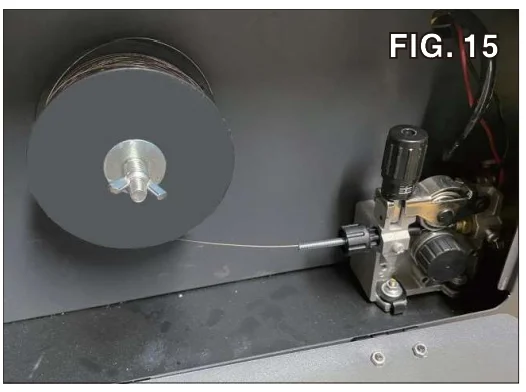
- Replace the Tension Arm and re-latch the Pressure Adjuster (FIG 15).

- Connect the welder to a power supply and turn the Upper Back Panel to the “ON” position. Set the Ampere/Wire Speed Control [E] according to the Welding Chart.
- With the gun pointed away from you and others, depress the trigger to begin feeding wire
- Once the wire exits the end of the torch, reinstall the contact tip and nozzle. Cut the wire about 1/4″ from the end of the contact tip.
![Azzuno 200A MIG Welder User Manual 16]](https://manualslibraryy.com/wp-content/uploads/2025/10/Azzuno-200A-MIG-Welder-User-Manual-16.webp "Azzuno 200A MIG Welder User Manual")
SHEET METAL WELDING TECHNIQUES
When welding sheet metal, a different approach is usually taken to account for how thin the metal is and how susceptible it is to warping. The technique most often used is called Stitch Welding, and this process is described below:
- Clean the metal to be welded of any paint, rust, oil, grease, dirt, or any other contaminants that may be on the surface of the piece.
- Secure the pieces to be welded in place using clamps. Be sure to leave a small gap between the two pieces of sheet metal for the weld to flow into. This will result in a lower bead height, which will require minimal finishing.
- Consult the Suggested Settings Chart and set the Voltage and Wire Speed knobs appropriately. Get some pieces of scrap metal of the same thickness and verify that the settings will work for the specific weld you will be making.
- Once the settings have been fine-tuned, tack-weld your final pieces in place and remove the clamps if they are in the way of the weld.
- The Stitch Welding technique can now be utilized, which is basically a series of tacks connecting together. To perform the technique, trigger the gun to form a tack weld and then continue to trigger on and off the gun, making a series of connected tack welds following along the path of the weld joint. Continue the series of tacks for an inch or so, and then move to a different section of the weld and perform the process there. It is essential to keep moving around to spread out the heat, making sure not to get one section too hot and warp the metal.
- Once the entire weld has been completed, allow the metal to cool. If necessary, follow up with a flap disc to grind the weld bead flush.
For More Manuals By Azzuno Welder, Visit ManualsLibraryy.
Azzuno 200A MIG Welder -FAQs
Q1. How thick of steel can a 200A MIG welder handle?
A 200A MIG welder can weld mild steel up to about 1/4 inch (6.4 mm) with good penetration.
Q2. What country is the Azzuno welder made in?
The Azzuno MIG welder is manufactured in China.
Q3. What materials can I weld with a 200A welder?
You can weld up to 5/16-inch steel with a 200A welder. For thicker steel, higher amperage welders are recommended.
Q4. How many kVA are needed to run a 200A welder?
A generator with at least 8 kVA (about 6.5 kW) capacity is suggested for stable operation.
Q5. How many watts does a 200A welder use?
Running at 240V, a 200A welder draws around 50A, which equals about 12,000W. Surge wattage may require up to 18,000W.
Q6. Can I run a MIG welder with a generator?
Yes, but ensure your generator can provide enough continuous and surge power to avoid equipment damage.
Q7. Do MIG welders consume a lot of electricity?
Power use depends on metal thickness. On average, welding may draw 20–200+ amps, with heavier jobs using more electricity.
Q8. What size breaker is required for a 200A MIG welder?
At least a 50A breaker is recommended for safe and reliable operation.