
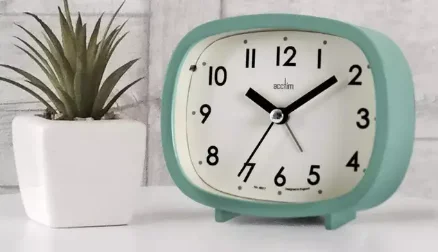

Acctim 15900 Hilda Retro Sweep Alarm Clock
Introduction
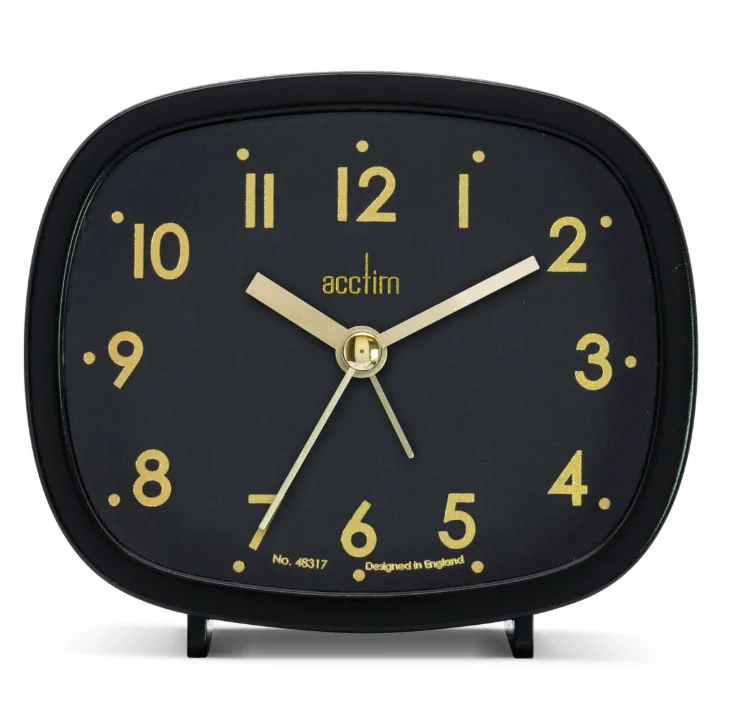
The Acctim 15900 Hilda Retro Sweep Alarm Clock blends nostalgic charm with modern functionality, perfect for bedside tables or office desks. Its compact retro-shaped case, measuring just 8.7cm high, 9.8cm wide, and 4cm deep, features a stylish glass lens over a clear, easy-to-read analog dial with bold numerals. Available in eye-catching colors like Cloverfield Green or Pigeon Grey, it evokes mid-century vibes while fitting seamlessly into any decor. Crafted with precision quartz movement, the Hilda boasts a silent, non-ticking sweep second hand—ideal for light sleepers who hate disruptive ticks. The crescendo beep alarm gently builds in volume, ensuring you wake refreshed, and includes a convenient snooze button for those extra minutes. A built-in backlight illuminates the dial at night for effortless time checks without glare. Powered by 1 x AA battery (not included), it’s hassle-free to set up. Designed in Britain by Acctim, this durable clock comes with a 2-year manufacturer’s guarantee, promising reliability for years. Elevate your mornings with the Hilda’s timeless appeal and thoughtful features—order yours today for uninterrupted rest and punctual wake-ups!
QUARTZ ALARM OPERATING INSTRUCTIONS
Thank you for your purchase of this quality clock. Please read these Instructions carefully and keep in a safe place for future reference.
ACTIVATING THE CLOCK
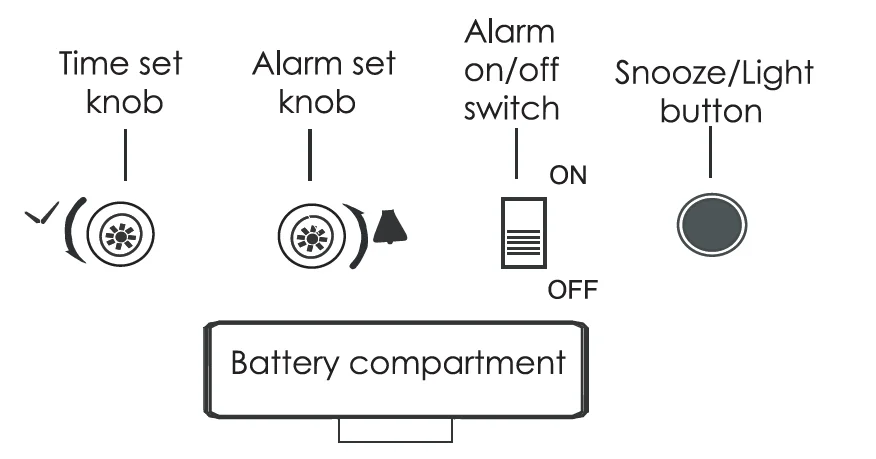
Insert a 1 X M battery into the battery compartment, taking care to observe the polarity.
SETTING THE TIME
Rotate the TIME SET knob in the direction of the arrow until the correct time is reached.
SETTING THE ALARM
Rotate the ALARM SET knob in the direction of the arrow to the desired alarm time.
TO TURN ON/OFF THE ALARM
Slide the ALARM ON/OFF switch to ON or OFF.
TO LIGHT THE DIAL
Press the SNOOZE/LIGHT button to activate the light.
USING THE SNOOZE FEATURE
When the alarm sounds, press the SNOOZE/LIGHT button to snooze the alarm for approximately 5 minutes.
CHANGING THE BATTERY
It is recommended that you replace the battery annually, even if the product is still running. Only use 1 X M (1.5V) Alkaline batteries in this clock. Remove the battery if the clock is not stored or not in use. Remove the exhausted battery from the product.
Warning: Do not recharge non-rechargeable batteries. Please responsibly dispose of the used battery. For more information, please contact your local authority.
MAINTENANCE
A soft cloth may be used to clean your clock. Do not use any corrosive cleaners or chemical solutions on the clock. Keep the clock clean and dry to avoid any problems.
YOUR GUARANTEE
Your clock is guaranteed for 2 years from the date of purchase against any faults arising from defective materials or manufacture. Damage caused through careless handling, misuse, or in transit is expressly excluded. Should this clock fail within 2 years,, please return it to your retailer.
Environmental Protection
Disposal of electrical & electronic equipment
Do not dispose of this product with household waste. For the proper treatment, recovery, and recycling, please take this product to the appropriate collection point. If you are unsure of where this is, contact your local authority. Improper disposal may be harmful to the environment.
For more innovative Acctim products, please visit: www.acctim.com
For more manuals by Acctim Clocks, visit ManualsLibraryy
Acctim 15900 Hilda Retro Sweep Alarm Clock-FAQs
How do I set the time on the Acctim 15900 Hilda clock?
To set the time, turn the adjustment knob located on the back of the clock. Rotate it slowly until the hands show the correct hour and minute. Always move the hands forward rather than backward to maintain accuracy and avoid damaging the internal mechanism.
How can I set the alarm on this clock?
Use the alarm-setting knob at the back to move the alarm hand to your desired wake-up time. Once set, switch the alarm to the “ON” position. Make sure the alarm hand aligns correctly with the clock hands for accurate triggering.
How do I turn the alarm on or off?
There is a simple switch on the back of the clock for alarm control. Slide it to the “ON” position to activate the alarm and to “OFF” to disable it. A small indicator may show when the alarm is active.
How do I reset the clock if it stops working?
Remove the battery and wait for a few seconds before reinserting it. This refreshes the clock mechanism. After inserting a fresh battery, reset the time and alarm settings manually to ensure proper operation.
Why is my clock not keeping accurate time?
Inaccurate time is usually caused by a weak or low battery. Replace it with a new, high-quality battery. Also, ensure the clock is placed on a stable surface and away from strong magnetic or electronic interference.
What type of battery does the clock use?
The Acctim 15900 Hilda clock typically uses one AA battery. For best performance, use an alkaline battery and insert it according to the polarity markings inside the battery compartment.
How does the sweep movement work?
This clock features a sweep movement, meaning the second hand moves smoothly instead of ticking. This creates a quieter operation, making it ideal for bedrooms or study areas where minimal noise is preferred.
What should I do if the alarm sound is too low or not working?
Check the battery first, as low power can reduce alarm volume. Ensure the alarm switch is turned on and the time is set correctly. If the issue continues, try replacing the battery or repositioning the clock.
How can I clean and maintain the clock?
Use a soft, dry cloth to gently clean the exterior. Avoid using water or cleaning sprays, as moisture can damage internal components. Regular dusting helps maintain both the appearance and performance of the clock.
Why is my alarm not going off at the correct time?
This may happen if the alarm hand is not aligned properly with the current time. Double-check both time and alarm settings. Also, ensure the clock is set to the correct AM/PM cycle if applicable.