
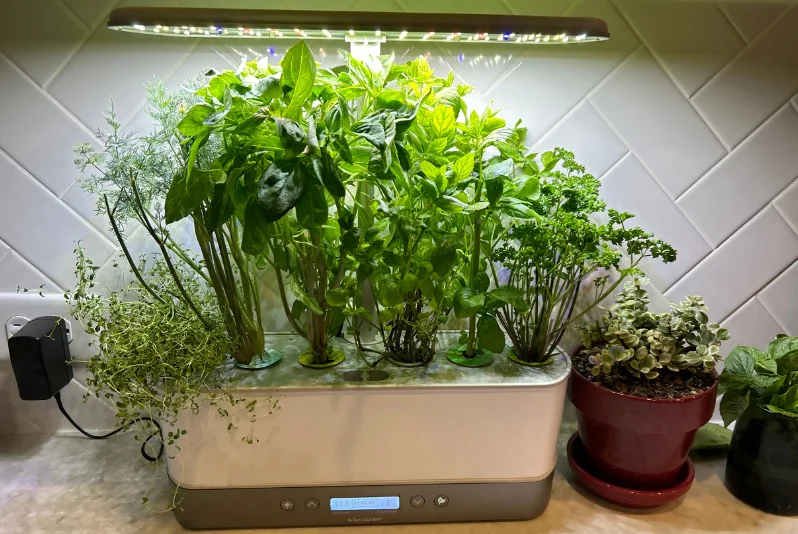

AeroGarden Harvest Elite Indoor Hydroponic System
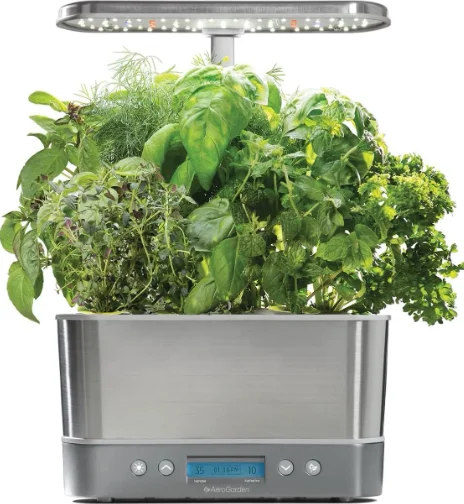
Get Growing in 4 Fast & Easy Steps!
- Make sure that the bowl is securely seated in the base and that the grow deck is properly aligned on the bowl.

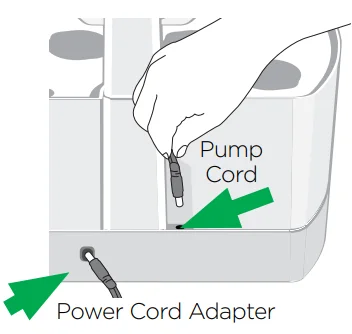
- Make sure that the pump cord is plugged into the connector at the back of the base. Plug in the power cord adapter.

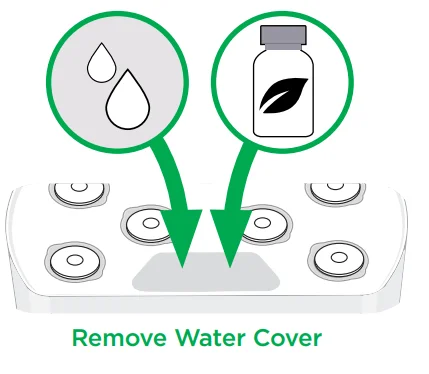
- Add water to “Fill to Here.” Add plant food directly to the bowl as per the instructions.

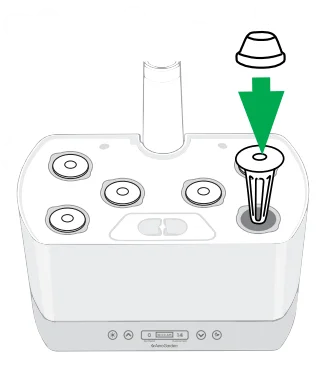
- Place seed pods in openings on the grow deck. Cover seed pods loosely with grow domes.


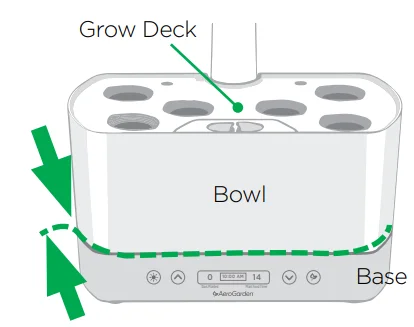

Control Panel & Garden Settings
Main Menu
- Touch the
 button to access your menu options: set clock, start a new garden, plant select, lights ON timer, test pump.
 - Touch the
 button to select and confirm changes.
 - Touch the
 buttons to scroll between settings and time.
 - Touch the
 button to temporarily turn LED grow lights on/off. This will not affect the timing of your light cycle, and occasional use will not harm your plants. Once pressed, the lights will stay on/off until the next time they are set to go on/off.
 buttons to scroll between settings and time.
 button to temporarily turn LED grow lights on/off. This will not affect the timing of your light cycle, and occasional use will not harm your plants. Once pressed, the lights will stay on/off until the next time they are set to go on/off.
Plant Food
- Add liquid plant food to the water bowl when you first plant your seed pod kit and when the “Add Plant Food” reminder activates every 2 weeks.
- Follow directions on the liquid plant food bottle for feeding amounts and top off the water level to “Fill to Here.”
- Touch the button once to turn off the alert and reset the plant food timer.
Good To Know:
Your pump cycle is set to be on for 5 minutes and off for 25 minutes. There is a Test Pump setting in your garden menu options.
Watering / Lights
Watering
Your garden will alert you when the water level drops more than halfway below the “Fill to Here” line.
Set Lights “ON” Time
When you plug in your AeroGarden for the first time, the grow light will come on, and will continue to come on at this same time every day. It will then turn off after the number of hours used for your plant selection: flowers 15.5 hrs., veggies 16 hrs., salads 16.5 hrs., herbs 17 hrs., custom 24 hrs. If you would like to change the time of day when the light comes on, go to your garden’s menu, touch the button, and scroll down with the
  button; then select “Set Lights ON Time” to make the change. Your grow lights will now come on at this time each day.
An Important Note About Lights:
Your AeroGarden Harvest has a built-in timer for the grow light that automatically provides your plants with the perfect amount of “sunlight.” As long as your plants get this amount of light, it does not matter what time the lights are off. You may find it most convenient to have the lights go on in the morning and off at night to match your own personal wake and sleep schedule.
Warning: Changes or modifications to this unit not expressly approved by the party responsible for compliance could void the user’s authority to operate the equipment.
Note: This equipment has been tested and found to comply with the limits for a Class B digital device, pursuant to Part 15 of the FCC Rules. These limits are designed to provide reasonable protection against harmful interference in a residential installation. This equipment generates, uses, and can radiate radio frequency energy and, if not installed and used in accordance with the instructions, may cause harmful interference to radio communications.
However, there is no guarantee that interference will not occur in a particular installation. If this equipment does cause harmful interference to radio or television reception, which can be determined by turning the equipment off and on, the user is encouraged to try to correct the interference by one or more of the following measures:
- Reorient or relocate the receiving antenna.
- Increase the separation between the equipment and receiver.
- Connect the equipment into an outlet on a circuit different from that to which the receiver is connected.
- Consult the dealer or an experienced radio/TV technician for help.
This device complies with Part 15 of the FCC Rules. Operation is subject to the following two conditions:
- This device may not cause harmful interference, and
- This device must accept any interference received, including interference that may cause undesired operation.
U.S. CAUTION – You are cautioned that any changes or modifications not expressly approved in this manual could void your authority to operate this equipment.
User Maintenance: Any servicing is to be performed by an authorized service representative. Use original packaging for storage when the appliance is not used. Disconnect power before servicing or replacing lights. Use only AeroGarden LED light replacement.
IMPORTANT SAFETY INSTRUCTIONS
- To reduce the risk of electric shock, the AeroGarden has a specific plug. Do not change the plug in any way.
DANGER – To reduce the risk of electric shock: - Always unplug the AeroGarden from the electrical outlet before cleaning. WARNING – To reduce risk of burns, fire, electric shock, or injury to persons:
- Unplug the AeroGarden from the outlet before putting on or taking off parts.
- Please take proper precautions when operating an AeroGarden near or by individuals requiring close supervision, including children.
- Use AeroGarden only for its intended use as described in the instructions. Do not use attachments not recommended by the manufacturer.
- Never operate the AeroGarden if it has a damaged cord or plug, if it is not working properly, if it has been dropped and damaged, or if it has been dropped in water. If any of these conditions occur/exist, contact www.AeroGardenSupport.com or your country’s local distributor for instructions.
- Keep the cord away from heated surfaces.
- Never operate the furnishing with air openings blocked. Keep air openings free of lint, hair, and the like.
- Never drop or insert any object into any electrical openings.
- Do not use outdoors.
- Do not operate where aerosol (spray) products are being used or where oxygen is being administered.
- Do not touch moving parts or hot parts such as pumps, lights, reflective surfaces, and the like.
- To disconnect, remove the plug from the outlet.
- Do not place or submerge the base, cord, plug, or light hood in water or other liquid to clean it.
- Do not allow water to contact hot LED grow lights.
- Use only approved and supplied parts and accessories. Use only AeroGarden LED grow lights with this AeroGarden model. Use of any other kind of accessory is not recommended. Replacement parts can be ordered from www.AeroGarden.com.
- Do not use AeroGarden for anything other than its intended purpose.
- This product is intended for household and residential use only. This product is not approved for commercial applications.
- If the supply cord is damaged, it must be replaced by the manufacturer, its service agent, or a similarly qualified technician to avoid a hazard.
- Electrical wiring must be in accordance with local regulations.
- This appliance is not intended for use by persons (including children) with reduced physical, sensory, or mental capabilities, or a lack of experience and knowledge, unless they have been given supervision or instruction concerning use of the appliance by a person responsible for their safety.
- Children should be supervised to ensure they do not play with the appliance.
LIMITED WARRANTY
WHAT IS COVERED – This warranty covers any defects in materials or workmanship, with the exceptions stated below.
HOW LONG COVERAGE LASTS – This warranty runs for one (1) year on this AeroGarden and LED grow lights, from the date of original purchase, for the original purchaser/user.
WHAT IS NOT COVERED – The warranty shall not apply to problems arising from: normal wear; failure to adhere to enclosed operating instructions; serial-numbered products if the serial number has been removed or defaced; products subject to negligence, accident, improper use, maintenance, or storage; products damaged by circumstances beyond AeroGrow International Inc.’s control; loss or damage to removable parts; or products modified (including, but not limited to, modifications through the use of unauthorized parts or attachments) or repaired by anyone other than AeroGrow International, Inc., or its designee. This warranty excludes all incidental or consequential damages.
WHAT AEROGROW WILL DO – AeroGrow International, Inc., at its option, will repair any defects in materials or workmanship or will replace these products with ones of similar features and price. AeroGrow International, Inc.’s sole obligation and your exclusive remedy under this warranty shall be limited to such repair or replacement.
TO RETURN THIS PRODUCT – If you have questions or concerns regarding your AeroGarden, please contact Customer Service at 1-800-476-9669. Please do not return any product without contacting AeroGrow for return authorization. Unauthorized returns, as well as C.O.D. shipments, will be refused. For more information regarding returns, please see the Returns section at www.AeroGarden.com.
Due to continuing improvements, the actual product may differ slightly from the product described herein. Some states do not allow the exclusion or limitation of incidental or consequential damages, so the above limitation or exclusion may not apply to you. This warranty gives you specific legal rights, and you may have other legal rights that vary from state to state.
If you have any questions, please feel free to contact our customer service representatives:
US: 1-800-476-9669 | Canada: 1-800-611-9058
NEED SUPPLIES, ACCESSORIES, OR INFORMATION? Call: 1-800-476-9669 or visit our website: www.AeroGarden.com
For More Manuals By AeroGarden, Visit ManualsLibraryy.
AeroGarden Harvest Elite Indoor Hydroponic System-FAQs
What is the AeroGarden Harvest Elite?
The AeroGarden Harvest Elite is an indoor hydroponic system that grows plants in water instead of soil. It can grow up to 6 herbs, vegetables, or flowers at once, with plants reaching up to 12 inches tall.
How do I use the AeroGarden Harvest Elite?
Fill the water bowl, insert seed pods, add liquid plant food, and turn on the LED grow lights. The system reminds you when to add water or nutrients.
Can I use tap water in my AeroGarden?
Yes, most municipal tap water works. For very hard water, distilled or reverse osmosis water can improve results.
How often should I change the water?
Refill and add fresh nutrients every 4–6 weeks to keep plants healthy.
Can I grow my own seeds in AeroGarden?
Yes, you can use your own seeds with the Grow Anything Kit. Just plant 2–3 seeds per pod.
Can I grow flowers or tomatoes in it?
Yes! You can grow flowers, herbs, vegetables, and tomatoes, but some plants like root vegetables (carrots, potatoes) cannot grow hydroponically.
What happens if the water runs out?
The Harvest Elite has a low water shut-off feature. The pump and lights stop to prevent plant damage.
Does it use a lot of electricity?
No, it’s energy-efficient. Small models use around 13 watts per month, while larger models use more.
How long does it take for plants to grow?
Growth times vary by plant type, but seedlings sprout faster than traditional soil planting, often ready to harvest in a few weeks.