


Amazon Echo Show 5 3rd Gen Smart Display for Kids
Introduction
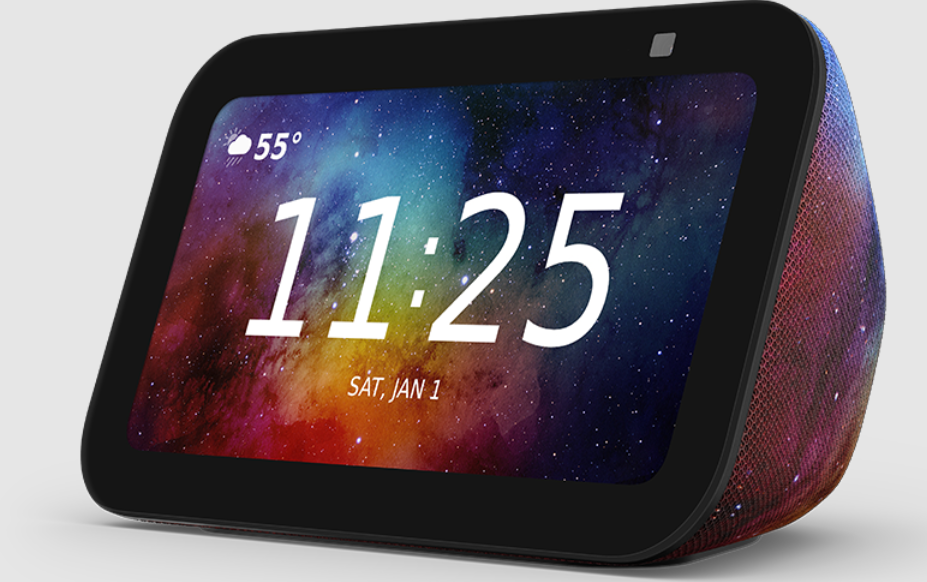
The Amazon Echo Show 5 (3rd Gen) Smart Display for Kids is a kid-friendly version of Amazon’s popular smart screen, designed to make learning, playing, and everyday routines fun and safe for children aged roughly 3–12 years. It features a vibrant 5.5-inch touchscreen that lets kids watch videos, listen to music and audiobooks, play interactive games, or even get help with homework using voice commands to Alexa. The device comes with a built-in 2 MP camera with privacy shutter, voice-activated Alexa assistance, and hands-free calling to approved contacts for family communication. One of its standout features is Amazon Kids+, a one-year subscription included in the package that offers thousands of age-appropriate and ad-free books, videos, songs, and Alexa skills tailored for kids. Parents can easily manage screen time, set daily limits, and review activity using the Amazon Parent Dashboard, with Alexa automatically filtering explicit content and offering kid-friendly responses. Designed with privacy and sustainability in mind, the Echo Show 5 Kids also includes multiple layers of privacy protection like a mic/mute button and physical camera cover, plus eco-friendly materials in its build and packaging.
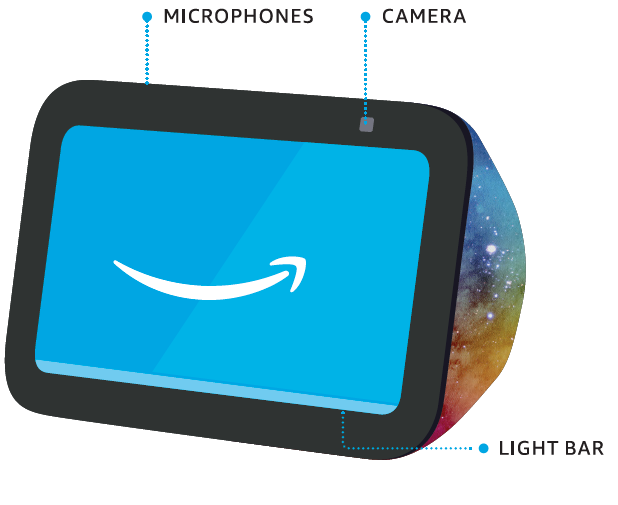
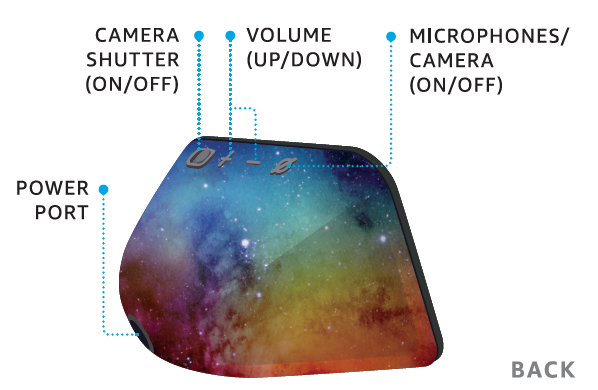
MEET YOUR ECHO SHOW 5 KIDS
Also included: Power adapter
The design featured above could be different from your device.
SET UP YOUR ECHO SHOW 5 KIDS
- HAVE YOUR WIFI AND AMAZON PASSWORDS READY
During setup, you will connect to the internet and sign into your Amazon account. - PLUG ECHO SHOW 5 KIDS INTO A POWER OUTLET
Use the included power adapter. In about a minute, the display will turn on and Alexa will greet you. - FOLLOW THE ON-SCREEN SETUP
Log in with an existing Amazon account username and password or create a new account. - DOWNLOAD THE ALEXA APP FROM YOUR APP STORE
Installing the app on your phone or tablet helps you get more out of your Echo Show 5 Kids. It’s where you set up calling and messaging, manage music, lists, settings, and news.
TO CHANGE YOUR SETTINGS
Swipe down from the top edge of the screen.
For help and troubleshooting, go to Help & Feedback in the Alexa app or visit amazon.com/devicesupport.
MANAGE YOUR ECHO SHOW 5 KIDS
INCLUDES 1 YEAR OF AMAZON KIDS
Your Echo Show 5 Kids comes with 1 year of Amazon Kids+ (auto-renews at applicable rate). Discover a world of kid-friendly Audible books, interactive games, and educational skills.
AMAZON PARENT DASHBOARD
To help your child get more out of their Echo Show 5 Kids, visit the Parent Dashboard at https://parents.amazon.com, https://parents.amazon.ca, or in the Alexa app by selecting Amazon Kids in Settings. With easy-to-use parental controls, you can review activity, manage time limits, share content, and more.
LEARN ABOUT THE LIGHT BAR
By default, Alexa doesn’t begin listening until your Echo device hears you say “Alexa.”
- BLUE

Alexa is now listening. - RED

The microphones and the camera are off. Alexa can’t hear or see you. - ORANGE

Your device is in setup mode or is trying to connect to the internet. - PURPLE

Your device is in Do Not Disturb mode. During initial device setup, purple shows if there are wifi issues. - YELLOW

You have a new notification from a parent-approved contact. Say, “Alexa, read my notifications. - GREEN

An incoming call from a parent-approved contact or a household member may be viewing the camera.






PRIVACY AND SUPPORT
 PRIVACY CONTROLS
Turn the camera and microphones off by pressing the microphones/camera on/off button. Cover the camera easily with the built-in shutter. See when Alexa is recording and sending you a request to Amazon’s secure cloud via a blue indicator light. MANAGE YOUR VOICE HISTORY
You can view, hear, and delete the voice recordings associated with your account in the Alexa app at anytime. GIVE US YOUR FEEDBACK
Alexa is always getting smarter and adding new skills. To send us feedback about your experiences with Alexa, use the Alexa app or visit amazon.com/devicesupport
 PRIVACY CONTROLS
 MANAGE YOUR VOICE HISTORY
 GIVE US YOUR FEEDBACK
You have control over your Alexa experience. Explore more at amazon.com/alexaprivacy or amazon.ca/alexaprlvacy.
THINGS TO TRY WITH ALEXA
Start by asking, “Alexa, what can you do?” You can also stop a response at any time by saying “Alexa, stop.”
 PLAY THEIR FAVORITES
“Alexa, please play music.”Alexa, let’s play a game. LEARN AND GROW
“Alexa, how many moons does Jupiter have?” “Alexa, how do you spell beautiful?” MAKE BEDTIME EASIER
«Alexa, read me a story. “Alexa, set an alarm for 8 AM.”
 PLAY THEIR FAVORITES
 LEARN AND GROW
  MAKE BEDTIME EASIER
Some features may require customization in the Alexa app, a separate subscription, or an additional compatible smart home device. Certain ski/ls and services may not be available in all languages. You can find more examples and tips in the Alexa app.
For more manuals by Amazon Basics, visit ManualsLibraryy
Amazon Echo Show 5 3rd Gen Smart Display for Kids-FAQs