
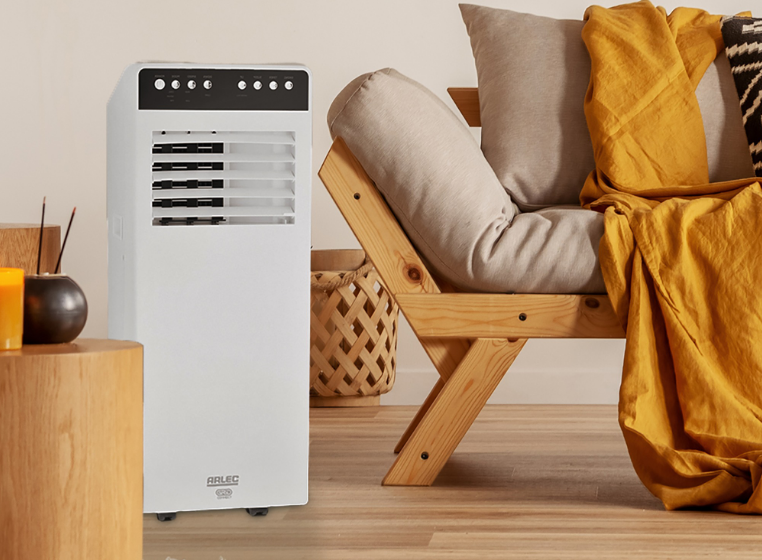

Arlec PA1201GB Portable Air Conditioner
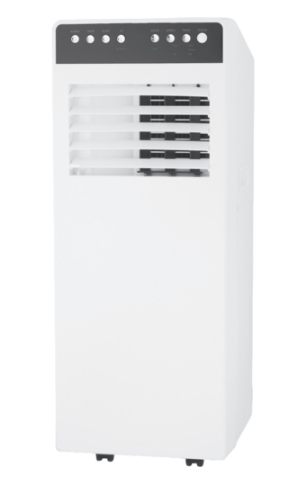
SAFETY INSTRUCTIONS
Please read carefully and keep the manual in a safe place for future reference before using the machine.
- This unit is not intended for use by persons (including children) with reduced physical, sensory, or mental capabilities, or a lack of experience and knowledge, unless they have been given supervision or instruction concerning use of the appliance by a person responsible for their safety. Children should be supervised to ensure that they do not play with the appliance.
- Children should be supervised to ensure that they do not play with the appliance.
- DO NOT operate the unit with a damaged plug or loose wall outlet. If the supply cord is damaged, it must be replaced by the manufacturer, its service agent, or similarly qualified persons to avoid a hazard.
- DO NOT connect the unit unless it is completely assembled.
- DO NOT rest heavy objects on the unit.
- DO NOT tilt the unit. Always keep the unit in an upright position and on a flat/stable surface where it cannot easily fall over.
- DO NOT pull or carry the appliance by the power cord. This may cause a portion of the core wire to break, which may cause overheating or fire.
- DO NOT run the power cord under carpeting and rugs.
- DO NOT cover or obstruct the air inlet or outlet grilles.
- DO NOT use the device in the following cases:
- Near a fire source
- In areas where gasoline, paint, or other flammable goods are stored
- In an area where water can be projected
- In a wet room, such as a bathroom or laundry
- Before cleaning the unit, switch it OFF and disconnect the power plug or turn the breaker OFF. This may cause injury since the fan inside rotates at high speeds during operation.
- DO NOT touch the plug or device with wet hands or bare feet.
- DO NOT insert or allow foreign objects to enter the grille openings, as this may cause damage to the unit and/or the user.
- DO NOT turn the breaker OFF/ON or disconnect/connect the power plug during operation. This may create sparks, which can cause fire.
- This appliance has been manufactured for domestic environments, indoor use only, and should not be used for other purpose.
- DO NOT use an extension cord with this unit.
- The supplier is not liable for injury caused to a person or property damage due to non-compliance with maintenance instructions, improper use of the appliance, or not using genuine parts from an official supplier. If service is needed, contact an authorised service agent.
- When the unit will be unused for a long time, disconnect the power plug or turn the breaker OFF.
- ALWAYS unplug the unit from the mains before maintenance or cleaning.
- ALWAYS keep a clearance of at least 200mm from walls, furniture, and curtains.
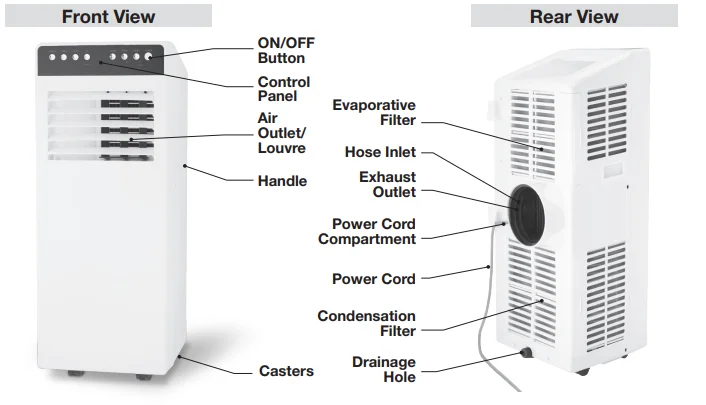
IDENTIFICATION
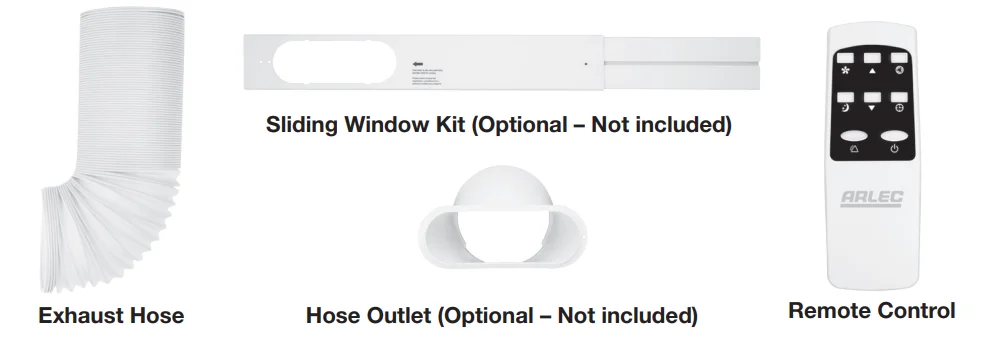
Accessories
INSTALLATION
Please Note: Selection of Installation Place
- Install the unit in a flat and dry place.
- Leave at least 50cm space around the unit (when the hose is not connected).
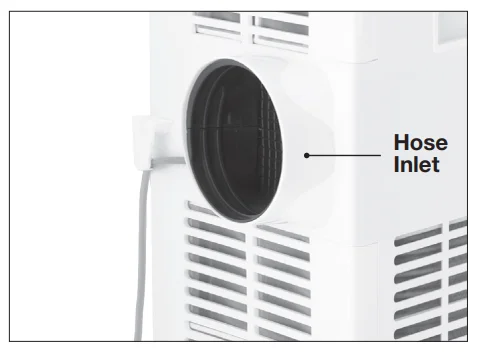
- The hose inlet is embedded at the back of the air conditioner.

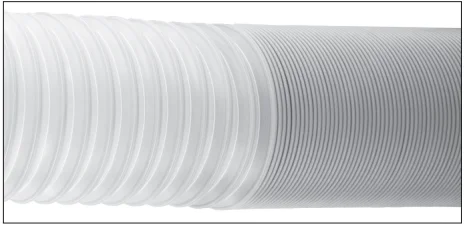
- This air conditioner requires the exhaust hose to be fitted over the hose inlet. Pull a few threads of the exhaust hose.

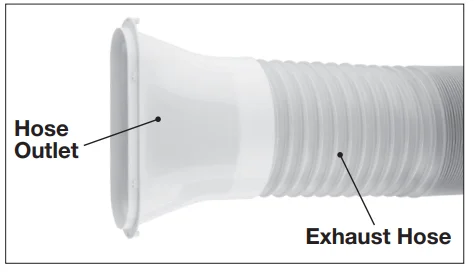
- Fix the exhaust hose to the moulded threads on the hose inlet by turning it in a counter-clockwise direction. The exhaust hose can be extended from 310mm to 1.5m long (approx). However, it is recommended to use the shortest possible length. NOTE: Pull one end of the exhaust hose apart by several threads before you attempt to fix it with the hose inlet/outlet.
- (Optional Accessories – Not provided with the unit) Connect the hose outlet to the other end of the exhaust hose by turning it counterclockwise. Place the exhaust hose securely on the moulded threads of the hose outlet.

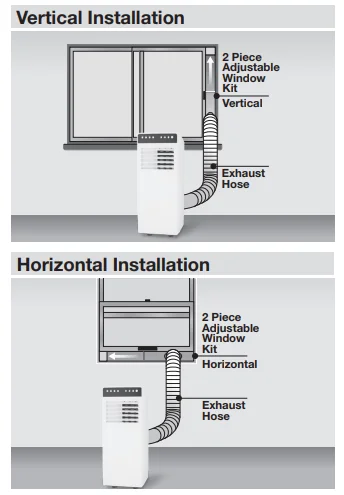
- Optional Accessories – Not provided with the unit) Sliding Window (Horizontal/Vertical)
- Slide the window open.
- Place the window adaptor kit into the opening, telescope the window adaptor to fit the window (Horizontal/Vertical). Insert the screw into the closest available hole on the edge of the kit to hold it in position.
- Partially close the window to hold the window adaptor kit securely.
- Insert the hose outlet into the window adaptor and clip it into place.
NOTE:
- Free access to the exhaust pipe is important. Ensure the air in the exhaust pipe can run smoothly; installation errors will have a bad influence on the machine.
- The extreme length of the unfolding exhaust pipe is 1500mm; please shorten the length as much as possible and keep it as level as possible when installing.
- Place the machine on flat ground and keep it far from around things at least 50cm.
- Make sure the socket can be reached from the machine location.
- Keep the machine standing upright so that the compressor can work well.
- Make sure free access to the air inlet and air outlet.

- Don’t use spraying agent (such as pesticides, paint) or other flammable materials; otherwise, plastic deformation, or even electric damage to the machine may be caused.
- Avoid the exhaust pipe with a sharp bend.


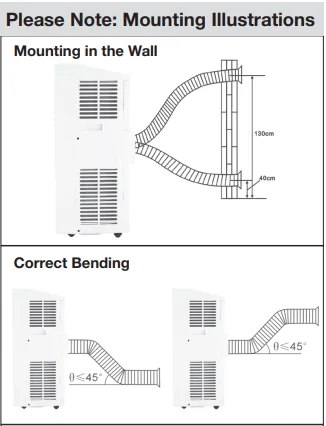
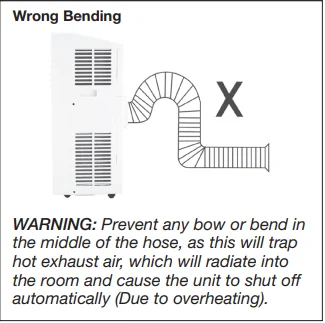
IMPORTANT: The hose length has been specifically designed for this product. Do not replace or increase the length of the hose with attachments. If the venting of the exhaust air is inhibited in any way, the unit may overheat and shut off.
CONTROL PANEL
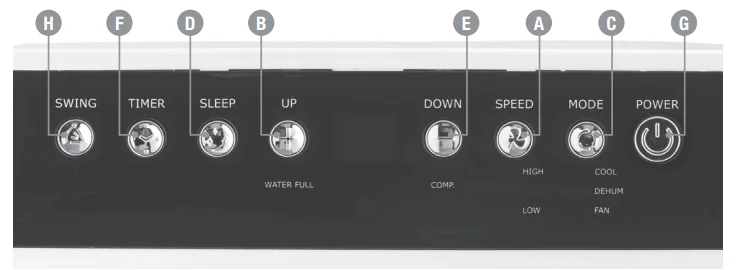
- Fan Speed Button
- Increment Button (Timer/Temperature)
- Mode Selection Button
- Sleep Mode Button
- Decrement Button (Timer/Temperature)
- Timer Button
- Power ON/OFF Button
- Swing
REMOTE CONTROL
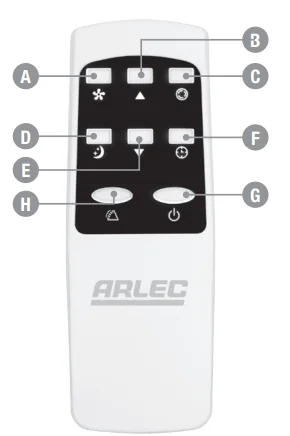
- Fan Speed Button
- Increment Button (Timer/Temperature)
- Mode Selection Button
- Sleep Mode Button
- Decrement Button (Timer/Temperature)
- Timer Button
- Power ON/OFF Button
- Timer Button

- The remote-control unit requires 2 x 1.5V AAA Alkaline batteries.
- Please remove the plastic isolation piece inside the battery cover plate slot when you use it for the first time.
- You can use the remote-control unit when the distance between the air conditioner and the remote is less than five meters. Make sure the deviation of the remote is less than 30°.
- The remote controller has all the same functions as the buttons on the control panel of the unit.
- To use the remote-control unit, make sure the unit is plugged into the mains supply, then point the remote to the sensor located at the control panel and press the desired button.
- The remote-control unit’s operating range is 5m. Make sure there are no obstacles between the remote and the sensor.
OPERATION
The beep sound will be heard whenever the button is pressed on the keypad display or the remote handset.
POWER ON/OFF BUTTON
To power the unit, ensure that the power plug is plugged into an appropriate 240V a.c. Receptacle and switch the power on at the wall outlet. Once the power is applied, the unit will beep, and the display will come up indicating the temperature of the room; the unit will be in standby mode. Press the Power ON button, and the unit will start operating in the last selected settings.
IMPORTANT: To prolong the life of the compressor, wait for at least 3 minutes before turning on the unit after it has been switched off. Never turn the air conditioner off by unplugging it from the mains wall outlet. Always use the POWER ON/OFF button to turn off the unit and then wait for a few minutes before unplugging the mains power cord.
MODE SELECTION BUTTON
COOLING MODE
When the unit is in default, the value is in cooling mode with 22° and low fan speed.
- Press the MODE button on the control panel or remote
 repeatedly until the green LED light next to the COOL mode icon lights on the display. This indicates the unit is set in cool mode.
 - Press the UP/DOWN
 button on the control panel or remote to set the room temperature as desired between 16°C to 31°C (60.8°F to 87.8°F). The temperature will increase/decrease by 1°C each time the UP/DOWN button is pressed.
 - Press the FAN speed button on the control panel or remote
 to change the fan speed from Low to High, and the corresponding LED indicator will light up on the control panel.
 repeatedly until the green LED light next to the COOL mode icon lights on the display. This indicates the unit is set in cool mode.
 button on the control panel or remote to set the room temperature as desired between 16°C to 31°C (60.8°F to 87.8°F). The temperature will increase/decrease by 1°C each time the UP/DOWN button is pressed.
 to change the fan speed from Low to High, and the corresponding LED indicator will light up on the control panel.
FAN MODE
- Press the MODE button repeatedly on the control panel or remote
 until the green LED light next to the FAN mode icon lights up on the display.
 - Press the FAN button to change the fan speed from LOW to HIGH, and the speed indicator will change on the display panel to the selected fan speed settings.
Note: In Fan mode, temperature and sleeping functions will be disabled.
DEHUMIDIFYING MODE
- Press the MODE button repeatedly on the control panel until the green LED light next to the DEHUM icon lights on the display, or press on remote control to activate.
- In dehumidifying mode, the fan speed is preset in low mode. The speed button, temperature, and sleep function are not available. The temperature cannot be set either.
Note: Dry mode cannot be used to cool the room; it is ideal to reduce room humidity. See the water drainage section to drain the condensate (water) in the unit.
SLEEP MODE
- When the unit is operating in cool mode, pressing the sleep mode button, the unit will enter sleep mode.
- During sleep mode, the fan speed will be adjusted to low speed, and the corresponding low speed icon will light up on the keypad display. And the speed can’t be adjusted during this time.
- The set temperature will increase by 1° after one hour since the unit has entered sleep mode. The unit will continue to operate at the new set temperature for the next hour and then again increase the set temperature by 1°. The final setting temperature will be the same after the unit automatically increases the set temperature twice.
- Note: Sleeping mode is invalid under dehumidifying and fan mode. Under water drainage full condition, the machine will change to standby mode, and the sleeping mode will be cancelled.
TIMER BUTTON
The timer function is used to set the ON or OFF time of the unit. This function can be set using the control panel or remote. The duration of the timer is from 1Hr to 24Hrs, incremented in steps of 1Hr.
TIMER ON: Setting only when it is OFF
This function is used to start the unit after a specific time interval.
To set the ON Time:
- Ensure the unit is connected to the mains supply and the supply switch is turned ON.
- Press the TIMER button on the control panel or remote
 , and the corresponding green light next to the Timer Mode icon will glow. Also, the timer count will be displayed.
 - Set the time (between 1Hr to 24 hours) after which you want the unit to be turned ON using the UP/DOWN
 button on the remote or control panel.
 - Once the time is selected, the corresponding time will blink for 5 times on the display, and the count is stored.
- The unit will start operating once the preset time has elapsed.
- To cancel the timer setting, press the TIMER button again and push the timer button continuously to count the timer back to “0”.
 , and the corresponding green light next to the Timer Mode icon will glow. Also, the timer count will be displayed.
TIMER OFF: Setting only when it is RUNNING
This function is used to turn OFF the unit after a specific time interval.
To set the OFF time:
- Press the TIMER button on the control panel or remote
 .
. - Set the time after which you want the unit to be turned OFF using the UP/DOWN
 button on the control panel or remote.
 - Set the time (between 1Hr to 24Hrs) after which you want the unit to be turned OFF using the UP/DOWN
 button / on the remote or control panel.
 - Once the time is selected, the corresponding time will blink for 5 times on the display, and the count is stored.
- The unit will be turned OFF when the preset time is reached and will be in standby mode.
- To cancel the timer setting, press the TIMER button again and use the UP/DOWN button / bring the timer count back to “0.”
Note: In the event of a power failure, the timer needs to be reprogrammed.
PLUG WIRING
These safety instructions should be read carefully and kept in a safe place for future reference. The appliance is fitted with a plug that complies with BS1363. Wires colour code as below:
- Brown – Live
- Blue – Neutral
- Yellow & Green – Earth
- If the appliance is fitted with a 2-core cable, it is double-insulated and will not have the Earth (Yellow & Green) wire.

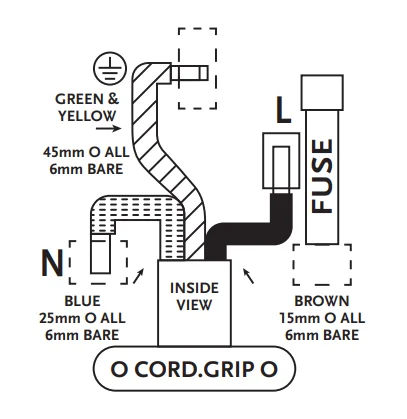
IT IS ESSENTIAL THAT THE WIRES ARE ATTACHED ONLY TO THEIR DESIGNATED TERMINALS. The plug must also be fitted with a genuine BS1362-approved fuse with the below rating, which is dependent on the rated wattage of the product.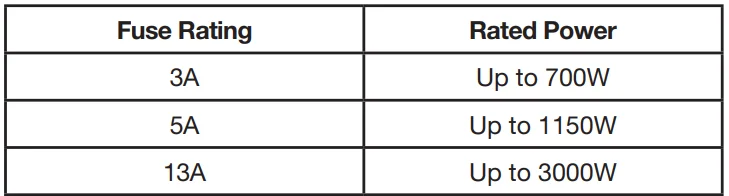
SAFETY FEATURES
FROST PROTECTION FUNCTION (LOW TEMPERATURE)
The unit is fitted with a frost protection device to avoid excessive formation of ice during Cooling, Dry, or Sleep mode. The unit will start automatically when the defrosting process is completed.
OVERFLOW PROTECTION FUNCTION
When water in the water pan exceeds the warning level, the machine will automatically sound an alarm, and the “FULL” indicator light will flash. At this point, you need to move the drainage pipe connecting the machine or the water outlet to a suitable drainage area to empty the water (For details, refer to the Drainage Instructions section in the instructions). After the water is emptied, the machine will automatically return to the original state.
PROTECTION FUNCTION OF THE COMPRESSOR
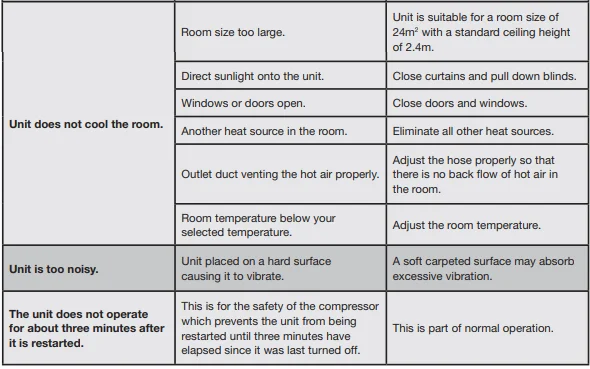
To increase the service life of the compressor, it has a 3-minute delay booting protection function after the compressor is turned off.
WATER DRAINAGE
This product has a self-evaporative system. The condensing water will be recycled to cool the condenser. This not only improves cooling efficiency but also saves energy. But in case the internal vessel fills up, then the compressor will stop working, and the corresponding LED indicator light will light up next to the “Water Full” icon on the control panel. Refer to the steps for manual water drainage. Turn OFF the power from the unit and remove the plug from the mains socket. Follow the procedures below to remove water condensation.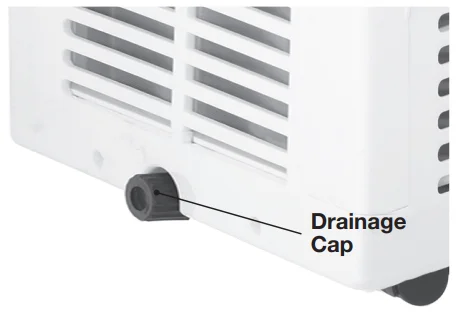
- Unplug the unit from the power source.
- Place a shallow pan under the lower drain plug.
- Remove the drain cap located on the back side at the bottom of the unit.
- Water will drain out and collect in the shallow pan.
- After the water is drained, replace the lower drain plug firmly.
- You can now turn on the unit. The machine will run normally.
NOTE:
- Keep the drainage cap and the water plug securely for later use.
- During drainage, the unit can be tilted slightly backwards to undergo the drainage process smoothly.
- If the water container cannot hold all the water, before the water container is full, insert the water outlet with the water plug as soon as possible to prevent any spill of water on the carpet or floor area.
- When the water is discharged, insert the water plug and tighten the drainage cover.
- If the water full alarm is often on, there may be a malfunction. Contact the service centre for advice/help/service. Alternatively, in extreme humidity in tropical zones, the unit may not be able to evaporate the condensing water effectively; in this instance, follow the same procedure for dehumidifying.
TROUBLE SHOOTING
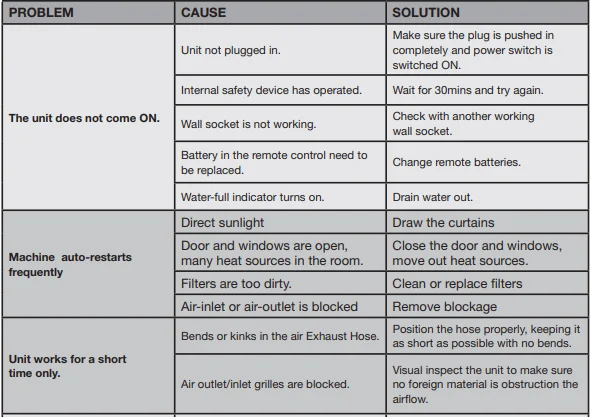
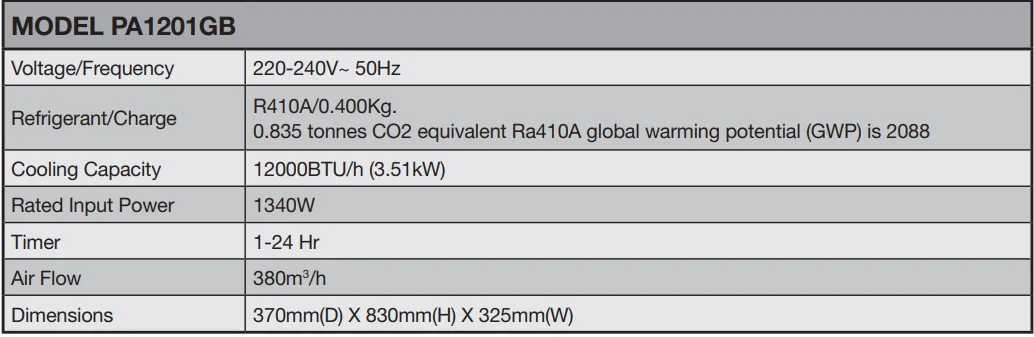
SPECIFICATIONS
WARRANTY
Products are protected by warranty against manufacturing defects for a period of 12 months from the date of purchase or delivery, including defects in production, materials, and workmanship. In the event of a problem with the product within the warranty period, please return it to your nearest store. If the item is shown to have an inherent defect present at the time of sale, the store will, at its discretion, provide you with a replacement. If we are unable to repair or replace a defective product, we will refund the purchase price of the defective product in part or in full.
This warranty does not cover the product where the fault is due to you or any third party’s misuse, abuse, neglect, use in contravention of any oral or written instructions as to the storage, installation, commissioning, use, or maintenance of the product, or where the product has been the subject of unauthorised modifications or alterations without our prior written consent, including the use of unauthorised spares, or has been the subject of commercial use.
For the avoidance of doubt, the exclusions in this paragraph apply to any defect arising as a result of fair wear and tear, wilful damage, negligence, or abnormal working conditions, or where products differ from their description as a result of changes made to ensure they comply with applicable statutory or regulatory standards.
The terms of this warranty shall apply to any repaired or replacement product we supply, and the 12-month warranty period is treated as continuing as if the repaired or replacement product was supplied at the original date of purchase.
Your statutory rights remain unaffected, and nothing in this warranty shall limit or exclude our liability for any rights you have under the Consumer Rights Act 2015. If any part of this warranty is deemed unenforceable (including any exclusion of liability), the enforceability of any other parts of this warranty will not be affected.
Please retain for future reference.
Arlec Electrical Company Limited
Arlec’s telephone number, address, and email address are:
Customer Service Toll Free: 0800 112 0275
Unit 18, Cromwell Business Park, Howard Way, Newport Pagnell,
Buckinghamshire, MK16 9QS.
Email: [email protected]
For More Manuals By Arlec, Visit ManualsLibraryy.
Arlec PA1201GB Portable Air Conditioner-FAQs
What are the main features of the Arlec PA1201GB Portable Air Conditioner?
The unit offers 8000 BTU cooling power, cooling + dehumidifying + fan modes, two fan speeds, Eco mode, and a slim portable design suitable for small to medium rooms.
Is a portable air conditioner effective?
Yes, modern portable ACs cool rooms efficiently and can perform similarly to window units when used in properly sized spaces with correct ventilation.
What is the “3-minute rule” for ACs?
Always wait at least 3 minutes after switching off the AC before turning it on again. This allows refrigerant pressure to stabilize and protects the compressor from damage.
Can I run the Arlec portable AC all day?
Yes, as long as it has proper ventilation and a stable power supply, it can run continuously.
Is 8000 BTU enough for a bedroom?
An 8000 BTU AC is ideal for small rooms—typically up to 12×12 ft (about 13–15 m²) depending on insulation and heat load.
Is it safe to sleep with a portable AC on?
Yes, it is safe. A portable AC helps maintain a comfortable sleeping temperature and can improve sleep quality.
Which is better: single-hose or dual-hose portable AC?
Dual-hose models cool faster and more efficiently, especially in larger rooms. Single-hose models (like most compact units) are more lightweight and easier to install.
Do portable ACs consume a lot of electricity?
Consumption varies, but portable units generally use more power than small window ACs. Usage time, mode, and fan speed all affect electricity use.
How long does it take to cool a room?
A properly ventilated portable AC typically begins cooling within 10–20 minutes, with full room cooling depending on room size and heat level.
Can a portable AC overheat?
Yes, if filters are blocked, ventilation is poor, or the exhaust hose is kinked. Regular cleaning and proper placement prevent overheating.