
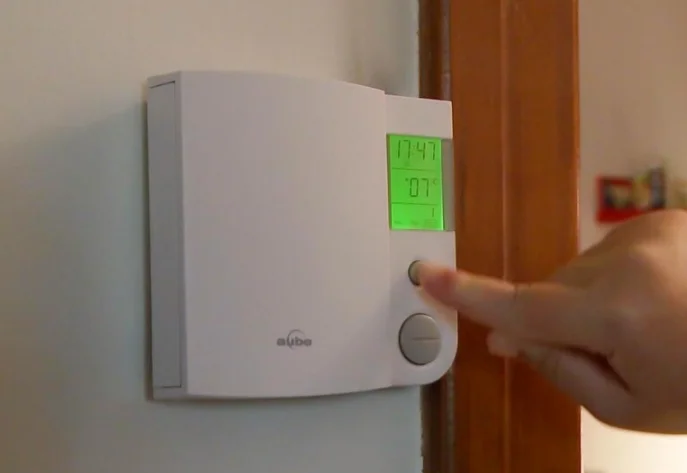

Aube Technologies TH104PLUS Programmable Thermostat
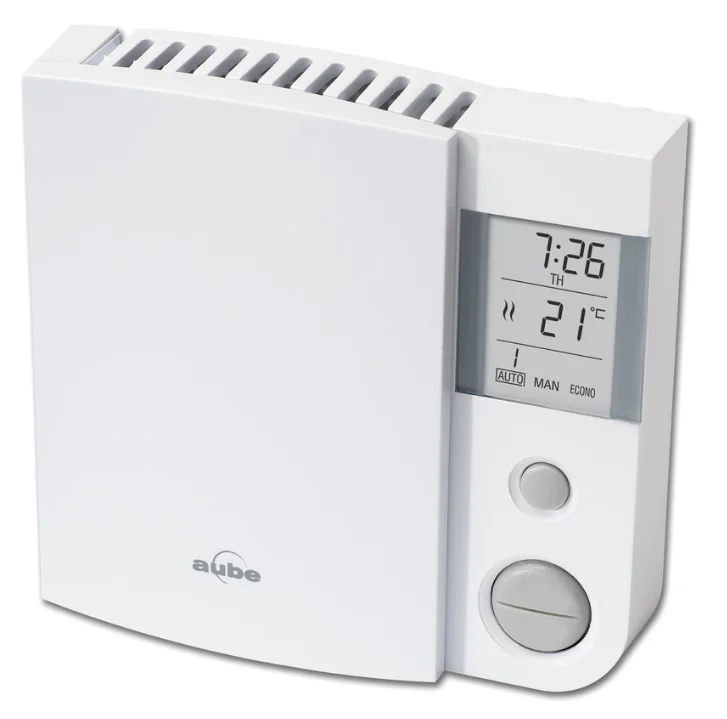
Programmable Thermostat
Description
The TH104PLUS thermostat can be used to control an electric heating system such as a baseboard heater, a radiant floor, a radiant ceiling, a convector, or a fan-forced heater. The thermostat cannot be used with the following:
- a resistive load under 2 A
- a resistive load over 14.6 A
- systems driven by a contactor or a relay (inductive load)
- central heating systems
SUPPLIED PARTS
- One (1) thermostat
- Two (2) 6-32 mounting screws
- Two (2) solderless connectors
Installation
TURN OFF POWER TO THE HEATING SYSTEM AT THE MAIN POWER PANEL TO AVOID ELECTRICAL SHOCK.
- All cables and connections must comply with local electrical codes.
- This thermostat has tinned copper wires for line and load connections. Special CO/ALR solderless connectors must be used if these wires will be connected to aluminium conductors.
- Install the thermostat onto an electrical box.
- Install the thermostat about 5 feet high, on an inside wall facing the heater.
- Avoid locations where there are air drafts (such as the top of a staircase or an air outlet), dead air spots (such as behind a door), or direct sunlight.
- Do not install the thermostat on a wall that conceals chimney or stove pipes.
- The thermostat wires are not polarized; either wire can be connected to the load or to the power supply.
1. Connect the thermostat
Connect the thermostat wires to the power and to the load using solderless connectors for copper wires.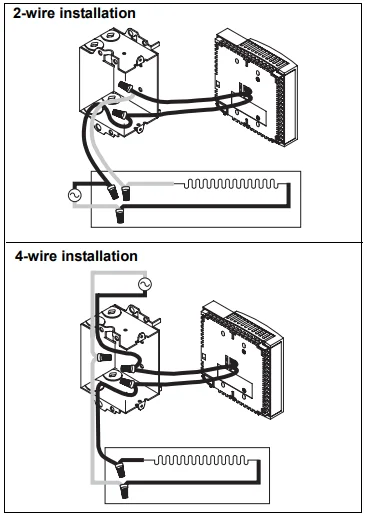
2. Mount the thermostat
Push the excess wires back inside the electrical box. Secure the thermostat to the electrical box using the provided screws. Insert the screws through either the right or left pair of mounting holes on the thermostat.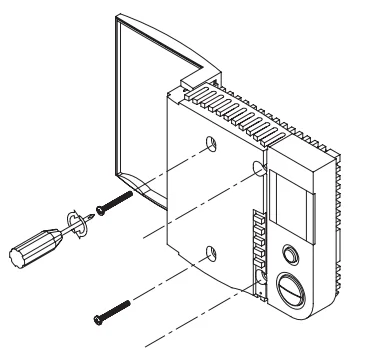
3. Complete the installation
NOTE: If there is a protective film or sticker on the thermostat’s screen, peel it off. Apply power to the heating system. Verify the installation by checking that the heater can be turned on and off by raising and lowering the setpoint using the Up and Down buttons.
WARNING: Keep the thermostat’s air vents clean and free from obstructions.
Temperature Display and Setting
The thermostat normally displays the room (measured) temperature.
- To view the set temperature (setpoint), press the Up or Down button once.
- To change the setpoint, press the Up or Down button until the desired setpoint is displayed.
- The screen is backlit for 10 seconds when any button is pressed.
Configuration
The factory settings are inside the shaded cells of the following table.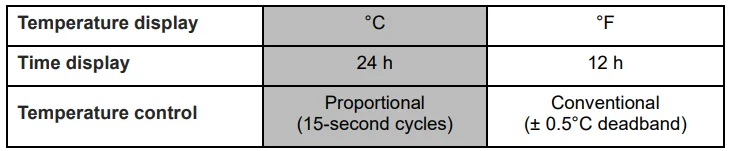
WARNING: The clock loses its setting whenever you change the thermostat’s configuration.
Temperature display
To change the temperature display between °C and °F:
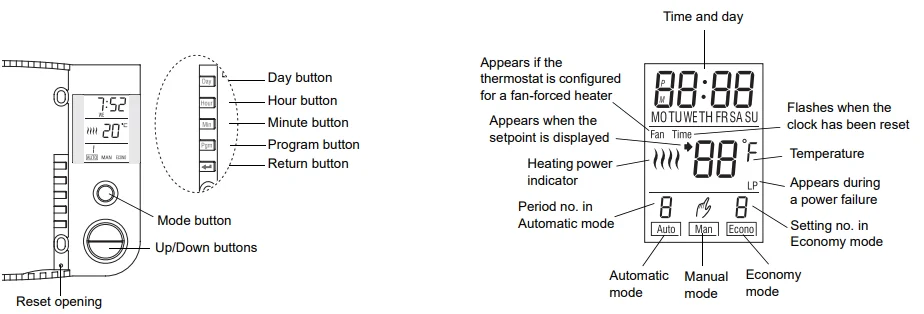
- Open the thermostat’s door.
- Press and hold the Day button.
- Insert a pointed object (e.g., paperclip) in the reset opening. Remove it when the thermostat’s screen becomes blank.
- Wait one second and release the Day button.
Time display
To switch between the 12-hour format and the 24-hour format:
- Open the thermostat’s door.
- Press and hold the Hour button.
- Insert a pointed object (e.g., paperclip) in the reset opening. Remove it when the thermostat’s screen becomes blank.
- Wait one second and release the Hour button.
Control type
- Use proportional control (default setting) in most cases, as it provides better temperature control.
- Use conventional control if you have a fan-forced heater.
Fan is displayed when conventional control is selected. To switch between the two types of control:
- Open the thermostat’s door.
- Press and hold the Min button.
- Insert a pointed object (e.g., paperclip) in the reset opening. Remove it when the thermostat’s screen becomes blank.
- Wait one second and release the Min button.
Clock and Day Setting
The clock must be set when the time flashes on the screen.
- Open the thermostat’s door.
- Press the Day button to set the day.
- Use the Hour and Min buttons to set the clock.
- Press the
 button to exit.
 button to exit.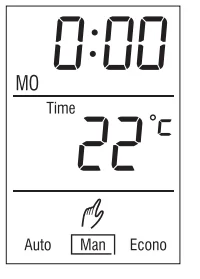
Modes of Operation
The thermostat has three modes of operation:
Automatic mode
To use the Automatic mode, press the Mode button until Auto is selected (outlined) on the screen. The current period number will appear. In this mode, the thermostat automatically adjusts its temperature setpoint according to the period of the day (wake up, leave for work, return home, and sleep). You can program up to 4 periods in a day. You can set 2 different programs: one for the weekdays (Monday to Friday) and another one for the weekend (Saturday and Sunday).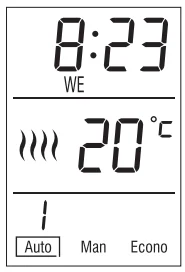
The thermostat is preprogrammed with the following schedule: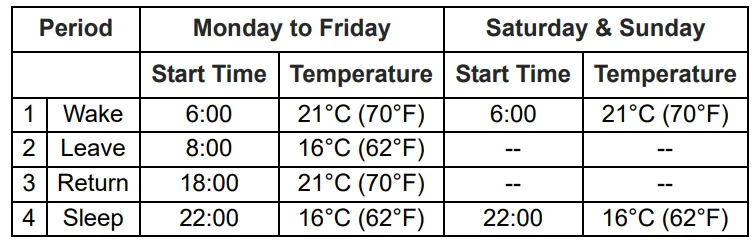
To temporarily override the current setpoint, set the desired temperature using the Up or Down button. The new setpoint will be used until the beginning of the next period.
To modify the schedule:
- Press the Mode button until Auto is selected.
- Press Pgm. Each time you press the Pgm button, the thermostat displays one of the periods of the schedule in the following order (from left to right):

- Set the start time for the displayed period using the Hour and Min buttons. NOTE: To deactivate the period, press the Mode button. Instead of displaying the start time of the period, the thermostat will display –:–. During operation, the thermostat will skip over that period.
- Set the temperature for the period using the Up or Down button.
- Repeat steps 2 to 4 for the remaining periods.
- Press the button to return the thermostat to normal operation.

Manual mode
To use this mode, press the Mode button until Man is selected (outlined) on the screen. Set the desired temperature using the Up or Down button. In this mode, any modification to the temperature setpoint must be done manually.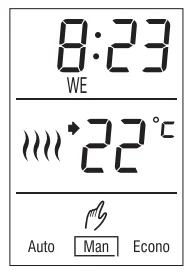
Economy mode
To use the economy mode, press the Mode button until Econo is selected (outlined) on the screen. This mode is ideal for weekend residences as it can be used as follows: The temperature is kept at an economy level during most of your absence and is raised to a comfortable level by your usual arrival time.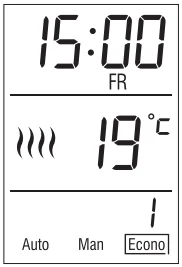
If you do not show up, the temperature returns to the economy level until next weekend. The economy mode has two periods, which should be set as follows: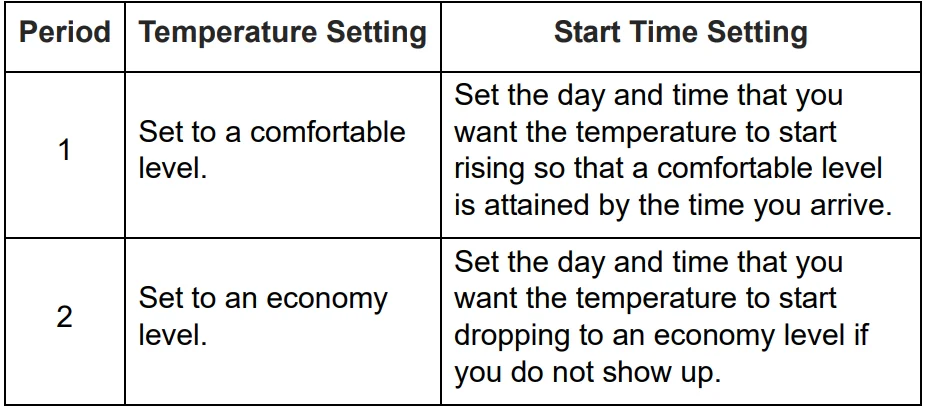
The economy mode should be used as follows:
- Place the thermostat in economy mode during your absence.
- When you arrive, place the thermostat in automatic mode or in manual mode before the temperature drops back to the economy level.
- When you leave, switch the thermostat back to economy mode.
To program the two periods of the economy mode:
- Press the Mode button until Econo is selected.
- Press the Pgm button. The first period is displayed.
- Set the start day for the displayed period using the Day button.
- Set the start time using the Hour and Min buttons.
- Set the temperature for the period using the Up or Down button.
- Press the Pgm button to select the next program (2).
- Repeat steps 2 to 4 to set the day, time, and temperature.
- Press the button to return the thermostat to normal operation.
Thermostat Reset
WARNING: When the thermostat is reset, all parameters (clock, configuration, and schedules) return to their default settings.
- Open the thermostat’s door.
- Press and hold the Pgm button.
- Insert a pointed object (e.g., paperclip) in the reset opening. Remove it when the thermostat’s screen becomes blank.
- Wait one second and release the Pgm button.
Power Outage
During a power outage, the thermostat display remains lit for approximately the next 15 minutes, during which the LP (low power) indicator appears. The settings are stored in memory. However, if the power failure exceeds 5 hours, only the thermostat’s clock must be re-adjusted. When power returns, the thermostat returns to the mode of operation preceding the power outage.
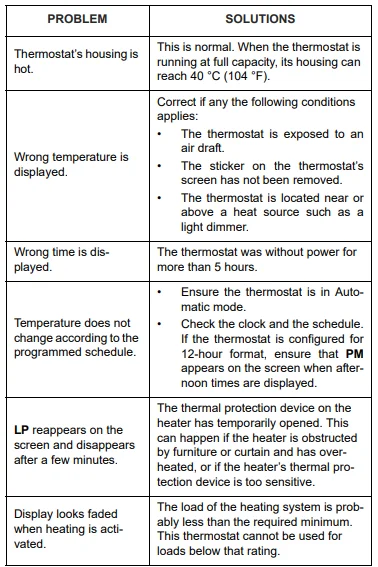
Troubleshooting
Specifications
- Supply: 240 VAC, 60 Hz
- Power consumption (off): 860 mW
- Minimum load: 500 W / 2 A (resistive only)
- Maximum load: 3500 W / 14.6 A (resistive only)
- Display range: 0°C to 70°C (32°F to 99°F)
- Setpoint range: 5°C to 27°C (40°F to 80°F)
- Resolution: 1°C (1°F)
- Storage temperature: -20°C to 50°C (-4°F to 120°F)
- Dimensions: 120 x 115 x 26 mm (4.8 x 4.5 x 1 inches)
- Approval: CSA / UL
Warranty
Aube warrants this product, excluding battery, to be free from defects in the workmanship or materials, under normal use and service, for a period of three (3) years from the date of purchase by the consumer. If at any time during the warranty period the product is determined to be defective or malfunctions, Aube shall repair or replace it (at Aube’s option). If the product is defective,
- return it, with a bill of sale or other dated proof of purchase, to the place from which you purchased it, or
- contact Aube. Aube will make the determination whether the product should be returned or whether a replacement product can be sent to you.
This warranty does not cover removal or reinstallation costs. This warranty shall not apply if it is shown by Aube that the defect or malfunction was caused by damage that occurred while the product was in the possession of a consumer. Aube’s sole responsibility shall be to repair or replace the product within the terms stated above. AUBE SHALL NOT BE LIABLE FOR ANY LOSS OR DAMAGE OF ANY KIND, INCLUDING ANY INCIDENTAL OR CONSEQUENTIAL DAMAGES RESULTING, DIRECTLY OR INDIRECTLY, FROM ANY BREACH OF ANY WARRANTY, EXPRESS OR IMPLIED, OR ANY OTHER FAILURE OF THIS PRODUCT. Some provinces and states do not allow the exclusion or limitation of incidental or consequential damages, so this limitation may not apply to you.
THIS WARRANTY IS THE ONLY EXPRESS WARRANTY AUBE MAKES ON THIS PRODUCT. THE DURATION OF ANY IMPLIED WARRANTIES, INCLUDING THE WARRANTIES OF MERCHANTABILITY AND FITNESS FOR A PARTICULAR PURPOSE, IS HEREBY LIMITED TO THE THREE-YEAR DURATION OF THIS WARRANTY. Some provinces and states do not allow limitations on how long an implied warranty lasts, so the above limitation may not apply to you. This warranty gives you specific legal rights, and you may have other rights which vary by province, state, or region.
Customer Assistance
If you have any questions about the product installation or operation, contact us at the address shown below:
705 Montrichard
Saint-Jean-sur-Richelieu, Québec
J2X 5K8
Canada
Tel: (450) 358-4600
Toll-free: 1-800-831-AUBE
Fax: (450) 358-4650
Email: [email protected]
For more information on our products, visit us at: www.aubetech.com.
For More Manuals By Aube Technologies, Visit ManualsLibraryy.
Aube Technologies TH104PLUS Programmable Thermostat-FAQs
Are Aube thermostats easy to use?
Yes, Aube thermostats like the TH104PLUS are designed to be user-friendly. Many models come factory pre-programmed with a 7-day schedule, so you can start using them immediately and adjust settings as needed. The interface is straightforward, allowing easy temperature changes and switching between Fahrenheit and Celsius. Once installed, most homeowners find daily operation simple and intuitive without needing constant manual adjustments.
Are Aube thermostats compatible with all heating systems?
Aube thermostats are mainly designed for electric heating systems, especially electric baseboards and radiant floor heating. Some models are compatible with forced air gas or oil systems, but not all units work with every HVAC setup. It is important to verify voltage, amperage, and system type before purchasing. The TH104PLUS, for example, is typically intended for line-voltage electric heating applications rather than low-voltage central HVAC systems.
Who makes Aube thermostats?
Aube thermostats are manufactured under the Honeywell family of brands. Since 2009, Aube has been part of Honeywell, which is now known as Resideo in the home comfort market. This connection adds credibility, as Honeywell is a well-established name in thermostat and temperature control technology. Aube products focus especially on electric heating control solutions.
Does the Aube TH104PLUS support air conditioning?
The TH104PLUS is generally designed for electric heating systems and operates as a line-voltage thermostat. It is not typically used for central air conditioning systems that require low-voltage controls. Before installing, it is important to confirm whether your HVAC setup is heating-only or heating and cooling, as this model is primarily intended to control electric heat loads.
What is the ideal temperature setting for a home?
Most energy experts recommend keeping your home between 18°C and 20°C during colder months for comfort and efficiency. In Fahrenheit, this equals about 68°F. During warmer seasons, indoor temperatures between 23°C and 25°C are commonly considered comfortable. Ultimately, the ideal setting depends on personal preference, insulation quality, and humidity levels, but moderate settings help balance comfort and energy savings.
How should I correctly set a programmable thermostat?
A good starting point for winter is setting the thermostat to 68°F and adjusting slightly for comfort. With a programmable model like the TH104PLUS, you can lower temperatures while you are asleep or away and raise them before you return home. Small adjustments of one or two degrees at a time help maintain comfort while improving energy efficiency over time.
Do I need a professional to install the Aube TH104PLUS?
Because the TH104PLUS is a line-voltage thermostat rated for higher voltage systems, installation may be more complex than replacing a low-voltage thermostat. While experienced DIY users may handle installation, turning off the breaker is essential for safety. If you are unsure about wiring or dealing with 120V or 240V connections, hiring a qualified electrician is strongly recommended.
Should I set my thermostat fan to Auto or On?
For most heating systems, using the “Auto” setting is more energy efficient. In Auto mode, the fan runs only when heating is active, which reduces electricity use and wear on components. The “On” setting keeps the fan running continuously, which may improve air circulation but increases energy consumption. For electric baseboard systems controlled by the TH104PLUS, fan settings are typically not applicable.
Is 25°C too hot for a room?
A room temperature of 25°C can feel warm for many people, especially in winter. Comfort levels vary based on humidity, clothing, and activity level, but most guidelines suggest keeping indoor temperatures between 20°C and 23.5°C in colder seasons. In summer, 23°C to 25.5°C may feel comfortable. Maintaining moderate temperatures also helps reduce energy bills and strain on heating systems.
What are the main types of thermostats available?
There are three primary types of thermostats: manual, programmable, and smart. Manual thermostats require constant adjustment, while programmable models like the TH104PLUS allow you to set schedules in advance. Smart thermostats connect to Wi-Fi and can be controlled remotely through apps. Choosing the right type depends on your heating system, budget, and desire for automation and energy savings.